Shopify Address Verification: How to Prevent Fake & Invalid Orders
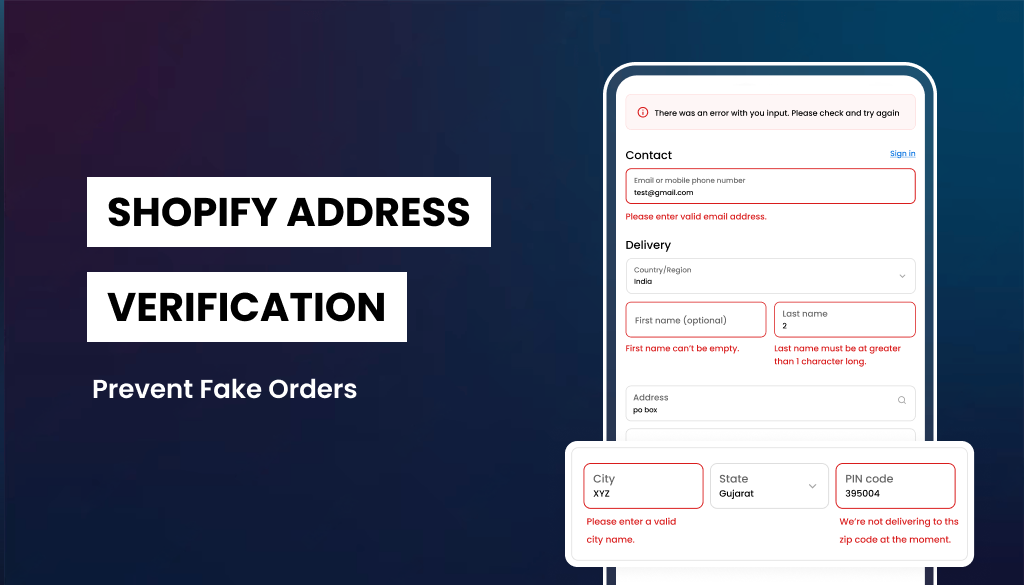
If you run a Shopify store,3 headaches.
A returned package. A weird-looking order. A chargeback that made zero sense.
Shopify address verification isn’t optional anymore in 2026. With ecommerce fraud rising, AI-generated fake identities getting smarter, and bot-driven checkout abuse increasing, store owners need stronger checkout validation systems. Ignoring it now usually shows up later as a lost margin.
The good news? Shopify gives you built-in tools. And if you need more control, there are powerful apps that can significantly reduce invalid orders, failed deliveries, and fraud risk.
In this guide, we’ll break down:
- What Shopify address verification really means
- Why it matters more than ever in 2026
- Shopify’s default checkout validation features
- Shopify Plus vs non-Plus checkout differences
- Advanced validation apps and automation strategies
- Practical ways to resolve address-related issues
Let’s dive in.
What is Shopify Address Verification?
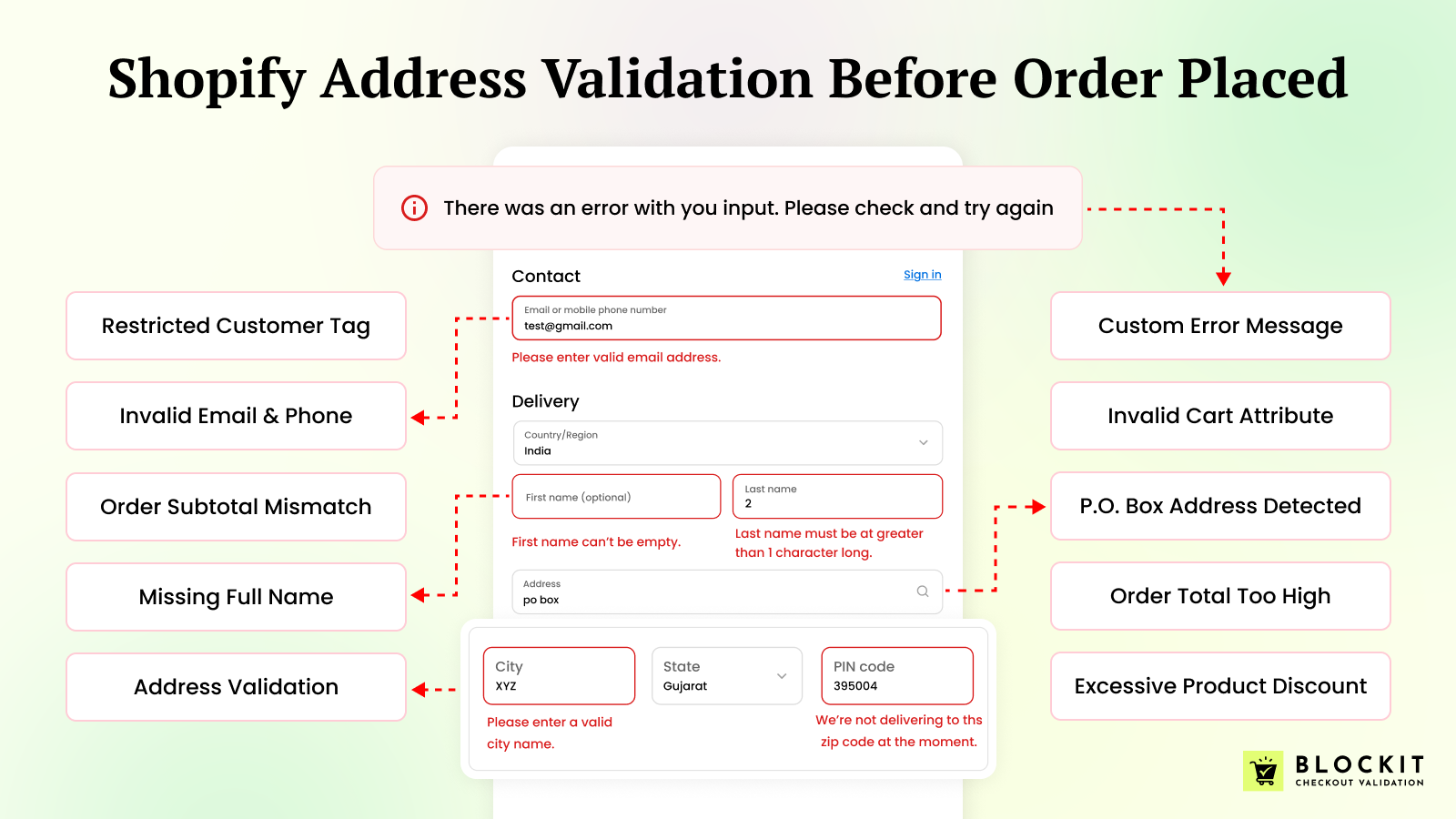
Shopify address verification is the process of validating customer shipping and billing addresses during checkout to ensure they are:
- Accurate
- Deliverable
- Formatted correctly
- Not fake or bot-generated
It helps confirm that:
- The street name exists
- The postal/ZIP code matches the city
- The country is valid
- The address is mailable
Many systems rely on AVS (Address Verification System) widely used by major card networks like Visa and Mastercard to compare billing address data with what the card issuer has on file.
However, AVS only validates billing addresses.
Shipping address validation requires additional logic and that’s where Shopify’s checkout validation apps come into play. This is usually the gap most store owners don’t notice until something goes wrong.
Why Shopify Stores Need Address Verification in 2026
Ecommerce fraud is evolving fast. According to industry reports from organizations like the National Retail Federation, chargebacks and friendly fraud continue to rise year over year.
Here’s what store owners are facing:
1. AI-Generated Fake Orders
Bots now generate realistic names, emails, and addresses. Some of them look cleaner than real customer entries. Without proper validation, these orders move through checkout without friction.
2. Delivery Failures
Incorrect addresses lead to:
- Returned packages
- Reshipping costs
- Refund disputes
- Negative reviews
And every failed shipment quietly chips away at profit.
3. Chargebacks & Fraud
When billing addresses don’t match, or orders ship to suspicious locations, merchants often absorb the loss. Payment processors rarely favor merchants unless everything lines up perfectly.
4. Operational Waste
Every invalid order wastes:
- Warehouse time
- Packaging materials
- Payment processing fees
- Support team hours
Wouldn’t it be better to stop bad orders before they’re created?
That’s exactly what Shopify address verification is designed to help you do.
Types of Advanced Address & Checkout Validation Rules to Prevent Fake Orders
Modern ecommerce stores don’t rely on one filter anymore. They use layered checkout validation combining address verification, email checks, order logic, and risk signals to stop fake and invalid orders before payment is processed.
If you’re serious about Shopify address verification, these are the most effective rules to implement in 2026.
1. Real-Time Address Autocomplete
Real-time autocomplete connects checkout fields to official postal databases and suggests valid addresses as customers type.
Why it matters:
- Suggests valid street names and formats
- Prevents spelling errors
- Reduces incomplete addresses
- Improves mobile checkout speed
It’s one of the simplest ways to increase delivery success rates without adding friction.
2. Postal Code & City Matching
This rule verifies that:
- The ZIP/postal code matches the selected city
- The region aligns with the country
- The combination is logically valid
It blocks impossible combinations like:
- New York + California ZIP code
- Invalid regional pairings
- Random numeric postal entries
It sounds minor. It’s not. This catches more fake entries than most people expect.
3. PO Box Detection
Certain products, high-value items, perishables, or restricted goods shouldn’t ship to P.O. boxes.
Advanced checkout validation can:
- Automatically detect PO Box formats
- Restrict specific shipping methods
- Block checkout entirely if needed
For high-ticket brands especially, this reduces delivery disputes and fraud exposure significantly.
4. Country & Region Restrictions
High-performing ecommerce brands apply geo-based checkout rules.
Examples include:
- Blocking high-fraud countries
- Restricting unsupported shipping zones
- Preventing mismatched billing and shipping countries
- Allowing specific regions for certain products
This becomes especially critical for cross-border stores. Scaling internationally without geo-rules can get messy fast.
5. High-Risk Pattern Detection
Address validation alone isn’t enough anymore.
Advanced checkout systems analyze behavioral signals such as:
- Mismatched billing and shipping countries
- Duplicate IP addresses across multiple accounts
- Multiple orders using different addresses but the same email
- Suspicious naming patterns
When these rules trigger, you can:
- Flag the order
- Hold it for review
- Block checkout entirely
Prevention is almost always cheaper than handling chargebacks later.
6. Carrier-Level Validation
Carrier-based validation checks addresses directly against official databases such as:
- United States Postal Service
- Royal Mail
- Canada Post
This ensures:
- The address is mailable
- The delivery point exists
- Formatting matches national standards
For stores shipping internationally, this can dramatically reduce returned packages and failed deliveries.
Shopify Default Checkout & Address Validation
When it comes to Shopify address verification, many store owners assume Shopify automatically validates every shipping address for accuracy and deliverability.
That’s not entirely accurate.
Shopify provides structured address collection, formatting rules, and some validation features but there are limitations you should understand before relying solely on the default system.
Let’s break it down clearly.
Validate Shipping Addresses at Checkout
Shopify includes a built-in address verification feature that helps catch invalid shipping details before an order is placed.
When customers enter an incorrect or incomplete address, Shopify can show suggestions to fix it but only when it has high confidence in the correction.
This helps reduce:
- Failed deliveries
- Returned packages
- Delays caused by typos
If you turn this feature off or if the address is from an unsupported country, customers can still complete checkout normally. Basic field validations (like required fields and correct formatting) always remain active.
Supported Countries
Address validation suggestions are available for shipping addresses in selected countries, including:
Australia, Austria, Belgium, Bermuda, Canada, Czechia, Denmark, Faroe Islands, France, Guernsey, Italy, Liechtenstein, Luxembourg, Netherlands, Poland, Portugal, Slovenia, South Korea, Switzerland, United States.
Orders from unsupported countries are still reviewed, but may receive fewer suggestions.
Important Note
If you’re using a Shopify third-party address validation app, don’t enable Shopify’s native validation at the same time. Running both can create duplicate error messages and hurt checkout conversions.
Use one system, not both.
How to Enable It
Step 1: Go to Shopify Dashboard → Settings → Checkout
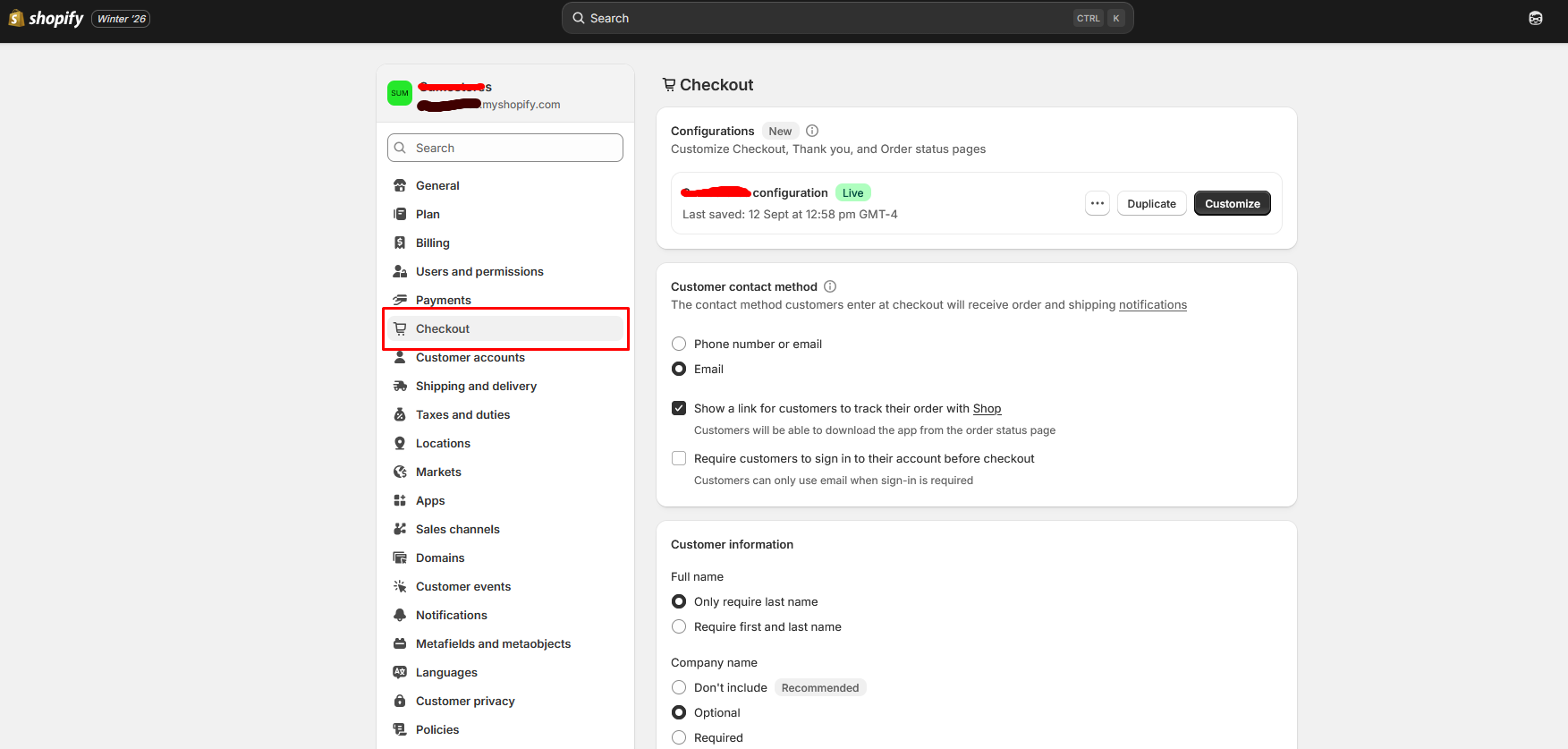
Step 2: Scroll Down to Advanced preferences & Click Address collection
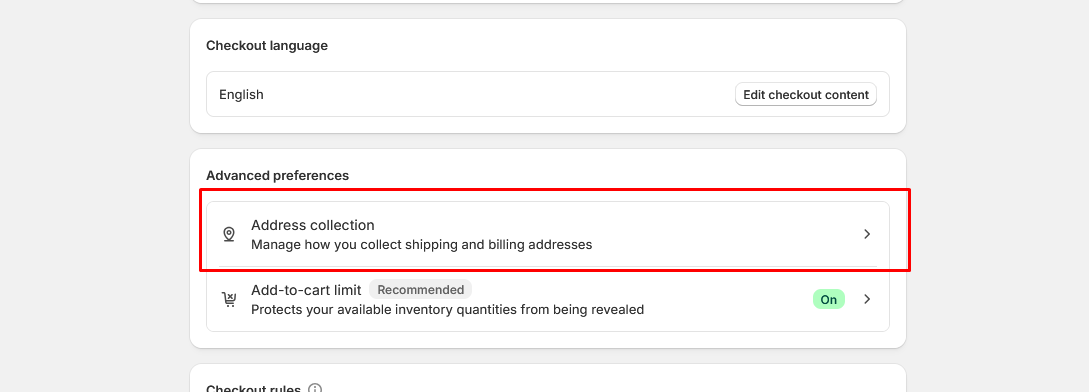
Step 3: Tick on Validate shipping address & click Done
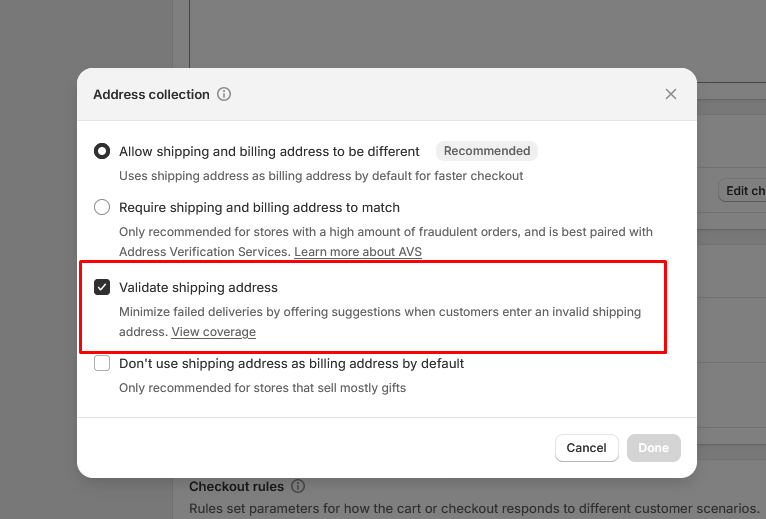
That’s it. A simple setting but a strong first step toward cleaner, more reliable orders.
It’s a simple setting but a solid first step toward cleaner orders.
Shopify Plus vs Non-Plus Differences at Checkout
When it comes to Shopify address verification, both Shopify Plus and non-Plus stores benefit from automatic address validation but Plus includes additional B2B-related triggers.
What All Shopify Stores (Non-Plus & Plus) Get
For all plans, Shopify automatically validates addresses in the following situations:
- When a customer places a new online order
- When an order is created through the API
- When you create a draft order and add a customer
- When you add or update a fulfillment location
- When you create a shipping label
- When you add or update a customer address in the admin
If a potentially invalid address is detected in your admin, a warning appears along with suggestions but only when Shopify is confident about the correction.
This helps reduce:
- Orders with incorrect shipping details
- Delivery failures
- Returned shipments
Importantly, this validation happens automatically.
What Shopify Plus Adds
If you’re on Shopify Plus, address validation is also triggered in B2B workflows, including:
Adding a new B2B company’s shipping or billing address
Adding or updating a B2B company location’s shipping or billing address
This is particularly useful for wholesale or enterprise merchants managing multiple company locations.
The Key Difference
The core address validation system is the same across plans for standard ecommerce orders.
The difference is that Shopify Plus extends validation into B2B company management workflows, keeping data cleaner across more complex organizational accounts.
Shopify Address Validation Limitations
While Shopify offers structured address collection and formatting support, there are limitations.
Shopify does not natively guarantee:
- Full carrier-level address verification
- Guaranteed deliverability validation against postal databases
- Automatic blocking of suspicious shipping regions
- Advanced logic-based checkout blocking (without apps)
- Detection of PO boxes unless restricted via shipping methods
In simple terms:
Shopify ensures the address looks structurally correct.
It does not guarantee the address is real, deliverable, or low risk.
For international stores, this becomes even more important due to varying global address formats and regional postal requirements.
That’s why many growing brands eventually move beyond default validation.
Resolve Issues with Addresses in Shopify
Already dealing with returned shipments or invalid addresses?
Here’s how to handle address-related issues inside Shopify.
1. Validate Order Addresses Before Fulfillment
From the order admin, you can:
- Review the shipping address
- Check for formatting warnings
- Manually edit incorrect addresses
- Contact customers for confirmation
Catching issues before fulfillment is critical, especially for high-value shipments.
2. Contact Customers Quickly
If something looks suspicious:
- Missing apartment number
- Unusual formatting
- Mismatched country and postal code
- Reach out before shipping.
Waiting 12–24 hours to confirm details is usually cheaper than handling a returned package.
3. Standardize Your Address Collection Settings
Inside checkout settings:
- Require phone numbers if carriers need them
- Ensure mandatory address fields are enabled
- Align shipping zones with supported regions
Small configuration changes can reduce errors more than you’d expect.
4. Monitor Returned Orders
Track patterns such as:
- Specific countries with higher failure rates
- Repeated ZIP/postal errors
- Certain product types with delivery issues
Data reveals where your validation strategy needs tightening.
Advanced Shopify Address Validation App
If your store handles:
- High order volume
- International shipping
- High-value products
- Subscription models
- You may need more than Shopify’s default checkout validation.
Advanced address validation solutions can provide:
- Real-time shipping address verification
- PO Box detection
- Postal code & city cross-matching
- Checkout blocking rules
- Custom error messaging
- Email and phone validation
- Risk-based checkout restrictions
These systems go beyond formatting checks and focus on preventing fake and invalid orders before payment is processed.
For scaling ecommerce brands in 2026, layered validation is often the difference between clean operations and constant firefighting.
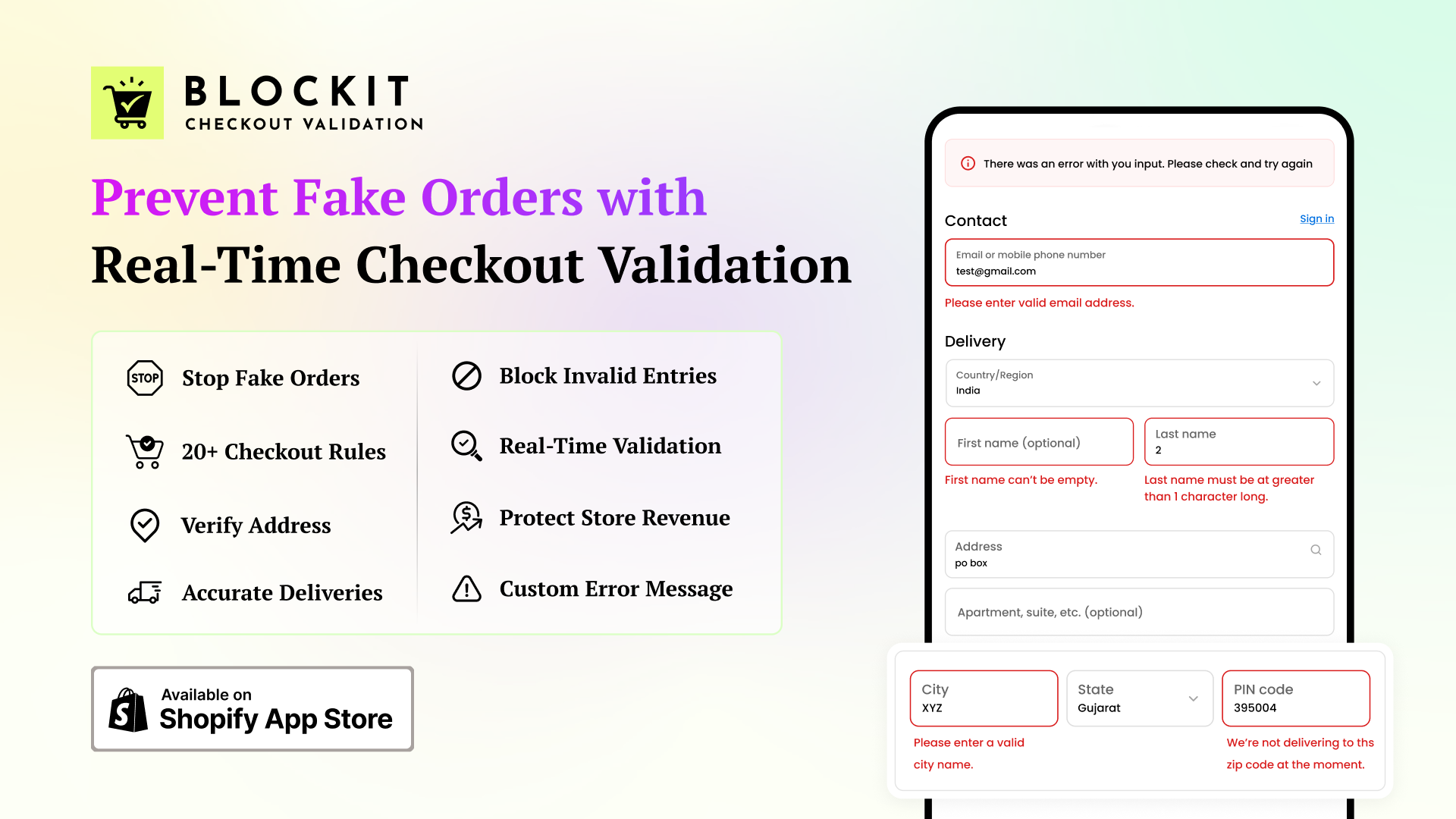
For merchants needing stronger control, Blockit Checkout Validation adds rule-based logic directly inside the native checkout. Instead of only suggesting corrections, it can validate shipping addresses, emails, and phone numbers in real time and block checkout when entries don’t meet defined rules.
The app allows custom conditions based on customer data, cart contents, order value, shipping regions, and more. You can restrict P.O. boxes, block specific countries or postal codes, and display clear custom error messages that guide customers to fix issues instantly.
Key features:
- Real-time address, email, and phone number validation at checkout
- Custom rules based on customer, order, cart, and shipping details
- Address-based checkout blocking (P.O. boxes, zip codes, countries)
- Global custom error messaging when checkout is restricted
- Seamless integration with Shopify’s native checkout experience
Final Thoughts
In 2026, Shopify address verification isn’t just a “nice-to-have” it’s a revenue protection strategy.
Shopify’s native tools provide a solid foundation. For small or local stores, that may be enough.
But as your store scales especially with international shipping or higher-value products default validation often isn’t sufficient.
That’s when layered protection becomes essential:
- Real-time address validation
- Email and phone verification
- PO Box detection
- Region-based checkout blocking
- Custom rule-based restrictions
The goal isn’t to make checkout harder. It’s to make it smarter.
Preventing fake and invalid orders before payment saves time, reduces chargebacks, and protects margins. And in competitive ecommerce, operational efficiency is a real growth advantage.
If failed deliveries or suspicious orders are increasing, it’s probably time to strengthen your checkout validation strategy.
FAQ
1. What is the best address validation app for Shopify?
The best app depends on your store’s needs. If you want real-time checkout blocking, rule-based validation, and email/phone verification inside Shopify’s native checkout, Blockit Checkout Validation is a strong option.
2. Does Shopify automatically verify shipping addresses?
Shopify can suggest corrections in supported countries and enforce required field formatting, but it does not guarantee full carrier-level deliverability validation for every order.
3. Can I block specific countries or postal codes at checkout?
Not natively in all cases. For advanced geographic restrictions and checkout blocking, you’ll typically need a third-party validation app or Shopify Plus custom logic.
4. Does address validation reduce chargebacks?
It can significantly reduce chargebacks related to delivery disputes, invalid addresses, and fraudulent shipping details especially when combined with email validation and risk-based checkout rules.
5. Should I use Shopify’s built-in validation or a third-party app?
Use Shopify’s native validation for basic formatting checks. If you need advanced control, fraud prevention, and rule-based checkout blocking, a specialized app provides stronger protection.

Finn Nguyen
Finn is a Shopify expert with 5+ years of experience helping new business owners launch and grow online stores. Specializing in store setup, theme selection, and optimization, he provides practical guidance to turn ideas into successful eCommerce businesses