WordPress vs Shopify vs Squarespace: A Detailed Comparison 2025
Nowadays, building a website has become easier than ever thanks to the arrivals of various e-commerce platforms. Among the popular names are WordPress, Shopify, and Squarespace. So, what are the differences between these website builders? To help you get an overall understanding, we will put WordPress vs Shopify vs Squarespace face-to-face in this detailed comparison.
Overview of WordPress vs Shopify vs Squarespace
Before we jump into the details, let’s get to know each platform first.
WordPress, or WordPress.org, is an open-source content management system (CMS) that was launched in 2003. It is often mistaken for WordPress.co; however, the latter one is more of a hosted, beginner-friendly service with limited flexibility. Meanwhile, WordPress.org offers full control and is favored for its flexibility, vast plugin ecosystem, and extensive theme library.
Shopify is a fully hosted e-commerce platform that has been around since 2006. With the mission to simplify online selling, Shopify has tools for inventory management, payments, and multi-channel sales. It integrates well with social media, marketplaces, and even in-person via POS. This platform is perfect for entrepreneurs who want to hit the ground running.
Squarespace is known as an all-in-one hosted website builder with strong emphasis on aesthetics. It debuted in 2004. Their offering includes designer templates and built-in features like blogging tools, analytics, and basic e-commerce functionality. Portfolios, blogs, and light e-commerce are the sweet spots for Squarespace.
Here’s an overview of each platform:
| Platform | Key Features | Best For |
| WordPress |
| Developers, bloggers and custom sites |
| Shopify |
| E-commerce entrepreneurs of all sizes |
| Squarespace |
| Creatives and small businesses |
Shopify vs Squarespace vs WordPress: A Deep Dive
Now that you have a basic understanding of WordPress, Shopify, and Squarespace, it’s high time to look at each one in detail.
Shopify

When we talk about Shopify, we are talking about the e-commerce powerhouse. This platform is behind over 4 million stores, with a significant presence powering 20% of all online stores globally, second only to WooCommerce in popularity.
Regarding the feature suite, Shopify has robust inventory management. Sellers can track stock levels across multiple locations, automate purchase orders, and sync inventory in real-time. The next one is the seamlessly integrated multi-channel selling, allowing sales on social platforms, marketplaces, and in-person via POS.
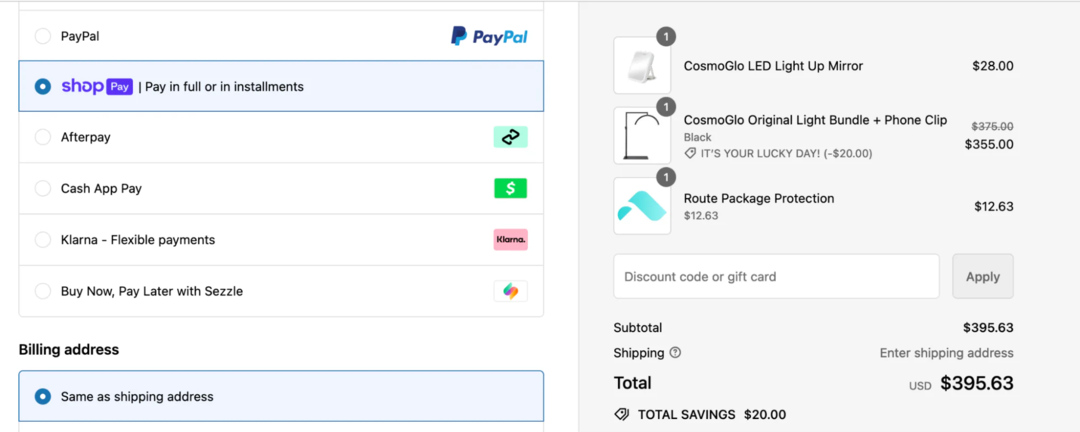
Another standout feature is the customizable checkout process with flexible payments. You can add branded elements, upsell options, and discount codes to enhance the buyer experience. The platform has over 100 payment gateways, including its in-built Shopify Payments and PayPal, AmazonPay, Stripe, and more.
Adding to that is Shopify’s ecosystem, with an app store of over 6,000 exclusive tools and extensions designed for different e-commerce needs. Be it marketing, dropshipping, or analytics, there is always a solution.
Pros
- Highly e-commerce-focused. This platform is built from the ground up for online stores.
- Extremely scalable. There are loads of functions and features supporting both startups and enterprise-level brands.
- Easy to use. It’s beginner-friendly with hosting, security, and updates included.
- Sell across channels. Shopify syncs effortlessly with social media and marketplaces without complex hands-on setups.
- 24/7 support. Assistance is available via phone, chat, email, and community forum.
Cons
- Transaction fees can be expensive. Non-Shopify Payments users may incur 0.5%–2% fees per transaction, depending on the plan.
- Blogging tools are basic. It lacks the depth of customization, SEO options, and content management.
- Not that great for purposes other than e-commerce, such as content-heavy sites, portfolios, or complex membership platforms.
Pricing
Shopify is a subscription-based platform. It has four pricing plans:
- Basic: $19/month
- Shopify: $49/month
- Advanced: $299/month
- Plus: $2,300/month
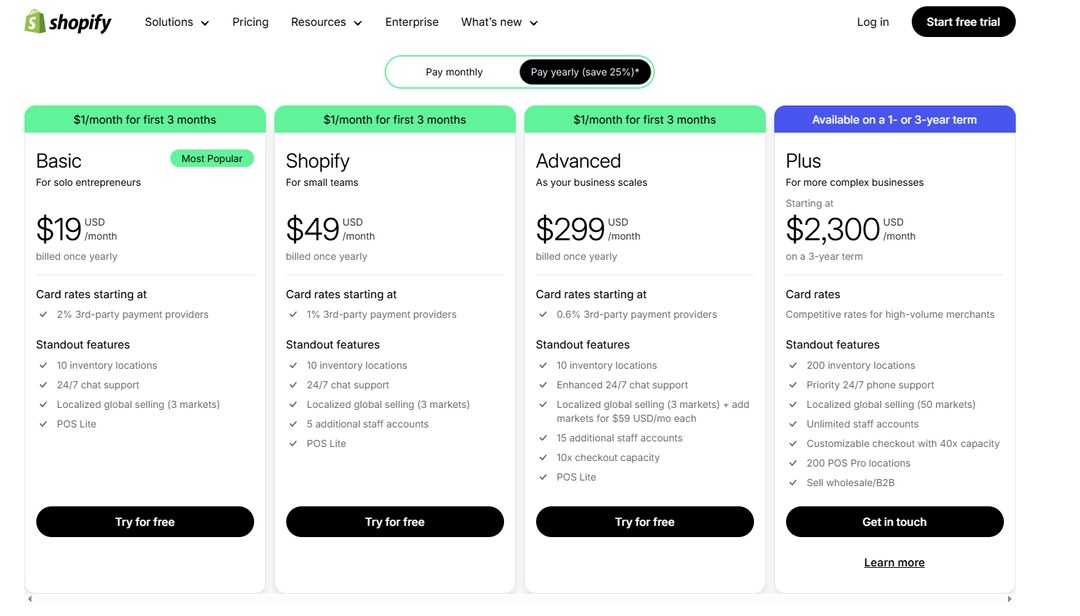
Notably, newcomers can benefit from Shopify’s $1 for 3 months introductory after a 3-day free trial.

Additional costs include optional apps and themes, which can range from free to $300+ each. Hosting is free, but you will need to buy a custom domain (around $15/year via Shopify or third-party registrars). Non-Shopify Payments users are also charged 0.5%–2% fees per transaction.
WordPress

WordPress.org is a popular content management system (CMS) in the world of website building. This platform has powered over 40% of the web since its launch in 2003.
The way WordPress works is via WooCommerce, a leading e-commerce plugin. The role of this plugin is to transform WordPress into a fully functional online store by adding features like product management, payment gateways (e.g., PayPal, Stripe), and shipping options.
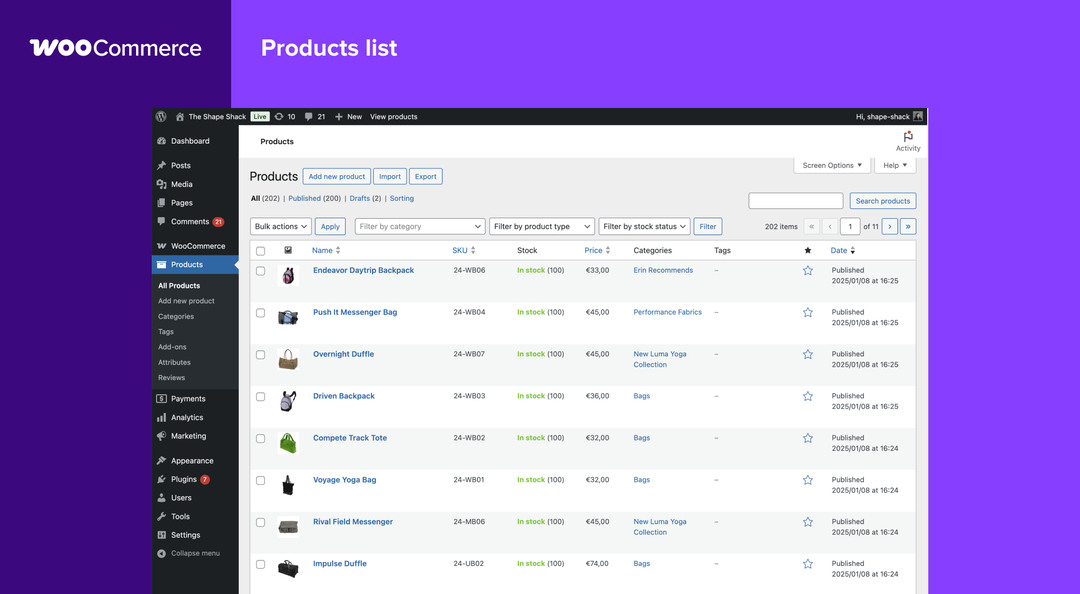
WordPress stands out for its unmatched level of customization. As an open-source platform, it allows users to modify code, design, and functionality to suit any need. Their ecosystem also features thousands of free and premium themes and plugins. Its range of offerings is wide, from e-commerce tools to blogging, portfolios, and even complex membership sites.
Getting started with WordPress has a steeper learning curve compared to other solutions. To simplify website creation, users can pair WordPress with an AI website builder that generates a complete site from a single prompt. Simply describe your website idea, and the AI will create a personalized layout with pre-filled content and high-quality images.
Pros
- Highly customizable. WordPress offers near-limitless flexibility with over 60,000 plugins and 10,000+ themes.
- Easy to use. Many themes come with drag-and-drop content. The new Gutenberg editor is also simple to get to know.
- Strong SEO features. Built-in tools and plugins like Yoast or Rank Math give it a strong edge over other competitors.
- Community support. A massive global community provides free resources and forums.
- Excels beyond e-commerce. You can use WordPress to create blogs, portfolios, or custom projects.
Cons
- Technical learning curve. It can be overwhelming to set up and manage since you have access to a vast ecosystem of plugins, themes, and custom code.
- Lack of built-in hosting. You must source hosting separately.
- Security risks. Since the platform is open-source, whose nature is transparent, it’s an attractive target for hackers.
Pricing
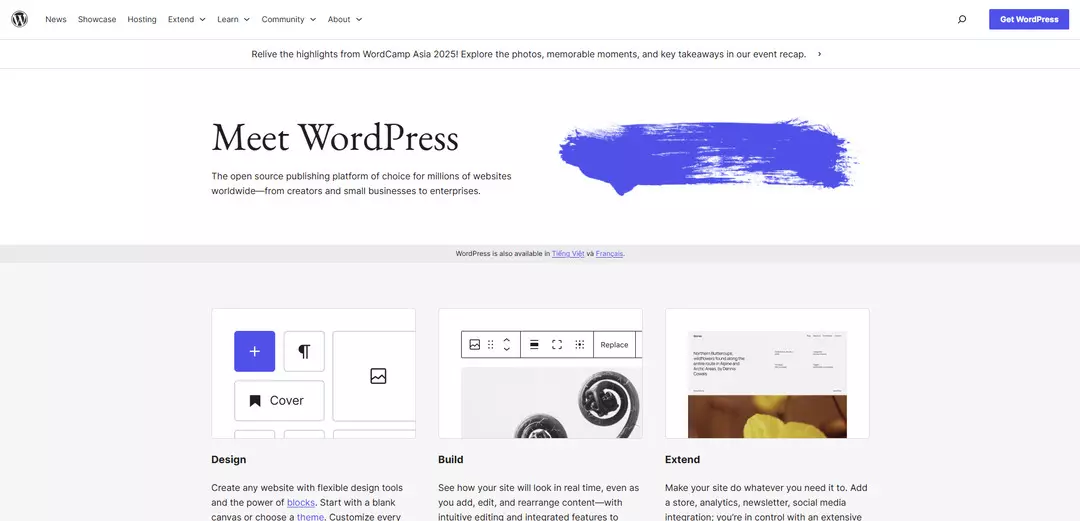
WordPress is free to use. However, this is limited to the core software alone. Most people opt to purchase hosting, a domain, and often premium themes or plugins to unlock its full potential. Here’s a breakdown of WordPress potential costs on average:
- Hosting: $5–$50/month
- Domains: $10–$15/year
- Add-ons: $20–$100
- Plugins: $0–$200+
>> Find out: Shopify vs Etsy vs Squarespace: Which is Better
Squarespace

Coming to Squarespace, this all-in-one website builder makes its name for its stunning design templates and ease of use. Squarespace ranks among the top website builders, praised for its aesthetic appeal and beginner-friendly interface, though it trails Shopify in e-commerce depth and WordPress in customization.

In terms of features, Squarespace supports decent inventory tracking. Sellers can access tools to manage stock levels, set low-stock alerts, and organize products efficiently.
Another standout e-commerce feature is checkout customization. While not being as extensive as Shopify, Squarespace allows branding adjustments, custom fields, and a seamless on-domain checkout experience. It also has a streamlined ecosystem of built-in tools. Their offerings are limited to a select number of third-party extensions, though.
Pros
- Super beginner-friendly. Squarespace’s interface is intuitive with a drag-and-drop editor.
- Excellent design. Its templates actually win awards in terms of aesthetics and responsiveness. You can create visually driven sites with this website builder.
- All in one solution. Hosting, security, and a free domain (first year) are included.
- Strong blogging and portfolio features. Squarespace provides various content options that outshines other platforms.
Cons
- Lack of depth in e-commerce functions. Its feature suite is functional yet basic, hindering further scalability.
- Limited customization options. Templates and plugins are available, but the options are restricted.
- Customer support is only available via text. Support channels are limited to email and live chat, and response time is within business hours.
- Weak on-page SEO. No options for adding structured microdata and customizing internal links.
Pricing
Squarespace has four pricing plans:
- Personal: $10/month
- Business: $14/month
- Commerce (Basic): $17/month
- Commerce (Advance): $30/month
New users can try Squarespace for 14 days for free, no credit card required.
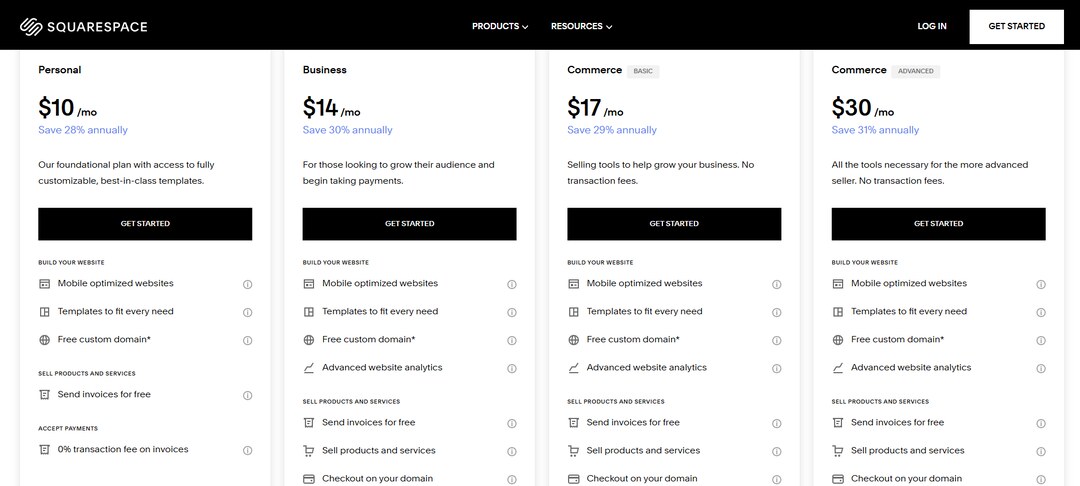
Hidden fees include domain renewal costs after the first free year and potential add-ons like Google Workspace email. Payment processor fees are also charged on certain plans.
>> EXPLORE:
Squarespace vs Shopify vs GoDaddy: Which Wins The Crown?
Shopify vs Wix vs Squarespace: Which Is the Best Choice
WordPress vs Squarespace vs Shopify: A Comparison
In this section, we will compare WordPress vs Shopify vs Squarespace across key features and performance factors.
1. Ease of Use
The first aspect is user friendliness. Both Shopify and WordPress have a bit of a learning curve as they deal with complex features and setup processes.
Squarespace, on the other hand, is plug-and-play and intuitive. So, Squarespace wins this round.
2. E-commerce Capabilities
E-commerce capabilities and functions are about selling online effectively. As you can see, the winner here is not WordPress nor Squarespace but Shopify. Built for e-commerce from the ground up, it excels with advanced tools like multi-currency and POS.
WordPress (via WooCommerce), despite offering flexibility, requires manual configuration and technical setup. Squarespace is not a good fit because its focus is on design over robust sales features.

3. Customization
Be it for themes, plugins, custom code, WordPress allows endless customization options. Shopify also has decent flexibility. However, its customization range is more about e-commerce functionalities.
Meanwhile, Squarespace’s priorities are on the basics. Complex customization needs are not preferred. So, the winner here is definitely WordPress.
4. SEO and Marketing
When comparing the SEO and marketing capabilities of WordPress vs Shopify vs Squarespace, one must look at built-in tools and extensibility.
- WordPress: Has many plugin support like Yoast, advanced on-page SEO and content optimization.
- Shopify: Has solid built-in tools for meta tags and redirects, along with Yoast compatibility for deeper control.
- Squarespace: Provides decent built-in SEO options like sitemaps and clean URLs, but lacks advanced plugin support.
So, our take is WordPress leads for SEO flexibility.
Read more:
Top 15+ Best Shopify SEO Apps To Boost Ranking & Traffic
Best Shopify Themes for SEO to Drive More Traffic (Free & Premium)
5. Pricing
Both Shopify and Squarespace operate on subscription-based models. Simply put, one will need to pay to access the platform. WordPress, on the other hand, is free to use.
However, it’s important to mention additional costs and charges. Here comes a breakdown:
- WordPress: Free CMS, but hosting, domains, and plugins/themes are not covered.
- Shopify: $19-$299/month, plus additional fees for apps, themes, and transaction fees.
- Squarespace: $10-$30/month, plus additional fees for domain renewal costs, plugins, and sometimes transaction fees.
In the end, WordPress is the most affordable if well managed. Squarespace is budget-friendly since it offers a free domain for the first year. Shopify comes at the highest cost. Yet, it offers the best e-commerce value for money.
6. Scalability
The next area of comparison is scalability. This can be measured in growth potential and resource handling. Shopify has all the tools built-in, so big stores can easily expand to enterprise levels. WordPress also scales well, but the level of scalability heavily depends on hosting quality. If hosting is poor, performance suffers.
In the meantime, Squarespace functions best for mid-sized sites. This is due to the lack of robust resource management and advanced integrations.
So the winner here is Shopify.
7. Security
Last but not least, we have security measures. Shopify and Squarespace handle security automatically. As a hosted platform, they have free SSL certificates, automatic updates, and fraud protection.
In contrast, WordPress is an open source platform, which makes it a target for hackers. Any updates and security patches should be done manually or via plugins like Wordfence. This makes it riskier.
The following table compares the platforms across crucial features:
| Feature | WordPress | Shopify | Squarespace |
| Ease of Use | Developer-centric, moderate learning curve | Beginner-friendly, intuitive | Very beginner-friendly |
| E-commerce | WooCommerce: Flexible, manual setup | Advanced: Gateways, inventory, POS | Basic: Limited but simple |
| Customization | High: Themes, plugins | Moderate: Apps, Liquid code | Low: Templates, extensions |
| SEO | Excellent: Yoast, manual tweaks | Good: Yoast integration | Good: Built-in tools |
| Pricing | Flexible: $0–$100+/month | $19–$299/month, fees | $10–$30/month |
| Hosting | No | Yes | Yes |
| Domain | No | No | Free for first year |
| Scalability | High: Depends on hosting | Very high: Built for growth | Moderate: Limited resources |
| Security | User-managed: SSL, plugins | High: SSL, fraud protection | High: SSL, auto-updates |
WordPress vs Shopify vs Squarespace: Which Is Suitable For You?
So there you have it, the ultimate WordPress vs Shopify vs Squarespace comparison. The question is, which one is for you? Apparently, each platform has its own strengths and limitations. Based on the comparison above, our take is:
✔️ Choose Shopify if you’re an e-commerce seller needing advanced tools and scalability.
✔️ Choose WordPress if you want total customization and flexibility for any site type.
✔️ Choose Squarespace if you’re a beginner or creative seeking stunning design with minimal effort.
For alternatives, you can also consider Wix and Webflow. They are viable options with user-friendly interfaces and modern features.
That concludes our detailed reviews of WordPress vs Shopify vs Squarespace. For more insightful comparisons, feel free to visit BSS Commerce.

Finn Nguyen
Finn is a Shopify expert with 5+ years of experience helping new business owners launch and grow online stores. Specializing in store setup, theme selection, and optimization, he provides practical guidance to turn ideas into successful eCommerce businesses