SEO in 2025: What Still Works for Shopify
SEO for Shopify is changing, and you know it. Run-of-the-mill backlinks, keyword stuffing, and clunky UX no longer move the needle. AI is also disrupting how search engines handle ranking for online stores.
As the competition heats up, failing to adapt your SEO strategy might tank your rankings. This can gradually reduce your visibility, resulting in fewer visitors and potential sales over time.
If you want to stay ahead, you need to know what still works for Shopify SEO in 2025 and how to implement it.
Let’s get to it.
Note: If you haven’t opened your Shopify store, now is the best time! With the Shopify 3 months for 1 dollar offer, you can njoy the SEO-friendly platform fully with an extremely low cost
1. Quality Content Creation
If your Shopify blog is going to show up on SERPs, you need to double down on creating valuable posts. Why? Because quality website content remains one of the strongest ranking factors.
For search engines like Google, your content must be
- Easy to read
- Unique
- Up to date
- Reliable and people-first
Experience, Expertise, Authority, and Trustworthiness
E-E-A-T is part of Google’s Search Quality Rater Guidelines and is used to determine the quality of your blog pages before being recommended to users.
- Experience: To write a product review, you must have used the product firsthand. That’s experience, and it makes a difference in how the audience sees your content compared to hearsay.
- Expertise: Primarily focuses on the qualifications you have and what makes you suitable for talking about a topic. For instance, a fashion star sharing styling tips for party wear is considered an expert compared to a random author who has never featured on the runway.
- Authority: This refers to the degree to which your website is recognized as a credible and respected source on a specific topic. Build authority through creating topic clusters, appearing at conferences, speaking on podcasts, and pushing your brand name through the internet.
- Trustworthiness: It is a measure of how much users and search engines can rely on you to provide honest and verified information. Is your content accurate, safe, reliable, and provable? Does it also contain links to other trustworthy websites?
While EEAT is not a ranking factor, it helps search engines improve site results and decide on how pages rank. If your content does not follow the guidelines, it might struggle to rank and retain customers.
Topic Clusters and Content Relevance
A topic cluster is a group of interconnected pages covering a single topic in depth..
Let’s say you sell custom t-shirts and other personalized clothing. You can create a main pillar page on “The Complete Guide to Personalized T-Shirts for Every Occasion” and link it to supporting articles like:
- How to Choose the Perfect Fit for Your Custom T-Shirt
- The Best Fabric Options for Personalized Tees
- Essential Style Tips for Customizing Your T-Shirt Wardrobe
- Trendy Custom T-Shirt Ideas for Every Season
- Common Mistakes to Avoid When Designing Custom Tees
- Why Quality Matters in Personalized Apparel
This approach tells search engines that your store is an expert in personalized clothing and, ultimately, a reliable authority it can direct traffic to when such queries pop up. Besides, clustering positions you as an expert to the audience.
However, it’s not all about jam-packing pages. Each cluster must be relevant to both what you sell and your target market’s needs.
Frequently Asked Questions and Help Hubs
Sections on Google page, like People Also Ask and People Also Search For, help you discover additional questions your audience might have after reading a topic. Include these questions in your Blog and product page’s FAQs section to broaden visibility for related queries.
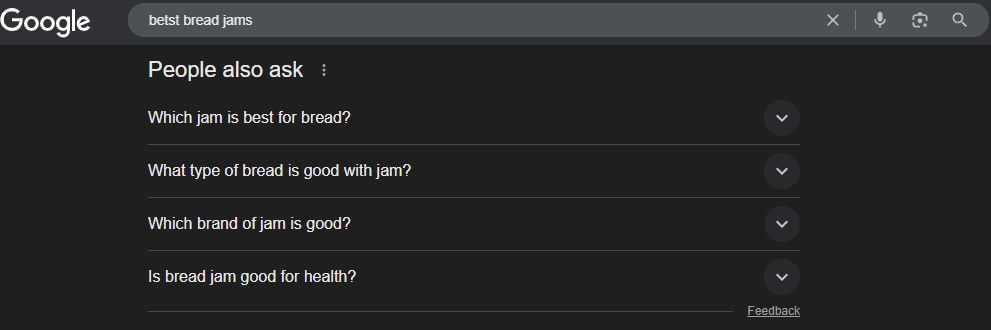
You can also use the AlsoAsked tool for more intent-driven insights into the extras your store content should address.
2. Intent-driven Keyword Research and Optimization
Each keyword has to reflect the exact needs of your target audience. And that’s why using a research tool shouldn’t be the only way you gather your queries.
Here’s what you can do:
- Analyze the most frequent searches on your product page and extract the queries used.
- Check for common questions on review websites like Reddit and Quora if related to your product offerings.
- Use a heatmap to identify the most visited pages on your site and determine which product is driving the most traffic. Turn that product into a keyword.
Collate all these queries and use them to build topic clusters for your blog.
Short Term vs. Long Term Keywords
There’s no hard and fast rule against using short-term or long-term keywords. But if your store is new, targeting short keywords can be quite challenging. Most big brands already rank well for these keywords, making it an uphill battle to displace them with your fresh website.
Instead, target long-term keywords, as they typically have a low difficulty score but a high traffic rating. For instance, a long-term variant of “Peanut butter,” like “5L brown colored peanut butter,” is specific and much easier to rank for.
If you’re already optimizing your store with some keywords, use a rank checker to know how well you’re ranking for them and optimize accordingly.
Proper Keyword Optimization
Ensure you place your primary keywords into the website’s meta heading and homepage URL. As for product and page-specific URLs, insert them into the page’s meta title and description, URL/slug, product descriptions, and every other relevant content.
Avoid overstuffing your URLs, as it doesn’t improve visibility and might look spammy instead.
- No: /products/best-skincare-face-cream-moisturizer-anti-aging-cream-2025
- Yes: /products/anti-aging-face-cream
The same thing goes for your meta. Shopify recommends a maximum of 55 characters for meta titles and 150 characters for descriptions. Fit the relevant and concise keywords in there.
3. SEO-friendly UX design
Shopify’s free themes are often fixed and provide barely any room for adjustments. Most of the technical optimizations, like SSL submission, are also auto-implemented from their end. But you can still tweak minor things like navigation, create custom blocks, and fix site architecture.
- Navigation: Keep primary menu options at the top bar and make them large enough. It should contain direct access to important sections of your online store.
- Site architecture: Use a hierarchical model to structure your product categories appropriately. See an example below from GymShark.
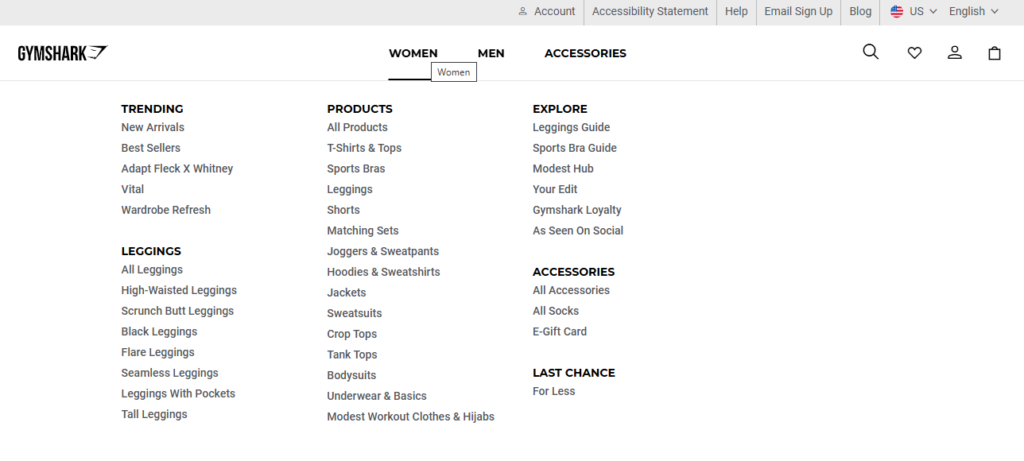
Source: Gymshark
Good navigation helps your customers find what they need with little effort, while proper architecture enhances crawlability.
Your UX’s mobile version must also be as friendly as possible:
- Optimize font size for readability
- Ensure buttons are large and easy to tap
- Simplify navigation with a clear menu
- Minimize pop-ups and intrusive elements
Importantly, A/B test every design tweak on different screen sizes before rolling it out. You can also check out some of the best Shopify themes for SEO.
4. Quality Backlinks and Speed Optimization
Backlinks are among the top three ranking factors that matter. Each link is a vote of confidence from another website, telling search engines to rank your store high. Of course, the majority of the backlinks you earn shouldn’t go to your product page, except your catalog is thin.
Instead, focus on earning links to high-value content such as buying guides, comparison posts, or blog articles that genuinely help users. This builds authority naturally and drives relevant traffic to your store. Your homepage also needs some link juice.
Quality backlinks mean:
- It is from a relevant and authoritative website
- It is not from a link farm
- It is not from a commercial advertisement. If so, make sure you add the “rel=sponsored” tag
- Referring domain has a low spam score
You can earn such links by creating valuable content, sharing expert opinions, guest posting on other websites, and sourcing PR mentions.
While building backlinks, ensure you’re also working on your website’s speed. Quality backlinks and content won’t make up for a store that takes forever to load. Besides affecting your SEO score, 53% of customers will switch once your site takes more than 3 seconds to load.
To optimize store speed:
- Use PageSpeedInsights to check your store’s speed on mobile and desktop devices
- Review the reasons for the lag and fix
- Cache excess JavaScripts and syntaxes
- Compress your media files, including product videos and images. Shopify provides an in-app image resizer to help with this
- Shopify Plus also provides lazy-load features you can use
In addition, reduce page plugins, whether third-party or not.
5. Page Canonicalization
Shopify product pages usually appear in duplicates, which means they are accessible via multiple paths or URLs. For instance, you can have two different links, such as:
- /collections/category/product-name and,
- /products/product-name
However, both URLs are separately accessible and display the same content, albeit as duplicates.
While this unintended duplication won’t affect your SEO, it can affect link equity and make it difficult to gauge your link health. What it means is that the authority and ranking power of those links may get split between the duplicates instead of consolidating into one strong page.
To fix duplicates:
- Identify duplicate URLs via ScreamingFrog or SEMrush
- Use Shopify’s auto-generated canonical tag feature
- Or manually insert rel=”canonical” within the head section of the preferred page
If your Shopify store already hosts hundreds of products, you likely have a ton of duplicates as well. Sorting them manually while handling other SEO restructuring might be daunting. In that case, you can get a specialized virtual assistant to handle the heavy lifting.
Alternatively, SEO apps like Yoast SEO for Shopify can automate adding canonical tags, but they might miss out on complex duplicate scenarios like parameter-based duplicates. Besides, Yoast might fail to work on custom templates. So, human review is still necessary.
Also note that due to similarities in some ecommerce products, search engines might mistake two pages as duplicates. For instance, if you sell a red ceramic coffee mug and a blue ceramic coffee mug, the descriptions might be so alike that Google sees them as duplicate content.
You can avoid this by writing unique product descriptions for each item, adding specific details like color, size, and use cases.
>>> Further reading:
Wrapping up
SEO for Shopify has evolved, but the basics remain the same. To rank well on SERPs, you need to create high-quality content that answers customers’ needs, directs them to a solution, provides all the necessary information in one place, and is accurate.
Other SEO basics you should never ignore include intent-driven keyword research and optimization. SEO-friendly design should also top your list, especially for mobile shoppers. Likewise, build quality backlinks and enhance page speed to provide a smooth shopping experience.
Lastly, canonicalize your pages to avoid duplicates.

Finn Nguyen
Finn is a Shopify expert with 5+ years of experience helping new business owners launch and grow online stores. Specializing in store setup, theme selection, and optimization, he provides practical guidance to turn ideas into successful eCommerce businesses