To share a private collection on Shopify through a secret link, create a lock in BSS B2B Lock for the collection or page, add the Secret link condition with a token, and send buyers the page URL with ?token= and your token at the end. Anyone who opens that link sees the content, and everyone else sees your lock message. No customer accounts, passwords or tags are needed.
This page is for brands and wholesalers that preview a line sheet, a preorder or an early collection with a short list of retailers. It covers when a secret link is the right tool, how to set it up with one token per retailer, and what it does not do, so you do not mistake it for account-level security.
Who this is for
A secret link suits you if:
- You are launching a new range and want a handful of retailers to see it before the public does.
- Your sales reps send line sheets by email and want the link to open a real storefront page.
- The buyers you invite do not have accounts yet, and creating them one by one would slow you down.
- You want to run a time-limited campaign, such as a trade-show preview, with its own link.
- You want to retire a link later without touching any other buyer’s access.
- You need a lighter alternative to a passcode or a customer tag for a short-lived page.
Why this matters
Fashion, gift and home brands often preview a new range with selected retailers before it goes live. A Shopify password page hides your whole store and gives every visitor the same wall, so the public catalog disappears for everyone while you run the preview. Creating accounts and tags for every contact is heavy for something you may only run for two weeks. A secret link keeps the preview private to the people you send it to, and your public catalog stays open.
The buyer side matters too. A retailer who receives a link in a sales email can open the page in one click, on the phone, in the middle of a trade show. A retailer who has to register, wait for approval and log in may not come back. Early access works best when the first step is as easy as opening an email.
Think of a swimwear brand preparing a spring collection. It wants eight key retailers to browse the new styles and send preorders four weeks before the public launch. The rep sends each retailer a personal link. The collection page is open to them, closed to everyone else, and the main store carries on selling the current season. For another way to keep a fashion wholesale site for retailers only, see how MVT Fashion restricts its site to B2B customers.
What Shopify covers natively, and where an app helps
Shopify’s storefront password protects the entire store with one shared password. Its built-in B2B features, described on the B2B features by plan page, cover companies, catalogs, payment terms and quantity rules, not private pages reached by a link. The pillar guide Shopify B2B compares native B2B with apps.
BSS B2B Lock locks a single collection, page, blog or URL, and lets you define who gets in with a condition. The Secret link condition is one of several; the access control hub explains the others, including login, customer tags, passcodes and request access.
How to set it up with BSS B2B Lock
1. Choose what to hide behind the link
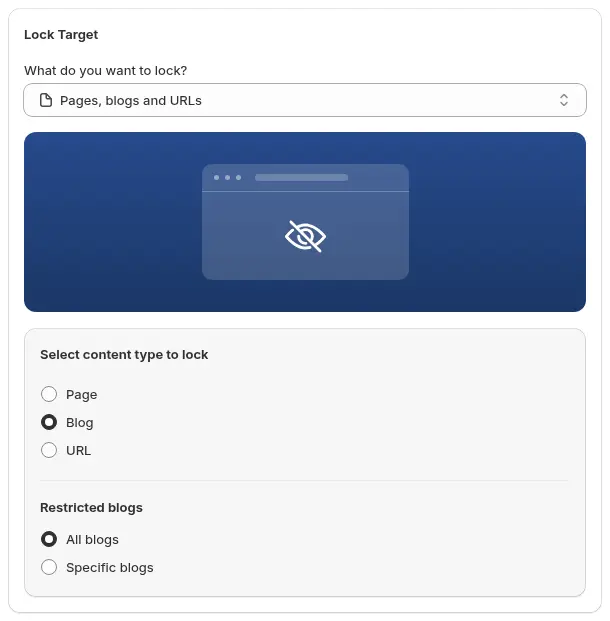
Open Locks > Add lock rule, choose Create my own lock and name it, for example “Secret link for spring preview”. For a collection, choose Collections, then Specific, and pick the collection. For a page, choose Pages, blogs and URLs, then Page and select the page, or URL and enter the address.
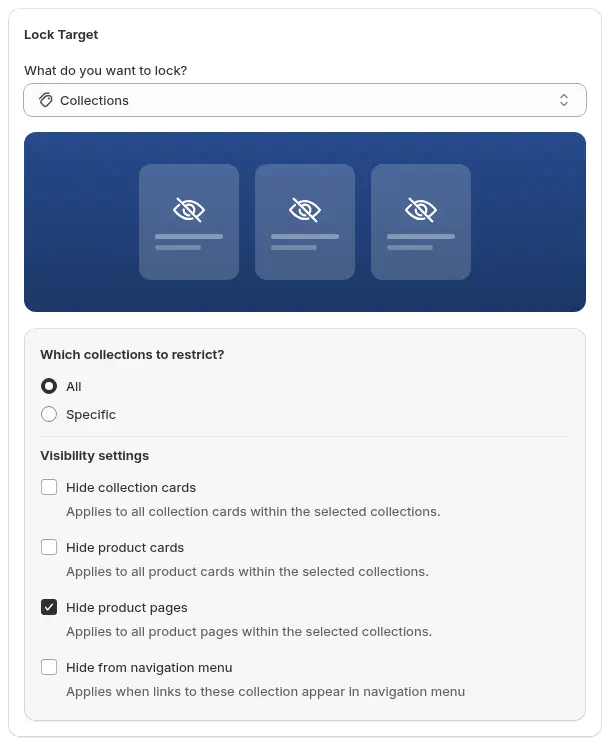
For a page or URL, the target looks like this.
2. Add the Secret link condition and tokens
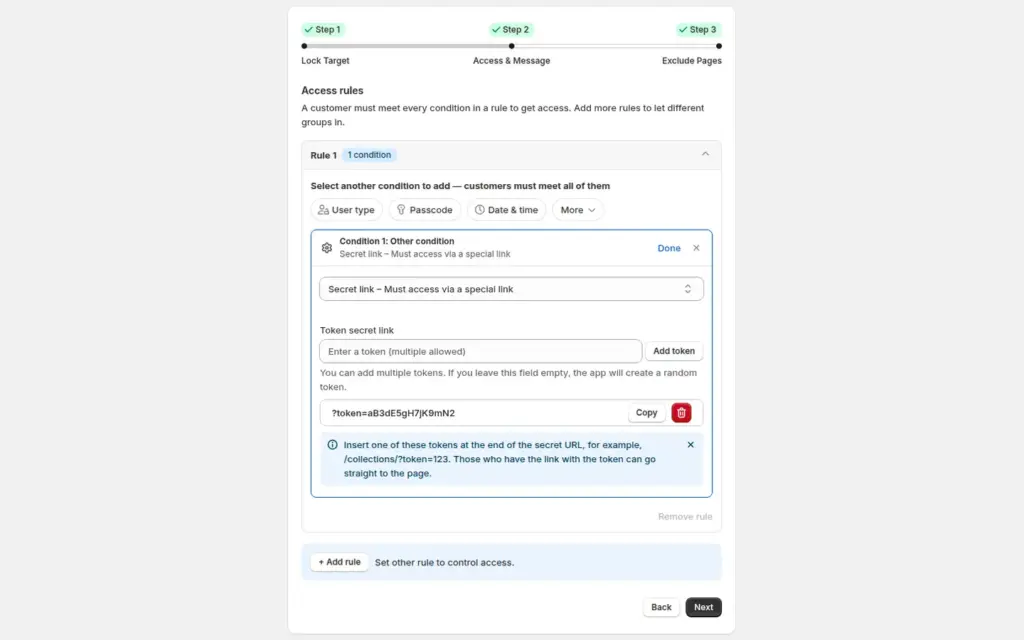
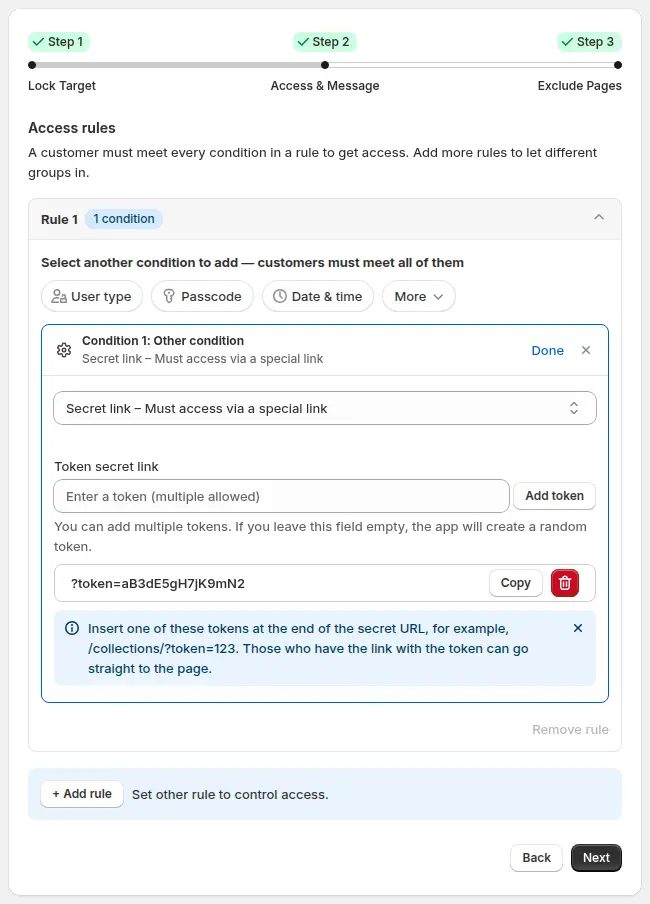
In Access & Message, click More > Other condition and choose Secret link: Must access via a special link. Enter a token and click Add token, or leave the field empty and the app creates a random one. You can add several tokens, one per retailer or campaign. The app shows the URL ending to use, for example ?token= followed by your token, and you append it to the page address.
3. Write the message for everyone else
Under Preview, click Customize message for the Secret link message. A good message is friendly and says whom to contact: “This page is not publicly available. If you received a special invitation, please use the link in your email, or contact us to request one.”
4. Keep other pages open and save
In Exclude Pages, tick anything that must stay public. Save the rule, then check the normal URL (without the token), which should show your message, and the secret link, which should show the content.

5. Send one link per buyer, and watch the Lock list
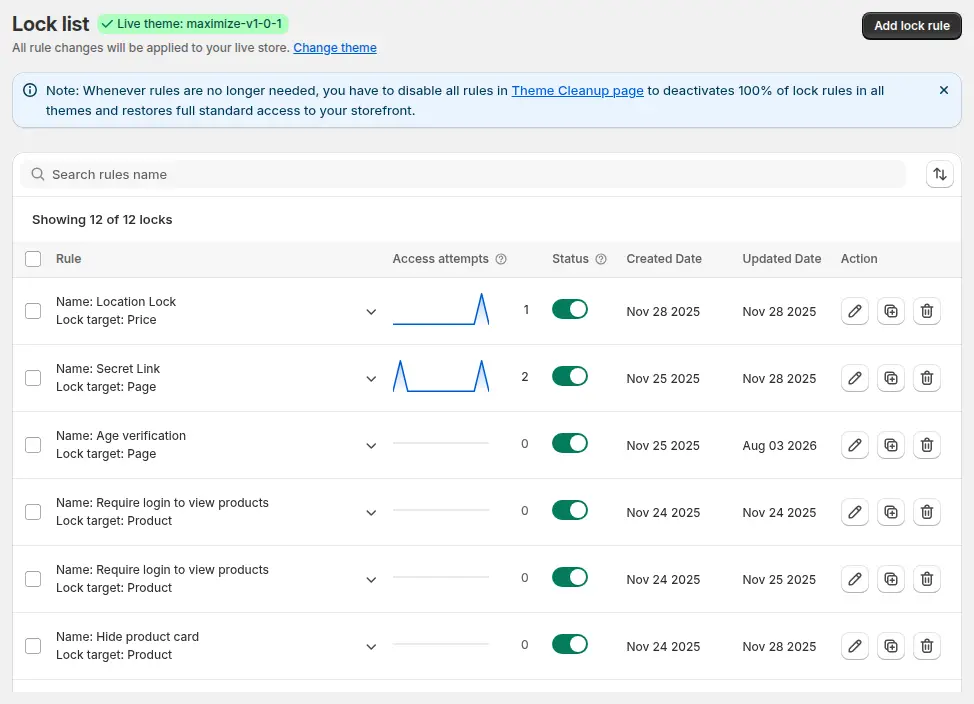
Build a separate URL for each retailer and send it from your own email. The Lock list shows each rule with a count of access attempts, so you can see whether the link is being used.
Token habits that make links easier to manage
Tokens are plain text you choose, so a little discipline pays off:
- Make each token long and random. A token such as spring is easy to guess, while a string of mixed letters and digits is not.
- Do not put a buyer’s name or email address in the token, because the token appears in the URL and can end up in browser history and email previews.
- Keep a small sheet with three columns: retailer, token and date sent. When a link spreads, you know exactly which token to remove.
- Use a new token for each campaign. Reusing last season’s token means last season’s recipients can still open this season’s preview.
- If you let the app generate a random token, copy it straight into your sheet before you leave the editor.
6. Retire a link
To stop one link from working, remove its token from the rule and save. The other tokens keep working.
What your retailers experience
A buyer who opens the link lands on the page as if it were public: the collection, the product cards and the product pages appear, and they can browse it normally. A buyer who opens the normal URL, or a link with a wrong token, sees your lock message instead. Because there is no login step, the experience is the same on a phone as on a laptop, which matters when links are opened from email on the move.
Example
Example for illustration only. A swimwear brand creates a collection called “Spring preview” and a lock with the Secret link condition. It adds eight tokens, one per retailer, and builds eight URLs. The sales rep emails each retailer its own URL. Four weeks later, the preview ends: the rep removes all eight tokens from the rule, or simply switches the lock off and publishes the collection. During the preview, the lock list showed which links had been opened. A buyer who shared their link with a colleague at the same shop was fine with the brand; a link that surfaced on a social media post was retired by removing that single token.
Secret link, passcode, tag or request access?
| Option | Who gets in | Best for | Weakness |
|---|---|---|---|
| Secret link | Anyone holding the URL | Short-lived previews and line sheets | The link can be forwarded |
| Passcode | Anyone who knows the code | Known groups with no accounts | The code can be shared |
| Customer tag | Logged-in customers with the tag | Ongoing wholesale access | Buyers need accounts |
| Request access | Visitors you approve rule by rule | Gated pages you want to vet | Visitors must log in and wait for approval |
If you need to control individual buyers, use tags or Request access instead.
Works well with
- Give B2B buyers access with a passcode when a shared code is easier than a link.
- Request access button for locked pages to let interested buyers ask for access.
- Hide wholesale collections from guests for a permanent wholesale section.
- Show products only to tagged customers for ongoing, account-based access.
Glossary: gated catalog, passcode and customer tag.
Limits and common mistakes
- Anyone with the link gets in. A secret link is a key you hand out. It is not tied to a person, and a forwarded email works as well as the original.
- It does not hide the page from search engines by itself. Noindex is a separate option for locked pages. If the page must stay out of search, turn it on and avoid linking to the page from public pages and menus.
- The match is remembered on the visitor’s cart. After the first visit through the link, the app records it as a cart attribute so the page keeps opening. Test the link in a fresh browser, and again after a theme update.
- For collections, use the visibility settings. If you lock a collection, decide whether to hide its card and menu link too, so the public store does not advertise the preview.
- A paid plan is needed. Locking collections and pages needs a paid BSS B2B Lock plan; the Free plan covers the Entire store target only.
- It is a storefront rule. BSS B2B Lock works through your theme code, so headless storefronts are not supported.
Setup checklist
- Choose the collection, page or URL to share.
- Create the lock and add the Secret link condition.
- Add one token per retailer or campaign, long and hard to guess.
- Write a friendly message for visitors without a token.
- Save, then test the normal URL and each secret link in a private window.
- Send each link from your own email and note which token went to whom.
- Remove tokens when the preview ends, or switch the lock off.
- Follow the secret link guide for every option.
Plans and requirements
BSS B2B Lock has a Free plan (Entire store lock) and paid plans from $9.99 per month for collection, page and product locks, with a 7-day trial on paid plans; the price steps up with your store’s Shopify plan. See the pricing page. When a preview turns into regular wholesale orders, move those buyers to proper accounts with registration forms, approval and customer tags in BSS B2B Solution.