
Tax ID checks are a screen
The check runs in the browser and blocks submit only when the field is required. The server does not re-check, and imports are not checked.
Customer onboarding
Onboarding turns a visitor into an approved wholesale buyer. The buyer submits an application, you review it, and approval adds a customer tag that unlocks wholesale prices and terms. This hub covers registration forms, approval workflows and tagging, with guides, use cases and docs for Shopify stores.
A form where a business gives its details, and sometimes a tax ID, so you can decide whether to approve it.
The review step between application and access, done by hand or by simple automatic rules.
The label added on approval. Pricing, lock and order rules read it to decide what the buyer gets.
Glossary: Customer tagThe approved business account that carries wholesale prices, terms and access.
Glossary: Trade accountRules that tag customers automatically, for example by their orders or spend.
Shopify handles access requests with a free form app. BSS B2B Solution is a form builder aimed at wholesale applications.
| Requirement | Shopify native (Shopify Forms) | BSS B2B Solution |
|---|---|---|
| Fields | Company name and email are required. Custom fields include text, dropdown, radio, date, number and file upload up to 20 MB.[1] | Text, textarea, number, date, file (10 MB each), dropdown, checkbox, radio and header fields. Field widths: 30%, 50% or 100%. |
| Tax ID check | The request-access page lists no tax ID field. On UK and EU company locations with Shopify Tax, a VAT number is validated.[1][2] | Live check as the buyer types: EU VAT, UK VAT, US EIN, ABN and India GST. Blocks submit only when the field is required.Use case: verify a tax ID |
| Approval | Manual. Companies cannot order until approved, in the Ordering not approved tab.[1] | Approve or reject each application and email the applicant. Auto-approval options need a paid plan.Use case: approve and notify |
| What approval creates | A company, a company location and a customer, automatically.[1] | A Shopify customer with the tags set on the form. No company is created. |
| Gated stores | The form is not reachable by logged-out visitors in a fully gated B2B-only store.[1] | The wholesale form can sit on any storefront page. Multi-step forms run on the customer account page. |
Build a form with tax ID checks on a development store for free before you commit.
Get BSS B2B SolutionNumbers in brackets point to the Shopify sources below.
Ask only what you need to decide. Fewer fields mean more completed applications.
Add a Google reCAPTCHA field. It is checked before the form is submitted and is not available on the Free plan. Treat it as one screen among several.
Yes. Forms can carry a translation for each language, which helps cross-border wholesalers apply in their own language.
A multi-step form splits a long application into screens and runs on the customer account page in new customer accounts, on paid plans. Conditional logic shows or hides a field by the answer to another, with Any or All matching, and it runs on the Platinum plan.
Shopify facts in this section: [1], read October 4, 2026.

The application waits as pending. You approve or reject it, and the applicant gets an email for each outcome when sending is on. The same email cannot register twice, whatever the earlier status.
The app has templates for a new registration, a pending application, an approval, a rejection and an account activation. Approval and rejection emails are sent only when sending is on for that form.
A form can allow customers who already have a Shopify account. The app reuses an enabled account. For an invited or disabled account it can send an invite instead.
On approval the app applies the tags you set on the form, such as wholesale. Price, lock and order rules that target that tag then apply. Auto Tag rules can add tags by spend or order count, but only after new orders and not for existing customers.
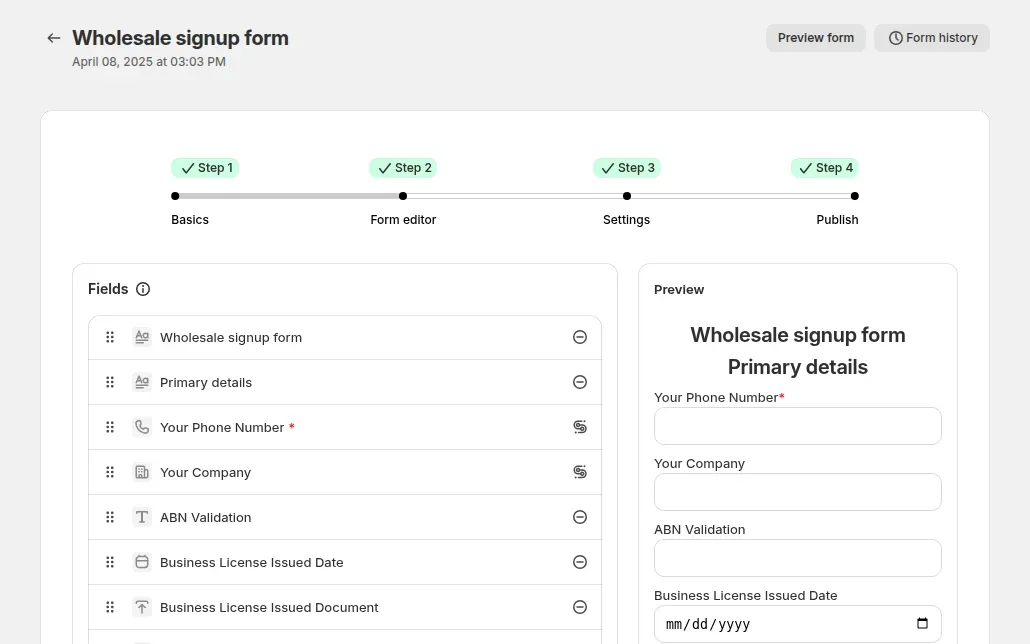
A fictional candle brand runs one store for retail and wholesale. A buyer applies on Monday.
| Step | What happens | Result |
|---|---|---|
| 1. Apply | The buyer fills company name, phone, an EU VAT ID (required) and a business license file under 10 MB. | The form blocks submit if the VAT ID is invalid. |
| 2. Review | You open the pending application and approve it. | The buyer gets an approval email. |
| 3. Tag | The form adds the tag wholesale. | A Shopify customer exists with that tag. |
| 4. First login | The buyer logs in. | Rules that target wholesale now apply: prices, unlocked pages, order rules. |
Illustrative flow. Native companies are separate: if you also use Shopify companies, add the buyer to one in the admin.
you need company name, email and a few custom fields, want a company created automatically, and check tax IDs yourself.
you need live tax ID checks, multi-step forms, conditional fields, file review or tags added on approval, or you also use tag-based prices.
Seven steps from a blank form to a tagged buyer.
Add fields, set widths and write the thank-you message.
Choose EU VAT, UK VAT, EIN, ABN or GST and mark the field required.
Use multi-step for long applications.
Show extra fields only when needed and accept a license file.
Choose manual or auto-approval and the emails sent.
Put it on a page and link it from your header.
Submit a test application, approve it and check the tag.
Source: Build a Powerful Wholesale Registration Form.
Build your first wholesale registration form. BSS B2B Solution is free on development stores.
These come from how the form behaves today.
The check runs in the browser and blocks submit only when the field is required. The server does not re-check, and imports are not checked.
Conditional logic runs on the Platinum plan, so test it on your live plan.
A second submission with the same email is blocked, so a rejected buyer cannot simply reapply.
Tax ID fields need a paid plan, and the US EIN field needs Platinum.
reCAPTCHA is verified before submit and not again on the server, so keep reviewing applications by hand.
Worked examples of customer onboarding on Shopify. Browse all use cases.
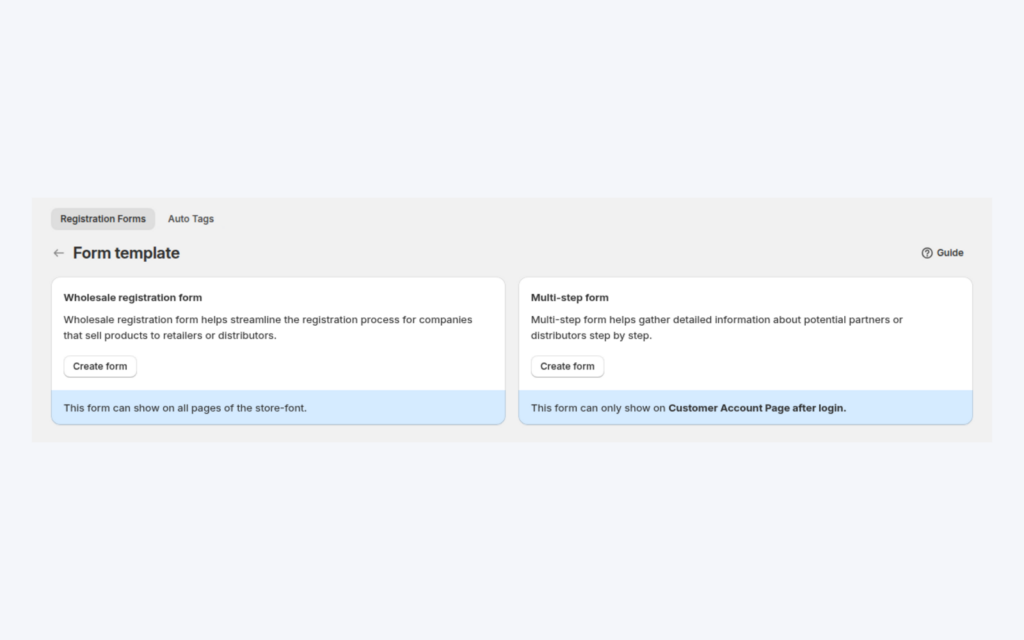
A long application scares applicants away. A multi-step form splits it into short steps with Next and Previous buttons, keeps every answer in one applicant record, and runs in Shopify's new customer accounts.
Explore use case: Multi-Step Wholesale Application Form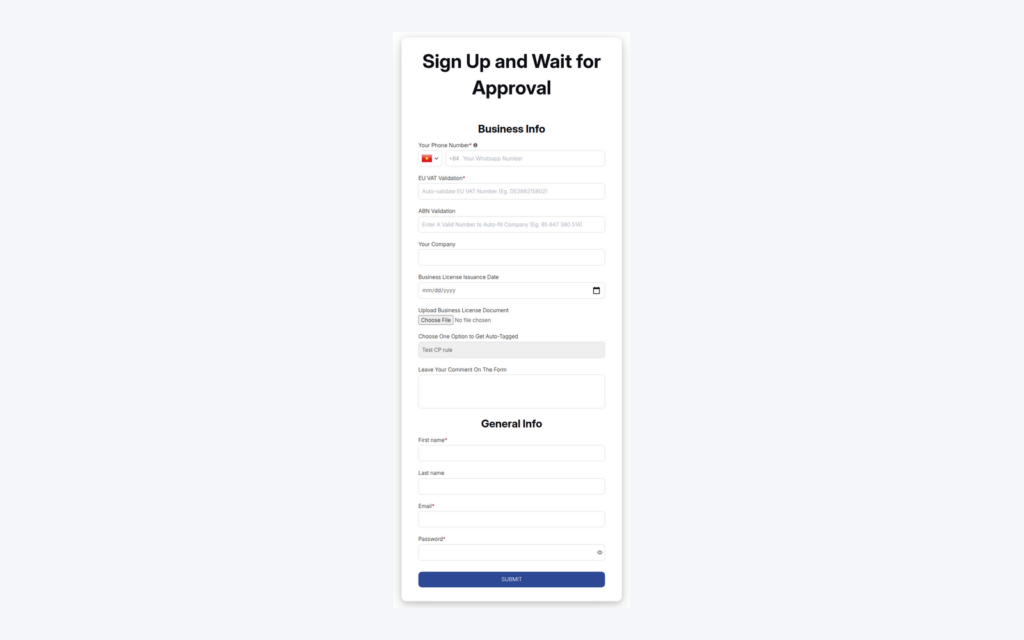
Build a wholesale application form with the fields you need, review each applicant, approve or reject, and let approval add a customer tag and send email notifications so wholesale prices reach approved buyers.
Explore use case: Wholesale Registration Form With Approval
Different applicants need different questions. Conditional logic shows or hides fields by earlier answers, and a file upload field collects a licence or resale certificate for you to review before approving.
Explore use case: Registration Form With Conditional Logic and Uploads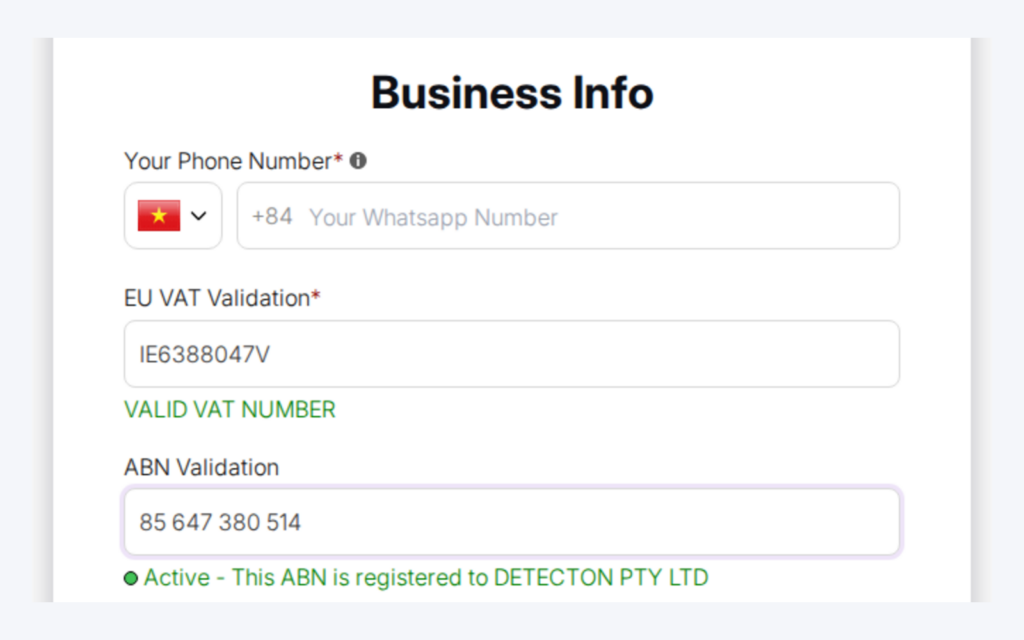
Add a tax ID field to your registration form and applicants get live feedback while they type. On required fields, an invalid number blocks submission, so you review fewer applications with typos or invalid numbers.
Explore use case: Verify a Business Tax ID Before Approving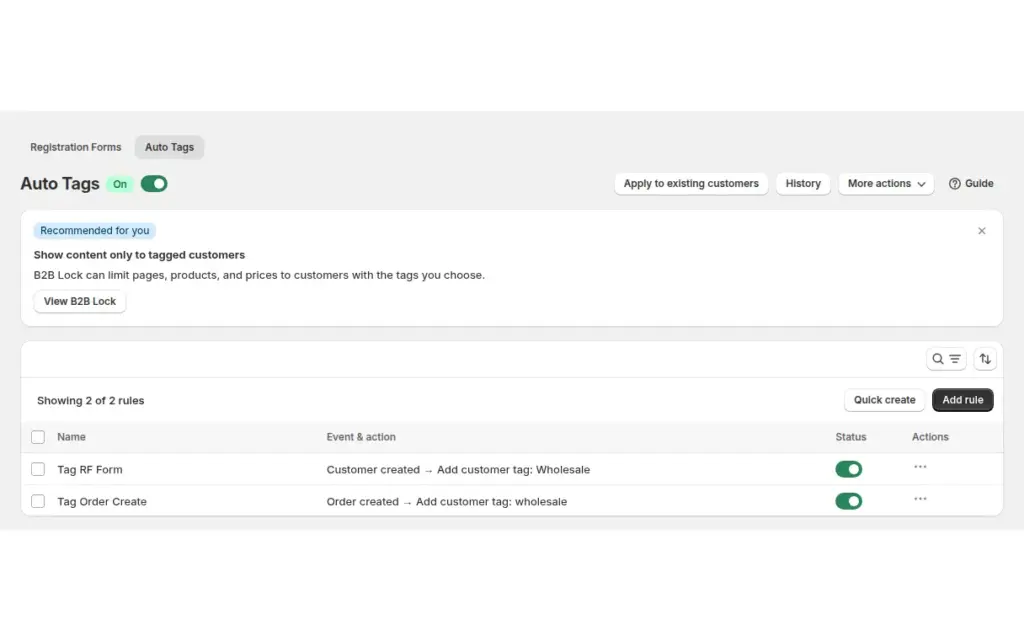
Add and remove customer and order tags automatically when Shopify events match your conditions, so spend-based wholesale tiers and tag-driven prices stay current in BSS B2B Solution without manual edits.
Explore use case: Auto-Tag Customers by Spend or Order Count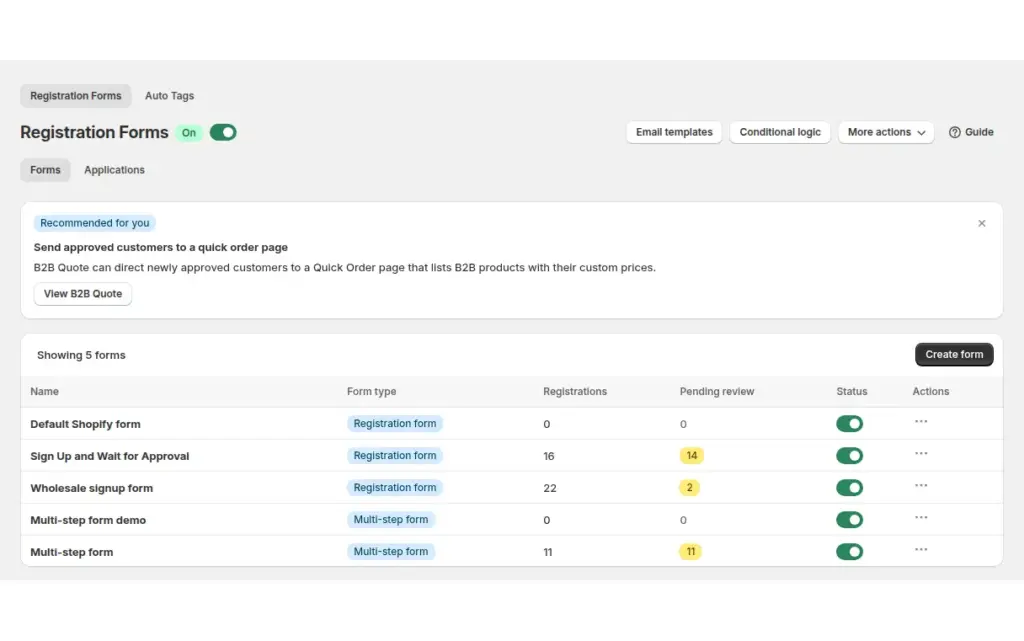
Review every wholesale application in one list, approve or reject with a click, and let BSS B2B Solution email applicants automatically so retailers are not left waiting for a manual reply.
Explore use case: Approve, Reject and Notify Wholesale ApplicantsBuild registration forms, approve buyers and tag them in one app, so the right prices and terms apply from the first login.
Build a form that collects business details, publish it on a page and review the applications. BSS B2B Solution adds a form builder with multi-step forms, conditional logic and tags on approval. Shopify also offers the free Shopify Forms app for access requests.
Shopify's setup checklist points to the free Shopify Forms app. A submission creates a company, a location and a customer, and the company cannot order until you approve it. The request-access page lists no tax ID field.
In BSS B2B Solution a wholesale registration form can show on any storefront page, while a multi-step form shows on the customer account page. Multi-step forms are not available on the Free plan.
BSS B2B Solution supports manual approval and auto-approval, such as approving applicants whose email contains a given text. Auto-approval needs a paid plan.
A customer tag is a label on the customer's account. Pricing, lock and order rules can target a tag, so one tag added on approval unlocks everything that buyer should see.
Yes. BSS forms have tax ID fields for EU VAT, UK VAT, US EIN, Australian ABN and India GST, checked as the buyer types. A required field blocks submit when the number is invalid. The US EIN field needs Platinum.
Each file can be up to 10 MB, with one file per field. Allowed types include PDF, Word, Excel, CSV, JPEG and PNG. Shopify Forms accepts uploads up to 20 MB.
No. If an application already exists for an email, a new submission is blocked with a message, whatever the earlier status.
No. BSS B2B Solution creates or updates a Shopify customer and adds the form's tags. If you use Shopify companies, add the buyer to a company in the admin. Shopify Forms creates the company for you.
Free on development stores, and from $29 per month on paid plans with a 14-day free trial on paid plans. Prices are from the App Store listing as of October 4, 2026.
Shopify facts come from the pages below. BSS facts follow our checks against the app. We make BSS B2B Solution, so check Shopify's pages before you buy.
Show business buyers their own prices with price lists, custom pricing and quantity breaks.
Verify tax IDs, handle tax exemption and show prices with or without tax to the right buyers.
Hide prices from guests, gate wholesale catalogs and protect pages with passcodes.
Native B2B vs apps, and how the six hubs fit together.