
Uncontrolled price visibility
Google can index and display wholesale prices directly in search results, exposing confidential pricing to competitors and unauthorized buyers.
Use Case
Protecting Your Wholesale Margins by Reducing the Chance of Sensitive Pricing Data Appearing in Public Search Snippets
Reviewed by Hoa Nguyen, Senior Marketer. Last reviewed
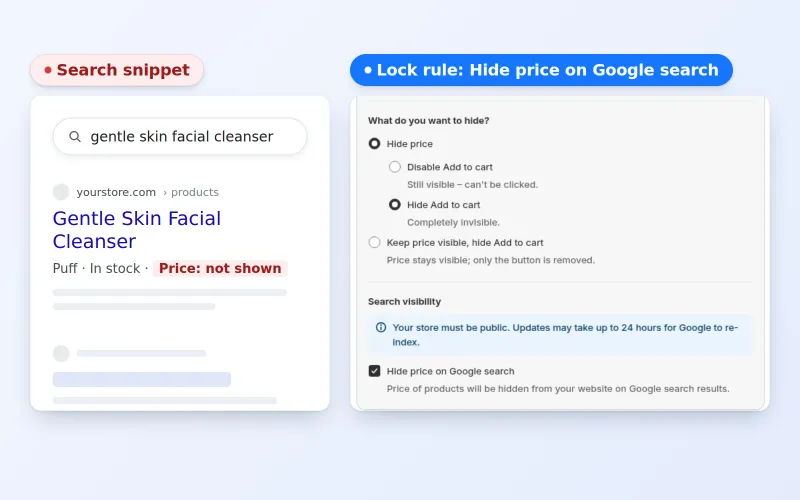












To hide prices from Google search results on a Shopify store, create a price lock in BSS B2B Lock and tick Hide price on Google search. The app then replaces the price in your theme's structured data and price meta tags for visitors who do not pass the lock, and Googlebot is treated like any other guest.
This page is for wholesalers and brands whose trade prices must not appear in search snippets, rich results or social previews. It explains what the setting changes, how to verify it, what it cannot do and how it combines with a login or passcode lock.
the problem
B2B pricing is often tiered, negotiated, or contract-based, making it highly sensitive. However, standard storefront setups may unintentionally expose wholesale pricing to search engines like Google, leading to several risks that can damage both revenue strategy and partner relationships.
Google can index and display wholesale prices directly in search results, exposing confidential pricing to competitors and unauthorized buyers.
Publicly visible B2B pricing may undercut distributors or create tension with partners operating under different pricing agreements.
Businesses lose the ability to differentiate pricing across segments, regions, or buyer tiers.
Some agreements require strict confidentiality of pricing, which can be violated through search engine indexing.
OUR SOLUTION
BSS B2B Lock has a Hide price on Google search option. It removes or replaces price values in your theme’s structured data and other price snippets, so Google is less likely to show them in search results. Your lock rules still decide which real visitors see prices.
A manufacturer has exclusive, negotiated contracts with several distributors hide prices from Google Search to prevent price wars between partners.
A wholesaler offers different pricing tiers (Silver, Gold, Platinum). They hide the prices from public search results so that “window shoppers” only see the product details, while actual rates remain hidden until the buyer logs in.
A high-volume supplier wants to keep organic SEO traffic for its product names but does not want bulk prices listed in Google results, where competitors can compare them easily.
Target Sectors
operating on Shopify with tiered or negotiated pricing
managing distributor networks with varying price levels
aiming to protect pricing strategy while still attracting organic traffic
with strict pricing confidentiality in contracts or partnerships
benefits
See how hiding price from Google Search Result can benefit Your Business
Reduces the chance of wholesale rates appearing in public search snippets.
Protects distributor relationships by keeping negotiated rates private.
Keeps product pages indexable and visible without revealing data.
Encourages anonymous visitors to register or inquire for pricing.
Keep negotiated rates out of search snippets, so they are less likely to be indexed and compared.
Makes it harder for competitors to follow your price changes through search results.
Retain the power to decide exactly who sees your pricing and when.
Reduce the chance that partners see different price points in public search results.
Helps keep regional price differences from being compared in public search results.
Build trust with wholesalers by keeping their rates out of public search snippets.
Keep your products ranking for search terms while the price is removed from search snippets.
Transform anonymous traffic into qualified leads by requiring interaction to see pricing.
Helps keep your search results free of wholesale prices.
USE CASES
Discover how you can hide prices from Google Search Result in 3 simple steps
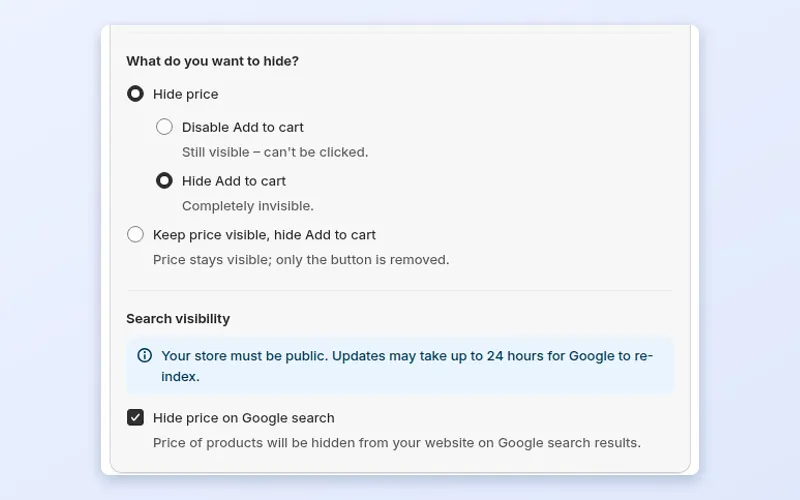
In BSS B2B Lock, choose Products or Price and add to cart as the lock target, then tick Hide price on Google search under Search visibility.
Add at least one access condition (for example signed-in customers or a customer tag) and save. The app updates your theme so price values are removed from structured data. Your store must be public, and Google can take up to 24 hours to re-index.
Buyers who pass your lock rules still see prices in the store. Google re-crawls on its own schedule, so check rich snippets in Google Search Console afterwards.
see it in action
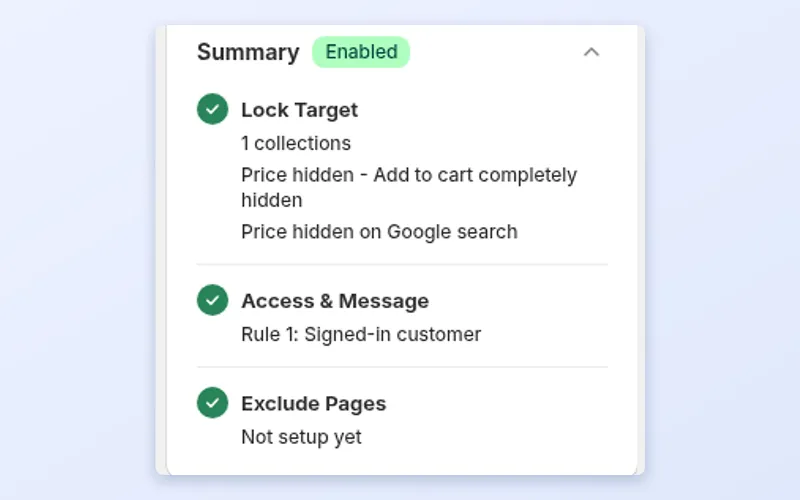
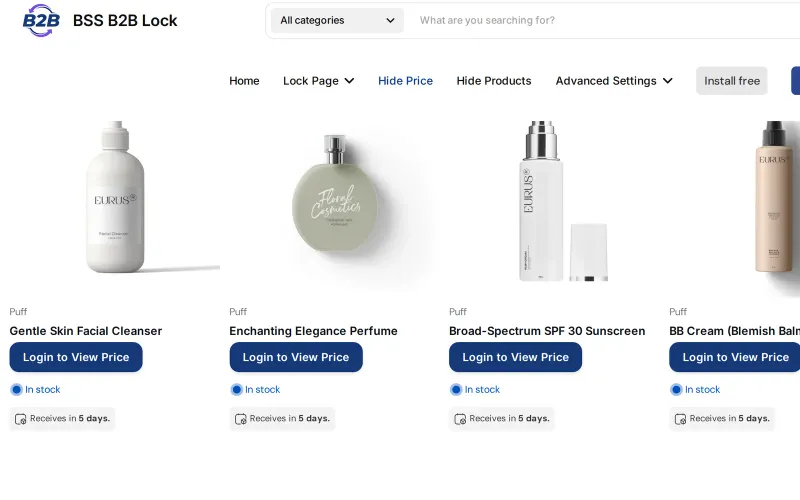
Where the setting lives in BSS B2B Lock, and what a guest sees on the demo store. The Google result itself changes only after Google re-crawls, so it is not shown here.
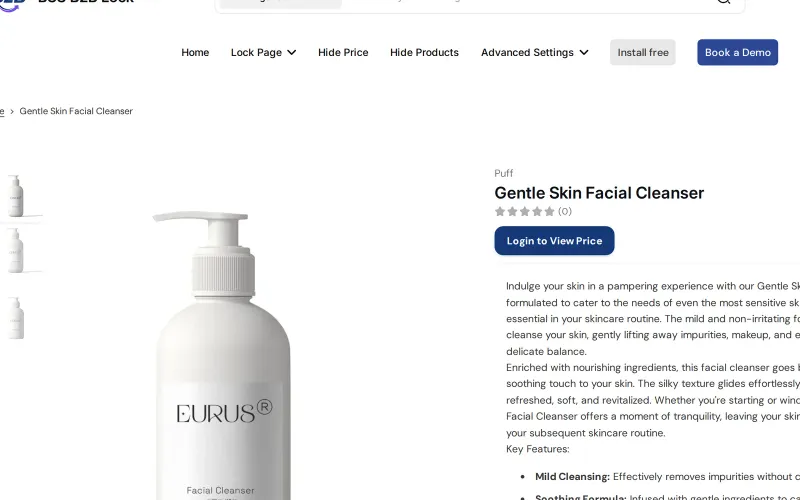
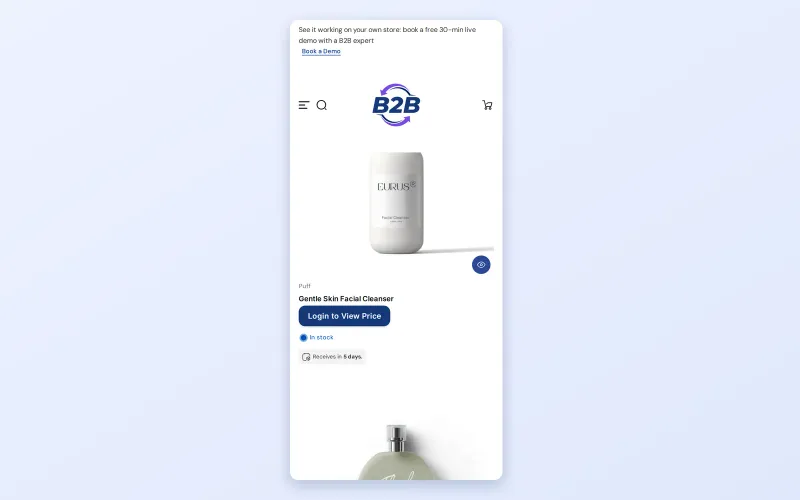
Hiding prices from search results helps when a price in a snippet could cause harm:
Search engines read more than the visible page. Product pages usually carry structured data, a block of machine-readable details that includes the price, and some themes also expose it in meta tags used by social previews. Hiding the price in the visible layout is not enough if the same number sits in that markup.
A price in a search result reaches people who never opened your site. It can be copied into comparison sites, quoted by buyers in negotiation or shown next to a retailer's own listing. For a business built on differentiated pricing, this is a quiet way to lose margin and goodwill.
When a visitor fails the lock, BSS B2B Lock edits the price in the places a theme normally prints it: the visible price, the price in the structured data block, and price meta tags such as the Open Graph price. The number is replaced with placeholder text. Product availability in the structured data stays as it was, so a product is not suddenly shown as out of stock.
The decision is made per visitor, not per crawler. A logged-in buyer who passes your condition keeps seeing the real price in the page and in the markup. Because the rule works on the page the visitor receives, anything a guest can see, a search engine can see too.
Shopify's B2B features cover companies, catalogs and payment terms, and hiding prices from guests or search engines is not listed among them in Shopify's B2B features by plan. The Shopify B2B guide shows this in its native versus apps table. BSS B2B Lock handles the guest side and adds the search side as an option on the same rule. See the access control hub for the wider set of locks.
The gallery above shows these steps. The reference article is Hide price on Google: SEO and catalog considerations.
In BSS B2B Lock create a new lock and, in Step 1, choose Price and add to cart as the target for the products you want covered. You can pick all products or a tag, collection or specific products.
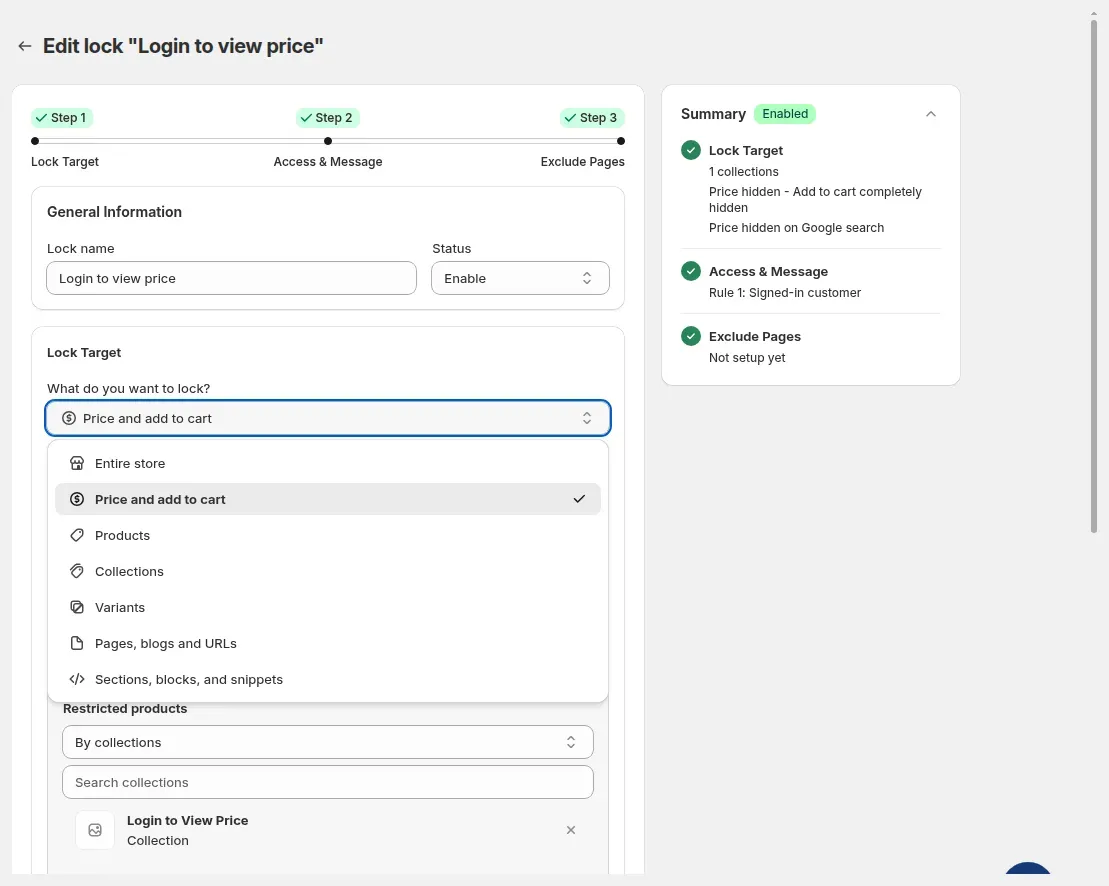
Under Search visibility, tick Hide price on Google search. The app reminds you that your store must be public and that Google needs time to re-index. Leave the box unticked if you only want a visible guest lock.
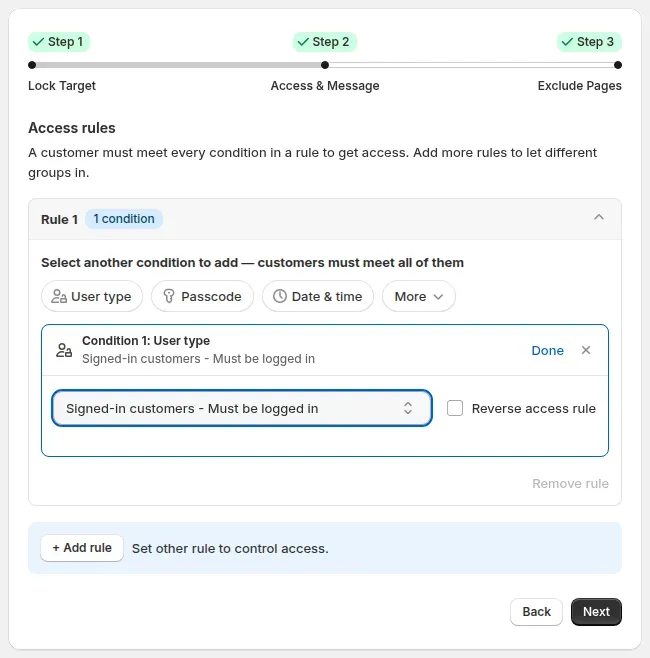
Step 2 needs at least one condition, such as Signed-in customers or a customer tag. The summary panel then lists the price lock and the Google setting together so you can confirm both before you save.
Open a collection and a product page in a private window. The price is replaced with your message. The product page stays public, so its title, images and description are still indexed.
View the page source or run Google's Rich Results Test on a product URL and look at the price in the structured data. Search results update only after Google recrawls the page, which you can request in Search Console.
Do not assume the setting worked on your theme. A five-minute check on two or three products gives you confidence before you tell your team it is done.
If a theme still prints the price somewhere unexpected, such as a custom section, send the theme name and product URL to support so the pattern can be checked.
This is a made-up illustration, not a customer result. A distributor of professional hair products publishes its catalog so salon owners can find items by name in search. Trade prices are lower than the suggested retail price the brand requires.
The page still earns traffic, and the price reaches only logged-in buyers.
Glossary: hide price, gated catalog and MSRP.
Price locks need a paid BSS B2B Lock plan or an active trial, since the Free plan only supports locking the entire store. Details are on the BSS B2B Lock page. Install BSS B2B Lock from the Shopify App Store to follow the steps above.
faq
Yes, with an app that edits the price markup in your theme. In BSS B2B Lock, create a price lock and tick Hide price on Google search. Visitors who do not pass the lock, including search crawlers, then see your hidden version of the page, and the price in the structured data is replaced.
Yes. The setting changes the price, not the page. Titles, descriptions and images remain public, so the page can still rank for the product name. Only the price in the page markup is replaced for visitors who fail the lock.
It depends on when Google recrawls each page. The app notes that updates can take up to 24 hours, but search results change on Google's schedule, not yours. You can speed it up by requesting indexing for key URLs in Search Console.
No. The lock is based on the visitor's access, not on a crawler list. Googlebot is treated like any other guest, so it sees what a guest sees. Logged-in buyers who pass your condition still see the normal price in the page and in its markup.
No. Your Merchant Center product feed is separate and is not changed by this setting. If you send prices to shopping surfaces, review and edit that feed yourself, or remove restricted products from it, so the two stay consistent and no price reaches a shopping surface by another route.
Open a product page in a private window and look at the page source or run Google's Rich Results Test on the URL. The price field in the structured data should be replaced. Check a collection page and a mobile view as well.
No. Hiding the price keeps the page indexable but changes the price data. Noindex tells search engines not to list the page at all. BSS B2B Lock has a separate noindex option on locked pages if that is what you need.
case study
Quotes and results below are taken from our published case studies.

“We’re now able to publish our wholesale website without hiding everything behind a Shopify password page.”
2 years of scaling wholesale on BSS B2B Solutions without added manual intervention.
Read case study
“without using your application we would not have been able to solve the global problem of using one website for retail and wholesale clients.”
~35% turnover growth over six months of use, as reported by the merchant (seasonality not excluded).
Read case study
“I now have a fully operational wholesale portal and a team to assist me with any future questions or issues.”
12% wholesale share of revenue, up from 2%.
Read case studyget started
Explore our comprehensive ecosystem of learning materials and live support designed to help you master our suite at your own pace.

Master the features with step-by-step documentation.
Learn more - Read User guide
See how our features function in a live storefront.
Learn More - View Demo store
Walk through the suite with our team in a live demo.
Learn More - Book a Demo Session
Have a specific question? We’re here 24/7 to help.
Learn More - Contact UsVisit our app listing to begin your setup, then let our team walk you through a personalized demo to ensure your success at scale.