
High friction in buyer onboarding
Requiring account creation or form submission slows down lead engagement and reduces conversion rates.
Use Case
Streamlining B2B Sales by Removing Onboarding Friction and Manual Workflows
Reviewed by Hoa Nguyen, Senior Marketer. Last reviewed
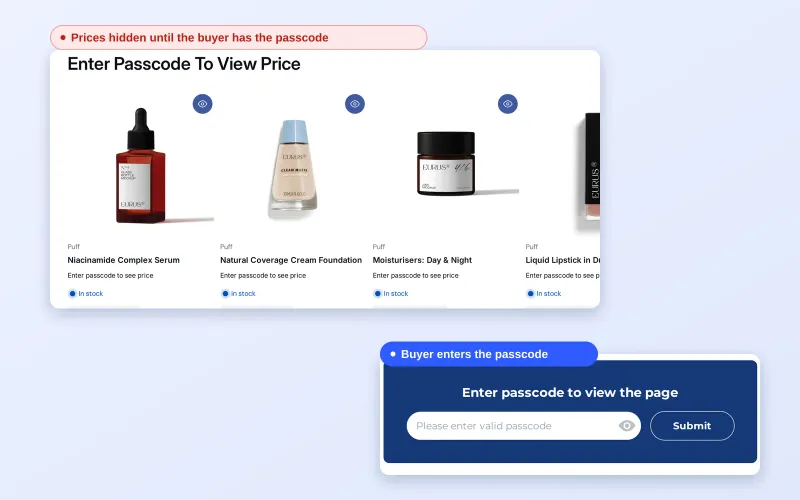












To give B2B buyers access with a passcode on Shopify, add a Passcode condition to a lock in BSS B2B Lock. Visitors who enter a correct passcode see the protected prices, products, collections or pages, and no customer account or tag is needed.
This page is for wholesalers and brands that want to let prospects, trade-show contacts or early-access buyers in quickly, without waiting for registration and approval. It covers how passcodes work, how to choose between them and other access methods, an example, the limits of a shared code and a setup checklist.
the problem
Controlling access to B2B exclusive content, such as wholesale pricing, distributor catalogs, or early product releases, typically relies on customer accounts and tagging systems. While effective, this approach introduces several operational and strategic challenges that create bottlenecks in scaling B2B operations and limit the ability to respond quickly to market opportunities.
Requiring account creation or form submission slows down lead engagement and reduces conversion rates.
Buyers who are not yet ready to register cannot access critical information, leading to missed or delayed deals.
Running short-term campaigns (e.g., early access, private previews) becomes cumbersome when dependent on account-based access control.
OUR SOLUTION
BSS B2B Lock enables merchants to protect products, collections, pages, or pricing using a passcode-based access system, eliminating the need for account login or pre-assigned customer tags.
A passcode is a shared access code, not a customer account: anyone who has it can use it, so share it only with the buyers you choose.
A manufacturer shares a passcode with prospective distributors, allowing them to preview wholesale pricing and catalogs without requiring account registration
A brand launches a new product line and provides selected buyers with a passcode for early access, without tagging customers first.
Target Sectors
managing large, segmented buyer networks
running private catalogs
executing campaigns such as early access, product launches, or private sales
where buyers need pre-registration access before committing
benefits
How Access Control with Passcode Impacts Your Business
Accelerates lead conversion and shortens sales cycles
Minimizes friction in early engagement stages
Lowers admin workload and maintenance complexity
Keeps pricing and catalogs behind a passcode
Shortens the sales cycle by providing immediate access to pricing and catalogs.
Drives higher engagement for early-access launches by removing the onboarding barrier
Allows “window shopping” for high-value B2B leads who aren’t yet ready to commit to a full account.
Removes the need for staff to manually review and tag customer profiles before they can see pricing.
Gate prices or pages with one rule instead of tagging customers one by one.
Marketing and sales teams can set up a passcode rule in a few steps, without touching customer records.
Buyers gain instant entry to protected assets without waiting for admin verification.
Provides a professional & fast experience that builds trust during the critical first impression.
Eliminates the need for new leads to manage yet another set of credentials just to view a catalog.
USE CASES
Discover how to protect prices or pages with a passcode in 3 steps
In BSS B2B Lock, choose what to protect (price and add to cart, products, collections or pages) and add the Passcode condition.
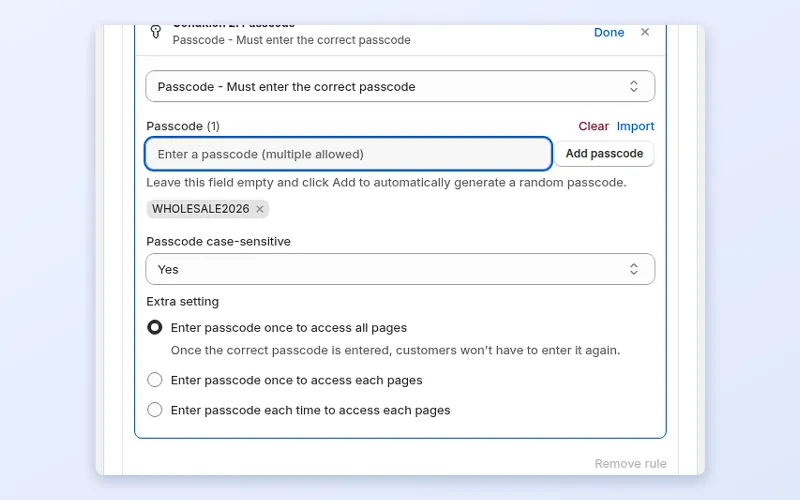
Add one or more passcodes: type your own, generate a random one, or import a CSV. Choose whether visitors enter it once for all content or per item. Passcodes have no expiry; remove one from the list to stop it working.
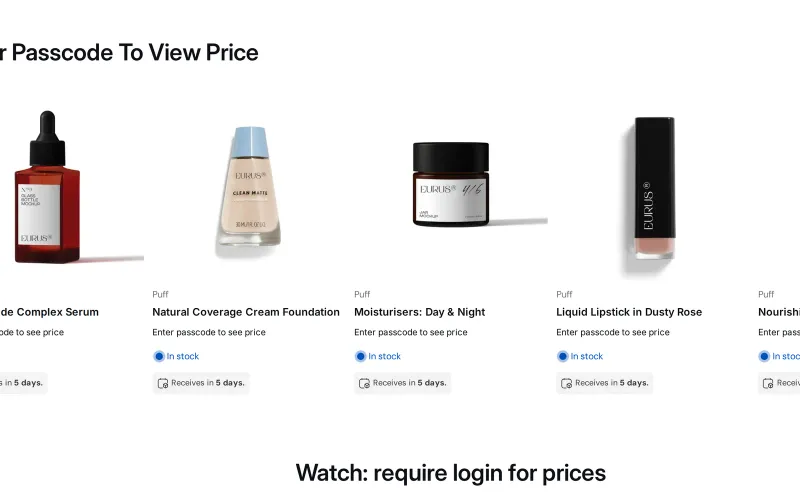
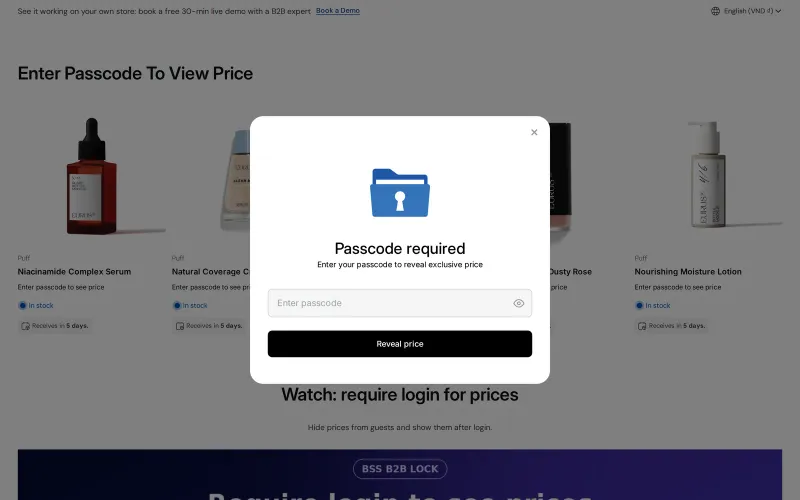
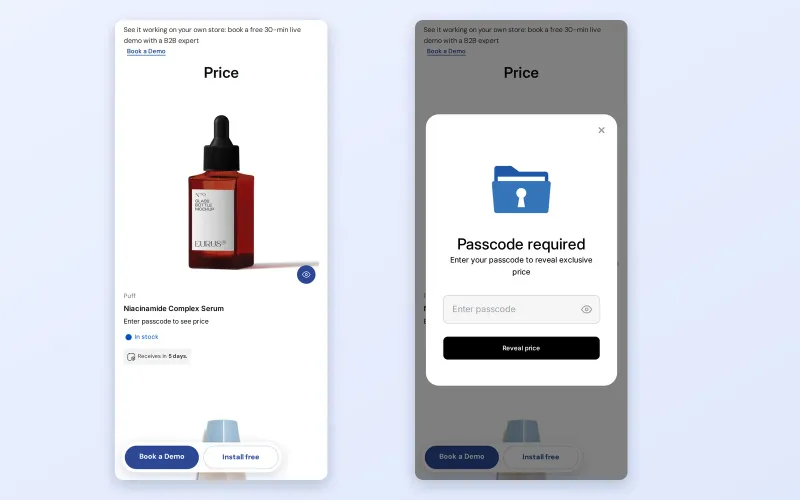
Visitors who enter a correct passcode see the protected prices or pages. Everyone else sees the passcode prompt, for example Enter passcode to see price.
see it in action
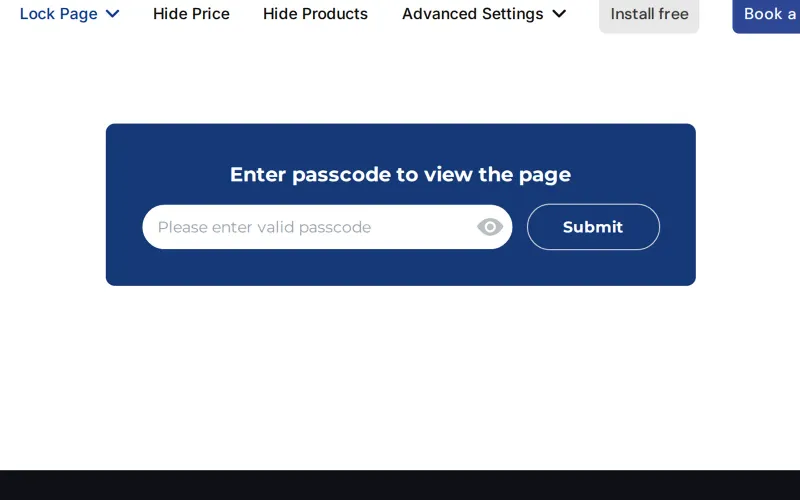
From the Passcode condition in BSS B2B Lock to what a visitor sees on the demo store.
A passcode is the right tool when speed matters more than identity. These situations are typical:
Registration forms, approvals and tags are the right foundation for long-term buyer relationships, but they add steps before a buyer sees any value. A prospect who is not ready to commit may leave rather than fill in a form, and a short campaign may be over before accounts are reviewed.
A passcode removes that first barrier. The buyer enters a short code, sees the prices or pages you meant them to see and keeps shopping. Your team can still follow up with a full account later.
There is a sales benefit as well. When a buyer has asked for pricing during a call and gets it a minute later, the conversation continues while interest is high. A passcode shortens the path from interest to a priced catalog to a first order, and you can still ask the buyer to register afterwards, once they have seen why it is worth it.
Shopify's native B2B tools are built around companies and catalogs, where each buyer has an account and is assigned to a location. Passcode-protected pages and prices are not listed in Shopify's B2B features by plan, and the Shopify B2B guide notes the same for hiding prices from guests. BSS B2B Lock adds passcode, tag, request-access and login conditions that you can combine. The access control hub compares them.
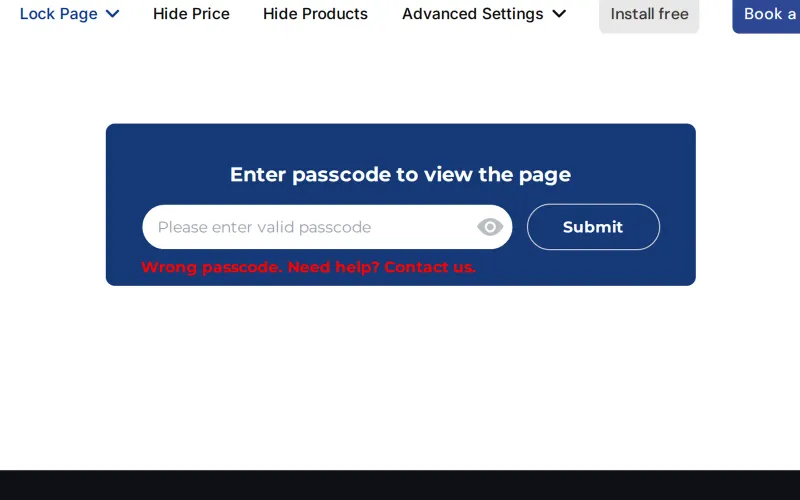
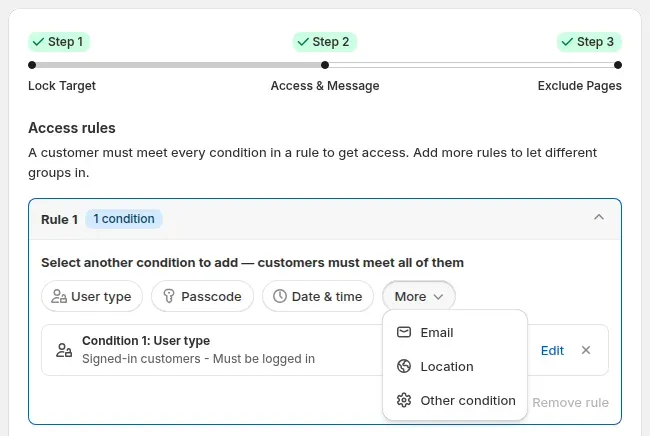
The gallery above shows each step. The reference guides are Protect pages with a passcode and Manage passcodes.
Create a lock and choose the target: price and add to cart, products, collections or pages. For a passcode on prices, the guest sees a prompt such as Enter passcode to see price. For a page lock, the visitor sees a passcode field and a Submit button until the right code is entered.
In Step 2, add the Passcode condition. You can type your own passcode, leave the field empty and click Add to generate a random one, or import many from a CSV file. The field accepts several passcodes, so you can give each group its own.
You can ask for the passcode once to access all pages, once per page, or each time a page is opened. Pick the first for a catalog preview and the last for something sensitive. Passcodes are case-sensitive by default, and you can switch that off.
Open the store as a guest, enter a correct passcode and confirm the content appears. Then enter a wrong one: the page shows an error and stays locked. Check the same flow on a phone.
Send the code to chosen buyers. Passcodes have no expiry and no usage limit, so to stop one working you remove it from the list. Use a separate code per group if you want to revoke one group without affecting the rest.
This is a made-up illustration, not a customer result. A homeware brand attends a trade show and wants buyers to see wholesale prices straight after meeting the team.
The brand collected leads without building a form or tagging anyone first. Because one code per event is easy to track, the team can compare which events produced buyers who later registered, using its own records of who received each code.
Related glossary terms: passcode, gated catalog and hide price. More patterns are in the access control hub.
Passcodes are one of four ways to open a lock. The right choice depends on how much you need to know about the buyer.
| Method | What the buyer does | Do you know who used it? | Best for |
|---|---|---|---|
| Passcode | Types a shared code | No | Trade shows, previews, short campaigns |
| Secret link | Opens a URL that holds a token | No | Private collections shared by email |
| Customer tag | Signs in with a tagged account | Yes | Approved, long-term buyers |
| Request access | Asks for approval, you approve | Yes | Controlled onboarding |
Locks on price, products, collections and pages need a paid BSS B2B Lock plan or a trial; the Free plan only supports locking the entire store. See the BSS B2B Lock page for current plans. Install BSS B2B Lock from the Shopify App Store to start.
faq
Add a Passcode condition to a price lock in BSS B2B Lock. Buyers who enter a correct passcode see the protected prices in the same session, with no account, tag or approval step. Share the code only with the buyers you choose, since anyone who has it can use it.
Yes. The Passcode field accepts several passcodes, and you can type them, generate random ones or import a list from a CSV file. Using one passcode per group lets you remove one group's access later without affecting any of the other groups.
No. Passcodes have no expiry date and no usage cap. To stop a code working, remove it from the list. If you want a time-limited campaign, plan a date to remove the code and consider a separate code for that campaign.
Yes. You can lock products, collections or pages with a passcode. A locked page shows only a passcode field and a Submit button until the right code is entered. A wrong code shows an error and keeps the content locked.
You choose. Options include entering it once to access all pages, once per page, or each time a page is opened. A single entry suits a catalog preview, while repeated entry suits more sensitive pages. Passcodes are case-sensitive by default, and you can switch that off.
A passcode is a convenience gate, not a security guarantee. It is shared, so anyone with the code can pass it on, and it restricts access through your theme. For confidential data, use account-based rules such as tags or request access and apply them to real customers.
A passcode asks the visitor to type a code. A secret link lets in anyone who opens the URL that contains the token. Neither identifies the visitor, and a secret link is not hidden from search engines by default, so it needs its own care, such as a separate noindex setting.
case study
Quotes and results below are taken from our published case studies.

“We’re now able to publish our wholesale website without hiding everything behind a Shopify password page.”
2 years of scaling wholesale on BSS B2B Solutions without added manual intervention.
Read case study
“without using your application we would not have been able to solve the global problem of using one website for retail and wholesale clients.”
~35% turnover growth over six months of use, as reported by the merchant (seasonality not excluded).
Read case study
“I now have a fully operational wholesale portal and a team to assist me with any future questions or issues.”
12% wholesale share of revenue, up from 2%.
Read case studyget started
Explore our comprehensive ecosystem of learning materials and live support designed to help you master our suite at your own pace.

Master the features with step-by-step documentation.
Learn more - Read User guide
See how our features function in a live storefront.
Learn More - View Demo store
Walk through the suite with our team in a live demo.
Learn More - Book a Demo Session
Have a specific question? We’re here 24/7 to help.
Learn More - Contact UsFeature guide: Age verification popup
Visit our app listing to begin your setup, then let our team walk you through a personalized demo to ensure your success at scale.