Shopify B2B Guide

Shopify B2B: The Complete Guide to Selling Wholesale on Shopify

To sell wholesale on Shopify, give approved business buyers their own prices, collect and approve their applications, apply the right tax rules, set order minimums and payment terms, offer quick ordering or quotes, and control who sees prices. Shopify's built-in B2B is included on Basic, Grow, Advanced and Plus, and apps fill the remaining gaps.

  • By BSS B2B Solutions Editorial Team
  • Reviewed by Hoa Nguyen, Senior Marketer. Last reviewed
  • Last updated
Install BSS B2B Solution See pricing BSS B2B Solution has a 14-day free trial on paid plans.

What is Shopify B2B?

Shopify B2B is Shopify's built-in set of features for selling to business buyers through the Shopify admin and your online store. You set up each business customer as a company with one or more locations, then give each company or market its own catalogs, prices, quantity rules and payment terms. Most of these features are already switched on in the admin.

Shopify's own definition is short: native B2B is a suite of features, not a separate product. Everything else a wholesale store needs, such as how buyers apply, who may see prices and how they place a big repeat order, is either a native feature, a free Shopify app, or a third-party app.

Native B2B vs a B2B store

Native B2B is the feature set. A B2B store is the finished result: a storefront where approved buyers log in, see their own prices, meet your order rules and pay on terms. Native features cover the core of that result. The sections below show where they stop, so you can decide what, if anything, to add.

B2B, DTC and blended stores

Shopify's setup guide starts with one decision: a blended store, which handles D2C and B2B customers in one store and admin, or a dedicated B2B-only store with its own admin. A blended store shares inventory, theme and admin with your retail business, and Shopify's guide says it cannot gate the store to B2B customers only. A dedicated store has separate branding and can gate access to B2B customers, but it means a second store, with its own app setup and payments to run.

What changed in April 2026

On April 2, 2026 Shopify announced that it is extending its foundational B2B features to the Basic, Grow and Advanced plans at no extra cost. Before that, these features were a Shopify Plus capability. Shopify describes the rollout as still under way, so check your own admin.

The non-Plus plans get company profiles for wholesale buyers, up to three custom catalogs with tailored pricing, volume discounts and quantity rules, vaulted credit cards and payment terms. Plus keeps unlimited catalogs, direct catalog assignment to companies and locations, partial payments and deposits.

The practical effect: advice that says B2B on Shopify needs Plus is out of date. The real questions are now how many catalogs you need, and whether your wholesale workflow needs more than the native list.

Source: Shopify: Shopify brings native B2B features to millions more merchants (2026-04-02), read October 4, 2026.

Shopify B2B features by plan: Basic, Grow, Advanced and Plus

This table condenses Shopify's Help Center page on B2B features by plan, which we read on October 4, 2026. The four Plus-only payment rows and the two Markets rows are merged into one row each. Six rows are identical on every plan and not shown: payment reminders, ACH (US only), checkout to draft, easy reorders, sales staff permissions and trade theme.

Shopify B2B features by plan (Shopify Help Center, read 2026-10-04)
FeatureBasicGrowAdvancedPlus
CompaniesYesYesYesYes
Company locationsYesYesYesYes
Location-level permissions (location admin and ordering)YesYesYesYes
B2B catalogs assigned to B2B markets333Unlimited
Direct company catalogs (catalog assigned to a company or location)NoNoNoYes
Quantity rules (minimum, maximum, increment)YesYesYesYes
Quantity price breaksYesYesYesYes
Net termsYesYesYesYes
Vaulted credit cardsYesYesYesYes
Deposits, partial payments, payment requests per fulfillmentNoNoNoYes
PO numbersYesYesYesYes
Draft order to invoiceYesYesYesYes
Quick order listYesYesYesYes
Contextual checkout and storefront (using Markets)NoNoYesYes
Shopify Flow (using B2B objects)YesYesYesYes

Shopify says most B2B features are available on all plans, and some are exclusive to Advanced or Plus. Check the Help Center before you decide, because Shopify changes plans. Source: Shopify Help Center: Shopify B2B features by plan, read October 4, 2026.

What native Shopify B2B does not cover

Native B2B is a solid base, and it has edges. These are the limits that matter most when you plan a wholesale store, each with the Shopify page it comes from.

A cap of 3 active catalogs on Basic, Grow and Advanced

On these plans you can assign up to 3 active catalogs across all your B2B markets, in total. Assigning 3 catalogs to one B2B market uses the full limit, and you must remove or draft an existing assignment before you add catalogs to another market. If you sell to four buyer groups with four different price levels, you reach the cap quickly.

Source: Shopify Help Center: Shopify B2B features by plan, read October 4, 2026.

No direct company catalogs below Plus

Customer-level pricing through a catalog assigned directly to one company or company location is a Plus feature. On Plus you can assign up to 25 catalogs to a single company location. On the other plans you price by market instead.

Source: Shopify Help Center: Shopify B2B features by plan, read October 4, 2026.

No deposits or partial payments below Plus

Deposit requirements, partial payments and payment requests per fulfillment are available only on Plus. Net terms work on every plan, but Shopify does not capture payment automatically when terms expire, so you collect from the admin.

Source: Shopify Help Center: Shopify B2B features by plan, read October 4, 2026.

Markets and customer accounts are prerequisites

To use B2B catalog features on Basic, Grow or Advanced, the store must use new Shopify Markets. You must also activate customer accounts and set up buyers as companies. Legacy customer accounts cannot be used for B2B orders and customers, although the setup checklist shows how to keep them for D2C shoppers.

Source: Shopify Help Center: Requirements and considerations for using B2B, read October 4, 2026.

Features that do not work with B2B orders

Shopify lists accelerated checkouts (Shop Pay, Apple Pay, Google Pay, Amazon Pay), local delivery, pickup points, tipping, subscriptions, legacy customer accounts, agentic storefronts, some third-party apps and checkout.liquid customizations as incompatible. Orders and draft orders are limited to 500 line items.

Source: Shopify Help Center: Requirements and considerations for using B2B, read October 4, 2026.

Quotes, CSV order upload, access requests and locking

The plan table has no row for request for quote, wholesale applications or hiding prices. Shopify's setup checklist fills those gaps with other tools: third-party apps for quoting workflows and order upload via CSV, the free Shopify Forms app for prospects who request access, and third-party apps to lock parts or all of a store from visitors who are not logged in.

Source: Shopify Help Center: Setup checklist for blended B2B stores, read October 4, 2026.

Native Shopify B2B or an app?

The question is not which is better. It is what native already covers for your store, and where an app removes manual work. The table compares them row by row, and the diagram turns it into three questions.

RequirementShopify native B2BBSS apps
Company accounts Yes: companies, locations and location permissions. BSS B2B Solution rules can target a customer tag, a specific customer or a company location. Hub: Wholesale pricing
Prices by buyer group Catalogs assigned to B2B markets: up to 3 on Basic, Grow and Advanced; unlimited on Plus. BSS B2B Solution: custom pricing, price lists and volume pricing by tag, customer or company location. Hub: Wholesale pricing
Net terms Yes. Net 7 to Net 90, due on fulfillment, or a fixed date on draft orders. Plus adds deposits and partial payments. BSS B2B Solution Net Terms (Net 7, Net 15, Net 30, end of month or custom), for buyers identified by tag. Hub: Order rules and terms
Minimums and increments Quantity rules: minimum, maximum and increment, for B2B customers in companies. BSS B2B Solution order limits (minimum or maximum amount or quantity) and quantity increments. Hub: Order rules and terms
Registration and approval Shopify's setup checklist points to the free Shopify Forms app for access requests. BSS B2B Solution registration forms: multi-step forms, tax ID fields and tags on approval. Hub: Customer onboarding
Quick order and CSV A quick order list is included on all four plans. CSV order upload is listed as a third-party app use case. BSS B2B Quote: quick order pages, CSV bulk import, product page variant table, reorder. Hub: Quick order and RFQ
Request for quote Quoting workflows are listed as a third-party app use case. BSS B2B Quote request for quote, with approval and automated proposals. Hub: Quick order and RFQ
Hide prices from guests Locking parts or all of a store is listed as a third-party app use case. BSS B2B Lock: hide prices and Add to cart, lock products, collections and pages by tag, passcode or login. Hub: Access control

Compare these rows on your own store: install BSS B2B Solution for free on a development store and test the rules before you pay.

Get BSS B2B Solution

Want the full feature-by-feature view on Basic, Grow, Advanced and Plus, including where BSS trails native? Read Shopify native B2B vs BSS B2B Solution.

Decision diagram: native Shopify B2B or an app A three-step decision. Question 1: do your buyers fit into companies with 3 or fewer active catalogs? If no, use Plus for unlimited catalogs, or add BSS B2B Solution on other plans. If yes, question 2: do you need quotes, applications with approval or hidden prices? If no, native B2B is enough. If yes, add BSS apps: Quote, Solution and Lock. Do your buyers fit intocompanies, with 3 or feweractive catalogs? Need quotes, applicationswith approval or hiddenprices? Plus: unlimitedcatalogs. Otherplans: add BSSB2B Solution Native B2Bis enough Native B2B plus BSS apps:Quote for RFQ, Solution for applications,Lock to hide prices No Yes No Yes
Read it as text: more than 3 buyer groups means Plus or BSS B2B Solution price rules; 3 or fewer with no quotes, applications or hidden prices means native B2B is enough; otherwise add BSS B2B Quote, Solution or Lock.

Native is enough when

your wholesale buyers fit into companies, you need three catalogs or fewer, and you do not need guest price hiding, quotes or a full application flow.

Add an app when

you sell to both retail and wholesale on one store, need pricing for more buyer groups than the catalog limit allows, collect applications with tax ID checks, or want quotes, CSV ordering or locked content.

Native column: Shopify Help Center pages on B2B features by plan, requirements, the blended store setup checklist and Shopify's B2B for all announcement of 2026-04-02, read on 2026-10-04. BSS column: BSS user guides at docs.bss-b2b.solutions and the Shopify App Store listings. Shopify and app plans change, so confirm current limits in the Help Center before you decide. See the full list of sources.

How much does a Shopify B2B store cost?

There are four routes. Shopify's native B2B has no separate fee, so the cost is your plan plus whatever you add.

RouteWhat you payGood fit
Native B2B onlyYour Shopify plan. Billed yearly: Basic $19, Grow $49, Advanced $299 per month. Billed monthly: $25, $65, $399. B2B features are included at no extra cost.Buyers fit into companies and 3 or fewer catalogs; no quotes, applications or hidden prices.
Native plus appsYour Shopify plan plus app subscriptions. BSS B2B Solution starts at $29 per month, BSS B2B Lock at $9.99 and BSS B2B Quote at $19 (App Store listings as of October 4, 2026). Solution and Quote are free on development stores. Lock's paid plan follows your Shopify plan.Wholesale on Basic, Grow or Advanced with more price groups, applications, quotes or locked content.
Shopify PlusFrom $2,300 per month. Adds unlimited catalogs, direct company catalogs, deposits and partial payments.Many price levels per company, customer-level catalogs or deposits, handled natively.
Custom buildDeveloper or agency time, quoted per project. We list no price because none is published.Requirements that neither native B2B nor apps cover.

A worked example: Shopify Basic billed yearly ($19 per month) plus BSS B2B Solution's lowest paid plan ($29 per month) is $48 per month before tax and before any other apps. Check which BSS plan includes the modules you need, because plans differ by feature.

Shopify also notes that B2B and D2C orders can have different variable platform fee rates, which you can confirm with Shopify Support. Plan prices above are from shopify.com/pricing, read on October 4, 2026.

The six parts of a Shopify B2B store

Every wholesale store solves the same six problems. Each hub below explains one of them, then links to guides, use cases and setup docs.

1. Wholesale pricing

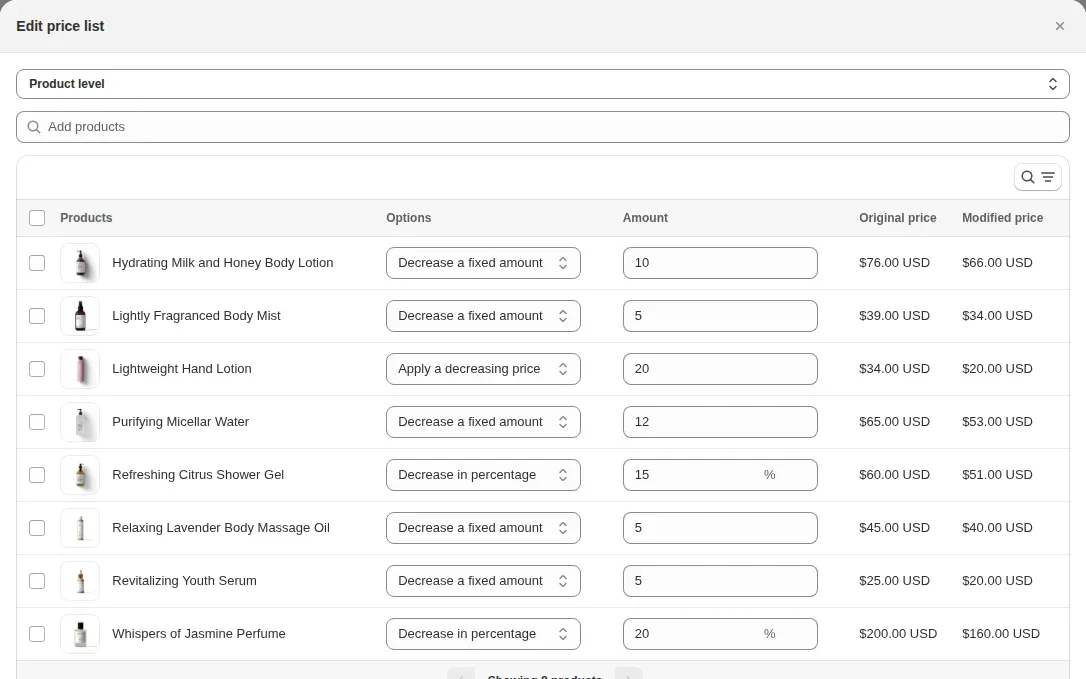
Pricing decides what each buyer sees. Natively, Shopify assigns catalogs to B2B markets (up to 3 active on Basic, Grow and Advanced) and, on Plus, directly to companies and locations. BSS B2B Solution adds its own price rules for buyers identified by a customer tag, a specific customer or a company location. A Price List or Custom Pricing sets the base price, and volume (quantity break) pricing stacks on top of that price. When two rules of the same type compete, the Priority number from 0 to 99 decides, and the lowest number wins.

Read the Wholesale pricing hub
BSS B2B Solution price list editor showing products, a discount type, an amount and the original and modified price for each product
Price list editor in BSS B2B Solution (demo store).

2. Customer onboarding

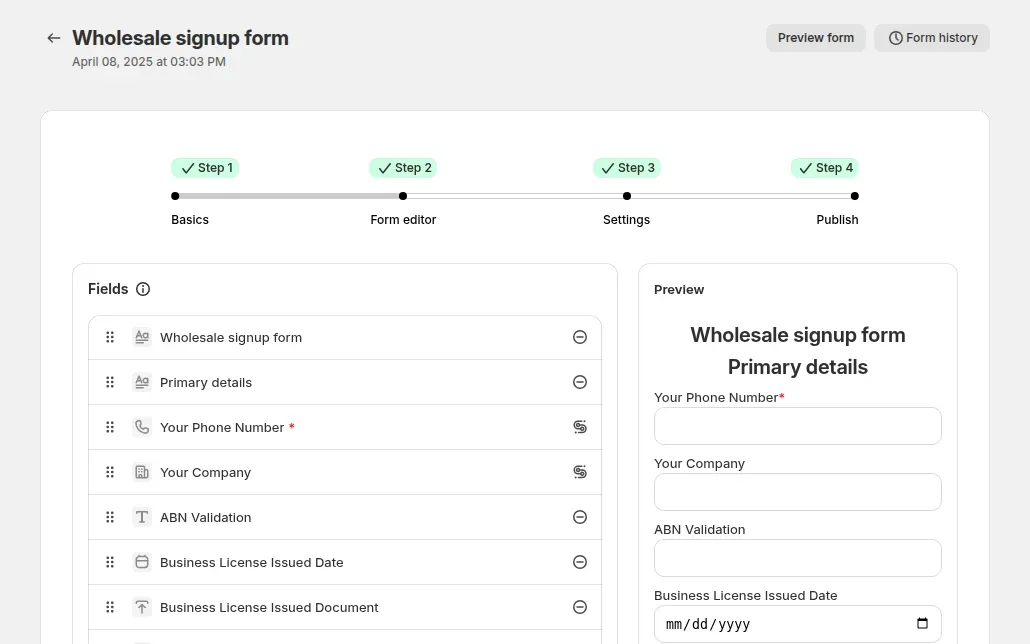
Onboarding turns a visitor into an approved buyer. A BSS B2B Solution registration form can use text, dropdown, file upload, date and checkbox fields, plus tax ID fields for EU VAT, UK VAT, US EIN, ABN and India GST. Each uploaded file can be up to 10 MB. You review every application, and approval can add the customer tag that your pricing and access rules already target. Multi-step forms run in new customer accounts on paid plans.

Read the Customer onboarding hub
BSS B2B Solution wholesale signup form editor with four steps, a field list and a live preview of the form
Wholesale signup form editor in BSS B2B Solution (demo store).

3. Tax and compliance

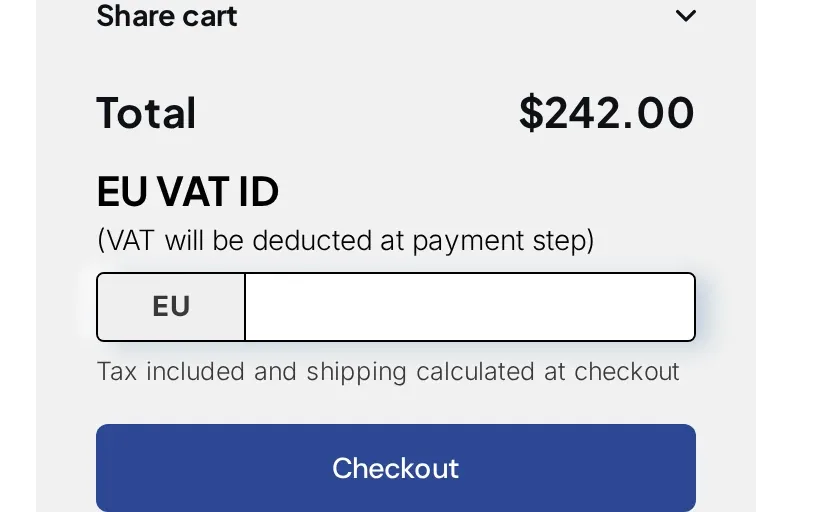
Tax is where wholesale and retail differ most. In Shopify, each company location can hold its own tax ID and tax exemptions. BSS B2B Solution adds a live tax ID check as the buyer types, against VIES for EU VAT and HMRC for UK VAT, with EIN, ABN and GST checks, and it blocks submit only when the field is required. For tax exemption, the buyer enters the tax ID on the cart page and the app creates a tax-free draft order (Advanced and Platinum plans). This is not tax advice: confirm local rules with your adviser.

Read the Tax and compliance hub
Cart on a demo store with an EU VAT ID field above the Checkout button
EU VAT ID field on the cart page (demo store).

4. Order rules and terms

Order rules set the smallest order you accept and when buyers pay. Shopify's native quantity rules cover minimum, maximum and increment, and payment terms run from Net 7 to Net 90. BSS B2B Solution adds order limits by amount or quantity and quantity increments for tagged buyers (increments on Advanced and Platinum), plus Net Terms for buyers identified by tag. Plan how you collect payment, because Shopify does not capture it automatically when terms expire.

Read the Order rules and terms hub

5. Quick order and RFQ

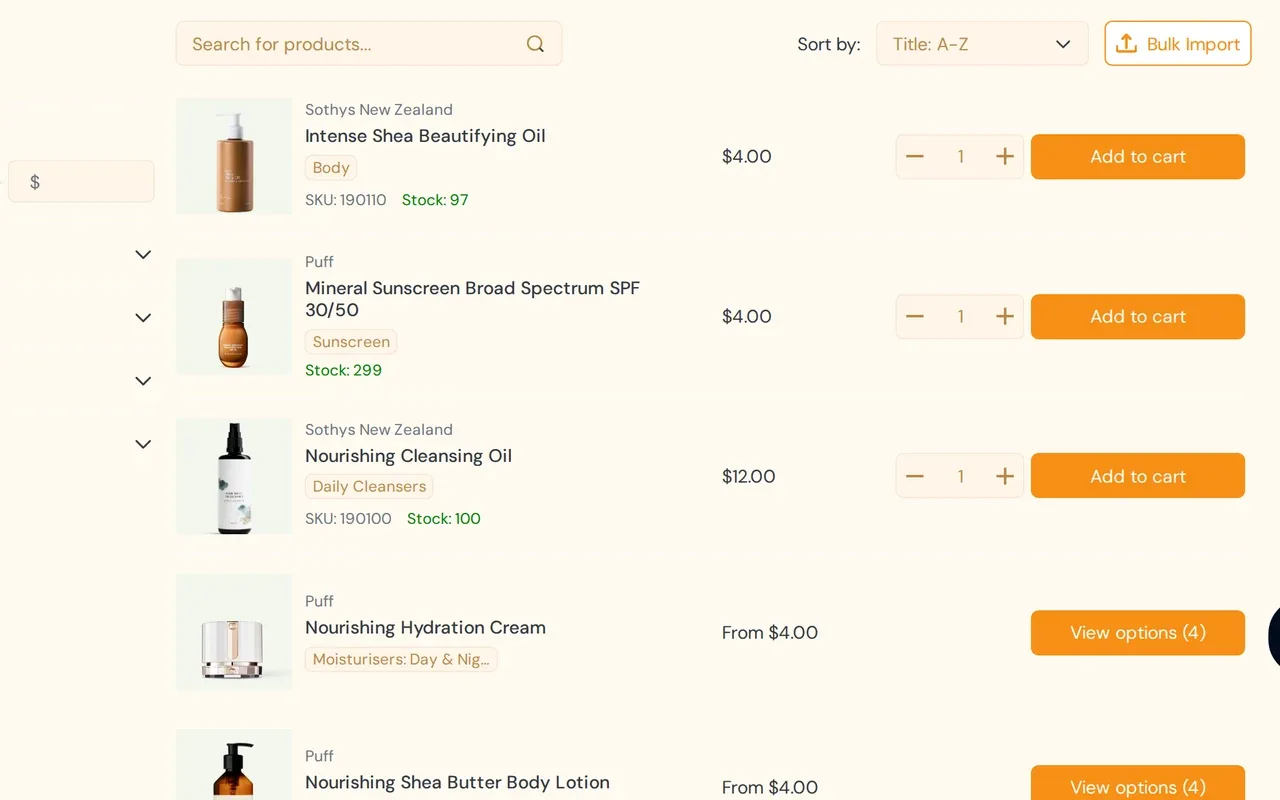
Wholesale buyers order from lists, not from product pages. Shopify includes a quick order list on all four plans. BSS B2B Quote adds a quick order page for Online Store 2.0 themes, CSV or XLSX upload that adds rows to the cart and sums duplicate SKUs, and reorder for logged-in buyers at current prices (Growth plan and up). The same app handles request for quote: any visitor can submit one, and you reply with an edited price.

Read the Quick order and RFQ hub
BSS B2B Quote quick order page listing products with SKU, stock, price, quantity and Add to cart, plus a Bulk Import button
Quick order page with Bulk Import in BSS B2B Quote (demo store).

6. Access control

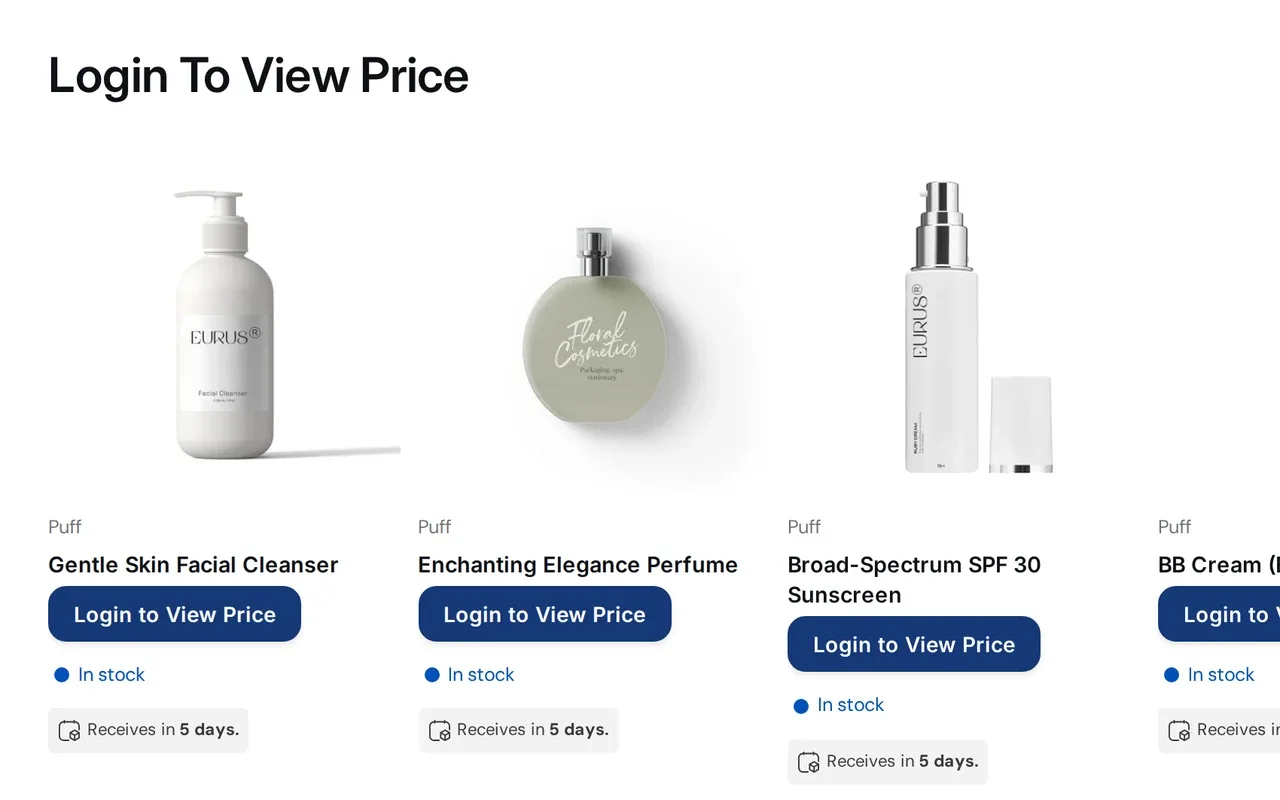
Access control decides who sees what. BSS B2B Lock can hide prices and Add to cart, or lock products, collections and pages by customer tag, login or passcode. A locked page keeps its main content out of the page HTML. Checkout lock is for Shopify Plus stores on paid Lock plans. Treat every lock as a visibility control, not as a security guarantee.

Read the Access control hub
Demo store collection page where each price is replaced by a Login to View Price button
Prices replaced by a login prompt with BSS B2B Lock (demo store).

How to set up Shopify B2B step by step

Shopify publishes a setup checklist for blended stores. The ten steps below follow it, and add the points where an app usually joins. Times are our rough estimates for a store with a small catalog.

  1. Choose your store type

    Decide between a blended store and a dedicated B2B-only store. Shopify's guide treats this as the first decision.

    About 15 minutes

  2. Check the requirements

    Confirm a plan that supports B2B, new Shopify Markets for catalogs on Basic, Grow and Advanced, and the incompatible features listed above.

    About 15 minutes

  3. Create companies and locations

    Set up each buyer as a company with locations, and add customers. A location can hold its own tax ID, tax exemptions, addresses, pricing and payment terms.

    20 to 40 minutes

  4. Create catalogs

    Build catalogs with the products and prices each group sees, and assign them to B2B markets. Basic, Grow and Advanced allow 3 active catalogs.

    30 to 60 minutes

  5. Activate customer accounts

    Buyers must sign in to see B2B prices. Turn on customer accounts for B2B customers, and keep legacy accounts for D2C shoppers if you use them.

    About 15 minutes

  6. Set payment terms and methods

    Choose net terms for each company location, and decide which payment and shipping methods B2B buyers see.

    About 20 minutes

  7. Add pricing and application rules

    If catalogs are not enough, install BSS B2B Solution. Create price rules for a customer tag, then a registration form that tags buyers on approval.

    30 to 90 minutes

  8. Add tax rules

    Collect tax IDs at registration, and decide how exempt buyers are handled and whether prices show with or without tax.

    About 30 minutes

  9. Add ordering and access tools

    Add BSS B2B Quote for quick order, CSV upload and quotes, and BSS B2B Lock to hide prices or lock pages for visitors who are not approved.

    30 to 60 minutes

  10. Test, then invite buyers

    Shopify advises testing as a test customer before you invite buyers. Place a test order, then send invitations.

    About 30 minutes

Source: Shopify Help Center: Setup checklist for blended B2B stores, read October 4, 2026.

Steps 7 to 9 are where BSS B2B Solution, Quote and Lock come in. Start with Solution: it is free on development stores, so you can build the rules before you pay.

Get BSS B2B Solution

Shopify B2B store examples

Three BSS customers, with the plan and results exactly as each case study reports them. They are merchant-reported numbers, not a promise of what your store will see.

How BSS B2B Solution, Lock and Quote fit together

BSS B2B Solution is the core: it decides who your B2B customers are and what they pay. BSS B2B Lock decides who can see what, and BSS B2B Quote decides how buyers order. One customer tag links the three apps, so you can start with Solution and add the others when you need them.

  1. RegisterA buyer fills in the wholesale registration form (Solution).
  2. ApproveYou approve the application (Solution).
  3. TagApproval adds the tag you configured (Solution).
  4. PricePricing rules that target the tag apply (Solution).
  5. UnlockLock rules that target the same tag open wholesale prices, collections or pages (Lock).
  6. OrderThe buyer orders fast with quick order, CSV upload or a quote (Quote).

Source: BSS user guide: How the apps work together.

Core app

BSS B2B Solution

Wholesale pricing, registration forms with approval, tax rules, order limits and net terms.

4.9 out of 5 from 1,187 reviews on the Shopify App Store (as of 2026-10-04)

Add-on: access

BSS B2B Lock

Hide prices, products and pages from visitors who are not approved buyers.

4.9 out of 5 from 651 reviews on the Shopify App Store (as of 2026-10-04)

Add-on: ordering

BSS B2B Quote

Quick order pages, CSV import, reorder and request for quote.

4.9 out of 5 from 191 reviews on the Shopify App Store (as of 2026-10-04)

Common Shopify B2B problems

Three problems account for most support questions on wholesale stores.

Wholesale prices are not showing

Shopify applies B2B rates only when the order comes from a B2B customer linked to a company location. Otherwise D2C rates apply. Check that the buyer is signed in, belongs to a company location and that the catalog is assigned within the 3-catalog limit. For BSS rules, check the customer tag, that the rule is enabled, and that the app embed is on in the theme you preview.

Net terms do not appear

Shopify applies payment terms to company locations and draft orders, so set them on the location. For BSS B2B Solution Net Terms, the Net Terms button must be added to the cart page as an app block in the theme editor, and the rule must be saved and enabled.

Theme and checkout conflicts

In our analysis of 2,025 public App Store reviews of the three BSS apps, installation, theme compatibility and code changes were the most common topic: 613 of the 1,427 reviews with substantive text (topics overlap). Cart drawers and quick-view can need manual selectors. Shopify lists accelerated checkouts as incompatible with B2B, and express checkout buttons can skip some BSS rules (BOGO, discount code, extra fee).

Key terms

Price list
A price list is a set of prices assigned to a customer group, market or account in place of the standard retail prices.
Catalog
In B2B ecommerce, a catalog is the set of products, and often prices, that a particular buyer or market can see and buy.
Company location
A company location is a branch, store or address of a business customer.
Customer tag
A customer tag is a short label attached to a customer account in Shopify, such as wholesale.
MOQ
Minimum order quantity (MOQ) is the smallest number of units a seller will accept for an order or for one product.
Net terms
Net terms are a payment arrangement where the buyer receives the goods first and pays the invoice within an agreed number of days, written as Net followed by the days, such as Net 30.
Request for quote (RFQ)
A request for quote (RFQ) is a buyer's request for a price on a list of products or quantities.
Tax exemption
A tax exemption lets an eligible buyer purchase without sales tax or VAT being charged.

All 70 terms in the glossary

Related guides

Start with BSS B2B Solution

BSS B2B Solution is the core app for wholesale pricing, registration forms with approval, tax rules, order limits and net terms. Add BSS B2B Lock to control who sees prices and pages, and BSS B2B Quote for quick order and quotes.

Also: BSS B2B Lock and BSS B2B Quote.

Shopify B2B: frequently asked questions

What is Shopify B2B?

Shopify B2B is Shopify's built-in feature set for selling to business buyers. You set up each buyer as a company with locations, then give it catalogs with their own prices, quantity rules and payment terms. One store can serve both B2B and D2C customers, or you can run a separate B2B-only store.

Is Shopify a B2B or B2C platform?

Both. A Shopify store can sell direct to consumers and to business buyers at the same time, which Shopify calls a blended store. Shopify's built-in B2B features are included on the Basic, Grow, Advanced and Plus plans.

Do I need Shopify Plus for B2B?

No. Since April 2, 2026 native B2B is available on Basic, Grow and Advanced as well as Plus. Plus adds unlimited B2B market catalogs, catalogs assigned directly to companies, deposits and partial payments. Apps can add features Shopify does not list on any plan.

How much does Shopify B2B cost?

Native B2B has no extra fee. It is included in your plan: Basic $19, Grow $49 or Advanced $299 per month billed yearly, and Plus from $2,300 per month (shopify.com/pricing, read October 4, 2026). Apps are extra. BSS B2B Solution starts at $29 per month on paid plans.

How many B2B catalogs can I have on Basic, Grow and Advanced?

Up to 3 active catalogs across all your B2B markets, in total. Assigning 3 catalogs to one market uses the whole limit. Plus has unlimited market catalogs and can also assign catalogs directly to companies and locations.

Can I run B2B and DTC on one Shopify store?

Yes. Shopify supports a blended store with one admin, shared inventory and one theme. B2B rates apply only when an order comes from a B2B customer linked to a company location, and other orders get D2C rates. Shopify's store-type guide says a blended store cannot gate access to B2B customers only.

Does Shopify B2B support net terms?

Yes, on all four plans. Shopify offers Net 7, 15, 30, 45, 60 and 90, and due on fulfillment. A fixed date works only on draft orders. Shopify does not capture payment automatically when terms expire, and deposits are Plus only.

How do I hide prices from visitors who are not logged in?

Shopify's plan table has no price-hiding feature, and its setup checklist points to third-party apps for locking a store. BSS B2B Lock hides prices and Add to cart from guests and can lock products, collections and pages by customer tag, login or passcode. Locks control visibility and are not a security guarantee.

Can I collect wholesale applications and approve buyers?

Shopify's setup checklist points to the free Shopify Forms app for access requests. BSS B2B Solution adds registration forms with text, file and tax ID fields, live tax ID checks and your approval of each application. Approval can add the customer tag that unlocks prices.

Does Shopify have request for quote?

Shopify's setup checklist lists quoting workflows as a third-party app use case. BSS B2B Quote lets any visitor send a quote request. You edit price, shipping and expiry and send a proposal. A logged-in customer approves by email, and the app creates a draft order and sends the invoice.

What apps do I need for Shopify B2B?

Few stores need every app. Check native B2B first. Add BSS B2B Solution for price rules by tag, applications with approval, tax ID checks and order limits. Add BSS B2B Lock to hide prices or lock pages, and BSS B2B Quote for quotes, quick order and CSV upload.

How much do the BSS B2B apps cost?

BSS B2B Solution is free on development stores and starts at $29 per month on paid plans, with a 14-day free trial on paid plans. BSS B2B Lock has a free plan and paid plans from $9.99 per month, with plan tiers that follow your Shopify plan. BSS B2B Quote is free on development stores and starts at $19 per month. Prices are from the Shopify App Store listings as of 2026-10-04 and can change, so check the listing before you install.

Sources, method and update log

Facts about Shopify come from Shopify's own pages, read on the date shown. Facts about BSS come from the Shopify App Store listings, the BSS user guides and our own review of how the apps behave. If a Shopify limit changes, this page changes with it.

Sources

  1. Shopify Help Center: Shopify B2B features by plan, read . Plan table, catalog limits, Markets requirement, Plus-only features.
  2. Shopify Help Center: Requirements and considerations for using B2B, read . No extra fee, customer accounts, incompatible features, 500 line item limit.
  3. Shopify Help Center: Setup checklist for blended B2B stores, read . Setup steps, company location details, third-party app use cases, Shopify Forms, test customer.
  4. Shopify Help Center: Blended and dedicated B2B stores, read . Blended vs dedicated store differences.
  5. Shopify Help Center: Shopify B2B, read . Definition, one store for B2B and D2C, companies.
  6. Shopify Help Center: Catalogs and pricing in B2B, read . Catalog limits and assignment.
  7. Shopify Help Center: B2B payment terms, read . Net periods, due on fulfillment, fixed date, no automatic capture, deposits on Plus.
  8. Shopify: Shopify brings native B2B features to millions more merchants (2026-04-02), read . The April 2026 change.
  9. Shopify: Pricing, read . Basic, Grow, Advanced and Plus prices.
  10. Shopify App Store listings for BSS B2B Solution, Lock and Quote, read . BSS plan prices and ratings.
  11. BSS case studies: Alpha Coffee, Schlechte Karten, KAPR, read . Plans and results as reported by each case study. Schlechte Karten. KAPR.

Method and editorial note

BSS product statements follow our checks of the apps against the BSS user guides. The review count comes from our analysis of the public App Store reviews of the three BSS apps. We write the BSS apps up as the options this guide is about, so weigh our view accordingly, and check Shopify's pages for anything that affects a purchase.

Spotted an error or a Shopify change we missed? Tell us through the contact page. Contact us.

Update log

  • : Expanded the guide: key takeaways, April 2026 change, features by plan, native limits, decision diagram, cost, setup steps, case studies, problems, 12 FAQs and sources. Shopify facts re-read on this date.
  • : First published: six parts, native vs apps table, app flow, 7 FAQs.