
Price Leakage
Competitors can easily scrape your wholesale rates, allowing them to undercut your pricing strategy and monitor your margins.
Use Case
Prevent price leakage and protect your brand equity. Control visibility for guest users and unauthorized visitors with granular access control layers.
Reviewed by Hoa Nguyen, Senior Marketer. Last reviewed
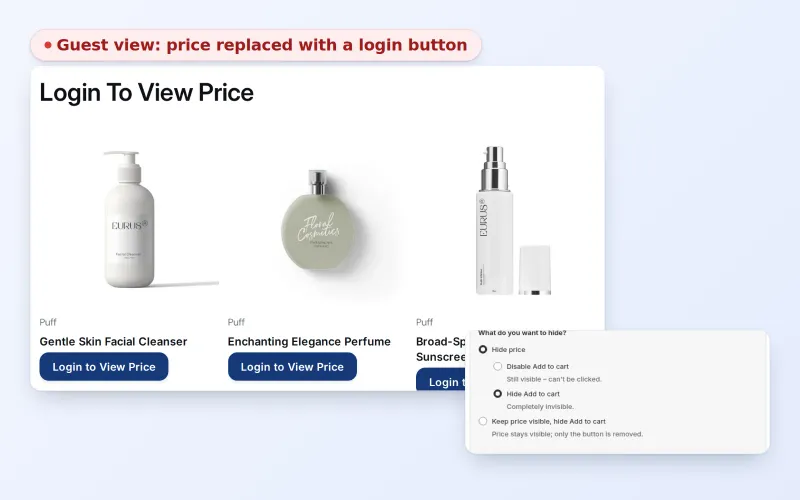










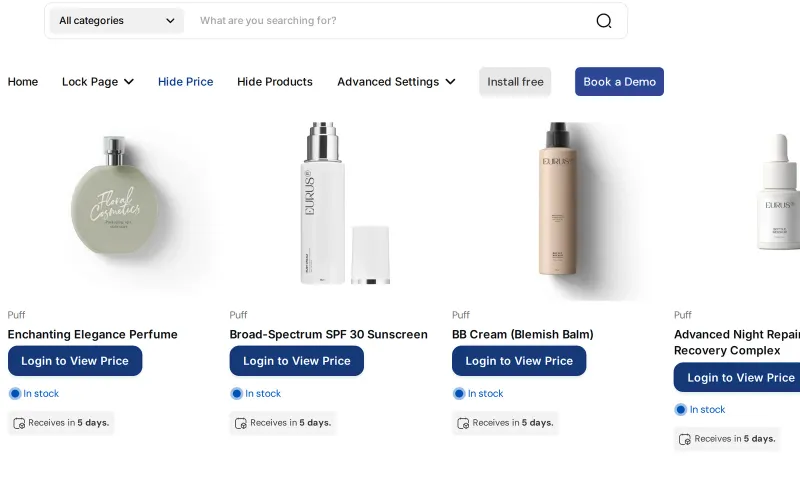
To hide wholesale prices from guest visitors on Shopify, create a lock rule in BSS B2B Lock that hides the price, and optionally the Add to cart button, until a visitor is signed in or meets another condition you choose. Guests then see a message such as Login to View Price instead of the number.
This page is for wholesalers, manufacturers and brands that sell to both the public and trade buyers on one store, or that simply do not want competitors reading their price list. It covers who benefits, the options for choosing who sees prices, a worked scenario, the limits of storefront price hiding and a setup checklist.
the problem
When wholesale prices are visible to non-logged-in users or unauthorized guest visitors, it creates several critical operational and strategic risks
Competitors can easily scrape your wholesale rates, allowing them to undercut your pricing strategy and monitor your margins.
Publicly exposing deep discounts intended for bulk buyers can lower the perceived value of the brand for retail (B2C) consumers.
If retail partners see that a manufacturer is selling directly at wholesale prices online, it creates friction and distrust within the distribution network.
Guest visitors might mistake wholesale minimum order quantities or bulk pricing for standard retail terms, leading to high volumes of unqualified support inquiries.
OUR SOLUTION
BSS B2B Lock provides a granular access control layer that shields sensitive commercial data from the public eye. The feature enables merchants to hide specific elements such as prices or “Add to Cart” buttons
Hybrid B2B/B2C stores where anyone can browse but only approved buyers see pricing.
Contract or wholesale pricing that should not appear publicly.
Stores where price visibility depends on the visitor’s customer segment.
Target Sectors
This solution is designed for businesses where pricing is a competitive advantage or a protected secret, such as:
Companies with negotiated contracts that vary significantly by customer account.
Businesses that need to separate Bronze, Silver, and Gold tier pricing and product availability.
Manufacturers who must uphold Minimum Advertised Price policies in the public domain while offering wholesale rates privately.
benefits
How Hiding Wholesale Prices From Guests Impacts Your Business
Keeps prices from being shown to guests and preserves negotiation leverage.
Encourages unidentified visitors to register or contact sales to see prices.
Protects retail partners by keeping wholesale rates out of guest view.
Ensures users only see content and pricing relevant to their segment.
Keeps contract-specific pricing confidential to maintain an advantage in high-value deals.
Makes it harder for competitors to monitor your price floor and undercut your bulk rates.
Avoids a “race to the bottom” by keeping wholesale negotiations behind a login.
Publicly displays retail-compliant pricing while offering wholesale rates privately.
Protects the margins of your retail partners by ensuring they aren’t competing with your own wholesale site for public traffic.
Seamlessly serves different buyer types on a single site without diluting the brand for either.
Encourages anonymous visitors to register, giving you contact data for your CRM.
Directs non-business guests to your retail site or retail partners, keeping your B2B support desk focused on high-value accounts.
USE CASES
Discover how you can hide wholesale prices in your storefront in 3 simple steps
Administrators define who sees what based on login status, customer tags (e.g., “VIP-Wholesale”), specific customers, a passcode or approved access requests.
Hide the price, and optionally the Add to cart button, for all products or for products picked by tag, collection, product or variant. Replace the hidden price with your own message, such as Login to View Price.
Approved visitors (logged in or tagged) see normal prices and the full purchase flow. Guests and blocked visitors see a placeholder message where the price normally appears.
see it in action
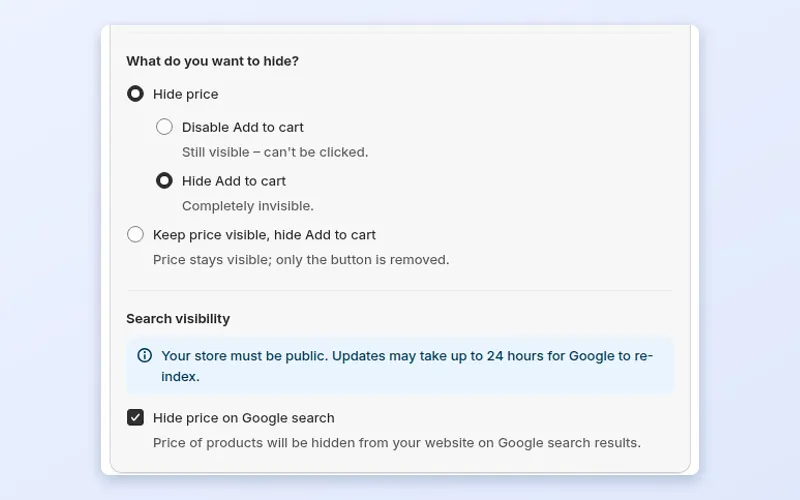
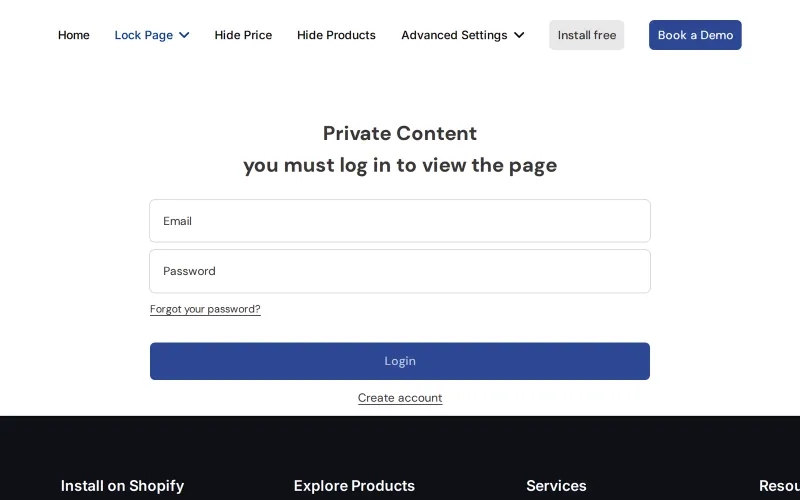
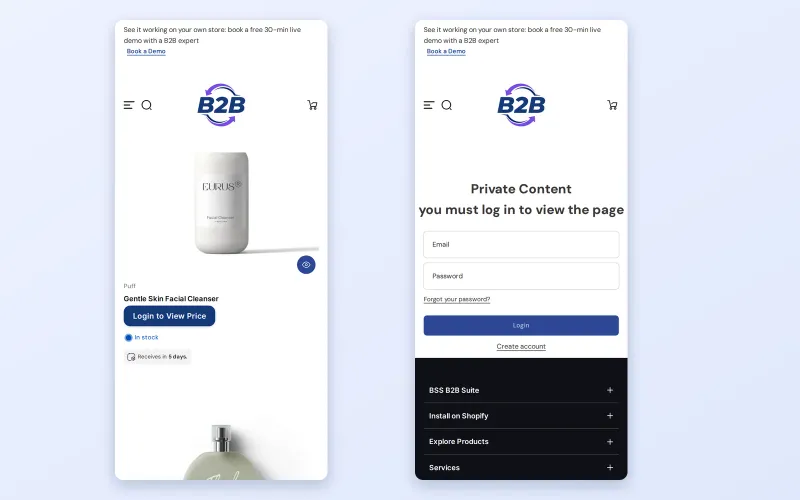
Pick who sees prices, choose what to hide, then compare what a guest sees on the demo store.
Hiding prices from guests is a good fit when any of these describe your store:
A public price is a promise to everyone who sees it. When wholesale rates sit next to retail ones, a retailer who stocks your products may find that you undercut them online. A competitor can copy your price list in minutes. A consumer can decide that a discount meant for bulk buyers should apply to a single unit, and your support team ends up explaining it.
There is also a cost on the buyer side. A trade buyer who finds a retail-looking price may leave, assuming you do not sell wholesale. When guests see a clear message about how to get trade prices, you can explain your program at the moment they are interested.
Hiding prices also turns a dead-end page into a conversation. A button that says Login to View Price gives an anonymous visitor a clear next step, and the buyers who take it are exactly the people you want in your customer list.
Shopify's native B2B features cover companies, catalogs, payment terms and quantity rules, but hiding prices from guests is not listed among them in Shopify's B2B features by plan page. The comparison table in the Shopify B2B guide shows the same gap. BSS B2B Lock adds that layer: it hides prices and Add to cart, or locks products, collections and pages, based on login, tag, passcode or an approved request. The access control hub explains how the options fit together.
The gallery above shows each step on a demo store. The reference guide is Hide prices from guest users.
In BSS B2B Lock, create a new lock and name it so you can find it later. In Step 1, choose what the lock applies to: price, or price together with Add to cart, for all products or for products picked by tag, collection, product or variant.
Hide the price and either disable or fully hide the Add to cart button, or keep the price visible and hide only the button. If you disable the button it stays on the page but cannot be clicked. If you hide it, it disappears.
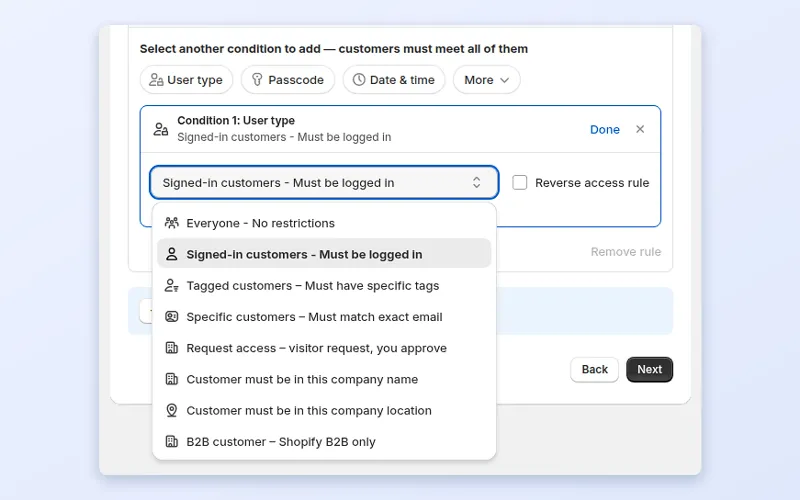
In Step 2, add a User type condition. Signed-in customers is the simplest choice. Tagged customers lets only buyers with a specific tag through, which is the better option when consumers also have accounts. Other options are specific customers, request access, company name and location, and Shopify B2B customers. Each rule needs at least one condition, and a customer must meet every condition in a rule. Add a second rule to let another group in.
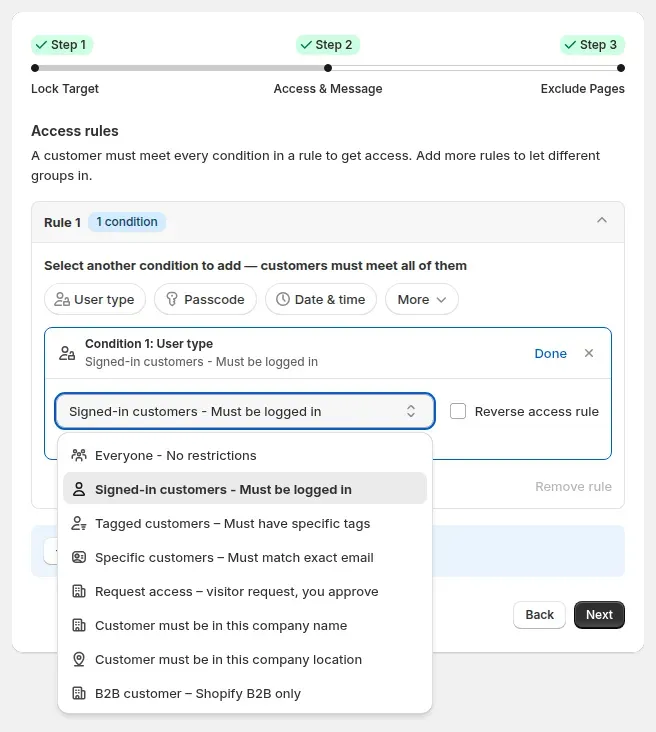
Conditions inside one rule must all be met. Separate rules work as alternatives, so a buyer who meets any one rule gets access. A lock can hold up to 10 rules, and each rule up to 10 conditions.
Customize the replacement text and button so guests know what to do. Login to View Price works well; for a tag-based setup, say how to apply for an account. The login page can send buyers back to the page they came from, to a custom URL, to the account page, or to different pages by customer tag.
Open your store in a private window to confirm guests see the message on collection, search and product pages. Then sign in as a buyer who meets the condition and confirm normal prices and the full purchase flow appear.
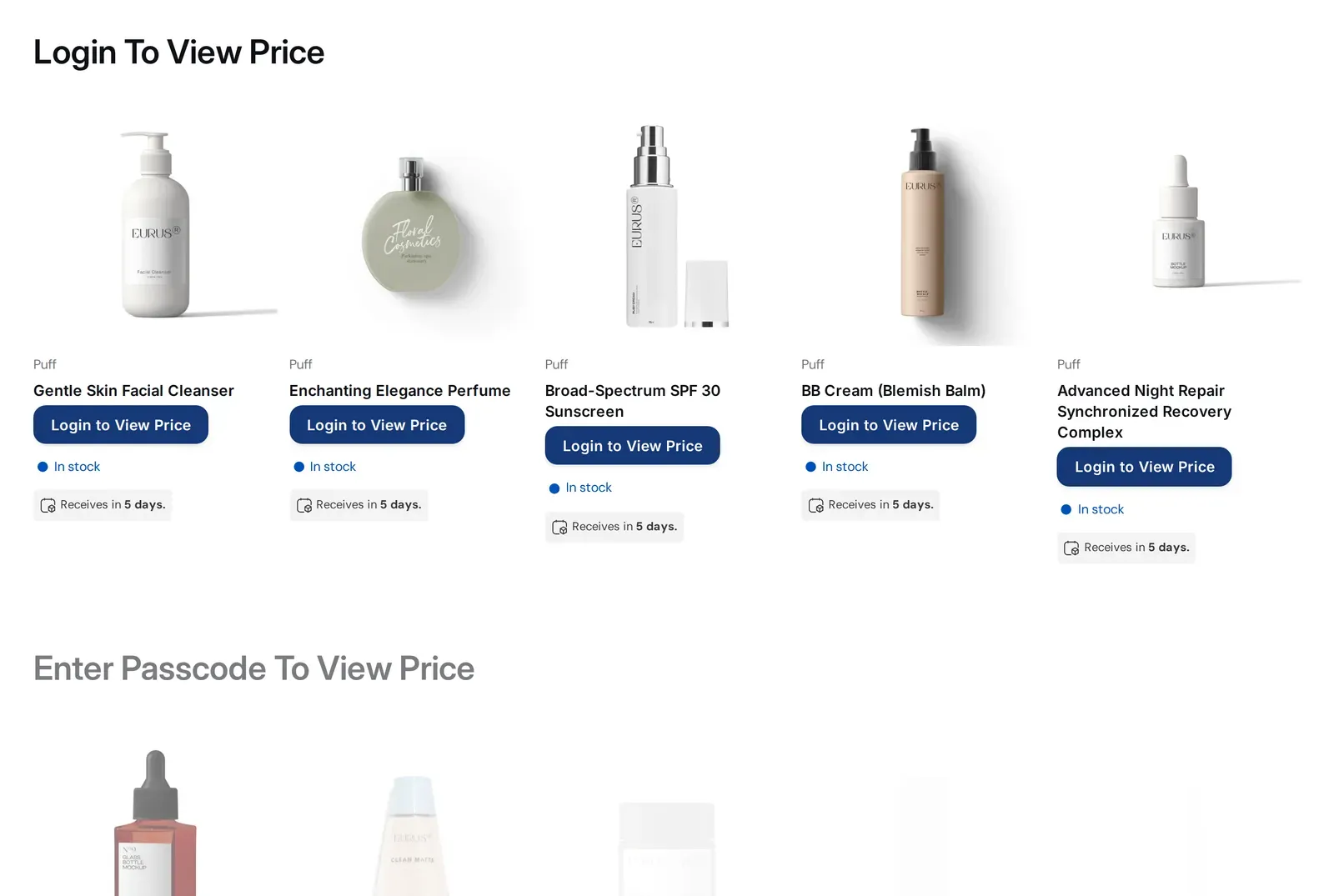
This is a made-up illustration, not a customer result. A skincare brand sells to consumers online and to salons through a wholesale program. Wholesale prices are shown on every product page.
The brand does not need a second store, a password page or a duplicate product catalog. One theme serves both audiences.
Related terms: hide price, gated catalog and customer tag. Browse the rest of the access control hub for more patterns.
BSS B2B Lock needs a paid plan or an active trial for price and Add to cart locks; the Free plan only supports locking the entire store. Plan details are on the BSS B2B Lock page and in the Shopify App Store listing. The app works with themes where it can add its code, either automatically or by a manual install.
To get started, install BSS B2B Lock from the Shopify App Store, or book a demo if you want a walkthrough first.
faq
Use an access control app such as BSS B2B Lock. Create a lock that targets price, choose Hide price, and add a User type condition such as Signed-in customers or Tagged customers. Guests then see a message or button instead of the price, while buyers who meet the condition see normal prices and can order.
Yes. When you choose what to hide, you can hide the price and either disable or completely hide Add to cart. You can also keep the price visible and hide only the button. A disabled button stays on the page but cannot be clicked, and a hidden one is removed.
Yes. Add a Tagged customers condition in Step 2 and enter the tag. Only signed-in customers carrying that tag pass the lock. This is the right choice when consumers can also create accounts and you want wholesale prices for approved buyers only.
They see the message you set, for example a Login to View Price button. Clicking it opens the login page, where buyers can sign in or create an account. You can customize the text and choose where buyers land after logging in, including a custom URL or a page based on their tag.
Yes. The same rule applies on phones, so a guest sees the same message and the same login page as on desktop. Test on mobile after you save the rule, especially cart drawers and quick-view popups, which can differ by theme.
No. The lock changes what your Shopify theme displays. Data Shopify serves outside the theme, such as product JSON endpoints, the Storefront API and shopping feeds, is not covered. Use price hiding to reduce casual exposure and gate buyers, and test your store if the information is highly confidential.
Yes. BSS B2B Lock includes conditions for company name, company location and Shopify B2B customers, as well as tags and specific customers. Choose the condition that matches how your buyers are set up, and add more than one rule if different groups qualify in different ways.
case study
Quotes and results below are taken from our published case studies.

“We’re now able to publish our wholesale website without hiding everything behind a Shopify password page.”
2 years of scaling wholesale on BSS B2B Solutions without added manual intervention.
Read case study
“without using your application we would not have been able to solve the global problem of using one website for retail and wholesale clients.”
~35% turnover growth over six months of use, as reported by the merchant (seasonality not excluded).
Read case study
“I now have a fully operational wholesale portal and a team to assist me with any future questions or issues.”
12% wholesale share of revenue, up from 2%.
Read case studyget started
Explore our comprehensive ecosystem of learning materials and live support designed to help you master our suite at your own pace.

Master the features with step-by-step documentation.
Learn More - Read User guide
See how our features function in a live storefront.
Learn More - View Demo store
Walk through the suite with our team in a live demo.
Read More - Book a Demo Session
Have a specific question? We’re here 24/7 to help.
Learn More - Contact UsVisit our app listing to begin your setup, then let our team walk you through a personalized demo to ensure your success at scale.