To verify a business tax ID at registration on Shopify, add a tax ID field to your wholesale registration form in BSS B2B Solution: EU VAT, UK VAT, US EIN, Australian ABN or India GST. The field checks the number against a public registry or lookup service while the applicant types, shows a valid or invalid message at once, and, when the field is marked required, blocks submission of an invalid number.
A tax ID is usually the first thing a finance team checks before it opens a trade account. Doing it by hand slows approval and lets typos through. Live validation moves the check to the moment of entry, so applicants correct a mistake on the spot, and your reviewers start from cleaner data. Approval stays your decision: a valid number is a starting point, not proof of entitlement.
Who this is for
Tax ID checks at registration suit you when:
- You sell to business buyers in the EU, the UK, the United States, Australia or India and need their tax number before you grant trade access.
- You want to mark approved customers as tax exempt, and you need a valid number first.
- Your approvers lose time on applications with typos or numbers that do not exist.
- You run cross-border trade and want a consistent, documented first check.
- You want the check inside the form, without a separate tool or a manual lookup.
Why this matters
Early feedback reduces back-and-forth. An applicant who sees “invalid number” while still on the form fixes it in seconds, while a typo found a day later costs an email exchange and a delay in the first order. Each of those delays is a buyer waiting while a competitor’s checkout is open.
Registration is also the right time to ask. The case studies on this site describe merchants that moved verification into the form. Lift-Spares, a Swedish supplier of spare parts for elevator and escalator maintenance companies, lists cross-border European trade that needs tax-exempt handling without manual checks as one of its challenges, and its registration form includes a VAT validation field. DermaplanePro, a US professional skincare brand, collects tax IDs and business credentials in one structured form, where a built-in tax ID checker flags invalid entries and keeps unqualified buyers out of the review queue. Read the Lift-Spares story and the DermaplanePro story.
Decide in advance what happens when a registry is unavailable. A short internal rule, such as asking the applicant to resubmit later, avoids inconsistent decisions between approvers.
What Shopify covers natively, and where an app helps
According to the Shopify Help Center (read on 2026-10-02), registration and approval are not listed in Shopify’s B2B plan features. Our Shopify B2B guide covers what native B2B does once a buyer is set up as a company. BSS B2B Solution adds the application stage with tax ID fields that validate live, plus approval and tags. See the tax and compliance hub for how tax exemption and tax display fit around it.
How to set up tax ID validation with BSS B2B Solution
Step 1: Open or create the registration form
Go to B2B customers > Registration Forms and open the form, or click Create form and choose Wholesale registration form. Go to Form Editor.
Step 2: Add the tax ID field you need
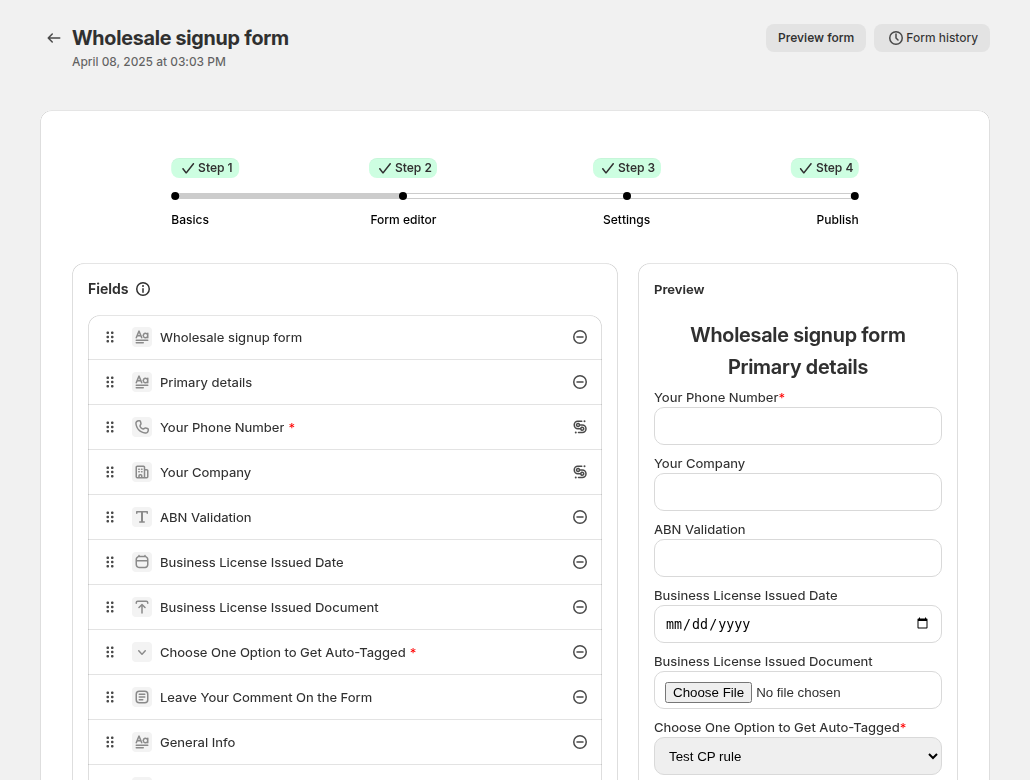
In the field list, add the field type for your buyers: EU VAT, UK VAT, US EIN, Australian ABN or India GST. Add only the types you really sell to, because every extra field is a reason to abandon the form. Mark the field as Required if an invalid number must block the submission.
Step 3: Choose approval, tags and tax exemption
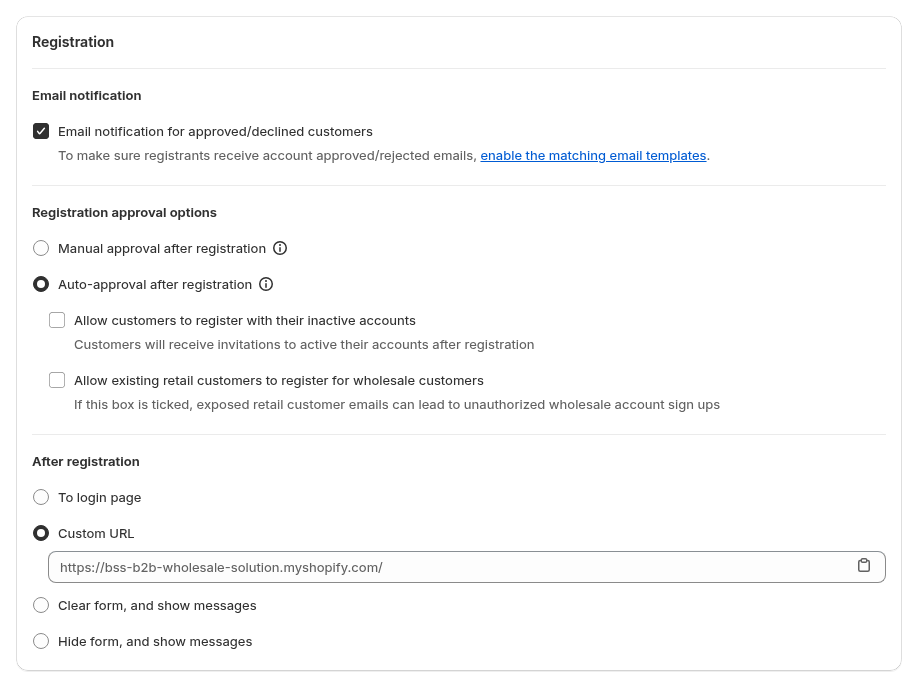
In Settings, choose manual approval and assign the tag on approval. If approved customers from this form should be marked tax exempt in Shopify, enable Auto exempt tax for customers registered with this form. Use it only when your own review confirms the exemption.

Step 4: Publish and test
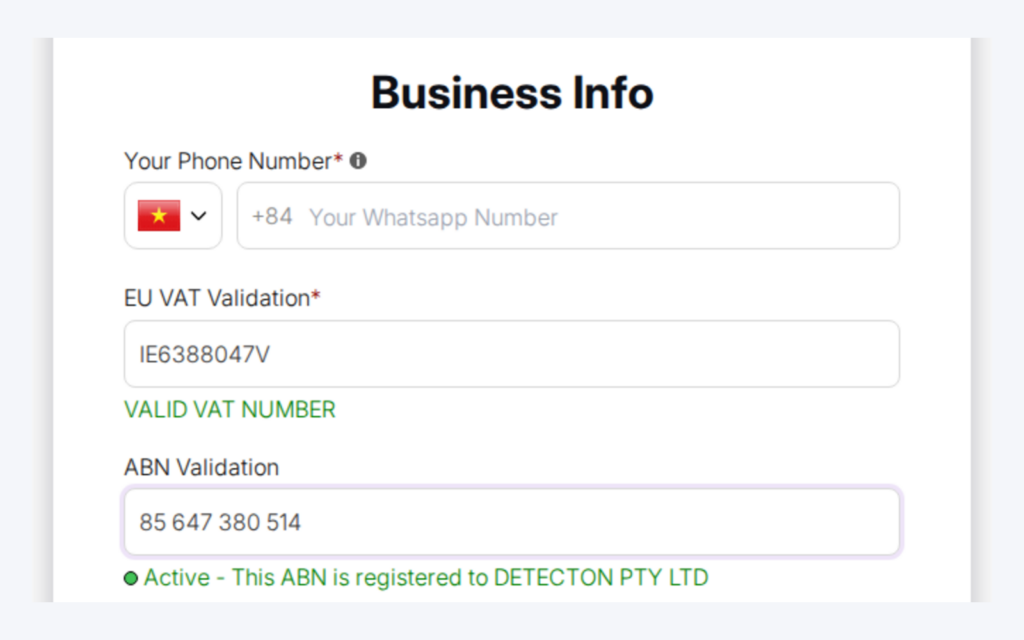
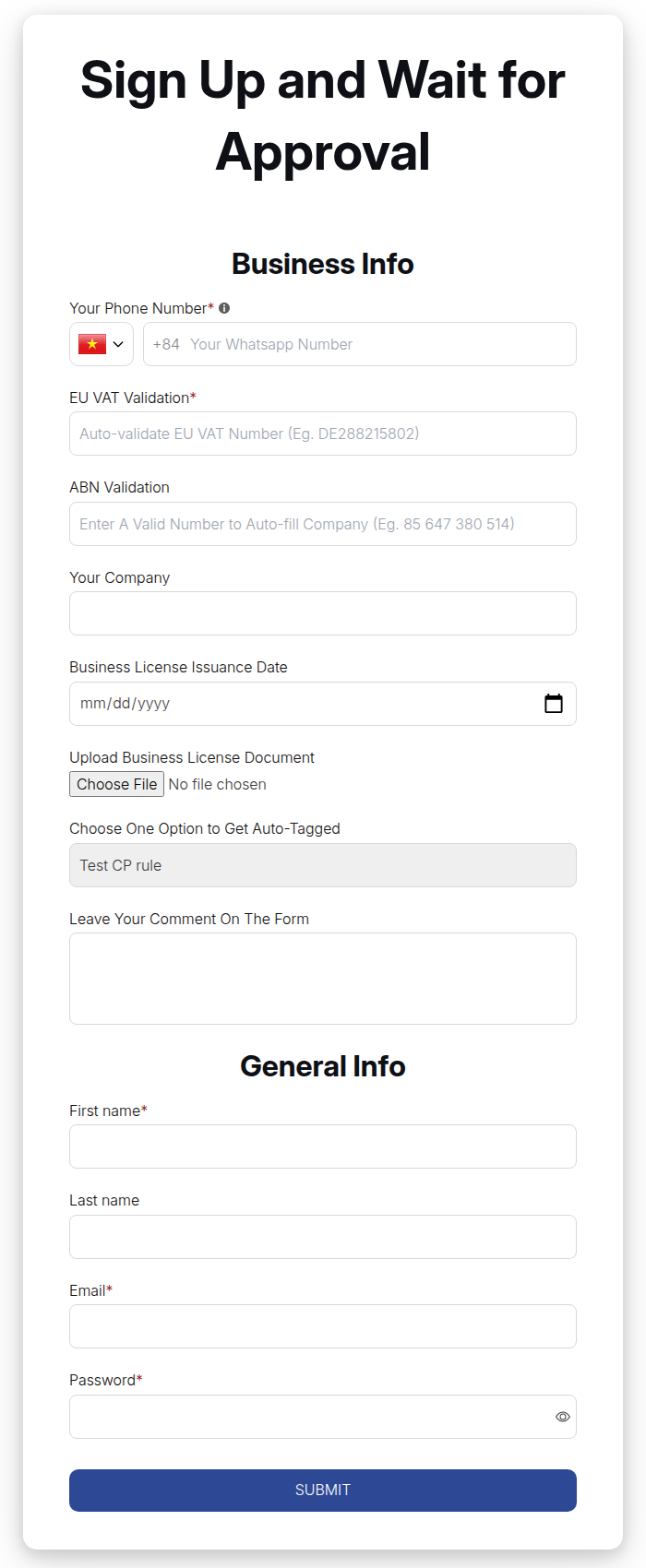
Publish the form and turn on the app embed. While typing, applicants see a message such as a valid number or an active ABN. Test a valid number, an invalid one and a number from another country, and check what the required and optional fields do.
Step 5: Review and approve
Open Registration management, check the application and approve or reject it. The approval adds the tag, which starts your pricing and access rules.
How each check works
The checks run against public sources, and each has its own behaviour.
| Field | Checked against | Notes |
|---|---|---|
| EU VAT | The EU VIES service, with a fallback lookup | UK numbers are rejected in the EU field; use the UK VAT field |
| UK VAT | HMRC or a VAT lookup service | |
| US EIN | An EIN lookup service | Nine digits; shown on the Platinum plan |
| Australian ABN | The Australian business register | Active ABNs only |
| India GST | A GST lookup service | Status must be Active |
Results depend on those services, which can be slow or temporarily unavailable, so treat the answer as an early signal.
What applicants see, and what you see
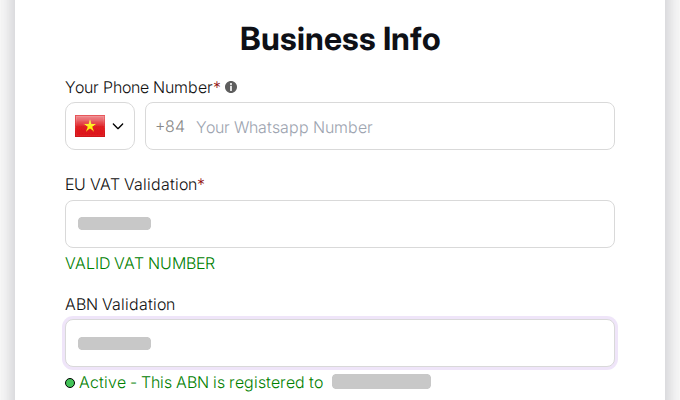
On the published form the tax ID field validates as the applicant types. A valid number shows a confirmation message, and an Australian ABN shows that the registration is active; an invalid number shows an error. On a required field the error stops the Submit button, so the application never reaches your queue with that mistake. When the applicant fixes the number, the form goes through.
In Registration management you see the number the applicant entered together with the other answers, so your reviewer can compare it with the uploaded documents and the company name. The check removes the clearly wrong numbers, such as a mistyped digit or a number from the wrong country. It cannot tell you whether the person filling in the form is allowed to act for the company, which is why the approval step stays with you.
Choosing fields for cross-border trade
Match the field list to the markets you really serve. A distributor selling only inside the EU needs one EU VAT field. A supplier with buyers in the EU and the United Kingdom needs two separate fields, because a UK number is rejected in the EU field. An exporter to Australia adds the ABN field, and one that sells to Indian businesses adds the GST field.
If you want one form for all markets, pair the tax ID fields with a Country field and conditional logic, so that an applicant sees only the field that matches their country. Conditional logic runs on Platinum, so on lower plans keep the form to one or two tax ID fields and label them clearly, for example “EU VAT number (if you are in the EU)”.
Example: a European parts distributor
This is an illustration with made-up details, not a customer result. A distributor sells to maintenance firms in Germany, France and the United Kingdom, and wants a tax ID before approval.
| Applicant | Field used | What happens |
|---|---|---|
| Firm in Germany | EU VAT, required | A valid number shows a success message; an invalid one blocks the Submit button |
| Firm in France | EU VAT, required | Same behaviour |
| Firm in the UK | UK VAT, required | A UK number in the EU field is rejected, so the applicant must use the UK VAT field |
| Sole trader in the US | US EIN, optional | The applicant can submit even if the check fails; the reviewer decides |
The reviewer sees the number and the check result in the application, and approves only when the documents agree. The tag added on approval then starts the price list for that country group.
Works well with
- EU VAT exemption. EU VAT exemption with VAT ID validation covers the cart-page flow after registration.
- Non-VAT buyers. Exempt tax for non-VAT-registered customers handles buyers without a VAT number.
- Documents. Conditional logic and document upload collects licences and certificates.
- Approval. A registration form with approval ties it to tags and emails.
- Payment terms. Onboard tax-exempt buyers with net terms continues the journey.
The glossary explains tax ID, tax exemption and resale certificate.
Limits and common mistakes
- Blocking happens in the browser only. An invalid number blocks submission only when the field is marked required, and the server does not re-check the number at submission.
- Optional fields do not block. An applicant can submit an invalid number if the field is optional.
- Numbers are not validated on import. Registration data imports do not check tax IDs.
- A valid number is not an exemption. A valid format or an active registration does not prove the applicant is entitled to a tax exemption, so keep your own review.
- Registries can be unavailable. Decide what approvers do when a check cannot run.
- Plan limits. VAT, UK VAT, ABN and GST fields are hidden on the Free plan, and the EIN field is shown on the Platinum plan.
- The same email cannot apply twice. A second application with an email that already has a record is blocked, whatever its status.
Setup checklist
- List the countries you sell to and the tax ID each needs.
- Add only those field types to the form and mark them required where a block is appropriate.
- Decide the approval mode and the tag.
- Decide whether approved customers are marked tax exempt, and who confirms it.
- Test a valid, an invalid and a wrong-country number.
- Write a short rule for approvers when a registry is down.
- Check the plan includes the fields you need.
Plans and requirements
VAT, UK VAT, ABN and GST fields need a paid plan, the US EIN field needs Platinum, and the Free plan hides the tax ID fields. The Free plan also lacks tax exempt on approval. See the BSS B2B Solutions pricing page for current plan details.
You can install BSS B2B Solution from the Shopify App Store (4.9 rating from 1,185 reviews as of 2026-10-02, 14-day free trial on paid plans), read the app overview, or follow the guide to build a wholesale registration form in the docs.