
Shopify Checkout-Redirect Attacks (October 2026): How to Check Your Store

Updated: October 22, 2026
Since October 10, 2026, security researchers and Shopify merchants have reported a wave of checkout-redirect attacks. Attackers used several third-party Shopify apps to load a malicious script on storefronts. The script sent some shoppers from the Checkout button to a fake payment page that steals card details.
This guide explains how the attack works, why it is easy to miss, and how to check your own store in about 5 minutes. At the end, we share where BSS B2B apps stand.
How the checkout-redirect attack works
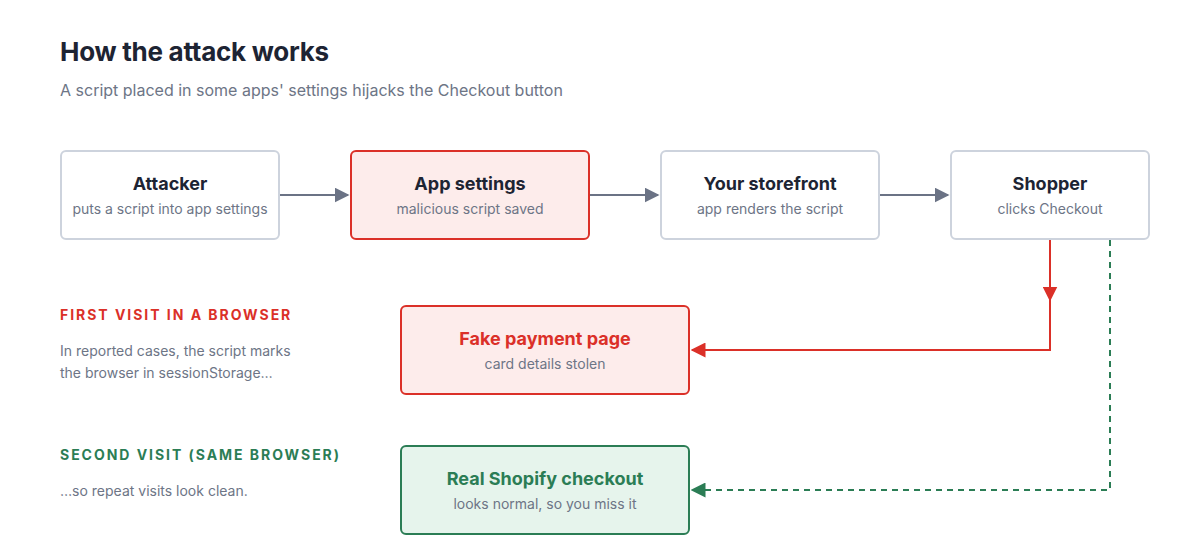
Attackers put a malicious script into the settings of some apps. Those apps then loaded the script on the storefront.
The script waited for a shopper to click Checkout. Instead of opening the real checkout, it sent the shopper to a fake payment page on a different domain. Anything typed there, including card details, went to the attacker.
Why many merchants did not notice
The script used the browser’s sessionStorage to track visits. In reported cases, the script remembered browsers it had already redirected and stepped aside on later visits.
When a merchant tested the store in the browser they use every day, checkout looked normal. New shoppers could still be sent to the fake page.
Your dashboard may look normal too. According to cside's analysis, orders the attacker stole could still complete on the real checkout, so sales numbers do not reveal the problem.
Signs to watch
- Customers tell you they landed on an unfamiliar payment page.
- Customers say their bank blocked a payment to your store.
- You see chargebacks or card-fraud reports you cannot explain.
- Your own test checkout, in a clean browser, opens a domain you do not recognize.
None of these proves an attack on its own. The incognito test below is the direct check.
How to check your store in 5 minutes
Step 1: Test checkout in a new incognito window
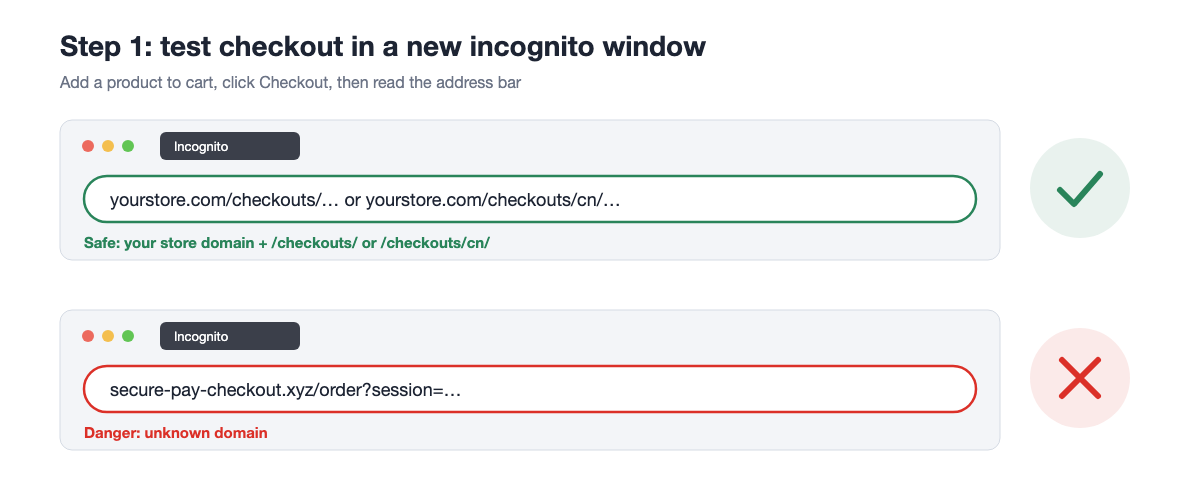
Do not test in your usual browser. The script may already have marked it as seen.
- Open a brand-new incognito or private window.
- Go to your storefront and add any product to the cart.
- Click Checkout.
- Read the address bar. It should show your store domain, or your
myshopify.comdomain.
Shop Pay, PayPal and the payment gateways you have enabled can open a page of their own. That is normal. A domain that belongs to none of these is the warning sign.
Close the window completely before each new test, so every test starts clean.
Step 2: Find the app that causes it
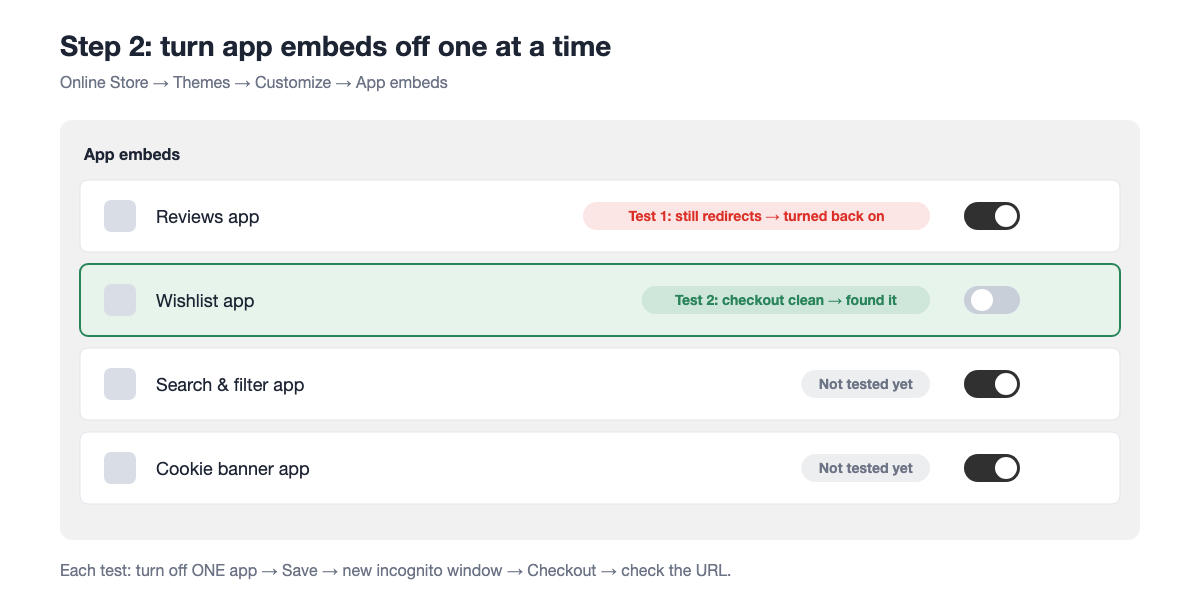
- In Shopify admin, go to Online Store > Themes.
- Click Customize (Edit theme).
- Open the App embeds icon in the left sidebar.
- Turn off one app embed and click Save.
- Repeat Step 1 in a new incognito window.
Continue one app at a time until checkout loads on the right domain. The last app you turned off is the likely source. Keep it disabled and contact its developer before you turn it back on.
Step 3: Check apps and theme code
A script can also sit outside the app embeds, so look in two more places.
- Open Settings > Apps and sales channels and look for apps you do not recognize.
- Open Online Store > Themes > Edit code and look for scripts you did not add.
Uninstall apps you no longer use. Each app that loads on your storefront is code running in front of your shoppers.
Step 4: Secure your admin
Change the passwords of your staff accounts and turn on 2-step verification for every staff member.
If your customers were affected
If you believe shoppers entered card details on a fake page:
- Email the affected customers and recommend they contact their bank to block or replace the card.
- Never ask customers to send card details by email or chat.
- Contact Shopify Support and the app developer. Include the dates and the suspicious domain you saw.
Where BSS B2B apps stand
- We checked BSS B2B Solution, BSS B2B Lock and BSS B2B Quote after these reports. Our apps were not affected.
- BSS B2B Solution and BSS B2B Lock run on Node.js and do not use PHP.
- Traffic between Shopify, your store and our servers uses HTTPS.
- We will keep monitoring and contact you directly if anything changes.
Frequently asked questions
My checkout looks fine on my computer. Am I safe?
Not necessarily. In reported cases the script skipped browsers it had already redirected. Test in a brand-new incognito window.
Should I uninstall every app on the lists shared online?
No. Use the one-by-one test above to find the app that affects your store. Remove the apps you do not need.
Do I need to do anything for BSS B2B apps?
You do not need to change any setting in our apps. We still recommend running the incognito test above, because it checks every app on your store at once.
Need help?
If you have questions about your store’s security or your BSS B2B setup, chat with our support team in the app or contact us. We are glad to help you check.
Sources
- cside: analysis of a Shopify checkout hijack (read October 22, 2026)
- iTnews: Shopify tells Australian store to stay shut after hijacked extensions divert shoppers (read October 22, 2026)
- Shopify Help Center: app embeds in themes (read October 22, 2026)