To enforce a minimum order quantity or value on Shopify wholesale orders, create an Order Limits rule in BSS B2B Solution: choose the customers and products, pick a limit type such as minimum order amount or minimum order quantity, and enter the number. When a cart falls short, a pop-up on the cart page explains what is missing before the buyer goes to checkout.
This page is for manufacturers and wholesalers who lose margin on small trade orders and want a clear, automatic minimum instead of a polite email. It covers the four limit types, how to target only wholesale buyers, the level at which a limit is counted, and the checkout bypass you should plan for.
Who this is for
An order minimum is worth setting up if:
- A small wholesale order costs as much to pick, pack and ship as a large one.
- You already have a minimum in your terms, but you enforce it by email after the order arrives.
- Retail shoppers on the same store should not be held to the trade minimum.
- You want different minimums for different customer groups, products or selling regions.
- You also want a maximum quantity for limited or allocated products.
- You need the minimum to be measured on the price the buyer actually pays, after trade discounts.
Why this matters
A $60 order and a $600 order take the same time to pick, pack and ship. When buyers can place any size of order, small ones quietly erode your margin. Asking customers by email to add more products creates delay, and some of them simply leave. A minimum that the store enforces before checkout turns that back-and-forth into a single clear message.
For the buyer, a stated minimum is a planning aid. A retailer who learns at the cart that the minimum is ten units per product can top up straight away, instead of discovering the rule after their order has been cancelled or adjusted. For your team, it removes a manual check from the order queue.
Real stores ask for exactly this. ORQA, a Croatian FPV technology brand, uses Order Limit to enforce minimum purchase quantities for its B2B customers, and Mesa Well, a US furniture maker, uses it to limit what customers can buy. See the ORQA and Mesa Well case studies.
Think of a specialty candle maker that sells both retail and wholesale. Retail shoppers can buy one candle. Trade buyers must order at least a case of twelve of each scent, and at least $250 per order. Both rules apply only to customers tagged wholesale, so a retail visitor never sees them.
What Shopify covers natively, and where an app helps
Shopify’s built-in B2B includes minimums and increments for business customers who belong to companies, as the pillar guide Shopify B2B and the Help Center’s B2B features by plan page describe. That works well when every wholesale buyer is set up as a company.
BSS B2B Solution Order Limits adds rules by customer tag, specific customer, product, collection, product tag, variant and selling market, for stores where buyers are identified by tag rather than by company, or that sell retail and wholesale to the same logged-in audience. It sets a minimum or maximum amount or quantity, and it measures the amount on the B2B price. The order rules and terms hub puts Order Limits next to quantity increments and net terms.
Minimum amount, minimum quantity or both?
The right limit depends on what actually costs you money.
| If your cost comes from | Use | Example |
|---|---|---|
| Handling many small orders | Minimum order amount | At least $250 per order |
| Packing every SKU separately | Minimum order quantity at the variant level | At least 12 of each scent |
| Producing a batch | Minimum order quantity at the product level | At least 100 units of a style, any sizes |
| Allocating scarce stock | Max order quantity | No more than 200 units per order |
| Protecting a promotion | Max order amount | No more than $5,000 per order |
Many sellers use two rules together, a quantity rule per variant and an amount rule for the order. Because the level setting is global, plan the combination before you build it: a per-variant level makes the amount rule count each variant’s amount, so test an amount rule on a mixed cart.
How to set it up with BSS B2B Solution
1. Turn on the module and the app embed
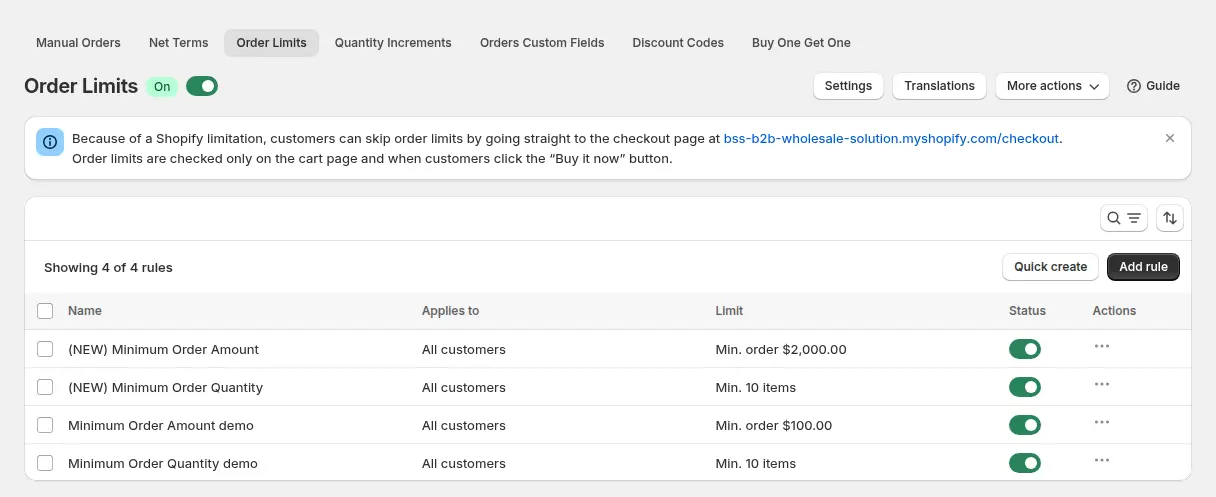
Go to B2B orders & discounts > Order Limits, switch the module on and click Add rule. Turn on the BSS B2B Solution app embed in your theme first. With the embed off, rules are saved but nothing is enforced, because the limits run in the app’s storefront script.
2. Choose customers, products and markets
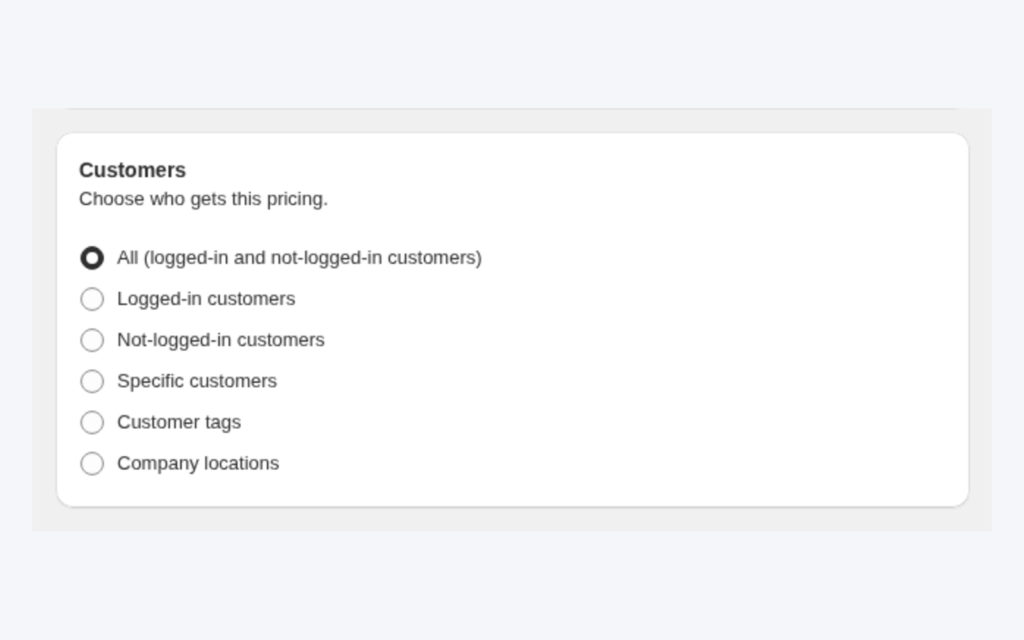
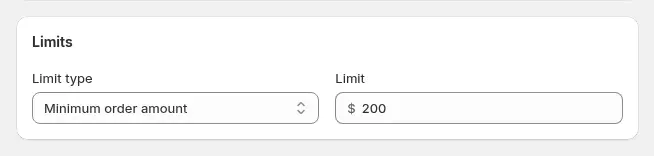
Name the rule, for example “Wholesale min $200”. Under Customers pick all customers, logged-in customers, not-logged-in customers, specific customers or customer tags such as wholesale, and optionally exclude some. Under Products pick all products, specific products or variants, collections or product tags, and exclude items that should not count, such as free samples. Under Markets you can limit the rule to specific selling regions.
3. Pick the limit type and value
There are four types: Minimum order amount, Minimum order quantity, Max order amount and Max order quantity. Enter an amount in your store currency or a whole number of items. When two rules match, the lower priority number wins; with equal priorities, the largest minimum and the smallest maximum win.
4. Choose the level at which limits are counted
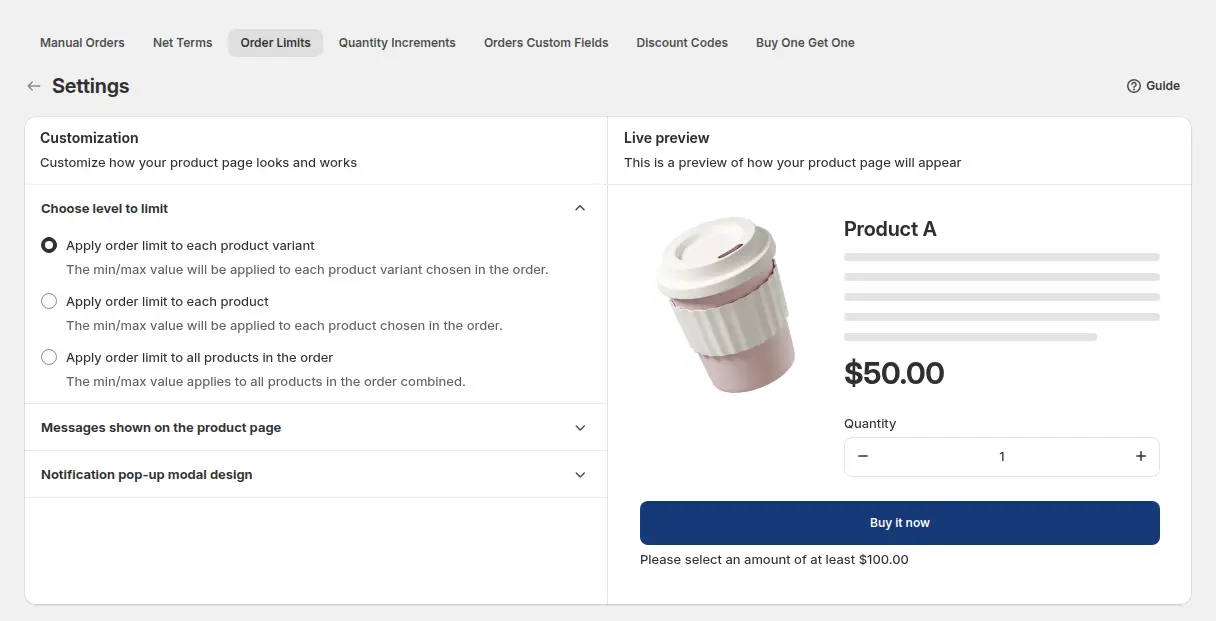
Under Order Limits > Settings, choose whether the limit applies to each product variant (the default), each product (all its variants together) or all products in the order. This setting applies to every rule. A minimum of 12 per variant means each scent must reach twelve; a minimum of 12 per product lets a buyer mix sizes of one scent; a minimum of 12 for the order counts the total.
5. Decide what the buyer sees
Settings also control the product page message: you can show a message below the quantity selector or below the Buy it now selector, and it turns red when the quantity does not meet the rule. You can edit the colours of the pop-up and translate every message.
6. Check the cart as a buyer
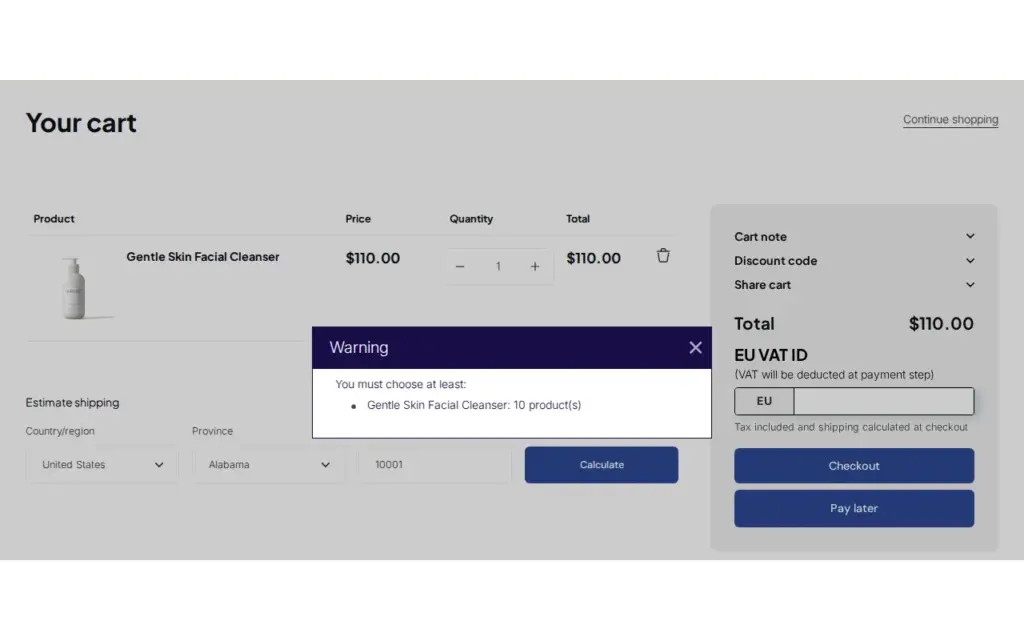
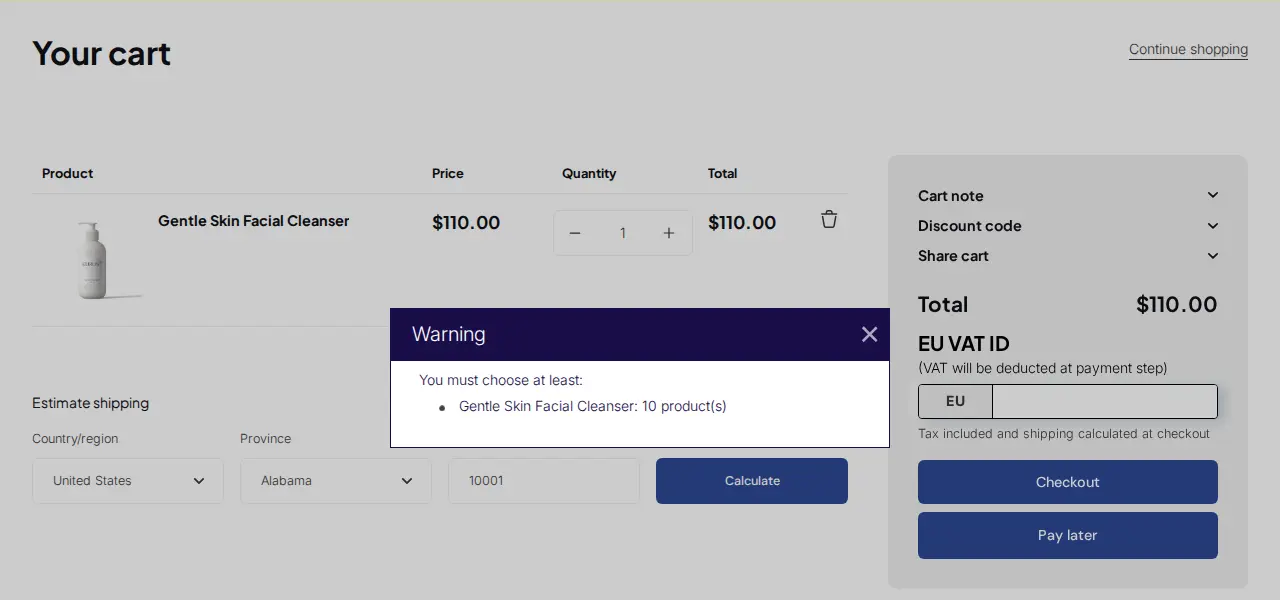
When the cart breaks a rule, a pop-up explains the problem when the customer clicks checkout on the cart page, or Buy it now on the product page.
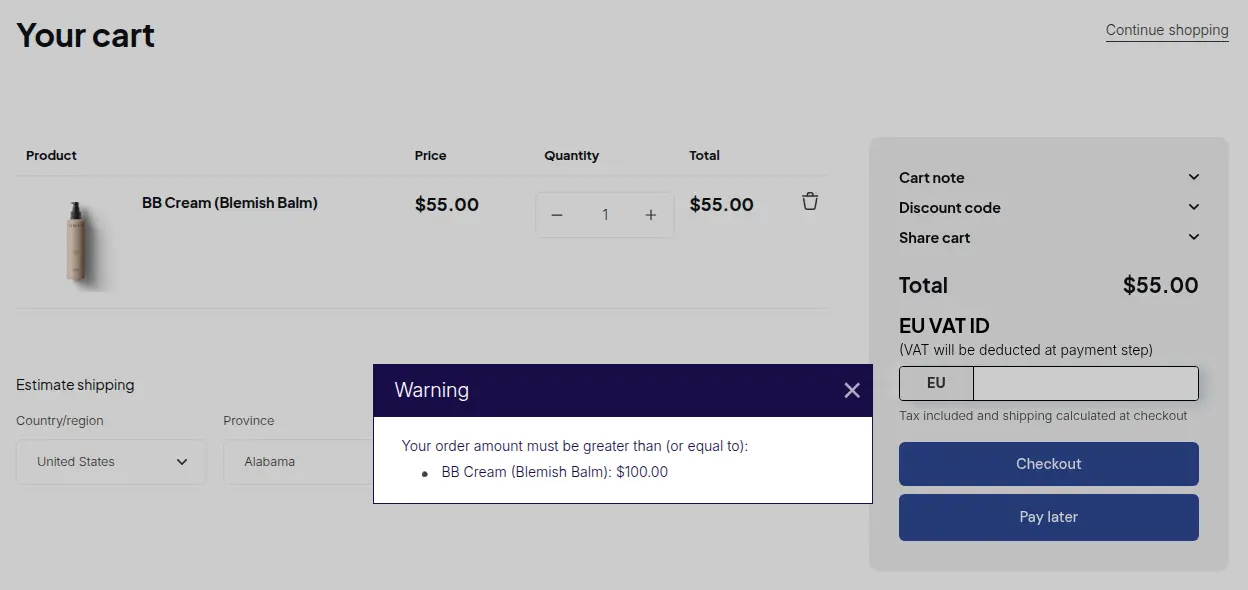
A quantity rule names the product and how many units the cart needs.
Example
Example for illustration only, not a customer result. The candle maker creates two rules for the tag wholesale: a minimum order quantity of 12 at the variant level and a minimum order amount of $250. Rule A, priority 1, covers all products except the sample-pack collection. A buyer adds eight units of Cedar & Fig to the cart and clicks checkout. The pop-up says the cart needs at least 12 of that scent. The buyer raises it to 12, adds six units of another scent, which triggers the same message, and tops it up to 12. The total of $276 meets the $250 minimum, and the cart goes through. A retail shopper who adds one candle sees no message at all.
Handling exceptions
Every minimum eventually meets a good customer who wants an exception. You have three clean ways to handle it. First, exclude the customer or tag from the rule, which is permanent. Second, have your sales rep create the order for them in the admin with Manual Orders, which Order Limits do not check. Third, keep a second rule with a lower minimum for a trial tag, so new accounts can start small. Whichever you choose, note the exception in the order notes or tags so the next person understands why it happened.
Works well with
- Sell in case packs with quantity increments so quantities also land in multiples of the case size.
- Tiered quantity break pricing to reward buyers who order more than the minimum.
- Place orders on behalf of customers for sales-rep exceptions, since Manual Orders are not limited.
- Silver and gold wholesale tiers for different minimums per tier.
Glossary: MOQ, MOV and case pack.
Limits and common mistakes
- Buyers can bypass the check at Shopify checkout. Order Limits are checked by the storefront script on the cart page and on Buy it now, not by a validation inside Shopify checkout. A customer who opens the checkout URL directly can skip the check. Treat limits as a guard for normal buyers and review unusual small orders.
- Manual Orders are not limited. Orders your team creates in the admin are not checked, which gives sales reps room for exceptions.
- The app embed must be on. Rules are saved but not enforced when it is off.
- Amounts follow the B2B price. Limits use the price after Custom Pricing, Price List or Volume Pricing, so set the amount against what buyers pay.
- The level is global. Per variant, per product or whole order applies to every rule, not to one rule.
- A paid plan is needed. Order Limits is on the Advanced and Platinum plans.
Setup checklist
- Turn on the app embed and the Order Limits module.
- Write down your terms: minimum amount, minimum quantity, any maximum.
- Create one rule per limit and target the wholesale tag.
- Exclude samples, gift cards and other items that should not count.
- Choose the level (variant, product or order) before you test.
- Edit the pop-up wording and add the languages you sell in.
- Test below, at and above each limit as a wholesale buyer and as a retail shopper.
- Read the Order Limits guide.
Plans and requirements
Order Limits is available on the Advanced and Platinum plans of BSS B2B Solution ($49 and $99 per month, with yearly billing saving 10%). See the pricing page to compare plans, then install BSS B2B Solution from the Shopify App Store.