To add a Request a Quote button on Shopify and hide the price, install BSS B2B Quote, create a quote logic, put the products you want to quote into a quote catalog, and switch on Hide price for that catalog. Visitors then see an Add to quote button and a quote form where the price and the Add to cart button used to be, and your team answers each request with a priced proposal.
This guide is for merchants whose products are priced by conversation, not by a public number: made-to-order items, project quantities, materials whose cost moves, or accounts that negotiate. It explains who should use the flow, how to set it up step by step, a worked example, and the limits to check before you launch. Quote is one of the three apps in BSS B2B Solutions, and it works best next to BSS B2B Solution for the prices you do publish.
Who this is for
A quote flow fits you if most of these are true:
- You sell custom, configurable or high-value products where the final price depends on quantity, specification or delivery.
- Your landed cost changes often (raw materials, freight, currency), so a printed price goes stale within weeks.
- Your sales team wants to see each buyer’s quantities, address and notes before they commit to a number.
- You sell through wholesalers, installers, contractors or project buyers who expect a proposal rather than a checkout.
- Part of your catalog has a normal price and part does not, and you need both on one store.
If every product has a fixed wholesale price, you probably want price lists or custom pricing instead. See wholesale price by customer tag for that.
Why this matters
A public price on a negotiated product starts the wrong conversation. Buyers compare your number with a competitor’s catalog price and never ask about volume, delivery or specification. An Add to cart button is worse: a buyer can place an order at a price you would not have offered for that quantity, and you find out after the order exists.
The other cost is the unstructured inquiry. A buyer who emails “how much for the big one?” starts a thread of questions about size, quantity, delivery address and timing, and each reply costs your team time. A quote form asks for those details once, in a fixed layout, and attaches them to the products being quoted. KAPR, a Dutch grooming brand that sells to barbers and salons, describes the same benefit: new and negotiated accounts request quotes through a structured flow instead of open-ended email. Read the KAPR case study for its full wholesale setup.
What Shopify covers natively, and where an app helps
Shopify’s built-in B2B features cover companies, catalogs, payment terms and quantity rules, but a request-for-quote workflow is not part of native B2B, and Shopify does not list hiding prices from guests among its B2B plan features. Those two gaps are what this use case fills. You can check the current native feature list in the Shopify Help Center, and the Shopify B2B guide compares native B2B with apps for every area. The quick order and RFQ hub collects the guides for this part of the store.
How to set it up with BSS B2B Quote
The whole setup takes place in the app’s Request for Quote section, and you can build it in one sitting.
Step 1: Create a quote logic
A quote logic decides who can request a quote and for which products. In Request for Quote, open Set Up Logics and choose Create New Logic. Name it for your team, set a priority (0 to 99, where 0 runs first), and choose who sees the quote flow: all visitors, logged-in customers, specific customers or customer tags. Choose all visitors if you want guests to be able to ask for a price, and a tag if only approved buyers should.
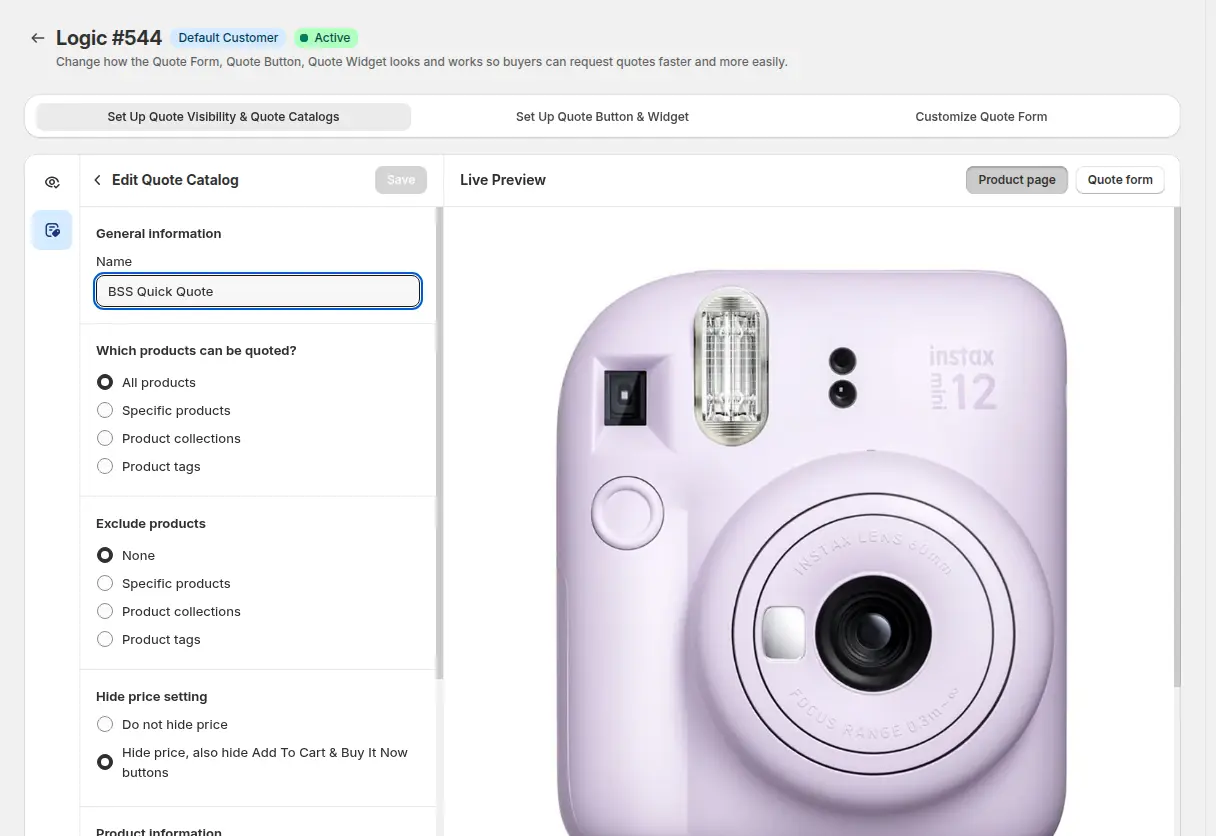
Step 2: Add a quote catalog and hide the price
The quote catalog is the list of products that are priced by quote, and Hide price lives inside it. Add the products or collections to quote, then use the Hide price setting to hide the price and also the Add to Cart and Buy It Now buttons. Products outside the catalog keep their normal price and checkout, so one store can mix quoted and fixed-price items.
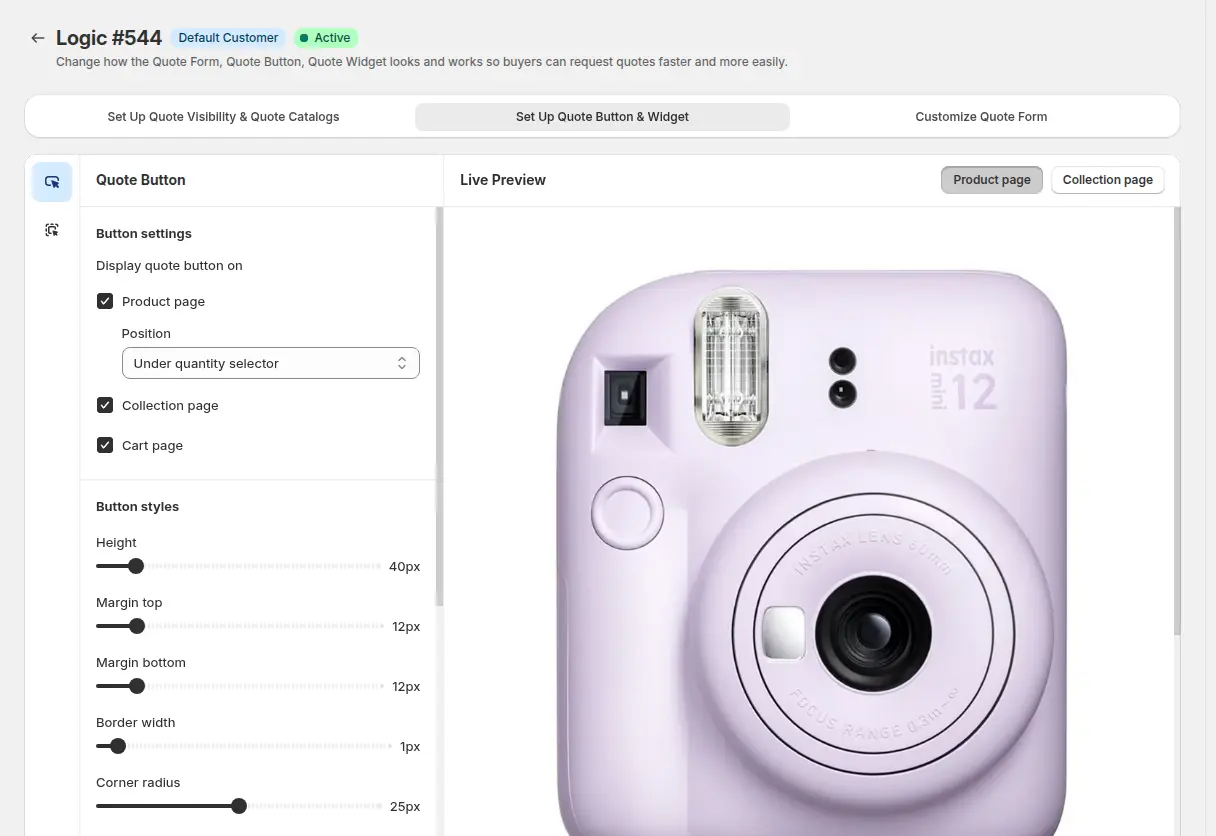
Step 3: Set up the quote button and widget
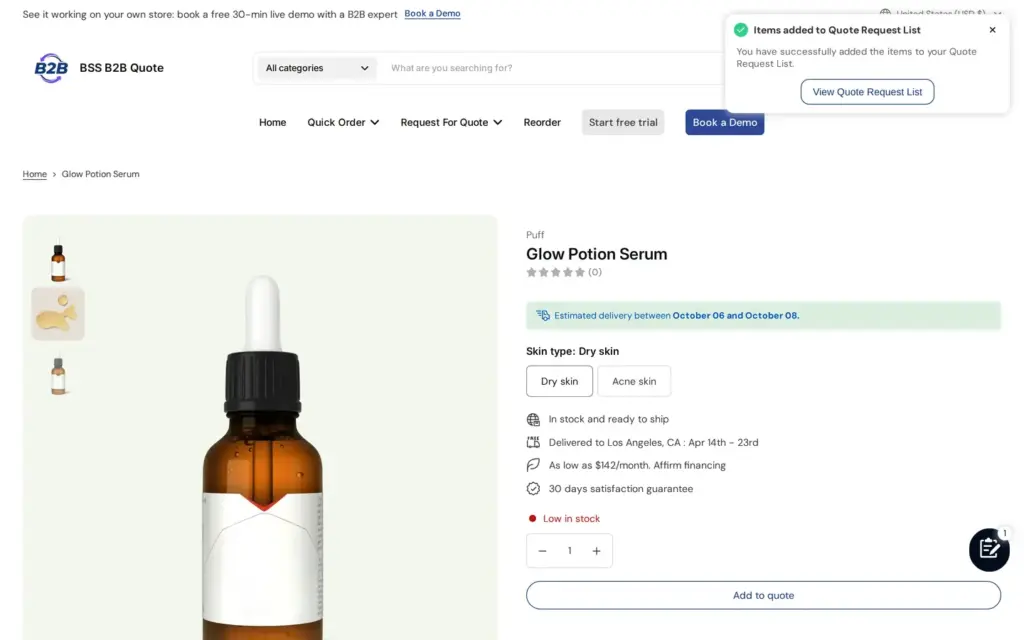
Choose where the Add to quote button appears (product pages, collection pages, the cart), where it sits relative to the price area, and what it says. Use plain buyer language such as “Request a quote” or “Contact us for pricing”. The widget collects the products a buyer adds, so a buyer can add several items and send one request.
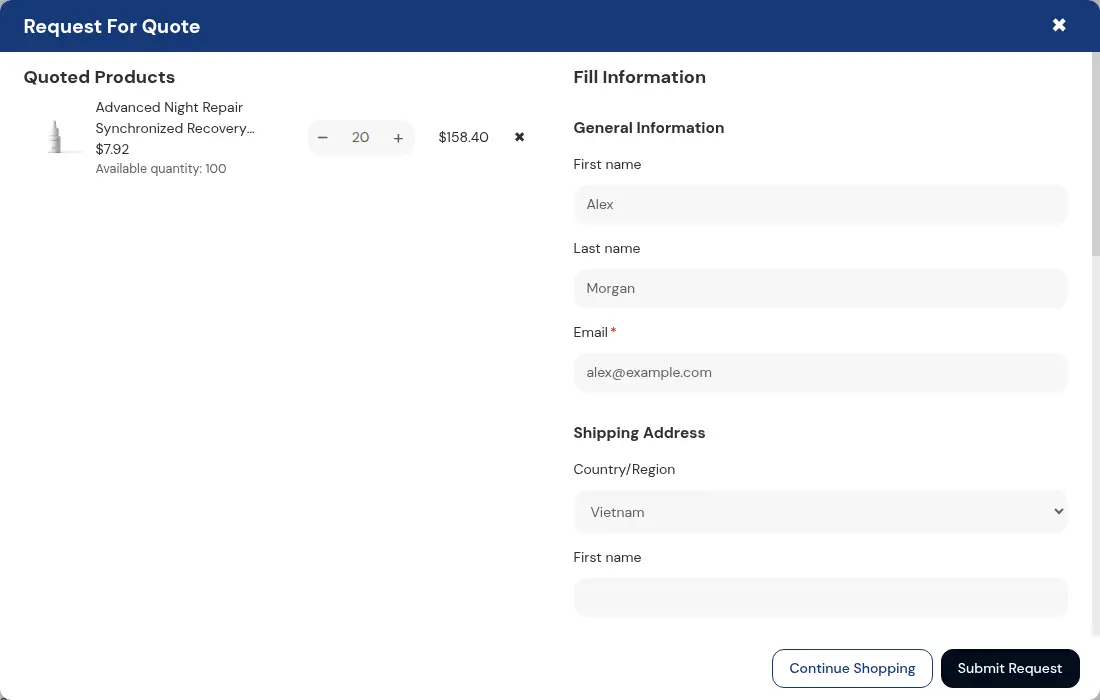
Step 4: Customize the quote form
The form is what your sales team reads, so ask for what you need to price the job. By default the form asks for first name, last name, email and a shipping address, and you can add fields such as phone, company, a PO number, a message, or a note for each quoted item. Item notes are useful for dimensions, finishes or packaging. Logged-in customers can have their details filled in from their account, which shortens the form for repeat buyers.
Step 5: Test as a guest, a tagged buyer and a regular customer
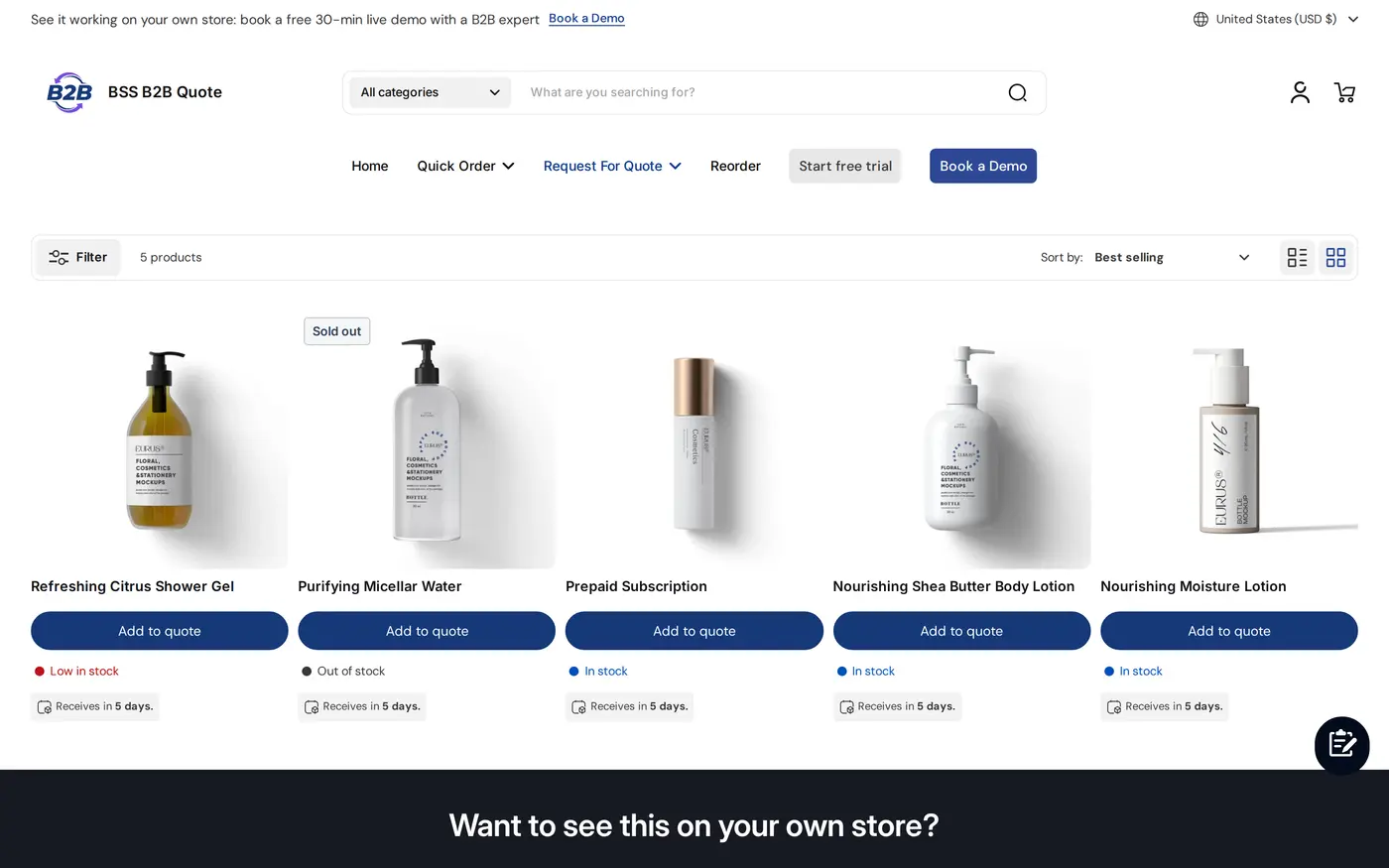
Open the storefront in a private window and check the product page and the collection page. The buyer should see no price and no cart buttons on quoted products, an Add to quote button, and a confirmation after adding.
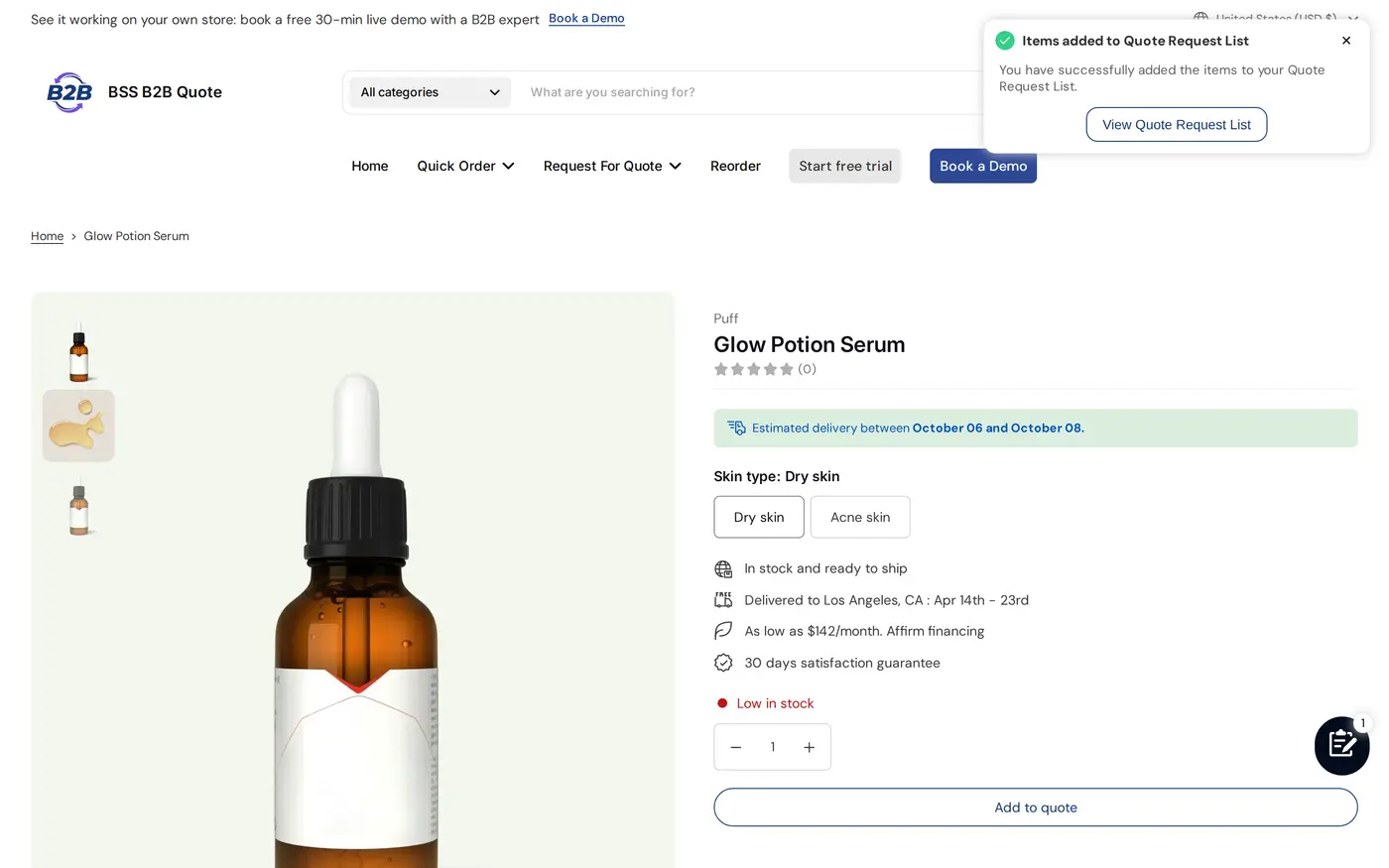
On collection pages every product card in the quote catalog gets the button, so buyers can build a multi-product request from the listing.
Step 6: Reply with a proposal
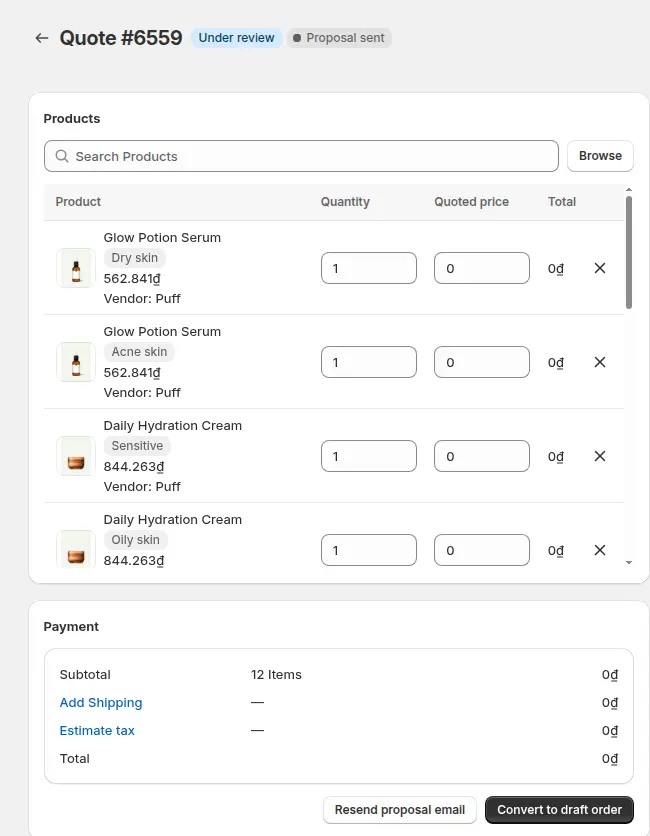
Submitted requests appear in Quote Requests with one of four statuses: Unread, Under review, Converted or Rejected. Opening a new quote moves it to Under review. Enter the quoted unit prices, shipping and an expiry date, then send the proposal email, optionally with a PDF of the quote attached. You can also set automation to send a proposal for forms that match rules you define.
Example: a made-to-order product with a project quantity
This example uses illustrative numbers, not results from a real store. A store sells made-to-order steel shelving. The listed starting price would be misleading because the real price depends on length, finish and quantity, so the merchant puts all shelving in a quote catalog with Hide price on.
A contractor adds three shelving models to the quote list and submits the form with a delivery address, a PO number and a note per item. The sales team opens the request, prices model A at $212 each for 40 units, model B at $168 each for 24 units and model C at $95 each for 60 units, adds a flat $380 shipping line and sets the quote to expire in 14 days. The subtotal is $8,480 + $4,032 + $5,700 = $18,212, plus $380 shipping, so the proposal shows $18,592 before tax.
The contractor receives the proposal. If the contractor is signed in, the proposal email can carry Approve and Reject buttons, and approving creates a Shopify draft order and emails the buyer the invoice. The quote approval to draft order guide shows that step in detail.
Works well with
Quote does one job well, and pairing it with the right neighbours covers the rest of a B2B storefront.
- Quote approval: turn an accepted proposal into a draft order with quote approval to draft order.
- Hide prices for guests: if the price should only be hidden from logged-out visitors, see hide wholesale prices from guest visitors and hide Add to cart and cart for guests, both built on BSS B2B Lock.
- Automatic proposals: automated B2B quote pricing covers sending a proposal without manual work.
- Published prices: BSS B2B Solution holds the wholesale prices for everything that is not quoted, and the Quote cart can use those prices for customers who are not on Shopify native B2B.
The access-control side of this topic is covered in the access control hub. Three glossary entries are useful here: request for quote, hide price and draft order.
Limits and common mistakes
- Hide price is a display setting, not a lock. It changes what the theme shows for the products in a quote catalog. If you need to keep pages, collections or prices away from guests, add BSS B2B Lock.
- Guests can request a quote, but they cannot approve one from the email link. Approving from the proposal email needs a signed-in customer, so for guest requests the merchant sends an invoice or asks the buyer to log in.
- Every proposal link is time-limited. The Approve and Reject buttons in a proposal email work for 72 hours; after that, or after you send a newer proposal for the same quote, resend the proposal.
- An expiry date is a reminder. The Expired badge does not stop you from sending a proposal or converting the quote.
- One logic per audience. If guests and tagged buyers need different treatment, create separate logics and set their priorities, then test each audience.
- A logic hides the price for every buyer it targets. A buyer who is entitled to a published price must be outside the logic’s audience, or the product should sit outside the quote catalog.
- Check the theme embed. The button needs the app embed switched on in your theme; if the button does not show, the button troubleshooting guide walks through the usual causes.
Setup checklist
- Install BSS B2B Quote and switch on the app embed in your theme.
- Create a quote logic and choose who can request a quote.
- Build a quote catalog with only the products priced by conversation.
- Turn on Hide price and hide Add to Cart and Buy It Now for that catalog.
- Place the Add to quote button on product and collection pages and write a clear label.
- Add the form fields your team needs: quantity context, address, PO number, item notes.
- Send yourself a test quote and reply with a proposal.
- Test the storefront as a guest, a logged-in buyer and a tagged customer.
Plans and requirements
BSS B2B Quote runs on paid plans (Growth, Business and Enterprise) with a 14-day free trial on paid plans, and some options, such as the confirmation email or shipping-method selection in the form, need a higher plan. Compare the plans on the BSS B2B pricing page and read the full hide price and Add to cart guide for every option. When you are ready, install BSS B2B Quote from the Shopify App Store and start with one quote catalog.