
Operational Overhead
Sales teams spend too much of their time manually quoting or cross-referencing static spreadsheets, leading to slow response times and lost deals.
Use Case
Drive higher AOV and buyer loyalty by offering personalized B2B Wholesale pricing and quantity-based incentives directly on your Shopify storefront
Reviewed by Hoa Nguyen, Senior Marketer. Last reviewed
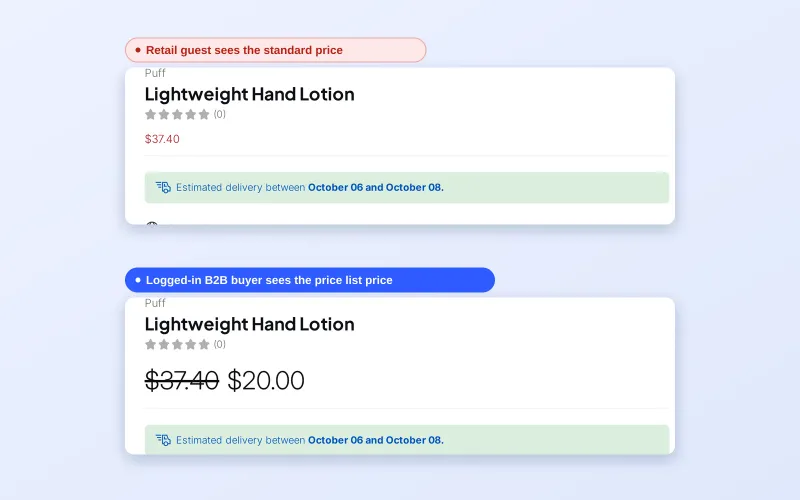












To offer personalized B2B wholesale pricing on Shopify, tag each wholesale buyer, then create pricing rules in BSS B2B Solution that give that tag its own price. Logged-in buyers see their price on the product page, collection and cart, while guests keep seeing your retail price.
This page is for manufacturers, distributors and brands that sell the same SKU to several kinds of buyer and are tired of price sheets, discount codes and manual quotes. Below you will find who it fits, how the price layers stack, a worked example, the limits to plan around and a setup checklist.
the problem
For growing B2B merchants on Shopify, managing diverse client relationships via manual processes creates a strategic bottleneck. Without pricing that are customized for different type of customers , businesses face several critical risks
Sales teams spend too much of their time manually quoting or cross-referencing static spreadsheets, leading to slow response times and lost deals.
Manual application of discounts often leads to “rule stacking” (multiple discounts applying to one order) or incorrect pricing, which erodes profit margins and damages buyer trust.
As SKU counts and customer segments grow, it becomes impossible to maintain personalized pricing at scale. This often results in a “one-size-fits-all” pricing strategy that fails to incentivize high-volume distributors.
OUR SOLUTION
Bss B2B solution automates the logic of “Price-to-Customer” mapping. It allows merchants to define multiple price layers for the same SKU based on the rules you defined for each customer.
A manufacturer sells to “Gold,” “Silver,” and “Bronze” distributors. When a Gold partner logs in, they see a 20% lower price, while Bronze partners see a 10% lower price for the same product.
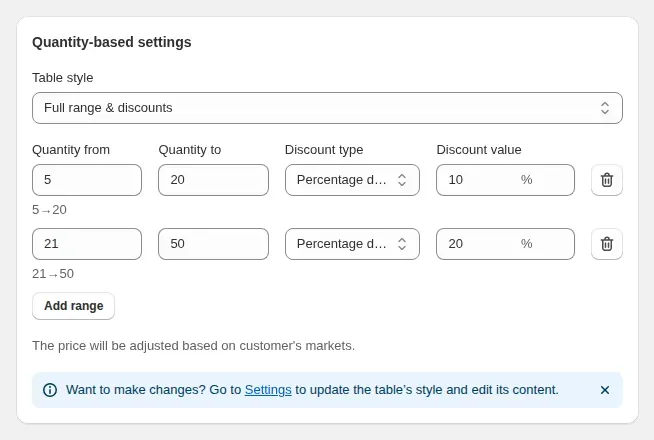
To move specific stock, a merchant sets logic-based Quantity Breaks. A buyer sees the price drop dynamically as they increase the count: 1–49 units remain at MSRP, 50–99 units trigger a $2/unit reduction, and 100+ units trigger a $5/unit reduction.
For VIP accounts with pre-negotiated contracts, merchant bypasses global rules to set a “Fixed Price” on specific SKUs
Target Sectors
selling to a complex hierarchy of buyers (local retailers to national distributors)
selling consumables where the goal is to move maximum units
opening a wholesale channel without launching a separate store
who negotiate unique contracts with VIP clients or government entities that require 100% compliance.
benefits
How Personalized B2B Wholesale Pricing Impacts Your Business
Reduces manual invoicing and “back-and-forth” emails.
Protects profits by allowing granular pricing per product/tier.
Empowers B2B buyers to order 24/7 without waiting for a sales rep.
Buyers see their price straight away, so they can go from product page to checkout without waiting for a quote.
Volume-based triggers incentivize larger bulk purchases
Contract-accurate pricing builds trust and repeat ordering.
Rules target customer tags, so adding an account means adding a tag, not building another price sheet.
Reallocates staff from data entry to proactive business development.
Ensures pricing consistency across the entire digital storefront.
Wholesale rates apply only to customers who match your rules; guests keep seeing the retail price
Provides a bespoke feel for high-value corporate clients.
USE CASES
Discover how personalized B2B prices reach the right buyers in 4 steps
Define customer profile with specific tags
Create rules with Price List, Custom Pricing, Volume Pricing
Choose how to apply the rule: to the entire catalog, specific Collections, or individual SKUs.
Personalized B2B price is displayed in real-time when the customers match the conditions.
see it in action
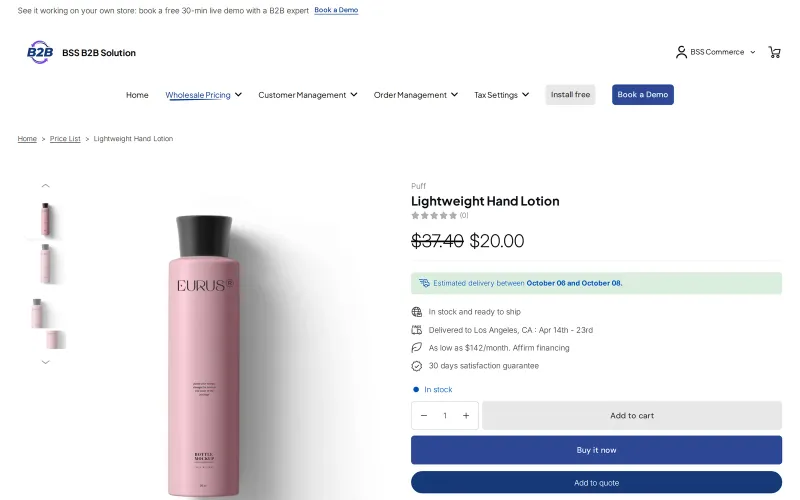
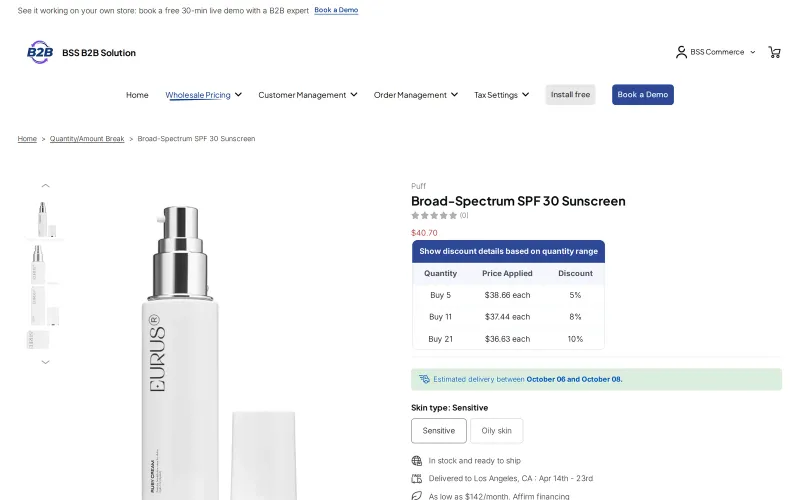
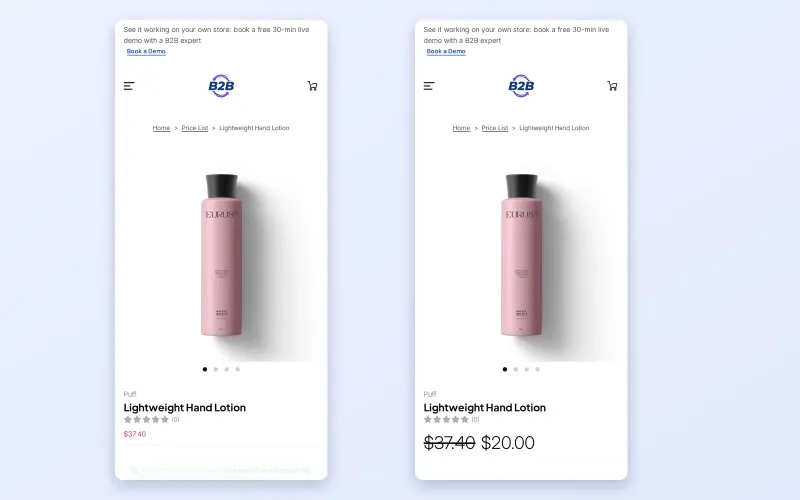
Follow one rule from the BSS B2B Solution admin to what a guest and a logged-in buyer see on the demo store.
Personalized pricing is worth setting up when one price list no longer describes how you sell. These are the usual signs:
Manual pricing has a cost that rarely shows up in a report. Every quote that waits on a sales rep is a buyer who may order from a competitor with a self-service portal. Every spreadsheet that drifts from your real prices turns into a credit note, an awkward call or a margin you did not plan to give away.
Buyers feel it too. A trade buyer who must request a price for each reorder soon looks for a supplier who shows prices after login. Showing the right price automatically is a small thing that makes reordering feel routine instead of a negotiation.
Shopify now includes B2B on Basic, Grow, Advanced and Plus. Native catalogs let you assign prices to B2B markets, with up to three catalogs on Basic, Grow and Advanced and unlimited catalogs on Plus. The comparison table in the Shopify B2B guide and Shopify's B2B features by plan page list the current details.
Native catalogs fit best when every wholesale buyer is a company with locations and you need three catalogs or fewer. An app helps when you also sell to retail shoppers on the same store, need more price groups than the catalog limit, or want to price by customer tag, by a single customer or by company location. BSS B2B Solution keeps its rules in the app, so it works alongside native B2B rather than replacing it. The wholesale pricing hub compares the options in more depth.
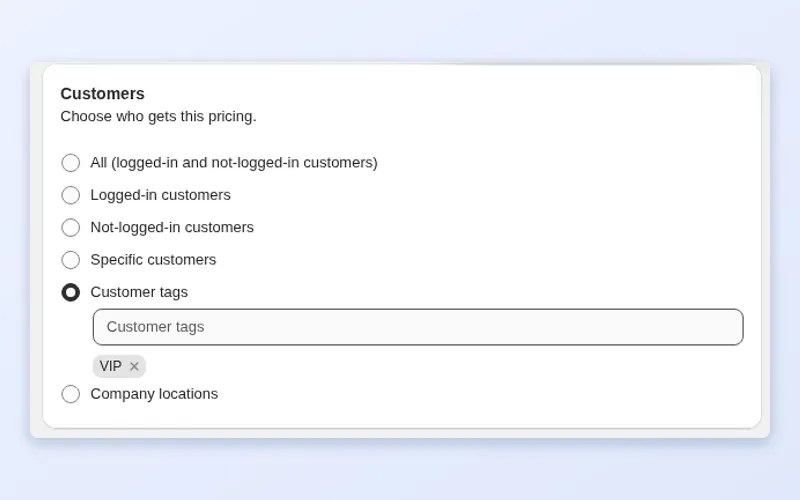
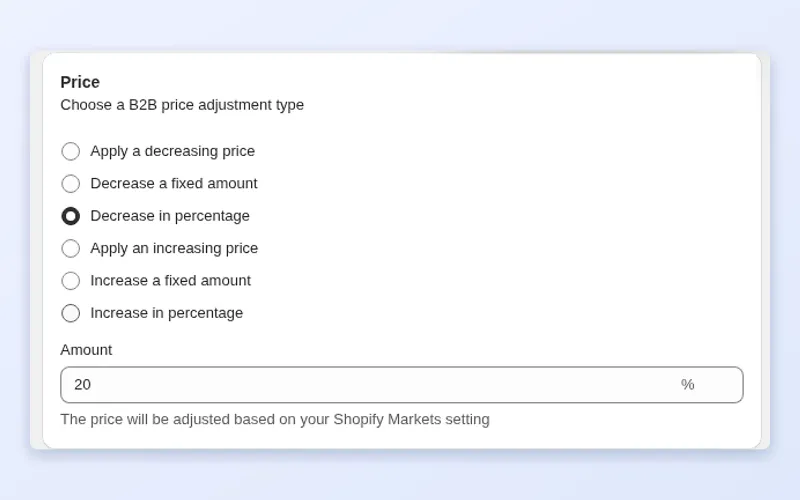
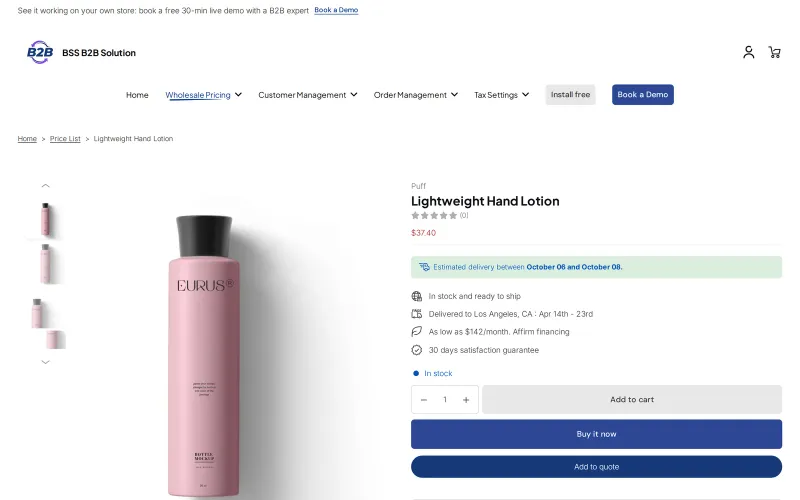
The screenshots in the gallery above follow these steps on a demo store. The full walkthrough is in the custom pricing guide.
Add a customer tag such as wholesale-gold to each approved buyer in Shopify. If you collect applications with a registration form, the form can add the tag when you approve the account. Tags are matched case-insensitively and a buyer only needs one of the tags listed in a rule.
In BSS B2B Solution open Custom Pricing and create a rule. Under Customers choose Customer tags and enter your tag. Other options are all customers, logged-in customers, not-logged-in customers, specific customers and company locations.
Apply the rule to all products, specific products or variants, collections or product tags. Start with one collection while you test, then widen the scope once the numbers look right.
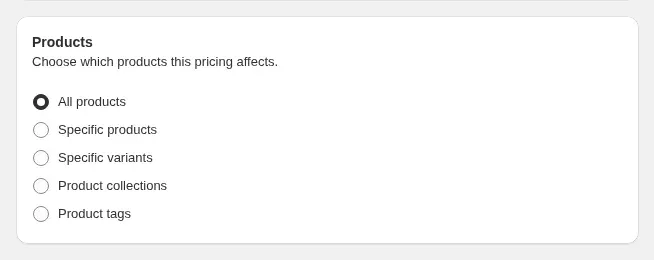
Pick the adjustment type, for example decrease in percentage, and enter the amount. Open the optional Exclusions and schedule section if some items should be skipped or the price should run for a limited period. Set a Priority between 0 and 99 if several rules can match the same buyer; the lower number wins, and rules in the same module are compared by priority and then by age.
Create a Volume Pricing rule to add tiers by quantity. Tier prices stack on top of the Custom Pricing or Price List price, not on the original retail price, which is why the example below shows two steps.
The rule page shows four checks: rule saved, rule enabled, module on, and the app embed active in your theme. Then log in with a test customer that carries the tag and open a product, a collection and the cart. Compare against a guest window to confirm the guest still sees retail.
This is an illustration with made-up numbers, not a customer result. A candle has a retail price of $25.00. You create one Custom Pricing rule for the tag wholesale-gold that decreases the price by 20 percent, and a Volume Pricing rule that takes a further 10 percent off from 24 units.
| Buyer | What they see | Unit price |
|---|---|---|
| Guest visitor | Retail price, no wholesale rule applies | $25.00 |
| Logged-in buyer with the tag, 6 units | Tag price, retail price crossed out | $20.00 |
| Same buyer, 24 units | Tag price, then the volume tier on that price | $18.00 |
The tier works on $20.00, not $25.00, so 10 percent off gives $18.00. If you would rather price a VIP account at an exact negotiated number, create a separate rule for that customer with a higher priority, and the contract price wins for them.
Terms used on this page are defined in the glossary: price list, customer tag and quantity break. For the broader picture, see the wholesale pricing hub.
BSS B2B Solution has a Free plan and paid plans: Essentials at $29 a month, Advanced at $49 and Platinum at $99, with a 10 percent discount for yearly billing. The Free plan includes one Custom Pricing rule, which is enough to test a tag-based price. Price Lists need Platinum, and targeting by company location needs Advanced or higher. Plan contents change, so confirm what you need on the BSS B2B Solution page before you subscribe.
You also need a theme with the app embed switched on. Ready to try it? Install BSS B2B Solution from the Shopify App Store and follow the checklist above.
faq
Tag the wholesale customers, then create a Custom Pricing rule in BSS B2B Solution that targets that tag and sets a percentage or fixed-amount decrease. Logged-in buyers with the tag see their price on product, collection and cart pages. Visitors without the tag keep seeing your retail price, so nothing changes for consumers.
Yes. The rule is evaluated for each visitor. A guest or a customer without the tag sees the retail price, and a logged-in buyer who matches the rule sees the wholesale price with the regular price crossed out. In the demo store the same product shows $20.00 to the buyer and the retail price to a guest.
Volume Pricing tiers apply on top of the Custom Pricing or Price List price. If a tag rule gives $20.00 and a tier takes 10 percent off from 24 units, the buyer pays $18.00 at that quantity. The tier does not start again from the retail price, so plan your tiers from the personalized price.
Each rule has a Priority from 0 to 99, and the lower number wins when rules in the same module overlap. If two rules have the same priority, the older rule is used first. A Price List beats Custom Pricing on the same variant, and different modules, such as Custom Pricing and Volume Pricing, chain instead of competing.
No. BSS B2B Solution keeps its own rules and targets customer tags, specific customers or company locations, so it does not depend on native catalogs. You can use it with or without Shopify's built-in B2B. Install the app, turn on the theme embed, and check the app listing for current requirements.
Yes. Create a Custom Pricing rule that targets that specific customer and the products in the contract, then give it a lower priority number than your general tier rules so it wins. This keeps negotiated prices exact while everyone else follows the tag-based tiers.
Prices are stored in your store currency and shown in other currencies using Shopify's exchange rate, with optional rounding. You cannot set a different fixed price for each currency, and checkout follows your store or Markets currency. Multi-currency display needs the Advanced plan or higher.
case study
Quotes and results below are taken from our published case studies.

“Amazing app that helped us a lot with inquiries of our B2B customers. Speeds up the ordering process as it offers a simple product catalog (wholesaler does not have to click through the whole e-shop). The customer service is super fast and helpful (especially Jonas and Duong) – they implemented an extra button we needed within 10 minutes.”
16% of total annual turnover came from B2B channels in the first year.
Read case study
“without using your application we would not have been able to solve the global problem of using one website for retail and wholesale clients.”
~35% turnover growth over six months of use, as reported by the merchant (seasonality not excluded).
Read case study
“I now have a fully operational wholesale portal and a team to assist me with any future questions or issues.”
12% wholesale share of revenue, up from 2%.
Read case studyget started
Explore our comprehensive ecosystem of learning materials and live support designed to help you master our suite at your own pace.

Master the features with step-by-step documentation.
Learn more - Read User guide
See how our features function in a live storefront.
Learn More - View Demo store
Walk through the suite with our team in a live demo.
Learn More - Book a Demo Session
Have a specific question? We’re here 24/7 to help.
Learn More - Contact UsVisit our app listing to begin your setup, then let our team walk you through a personalized demo to ensure your success at scale.