
Methods are matched by name
A method is hidden when its display name matches the name in the rule. A renamed method, or a manual name with a different spelling, stays visible. Check the checkout after any change to your payment or shipping settings.
BSS B2B Lock: hide payment and shipping methods
BSS B2B Lock hides the payment and shipping methods you choose at Shopify checkout, only when your conditions match. A rule can hide Cash on Delivery for retail customers, or a shipping rate for carts under a set total. It can also hide express buttons such as Apple Pay on product and cart pages. It needs a paid plan or the free trial.
Some payment and shipping methods suit one buyer and not another. Cash on Delivery or Bank Deposit may be right for a retail customer and wrong for a wholesale one. A courier rate may make sense for a small cart and not for a pallet order. BSS B2B Lock lets you hide those methods by rule, so each buyer sees the options that fit their order.
You create the rule in Checkout locks, choose Hide Payment & Express Checkout Options or Hide shipping methods, add conditions and pick what to hide. If the conditions are not met, every method stays visible. The app does not change your Shopify payment gateway settings or your shipping rates.
This page covers the setup in the app. Setting a price for shipping is a different job, handled by the Solution app, and it is covered below.
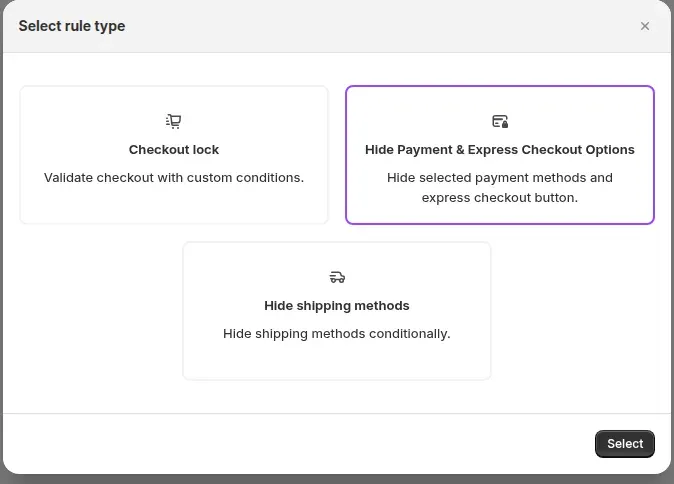
A payment rule has a Rule scope. The scope decides where the rule runs and how it works.
| Scope | What it hides | How it works | Note |
|---|---|---|---|
| Checkout: Hide Payment Methods | Standard methods such as Cash on Delivery, Bank Deposit and Wire Transfer, and express methods such as Apple Pay and Google Pay | A Shopify payment customization Function | The only scope that removes a method from checkout itself |
| Storefront: product page | Accelerated checkout buttons below Add to cart, such as Buy it now and Shop Pay | A theme script | A display change. The B2B Login By BSS app embed must be on |
| Storefront: cart page and drawer | Accelerated checkout buttons on the cart page and in the cart drawer | A theme script | A display change. The B2B Login By BSS app embed must be on |
| Shipping rule | Shipping methods shown at checkout | A Shopify delivery customization Function | Matches the shipping rate by its title |
The two storefront scopes use CSS and JavaScript to hide buttons. They do not block anything, so do not rely on them to stop a buyer from paying a certain way.
Under Actions, Hide all methods removes every payment option at checkout, and buyers then see a message that the store cannot accept payments right now, according to the user guide. Hide specific methods lets you tick the methods to hide. Start with specific methods, because a rule that hides everything can block every buyer.
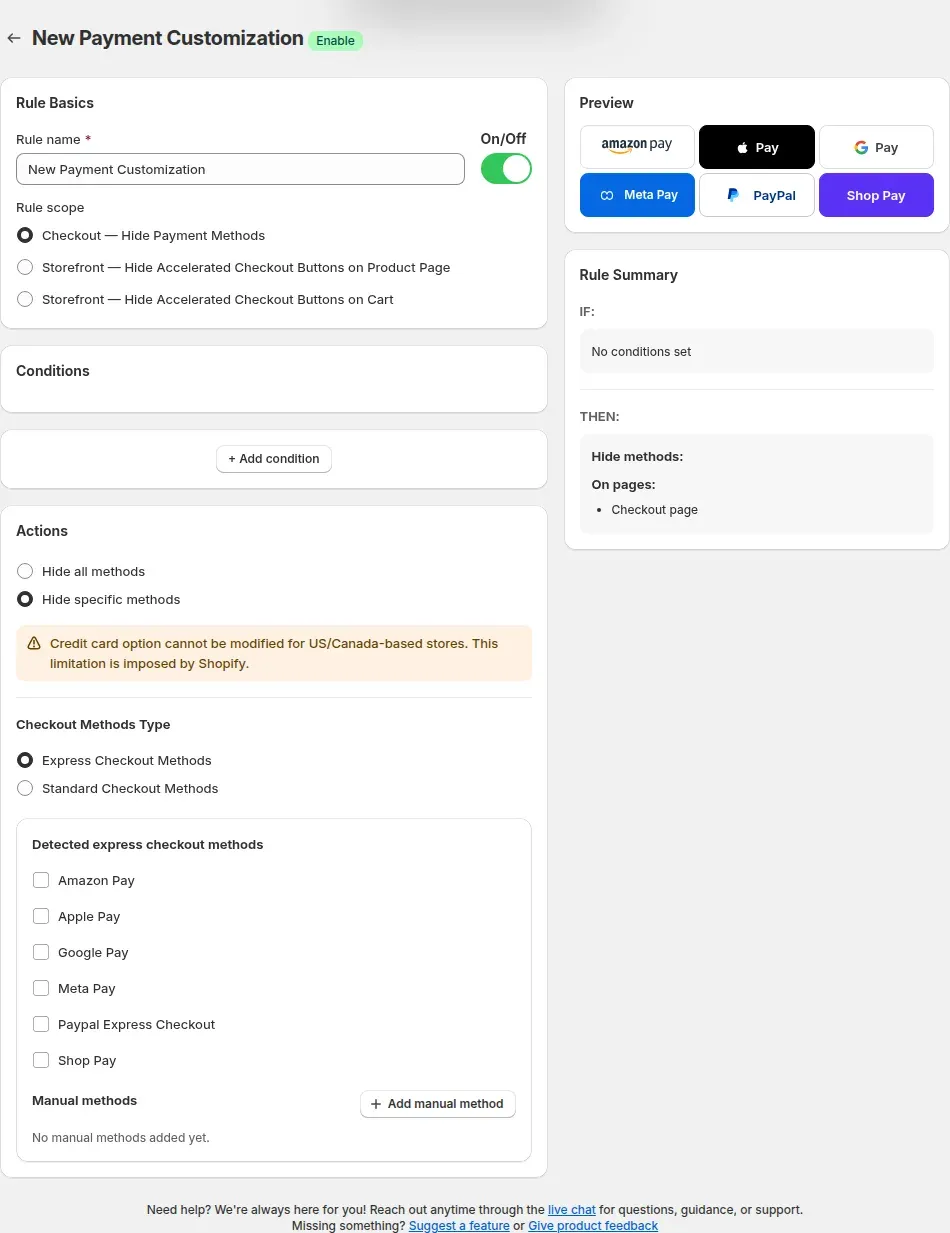
Pick a methods type. Standard Checkout Methods are the gateways set up in Shopify, such as Cash on Delivery or Bank Deposit. Express Checkout Methods are one-click buttons such as Apple Pay, Google Pay and Shop Pay. The app lists the methods it detects. If yours is missing, use Add manual method and type the exact display name from your checkout, because a name that does not match hides nothing.
Three setups come up often with B2B stores. These are examples, not defaults:
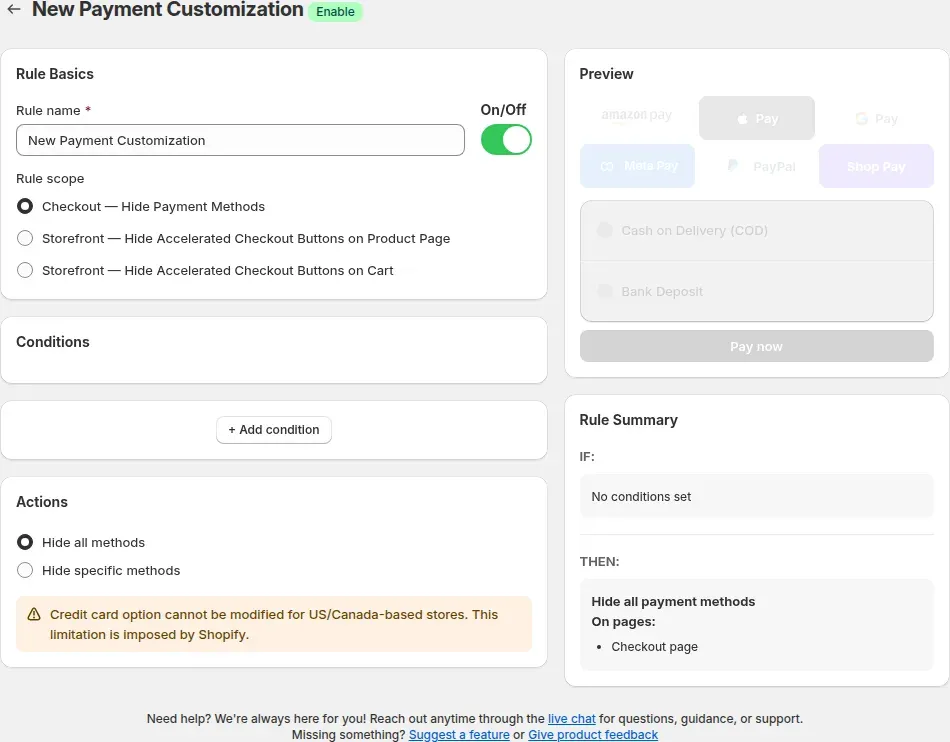
These steps follow the BSS B2B Lock user guide. The screens are from the app admin.
In Shopify admin open Apps, then BSS B2B Lock, then Checkout locks, and click Add rule. In the Select rule type box choose Hide Payment & Express Checkout Options, then click Select.
Enter a rule name you will recognize, such as Hide COD for retail. Keep the On/Off toggle off while you build the rule. Choose Checkout: Hide Payment Methods to act at checkout, or one of the storefront scopes to hide buttons on the product page or the cart. For a storefront scope, check that the App Embed Status card shows On.
Click Add condition and pick a condition, such as Customer tag or Cart total, then an operator and a value. Add more conditions and choose All or Any. Add at least one condition: to apply a rule to every checkout, choose the Always condition.
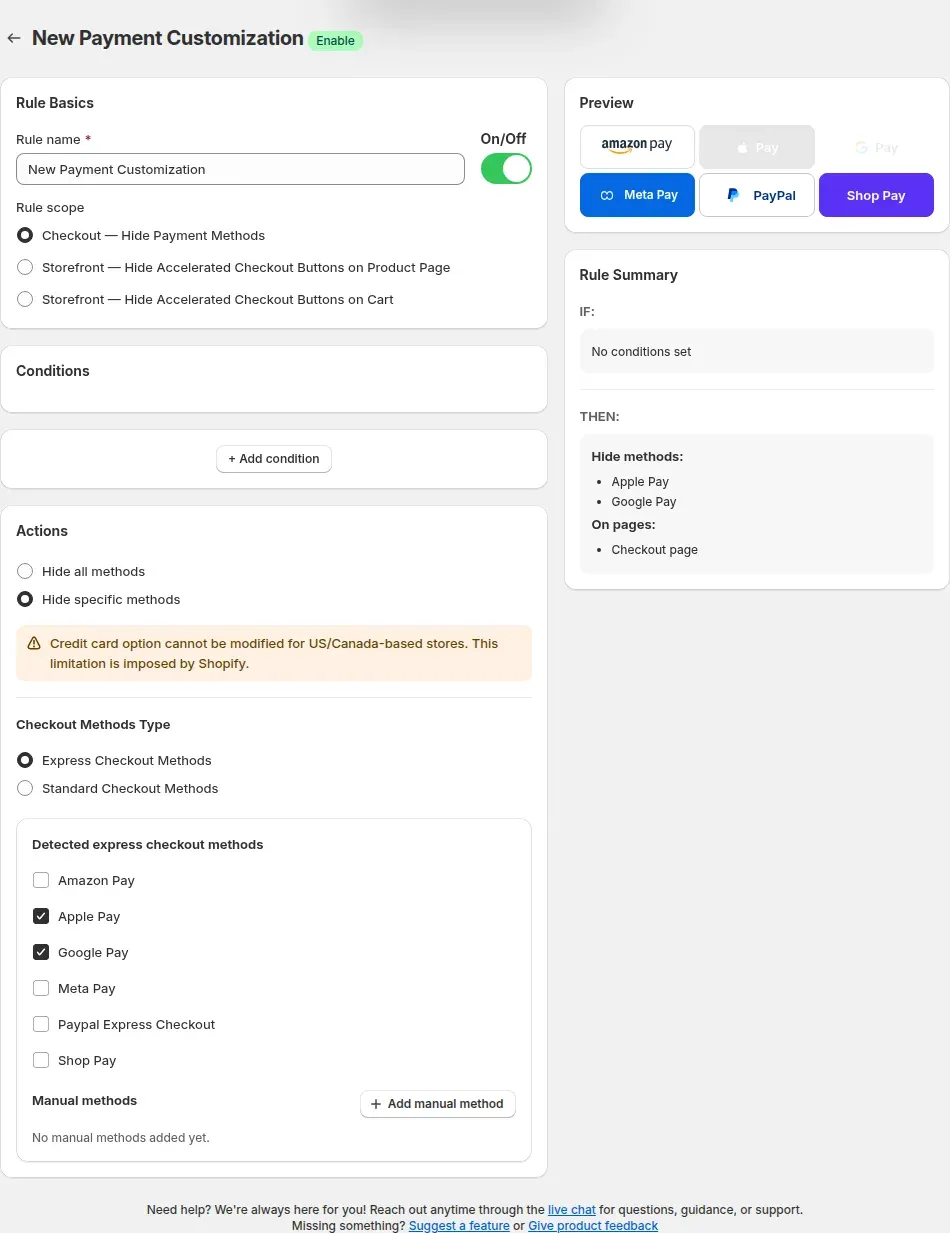
Under Actions choose Hide specific methods, pick Standard Checkout Methods or Express Checkout Methods, and tick the methods to hide. A warning in this panel says the credit card option cannot be modified for stores based in the US or Canada, and that Shopify sets this limit.
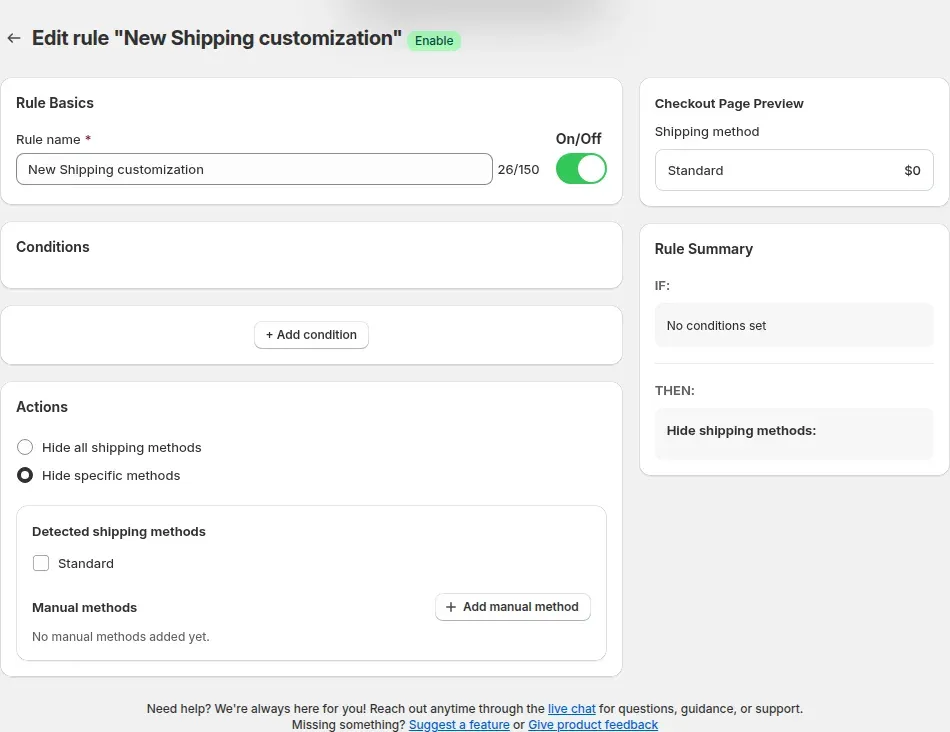
Read the Rule Summary on the right. It lists IF and THEN in plain words. Save the rule and turn it on. Then open the store in a private window, sign in as a buyer who matches the condition and check the checkout. Test a buyer who does not match as well, and confirm that every method is still visible.
Create your first payment or shipping rule on a paid plan. The listing shows a 7-day free trial on paid plans.
A shipping rule works the same way. Choose Hide shipping methods in the Select rule type box, add conditions, then choose Hide all shipping methods or Hide specific methods. The app lists the shipping methods it detects from your Shopify shipping settings, and Add manual method covers any it misses. Type the exact rate title.
Examples for a wholesale store: hide a courier rate when the cart subtotal is above an amount, hide Express shipping for customers tagged wholesale, or hide a standard rate when a product with a certain tag is in the cart. If you hide every method, buyers see Shopify's delivery error and cannot finish the order, so test before you turn the rule on.
The user guide says draft orders and orders created by hand in Shopify admin are not affected by shipping rules.
Conditions are combined with All or Any. Operators include Contain, Does NOT contain, Equals and, for amounts, Less Than and Greater Than.
| Condition | Payment rules at checkout | Shipping rules |
|---|---|---|
| Always | Yes | Yes |
| Signed in | Yes | Yes |
| Customer tag | Yes | Yes |
| Customer email and phone | Yes | Yes |
| Cart total and subtotal | Yes | Yes |
| Specific product | Yes | Yes |
| Cart line count | Yes | Yes |
| Product quantity | Yes | Not available |
| Product tag | No. It is offered only in the storefront scopes | Yes |
For a payment rule that depends on the product, use Specific product at checkout. A product tag condition is not read by the payment Function.
Read these before you build your first rule.
A method is hidden when its display name matches the name in the rule. A renamed method, or a manual name with a different spelling, stays visible. Check the checkout after any change to your payment or shipping settings.
Hiding accelerated buttons on the product and cart pages changes what the page shows and needs the app embed. Use the Checkout scope to remove a method from checkout.
The app shows a note that Shopify does not let it change the credit card option for stores based in the US and Canada. Other methods are not affected by that note.
Shopify allows a store 25 active payment customizations. When you reach the limit the app shows an error. Combine rules with conditions instead of creating one rule per case.
The rules run in the Shopify checkout. Headless and fully custom checkouts are not supported. The user guide also lists draft orders and orders created by hand as outside shipping rules.
A rule that hides all payment or shipping methods leaves buyers with no way to pay or ship. Use Hide specific methods first, read the Rule Summary and test before you turn the rule on.
Hiding a method decides what a buyer can choose. It does not set a price and it does not stop a buyer from reaching checkout. A checkout lock, the first rule type in the same box, validates checkout with custom conditions, for example to keep unapproved buyers out.
If you want to charge a fee or set a wholesale shipping rate, that is the job of BSS B2B Solution. Use Lock to hide a rate that does not suit a buyer and Solution to set the rate that does. For payment terms such as net terms, start with the order rules hub.
Hide payment and shipping methods needs a paid plan or the trial. The Free plan locks the entire store by condition and does not include this feature. Paid plans start at $9.99 per month with a 7-day free trial on paid plans, and the tier follows your Shopify plan. Prices are from the App Store listing on October 10, 2026.
According to the user guide, when a trial ends without a paid plan, existing rules turn read-only and the Save button is disabled until you subscribe. Questions about your plan go to [email protected].
Each topic has one page that owns it. Start from these.
Another BSS B2B Lock feature, for a minimum age notice.
Set a wholesale fee or shipping rate, instead of hiding one.
Hide prices, lock pages and gate catalogs.
Hide prices from guests, gate wholesale catalogs and protect pages with passcodes.
Customer tagNet termsGated catalog
Each feature has its own page. See also all BSS B2B Lock features.
A popup that asks visitors to confirm a minimum age before they see your store, a product or a collection.
BSS B2B Lock hides the methods you choose by customer tag, cart total or product, next to price hiding, page locks and checkout locks.
Also: BSS B2B Lock for hidden payment methods, hidden prices and locked pages and BSS B2B Quote for quotes and quick order.
Yes. Create a payment rule with the condition Customer tag contains your retail tag, choose Hide specific methods, then tick Cash on Delivery. Buyers without that tag still see it. Test with a buyer who has the tag and one who does not.
Yes. Shipping rules accept customer tag, signed in, email, phone, cart total, subtotal, specific product, cart line count and product tag. Pick Hide specific methods, tick the detected shipping method or add its exact title, and check the Rule Summary before you save.
No. The storefront scopes hide the accelerated checkout buttons on the product page and the cart with a theme script, and they need the app embed on. To remove Apple Pay from checkout itself, use the Checkout scope and tick it under Express Checkout Methods.
Check three things. The rule must be on and your plan or trial active. The condition must match the buyer, including the exact tag spelling. The method name in the rule must match the name shown at checkout. Add it with Add manual method if the app did not detect it.
The app shows a note that Shopify does not let it change the credit card option for stores based in the US and Canada. You can still hide other payment methods and express buttons. Ask Shopify about the credit card limit.
A paid BSS B2B Lock plan or the free trial. The Free plan locks the entire store by condition and does not include hide payment and shipping methods. Plans and prices are in the pricing section above.
Feature behavior follows our review of the BSS B2B Lock code on October 3 and October 10, 2026 and the BSS user guides, and the code decides when they disagree. For example, the payment Function does not read a product tag at checkout, although the user guide lists it. Prices come from the App Store listings on the date shown. We make BSS B2B Solution, BSS B2B Lock and BSS B2B Quote.