Compare

Shopify Password Page vs Locked Store vs BSS B2B Lock: Which Should You Use for Wholesale

Use Shopify's password page when the whole store should stay closed to the public, for example before launch, and one shared password is enough. Use a store-wide lock when entry should depend on login or a customer tag. Choose BSS B2B Lock when you keep a public retail store and lock only prices, products, collections or pages.

  • By BSS B2B Team
  • Reviewed by Hoa Nguyen, Senior Marketer. Last reviewed
  • Last updated
Install BSS B2B Lock See pricing BSS B2B Lock has a 7-day free trial on paid plans. 4.9 out of 5 from 651 reviews on the Shopify App Store (as of October 10, 2026).

How we compared

We make BSS B2B Lock, so weigh our view accordingly. Every statement about Shopify's password page comes from two pages of the Shopify Help Center, read on October 4, 2026 and cited with a number that links to the source list. Where those pages say nothing on a point we write "not described", which does not mean the feature is absent. We did not test the password page ourselves. Every BSS statement follows our review of the app against its code and its App Store listing; where the code and our user guides disagree, we follow the code.

"Locked store" is not a Shopify setting. We use it for locking the entire storefront by a condition such as login or customer tag, as the Free plan of BSS B2B Lock does, so the second and third columns are both BSS B2B Lock: the Free plan, then the paid rules. Prices are USD list prices from the App Store listing and can change. This page is due for a re-check by January 7, 2027. Found an error? Use the contact page.

Who should pick which

Start from one question: should anyone be able to see your retail store?

The Shopify password page fits when

  • The whole store should stay closed to the public, for example while you build it or before a launch. Shopify restricts store access to private mode when you first register for a plan.
  • One shared password, given to every approved visitor, is enough, and you do not need to tell buyers apart.
  • You want to edit the landing page in the theme editor, with the password header, footer and email signup sections Shopify provides.
  • You are a wholesale-only store and the option to restrict access to B2B customers covers your needs.

A store-wide lock (BSS B2B Lock Free) fits when

  • Entry should depend on who the visitor is, such as logged in or carrying a customer tag, rather than on a shared password.
  • The whole storefront is wholesale only and you want to test an app lock before paying.
  • You are fine with the Entire store target being the only target on the Free plan.

BSS B2B Lock rules fit when

  • You sell retail and wholesale from one store and want to lock only prices, Add to cart, products, collections or pages.
  • You need passcodes, secret links, request-access approval or rules by customer tag, company or Shopify Market.
  • You are on Shopify Plus and want a checkout lock, or you want payment and shipping method rules.

Shopify password page vs locked store vs BSS B2B Lock: 20 features compared

Each password page cell carries a source number and says "not described" where the help page is silent. Each BSS cell names the plan that unlocks the feature.

Shopify password page, a store-wide lock and BSS B2B Lock, 20 features (read 2026-10-04)
FeatureShopify password pageLocked store (BSS B2B Lock Free)BSS B2B Lock rules
What it is Private mode: a store-wide password page. Shopify says all pages are hidden from visitors and search engines and a customizable landing page is shown instead.[1] An app lock on the entire storefront, decided by a condition such as logged in or customer tag instead of a shared password. Locks by target: price, Add to cart, products, collections, pages, URLs and the entire store, each with its own conditions. Free: entire store. Paid: all targets Hub: Access control
Where you set it up Online Store, Preferences, Store access, then turn on Private mode.[1] In the BSS B2B Lock app: one rule with the Entire store target. In the same app: up to 10 rules per lock and 10 conditions per rule. Conditions inside a rule must all match; separate rules are alternatives. Free and paid
Keep a public retail catalog next to wholesale No. Private mode hides all of the store's pages from visitors.[1] No. The Entire store target covers the whole storefront. Yes. Lock only the targets you choose and leave the rest public. Paid plans or trial
Who gets in Anyone given the store's password. Shopify also describes an option to restrict access to B2B customers only.[1] Visitors who match the condition, for example signed in or tagged. Conditions available on Free are not itemized in our review; check in the app. Conditions include signed in, customer tag, specific customer, company name or location, Shopify B2B customer, request access, passcode, email, date range and Shopify Market. IP, region and country conditions are set in the browser and can be bypassed. Free and paid
Access by customer tag or named customer Not described.[1] Customer tag and specific customer are conditions in the app. Customer tag and specific customer, applied to any target. Free: entire store Hub: Access control
Lock only some products, collections or pages Not described. The help page describes one store-wide password.[1] Not on the Free plan, which allows only the Entire store target. Lock products, collections, pages and URLs by condition. When locked, the main page content is not in the HTML, except for an age lock. Paid plans or trial Hub: Access control
Hide price and Add to cart only Not described.[1] Not on the Free plan. Hide prices and Add to cart until a visitor logs in or matches a rule, such as a customer tag. Paid plans or trial Hub: Access control
Passcodes One password for the whole store. You can update it from the Online Store page.[1] Not verified for the Free plan. Passcode locks set per rule, up to 255 characters, with CSV import. No expiry or usage cap. Paid plans
Secret links Not described.[1] Not verified for the Free plan. A link that lets in anyone who holds it. It is not hidden from search automatically; noindex is a separate option on locked pages. Paid plans
Request access and approval Not described.[1] Not verified for the Free plan. A customer asks, and you approve per rule. Approval syncs through a queue, so it is not instant. Paid plans
Hidden from search engines Shopify says private mode hides the store from visitors and search engines.[1] Not stated as a feature of the lock. We have not verified a noindex tag for the Entire store target. A lock restricts access; noindex is a separate option on locked pages. The price shown to Google can also be replaced for visitors who fail the lock. Paid plans
What the browser receives when locked Not described on the help pages.[1] Not verified for the Entire store target. Check with view-source while logged out. For page, product and collection locks the main content is not in the HTML. An age lock keeps it in the HTML, hidden by CSS. JSON and Storefront API endpoints are not confirmed to be covered. Paid plans
Checkout Not described.[1] Not part of the Free plan. Checkout lock: a Shopify Function that blocks checkout by condition (logged in, tag, email, phone, product, quantity, subtotal, line count), matching All or Any. Shopify Plus only. It fails open if the Function errors, so it is not a guaranteed block. Shopify Plus + paid plan
Hide payment and shipping methods Not described.[1] Not part of the Free plan. Shopify Functions hide payment or delivery methods by condition. Shopify limits active customizations to 25. Paid plans
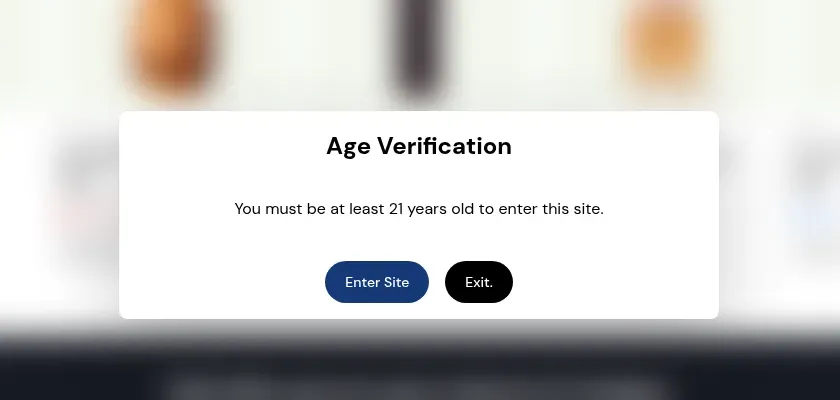
Age popup Not described.[1] Not verified for the Free plan. A popup with Confirm and Exit buttons. It is a self-declaration, not legal age verification. Paid plans
Customize what the visitor sees A password page template with password header and footer sections and an email signup banner, edited in the theme editor or in code.[1] A custom login or sign-up message is listed for the app. We have not verified it per plan.[3] A custom login or sign-up message on locked content.[3] As listed
Preview and testing While the store is private, the preview in the access settings on the Online Store page shows your password page.[1] Test logged out and as a tagged buyer. We have not verified a preview mode. Test as a guest, as a logged-in buyer without the tag and as a tagged buyer. We have not verified a preview mode. Not verified
Turning it off Launch the store to remove the password. Shopify asks for a subscription plan, a business address and payments set up with test mode off.[2] Turn off the rule in the app. Turn off or delete the rules. Lock rules live in the app, so uninstalling it ends the locks. Free and paid
Themes and storefront A theme template, editable in the theme editor or in code.[1] Online Store 2.0 and legacy themes, with automatic or manual install. Headless storefronts are not supported. The same. The app writes snippets into the theme, so unusual themes may need a manual install. All plans
Plans, rating and launch A Shopify setting, with no separate price stated on the help pages.[1] Free, then paid by Shopify plan. 4.9 out of 5 from 651 reviews. Launched December 3, 2019.[3] $9.99 (Basic Shopify), $24.99 (Grow Shopify), $49.99 (Advanced Shopify) and $79.99 (Shopify Plus) per month. Yearly billing saves 20%. The Built for Shopify badge is shown on the listing.[3] As of October 10, 2026

Try a store-wide lock and a price lock on your own store. BSS B2B Lock has a Free plan that locks the whole store, and a 7-day free trial on paid plans.

Get BSS B2B Lock BSS B2B Lock has a 7-day free trial on paid plans. 4.9 out of 5 from 651 reviews on the Shopify App Store (as of October 10, 2026).

Password page cells follow Shopify's help pages as read on October 4, 2026. "Not described" means those pages do not say, not that the feature is missing. Row links go to the matching hub in the Shopify B2B guide.

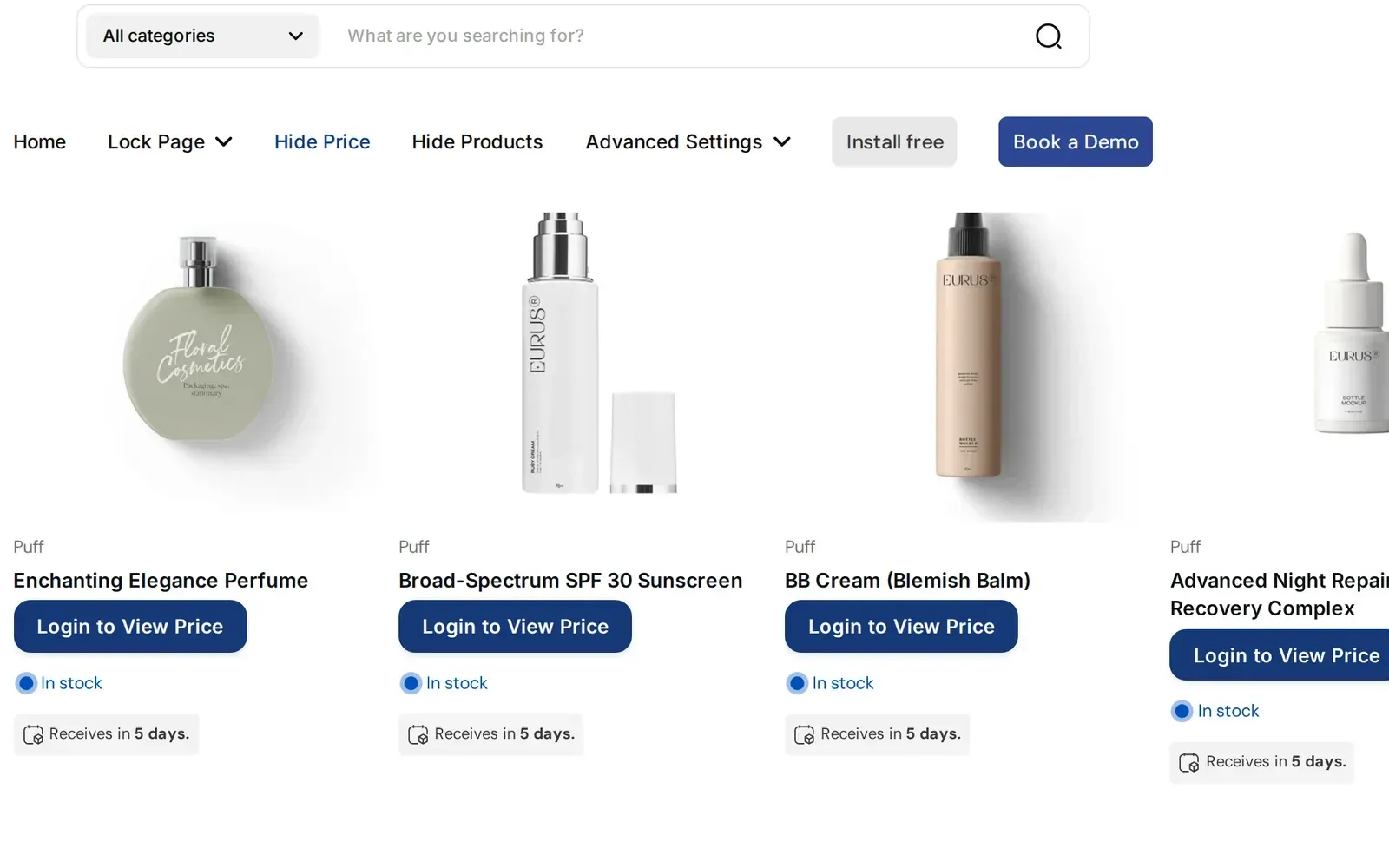
Demo store collection page where each price is replaced by a Login to View Price button
BSS B2B Lock, guest view: prices are replaced by a login button.
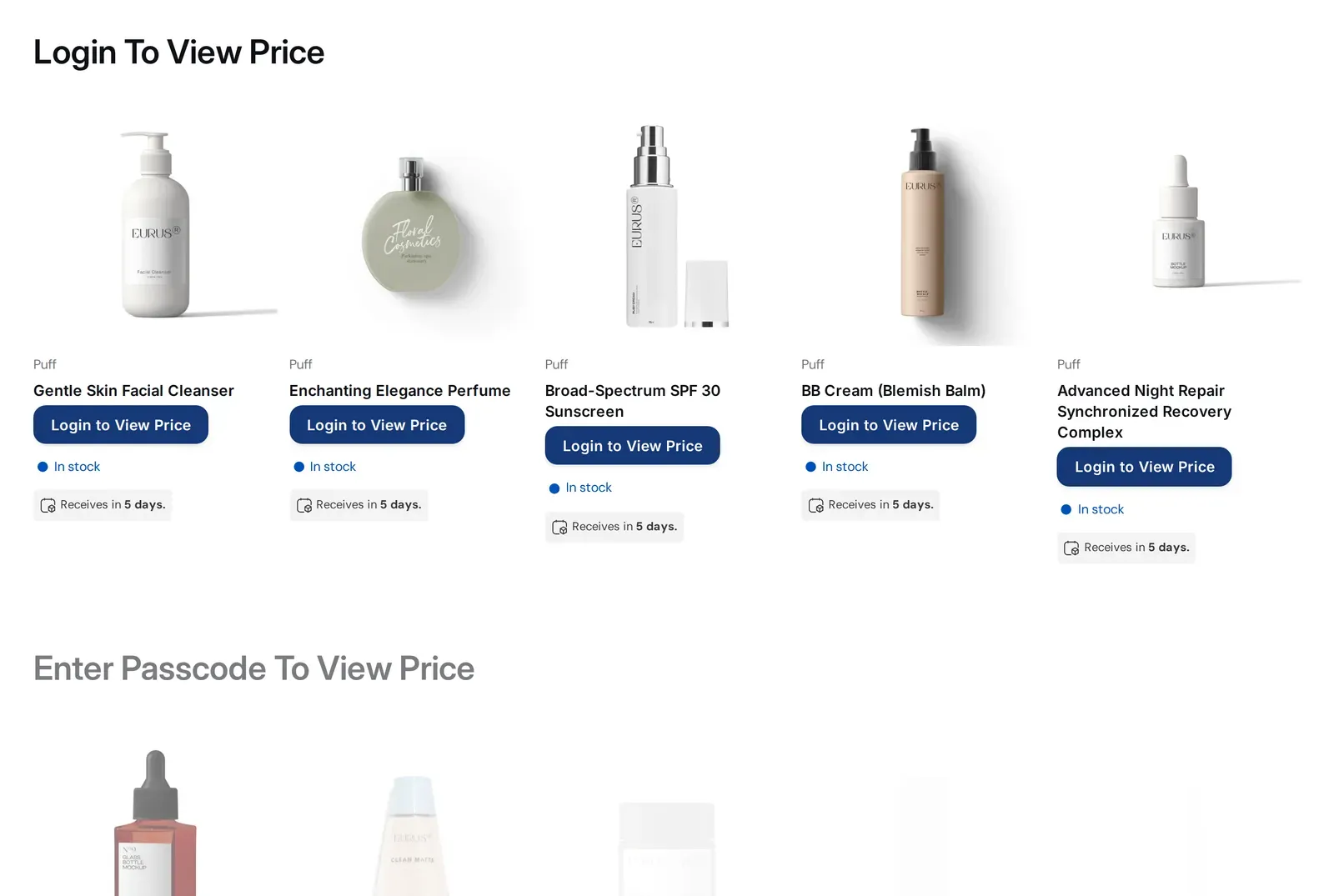
BSS B2B Lock demo store collection as a logged-in B2B buyer with prices visible
BSS B2B Lock, signed-in buyer: the prices are shown.

When is Shopify's password page enough?

A fair comparison says when the built-in option is the better choice. These are the cases we can support from Shopify's help pages.

Before you launch

Shopify starts a new store in private mode and removes the password when you launch. If nobody should see the store yet, you need nothing else.

A closed store with one shared password

If everyone you let in can see everything, and you never need to hide prices from some of them, one password and a customized landing page do the job at no separate charge on the help pages.

A wholesale-only store

Shopify describes an option to restrict access to B2B customers only. If your whole store is for wholesale buyers, test that option before you add an app.

No per-buyer rules

Prices, products and pages are the same for every buyer who gets in. The moment you want different access by customer tag, page or product, a rule-based lock fits better.

Sources: [1], [2].

Where BSS trails the password page

These are the gaps we know of, so you do not find them after installing.

  • It is an app, not a store setting. The lock works through theme code the app writes. Unusual themes may need a manual install, and headless storefronts are not supported.
  • Most locks need a paid plan. The Free plan allows only the Entire store target.
  • Some locks are not strict. An age popup is a self-declaration and leaves the content in the HTML. IP, region and country conditions are set in the browser, and a secret link lets in anyone who holds it.
  • The checkout lock is Shopify Plus only and fails open if the Function errors, so we do not call it a guaranteed block.
  • We have not verified the Entire store target in detail. Check what a logged-out visitor receives, including view-source, before you rely on it.

Migration notes: from the password page to BSS B2B Lock

These are not rival installs. Private mode and the app work on different layers, so plan the order carefully.

Shopify's help pages do not say how private mode interacts with an app lock, so we do not claim to know. Build and test the lock on a development store, and treat the live switch as a separate step.

What you rebuild

A shared password becomes a condition: a customer tag, a login or a passcode set per rule. Decide first which pages, prices and products each buyer group may see.

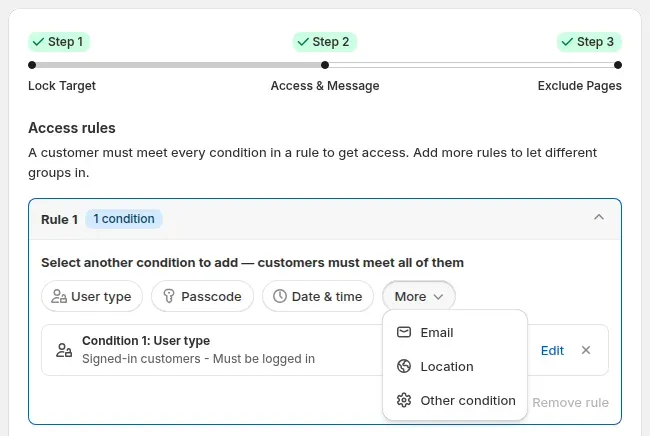
Condition chips User type, Passcode, Date and time and More in a BSS B2B Lock rule
A shared password becomes a condition: a login or tag, a passcode, or one of the other conditions.

What stays in Shopify

Customer records, tags and orders stay in Shopify. If wholesale buyers already carry a tag, point the lock at that tag instead of retagging them.

When to remove the password

Removing the password means launching the store, and Shopify asks for a subscription plan, a business address and payments with test mode off.[2] Do it only after the lock behaves as expected for a guest and for a tagged buyer.

Going the other way

If a lock turns out to be more than you need, uninstall the app. Lock rules live in the app, so uninstalling it ends the locks, while tags and orders stay in Shopify.

How does the cost of the password page compare with BSS B2B Lock?

The password page has no separate price on the help pages. BSS B2B Lock prices by Shopify plan.

SetupMonthly costWhat it covers
Shopify password pageNo separate price statedOne store-wide password, a customizable landing page, optional restriction to B2B customers
BSS B2B Lock Free$0Lock the entire website by condition
BSS B2B Lock Basic Shopify$9.99 per monthRule-based locks for stores on Shopify Basic
BSS B2B Lock Grow Shopify$24.99 per monthThe same locks for stores on Shopify Grow
BSS B2B Lock Advanced Shopify$49.99 per monthThe same locks for stores on Shopify Advanced
BSS B2B Lock Shopify Plus$79.99 per monthAdds the checkout lock, for Shopify Plus stores

BSS prices are from the App Store listing as of October 10, 2026, except the Shopify Plus tier, which comes from the BSS pricing page and is not shown on the listing. Test the entire-store lock on the Free plan and price locks on the 7-day free trial on paid plans. The listing shows 4.9 out of 5 from 651 reviews.[3]

The figures are list prices before tax and other apps, and they compare cost, not capability. BSS yearly billing saves 20%. BSS plan details are on the pricing page.

How do I choose and set up the right lock?

The times are our estimates for a small store.

  1. Decide what stays public

    List what a guest may see: retail products, prices, blog, pages. If the answer is nothing, the password page may be enough.

    About 20 minutes

  2. Try the password page first if the answer is nothing

    Set it in Online Store, Preferences, Store access, and check the landing page in the preview.

    About 15 minutes

  3. Install BSS B2B Lock on a development store

    Use the free plan for an entire-store lock, or the trial for the other targets.

    About 30 minutes

  4. Create one rule per target

    Start with the price and Add to cart lock, then lock products, collections or pages. Use a customer tag as the condition.

    About 60 minutes

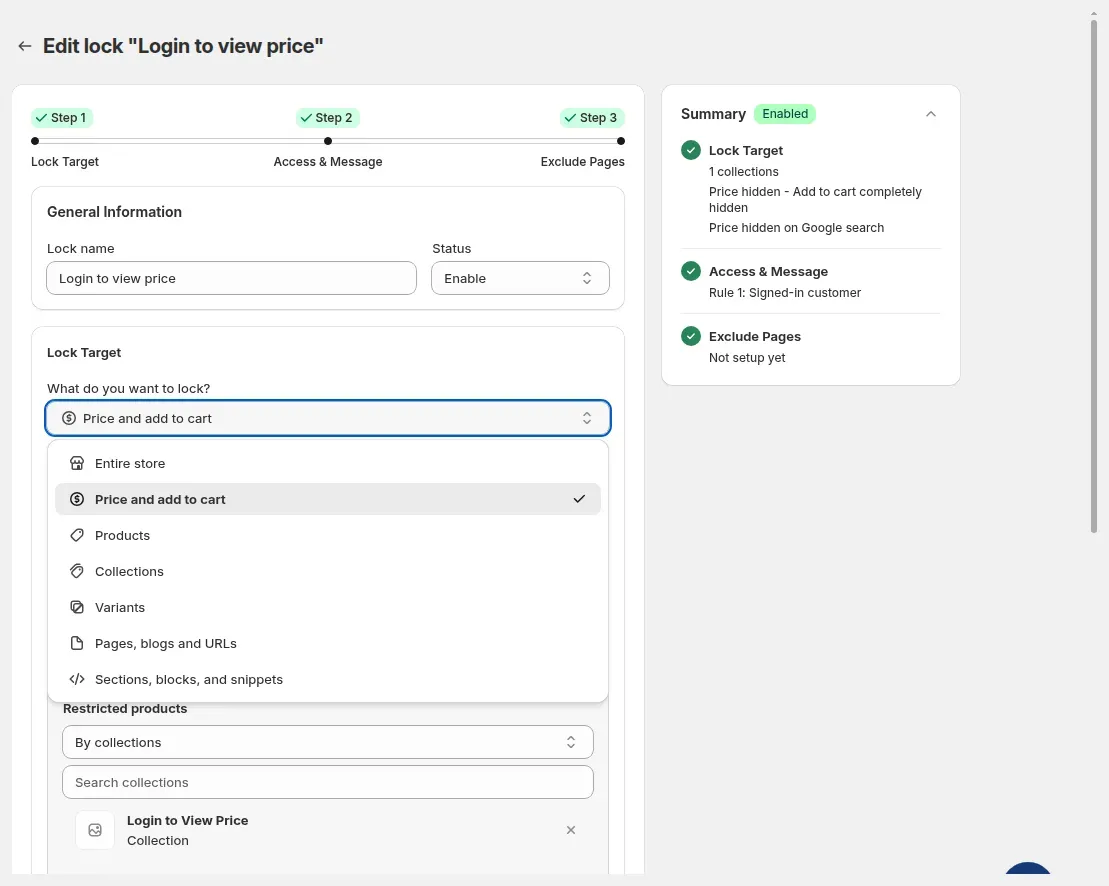
    What do you want to lock? dropdown open with the 7 lock targets
    One rule per target: price and Add to cart, products, collections, pages and more.
  5. Test as each visitor

    Check as a guest, as a logged-in buyer without the tag and as a tagged buyer, on product, collection and page URLs and in search.

    About 60 minutes

  6. Go live

    Install on the live store, repeat the three checks, and only then remove any password.

    About 30 minutes

If you add a checkout lock on Shopify Plus, test a real checkout as well, because it fails open if the Function errors.

BSS B2B Lock has a Free plan that locks the whole store, and a 7-day free trial on paid plans.

Get BSS B2B Lock

What are the limits of both options?

Neither option covers everything. These are the limits that most often decide the choice.

Shopify password page (from its help pages)

  • The help page describes one password for the whole store, and it hides all pages from visitors.[1]
  • Per-page, per-product and per-tag access are not described.[1]
  • How private mode treats checkout and orders is not described.[1]
  • Removing it means launching the store, which needs a subscription plan, a business address and payments set up.[2]

BSS B2B Lock

  • Free allows only the Entire store target. Other targets need a paid plan or the trial.
  • Page, product and collection locks keep the main content out of the HTML, but an age lock does not, and we have not confirmed that JSON or Storefront API endpoints are covered.
  • The checkout lock is Shopify Plus only and fails open. Market, date, time and discount code conditions at checkout are Coming soon.
  • Request-access approval syncs through a queue, so it is not instant.
  • It does not support headless storefronts.
Age verification popup centered on screen over a blurred storefront with Confirm and Exit buttons
The age popup is a self-declaration with Confirm and Exit buttons, not legal age verification.

Try a lock before you choose

Install BSS B2B Lock on a development store, lock the entire store on the Free plan, then add a price lock on the trial and test both as a guest and as a tagged buyer. Add BSS B2B Solution or BSS B2B Quote only if you also need price rules or quotes.

Also: BSS B2B Solution and BSS B2B Quote.

Feature guides

Step-by-step pages for every BSS B2B Lock feature.

Shopify password page vs locked store vs BSS B2B Lock: frequently asked questions

Is Shopify's password page enough for a wholesale store?

It is enough when the whole store should stay closed and one shared password for every visitor is fine, for example before launch. Shopify also describes an option to restrict access to B2B customers only. It is not enough when you need different access by customer tag, page or product, because the help page describes one store-wide password.

What does Shopify's password page do?

While private mode is on, Shopify says all of the store's pages are hidden from visitors and search engines and a customizable landing page with a password option is shown instead. You turn it on under Online Store, Preferences, Store access.

Can I keep my retail store public and hide only wholesale prices or pages?

Not with the password page, which covers the whole store. Rule-based locks such as BSS B2B Lock can hide prices and Add to cart or lock products, collections and pages by condition, and leave the rest public. Those targets need a paid plan or the trial.

What is a locked store, and does BSS B2B Lock do it for free?

We use the term for locking the entire storefront by a condition such as login or customer tag. The BSS B2B Lock Free plan locks the entire website by condition. Every other lock target needs a paid plan or the trial.

Does BSS B2B Lock lock checkout?

Yes, for Shopify Plus stores on a paid BSS plan. A Shopify Function blocks checkout by condition, but it fails open if the Function errors, so we do not call it a guaranteed block. Market, date, time and discount code conditions at checkout are Coming soon.

Are the locks a replacement for security?

We describe them as restricting storefront access through theme code, not as security. An age popup is a self-declaration, IP and country conditions are set in the browser, and a secret link lets in anyone who has it. Do not use them to protect data that must stay private.

Do I have to remove the Shopify password to use BSS B2B Lock?

Shopify's help pages do not say how private mode and an app lock interact, so test on a development store first. To remove the password you launch the store, which needs a subscription plan, a business address and payments set up with test mode off.

How much does BSS B2B Lock cost?

It has a free plan, then $9.99 (Basic Shopify), $24.99 (Grow Shopify), $49.99 (Advanced Shopify) and $79.99 (Shopify Plus) per month by Shopify plan, with a 7-day free trial on paid plans. Prices are list prices as of October 10, 2026 and can change.

Sources, method and update log

Facts about the password page come from two Shopify Help Center pages, read on the date shown. Facts about BSS come from the App Store listing, the BSS user guides and our review of how the app behaves. If a price or feature changes, this page changes with it.

Sources

  1. Shopify Help Center: Customize your password page (private mode), read . Where to set private mode, what visitors and search engines see, the password and landing page customization, the B2B customers option, preview.
  2. Shopify Help Center: Prepare to launch your store, read . Private mode during the trial and what is needed before the password can be removed.
  3. Shopify App Store: BSS B2B Lock, Login & Password (BSS B2B Lock), read . BSS plans, trial, rating, Built for Shopify badge, launch date, custom login message.

Update log

  • : First published. Password page facts read from the Shopify Help Center on this date; BSS facts checked against the app review of 2026-10-03.
  • : Meta description shortened to fit search results.
Install BSS B2B Lock 7-day free trial on paid plans