
Shopify Hide Prices: The Complete Guide to Hiding Prices From Guests, Retail Buyers and Search Engines

To hide prices on Shopify, edit your theme code, hide the price with CSS, gate a dedicated B2B store, or install an app. Code and CSS hide prices from everyone unless you add more logic. To show prices only to logged-in or approved wholesale customers, use a rule-based app such as BSS B2B Lock.
Hide the price and Add to cart per rule, by customer login, tag or request access, with a message that tells guests how to get in.
Install BSS B2B Lock Add registration and tags with BSS B2B SolutionLast reviewed on October 4, 2026. Every Shopify fact below links to the Shopify page it comes from. BSS B2B Solutions makes BSS B2B Lock and BSS B2B Solution, the two apps used in the step-by-step sections, so treat our own app as one option among the four methods compared here. This guide is part of our Shopify access control for B2B hub and our complete guide to Shopify B2B.
Key takeaways
- Shopify does not document a built-in setting that hides the regular price from visitors who are not logged in. Its B2B plan table has no price-hiding row, and its setup checklist points to third-party apps for locking parts of a store.
- There are four ways to hide prices: theme code, CSS, Shopify’s own store gating, or an app. Only code and apps can still show the price to logged-in customers.
- CSS hides the price on screen only. The price stays in the page source.
- BSS B2B Lock hides the price and Add to cart per rule: for every product, by collection or tag, or for specific products. Signed-in customers, tagged customers or approved requests can see them.
- The Hide price on Google search option makes prices less likely to show in search results. It can take up to 24 hours and does not remove the page from Google.
- Hiding a price is a display control, not security. Do not rely on it for anything confidential.
Does Shopify have a built-in way to hide prices?
Not for a normal store that sells to both retail and business buyers. Shopify’s native B2B gives business buyers their own prices, but it does not remove the regular price that guests see. Four official pages explain why:
- Only logged-in B2B customers get B2B pricing. Shopify says that only logged-in B2B customers can access B2B-specific pricing, B2B-only products and B2B-exclusive store content (Sign-in and customer accounts in B2B).
- A blended store cannot be gated. Shopify’s store-type page says your online store can’t be gated to only B2B customers, because your D2C customers couldn’t place orders (Blended and dedicated B2B stores). Guests keep seeing the regular price.
- A dedicated B2B store can be gated. The same page says you can gate a dedicated store so the URL and login page are only accessible to B2B customers. Shopify adds that restricting access does not redirect all visitors to a sign-in page (Sign-in and customer accounts in B2B).
- The password page hides everything. In private mode, all of your online store’s pages are hidden from visitors and search engines, and a landing page shows instead (Password page). That is a store-wide switch, not a way to hide prices only.
For everything in between, Shopify’s own checklist says: if you want to hide entire pages of your store from D2C customers or anyone who isn’t logged in, you can use third-party apps to lock parts or all of your store (Setup checklist for blended B2B stores).
Why and when to hide prices on Shopify
Merchants hide prices for five practical reasons. Knowing yours decides which of the four methods below fits.
- Login to view price. Wholesale prices are for approved buyers only, so guests see a prompt to log in or apply (see hide-price in the glossary).
- Launching a new store. You want products visible before the price list is final.
- Volatile costs. When material or freight costs move often, a printed price goes stale and a quote is safer.
- Negotiated pricing. You want buyers to contact you or request a quote instead of reading a list price. See Add a Request a Quote button and hide the price.
- Competitors. You do not want rivals to read your wholesale prices without an account.
4 ways to hide prices on Shopify compared
Pick by what must happen for a logged-in wholesale buyer. If they must still see the price, CSS alone cannot do it. The last column is the limit to plan around.
| Method | Who sees the price | Logged-in buyers still see it? | Effort | Main limit |
|---|---|---|---|---|
| Edit theme code (Liquid) | Whoever your if check allows | Yes, if you write that check | Developer time on every template that prints a price | Changes can be lost on theme update; each place that prints a price needs its own edit |
| Hide with CSS | Nobody on screen | No, unless you add logic | Low | The price stays in the page source |
| Shopify’s own gating (dedicated B2B store or password page) | Only logged-in B2B customers (dedicated store) or only people with the password | Yes (dedicated store) | A second store, or a store-wide switch | A blended store cannot be gated to B2B customers only |
| App such as BSS B2B Lock | Rule-based: guests, tags, collections or products | Yes: signed-in, tagged, approved or passcode holders | Set up once in an app, no code | Paid plan for price rules; theme compatibility; display control only |
Method 1: Hide the price with theme code
Shopify’s Liquid language can check who is looking at the page. The customer object is available when a customer is logged in and returns nil for a visitor who is not logged in (Liquid customer object). Wrap the place where your theme prints the price in a check:
{% if customer %}
  {{ product.price | money }}
{% else %}
  <a href="{{ routes.account_login_url }}">Log in to see the price</a>
{% endif %}
routes.account_login_url is the account login page URL and redirects to customer accounts when they are enabled (Liquid routes object). To show prices only to wholesale accounts, test a tag instead: {% if customer and customer.tags contains 'wholesale' %}. Customers have a tags array you can read the same way.
Steps: duplicate your theme first, because Shopify warns that code changes incompatible with a theme update are removed in the updated copy (Edit theme code). Open Online Store, then Edit code, search the theme for the code that prints the price, wrap it, and repeat for each place a price appears. Then test in a private window.
Where a code edit still leaks the price
- Every template that prints a price. Product page, collection cards, search results, featured products, quick view and cart each have their own code.
- Structured data. Shopify’s
structured_datafilter converts a product into schema.org markup (structured_data filter), and themes often print it on every product page. Check what your theme outputs. - Public product endpoints. Shopify’s Ajax API returns a product’s JSON at
/products/<handle>.jswithout authentication, with monetary values included (Ajax Product API). A theme edit does not change that.
The last point applies to every theme-level method, including apps. It is why we call hiding a display control and not a security feature.
Method 2: Hide the price with CSS
Add a rule such as .price { display: none; } to your theme stylesheet. The class name depends on your theme, so inspect the price element first. This is the fastest method and the weakest: the price is still in the HTML, and it is hidden from everyone, including the wholesale buyers you want to serve. Use it for a temporary launch or a product page that is not ready, not for wholesale pricing.
Method 3: Use Shopify’s own gating
Two native options exist, and both are blunt. A dedicated B2B store can be gated so only logged-in B2B customers view it, which means running a second store with its own admin (Blended and dedicated B2B stores). The password page hides all pages from visitors and search engines (Password page). Neither lets a blended store show products to everyone and prices only to logged-in buyers. For a comparison of the password page and locks, read how to password protect a Shopify page.
Method 4: Use an app to hide prices by rule
An app removes the code work and adds the rules Shopify does not have: who may see the price, on which products, and what message guests get. BSS B2B Lock writes its rules into your theme as Liquid, so the check runs on Shopify’s server when the page is built. Where a theme is unusual, always confirm the result as a guest. If you are still comparing options, see our comparison of hide price apps.
How to hide prices from non-logged-in customers on Shopify (step by step)
This walkthrough uses BSS B2B Lock. The result: guests browse products but see a login prompt where the price was, and logged-in customers see prices as usual. The official hide prices from guest users guide has the full reference.
Before you start
- BSS B2B Lock is installed and opens from your Shopify admin.
- Customer accounts are enabled in your Shopify settings, because login-based access needs them.
- The BSS B2B Lock app embed is on in your live theme (Online Store, Themes, Customize, App embeds).
- You are on a paid Lock plan. The Free plan locks the entire website only, and price rules are listed on the paid plans.
Step 1: Add a lock rule
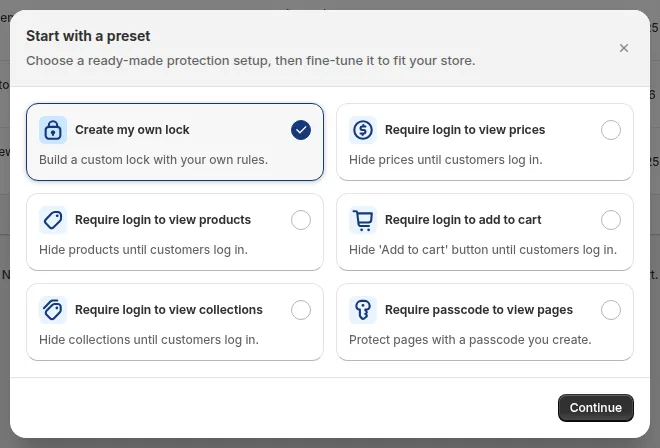
Open BSS B2B Lock, click Locks, then Add lock rule. In the Start with a preset window select Create my own lock and click Continue. The Require login to view prices preset builds a similar rule for you; building it by hand shows every setting.
Step 2: Choose Price and add to cart as the target
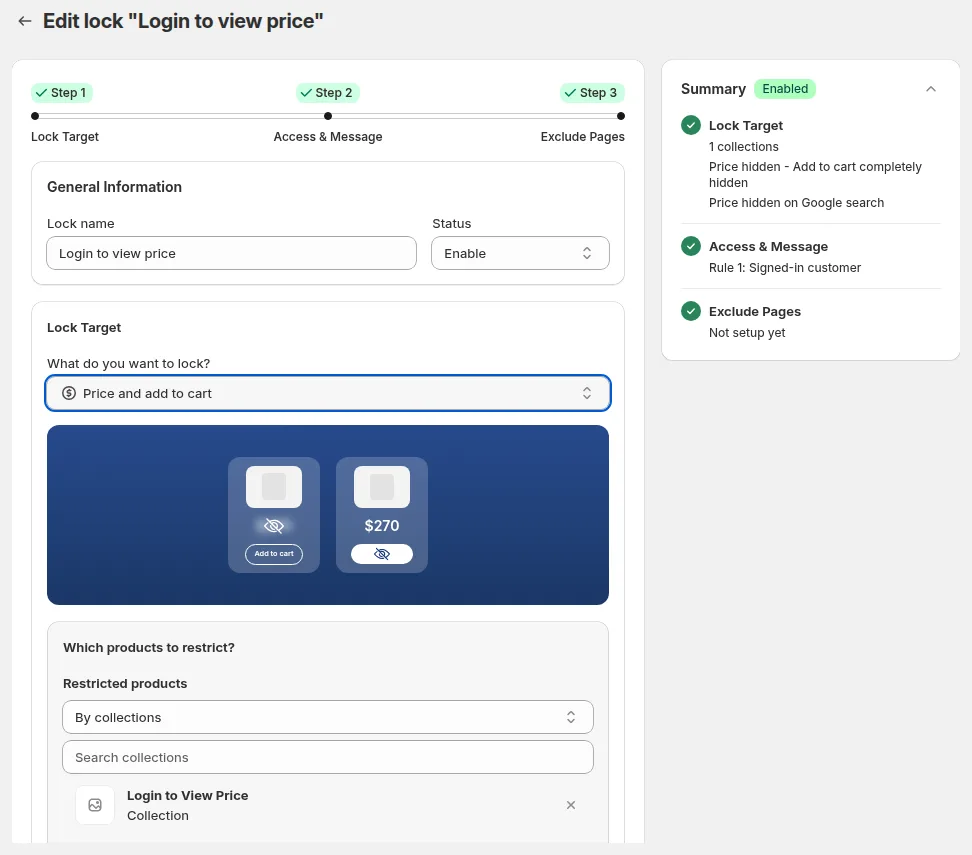
Enter a Lock name, for example Hide prices from guests, and keep Status on Enable. Under Lock Target, open What do you want to lock? and select Price and add to cart. Under Which products to restrict?, pick All product to hide prices store-wide, or restrict by tags, collections, specific products or specific variants.
Step 3: Decide what to hide
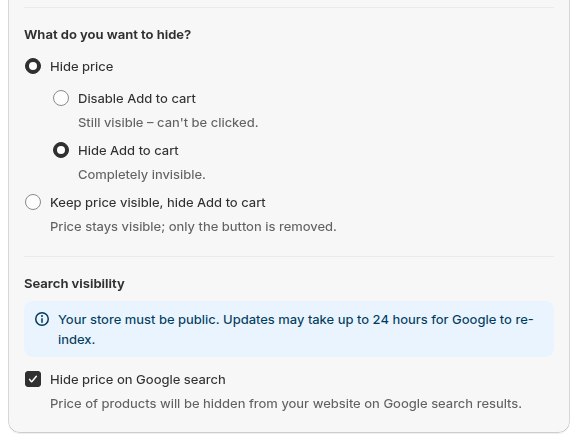
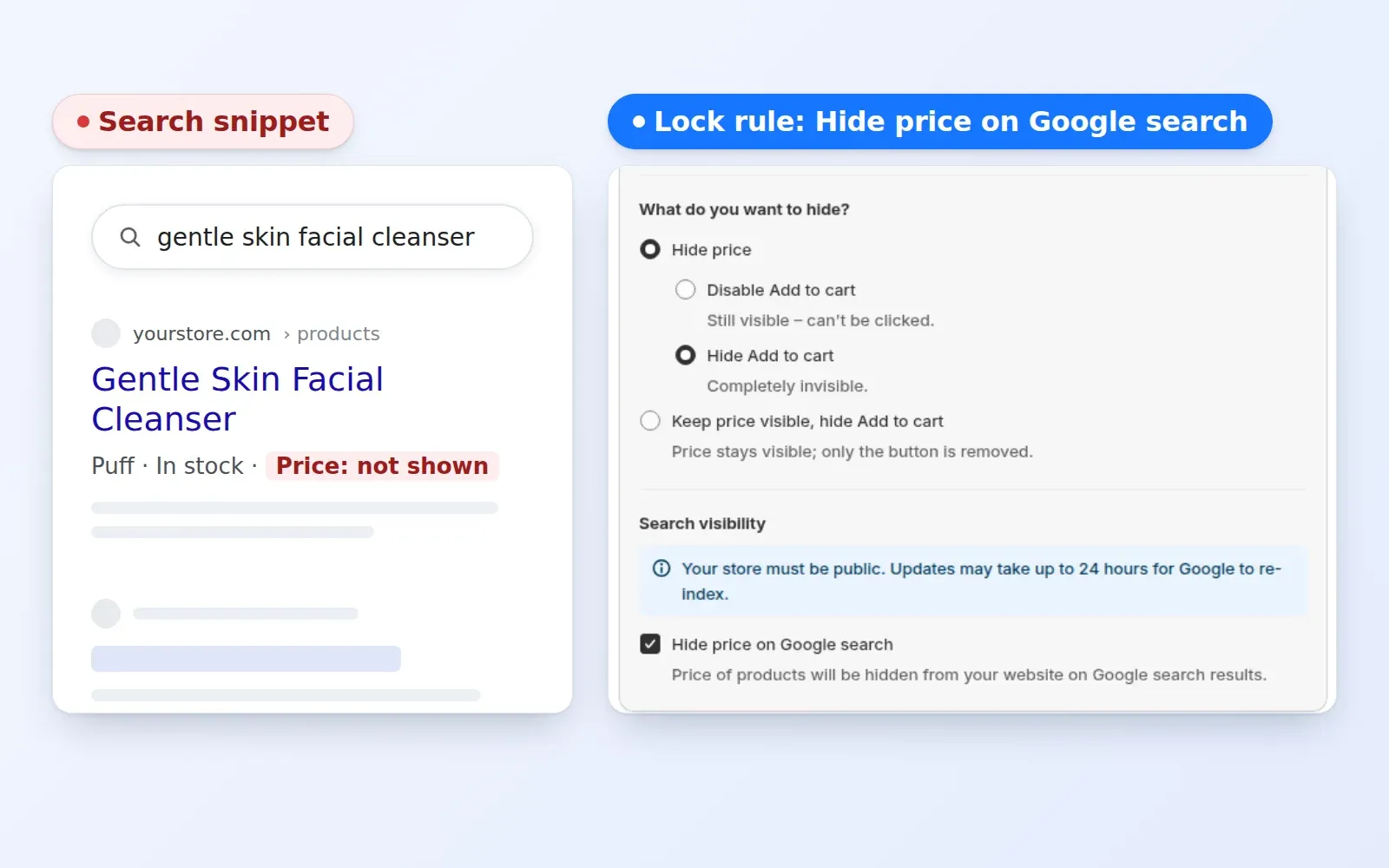
Under What do you want to hide? choose one of three setups: Hide price with Disable Add to cart (the button shows but cannot be clicked), Hide price with Hide Add to cart (the button disappears), or Keep price visible, hide Add to cart. Under Search visibility, tick Hide price on Google search if you want that option (details below).
Step 4: Choose who can see prices
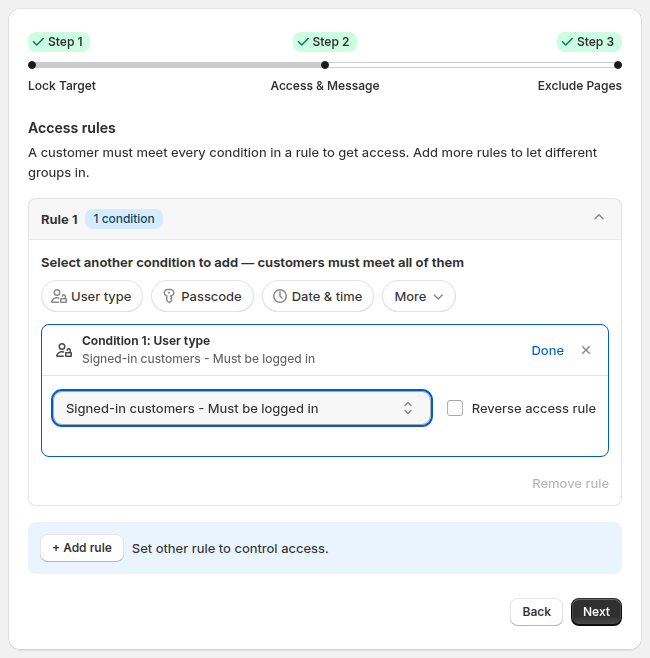
In the Access & Message step, click the User type condition and select Signed-in customers. Logged-in customers see prices; guests see your message. The dropdown also offers tagged customers, specific customers by exact email, request access, company name, company location and Shopify B2B customers.
In the Preview card, click Customize message to write what guests read in place of the price, such as Log in to your wholesale account to see pricing. A clear message cuts confusion and tells buyers how to get access.
Step 5: Exclude pages and save
In the Exclude Pages step you can keep prices visible on selected pages, such as the home page or specific products. Click Save and wait for the Saved lock settings message. Each rule has one lock target, so make a separate rule if you also want to lock the entire store.
Step 6: Test as a guest
- Open your store in a private window, logged out.
- Open a restricted product and a collection page. The price should be gone and your message should show.
- Search for the product on your store. Search results are covered too.
- Log in with a test customer that meets your rule and confirm the price returns.
- View the page source as a guest and search for the price. If it still appears, contact BSS support and tell them which theme you use.
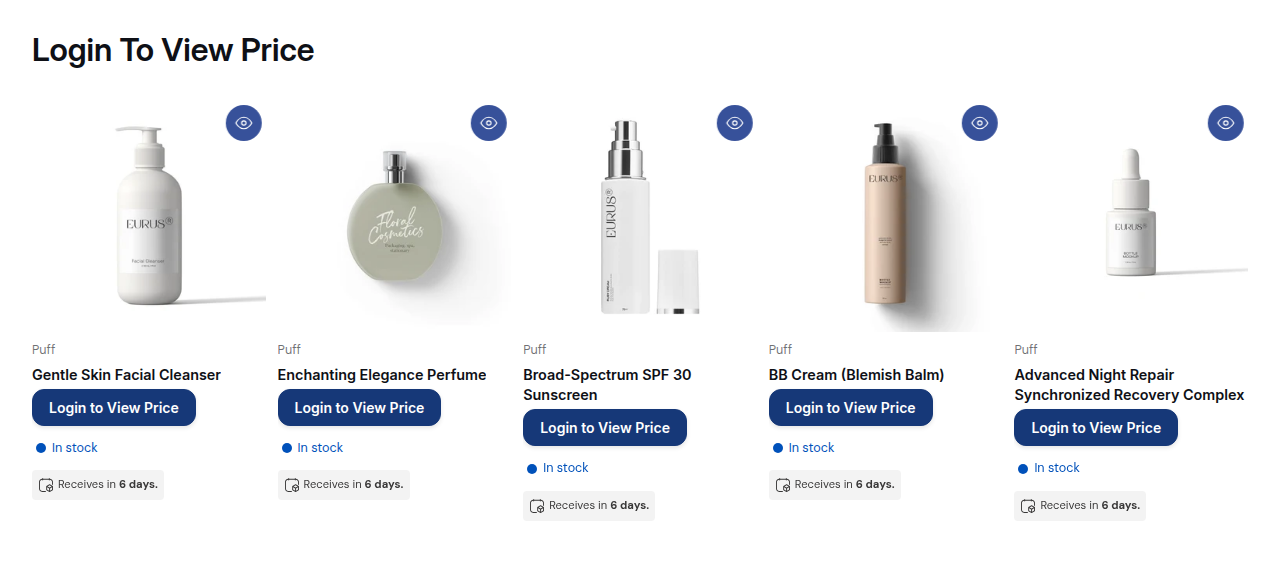
Start with the Require login to view prices preset, test it as a guest, then refine by tag or collection. Lock has a 7-day free trial on paid plans.
Get BSS B2B Lock See Lock pricing and plansHow to show prices only to approved wholesale customers
“Signed-in” is a low bar: any retail shopper can create an account. For wholesale, you usually want prices visible only after you approve the buyer. The flow is register, approve, tag, unlock.
- Register. Buyers apply through a form. BSS B2B Solution registration forms support text, file and dropdown fields and tax ID fields such as EU VAT, UK VAT, US EIN, ABN and India GST.
- Approve and tag. You review each application. On approval, the app can add a customer tag you choose, such as wholesale.
- Unlock. In BSS B2B Lock, set the User type condition to Tagged customers and enter that tag.

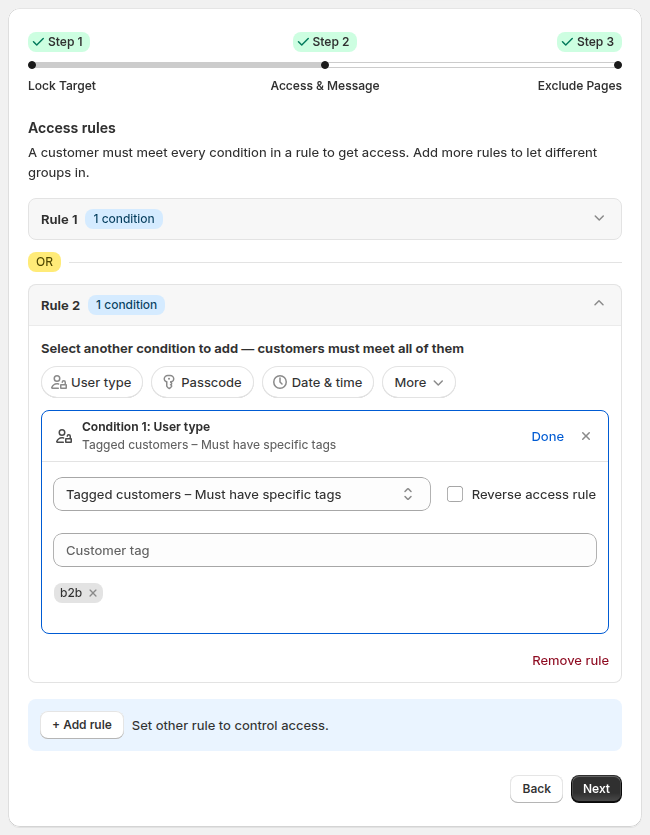
Tags are your keys: one tag can unlock prices, collections and pages at the same time. Rule 1 and Rule 2 work as OR, so you can let signed-in staff and tagged buyers in through separate rules. Read the registration and tags guide, or see the use cases Wholesale registration form with approval and Show specific products only to tagged customers. The onboarding side is covered in the customer onboarding hub. Learn the term in the glossary: customer tag.
Prefer not to build a form? Lock also has a Request access user type: a visitor asks for access and you approve it per rule. Approval syncs through a queue, so it is not instant, and it does not add a tag.
How to show retail prices but hide wholesale prices from guests
A common setup: public products show a normal price, while a wholesale or trade collection hides it. In the lock rule, set Restricted products to By collections or By tags and pick the wholesale collection or tag. Everything else keeps its price. Read the use case Hide wholesale prices from guest visitors and Hide wholesale collections from guests. To give the right buyers a different price, rather than hiding it, use price rules: see the wholesale pricing hub.
How to hide the price and ask for a quote instead
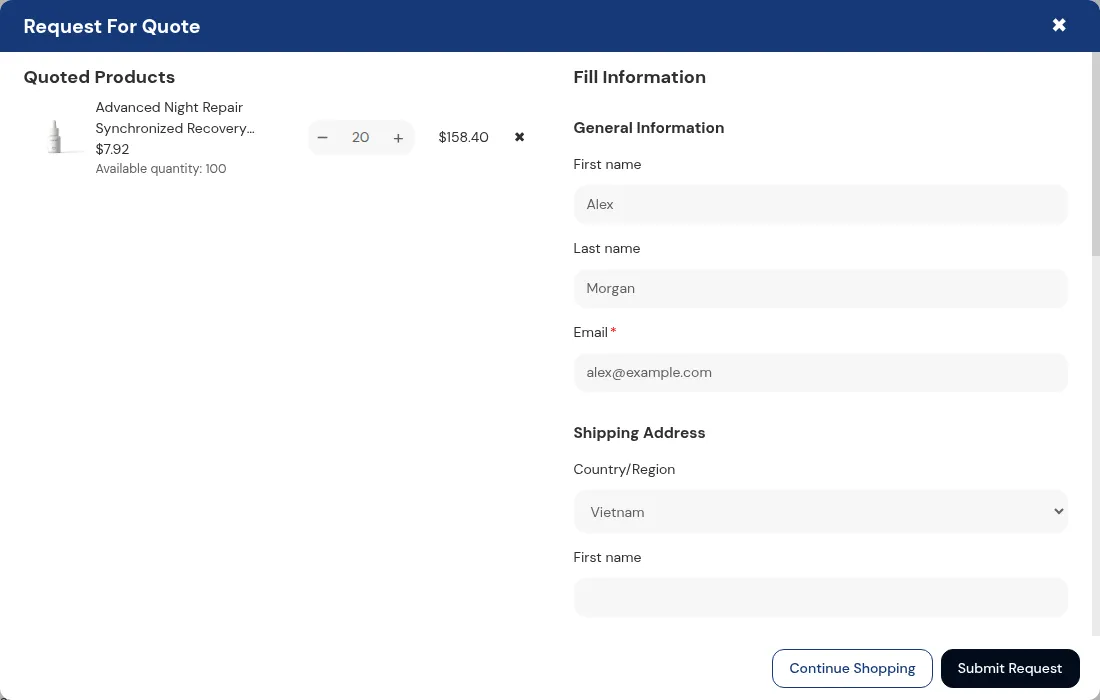
When a price needs a conversation, replace it with a request. Lock hides the price and Add to cart, and BSS B2B Quote lets a visitor send a quote request. You edit price, shipping and expiry and send a proposal, and a logged-in customer approves it by email. The app then creates a draft order and sends the invoice. See Add a Request a Quote button and hide the price and the quote and quick order hub.
How to hide prices from Google and search engines
Two different things get called hiding prices from search engines, and they are not the same.
| Option | What it does | What it does not do |
|---|---|---|
| Hide price on Google search (Lock option) | Hides the product price from your website for visitors who do not pass the rule, including search crawlers, which count as guests. Prices are less likely to appear in results. | It does not remove the page from Google. Changes can take up to 24 hours. Your store must be public. |
| noindex on locked pages (Lock option in the Exclude Pages step) | Adds a noindex meta tag to pages protected by the lock. | It does not hide prices on pages that are not locked. |
| Shopify password page | Hides all pages from visitors and search engines. | It hides the whole store, so nothing can rank (Shopify Help Center). |
Lock does not change your Merchant Center product feed. If you advertise on Google, review the feed separately. Read the use case Hide prices from Google search results for the full flow and limits.
Hide price, hide Add to cart, hide products or lock the store: what to choose
| Goal | Lock setting | What a guest sees | Note |
|---|---|---|---|
| Hide the price, block buying | Price and add to cart, Hide price, Disable or Hide Add to cart | A message in place of the price | Paid plan |
| Show the price, block buying | Price and add to cart, Keep price visible, hide Add to cart | Price without a buy button | Useful for catalog-only browsing |
| Hide whole products or collections | Lock product or collection | The page is replaced by your message | Main content is not printed in the page for locked pages |
| Gate the whole store | Entire store with a condition such as login or passcode | A login or passcode prompt | Available on the Free plan |
| Stop guests at checkout | Checkout lock (Shopify Function) | Checkout is blocked for buyers who fail the rule | Shopify Plus only, and needs a paid Lock plan. Read Block checkout for unapproved buyers |
A lock on a whole product or page is stronger than hiding a price: the main content is not printed in the HTML for visitors who fail the rule. Age gates are the exception, because the content stays in the HTML. For gating a whole wholesale store, read Lock the entire store for approved wholesale customers.
Limits and caveats before you hide prices
- Not a security feature. Locks control what the storefront shows. A determined visitor can find prices through other routes, such as public product endpoints. Do not hide anything confidential this way.
- Theme-based. BSS B2B Lock works with Online Store 2.0 and legacy themes, with auto or manual install. Headless storefronts are not supported. Unusual themes may need a manual install or a check.
- Other apps and scripts. A theme script or another app that prints prices or buttons can override a rule. Test every place a price shows, such as popups and quick views.
- One target per rule. You cannot combine Entire store and Price and add to cart in one rule. Create separate rules.
- Hide price on Google is best effort. It makes prices less likely to appear, can take 24 hours or more, and does not unindex a page.
Which method should you use?
| Your situation | Best fit | Why |
|---|---|---|
| Hide one price for a few days | CSS | Fast, reversible, and nobody needs to see the price |
| Show prices to any logged-in customer on one template, with a developer available | Theme code | Full control, but you maintain it |
| A separate trade-only site | Dedicated B2B store (Shopify) | Gates the whole store, but means a second store |
| Retail and wholesale in one store, approved buyers only | App with registration and tags | Rules by tag, collection or login, plus approval |
| Store not ready to launch | Password page | Hides everything from visitors and search engines |
How much does it cost to hide prices on Shopify?
CSS and theme code cost developer time only. Shopify’s gating options are included with your plan. An app adds a monthly fee. BSS B2B Lock is free to install, and the Free plan locks the entire website by condition. Price rules need a paid plan, priced by your Shopify plan: $9.99 (Basic Shopify), $24.99 (Grow Shopify), $49.99 (Advanced Shopify) or $79.99 (Shopify Plus) per month, with a 7-day free trial on paid plans. BSS B2B Solution, which adds registration, approval and tags, starts at $29 per month on paid plans with a 14-day free trial. Prices are from the Shopify App Store listings as of October 2, 2026, so confirm them on the BSS B2B Lock page or the BSS B2B Solution page. Both apps are rated 4.9 on the App Store (BSS B2B Lock: 651 reviews; BSS B2B Solution: 1,187 reviews, as of that date).
FAQ: hiding prices on Shopify
How do I hide prices on Shopify?
Four ways: edit your theme code, hide the price with CSS, gate a dedicated B2B store, or install an app. CSS hides the price from everyone. Theme code and apps can hide it from guests and still show it to logged-in customers. BSS B2B Lock does this with a rule and no code.
How do I hide prices from customers who are not logged in?
Create a lock rule with the target Price and add to cart and the access rule Signed-in customers. Guests then see your message instead of the price, and logged-in customers see prices as usual. Test in a private window.
Can I hide prices on Shopify without an app?
Yes, with theme code. Wrap each place your theme prints a price in a Liquid check such as {% if customer %}. You must repeat it for every template and recheck after theme updates. Shopify does not document a built-in setting that hides the regular price from guests.
Does Shopify have a built-in hide price feature?
Shopify does not document one. Its B2B plan table has no price-hiding feature, and its setup checklist points to third-party apps to lock parts or all of a store. Shopify’s B2B pricing is shown only to logged-in B2B customers, but the regular price stays visible in a blended store.
Can I show prices only to wholesale customers?
Yes. Use a lock rule with the User type Tagged customers and the tag your wholesale buyers carry. BSS B2B Solution can add that tag automatically when you approve a registration form, so approved buyers see prices and everyone else does not.
Can I hide Add to cart but keep the price?
Yes. In BSS B2B Lock choose Keep price visible, hide Add to cart. The price stays and only the button is removed. You can also hide the price and disable the button, which stays visible but cannot be clicked.
How do I hide prices from Google?
Tick Hide price on Google search in the lock rule. It makes prices less likely to appear in search results. It can take up to 24 hours, your store must be public, and it does not remove the page from Google. The Shopify password page hides all pages from search engines instead.
Is hiding prices on Shopify secure?
No. Hiding is a display control for the storefront. Prices can still be reachable through other routes, such as Shopify’s public product endpoints. Use it to shape what visitors see, not to protect confidential information.
Do I need Shopify Plus to hide prices?
Shopify’s B2B plan table does not list hiding prices as a feature on any plan, so it is not tied to Plus. For BSS B2B Lock, the part limited to Shopify Plus is the checkout lock. Hiding prices and Add to cart is a storefront rule.
How do I stop wholesale prices showing in Google search results and in the page source?
These are two separate problems. For Google, tick Hide price on Google search in the BSS B2B Lock rule: it replaces the price in the structured data and meta tags that visitors without access receive, which makes the price less likely to appear in search results. It does not guarantee it, it can take time for results already indexed to change, and your store must be public. For the page source, a lock rule is a display control for the storefront. Shopify also exposes product data through public endpoints, so do not rely on hiding alone for prices that must stay confidential. If a product, collection or page must stay out of the HTML, lock it instead: the main content is then not in the page for people without access. See our use case on hiding prices from Google search results.
Next steps
Start by deciding who must see the price: nobody, any logged-in customer, or approved wholesale buyers. Then pick the method from the comparison table. If you sell to approved buyers, read the complete guide to Shopify B2B and the access control hub. For building a login flow, see how to create a Shopify B2B login.
Install BSS B2B Lock, hide prices for guests, and unlock them for approved buyers. Add BSS B2B Solution when you also need registration, approval and customer tags.
Install BSS B2B Lock Also see BSS B2B SolutionSources
Shopify pages read on October 4, 2026. BSS facts: BSS user guides at docs.bss-b2b.solutions and the Shopify App Store listings (as of October 2, 2026).
- Shopify Help Center: Shopify B2B
- Shopify Help Center: Blended and dedicated B2B stores
- Shopify Help Center: Sign-in and customer accounts in B2B
- Shopify Help Center: Setup checklist for blended B2B stores
- Shopify Help Center: Shopify B2B features by plan
- Shopify Help Center: Password page
- Shopify Help Center: Edit theme code
- Shopify developer docs: Liquid customer object
- Shopify developer docs: Liquid routes object
- Shopify developer docs: structured_data filter
- Shopify developer docs: Ajax Product API
- BSS B2B Lock user guide: Hide prices from guest users
You may also like

How to Remove Tax Included on Shopify (2026 Guide)
Shopify shows “tax included” when your store is set to include tax in prices. To remove it, […]

Shopify Quantity Breaks: How to Implement & Boost Sales
These quantity breaks are the most vibrant strategies that custom store owners around Shopify are using. It […]

How To Sell B2B Services: A Complete Guide to Closing Deals
B2B sales, especially B2B sales service have dramatically increased in recent years, and salespersons, therefore, have to […]