
Slow Sales Cycle
Manually looking up contract rates for dozens of SKUs creates a bottleneck.
Use Case
Bring your BSS B2B Solution prices into the quote request list, so requests arrive with B2B prices already in place. Less manual entry for every line item.
Reviewed by Hoa Nguyen, Senior Marketer. Last reviewed
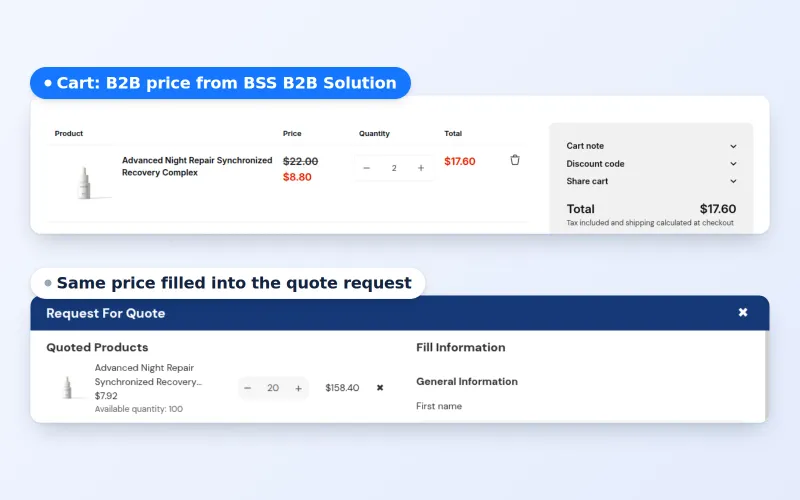












Automated B2B quote pricing on Shopify means quote requests arrive with your B2B prices already filled in, and proposals can go out without manual typing. With BSS B2B Quote, buyers add products to a quote list at the prices BSS B2B Solution gives them, and Quote Automation can send the proposal when your conditions match.
This page is for wholesalers and manufacturers that sell by quote and spend too long retyping prices. It explains how the flow works from request to draft order, who benefits, an example, the limits you should plan around and a setup checklist.
the problem
Relying on human input for quotes put your B2B business at risk. Manual entry creates friction that stalls your pipeline and frustrates your key clients.
Manually looking up contract rates for dozens of SKUs creates a bottleneck.
A single typo or a forgotten surcharge can result in quotes that are accidentally underpriced
Inconsistent pricing (e.g., quoting a VIP client the “standard” rate by mistake) creates friction and forces awkward negotiations to correct errors.
OUR SOLUTION
Buyers add products to a quote request list that shows their prices from BSS B2B Solution (Custom Pricing, quantity breaks and quantity increments). This applies to customers who do not use Shopify’s native B2B, and segment pricing needs the buyer to be logged in. After the request is submitted, the store owner manages it in the BSS B2B Quote admin: review prices, edit shipping and expiry, then send a proposal.
Target Sectors
This solution is essential for B2B merchants who manage complex, multi-tier pricing structures and negotiated customer contracts.
benefits
How Automated B2B Quote Pricing Impact Your Business
Less manual data entry for quote requests.
Quotes follow customer-specific pricing and contract rules.
Faster responses to quote requests
Consistent documentation for the buyer.
Quote lines arrive already priced, so there is less to type before you respond.
Prices come from your BSS B2B Solution rules, which reduces typing mistakes. You can still review every line before sending.
Frees up your account managers from “data entry” mode, allowing them to focus on high-value tasks like negotiation and relationship building.
Quantity breaks and custom prices set in BSS B2B Solution are applied to the quote request list, which lowers the chance of quoting a standard price to a VIP client. Always review before sending.
You can edit unit prices, shipping and expiry on any quote before you send the proposal.
Buyers get the proposal by email as soon as you send it, and signed-in buyers can approve it from the email link.
The prices in the quote request list match the prices the buyer saw in the store, which helps avoid price disputes.
Workflow
See how our suite handles your most complex B2B requirements
Assigns customers to specific groups or tags. Within BSS B2B Solution, you define the unique pricing rules, tiered discounts, or contract rates that apply strictly to those segments.
Customers browse the store and adds a bulk list of items to their quote basket. The system automatically detects pricing logic set up previously in BSS B2B Solution.
The quote request shows the B2B price for each line, taken from the rules you defined in BSS B2B Solution (Custom Pricing, quantity breaks, quantity increments).
Open the request in the BSS B2B Quote admin and check the prices. Adjust prices, shipping or expiry if needed, add a note and send the proposal. With Auto Convert to Draft Order on, a signed-in buyer can approve from the email and the app creates a draft order and emails the invoice.
see it in action
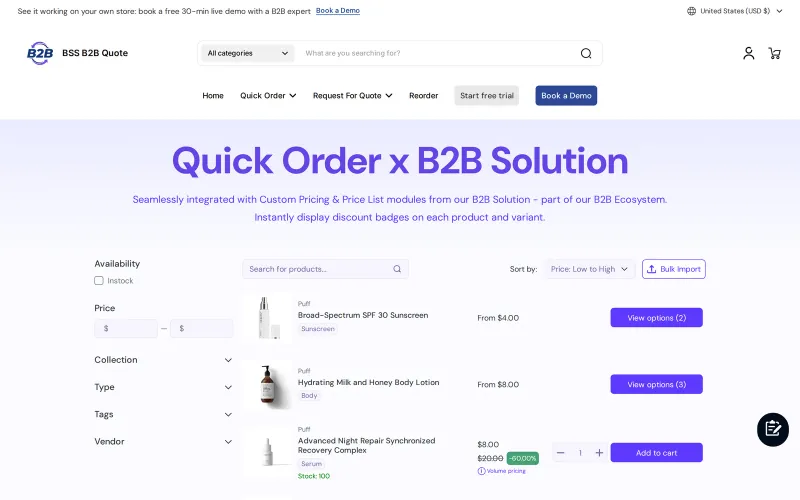
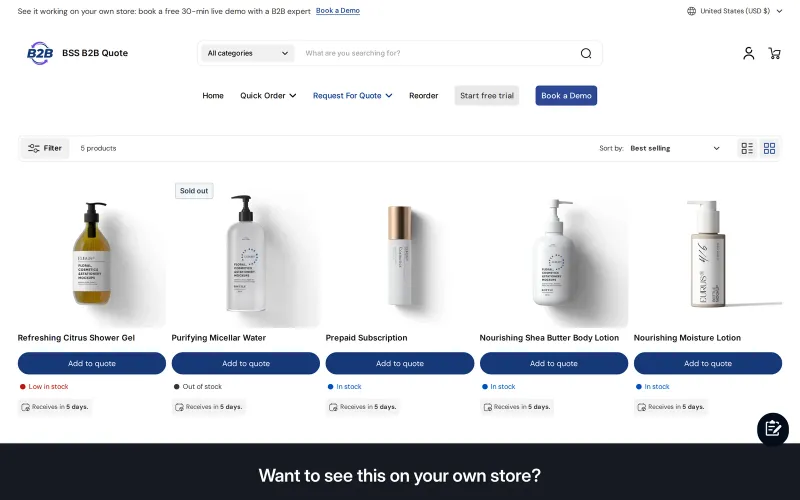
From the buyer’s quote request on the demo store to the BSS B2B Quote admin where you review and send it. No quote was submitted for these screens.
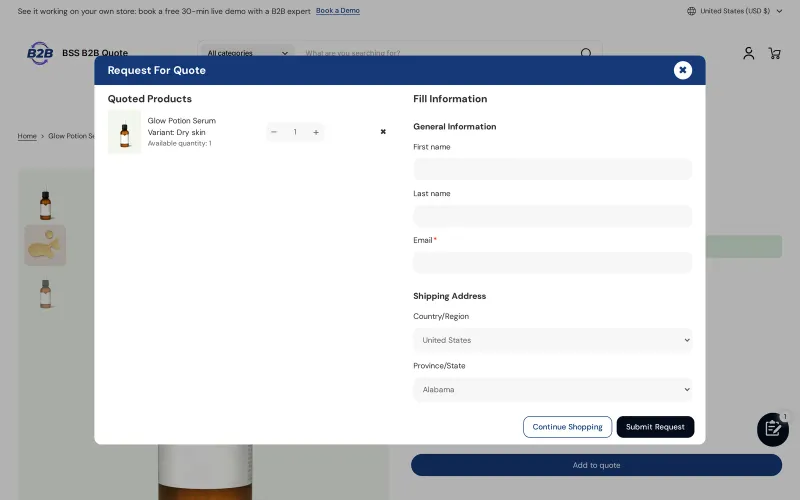
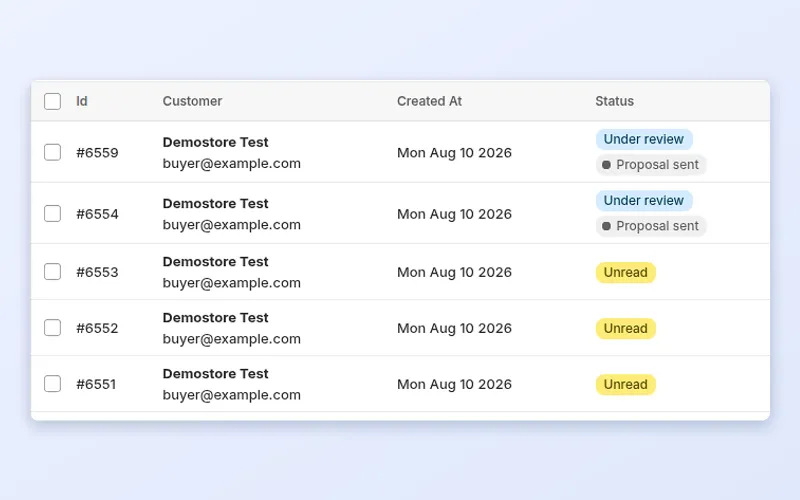
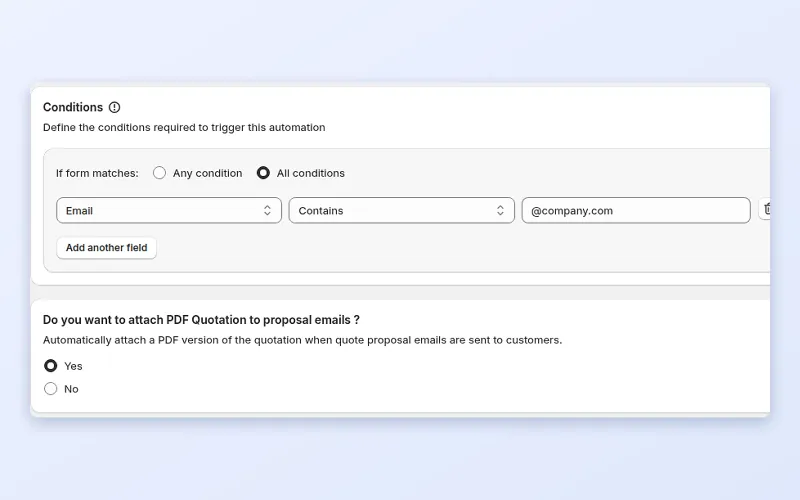
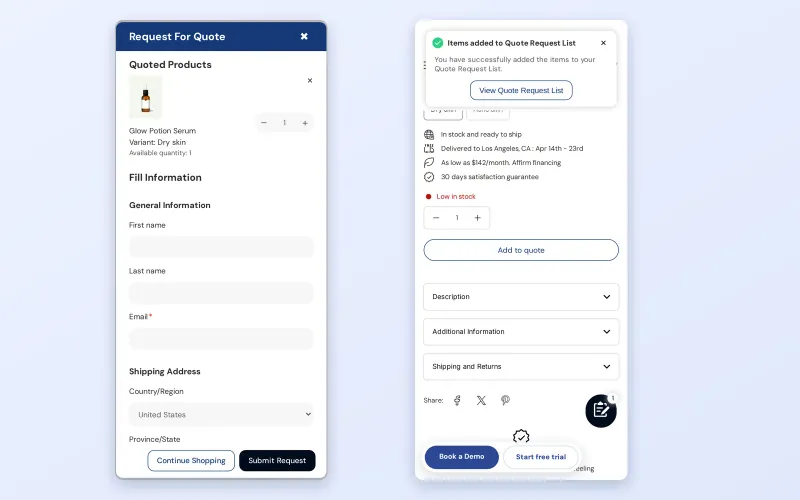
Quote automation helps when quoting is part of how you sell, but too much of it is manual:
Every quote handled by hand costs time and carries risk. A rep copies a price from a spreadsheet, a line is missed, and the buyer receives a proposal that does not match the contract price. Slow replies lose deals, and inconsistent numbers lose trust.
When requests arrive with the right prices and quantities already attached, the rep reviews and adjusts instead of building from scratch. Where your rules allow, automation sends the proposal and the buyer's approval creates the draft order.
There is also a consistency benefit. A buyer who sees one price while shopping and another in the proposal starts to question the whole relationship. Using the same price source for both the list and the quote keeps the story straight.
Request for quote is not part of Shopify's native B2B features, as the comparison table in the Shopify B2B guide shows. Native B2B gives companies, catalogs and payment terms, and draft orders let staff create custom orders by hand. BSS B2B Quote adds the quote request, the merchant review, the proposal and the conversion to a draft order. The quick order and RFQ hub compares the pieces.
The gallery above shows these steps. Useful guides are Auto-send proposal, Approve or reject quotes and the BSS B2B Solution integration.
Create your custom pricing, quantity breaks and quantity increments in BSS B2B Solution. For customers who are not using Shopify's native B2B, the Quick Order page and the quote list use those prices, so requests start from the same numbers buyers saw while shopping.
Choose which products show Add to quote or Request a quote, and customize the form. The default form for visitors asks for name, email and shipping address, and you can add fields such as a PO number. Guests can submit quotes.
New requests appear in the quote list with a status: Unread, Under review, Converted or Rejected, with Proposal sent and Expired shown as badges. Open a request to edit unit prices, shipping and the expiry date, then send the proposal.
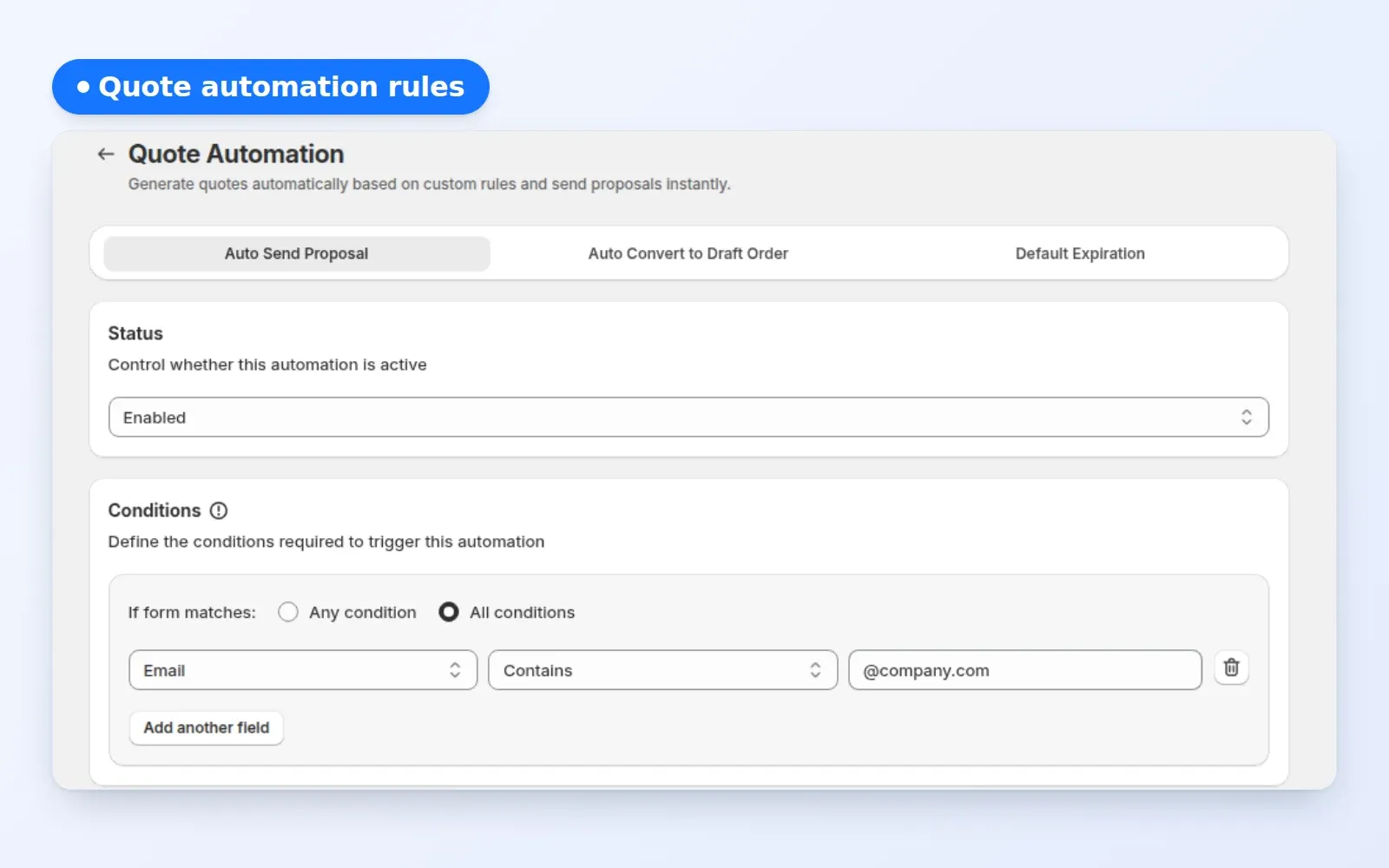
In Quote Automation, enable Auto Send Proposal and define conditions, for example that the buyer's email contains a company domain. Matching requests are sent a proposal automatically. You can attach a PDF quotation to the proposal email.
With Auto Convert to Draft Order, the proposal email includes Approve and Reject buttons. A logged-in buyer who approves causes the app to create a draft order and send the invoice, and the buyer pays through Shopify's invoice link. The Quote History page must be published.
Submit a quote as a guest and as a logged-in buyer, send a proposal, approve it and check the draft order and invoice.
Automation repeats whatever your setup says, so check the inputs first. A short review prevents a proposal with the wrong numbers from going out at scale.
Unread means nobody has opened the request. Under review means a team member opened it. Proposal sent and Expired appear as badges. Converted means the quote became a draft order, and Rejected means it was declined. Converted and Rejected are final.
This is a made-up illustration, not a customer result. A packaging supplier uses BSS B2B Solution tiers for trade buyers.
The rep touched the quote only if the prices needed a manual change.
Terms: request for quote, draft order and purchase order. Browse the quick order and RFQ hub for the wider setup.
BSS B2B Quote is free on development stores; on a live store, Growth is $19 a month (100 quotes), Business at $39 (unlimited) and Enterprise at $79, with a 14-day trial. Since 2026-06-14, a store on a plan below Growth can view but not edit its data. The merchant's Convert to draft order button is on Growth and above, and a default expiry period is on Business and above. Using BSS B2B Solution prices on Quick Order rows is listed under Growth and above. See the BSS B2B Quote page for current details.
Install BSS B2B Quote from the Shopify App Store to start.
faq
It means quote requests arrive with your B2B prices already attached, and proposals can be sent without retyping them. In BSS B2B Quote, the quote list uses prices from BSS B2B Solution, and Quote Automation can send a proposal automatically when a request matches your conditions.
Yes. Guests can submit a quote through the request form, which asks for name, email and shipping address by default. Guest quotes can still receive a proposal and a merchant-sent invoice, but they cannot approve or reject through the emailed link, which requires login.
When a logged-in buyer clicks Approve in the proposal email, the app creates a draft order, sets the quote to Converted and sends the invoice. The buyer pays through Shopify's invoice link. Merchants can also use the Convert to draft order button in the admin.
Yes. Turn on Auto Send Proposal in Quote Automation and set conditions, such as an email domain. Requests that match are sent a proposal automatically, and you can attach a PDF quotation. Requests that do not match stay in the list for manual review.
Yes. Open the request in the admin and edit the quoted unit prices, shipping and expiry date, then send the proposal. There is no separate discount field on a quote, so adjust the line prices to change the total. The buyer sees the edited prices in the proposal.
You can set an expiry date for each quote on every plan, and a default expiry period on Business and above. Expiry is informational in the app, so do not rely on it to block approval. Check the dates before you send.
Quote is free on development stores. On a live store, Growth is $19 a month with 100 quotes, Business is $39 with unlimited quotes and Enterprise is $79. Since 2026-06-14, stores below Growth can view but not edit. See the BSS B2B Quote page for current details.
case study
Quotes and results below are taken from our published case studies.

“We use the BSS B2B Quote app to streamline our wholesale process. It’s ideal for business clients to either place larger orders quickly via a simple form or request a quote, saving us significant manual work.”
90% of repeat wholesale orders moved to a self-service Quick Order and structured RFQ system (KAPR case study).
Read case study
“Amazing app that helped us a lot with inquiries of our B2B customers. Speeds up the ordering process as it offers a simple product catalog (wholesaler does not have to click through the whole e-shop). The customer service is super fast and helpful (especially Jonas and Duong) – they implemented an extra button we needed within 10 minutes.”
16% of total annual turnover came from B2B channels in the first year.
Read case study
“without using your application we would not have been able to solve the global problem of using one website for retail and wholesale clients.”
~35% turnover growth over six months of use, as reported by the merchant (seasonality not excluded).
Read case studyget started
Explore our comprehensive ecosystem of learning materials and live support designed to help you master our suite at your own pace.

Unlock the full potential of BSS B2B Solutions
Learn more - Browse other use cases
See how our features function in a live storefront.
Learn more - View Demo store
Walk through the suite with our team in a live demo.
Learn more - Book a Demo Session
Have a specific question? We’re here 24/7 to help.
Learn more - Contact UsFeature guide: Quote form and emails
Visit our app listing to begin your setup, then let our team walk you through a personalized demo to ensure your success at scale.