BSS B2B Quote: quote form and emails

Quote Form Fields and Quote Emails in BSS B2B Quote

In BSS B2B Quote you choose what a buyer fills in on a quote request: name, email, shipping address and custom fields such as text, number, dropdown or file upload. The app then sends up to five kinds of email. The admin notification needs Growth, the buyer confirmation and team reminders need Business, and the proposal works on every plan.

  • By BSS B2B Team
  • Reviewed by Hoa Nguyen, Senior Marketer. Last reviewed
  • Last updated
Install BSS B2B Quote Back to BSS B2B Quote Looking for the full guide to this topic? Shopify quote app: how to choose one. Needs the Growth plan and up. BSS B2B Quote has a 14-day free trial on paid plans. 4.9 out of 5 from 193 reviews on the Shopify App Store (as of October 10, 2026).

The quote form: what buyers fill in

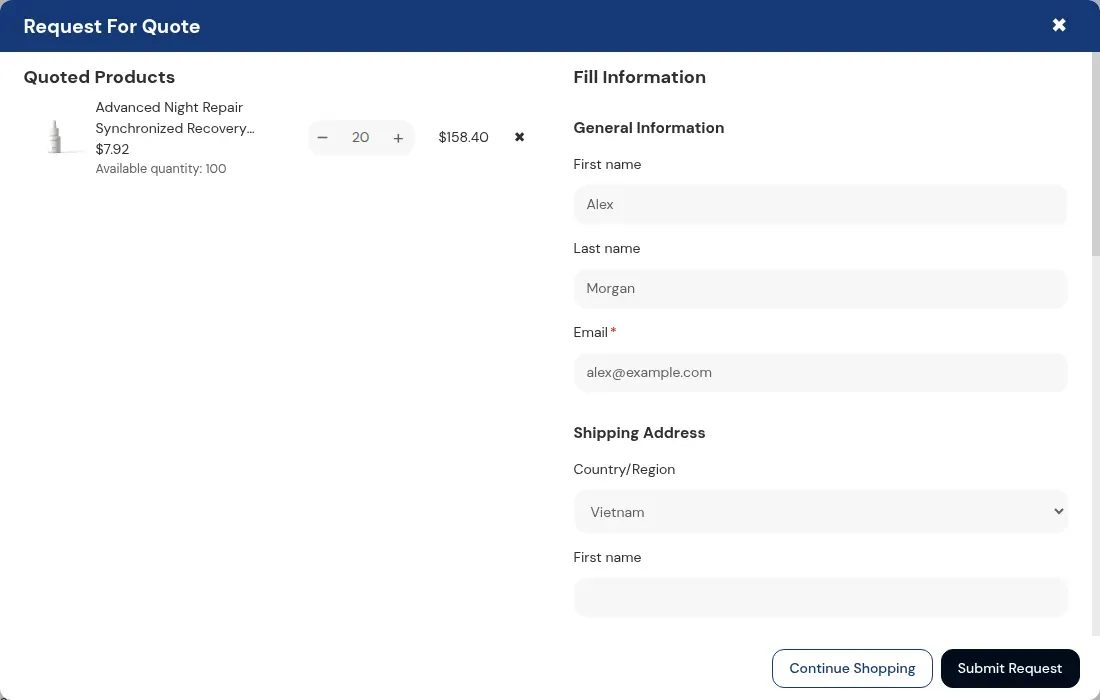
A buyer adds products to a quote list, then opens the form. On a regular store the default form asks for first name, last name, email and a shipping address, and email and address are required. On a store set up as B2B the form shows the buyer's company details from Shopify, read only. A logged-in customer's details can be filled in from their Shopify profile.

You decide which product details appear in the quote pop-up: variant, SKU, available quantity and price. The price is hidden when the quote catalog hides prices. From Growth you can add vendor, barcode, type, offer price and a note on each item. Product details are set per quote catalog, not in the form tab.

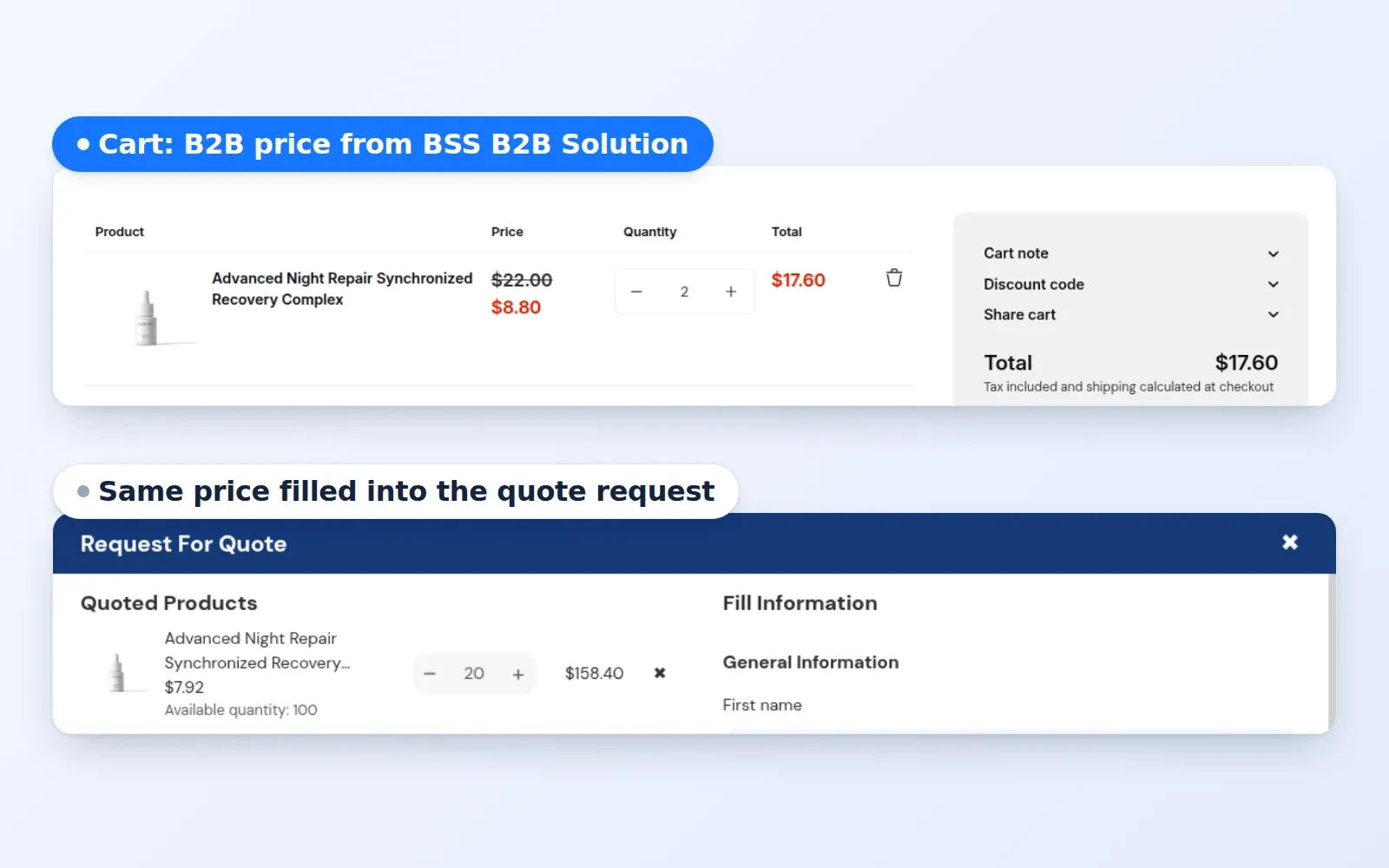
Request For Quote pop-up with one product and a contact form
The buyer's quote pop-up: quoted products on the left, the form on the right.

Field types and what limits them

Fields are added, hidden, reordered and edited in the Customize Quote Form tab of a quote logic.

FieldUse it forPlan or limit
Short text, paragraph, number, emailProject name, specifications, target budget, an accounting contactCustom field limit: 5 on Growth, unlimited on Business and Enterprise
Dropdown, radio buttons, checkbox listIndustry, delivery preference, add-onsSame custom field limit
File uploadSpec sheets and drawingsFile upload fields per form: 3 on Growth, 5 on Business, unlimited on Enterprise. File size: 10 MB on Growth, 20 MB on Business and Enterprise
PO numberLinks the quote to the buyer's own purchase orderUp to 50 characters. The number is passed to the draft order and shows in emails and the PDF. Counts toward the custom field limit. Live stores below Growth are read only
Tax number checkEU VAT, UK VAT, US EIN, Australian ABN and Indian GST numbersA format check in the browser. It does not look the number up. Counts toward the custom field limit. Live stores below Growth are read only
Shipping methodThe buyer picks a rate from your Shopify shipping zones, based on the shipping addressBusiness and up. The chosen rate is pre-selected when you open the quote
Heading and dividerSection titles in a long formLayout only. Counts toward the custom field limit

Plan limits come from the app code and the user guide as of October 2026. If the app shows a different limit on your plan, trust the app.

How do I set up the quote form and the emails?

Follow these steps in the app admin. Each step names the screen to open.

  1. Open the quote logic

    In the app open Request for Quote and your quote logic. A logic decides who can request a quote and for which products. The Customize Quote Form tab holds the form fields. Product details in the pop-up come from the quote catalog on the visibility tab.

  2. Add and order the fields

    Add fields from the list, drag them into order and use the eye icon to hide one. Edit a field to change its label, its placeholder and whether it is required. Add a heading or divider to split a long form.

  3. Style the form and the thank-you text

    Set colors, border and corner radius so the pop-up matches your theme, and edit the text shown after submit. The live preview switches between the form and the confirmation.

  4. Choose the emails to send

    Go to Request for Quote, Advanced Settings, Manage settings. The Notifications tab lists the templates, and each one shows Active or Inactive for your plan. A template that shows Inactive is not sent, even if you edited it.

  5. Set the sender and the team copy

    Under notifications for store admin add up to 5 BCC addresses. To send the proposal and confirmation emails from your own domain, use the Email Sender link, confirm the address and add the DNS records shown. Until the sender is verified, emails go from the default address and replies go to your sender email.

  6. Turn on reminders

    Go to Advanced Settings, then Quote Reminder. Turn on Unread quotes, Under review quotes or both. Set the number of days to wait, a recipient and optional BCC addresses, then save.

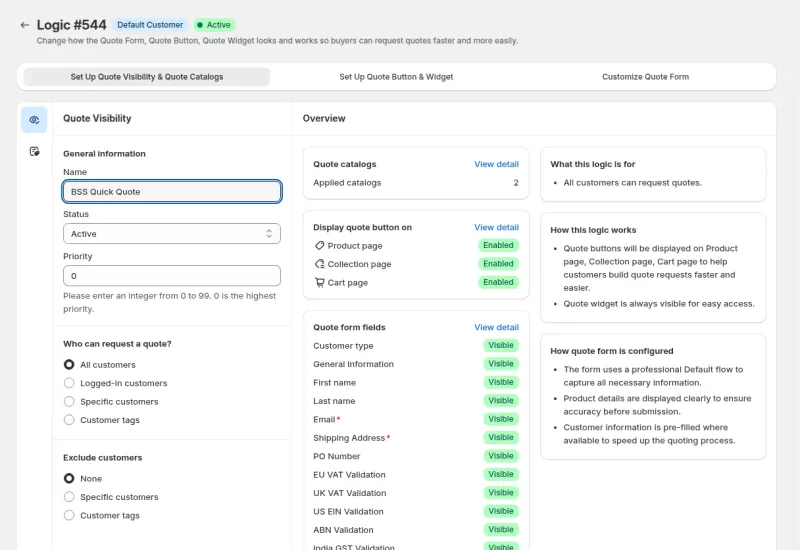
Quote logic page with visibility, button and form tabs
A quote logic: the visibility tab lists the form fields and who can request a quote.

Build the quote form on a Growth plan or above. The listing shows a 14-day free trial on paid plans.

Which email goes to whom?

The app sends up to five kinds of quote email. Three are templates you edit. Two are reminder digests for your team.

EmailGoes toSent whenPlan
Admin notificationYour store email, plus up to 5 BCC addressesA customer submits a quote requestGrowth and up
Quote confirmationThe customerA request is submitted and no proposal is sent automaticallyBusiness and up
Quote proposalThe customerYou send it from the quote, or Auto Send Proposal sends it on submitAll plans. Auto Send Proposal needs Business and up
Unread quotes reminderThe reminder recipient, plus BCCDaily, for quotes still Unread after your thresholdBusiness and up
Under review quotes reminderThe reminder recipient, plus BCCDaily, for quotes still Under review after your thresholdBusiness and up

The admin notification always uses the default sender address. The proposal and confirmation emails can use your own verified domain.

Proposal emails, auto send and reminders

The proposal email carries the prices you quoted. On Business and up you can attach the quote as a PDF. Email text takes variables such as store name, customer name, quote ID, PO number, creation date and expiry date, so one template fits every quote.

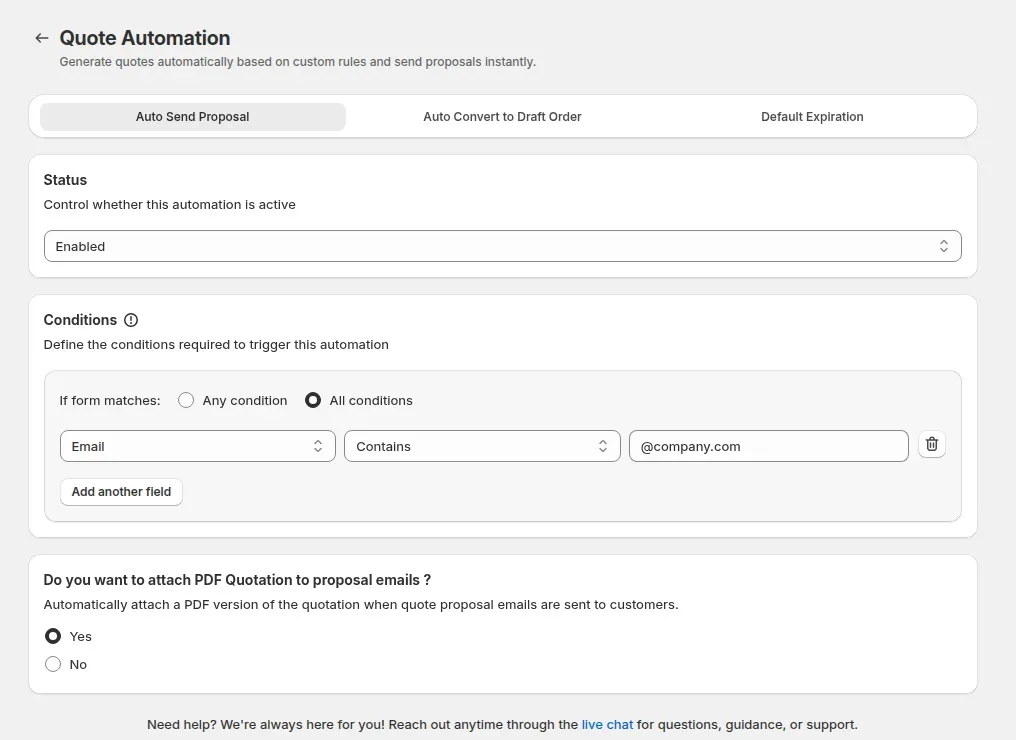
On Business and up, Auto Send Proposal sends the proposal the moment a submitted form matches conditions you set, for example an email that contains a company domain. When the form does not match, the buyer gets the confirmation email instead.

Reminders email your team a daily digest and add a notification in the app. A quote is included when its status has not changed for more days than your threshold. They run once a day at 00:00 UTC, and the app shows that time in your own time zone when you switch a reminder on.

Auto Send Proposal setup with an email condition and attach PDF
Auto Send Proposal: a condition on the form decides when the proposal goes out.

What are the limits of quote forms and emails?

Approve needs a login

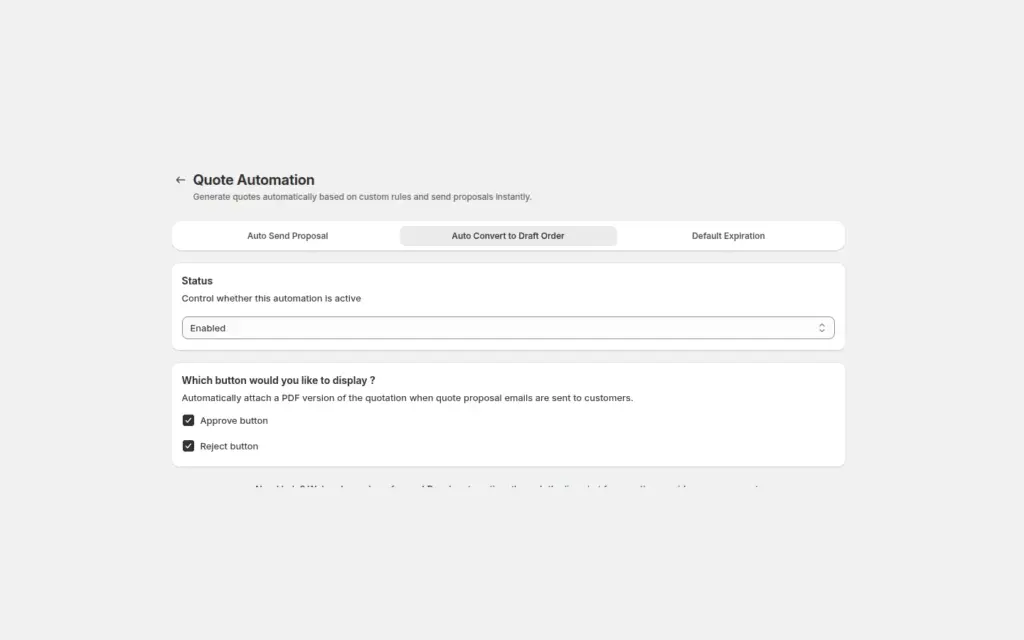
The Approve and Reject buttons in the proposal email open the Quote History page, which needs a logged-in customer. A guest can submit a quote and receive a proposal, but cannot approve from the email. The buttons only appear on Business and up, with Auto Convert to Draft Order on and the Quote History page published. A buyer who is not signed in is sent to the login page and must click the button in the email again after signing in.
Buttons expire after 72 hours

A proposal button works for 72 hours, or until you send a newer proposal for the same quote. After that the old link shows an error. Resend the proposal for a fresh link.

Reminders go to your team

Buyers get no reminder emails. The reminders are for your own team, once a day at 00:00 UTC, and need Business or higher.

Expiry does not block approval

The expiry date in a quote is informational. The app does not stop a buyer from approving an expired quote, so check the date before you send the proposal.

Live stores below Growth are read only

Since June 14, 2026 a live store below Growth can view the app but not change it. Every feature stays free on development stores.

The tax number check is a format check

The field checks that a number looks like an EU VAT, UK VAT, US EIN, Australian ABN or Indian GST number. It does not confirm that the number is registered.

Plans for the quote form and emails

BSS B2B Quote paid plans start at $19 per month with a 14-day free trial on paid plans. Prices are from the App Store listing on October 10, 2026. Growth gives you 5 custom fields, the admin notification, the proposal email and manual conversion to a draft order. Business removes the custom field limit and adds the buyer confirmation, the PDF attachment, reminders, the shipping method field, Auto Send Proposal and Auto Convert to Draft Order. Enterprise adds quote logic per company customer.

Use cases with quotes

Each use case shows one setup with screenshots and what the buyer sees. Browse all use cases.

BSS B2B Quote Quote Automation, Auto Convert to Draft Order tab, status Enabled with Approve button and Reject button ticked
  • BSS B2B Quote

Approve a Quote and Turn It Into a Draft Order

Send a proposal email with Approve and Reject buttons, and when a logged-in buyer approves, BSS B2B Quote converts the quote into a Shopify draft order and emails the invoice, with no manual order entry.

Explore use case: Approve a Quote and Turn It Into a Draft Order
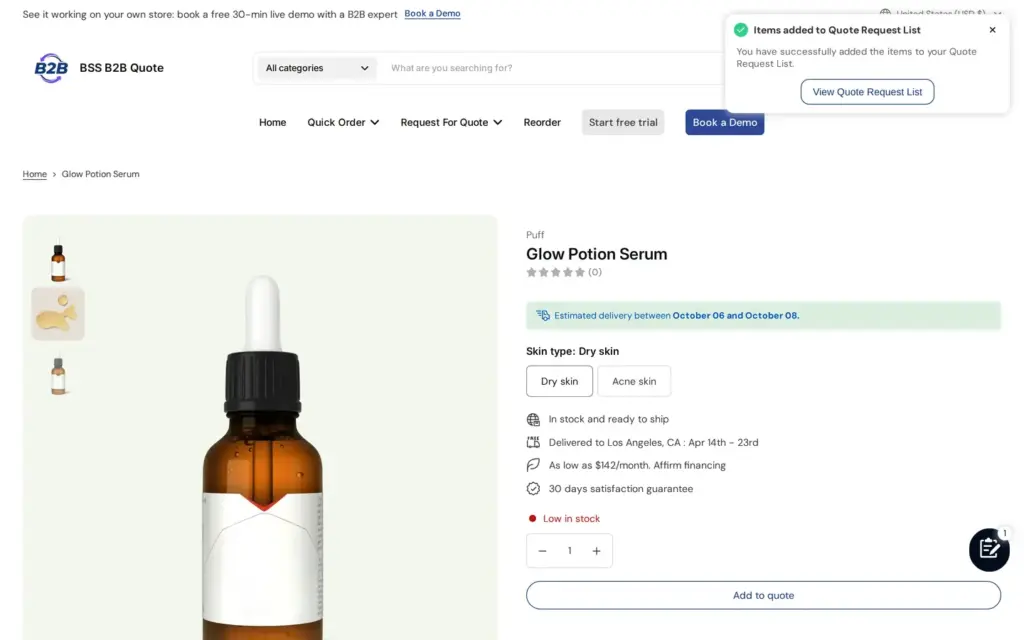
Product page on the BSS B2B Quote demo storefront with no price or Add to cart button, an Add to quote button, and a toast confirming items were added to the quote list
  • BSS B2B Quote
  • Home & Garden

Add a Request a Quote Button and Hide the Price

Replace the public price and Add to cart on custom or high-value products with an Add to quote button and a quote form, so buyers ask for a price instead of buying, using BSS B2B Quote.

Explore use case: Add a Request a Quote Button and Hide the Price

More use cases

Guides and glossary

Each topic has one page that owns it. Start from these.

Glossary

Request for quote (RFQ)Draft orderPurchase order (PO)Tax IDEINABNVIES

User guides on docs.bss-b2b.solutions

More BSS B2B Quote features

Each feature has its own page. See also all BSS B2B Quote features.

Collect the quote details you need

BSS B2B Quote gives buyers a quote form with your fields, and sends the proposal, confirmation and reminder emails for your plan.

Also: BSS B2B Lock for hidden prices until a quote and BSS B2B Quote for quick order and quotes.

Frequently asked questions

Which fields can I add to the quote form?

Short text, paragraph, number, email, dropdown, radio buttons, checkbox list and file upload, plus a PO number, a tax number format check and a shipping method field. Growth allows 5 custom fields. Business and Enterprise have no limit. The shipping method field needs Business.

Does the buyer get an email when they submit a quote?

On Business and up, yes. The buyer gets a confirmation email, or the proposal right away when Auto Send Proposal conditions match. On Growth your team gets the admin notification and the buyer gets a proposal email when you send one.

Who gets the quote reminders?

Your team. For Unread quotes and for Under review quotes you set a recipient email and up to 5 BCC addresses. Reminders go out once a day at 00:00 UTC and need Business or higher. Buyers do not get reminders.

Can I send quote emails from my own domain?

Yes, for the proposal and confirmation emails. Enter a sender name and email, confirm the address, add the DNS records shown and click Verify DNS record. Until it is verified, emails come from the default address. The admin notification always uses the default address.

Can a guest approve a quote from the email?

Not without signing in. The Approve and Reject buttons (Business and up) need a logged-in customer, so a signed-out buyer must click Approve again after logging in. Buttons stop working after 72 hours. Otherwise, ask the buyer to create an account or send the invoice yourself.

Sources, method and update log

Feature behavior follows our review of the BSS B2B Quote code on October 3, 2026 and the BSS user guides, and the code decides when they disagree. For example, the code needs a logged-in customer to approve a quote from an email. Prices come from the App Store listings on the date shown. We make BSS B2B Solution, BSS B2B Lock and BSS B2B Quote.

Sources

  1. BSS user guide: Customize Quote Form, read . Default fields, field types, PO number, tax number check, shipping method field.
  2. BSS user guide: Quote Emails and Reminders, read . Email types, recipients, plans, sender setup, reminders, 72 hour buttons.
  3. BSS user guide: Approve or Reject Quotes, read . Approve and Reject flow, plan requirement and 72 hour buttons.
  4. BSS user guide: BSS B2B Quote pricing plan and details, read . Plan comparison; checked against the app code.
  5. Shopify App Store listings for BSS B2B Solution, Lock and Quote, read . Plan prices and trial length.

Update log

  • : First version.
  • : Added a mid-page install button.
Install BSS B2B Quote 14-day free trial on paid plans