
Relevance Fatigue
Specialized buyers must sift through thousands of irrelevant SKUs, increasing the chance of order errors and frustration.
Use Case
Create curated order pages tailored for specific projects, VIP accounts, and long-term contracts. Give your best customers a dedicated page that respects their time.
Reviewed by Hoa Nguyen, Senior Marketer. Last reviewed
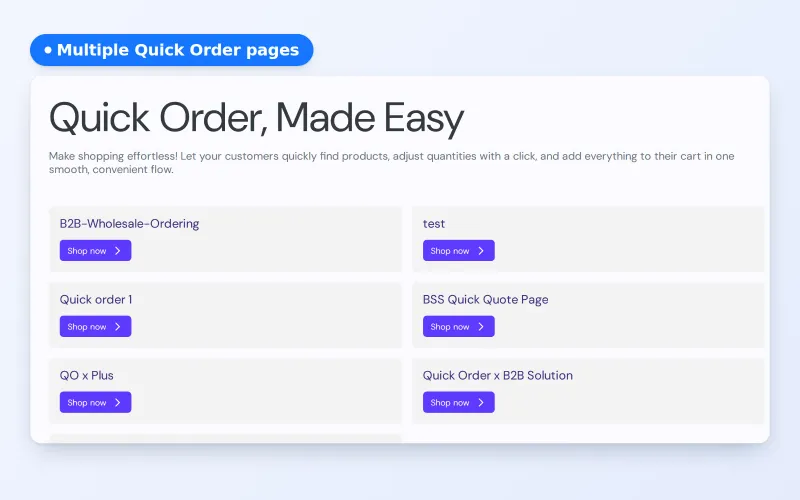












Personalized quick order pages let you give each customer, group or project its own order page on Shopify. In BSS B2B Quote you create a Quick Order page, choose which customers can open it and which products it lists, and share one universal link that sends each buyer to the right page.
This page is for wholesalers with VIP accounts, contract buyers or project-based orders who need curated lists instead of the whole catalog. It covers who benefits, how visibility and the universal link work, an example, the limits and a checklist.
the problem
In B2B, a general catalog might create more work for the buyer than it saves. When every customer is forced through the same interface, several problems arise
Specialized buyers must sift through thousands of irrelevant SKUs, increasing the chance of order errors and frustration.
Customers waste time every single session applying the same filters over and over to find “their” specific products.
Loyal, high-volume VIPs receive the same digital experience as guest buyers, failing to reflect their true value.
OUR SOLUTION
Instead of a one page fit all Order page, you can create multiple Quick Order pages that are customized exactly to cater to customer needs.
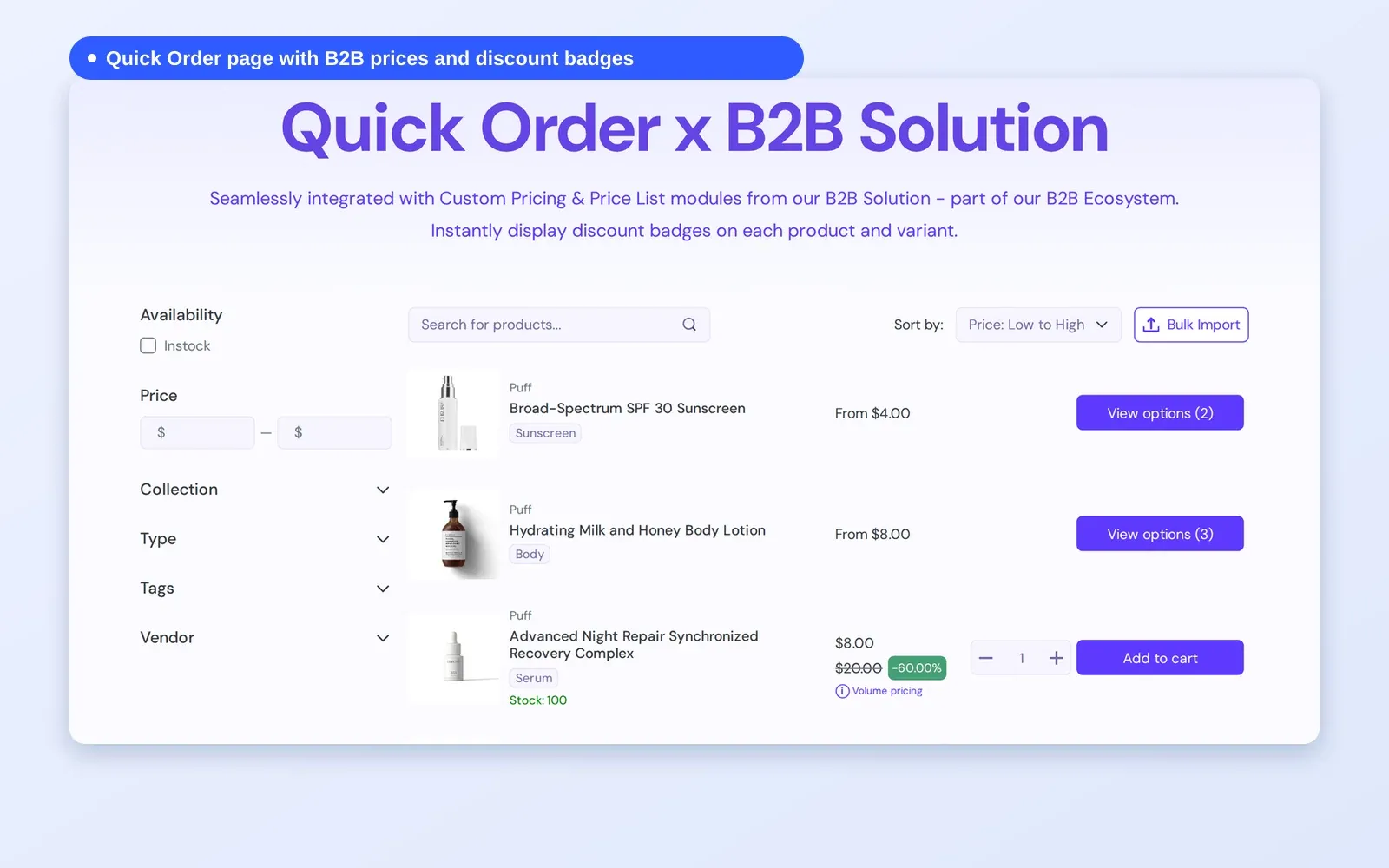
Additionally, customers can bulk import using CSV file to quickly add multiple products to the cart.
Quick Order pages need an Online Store 2.0 theme.
Target Sectors
This solution is designed for High-Touch Account Management and Project-Based B2B Sales. It is the perfect fit for merchants who manage “VIP” clients, long-term contracts, or large-scale projects that require a restricted, pre-approved list of products.
scenarios
Personalized Quick Order pages are customized exactly to cater to various customer needs. Here are several scenarios to help you understand the potential:
Eg: Create a “Seating Only” page for office renovators and a “Lighting Only” page for hotel developers. Remove the noise and show only approved categories.
Eg: Contain only the 50 specific materials approved for “Project A,” ensuring the buyer doesn’t accidentally order unapproved parts.
Eg: Provide exclusive private pages with early access to new arrivals and restricted bulk-only SKUs for your high-spending partners.
Eg: Pages for Shopify B2B companies can show each buyer’s Shopify company catalog. This needs Shopify Plus company catalogs and the Enterprise plan of BSS B2B Quote.
benefits
How Personalized Quick Order Pages Impact Your Business
Shows only the products the client needs.
Strengthens loyalty through “Specialized Treatment” workflows.
Shortens the path to purchase with a link to a pre-filtered page.
Displays the customer’s negotiated rates in a simplified list.
Personalized order pages are direct entry points that let loyal customers skip menus entirely.
Sales reps can set up a page with the client’s product list once and send the link.
Upload a CSV or spreadsheet (.csv, .xlsx, .xls) to add many products to the cart at once. Unknown SKUs are listed, and valid SKUs are still added.
Rows use Custom Pricing and Quantity Break rules from BSS B2B Solution, so buyers see their price, not the list price. This applies to customers who do not use Shopify’s native B2B.
Offer limited-run or restricted products only on pages that selected buyers can open.
Personalized order pages make the relationship feel like a high-level partnership rather than a basic transaction.
When it’s easier to order from you than search a competitor, you create a moat around best customers.
You can include these links in any communication channels to shorten buying journey
Workflow
See how BSS B2B Solutions handles your most complex B2B requirements
Assigns customers to specific groups or tags. Within BSS B2B Solution, you define the unique pricing rules, tiered discounts, or contract rates that apply strictly to those segments.
For example, you can set up exclusive pricing for specific products using Custom Pricing rules tailored to individual users or designated customer segments. Or set up specific quantity rules that could later on display directly on Quick Order page
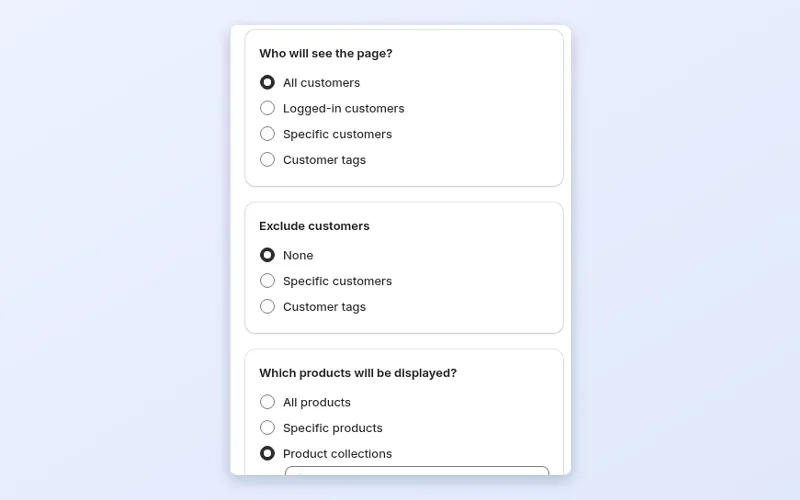
Choose which products the page lists: all products, selected collections, product tags or specific products, with exclusions if needed. Then decide who can open the page: all customers, logged-in customers, specific customers or customer tags.
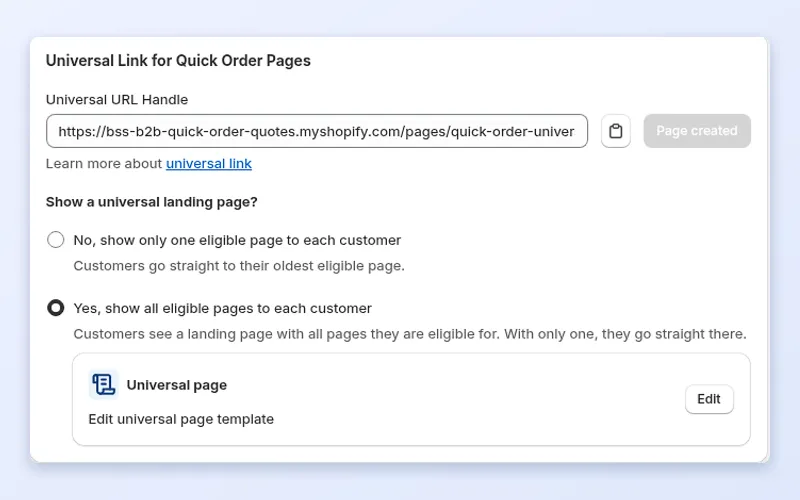
Publish the page with its own URL handle and send the link by email or chat. Or share one Universal link that sends each logged-in customer to the page they are eligible for.
When the buyer opens the page, it lists the products they are allowed to see with their B2B prices from BSS B2B Solution, ready for bulk entry or CSV import.
see it in action
From the page setup in BSS B2B Quote to what a buyer sees on the demo store.
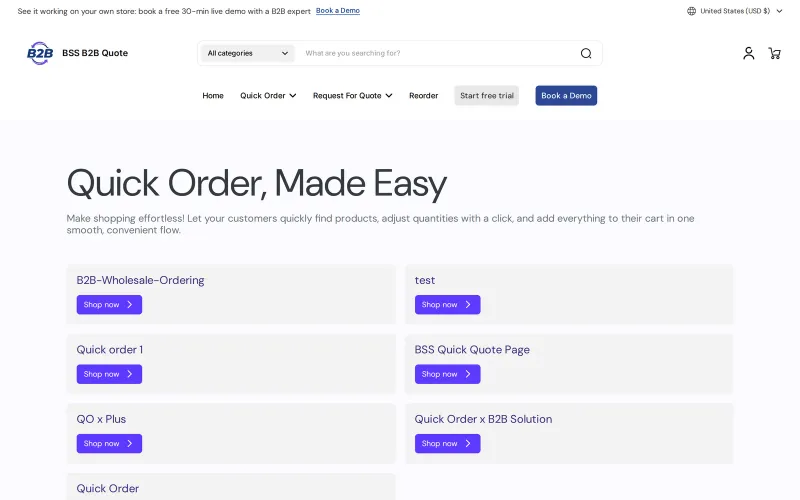
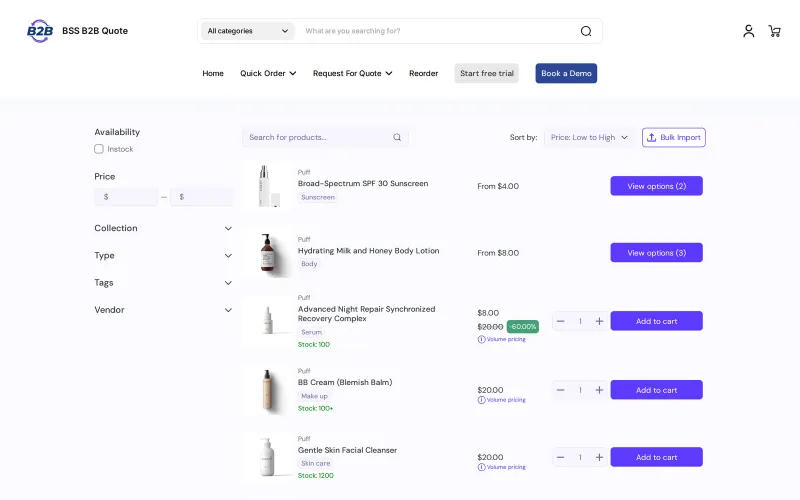
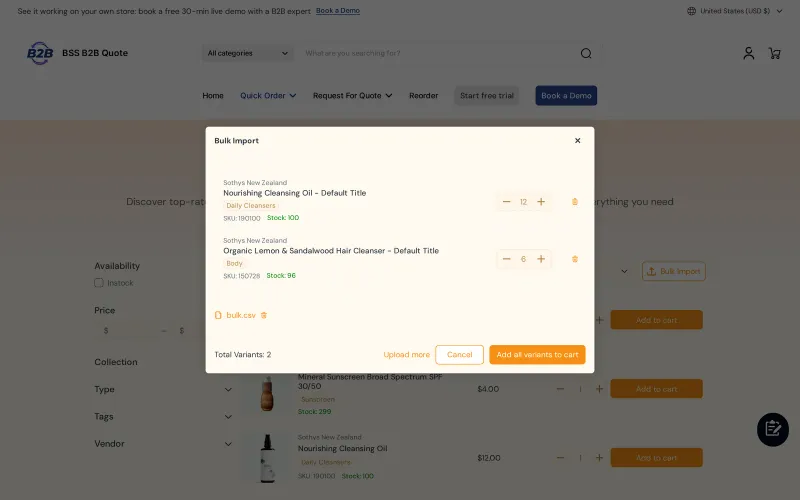
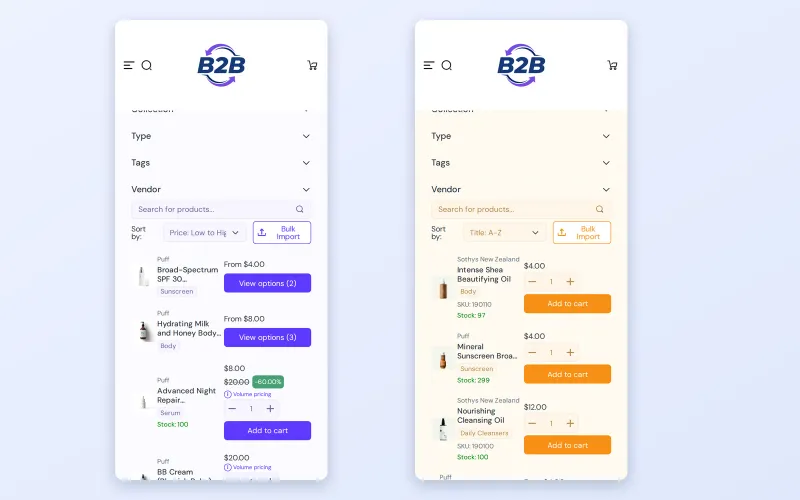
Personalized pages are worth the extra setup when one list does not suit every buyer:
A long catalog is hard to order from. A buyer who only buys 30 of your 2,000 products must filter, scroll and remember which items are theirs. Mistakes lead to wrong shipments, returns and calls to your support team.
A curated page shows only what a buyer is allowed and likely to order. It saves the buyer time, reduces order errors and gives you a way to treat large accounts as accounts, with their own page instead of a shared shop window.
Curated pages also support your sales conversation. When you hand a key account a page that already lists its products, you show that you know how it buys. That is a stronger message than pointing the buyer at a general catalog and hoping they find the right items.
Shopify's B2B plans include catalogs, so each company can see its own products and prices, and a quick order list. The Shopify B2B guide compares native features with apps. An app helps when you also serve buyers who are not set up as native companies, want pages assigned by customer or tag, need a single link that routes to the right page, or want CSV import and an Add to quote button on the same list. BSS B2B Quote works alongside native B2B, and the quick order and RFQ hub explains the options.
The gallery above shows each step. The reference guides are Create a Quick Order page and Create a universal page.
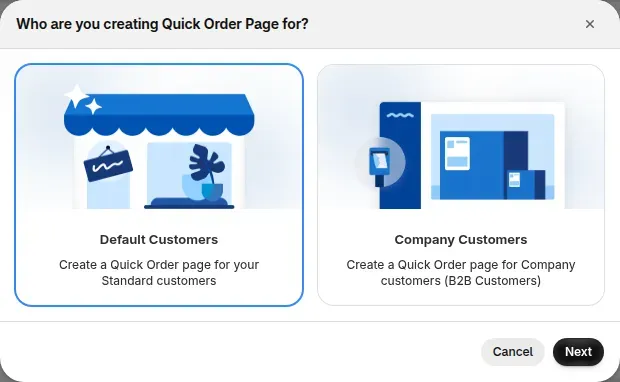
Create a Quick Order page and name it for the audience, such as Gold accounts or Project Atlas. Use an Online Store 2.0 theme with the app embed on.
On the Visibility tab, set who may open the page: all customers, logged-in customers, specific customers or customers with certain tags. If you serve Shopify B2B companies, company-based options are available on the Enterprise plan. Add exclusions for customers or tags that should not see it, even if they match otherwise.
Show all products, specific products or selected collections. A project page may list a handful of SKUs, and a VIP page may show a whole collection.
Enable search, filters and Bulk Import so buyers can upload a CSV. If you use BSS B2B Solution, the rows can show its custom prices, quantity breaks and increments for customers not using native B2B.
In Advanced Settings, set a Universal URL handle. A buyer with one eligible page goes straight to it. A buyer with several sees a landing page with a card and a Shop now button for each page. You can edit the landing template.
Publish each page, then test with accounts in each group and with an excluded account. Confirm each one sees the right page or none.
Personalized pages multiply quickly, so a little planning saves maintenance later. Work from your accounts to your pages, not the other way around.
A buyer with a single eligible page lands on it straight from the universal link and sees only the products you chose, with search, filters and bulk import. A buyer with several eligible pages sees one card per page. A buyer with none sees nothing to open, so tell them who to contact.
This is a made-up illustration, not a customer result. A cleaning supplies wholesaler has three kinds of accounts.
Each buyer sees the products that matter to them, without a custom site per account.
Terms: quick order form, customer tag and buyer group. Browse the quick order and RFQ hub for the wider setup.
BSS B2B Quote is free on development stores; on a live store, Growth is $19 a month, Business at $39 and Enterprise at $79, with a 14-day trial. Since 2026-06-14, a store on a plan below Growth can view but not edit its data, so plan for Growth or higher to publish pages. Company-based page targeting needs Enterprise. The BSS B2B Quote page has the current details. Install BSS B2B Quote from the Shopify App Store to start.
faq
Yes. Create one Quick Order page per audience and use the Visibility tab to choose who can open it: all customers, logged-in customers, specific customers or customers with certain tags. Add exclusions for anyone who should not see the page, and choose the products each page lists.
It is one URL you can send to every buyer. Set a Universal URL handle in Advanced Settings. A buyer who has access to a single page goes straight to it, and a buyer with several eligible pages sees a landing page with a card and a Shop now button for each.
Yes. Choose which products the page shows, such as all products, specific products or selected collections. A project page can list only the SKUs in a contract, and a VIP page can show a full collection. Buyers see only what you include.
No. The page controls who can open the order page and what it lists. Products still appear on your normal collection and product pages. To hide products from guests or other groups across your whole storefront, use BSS B2B Lock alongside it.
Yes. The Bulk Import dialog accepts CSV and Excel files, lists the SKUs it reads for review and adds valid rows to the cart. Duplicate SKUs are added together, and invalid SKUs are listed so the buyer can fix them.
If you use BSS B2B Solution, the rows can show its custom prices, quantity breaks and quantity increments for customers who are not using Shopify's native B2B. Otherwise the page shows the prices that buyer already sees on your store.
Yes, on the Enterprise plan, company-based visibility options are available for B2B forms. For most stores, targeting by customer or by customer tag is simpler and does not need the Enterprise plan. Choose the method that matches how you already organize your buyers.
case study
Quotes and results below are taken from our published case studies.

“We use the BSS B2B Quote app to streamline our wholesale process. It’s ideal for business clients to either place larger orders quickly via a simple form or request a quote, saving us significant manual work.”
90% of repeat wholesale orders moved to a self-service Quick Order and structured RFQ system (KAPR case study).
Read case study
“Amazing app that helped us a lot with inquiries of our B2B customers. Speeds up the ordering process as it offers a simple product catalog (wholesaler does not have to click through the whole e-shop). The customer service is super fast and helpful (especially Jonas and Duong) – they implemented an extra button we needed within 10 minutes.”
16% of total annual turnover came from B2B channels in the first year.
Read case study
“without using your application we would not have been able to solve the global problem of using one website for retail and wholesale clients.”
~35% turnover growth over six months of use, as reported by the merchant (seasonality not excluded).
Read case studyget started
Explore our comprehensive ecosystem of learning materials and live support designed to help you master our suite at your own pace.

Master the features with step-by-step documentation.
Learn more - Read User guide
See how our features function in a live storefront.
Learn more - View Demo store
Walk through the suite with our team in a live demo.
Learn more - Book a Demo Session
Have a specific question? We’re here 24/7 to help.
Learn more - Contact UsVisit our app listing to begin your setup, then let our team walk you through a personalized demo to ensure your success at scale.