


Kali Ma Designs is a Devon, England, maker of sterling silver and gemstone jewellery that sells to retailers through a trade registration form. Visitors can browse the home page, but prices and catalog pages sit behind an account. This spotlight explains how that trade-only setup works and how BSS B2B Solution’s volume pricing supports it.
Key takeaways
- The public home page shows the brand and product tiles without prices, and in our capture collection and product pages sent signed-out visitors to the login page.
- A Trade Registration form with eight required fields is the entry point for retailers, and approval gives them an account.
- BSS B2B Solution supplies the registration form and a volume pricing rule for logged-in customers, targeted by product tags.
- The merchant’s public review describes a volume pricing problem that support fixed, a useful lesson for anyone setting up tables.
About Kali Ma Designs
Kali Ma Designs presents itself with the line “Quality Sterling Silver Jewellery”. The navigation lists wristwear, earrings, neckwear, rings, body jewellery, one-offs, a range for kids, boxes, display, collections and categories. The site has information pages on gemstones, ring sizes, shipping and delivery and on tarnishing and plating, which are the questions retail buyers ask before they commit to stocking a line. The footer lists a Devon business address and shows a membership badge from the National Association of Jewellers.
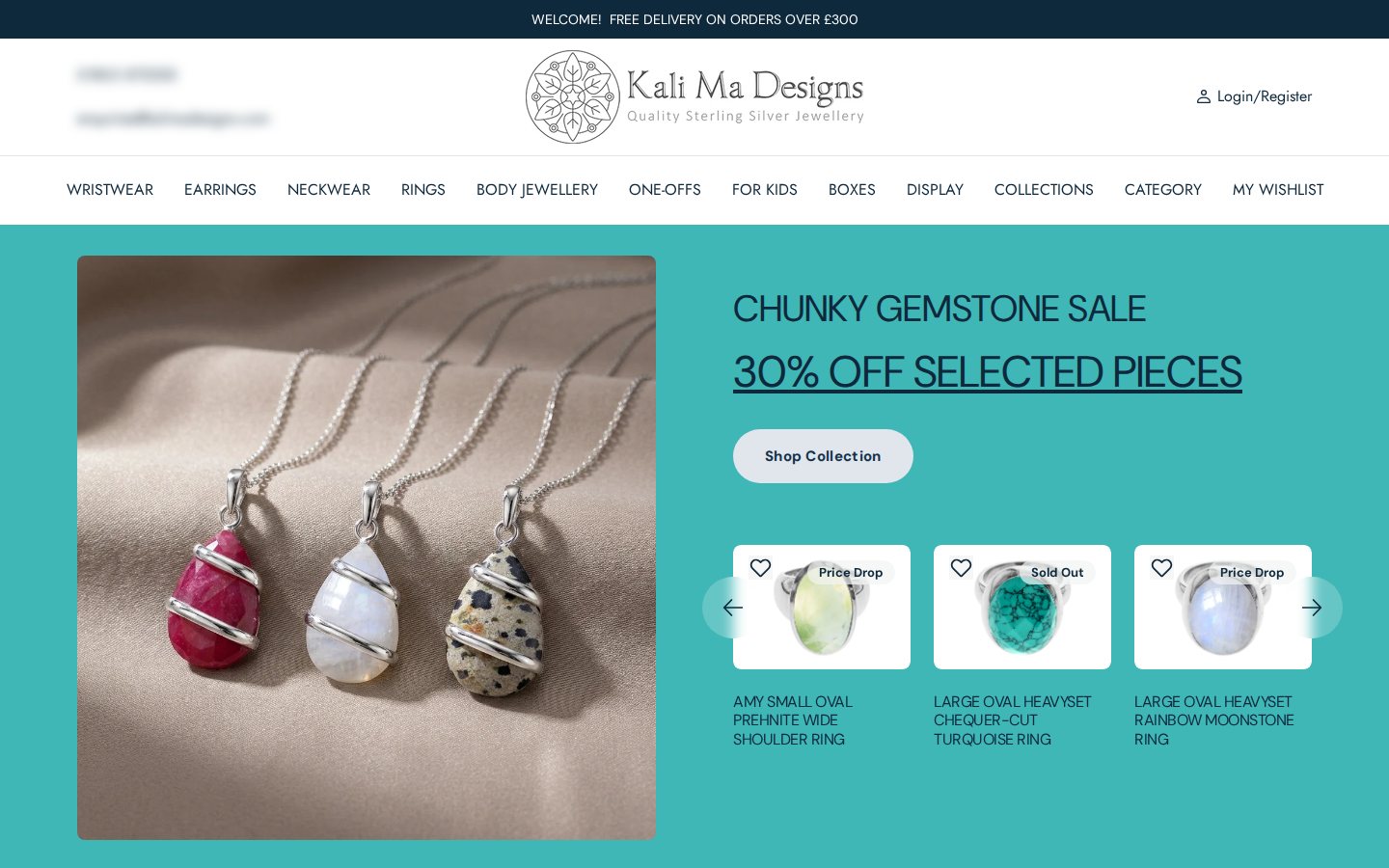
The banner at the top of the page advertises free delivery on orders over £300, a threshold that points to a business audience rather than individual shoppers. The home page also carries a seasonal sale banner for selected chunky gemstone pieces, and its product tiles show names and badges such as Price Drop and Sold Out, but no prices.
The B2B model: a trade catalog behind an account
Many jewellery brands sell through gift shops, boutiques and galleries, and protect those retailers by keeping prices off the public web. Kali Ma Designs follows that approach. The home page is open, so a buyer can see the style of the brand. Prices are not shown on the tiles, and in our capture, opening a collection page or a product page took a signed-out visitor to the account login page, with “Login/Register” in the header as the way in.
We cannot see from the outside which tool performs that redirect, and we do not attribute it to BSS. What we can say is that the store uses an account to separate trade buyers from the public, and that BSS B2B Solution supplies the registration form that creates those accounts and the pricing that logged-in buyers see. If you need a deeper explanation of the pattern, see our use case on hiding wholesale prices from guest visitors and the access control hub.
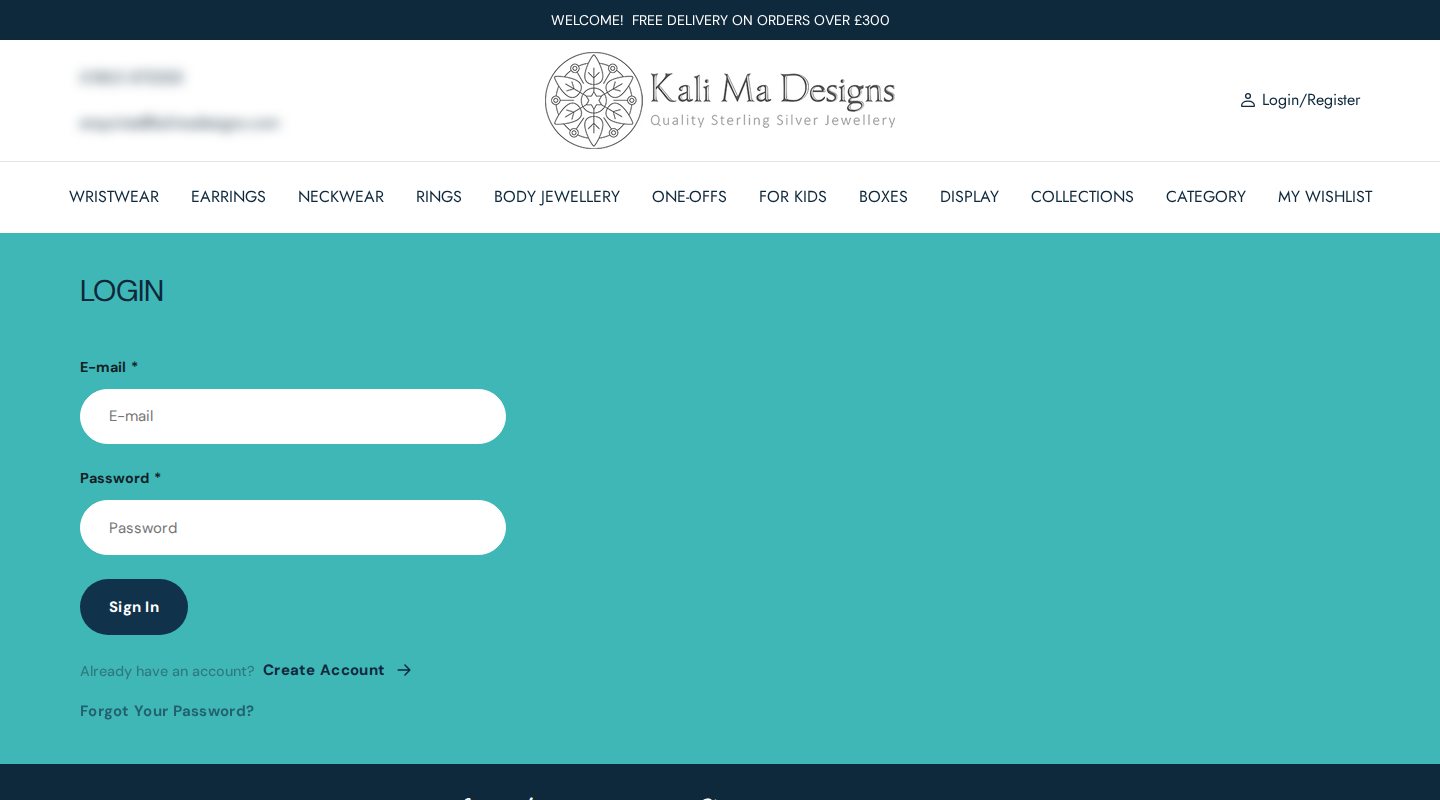
A login-first catalog has trade-offs worth weighing before you copy it. The upside is control: retailers know that nobody can see their wholesale prices without an account, and you decide who gets one. The downside is friction: a new buyer cannot browse products before applying, so the open pages have to do more persuading. Kali Ma Designs balances this with a polished home page, long-form information pages and a quick application. If most of your buyers already know your brand from trade shows or a sales rep, the friction is small. If they find you through search, consider leaving collections open and hiding only the prices.
A walkthrough of the wholesale surfaces
The trade registration page
The footer menu includes a “Trade registration” link, which leads to a page that explains how to buy wholesale. The page also points to a third-party wholesale marketplace as one way to order, and below it sits the direct route: a form titled “Trade Registration”. We keep the focus on that form here, because it is the part built with BSS.
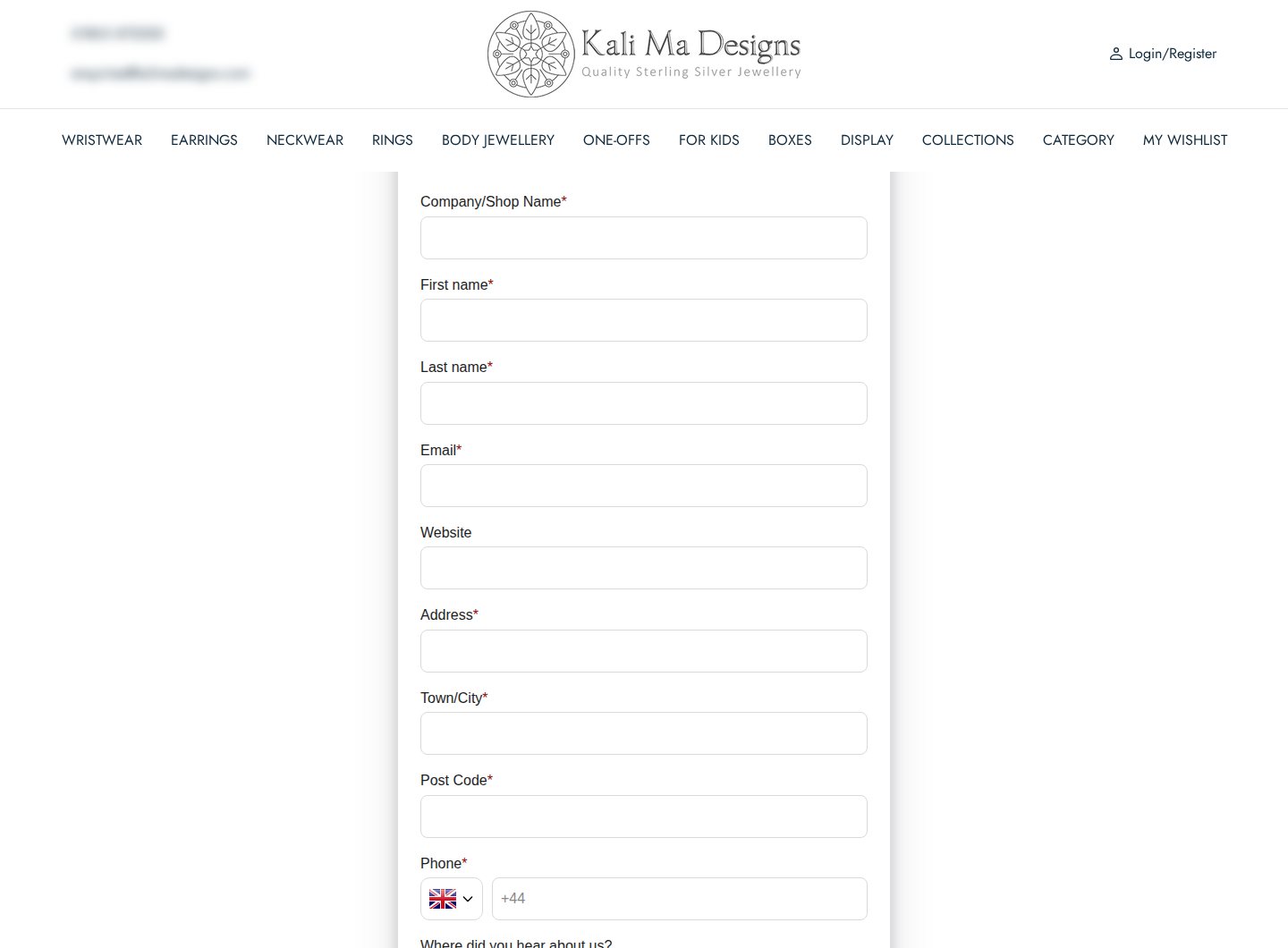
The form collects the company or shop name, first name, last name, email, an optional website, address, town or city, post code and phone (with a UK country code preselected), and asks “Where did you hear about us?”. Eight of those fields are required, enough for a reviewer to look up a shop and decide. A checkbox confirms the privacy policy. There is no password field, so buyers do not choose a login at the point of applying; the merchant approves first.
In the configuration data, the form applies a tag to approved customers, sends email notifications, sends an invitation email when an application is approved and records privacy consent. The invitation matters in a login-first store: an approved retailer gets a direct link to set up the account and see prices. Our guide to managing, approving and notifying wholesale customers explains the approval options.
On a phone

Shop owners often browse on a phone between customers. The home page collapses into a single column with a menu button, and the same trade registration route is available from the footer menu.
Which BSS features power it
Kali Ma Designs has used BSS B2B Solution since August 2024, so this is a long-standing setup. For this spotlight we confirmed the feature types from the app’s configuration data, without looking at business volumes.
- Registration form with approval, tags and email. The Trade Registration form described above, with a customer tag and notifications. See a wholesale registration form with approval and approving and notifying applicants.
- Volume pricing for logged-in customers. One volume pricing rule is active for logged-in customers and is limited to products with a particular product tag. Three more volume rules, based on collections, are switched off. The rule gives trade buyers price breaks as they add pieces to an order, which suits a catalog where retailers buy in multiples. See tiered pricing and quantity breaks and showing a volume pricing table on product pages.
That is a focused setup: one way in, one pricing rule. It shows that a store does not need every module to run a trade program. A jewellery brand with a clean catalog may only need accounts and quantity breaks.
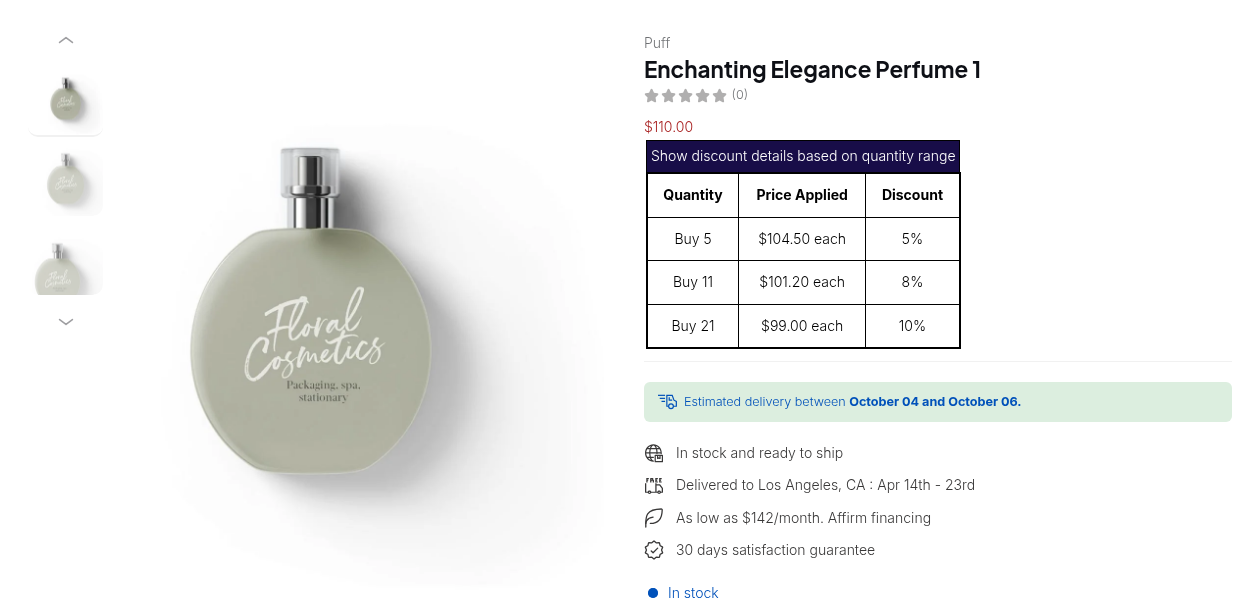
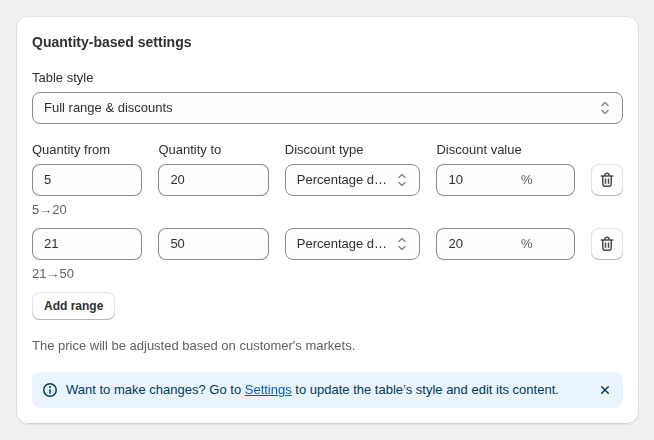
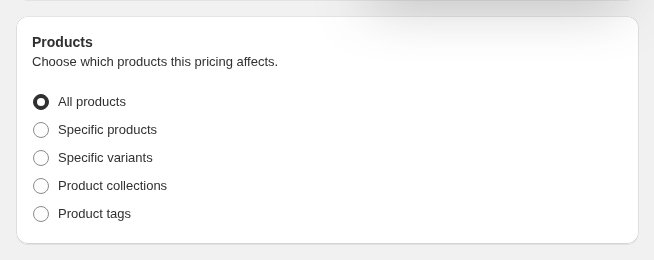
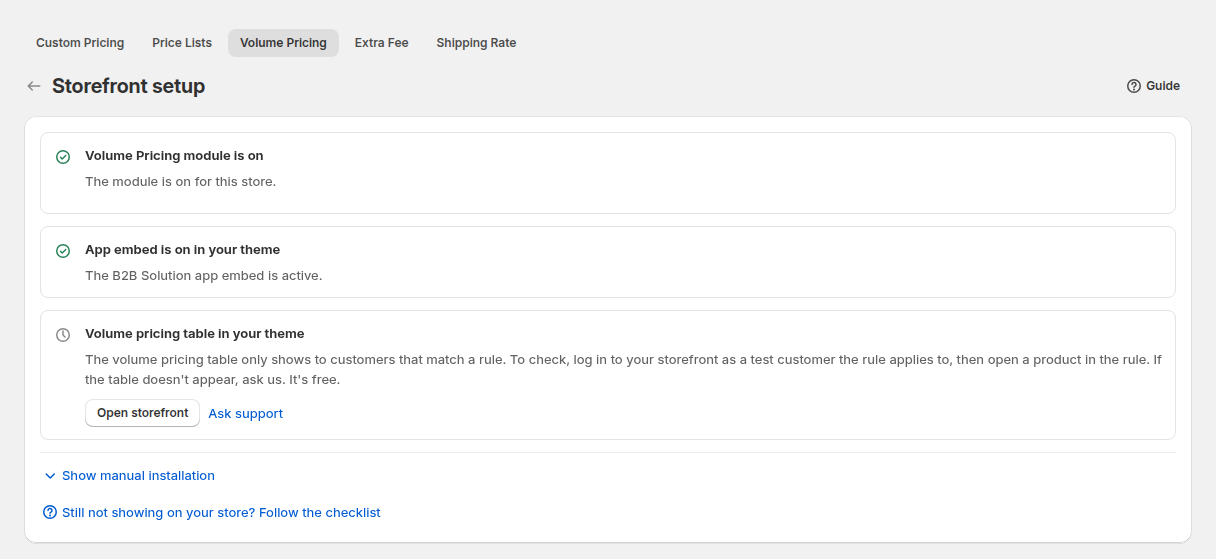
The four images above come from a demo store. The first shows what a volume pricing table looks like to a buyer: quantity, price applied and discount. The second shows how ranges and discounts are defined, the third how a rule picks its products (here, by product tag, the option Kali Ma Designs’ active rule uses), and the fourth a checklist that matters for troubleshooting. It reminds merchants that the table is shown only to customers who match the rule, so you must test as a customer the rule applies to.
Whichever model you choose, write down the buyer journey in four steps before you configure anything: discover, apply, get approved, order. Then check that each step has an owner, a page and an email. The most common failure in trade programs is not a missing feature but a gap between approval and the first order, where the buyer has an account but does not know where to go next.
What other merchants can copy
- Keep the home page open and the prices closed. Retailers can see your brand and style, while prices stay with approved accounts.
- Answer buyer questions in information pages. Gemstone details, ring sizes, shipping and plating pages reduce emails from shops.
- Use a short, strict trade form. Eight required fields give you what you need to check a shop without scaring applicants off.
- Send an invitation on approval. A login-first store needs the buyer to set a password and sign in quickly.
- Target price breaks by product tag. Tag the pieces that are sold in multiples and attach the quantity break to the tag.
- Always test as a matching customer. Create a tagged test account and open a product to confirm the table shows.
The merchant’s review
Kali Ma Designs left a five-star review of BSS B2B Solution on the Shopify App Store on June 12, 2026, after almost two years of use. We quote the public text as written:
We had some issues with the Volume Pricing feature not working in our store, but the support from the BSS B2B team was excellent and the feature is now working perfectly. Thank you to both Ryan and Lux from BSS B2B for their help.
Kali Ma Designs, United Kingdom, 5 stars, June 12, 2026, BSS B2B Solution reviews on the Shopify App Store
The review is a good reminder that a volume pricing table depends on three things lining up: a rule that targets the right customers, products that match it, and a theme where the table can appear. If a table does not show, our troubleshooting guide on volume pricing tables not showing on collection pages is a good place to begin.
Create a registration form, tag approved retailers and add a volume pricing rule for the tag or the products.
See BSS B2B Solution on the Shopify App StoreFAQ: a trade-only jewellery catalog on Shopify
How can a jewellery brand keep prices away from the public on Shopify?
Combine an account-based approach with price rules: retailers register, the merchant approves and tags them, and pricing rules for logged-in or tagged customers show their prices. A lock app or a theme setting can hide prices or pages from signed-out visitors.
What does a trade registration form need to ask?
The shop or company name, a contact name, email, address and phone are the basics. A website helps you check the business, and a source question tells you where applicants come from.
Why does my volume pricing table not show?
The table appears only to customers who match the rule and only on products the rule covers. Check the customer audience, the product selection, the rule status and that the app embed is on in your theme. Then test as a matching customer.
Can I use product tags to decide which items get quantity breaks?
Yes. A volume pricing rule can apply to all products, specific products or variants, collections or product tags, so tagging a group of products is an easy way to manage them.
Should approved retailers get an email?
Yes. An approval email with a link to set a password and log in speeds up the first order, which matters when the catalog is not visible until the buyer signs in.
This store spotlight is based on Kali Ma Designs’ public website and its public review on the Shopify App Store, as of October 5, 2026. Screenshots show the public storefront; admin images are labelled as example configuration and are not the merchant’s admin. Feature types were confirmed against app configuration data; no sales, order or customer figures are used.