
Shopify B2B Without Plus: What You Get on Basic, Grow and Advanced in 2026

Yes. Since April 2, 2026, Shopify’s native B2B features are included on Basic, Grow and Advanced, not only Plus: companies, company locations, quantity rules, net terms and up to 3 active B2B market catalogs. Plus adds unlimited catalogs, direct company catalogs, deposits and partial payments. Apps such as BSS B2B Solution cover what is left.
Set prices by customer tag, collect and approve applications with tax ID checks, and add order limits and net terms. Free on development stores, 14-day trial on paid plans.
Install BSS B2B Solution See pricingLast updated October 4, 2026. Older guides, including earlier versions of this one, say B2B on Shopify needs Plus. That changed in April. Shopify says the rollout is still under way (“Shopify B2B is now rolling out across all plans”, Shopify news, April 2, 2026), so confirm in your own admin. BSS B2B Solutions makes BSS B2B Solution, the app used below. This guide is part of our complete guide to Shopify B2B.
Key takeaways
- You do not need Plus for B2B. Basic, Grow and Advanced include companies, company locations, quantity rules, price breaks and net terms (Shopify Help Center).
- Without Plus you get up to 3 active catalogs across all B2B markets. Direct company catalogs, deposits and partial payments stay Plus only.
- B2B has no extra fee: it is included in your plan (Requirements and considerations).
- Shopify’s own checklist sends quoting, CSV ordering and locking a store to third-party apps, and access requests to the free Shopify Forms app (Setup checklist).
- BSS B2B Solution fills the common gaps: price rules by customer tag, registration with approval and tax ID checks, order limits and net terms.
Can you use Shopify B2B without Plus?
Yes. On April 2, 2026, Shopify announced that Basic, Grow and Advanced get native B2B at no extra cost: company profiles for wholesale buyers, up to three custom catalogs with tailored pricing, volume discounts and quantity rules, vaulted credit cards and payment terms. Shopify Plus keeps unlimited catalogs, direct catalog assignment to companies and locations, partial payments and deposits (Shopify news).
So the old advice, “upgrade to Plus for B2B”, is out of date. The real questions are how many catalogs you need and whether your wholesale workflow needs more than the native list. The next sections answer both with the Shopify Help Center as the source.
Shopify B2B features by plan: Basic, Grow, Advanced and Plus
This table condenses Shopify’s page on B2B features by plan, read on October 4, 2026. Related features are grouped into one row.
| Feature | Basic | Grow | Advanced | Plus |
|---|---|---|---|---|
| Companies and company locations | Yes | Yes | Yes | Yes |
| Quantity rules and quantity price breaks | Yes | Yes | Yes | Yes |
| B2B market catalogs | Up to 3 active | Up to 3 active | Up to 3 active | Unlimited |
| Direct company catalogs (customer-level pricing) | No | No | No | Yes |
| Net terms, payment reminders, ACH and vaulted cards | Yes | Yes | Yes | Yes |
| Deposits, partial payments and payment requests per fulfillment | No | No | No | Yes |
| Draft orders, PO numbers and easy reorders | Yes | Yes | Yes | Yes |
| Contextual checkout and storefront (using Markets) | No | No | Yes | Yes |
| Trade theme and quick order list | Yes | Yes | Yes | Yes |
| Shopify Flow with B2B objects | Yes | Yes | Yes | Yes |
Shopify notes that the “up to 3 active catalogs” limit applies across all your B2B markets. Catalogs decide which products and prices a B2B customer sees, and when several catalogs apply, the lowest price is shown (Catalogs and pricing in B2B). Learn the terms in our glossary: catalog and company location.
What you do not get without Plus, and what Shopify requires
Limits that come with Basic, Grow and Advanced
- 3 active catalogs. If you sell to more than three buyer groups with different price levels, the cap arrives quickly.
- No direct company catalogs. Pricing a single company or location through its own catalog is a Plus feature.
- No deposits or partial payments. Net terms work on every plan, but Shopify does not capture payments automatically when terms expire (B2B payment terms).
- Contextual checkout and storefront through Markets needs Advanced or Plus.
Requirements on every plan
- You must set up B2B customers as companies in your Shopify admin, and activate customer accounts. Legacy customer accounts cannot be used for B2B orders and customers (Requirements and considerations).
- To use B2B with Markets, you must activate it in feature test drive (same page).
- Some features do not work with B2B: accelerated checkouts (Shop Pay, Apple Pay, Google Pay, Amazon Pay), local delivery and pickup points, tipping, subscriptions, agentic storefronts, some third-party apps and checkout.liquid customizations (same page).
- Orders have a maximum of 500 line items (same page).
- B2B customers sign in with the email address linked to a company location and a one-time PIN sent to their email (Sign-in and customer accounts in B2B).
How much does Shopify B2B cost without Plus?
Native B2B adds no fee, so you pay your Shopify plan. Shopify also notes that B2B and D2C orders can have different variable platform fee rates (Requirements and considerations).
| Plan | Billed yearly | Billed monthly | B2B catalogs |
|---|---|---|---|
| Basic | $19 | $25 | Up to 3 |
| Grow | $49 | $65 | Up to 3 |
| Advanced | $299 | $399 | Up to 3 |
| Plus | Contact Shopify | From $2,300 | Unlimited |
Source: Shopify pricing. A worked example: Shopify Basic billed yearly ($19) plus the lowest paid plan of BSS B2B Solution ($29, Essential) is $48 per month before tax and other apps. Which BSS plan includes which module differs, so check the BSS B2B Solution page before you choose. The App Store listing (read October 2, 2026) shows BSS B2B Solution rated 4.9 from 1,187 reviews, with all features free on development stores.
How to set up Shopify B2B without Plus in 8 steps
This works for a new wholesale store or for adding B2B to an existing retail store. Steps 1 to 5 use native features, steps 6 to 8 add what native B2B leaves out.
Step 1: Choose a blended or a dedicated store
A blended store serves D2C and B2B customers from one store and admin. A dedicated store is B2B only, with separate branding and its own admin. Shopify says a blended store cannot be gated to B2B customers only, because D2C customers could not place orders, while a dedicated store can be gated (Blended and dedicated B2B stores). If you also sell to consumers, you will want a blended store.
Step 2: Activate customer accounts
Buyers need accounts to see B2B pricing. Shopify says only logged-in B2B customers can access B2B-specific pricing, products and content (Sign-in and customer accounts in B2B). Activate customer accounts, and keep legacy accounts out of B2B.
Step 3: Create companies and locations
Set up each business as a company with one or more locations. Each location can have its own tax ID, addresses, pricing and payment terms. You can create them manually in the admin, import in bulk with a third-party tool, or ask a Shopify Partner for a custom API solution (Setup checklist). A company location is the unit most B2B rules use: see company location.
Step 4: Create catalogs and quantity rules
Catalogs set which products and prices a buyer group sees. You can have up to 3 active catalogs on Basic, Grow and Advanced. Add quantity rules (minimum, maximum and increment) and price breaks on top. For the pricing options in depth, see the wholesale pricing hub.
Step 5: Set payment terms
Shopify offers no terms (payment due immediately, the default), net 7, 15, 30, 45, 60 and 90, due on fulfillment, and a fixed date. Payments are not captured automatically when terms expire (B2B payment terms). More on terms: net terms and the order rules and terms hub.
Step 6: Collect and approve wholesale applications
Shopify’s checklist points to the free Shopify Forms app for prospects who want to request access. If you want a full application with business fields, tax ID checks and approval, BSS B2B Solution registration forms support text, file and dropdown fields and tax ID fields such as EU VAT, UK VAT, US EIN, ABN and India GST. You approve or reject each application, and the form can add a customer tag on approval.
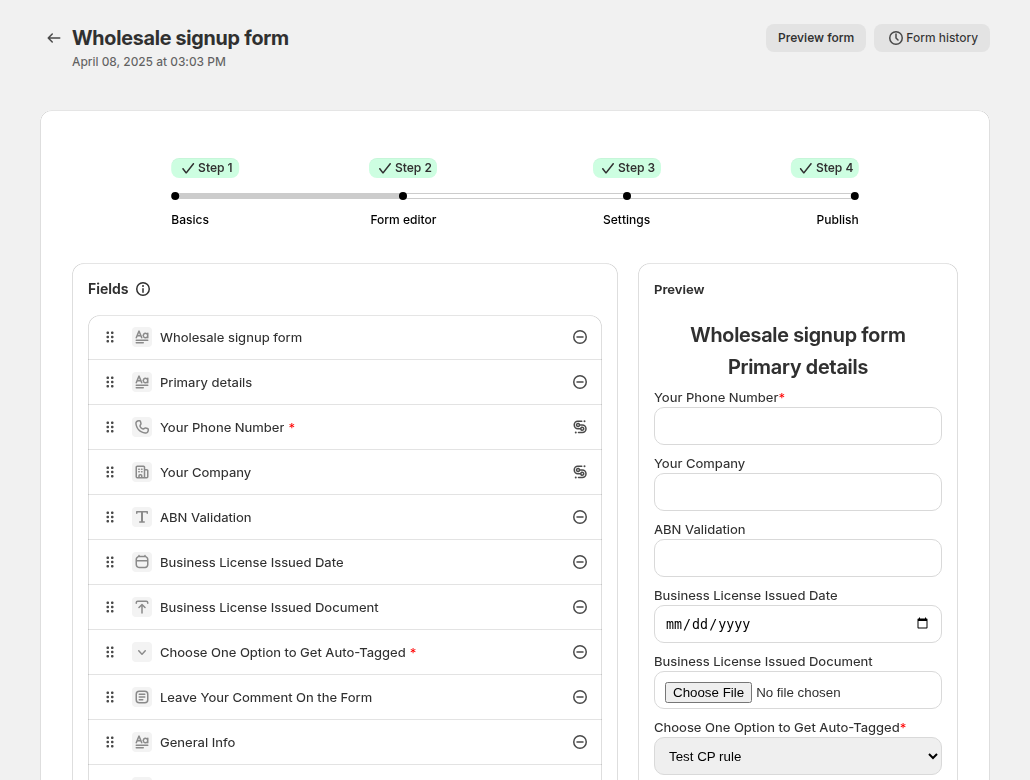
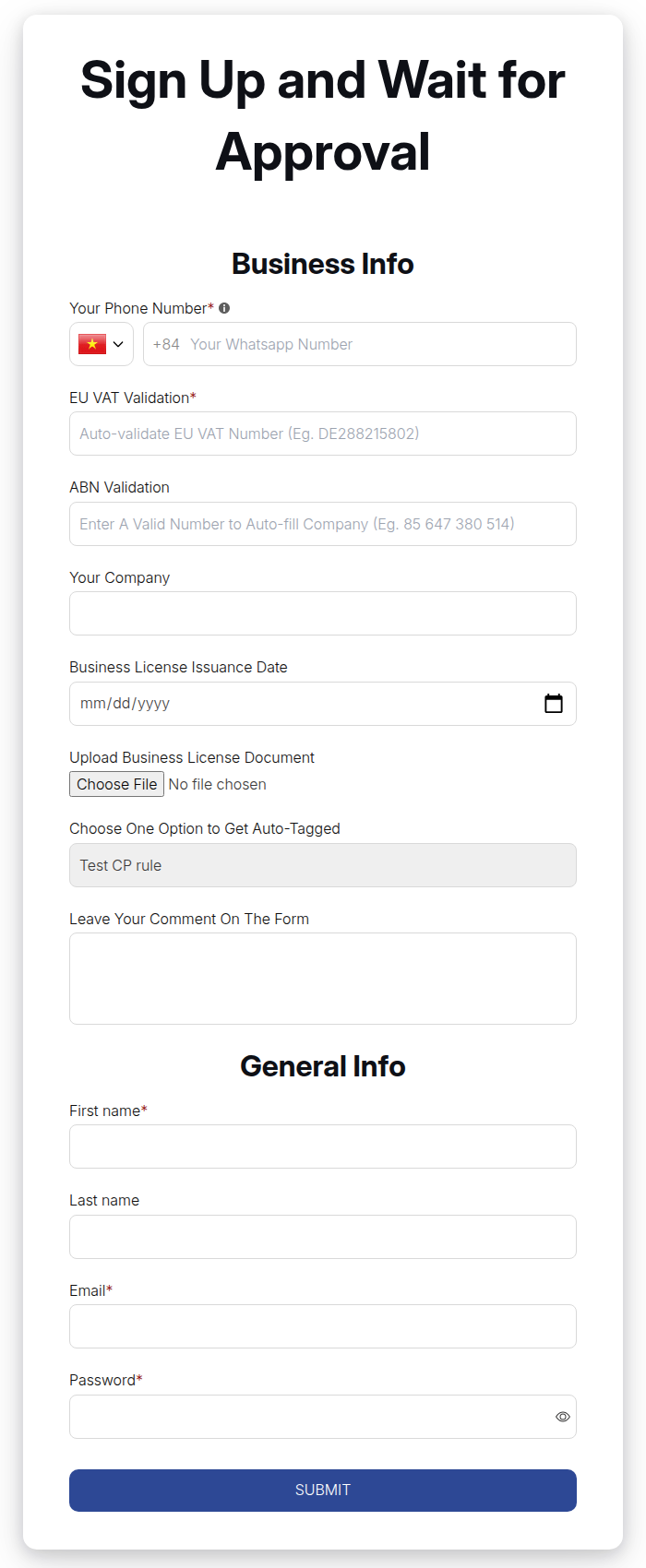

Follow the registration form guide and the use case Wholesale registration form with approval. The onboarding side has its own customer onboarding hub and a Shopify B2B registration form article.
Step 7: Price more buyer groups than three catalogs allow
When three catalogs are not enough, set price rules by customer tag. In BSS B2B Solution Custom Pricing, choose who gets the price (everyone, logged-in customers, specific customers, customer tags or company locations), then pick a price adjustment type and an amount. BSS B2B Solution manages these rules in the app, separately from Shopify catalogs, and lets you stack volume pricing on top. The rule with the lowest priority number wins within a module.
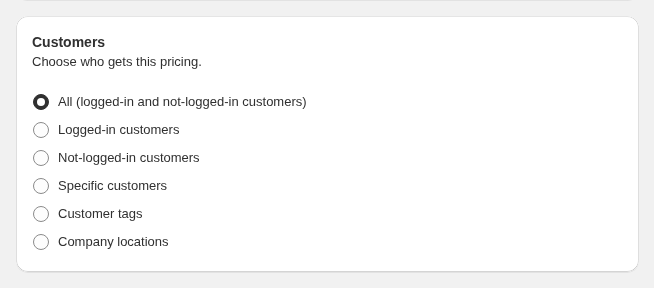
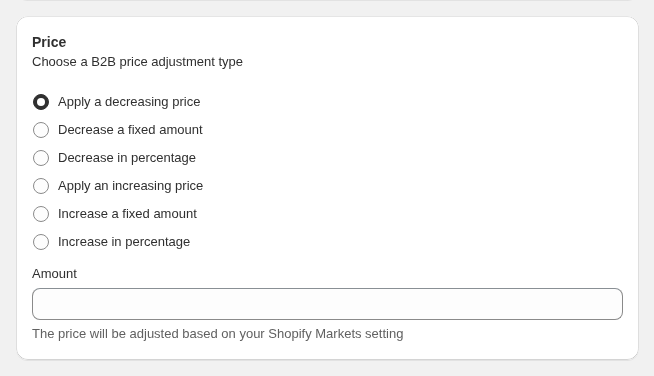
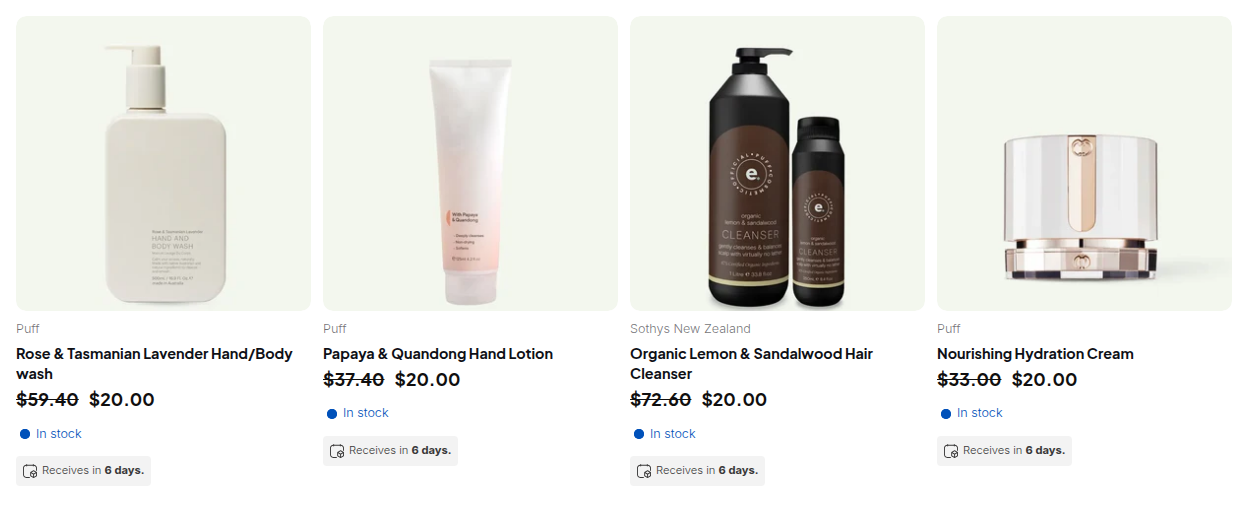
Read the custom pricing guide and the use case Give tagged wholesale customers special prices. Learn the term customer tag. Targeting by company location needs the Advanced plan or higher.
Step 8: Add order rules and test
Add a minimum order amount or quantity with Order Limits, and net terms for approved buyers. Then follow Shopify’s own last step: create a test customer and log in to check the buyer experience before you invite real buyers (Setup checklist).
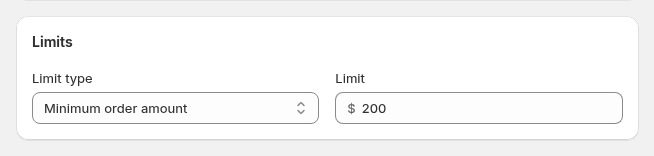
See Enforce a minimum order quantity and value and Offer Net 30 and other payment terms, or the order limits guide.
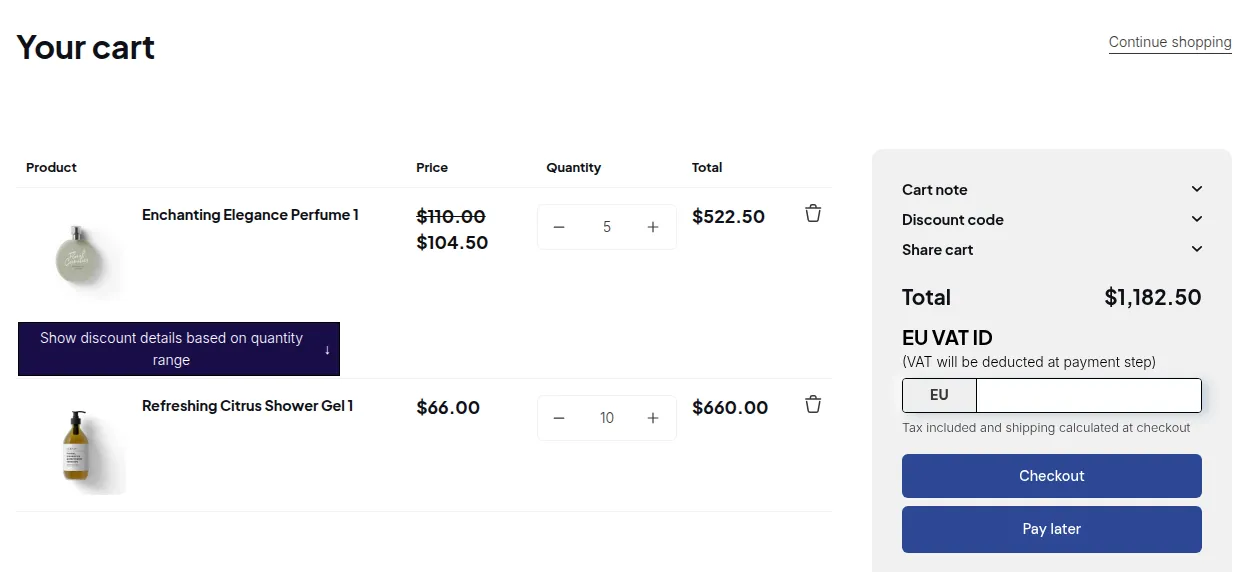
BSS B2B Solution is free on development stores. Build the form, a tag-based price rule and an order limit, test them as a buyer, then move to a paid plan on your live store.
Get BSS B2B Solution Read how BSS B2B Solution worksNative B2B or an app: what covers what without Plus
Use this table to see which requirements Shopify covers on Basic, Grow and Advanced, and where an app removes manual work.
| Requirement | Shopify native B2B (Basic, Grow, Advanced) | With BSS B2B Solution |
|---|---|---|
| Company accounts and locations | Yes: companies, locations and location permissions | Price rules can target a customer tag, a specific customer or a company location (company-location targeting: Advanced plan or higher) |
| Prices by buyer group | Up to 3 active catalogs across B2B markets | Custom Pricing and Volume Pricing by tag, customer or company location; Price List on the Platinum plan |
| Quantity discounts | Quantity price breaks and quantity rules | Volume (quantity break) pricing stacked on the custom price; quantity increments on Advanced and above |
| Payment terms | Net 7 to Net 90, due on fulfillment, fixed date | Net Terms for buyers identified by tag (paid plans) |
| Registration and approval | Free Shopify Forms app for access requests | Registration forms with file upload, tax ID checks, approval and tag on approval |
| Minimum and maximum order | Quantity rules per product | Order Limits: minimum or maximum amount or quantity per order |
| Hide prices from guests | Third-party apps lock parts or all of a store | Use BSS B2B Lock: see how to hide prices on Shopify |
| Quotes and CSV ordering | Third-party apps for quoting and CSV order upload | Use BSS B2B Quote: see the quote and quick order hub |
Native is enough when
Your wholesale buyers fit into companies, you need three catalogs or fewer, and you do not need an application flow with tax checks, price rules beyond the catalog cap, guest price hiding or quotes.
Add an app when
You sell retail and wholesale on one store, need prices for more than three buyer groups, collect applications and approve buyers, or want order limits, tag-based terms, hidden prices or quotes. For a roundup of options, see our Shopify B2B apps comparison.
When Shopify Plus is worth it
Choose Plus when you need unlimited catalogs, catalogs assigned directly to companies and locations, or deposits and partial payments handled natively. Plus starts at $2,300 per month on monthly billing (Shopify pricing). If your needs are three catalogs, net terms, quantity rules and an approval flow, the plans from Basic to Advanced plus an app usually fit. We compare the two paths in Shopify native B2B and describe the plan questions in Shopify wholesale customer accounts.
Limits of running B2B without Plus
- Apps add cost and set-up time. Each app has its own plan. Test every rule in a cart as a buyer, and check that price rules from an app do not conflict with catalogs.
- App price rules are separate from catalogs. BSS B2B Solution manages its own rules and does not create Shopify catalogs, so decide where each buyer group’s price lives.
- Some Shopify features do not work with B2B orders, such as accelerated checkouts and subscriptions (see the list above).
- Plan details change. Shopify is still rolling out B2B across plans. Re-read the Help Center page before you decide.
- Checkout locks need Plus. BSS B2B Lock’s checkout lock is available only on Shopify Plus; its storefront rules for prices, products and pages are separate.
The 3-catalog limit: what it means and how to handle more than three price tiers
On Basic, Grow and Advanced you can assign up to 3 active catalogs across all your B2B markets, in total and not per market. Plus has unlimited catalogs and can assign them directly to companies and company locations (Catalogs and B2B features by plan, read October 8, 2026). The cap does not stop you at three buyers. It stops you at three price levels, so a store with five tiers such as distributor, reseller, VIP, trade and partner needs another plan for the extra two.
You have three ways to handle it:
- Merge tiers. Group buyers into at most three price levels and give each level one catalog. This costs nothing but works only if the groups can share a discount.
- Price the extra groups with an app. Keep your catalogs for the main levels and set the other groups up as price rules by customer tag, specific customer or company location. In BSS B2B Solution these rules live in the app, separate from Shopify catalogs (see Step 7 above), so decide which system owns each group’s price.
- Upgrade to Plus. Unlimited catalogs and direct catalogs for a company or location are handled natively, at Plus pricing (see the cost section above). Upgrade when several tiers need their own catalog per company and you want to stay fully native.
Whichever route you take, log in as a test buyer from each group and check the price in the cart before you invite customers.
FAQ: Shopify B2B without Plus
Do I need Shopify Plus for B2B?
No. Since April 2, 2026, Shopify’s native B2B is included on Basic, Grow and Advanced as well as Plus, at no extra cost. Plus adds unlimited B2B market catalogs, direct company catalogs, deposits and partial payments. Shopify says the rollout is still under way, so check your admin.
Is Shopify B2B available on the Basic plan?
Yes. Basic includes companies, company locations, quantity rules, price breaks, net terms and up to 3 active catalogs across B2B markets. Contextual checkout and storefront using Markets needs Advanced or Plus.
How much is Shopify B2B?
Native B2B has no extra fee. You pay your plan: Basic $19, Grow $49 or Advanced $299 per month billed yearly ($25, $65 and $399 billed monthly), and Plus from $2,300 per month (shopify.com/pricing, read October 4, 2026). Apps cost extra. BSS B2B Solution starts at $29 per month on paid plans and is free on development stores.
How many B2B catalogs can I have without Plus?
Up to 3 active catalogs across all your B2B markets on Basic, Grow and Advanced. Plus has unlimited catalogs and can assign them directly to companies and locations. If you need more price groups than three catalogs, price rules from an app can cover the rest.
What is missing from Shopify B2B without Plus?
Unlimited catalogs, direct company catalogs, deposits, partial payments and payment requests per fulfillment are Plus only. Shopify’s checklist also lists quoting workflows, CSV order upload and locking a store as use cases for third-party apps.
Do I need an app for B2B on Shopify?
Not always. Native B2B is enough if your buyers fit into companies, you need three catalogs or fewer, and you do not need applications with tax checks, quotes or hidden prices. Add an app such as BSS B2B Solution when you need price rules for more groups, registration with approval, order limits or tag-based terms.
How do I create a B2B customer on Shopify?
Set the business up as a company in the Shopify admin, add a location and assign customers to it. B2B customers then sign in with the email address linked to the company location and a one-time PIN. You must activate customer accounts first, and legacy customer accounts cannot be used for B2B.
Does Shopify B2B support net terms without Plus?
Yes. Net 7, 15, 30, 45, 60 and 90, due on fulfillment and a fixed date are available. Shopify does not capture payment automatically when terms expire. Deposits and partial payments are Plus only.
Can I hide prices from guests without Plus?
Shopify’s B2B plan table does not list hiding prices as a feature on any plan, so it is not tied to Plus. Shopify’s checklist points to third-party apps to lock parts or all of a store. See our guide on how to hide prices on Shopify for the four methods compared.
Do I still need a B2B app now that Shopify B2B is on every plan?
Often yes, but not for every store. Shopify B2B is now on every plan and covers companies, company locations, up to 3 active catalogs, quantity rules, price breaks and net terms. If your buyers fit into three price levels and you take orders by hand or by email, native B2B may be all you need. An app earns its place when you need more than three price groups, a registration form with approval and tax ID checks, quotes, hidden prices for guests or a locked store. Shopify’s checklist lists quoting workflows, CSV order upload and locking a store as jobs for third-party apps. A checkout lock is Plus only in BSS B2B Lock.
Next steps
Check your plan’s catalog limit, activate customer accounts and create your first company. Then decide whether native B2B covers your buyers. Read the complete guide to Shopify B2B for the six parts of a wholesale store, how to price B2B on Shopify for pricing, and how to hide prices on Shopify if guests should not see prices.
Install BSS B2B Solution for registration with approval, price rules by customer tag, order limits and net terms. Add BSS B2B Lock or BSS B2B Quote when you need hidden prices or quotes.
Install BSS B2B Solution See all three appsSources
Shopify pages read on October 4, 2026. BSS facts: BSS user guides at docs.bss-b2b.solutions and the Shopify App Store listing (as of October 2, 2026).
- Shopify Help Center: Shopify B2B
- Shopify Help Center: Shopify B2B features by plan
- Shopify Help Center: Requirements and considerations for using B2B
- Shopify Help Center: Setup checklist for blended B2B stores
- Shopify Help Center: Blended and dedicated B2B stores
- Shopify Help Center: Catalogs and pricing in B2B
- Shopify Help Center: B2B payment terms
- Shopify Help Center: Sign-in and customer accounts in B2B
- Shopify news: Shopify brings native B2B features to more merchants (April 2, 2026)
- Shopify: Pricing
- BSS B2B Solution user guide
You may also like

How to Sell Wholesale to Retailers: A Playbook for Shopify Brands
To sell wholesale to retailers, set a wholesale price that leaves room for both of you (usually […]

Shopify Tax Exempt Customers With a Resale Certificate: A US Guide for Wholesale Sellers
A resale certificate is a state-issued US document that lets a business buy goods it will resell […]

Faire Alternatives for Brands: Sell Wholesale on Your Own Shopify Store
The best Faire alternative for most Shopify brands is not another marketplace. It is your own Shopify […]