
Shopify Native B2B vs Shopify Plus B2B: What Each Plan Includes (2026)

Shopify’s native B2B is included on Basic, Grow, Advanced and Plus since April 2026. All four plans get companies, locations, quantity rules, price breaks and net terms. Plus adds unlimited catalogs, direct company catalogs, deposits and partial payments. Advanced and Plus add contextual storefront and checkout.
Price more buyer groups than the catalog cap allows, collect and approve applications, and add order limits and net terms by customer tag. Free on development stores, 14-day trial on paid plans.
Install BSS B2B Solution See pricingLast updated October 4, 2026. This article replaces an older version. Shopify’s Help Center now documents the plan differences, and every plan fact below links to its source. BSS B2B Solutions makes BSS B2B Solution, Lock and Quote, mentioned where native B2B stops. For how to set B2B up on Basic, Grow or Advanced, see Shopify B2B without Plus. For the whole picture, read the complete guide to Shopify B2B.
Key takeaways
- Native B2B is a set of features inside Shopify, not a separate product. It adds no extra cost on Basic, Grow, Advanced or Plus (Requirements and considerations).
- Most features are identical on all four plans. The differences are catalogs (3 active vs unlimited), direct company catalogs, deposits and partial payments (Plus only), and contextual storefront and checkout (Advanced and Plus).
- The 3-catalog cap applies across all your B2B markets on Basic, Grow and Advanced (B2B features by plan).
- Quotes, CSV order upload, hiding prices and wholesale applications are not rows in Shopify’s plan table. Shopify’s checklist points to apps for them (Setup checklist).
- Pick a plan by catalogs and payments first, then decide what an app must cover.
What native B2B means in 2026
Native B2B is Shopify’s built-in set of features for selling to businesses from the same store and admin you use for consumers. You set up each customer business as a company with one or more locations, then give each location its own catalogs, prices, payment terms, checkout settings and tax details. Buyers sign in with customer accounts and see B2B pricing in your online store (Shopify B2B).
Until April 2, 2026, these features were a Shopify Plus capability. On that date Shopify announced it was extending its foundational B2B features to Basic, Grow and Advanced at no extra cost, and said the rollout is still under way (Shopify news, April 2, 2026). So “native B2B vs Plus B2B” is no longer a question of having B2B or not. It is a question of which limits matter to you.
Native B2B features by plan: the full matrix
This is Shopify’s own table, with its 25 rows regrouped, read on October 4, 2026 from the Help Center page on B2B features by plan. A check mark means included on that plan.
| Group | Feature | Basic | Grow | Advanced | Plus |
|---|---|---|---|---|---|
| Companies | Companies | Yes | Yes | Yes | Yes |
| Companies | Company locations | Yes | Yes | Yes | Yes |
| Companies | Location-level permissions | Yes | Yes | Yes | Yes |
| Catalogs | B2B market catalogs | 3 active | 3 active | 3 active | Unlimited |
| Catalogs | Direct company catalogs | No | No | No | Yes |
| Catalogs | Quantity rules | Yes | Yes | Yes | Yes |
| Catalogs | Quantity price breaks | Yes | Yes | Yes | Yes |
| Payments | Net terms | Yes | Yes | Yes | Yes |
| Payments | Payment reminders | Yes | Yes | Yes | Yes |
| Payments | Automated Clearing House (ACH) | Yes | Yes | Yes | Yes |
| Payments | Vaulted credit cards | Yes | Yes | Yes | Yes |
| Payments | Deposit requirements (companies) | No | No | No | Yes |
| Payments | Deposit requirements (draft orders) | No | No | No | Yes |
| Payments | Partial payments | No | No | No | Yes |
| Payments | Payment requests per fulfillment | No | No | No | Yes |
| Orders | Draft order to invoice | Yes | Yes | Yes | Yes |
| Orders | Checkout to draft | Yes | Yes | Yes | Yes |
| Orders | Easy reorders | Yes | Yes | Yes | Yes |
| Orders | PO numbers | Yes | Yes | Yes | Yes |
| Orders | Contextual checkout | No | No | Yes | Yes |
| Staff | Sales staff permissions | Yes | Yes | Yes | Yes |
| Storefront | Trade theme | Yes | Yes | Yes | Yes |
| Storefront | Quick order list | Yes | Yes | Yes | Yes |
| Storefront | Contextual storefront | No | No | Yes | Yes |
| Tools | Shopify Flow with B2B objects | Yes | Yes | Yes | Yes |
Of the 25 rows, 17 are identical on every plan, 6 differ only for Plus (including the catalog cap), and 2 start at Advanced. Shopify adds that most B2B features are on all plans and some are exclusive to Advanced or Plus, so recheck before a purchase. Terms used here are defined in our glossary: catalog, company location and net terms.
What Plus adds
Unlimited catalogs and direct company catalogs
On Basic, Grow and Advanced you can assign up to 3 active catalogs across all your B2B markets. On Plus you can create unlimited B2B market catalogs and assign catalogs directly to a company or company location, up to 25 catalogs per location (Creating B2B catalogs). Direct assignment is what lets one customer have its own negotiated price list. Below Plus, catalogs reach buyers through B2B markets instead.
Deposits, partial payments and payment requests
Deposit requirements, partial payments and payment requests per fulfillment are available only on Plus. A deposit lets you collect part of an order when it is created and the rest later, entered as a percentage and paid with a credit card or a manual payment method (B2B payment terms). Net terms themselves work on every plan.
Direct catalogs in a rollout
A related detail on the catalogs page: a catalog assigned directly to a company or location cannot be added to a rollout, which is Shopify’s way to schedule a catalog’s status change (Catalogs and pricing in B2B).
What Advanced adds over Basic and Grow
Two rows start at Advanced: contextual checkout and contextual storefront, both using Markets. Shopify says contextual storefront customizations by market are available on the Advanced plan and higher, and that theme editor customizations by customer type require Plus (Online store customization in B2B). In practice, Advanced lets you tailor the storefront and checkout by market context, which Basic and Grow cannot. Everything else in the matrix is the same on Basic, Grow and Advanced.
How native catalog pricing works
A catalog is a set of products you sell to B2B companies, with its own pricing. You create it under Markets, Catalogs, choose all products or specific ones, optionally set a currency, and set the status to Active (Creating B2B catalogs). The details that surprise people:
- Price adjustments. Apply a percentage increase or decrease to the whole catalog, or set a fixed price for a product or variant. Both can coexist in one catalog, and fixed prices take precedence.
- Lowest price wins. If several catalogs price the same product for a buyer, the lowest price displays (Catalogs and pricing in B2B).
- Volume pricing is fixed. After you apply volume pricing to a product, its price becomes fixed and a catalog-wide adjustment no longer applies. Shopify allows up to 10 price breaks per product, set per variant (Quantity rules and volume pricing).
- Quantity rules. Minimum, maximum and increment per variant. Shopify says to make sure your theme displays a minimum on the product page.
- Currency. The catalog currency does not decide the currency buyers see in your online store.
- Markets. To use B2B catalog features on Basic, Grow or Advanced, the store must use new Shopify Markets (B2B features by plan).
For prices by buyer group see our wholesale pricing hub, and for market-based prices the use case Wholesale prices per country with Shopify Markets.
How native payments and checkout work
Payment terms set how long a company has to pay. Shopify offers net 7, 15, 30, 45, 60 and 90, due on fulfillment, and a fixed date for draft orders only; the default is payment due immediately. You assign terms as a default per company location or per draft order. One limit matters: payments are not automatically captured when terms expire, even for a saved card, so you collect from the admin (B2B payment terms).
At checkout, a company location can submit all orders as drafts for review, with no payment collected until you confirm. You can also allow a one-time shipping address that is not saved to the location (B2B checkout settings). Each location can have its own tax ID and exemptions, addresses, catalogs and payment terms, and contacts have either ordering-only or location admin permissions (Creating companies and locations). More on this in the order rules and terms hub and the use case Offer Net 30 and other payment terms.
Requirements and what does not work with B2B
- Customer accounts. You must activate customer accounts. You cannot use legacy customer accounts for B2B orders and customers (Requirements and considerations). Buyers sign in with the email linked to a company location and a one-time PIN (Sign-in and accounts in B2B).
- Markets. The plan page says new Shopify Markets is required for catalog features below Plus. The requirements page says to use B2B with Markets you activate it in feature test drive. Check both in your admin.
- Incompatible features. Shopify lists accelerated checkouts (Shop Pay, Apple Pay, Google Pay, Amazon Pay), local delivery, pickup points, tipping, subscriptions, legacy customer accounts, agentic storefronts, some third-party apps and checkout.liquid customizations.
- Line items. Orders and draft orders have a maximum of 500 line items.
- Fees. B2B features are included at no extra cost, but B2B and D2C orders have different variable platform fee rates.
- Store type. A blended store serves D2C and B2B from one admin but cannot be gated to B2B customers only; a dedicated B2B store can be gated, and its apps must be set up and paid for again (Blended and dedicated B2B stores). See selling B2B and B2C from one store.
Where native B2B stops, whatever the plan
Four needs that wholesale stores often have are not rows in Shopify’s plan table. The setup checklist points to other tools for them: third-party apps for quoting workflows and order upload via CSV, the free Shopify Forms app for prospects who request access, and third-party apps to lock parts or all of a store (Setup checklist). This table maps those gaps and a fifth, price groups beyond the catalog cap, to what Shopify says and what BSS offers.
| Need | What Shopify says | BSS option |
|---|---|---|
| More price groups than 3 catalogs | Plus has unlimited catalogs | BSS B2B Solution price rules by customer tag, specific customer or company location |
| Wholesale applications with business fields and approval | Free Shopify Forms app for access requests | BSS B2B Solution registration forms with tax ID fields, approval and tags |
| Minimum order amount or quantity per order | Quantity rules per product variant | BSS B2B Solution Order Limits (amount or quantity) |
| Hide prices or lock pages from visitors | Third-party apps lock parts or all of a store | BSS B2B Lock: how to hide prices on Shopify |
| Quotes and CSV order upload | Third-party apps for quoting and CSV upload | BSS B2B Quote: quote and quick order hub |
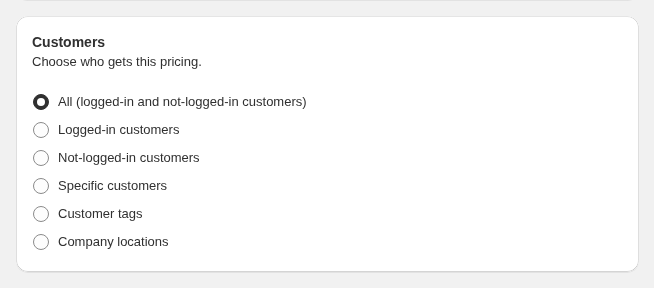
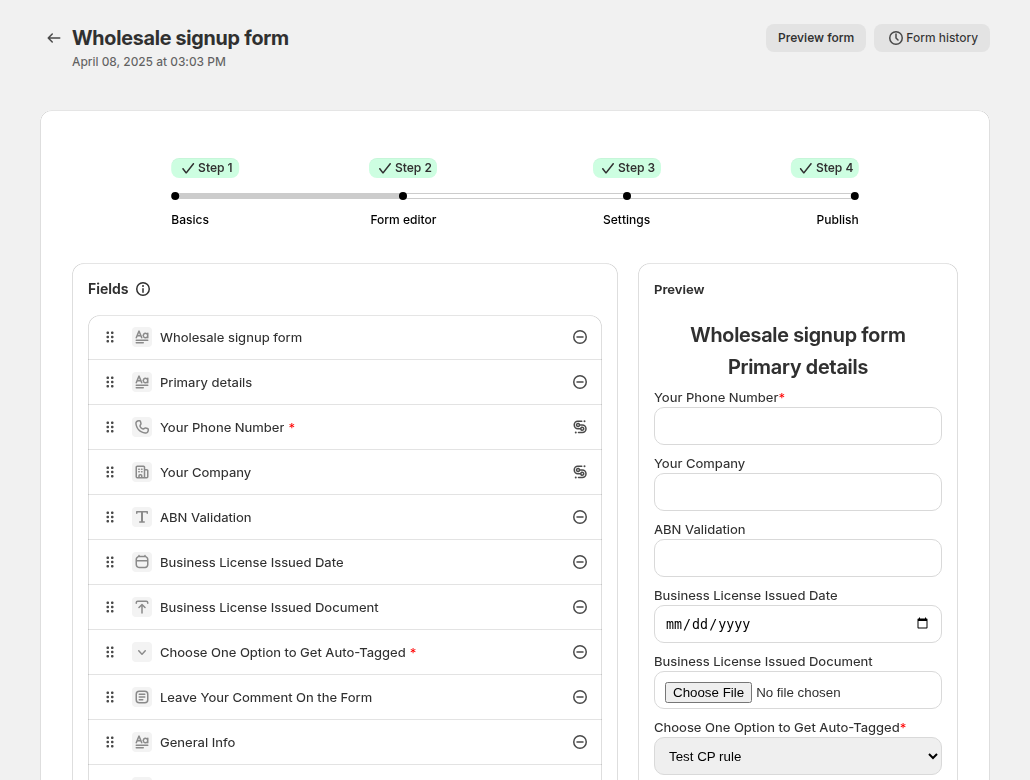
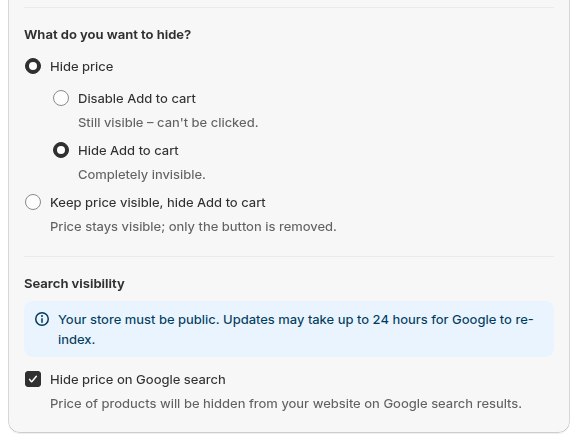
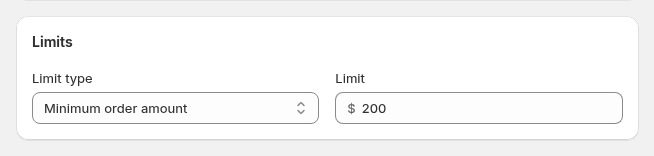
BSS B2B Solution manages these rules in the app, separately from Shopify catalogs, so decide where each buyer group’s price lives and test it as a buyer. Plan limits apply: for example, company-location targeting and quantity increments need the Advanced plan, and price lists need Platinum. Compare more options in our Shopify B2B apps roundup, read the custom pricing guide, or see Give tagged wholesale customers special prices.
Which plan fits which business
| Your situation | Plan that fits | Why |
|---|---|---|
| A few trade accounts on one or two price levels, net terms, minimums | Basic or Grow | Companies, up to 3 catalogs, quantity rules and net terms are included on every plan |
| Different content for B2B buyers by market, same 3-catalog limit | Advanced | Contextual storefront and checkout start at Advanced |
| Many price levels, or a negotiated price list per customer | Plus, or Basic to Advanced with price rules from an app | Unlimited and direct company catalogs are Plus only |
| Deposits, partial payments or payment per fulfillment | Plus | Plus only |
| Quotes, applications, hidden prices or CSV ordering | Any plan, with apps | Not part of the plan table on any plan |
What each plan costs
| Plan | Billed yearly | Billed monthly | B2B catalogs |
|---|---|---|---|
| Basic | $19 | $25 | Up to 3 |
| Grow | $49 | $65 | Up to 3 |
| Advanced | $299 | $399 | Up to 3 |
| Plus | From $2,300 | From $2,300 | Unlimited |
Source: Shopify pricing. Native B2B adds nothing to these prices. Apps are extra: BSS B2B Solution starts at $29 per month on paid plans (App Store listing, October 4, 2026) and is free on development stores. For pricing strategy rather than plan prices, read the Shopify B2B pricing guide.
Limits of this comparison
- Shopify is still rolling out B2B across plans. Some stores may not have every feature yet, so check your admin.
- Plan details change. Everything above is from Shopify pages read on October 4, 2026. Re-read the Help Center page before you buy.
- Shopify’s own pages differ in places. One page lists sales staff permissions as limited on non-Plus plans, while the plan table lists them as included on every plan. We follow the plan table.
- We make BSS apps. The BSS column is our view, based on our user guides and checks of the apps. Weigh it accordingly.
FAQ: Shopify native B2B vs Plus
What is the difference between Shopify B2B and Shopify Plus?
Native B2B is a set of features that is now included on Basic, Grow, Advanced and Plus. Plus adds unlimited B2B market catalogs, direct company catalogs, deposits, partial payments and payment requests per fulfillment. Plus also has theme editor customizations by customer type.
Does Shopify B2B require Plus?
No. Since April 2, 2026 Shopify has extended B2B features to Basic, Grow and Advanced at no extra cost. Shopify says the rollout is still under way, so confirm in your admin.
How many B2B catalogs do I get on each plan?
Up to 3 active catalogs across all your B2B markets on Basic, Grow and Advanced, and unlimited on Plus. Only Plus can assign catalogs directly to companies and locations, up to 25 per location.
Is Shopify native B2B free?
It adds no extra cost to Basic, Grow, Advanced or Plus, according to Shopify’s requirements page. You pay your plan, and B2B and D2C orders can have different variable platform fee rates.
Does native B2B include net terms and quantity rules?
Yes, on every plan. Net terms run from net 7 to net 90, due on fulfillment, or a fixed date on draft orders, and payments are not captured automatically when terms expire. Quantity rules cover minimum, maximum and increment.
Does Shopify B2B support quotes or a wholesale application form?
Not as rows in the plan table. Shopify’s checklist lists quoting workflows as a use case for third-party apps and points to the free Shopify Forms app for prospects requesting access.
Can I hide prices from guests with native B2B?
Only logged-in B2B customers see B2B-specific pricing, but guests can still browse and see the store’s normal prices. Shopify’s checklist points to third-party apps to lock parts or all of a store.
Do I need an app on top of native B2B?
Not always. Native is enough when your buyers fit into companies, you need three catalogs or fewer, and you do not need quotes, applications with tax checks or hidden prices. Add an app when one of those is missing.
Next steps
List your buyer groups and payment needs, check them against the matrix above, and choose the plan before the app. If you are on Basic, Grow or Advanced, continue with Shopify B2B without Plus for the set-up steps. Our Shopify B2B guide covers the six parts of a wholesale store.
Install BSS B2B Solution for price rules by tag, registration with approval and order limits. Add BSS B2B Lock to hide prices and BSS B2B Quote for quotes and quick ordering.
Install BSS B2B Solution See all three appsSources
Shopify pages read on October 4, 2026. BSS facts: BSS user guides at docs.bss-b2b.solutions and the Shopify App Store listing.
- Shopify Help Center: Shopify B2B features by plan
- Shopify Help Center: Requirements and considerations for using B2B
- Shopify Help Center: Creating B2B catalogs
- Shopify Help Center: Quantity rules and volume pricing
- Shopify Help Center: B2B payment terms
- Shopify Help Center: Online store customization in B2B
- Shopify Help Center: Setup checklist for blended B2B stores
- Shopify news: Shopify brings native B2B features to millions more merchants (April 2, 2026)
- Shopify: Pricing
You may also like

How to Sell Wholesale to Retailers: A Playbook for Shopify Brands
To sell wholesale to retailers, set a wholesale price that leaves room for both of you (usually […]

Shopify Tax Exempt Customers With a Resale Certificate: A US Guide for Wholesale Sellers
A resale certificate is a state-issued US document that lets a business buy goods it will resell […]

Faire Alternatives for Brands: Sell Wholesale on Your Own Shopify Store
The best Faire alternative for most Shopify brands is not another marketplace. It is your own Shopify […]