
Growth plan and up
Reorder is part of the Growth, Business and Enterprise plans.
BSS B2B Quote: Reorder page
The Reorder page in BSS B2B Quote is a theme page where a logged-in buyer sees past orders and pending draft orders, repeats one, edits the items and gets a checkout link or an invoice email. It builds a Shopify draft order at current prices. It needs the Growth plan or higher.
A repeat wholesale buyer usually wants the same products as last time, or close to it. Without a reorder page, they search again, pick options again and rebuild the cart line by line, or they email you the old order number.
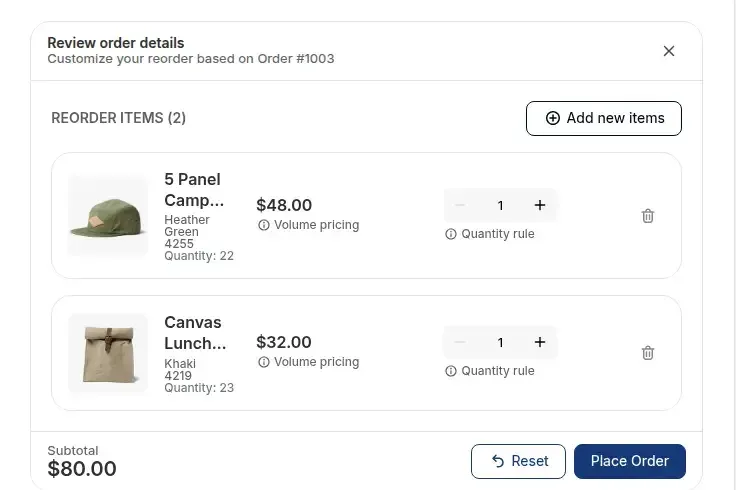
The Reorder page lists the buyer's past orders in an Orders tab and their pending draft orders in a Waiting for Checkout tab. A Reorder button opens a review window with the old items filled in. The buyer changes quantities, removes lines, adds other products and places the order.
The order is created as a Shopify draft order, so the buyer's active cart is not touched. The buyer then pays through the checkout link, or from the invoice Shopify emails.
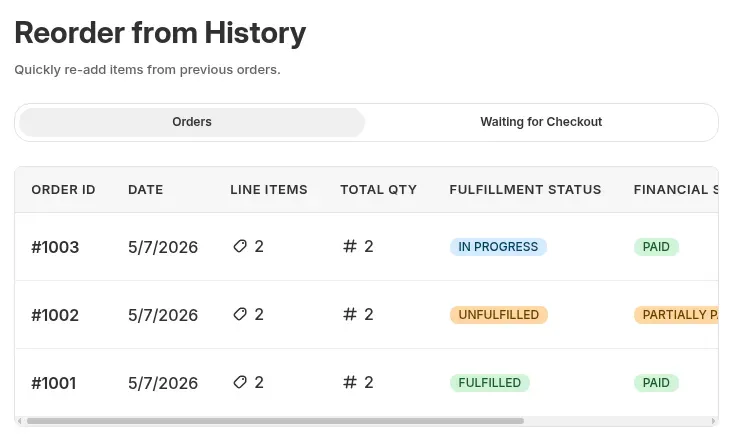
The page is a theme page that the app creates.
In the Shopify theme editor open App embeds and turn on B2B Portal. Without it, the page can show as Published in the app and still render nothing on the storefront.
In the app go to Reorder and click Manage settings on the Reorder Settings card. The page status badge shows Published or Unpublished.
Under Apply to customers pick logged-in customers, specific customers or customer tags, for example wholesale. Then add an exclusion by specific customers or tags if you need one. Exclusions are checked first and always win.
Set Checkout Link Visibility to display the link on the storefront, send it by email, or both. Both is the default. Email sends the Shopify invoice for the draft order, which suits buyers who need approval before they pay.
Set Page visibility to Show Reorder page on storefront, then publish the page. The default handle is reorder, so the URL is /pages/reorder. If a page with that handle already exists on your store, the app lets you override its content or pick a different handle. Add a link to the page in your navigation or account menu.
Log in as a customer who has past orders and open the page. Reorder an old order, change a quantity, place it and check the draft order in Shopify. Then open the page logged out and as an excluded customer to see the Restricted Access screen.
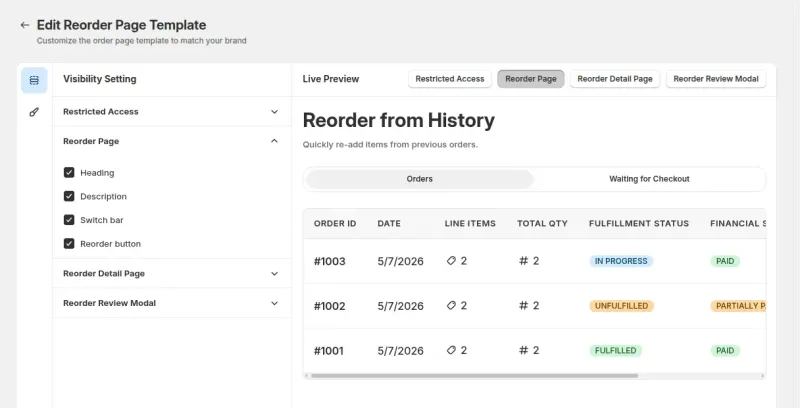
Set up the Reorder page on a Growth plan or above, or build it first on a development store.
Settings sit in the Reorder section of the app.
| Setting | What it does |
|---|---|
| Page status | Published or Unpublished. The page is hidden by default |
| Page visibility | Show or Hide the page on the storefront. Hide is the default |
| Apply to customers | Logged-in customers, specific customers or customer tags |
| Exclude customers | None, specific customers or customer tags. Checked before the apply rules |
| Checkout Link Visibility | Display the link on the storefront, send it by email, or both (default) |
| Template customization | Colors and which elements show, with a live preview, across the four storefront screens |
| Storefront translation | Edit the copy, button labels and status text for each language |
Orders tab. Each row shows the order number, date, line items, total quantity, fulfillment status and financial status, with a view icon and a Reorder button. The tab has its own pagination.
Waiting for Checkout tab. It lists pending draft orders with a status of Open, Invoice sent or Completed. The view icon opens a detail page with the items, prices and a checkout link. An empty list shows a short message.
Review and Edit window. It opens with the old items at the store's current prices. The buyer can change quantities, remove items and search for products to add. The window applies quantity rules such as minimums, maximums and pack sizes, and checks stock when it opens and when the buyer changes a quantity.
Unavailable items. If a product in an old order was archived or deleted, a warning lists the items and the buyer can continue with the rest. If every item is gone, the Reorder button is disabled.
Quote requests. A draft order created from a quote request shows in the Waiting for Checkout tab, next to draft orders made by reorders. See Quote form fields and emails for the quote side.
Quick Order. A Quick Order page suits a buyer who knows the SKUs. Reorder suits a buyer who wants to repeat a past order. A store often runs both. Variant table covers the case where one product has many sizes or colors.
Currency. On a multi-currency store the page shows prices in the currency the customer selected.
Reorder is part of the Growth, Business and Enterprise plans.
The app rejects a request without a logged-in customer. There is no guest reorder.
Reorder does not run BSS B2B Solution price rules. The draft order carries only the variant and the quantity, and Shopify prices it. Place a test reorder as a buyer and check the draft order before you launch.
The app reads the most recent 2,500 orders for a customer. Shopify can limit how far back an app can read orders. If a buyer's oldest orders do not appear, contact support.
Reorder ends with a checkout link or an invoice. The order is not paid until the buyer pays, and it stays in Waiting for Checkout until then.
Reorder is a page at /pages/reorder. It is not a block inside the new customer accounts area, where only the quote block is offered. Link to the page from your navigation or account menu.
A visitor who is logged out or excluded sees the Restricted Access screen. Exclusions by tag or customer always win over the apply rules.
Reorder is part of BSS B2B Quote on the Growth plan and above. On the Shopify App Store listing, as of October 10, 2026, Growth is $19 per month, Business is $39 and Enterprise is $79, with 15% off on yearly billing. The listing shows a 14-day free trial on paid plans. Every app feature is free on development stores, so you can build the page first.
The main use case shows the page for a store with repeat buyers. Browse all use cases.
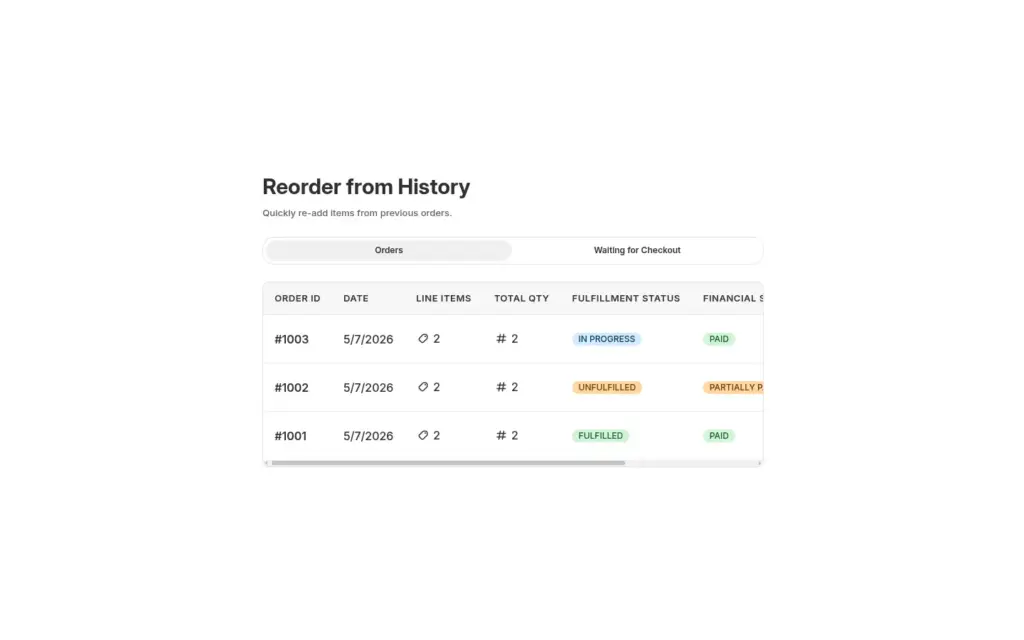
Give logged-in restaurants and retailers a Reorder page where they repeat a past order from their history, edit quantities in a review window and place it as a draft order, with BSS B2B Quote.
Explore use case: Reorder Page for Repeat Wholesale BuyersEach topic has one page that owns it. Start from these.
One quantity field per variant on the product page.
Bulk ordering and quotes for wholesale buyers.
Give buyers quick order pages, CSV upload, reorder and request for quote.
ReorderQuick order formDraft orderRequest for quote (RFQ)MOQQuantity increment
Each feature has its own page. See also all BSS B2B Quote features.
Choose what buyers fill in on a quote, who gets which email and when your team is reminded of quotes that wait.
A table on the product page where buyers enter a quantity for each variant and add all of them in one click.
BSS B2B Quote adds the Reorder page to your store, next to quotes, Quick Order pages and the variant table.
Also: BSS B2B Lock for hidden prices until a quote and BSS B2B Quote for quick order and quotes.
Growth or higher. Reorder is part of the Growth, Business and Enterprise plans of BSS B2B Quote. Development stores can use every app feature for free, so you can build and test the page before you pay for a plan.
Yes. The app rejects a request from a visitor who is not logged in, and shows a Restricted Access screen with a login button. Buyers you exclude by customer or tag see the same screen. Exclusions are checked before the apply rules.
Current prices. Reorder does not run BSS B2B Solution price rules. The draft order carries only the variant and the quantity, and Shopify prices it. Place a test reorder as a buyer and check the draft order before you launch.
No. Reorder works through Shopify draft orders and a checkout link, so items already in the buyer's cart stay as they are. The buyer pays from the link on screen or from the invoice Shopify emails, depending on your Checkout Link Visibility setting.
A warning lists archived or deleted products when the buyer opens the review window, and the buyer can continue with the rest. If every item in the order is gone or out of stock, the Reorder button is disabled. Stock is checked when the window opens and when a quantity changes.
Feature behavior follows our review of the BSS B2B Quote code on October 3, 2026 and the BSS user guides. Prices come from the App Store listings on the date shown. We make BSS B2B Solution, BSS B2B Lock and BSS B2B Quote.