
Shopify B2B Login: How to Require Login to View Prices and Pages (2026)

A Shopify B2B login makes buyers sign in before they see wholesale prices, products or pages. Shopify requires customer accounts for B2B but lists no price-hiding feature, so lock prices and content with an app such as BSS B2B Lock, or gate a dedicated B2B store.
Hide prices and Add to cart from guests, lock pages and collections by login or customer tag, or lock the whole website. Free plan locks the whole website; paid plans from $9.99 per month, 7-day trial.
Install BSS B2B Lock See the Lock pageLast updated October 4, 2026. We rewrote this 2022 guide for Shopify’s current B2B and customer account rules. It covers one question: how to put B2B content behind a login. BSS B2B Solutions makes BSS B2B Lock, so we say where Shopify’s own settings are enough. To hide prices only, read the hide price guide; for one password-protected page, read the password protect page guide. The wider access picture is in the access control hub and the complete Shopify B2B guide.
Key takeaways
- Shopify B2B requires customer accounts, and legacy customer accounts cannot be used for B2B customers and orders (Shopify sign-in).
- A dedicated B2B store can be gated so only logged-in B2B customers see it. A blended store cannot be gated that way, because D2C customers could not order (Shopify store types).
- For a blended store, Shopify’s checklist points to third-party apps to lock parts or all of the store from visitors who are not logged in (setup checklist).
- There are three patterns: lock the whole store, show the store and hide prices, or lock chosen pages, products and collections. A hybrid mixes them by customer tag.
- A login lock controls what the storefront shows. It is not a security guarantee: Shopify’s Product API is a public endpoint that returns prices.
What is a Shopify B2B login?
It is the sign-in step that separates business buyers from other visitors. After sign-in, the store knows who the buyer is, so it can show wholesale prices, private products and wholesale-only pages. Two parts are easy to mix up: authentication, which Shopify handles, and access rules, which decide what a signed-in buyer may see.
On the authentication side, Shopify says you must activate customer accounts to use B2B. Its new customer accounts sign buyers in with an email address linked to a company location and a one-time PIN sent to that email (Shopify sign-in). That changes the login screen, not the rules built on top of it. We keep the details out of this guide: see Shopify new customer accounts and email OTP for B2B.
Which login pattern fits your store?
| Pattern | What guests see | Best for | How to build it |
|---|---|---|---|
| Lock the whole store | A login or message page only | A B2B-only store | Dedicated-store restriction in Shopify, or a store lock in an app |
| Hide prices until login | The full catalog, with a Login to View Price button | A store that wants search traffic and keeps prices private | Theme code by customer tag, or a price lock in an app |
| Lock chosen pages, products or collections | Retail catalog; wholesale areas show a login message | Blended stores with a wholesale section | App lock by login, customer tag or request access |
| Hybrid by customer tag | Retail prices, and tagged buyers see wholesale prices and extra content | One store for retail and wholesale | Customer tags plus price and content rules |
What can Shopify do natively?
Three things matter. First, native B2B shows B2B prices and products to logged-in B2B customers: Shopify says that in a blended store only logged-in B2B customers can view B2B prices, products and account information (Shopify store types). Second, a dedicated B2B store can be gated so the URL and login page are accessible only to B2B customers, and the setup checklist lists it as an optional step after you activate customer accounts. Third, a blended store cannot be gated to B2B customers only.
What Shopify does not give you is a way to hide prices or sections from guests in a blended store. Its checklist points to third-party apps that lock parts or all of the store (setup checklist). Shopify also says some third-party apps may not be compatible with B2B (Shopify considerations), so test any lock with a B2B buyer.
Can you build a B2B login with theme code?
Yes, for simple cases. In Liquid, the customer object is nil when nobody is logged in and has a tags array (Shopify Liquid customer object). A theme can test it and show the price only to tagged customers.
{% if customer and customer.tags contains 'wholesale' %}
  {{ product.price | money }}
{% else %}
  <a href="/account/login">Log in to view price</a>
{% endif %}
Treat this as a sketch. You must repeat it in every template that prints a price (product page, collection cards, search, cart, quick view and structured data), keep it working after theme updates, and handle the new customer accounts login URL. The code only changes what the page prints. Shopify’s Product API is a public endpoint that returns the price fields of any product to any visitor (Shopify Product API), so a code-only hide is a display control. If you are not a developer, an app is faster and safer to maintain.
How to require login to view prices with BSS B2B Lock
The steps below use BSS B2B Lock. Price, page, product and collection locks need a paid plan or the 7-day trial. The Free plan locks only the entire website by condition (App Store listing, October 4, 2026).
Step 1: Start a lock from a preset
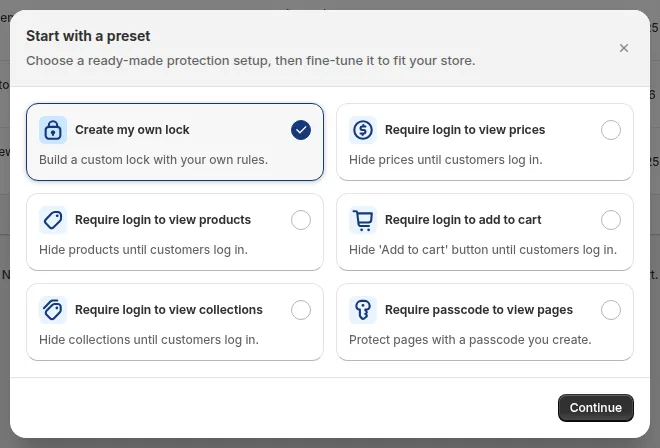
Open the app, go to Locks, then Add lock rule. In the Start with a preset window choose Require login to view prices. The other presets cover login to view products, collections and Add to cart, and a passcode for pages. Click Continue.
Step 2: Pick what to lock
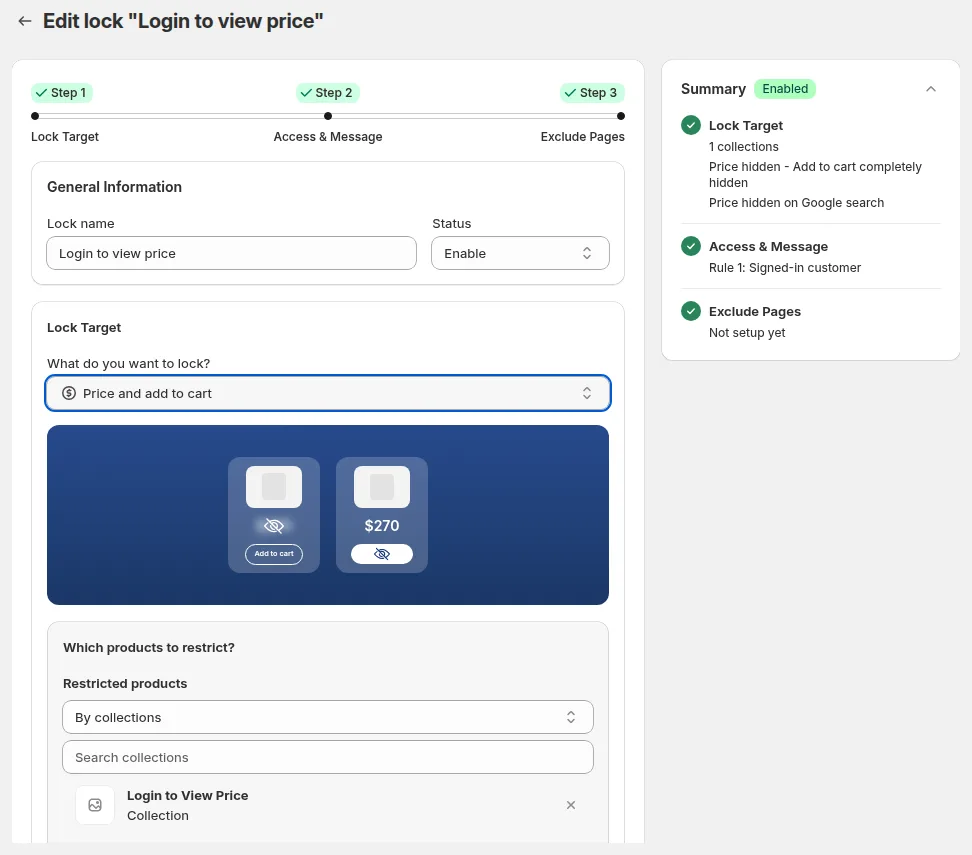
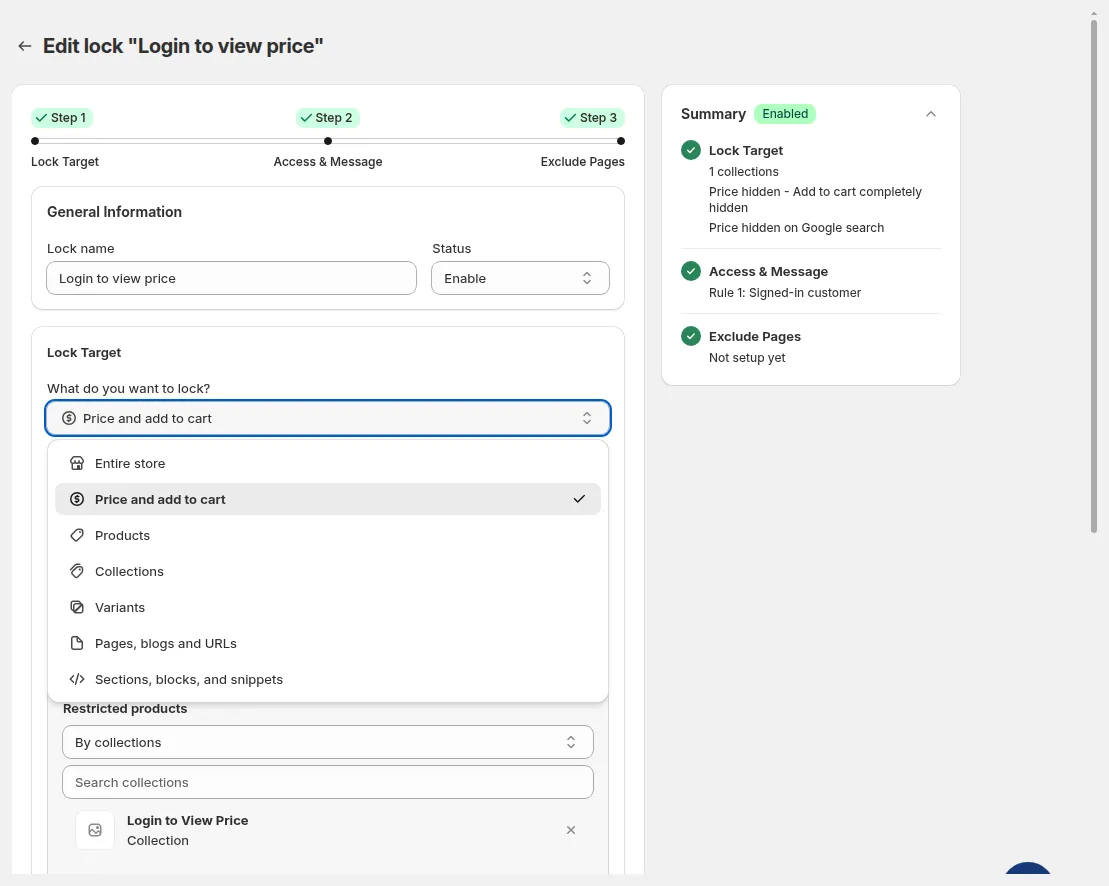
In Step 1, Lock Target, choose Price and add to cart to hide both, or pick products, collections, pages or the entire store. You can lock by page type, by URL, by collection or by product tag.
Step 3: Set who gets in and the hide options
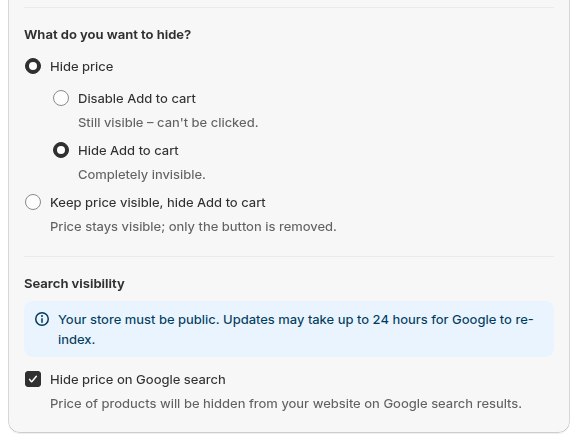
In Step 2, Access and Message, choose User type and pick Signed-in customers for any logged-in buyer, or Tagged customers for a tag such as wholesale. You can disable or hide Add to cart, and tick the option to hide the price from Google search. That option makes the price less likely to show in search results. It takes up to 24 hours, the store must be public, and it does not unindex pages or change Merchant Center feeds. Our hide prices from Google use case explains it.
Step 4: Customize the message guests see
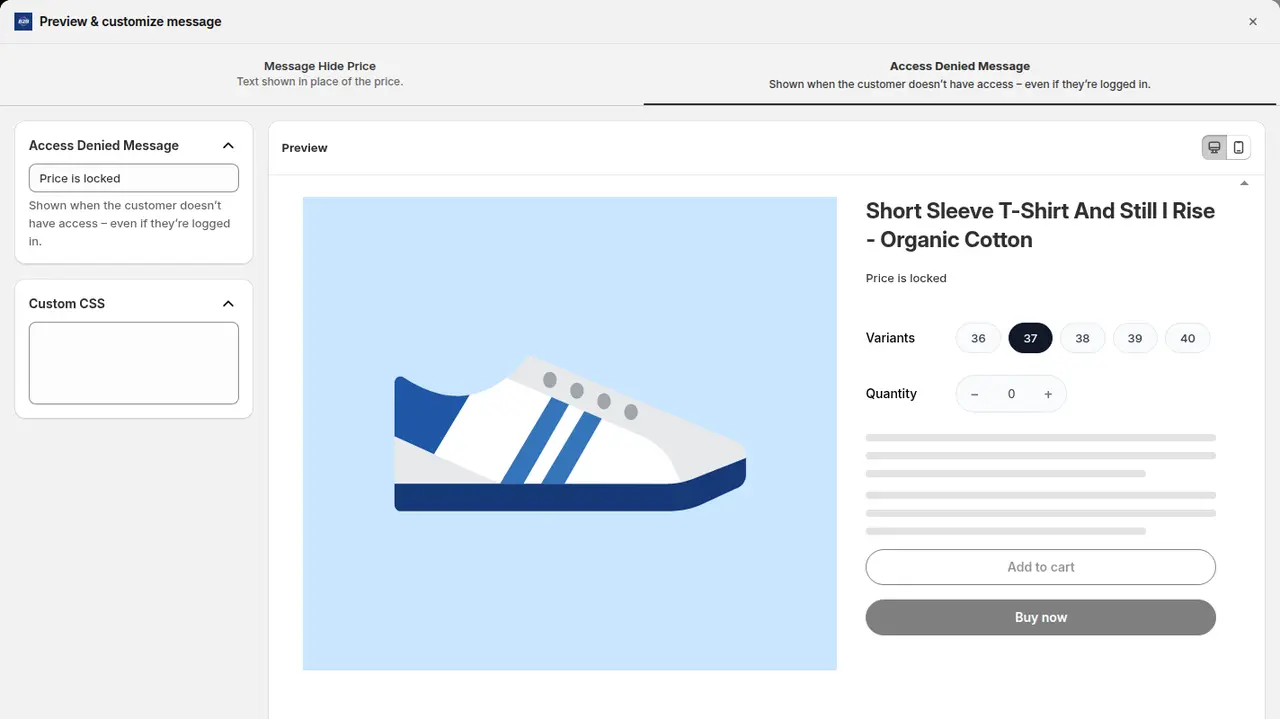
Click Customize message in the Preview card to edit the title and text, such as “Log in to view wholesale prices”. The message can offer a custom message, a custom page, or a login or sign-up form. After login you can send the buyer back to the page where they started, to a custom page, to the account page, or by customer tag. If your store uses Shopify’s new customer accounts, the app marks the login-form and sign-up-form message types as not supported; a custom message with a link to your login URL works (BSS docs: login and sign-up messages).
Step 5: Save, then test as a guest and as a buyer
Save the lock, open the store in a private window and check that the price is replaced by the Login to View Price button. Then log in as a tagged customer and check that the price returns. See the full recipe in our hide wholesale prices use case.
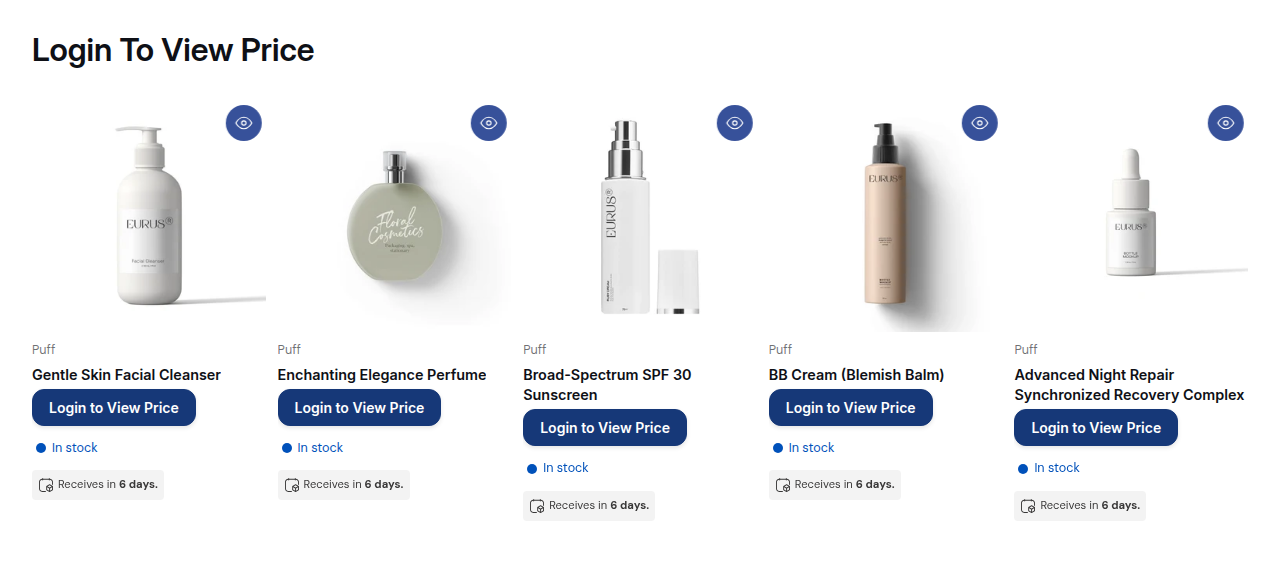
Presets for login to view prices, products, collections, Add to cart and passcode pages. Test free for 7 days.
Install BSS B2B LockHow to lock the whole store, a page or a collection behind a login
- The whole store. Choose the entire store as the target and require signed-in or tagged customers. The Free plan allows this. Follow the BSS guide to lock the entire website and the lock the entire store use case.
- A wholesale information page. Choose Pages, blogs and URLs, pick the page, and require signed-in or tagged customers. See the BSS guide to lock pages with a login.
- A wholesale collection. Pick the collection as the target and hide it from guests. See hide wholesale collections from guests.
- Products for tagged buyers only. Use tags on products and customers. See show products only to tagged customers.
How do buyers get a login?
A login lock is only useful if approved buyers can get in. The usual path is register, approve, tag, price, unlock, order. A registration form collects the application, you approve it, and the approval assigns a customer tag that your lock rules read. In BSS B2B Solution the form setting Assign tag when customer is approved does that, and the BSS B2B Lock docs show how to use the same tag (registration form guide).

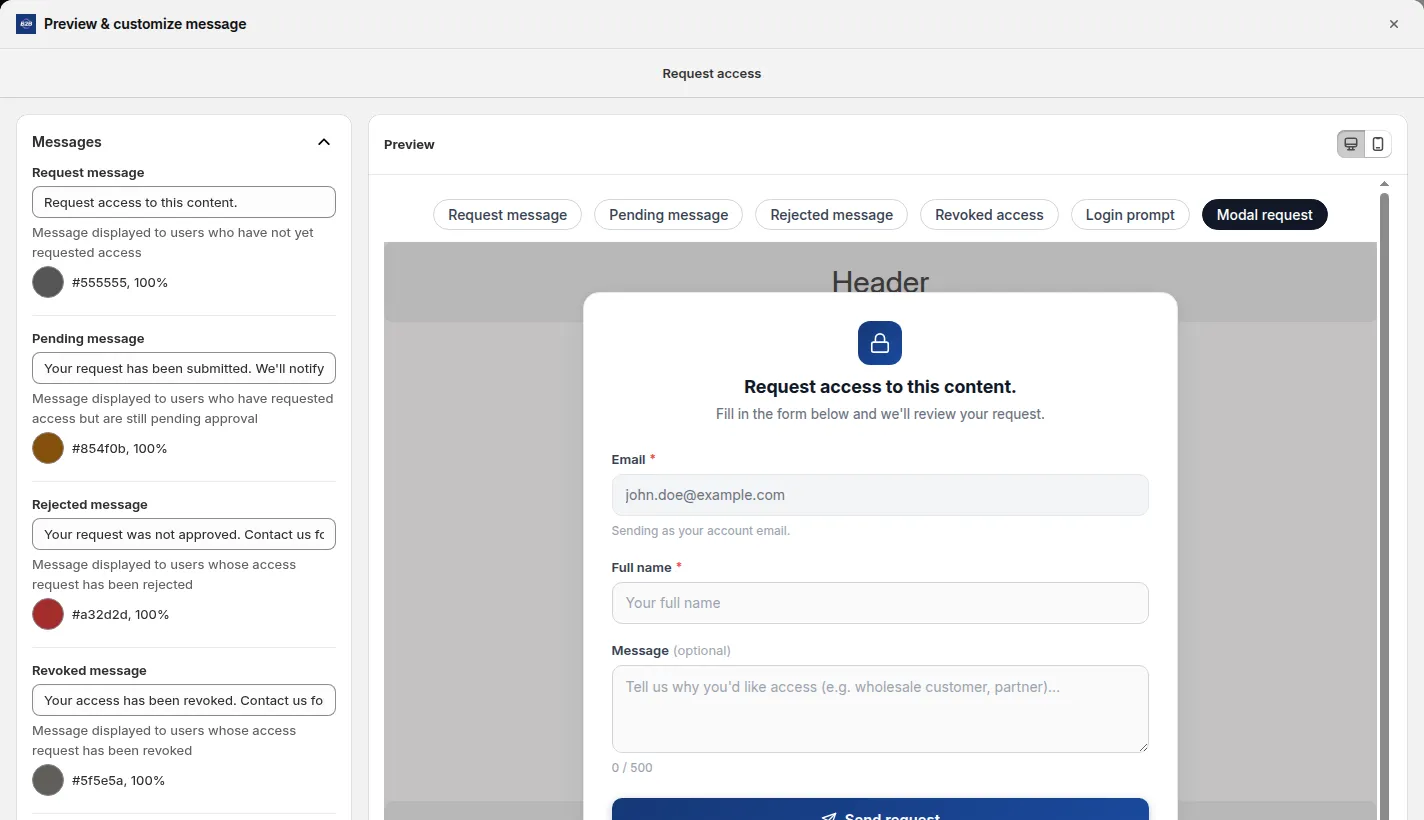
If you want buyers to ask for access from the lock message, BSS B2B Lock has a request access flow. Approval is stored per rule and syncs through a queue, so it is not instant, and it does not add a customer tag. Shopify’s free Shopify Forms app is the native route for access requests (setup checklist). Read add a request access button.
Which store type are you?
| Your store | Start with | Why |
|---|---|---|
| B2B only | Dedicated-store restriction or a store lock | Guests have no reason to browse |
| Mostly B2B with a public brochure | Lock the whole store except a few pages | Keep your story public, keep prices private |
| Retail and wholesale in one store | Hide prices or lock a wholesale collection, by tag | Shoppers keep their store, buyers get theirs; see B2B and B2C on one store |
| A catalog with quotes | Hide price and add a quote button | Buyers ask for a price; see request a quote and hide the price |
Limits and caveats
- BSS B2B Lock restricts storefront access through theme code. For page, product and collection locks the real content is replaced by the lock message in the page HTML. It does not protect JSON or Storefront API endpoints, and headless storefronts are not supported.
- Hide price and Add to cart locks wrap price output in the theme. Unusual themes may need manual installation.
- Do not describe a login lock as secure. It controls what the storefront shows.
- IP, region and country conditions can be spoofed from the browser. Do not use them as secure geo-blocking.
- The checkout lock is a different feature: it needs a paid BSS plan and Shopify Plus, and it is not guaranteed to block every checkout.
- Shopify lists accelerated checkouts, local delivery, pickup points, subscriptions and some third-party apps as incompatible with B2B orders (Shopify considerations).
Troubleshooting: why does the login lock not work?
| Problem | Likely cause | Fix |
|---|---|---|
| Buyers see prices without logging in | The lock is off, the target is wrong, or the theme was not patched | Check the lock status and target, then the app’s lock-not-working checklist |
| A tagged buyer still sees the message | The tag is missing or spelled differently | Check the customer’s tag in Shopify admin |
| The login form is missing on the message | New customer accounts do not support the login-form message type | Use a custom message with a link to your login page |
| Buyers are confused by a code screen | Shopify’s new customer accounts use an email code | Say “Log in to your account”, not “enter your password” (BSS docs) |
| Prices show on collection cards | A theme section is not covered | Contact support or install manually |
Frequently asked questions
How do I create a B2B login on Shopify?
Activate customer accounts, set up buyers as companies or tag them, then restrict content to logged-in or tagged customers. On a dedicated B2B store Shopify can gate the whole store. On a blended store use an app lock or theme code.
Can Shopify hide prices until a customer logs in?
We found no built-in setting for guests in a blended store. Shopify shows B2B prices to logged-in B2B customers and points to third-party apps to lock parts of a store. An app such as BSS B2B Lock, or theme code that tests the customer, can show a Login to View Price button.
Do I need Shopify Plus for a B2B login?
No. Shopify announced on April 2, 2026 that native B2B features are on Basic, Grow and Advanced. BSS B2B Lock’s price, page and collection locks run on paid BSS plans or the trial. Only the checkout lock is limited to Shopify Plus.
Can I lock my whole Shopify store for B2B customers only?
On a dedicated B2B store, yes: Shopify can restrict access to logged-in B2B customers. On a blended store, no, because D2C customers could not order. An app can lock the whole website by condition, and the Free plan allows that.
Are hidden prices really hidden?
They are hidden from the page. Shopify’s Product API is a public endpoint that returns price fields, so a hide is a display control, not a security guarantee. Do not store secrets in a price.
How do wholesale customers log in with Shopify’s new customer accounts?
They enter their email address and a one-time PIN sent to that email. Rules that check whether a customer is signed in or has a tag still work. Read our guide on new customer accounts and email OTP for B2B for the details.
What happens after a customer logs in?
In BSS B2B Lock you can return the buyer to the page they asked for, send them to a custom page, to the account page, or by customer tag.
Is there a free way to require login?
The BSS B2B Lock Free plan locks the entire website by condition. Locks for prices, pages, products and collections need a paid plan from $9.99 per month on Basic Shopify, or the 7-day trial.
Sources
- Shopify Help Center: Sign-in and customer accounts in B2B, Blended and dedicated B2B stores, Setup checklist for blended stores, Requirements and considerations. Read October 4, 2026.
- Shopify.dev: Liquid customer object and Ajax Product API, read October 4, 2026.
- BSS B2B Lock docs: lock pages with a login, lock the entire website, new customer accounts and email OTP.
- BSS plan prices and rating: BSS B2B Lock listing (4.9, 651 reviews, October 4, 2026).
Start with the Free plan for a whole-website lock, or try the paid plans for 7 days to lock prices, pages and collections.
Install BSS B2B Lock Talk to usYou may also like

How to Sell Wholesale to Retailers: A Playbook for Shopify Brands
To sell wholesale to retailers, set a wholesale price that leaves room for both of you (usually […]

Shopify Tax Exempt Customers With a Resale Certificate: A US Guide for Wholesale Sellers
A resale certificate is a state-issued US document that lets a business buy goods it will resell […]

Faire Alternatives for Brands: Sell Wholesale on Your Own Shopify Store
The best Faire alternative for most Shopify brands is not another marketplace. It is your own Shopify […]