
Shopify New Customer Accounts and Email OTP: What B2B and Wholesale Stores Must Change

Shopify’s new customer accounts replace passwords with a one-time 6-digit code sent by email, and Shopify B2B works only with them. For a wholesale store this means updating login links, moving any registration form off /account/register, and tagging approved buyers so access never depends on login alone.
BSS B2B Lock checks whether a visitor is signed in and which tags they have, so your rules keep working when buyers sign in with a code. Add BSS B2B Solution for registration, approval and tagging.
Install BSS B2B Lock Add registration with BSS B2B SolutionLast updated October 4, 2026. Shopify facts come from the Help Center and shopify.dev pages linked in the text. BSS B2B Solutions makes BSS B2B Lock and BSS B2B Solution, the apps in the screenshots. This guide belongs to the access control hub of our complete guide to Shopify B2B. If you want the broader picture of locking B2B content behind a login, start with our Shopify B2B login guide.
Key takeaways
- Shopify B2B needs customer accounts, and legacy customer accounts cannot be used for B2B orders and customers (Shopify Help Center).
- Buyers sign in with the email tied to their company location and a one-time PIN sent to that inbox (Shopify B2B sign-in). No password is needed.
- Shopify says legacy customer accounts are deprecated, and upgrading redirects URLs such as
/account/login(Shopify upgrade page). Pages I read give no shutdown date. - Do not gate B2B prices on login alone. Anyone can sign in with a code, so use customer tags or specific emails (BSS B2B Solution guide).
- Any custom login, register page or password wording in your theme needs a test as a buyer before and after you switch.
What are Shopify new customer accounts?
New customer accounts are Shopify’s current customer account system. A customer enters an email address and receives a one-time 6-digit verification code. In Shopify’s words, “a password isn’t required to sign in”, and sign-in sessions persist for up to 365 days (Shopify customer accounts). That one-time code is what people call email OTP.
Shopify lists more sign-in options on the same system: Shop credentials, and Google, Facebook or Apple sign-in alongside the default code. Merchants on Shopify Plus can connect their own OpenID Connect identity provider such as Auth0 or Okta (sign-in options). Apps add blocks and pages to the account area through customer account UI extensions (shopify.dev).
Does Shopify B2B require new customer accounts?
Yes. The Shopify Help Center states: “You must activate customer accounts. You can’t use legacy customer accounts for B2B orders and customers” (requirements and considerations). Only logged-in B2B customers can see B2B pricing, B2B-only products and B2B-exclusive content (B2B sign-in and accounts).
Can I keep legacy accounts for retail shoppers?
Shopify’s blended store checklist says you can keep legacy customer accounts for D2C customers and activate customer accounts only for B2B customers, by adding the customer accounts login URL to your store (blended store checklist). The upgrade page, however, says “legacy customer accounts are deprecated”. The two pages read differently and give no shutdown date, so plan for new accounts only. See also the blended store entry.
How do wholesale buyers sign in?
A buyer enters the email address that is associated with a company location and a one-time PIN that is sent to that email (Shopify). A customer profile needs an email address to be added as a main contact. If a buyer has access to more than one company location, Shopify prompts them to choose the location when they log in (companies). To show a sign-in link in the store header and at checkout, turn on the Show sign-in links option.
Classic vs new customer accounts: what Shopify documents
| Topic | Legacy customer accounts | New customer accounts |
|---|---|---|
| Sign-in | Email and password, with password resets | Email and a one-time 6-digit code, no password needed |
| Shopify B2B | Cannot be used for B2B orders and customers | Required for B2B |
| Status | Described as deprecated; no date on the pages read | Current system |
| URLs such as /account/login | Used by the old templates | After an upgrade, Shopify redirects legacy account URLs to the new accounts, including hardcoded theme links |
| Workflow triggers | Triggers based on legacy accounts | Not supported in customer accounts, per Shopify |
| Segments | Filter customer_account_status exists | That filter is only for legacy accounts, so segments using it will not work after the upgrade |
| Switching back | n/a | Revert within 30 days of upgrading |
Sources: legacy customer accounts, upgrade, B2B considerations. Rows Shopify did not state, such as what happens to old passwords and how invitation emails read, are left out. Check them in your admin.
What B2B and wholesale stores must change
Work through this checklist on a development or staging copy first, then repeat it on the live store.
- Turn on customer accounts in Settings, Customer accounts, and keep a test customer to try every journey (Shopify suggests testing with a test customer).
- Find old login and register links in the header, footer, menus, emails and any wholesale landing page. Shopify redirects
/account/loginafter an upgrade, but your own wording may still say password. - Move any registration form from /account/register to its own page, such as
/pages/wholesale-signup-form, and update the links (BSS B2B Solution guide). - Give every buyer a personal email that is linked to a company location. The code goes to that inbox only.
- Set access by tag or specific email, not by login status, and approve or tag buyers before they see wholesale prices.
- Rewrite messages such as “Enter your password” into “Log in to your account” or “Check your email for a login code”.
- Tell your existing buyers that sign-in is now a code, and test as a buyer: sign in, see prices, add to cart, check out, and sign out.
Create a rule in BSS B2B Lock, choose Signed-in customers or a customer tag, and test it as a guest and as a buyer. The free plan locks the entire website by condition. Paid plans have a 7-day trial.
Get BSS B2B Lock See Lock pricing and plansShared logins and role accounts
A code sent to one inbox is awkward when several people at a distributor share one login. Shopify’s company model assigns contacts to locations with roles: Ordering only, or Location admin who also sees the location’s orders and can update addresses (companies). Give each purchaser their own contact where you can. Shared mailbox logins are not covered by the pages I read, so that is not verified.
Company account requests on a gated store
Shopify’s own company account request form creates a company, a location and a customer for you to approve under Customers, Companies, Ordering not approved. Shopify notes that new customers do not need to be signed in to submit it, but that “the form isn’t accessible to non-logged in B2B customers in a gated store” (company account requests). If you hide your whole store from guests, you need another public page for applications. Our wholesale registration form guide and the wholesale store setup guide cover the options.
How BSS apps work with new customer accounts
BSS B2B Lock: rules check login state and tags
BSS B2B Lock does not handle passwords or one-time codes. It checks whether a customer is signed in and which tags they have, and the guide states that logging in with a password or a code does not change how rules work (Lock guide: new customer accounts and email OTP). So rules such as hiding prices from guests, locking a collection for tagged buyers or locking the entire store keep working once the buyer is recognized by Shopify as signed in.
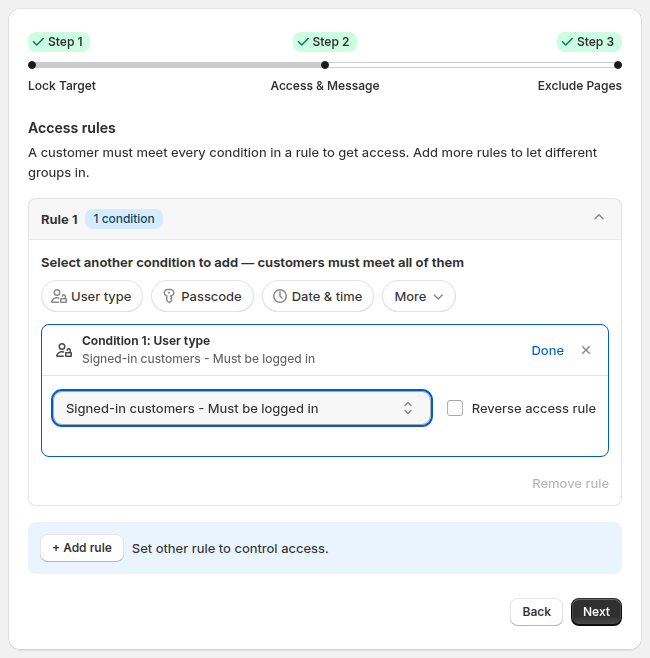
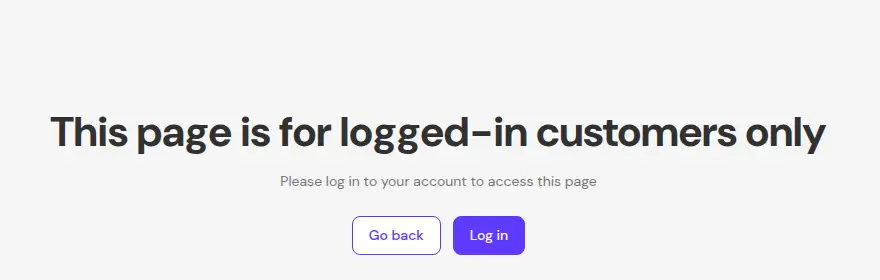
One limit is documented: if your store uses new customer accounts, the lock message options Login form and custom message and Sign-up form and custom message show as not supported. Use a custom message with a link to your login page instead. A visitor who is not signed in can still be sent to log in first, for example before requesting access:
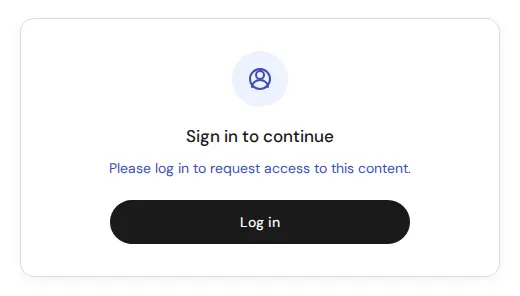
Examples: lock the entire store for approved buyers, hide wholesale prices from guest visitors and add a request access button to locked pages.
BSS B2B Solution: registration in the account, pricing by tag
The Solution guide says the app controls B2B access and pricing by customer tag or specific email, not by account type. Because a code login is easy and open, it recommends not using login status alone as a B2B condition (BSS guide). It describes four setups:
- Form on a separate page such as
/pages/b2b-registration: keep using it. A customer who signs in but is never approved or tagged should not receive B2B pricing. - B2B-only store: replace the default login entry with a wholesale page that has the form and a Login button. Do not hide the default login on a blended store, because it affects retail customers.
- Form at /account/register: the guide says this page does not work the same way with new customer accounts, so move the form to a new page and update old links.
- Multi-step form: shown in the customer account after sign-in, so customers who log in first can still apply.
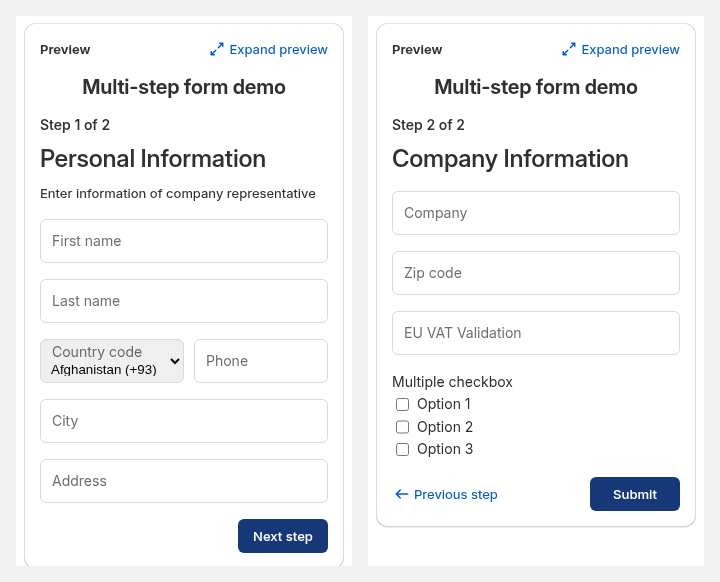
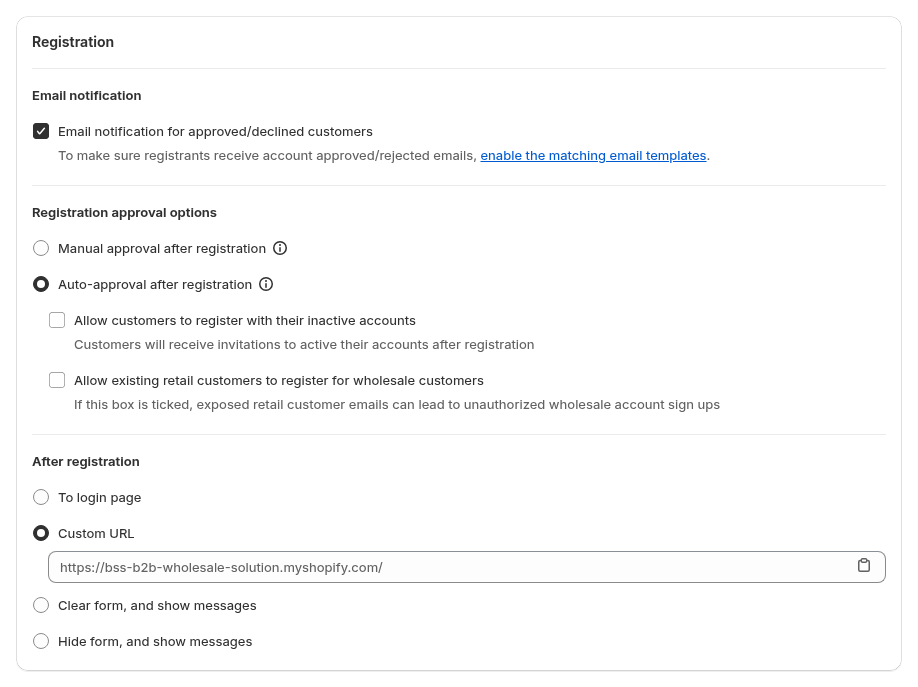
The multi-step form runs inside new customer accounts, needs a paid plan (Essential or higher) and is not available on legacy accounts (multi-step form guide). In the review of the app code, the form is a customer account page extension. The guide also says the buyer’s email comes from the sign-in and is not a field in the steps, which we have not confirmed in code, so treat it as not verified. You create the form by choosing the Multi-step form type:
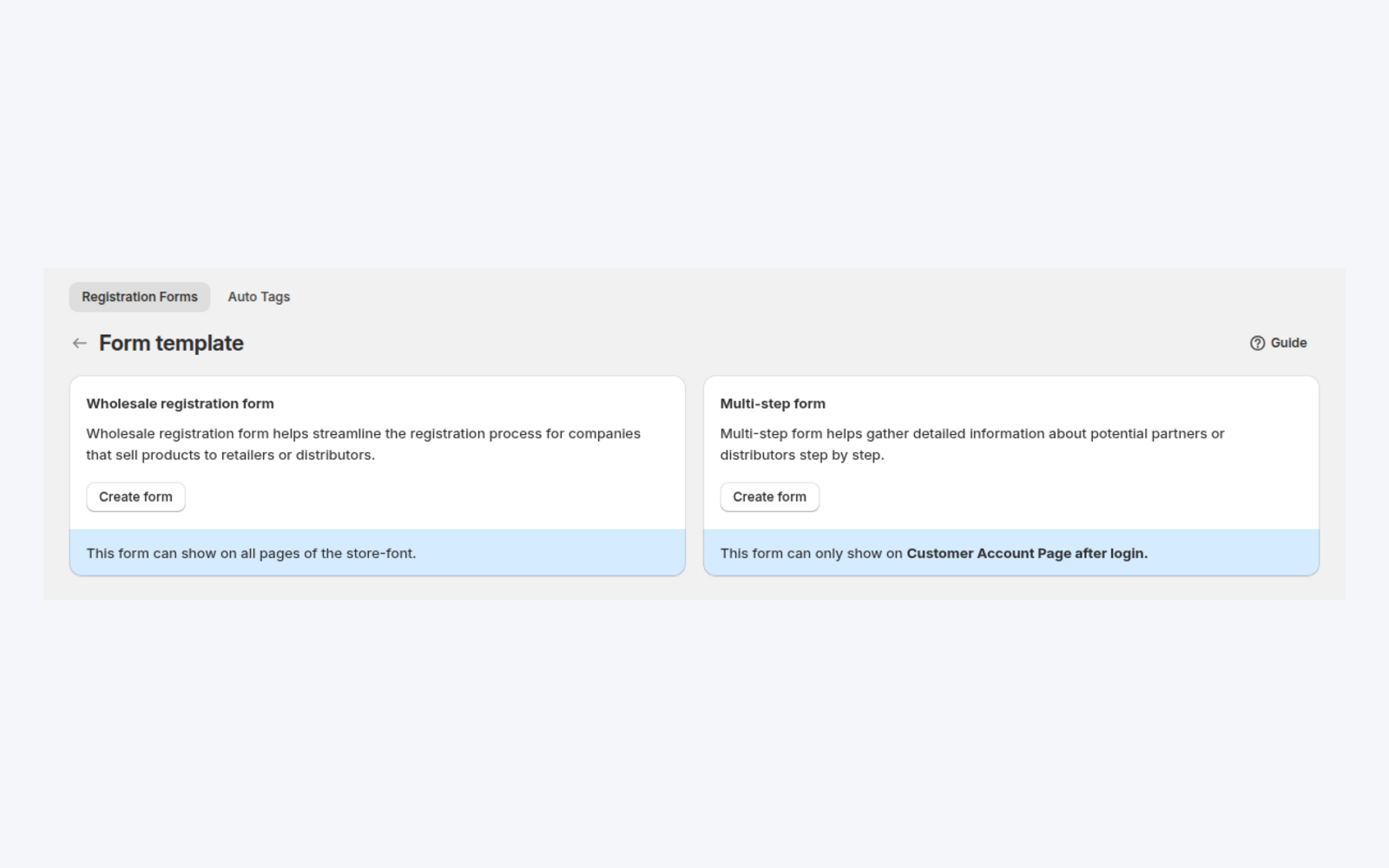
Approval stays in your hands. Choose manual or auto-approval, email notifications and what the applicant sees afterwards, and have approval add the tag that your pricing and lock rules read. BSS approval does not create a Shopify company or location: the Solution code review found no company creation on approval, so create the company yourself if you need native catalogs. See multi-step wholesale registration form and wholesale registration with approval.
BSS B2B Quote and Reorder: read-only list, login for approval
BSS B2B Quote adds a BSS Quote List extension to new customer account pages. It is read-only: buyers can view quotes there, but there is no approve or reject in it. Approve and Reject buttons in the proposal email open the Quote History theme page, which asks guests to sign in (our October 2026 code review).
Reorder: the page depends on Shopify’s app proxy, which passes the signed-in customer to the app. Whether it works the same under new customer accounts is not verified, so test it on your store before you promote it to buyers.
Can I keep password login instead of email OTP?
Shopify’s sign-in options page names the one-time code as the default and mentions no password option (sign-in options). BSS offers a free setup for Lock users: its team adds a legacy-style password login form to your theme, and Lock’s Login buttons can point to it. The BSS guide calls this a compatibility layer, not a reversal of Shopify’s direction, and says you may need to re-apply it after a theme change (Keep password login instead of email OTP). Does it work with Shopify B2B, which signs buyers in with a one-time PIN? That is not verified. Ask support before you rely on it for company contacts.
Shopify new customer accounts and B2B: frequently asked questions
What is Shopify email OTP login?
It is passwordless sign-in. The customer enters an email address and Shopify sends a one-time 6-digit code. Entering it signs them in, and sessions persist for up to 365 days.
Do I need new customer accounts for Shopify B2B?
Yes. Shopify says you must activate customer accounts and that legacy customer accounts cannot be used for B2B orders and customers.
Are legacy customer accounts being removed?
Shopify’s pages say legacy customer accounts are deprecated, and that upgrading redirects URLs such as /account/login. The pages I read on October 4, 2026 give no shutdown date.
How do wholesale buyers log in to a Shopify B2B store?
They enter the email address associated with a company location and the one-time PIN sent to it. A buyer with several locations is asked to choose one when logging in.
Does BSS B2B Lock work with new customer accounts?
Yes for rules. Lock checks whether the customer is signed in and which tags they have, not how they signed in. The Login form and Sign-up form message types are not supported with new customer accounts.
Can I put my wholesale registration form at /account/register?
BSS guidance is to move it. With new customer accounts that page does not work the same way, so place the form on its own page such as /pages/wholesale-signup-form and update your links.
Should B2B pricing depend on being logged in?
Not alone. Login is open to anyone with an inbox, so base B2B access and prices on customer tags or specific emails, and approve buyers before tagging them.
Does BSS Reorder work with new customer accounts?
We have not verified it. Reorder relies on Shopify’s app proxy to identify the signed-in customer, so test it on your store before you promote it.
How much do the BSS apps cost?
Prices are from the Shopify App Store listings as of October 4, 2026. BSS B2B Lock is free to lock the entire website by condition, with paid plans from $9.99 per month and a 7-day trial. BSS B2B Solution has paid plans from $29 per month and a 14-day trial.
Next steps
Switch on customer accounts in a test setup, run the checklist above, and move your registration form to its own page. Then read the customer onboarding hub for the application and approval flow. The customer tag entry explains the tags your rules read.
Install BSS B2B Lock for login and tag rules, and pair it with BSS B2B Solution for registration forms, approval and auto-tagging.
Install BSS B2B Lock Also see BSS B2B SolutionSources
Shopify pages read on October 4, 2026. BSS facts: user guides at docs.bss-b2b.solutions, our October 2026 review of the app code, and the Shopify App Store listings (as of October 4, 2026).
- Shopify Help Center: Customer accounts
- Shopify Help Center: Upgrade to customer accounts
- Shopify Help Center: Legacy customer accounts
- Shopify Help Center: Customer account sign-in options
- Shopify Help Center: B2B customer sign-in and accounts
- Shopify Help Center: Requirements and considerations for using B2B
- Shopify Help Center: Setup checklist for blended B2B stores
- Shopify Help Center: B2B companies
- Shopify Help Center: Company account requests
- shopify.dev: Customer account UI extensions
- BSS B2B Lock guide: Shopify’s new customer accounts and email OTP
- BSS B2B Solution guide: Does it adapt with new customer accounts?
You may also like

How to Uninstall a Shopify B2B or Lock App Safely: Remove Leftover Theme Code
Some Shopify apps leave code in your theme after you uninstall them. To remove a B2B or […]

Shopify Markets and B2B Pricing: Wholesale Prices Per Country and Currency
Shopify Markets control currency, languages and taxes by audience, and B2B catalogs can be assigned per B2B […]

How to Collect and Validate a Tax ID (EIN, ABN, GST, UK VAT) on Shopify
Shopify has a Tax ID field on company locations, but the pages we read describe no check […]