
Shopify Minimum Order Quantity: How to Set MOQ, MOV and Case Packs (2026)

To set a minimum order quantity on Shopify, use quantity rules in a catalog for buyers who belong to B2B companies, or an app for everyone else. Native rules set a minimum, maximum and increment per variant and are re-validated in checkout. BSS B2B Solution Order Limits adds minimums by customer tag, checked on the cart page.
Create Order Limits by amount or quantity, add quantity increments for case packs, and target tags, customers or products. Free on development stores, 14-day trial on paid plans.
Install BSS B2B Solution See pricingLast updated October 4, 2026. This guide replaces an older version that listed several third-party apps. It now covers minimum order quantity (MOQ), minimum order value (MOV) and case packs in one place, with Shopify’s own rules first. BSS B2B Solutions makes BSS B2B Solution, so we say where each rule is enforced and where it is not. The wider picture is in our order rules and terms hub and the complete Shopify B2B guide.
Key takeaways
- MOQ counts units, MOV counts the order total, and a case pack or increment fixes the multiples. Most wholesale stores need two of the three.
- Native quantity rules (minimum, maximum, increment) work per variant, apply to buyers in B2B companies, and are re-validated in checkout (Shopify quantity rules).
- For a minimum order subtotal, Shopify’s B2B pages point to the free Checkout Blocks app (Checkout and orders in B2B).
- BSS Order Limits and Quantity Increments run in the storefront. They stop normal buyers at the cart and Buy it now, but a direct checkout URL can skip them.
- Pick the number from your cost to process an order, not from a round figure.
What is the difference between MOQ, MOV and case pack?
A minimum order quantity (MOQ) is the fewest units a buyer can order. A minimum order value (MOV) is the smallest order total you accept. A case pack, or quantity increment, sells a product only in multiples such as 6, 12 or 24. They answer different questions: the minimum says how much is enough, and the increment says which quantities are allowed. Our glossary has short definitions of MOQ, MOV, case pack and quantity increment.
| Rule | What it controls | Example | Use it when |
|---|---|---|---|
| MOQ | Units of an item or an order | At least 12 units of each scent | Packing or producing each item costs you time |
| MOV | Order total in your currency | At least $250 per order | Every order costs about the same to ship, whatever its size |
| Case pack (increment) | Allowed multiples | Only 6, 12, 18 and so on | Your stock is packed in cartons or trays you do not want to split |
| Maximum | Upper limit per order | No more than 200 units | You allocate scarce stock or protect a promotion |
How can you set a minimum order on Shopify? The options compared
| Option | What it sets | Who it applies to | Where it is checked |
|---|---|---|---|
| Native quantity rules in a catalog | Minimum, maximum and increment per variant | Buyers in B2B companies that see the catalog | Line items, re-validated in checkout |
| Checkout Blocks app (free) | Minimum and maximum order subtotal | All customers or only B2B customers | Shopify checkout |
| BSS B2B Solution Order Limits | Minimum or maximum amount or quantity | All, logged-in, specific customers or customer tags | Cart page and Buy it now, in the storefront |
| BSS B2B Solution Quantity Increments | Multiples, plus minimum and maximum | Same targeting as Order Limits | Product page and cart page, in the storefront |
| Cart and checkout validation Function | Any rule a developer or app writes | Whoever the code targets | Checkout; Shopify says it cannot be bypassed |
Sources: Quantity pricing, Checkout and orders in B2B and Cart and checkout validation. The BSS rows come from our Order Limits guide.
Method 1: Set a minimum order quantity with native quantity rules
Native B2B has been available on Basic, Grow and Advanced since April 2, 2026 (Shopify news), and quantity rules are a Yes on every plan (plan table). Use this method when every wholesale buyer is a company with a catalog.
- Open Markets, then Catalogs, and choose the catalog for the buyer group. Shopify says rules are set there or by CSV import (Quantity pricing).
- Set the rule per variant: a minimum, a maximum or an increment. In a CSV import the columns are Quantity Increment, Minimum Order Quantity and Maximum Order Quantity, and you need a value of 1 or greater for both increment and minimum (Creating catalogs).
- Test as a buyer in that company. Variants do not pool: Shopify says customers cannot combine 5 gray hats and 5 blue hats to meet an increment of 10.
The limit is who the rule reaches. Catalogs go to B2B companies, and Basic, Grow and Advanced allow up to 3 active catalogs across all B2B markets (Catalogs). A wholesale buyer who is only a customer with a tag does not get native rules, which is the gap an app fills.
Method 2: Set a minimum order value
Shopify’s B2B checkout page says: “Require minimum and maximum order subtotals for all customers, or only for B2B customers using the free Checkout Blocks app” (Checkout and orders in B2B). That keeps the check inside Shopify checkout. If you need the minimum to follow customer tags, collections or the B2B price, use Order Limits in method 3.
Method 3: Set a minimum with BSS B2B Solution Order Limits, step by step
Order Limits sets a minimum or maximum order amount or quantity for the customers and products you target. Turn on the BSS B2B Solution app embed in your theme first. With the embed off, rules are saved but nothing is enforced, because the limits run in the app’s storefront script. Order Limits needs the Advanced or Platinum plan ($49 or $99 per month, App Store listing read October 4, 2026). The steps follow our Order Limits guide.
Step 1: Turn on the module and add a rule
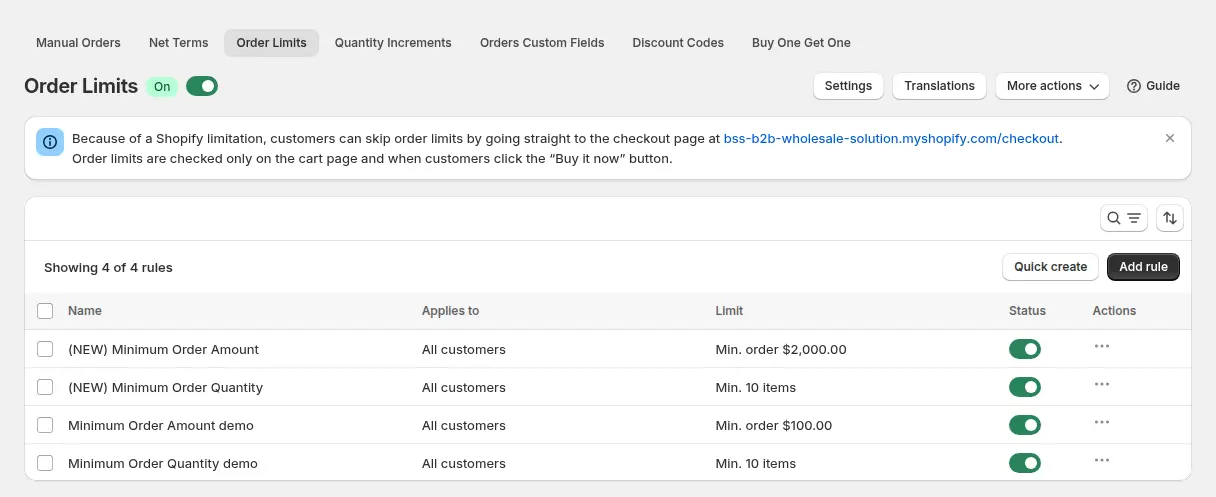
Go to B2B orders & discounts, then Order Limits, switch the module on and click Add rule. The rule list shows each rule, who it applies to and its limit. Note the banner at the top: it tells you buyers can skip limits by going straight to the checkout page.
Step 2: Choose customers, products and markets
Name the rule, for example “Wholesale min $200”. Under Customers pick all customers, logged-in customers, not-logged-in customers, specific customers or customer tags such as wholesale, and exclude some if needed. Under Products pick all products, specific products or variants, collections or product tags, and exclude items that should not count, such as free samples. Markets can limit the rule to selling regions.
Step 3: Pick the limit type and value
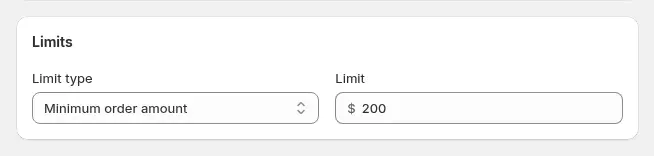
There are four types. Enter an amount in your store currency or a whole number of items.
| Limit type | Example | Protects you from |
|---|---|---|
| Minimum order amount | At least $250 per order | Many small orders |
| Minimum order quantity | At least 12 of each scent | Packing every SKU separately |
| Max order amount | No more than $5,000 per order | Overexposure on a promotion |
| Max order quantity | No more than 200 units per order | Allocating scarce stock |
When two rules match, the lower priority number wins. With equal priorities, the largest minimum and the smallest maximum win. Amounts follow the B2B price, so a limit applies to what the buyer pays after Custom Pricing, Price List or Volume Pricing.
Step 4: Choose the level at which limits are counted
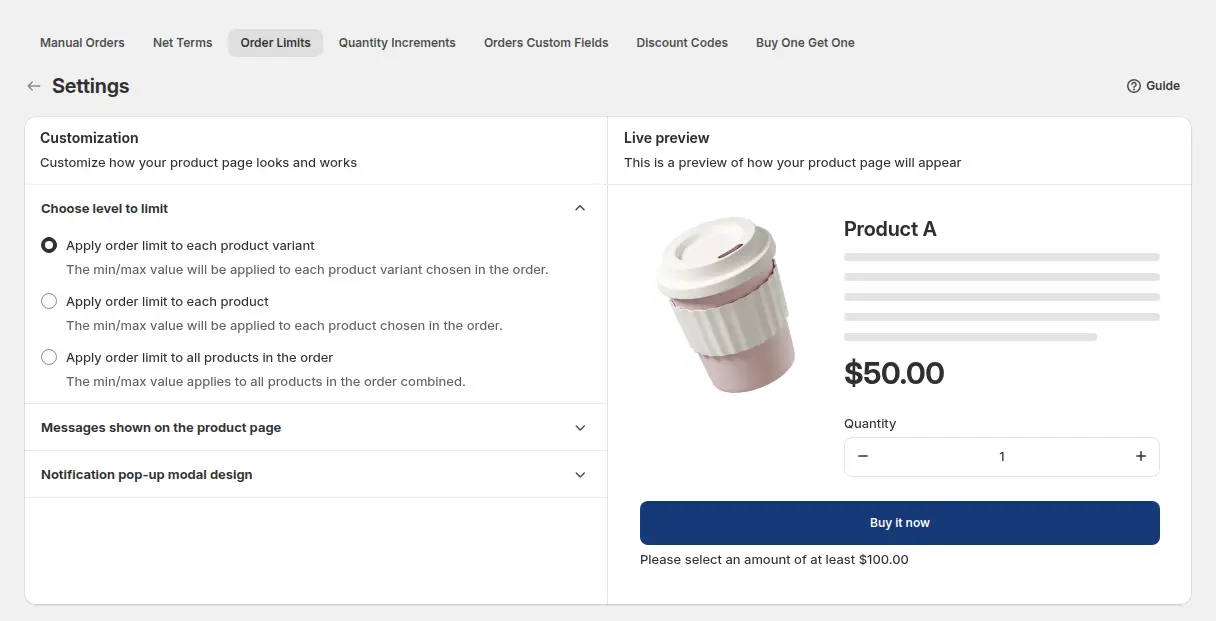
Open Order Limits, then Settings. You choose whether a limit applies to each product variant (the default), each product with all its variants together, or all products in the order combined. This setting is global, so it applies to every rule. A minimum of 12 per variant means each scent must reach 12, while 12 per product lets a buyer mix sizes of one scent. Test an amount rule on a mixed cart after you choose.
Step 5: Check the cart as a buyer
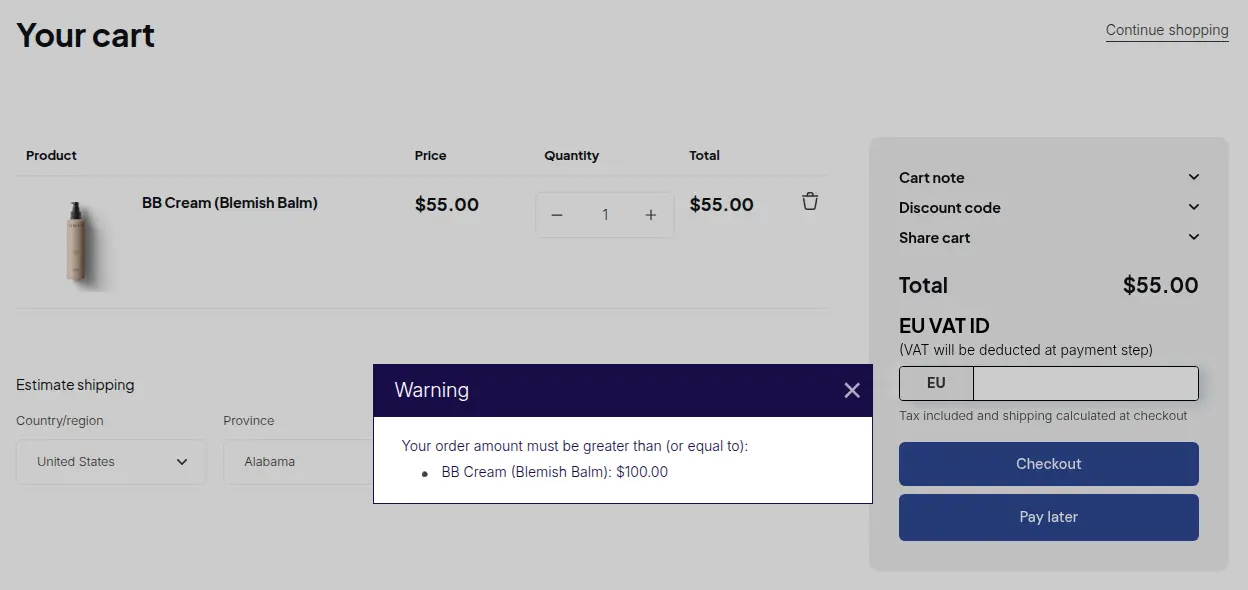
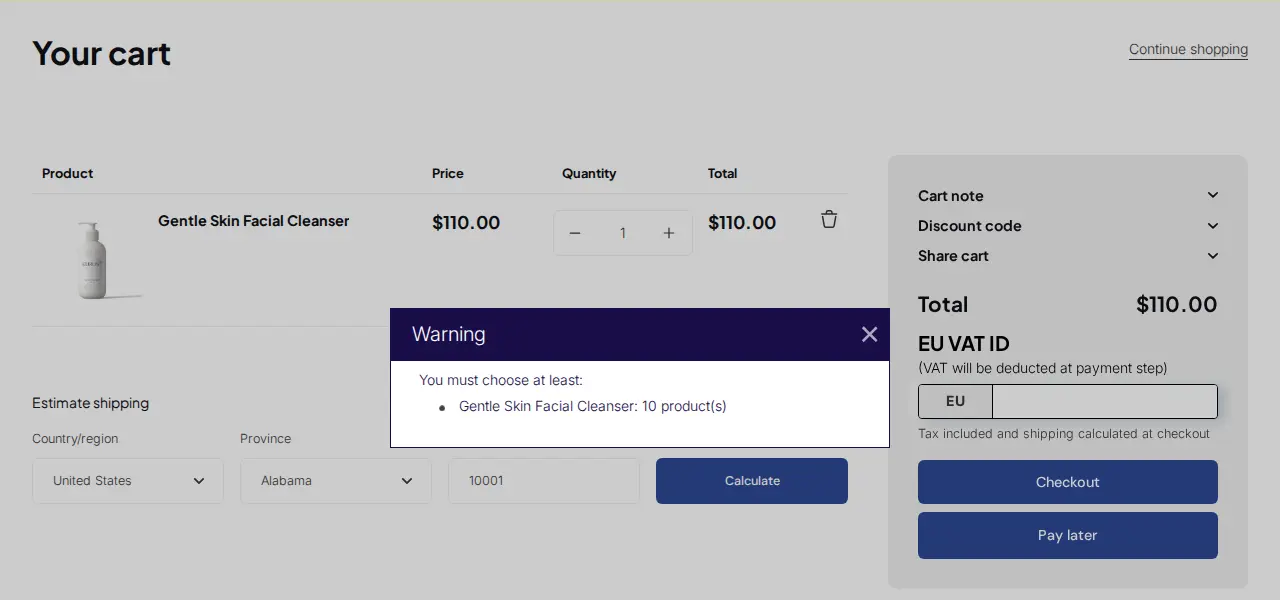
When a cart breaks a rule, a pop-up explains the problem as the buyer clicks checkout on the cart page, or Buy it now on a product page. You can edit the pop-up colours and translate every message.
Method 4: Sell in case packs with quantity increments
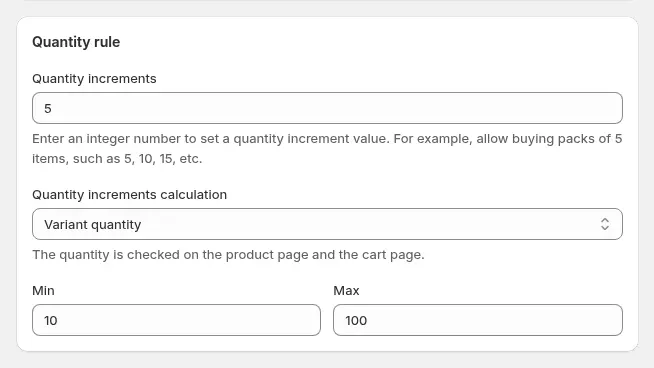
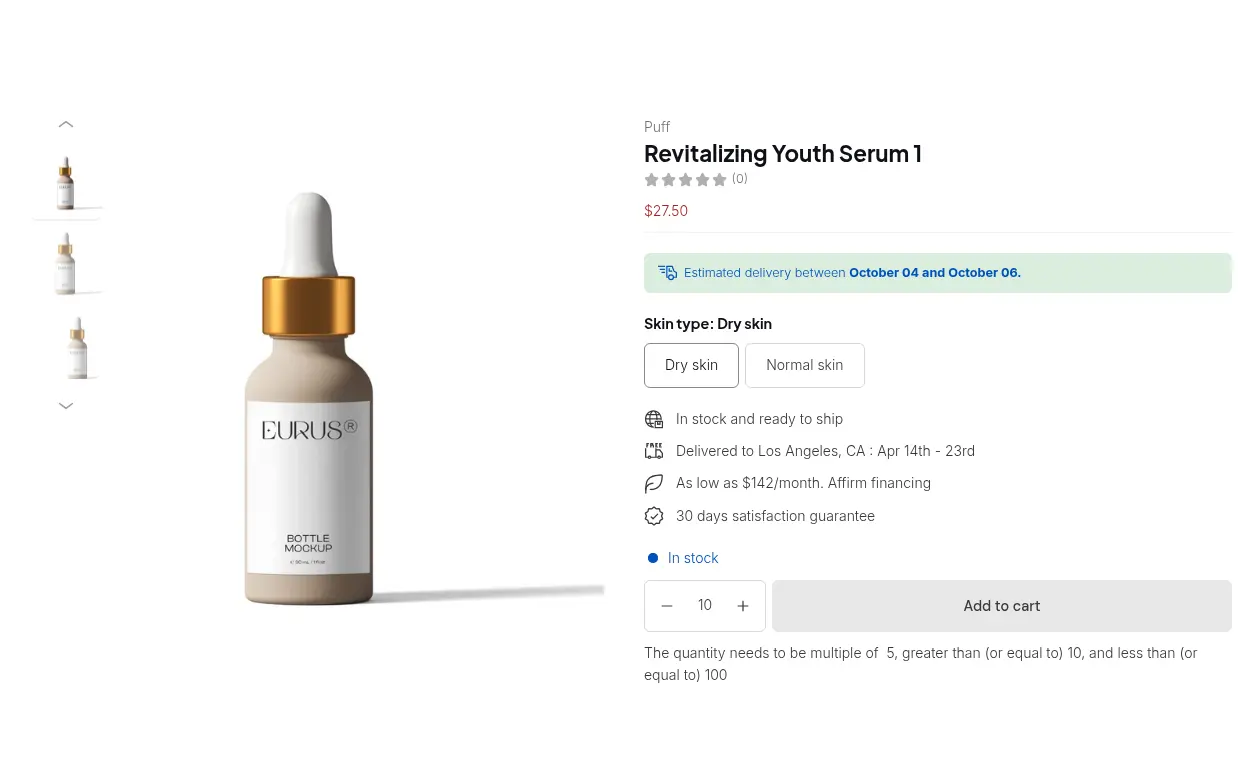
A quantity increment makes a product sell in multiples. With a step of 5, the plus and minus buttons move by 5 and the cart flags quantities that do not fit. A typed quantity is rounded to the nearest valid multiple. Go to B2B orders & discounts, then Quantity Increments, switch the module on and add a rule with the same customer and product conditions as above. Quantity Increments needs the Advanced or Platinum plan. See the Quantity Increments guide.
- Increment: a whole number from 1 to 30,000. A value of 6 allows 6, 12, 18 and so on.
- Minimum and maximum: set them in the same rule. The minimum must be at least the increment and a multiple of it, for example 12 with a step of 6.
- Calculation level: variant quantity, product quantity or order quantity. Order quantity suits mixed cartons such as beverages, variant quantity suits boxes of one item.
For the full set-up with calculation levels, read Sell in case packs and multiples. Collection pages and quick-order lists apply only variant-type increment rules.
What does a complete set of rules look like?
A fictional candle maker sells retail and wholesale on one store. These rules apply only to customers tagged wholesale, so a retail shopper who adds one candle sees no message. This is an illustration, not a customer result.
| Rule | Setting | What the buyer experiences |
|---|---|---|
| Order Limits, minimum order quantity | 12 per variant | Eight units of one scent trigger a pop-up that asks for 12 |
| Order Limits, minimum order amount | $250 | A $200 cart is stopped with a message about the missing amount |
| Quantity Increments | Step of 6 with a minimum of 12 | A typed 13 is rounded to the nearest valid multiple, 12 |
Reward buyers who order past the floor with tiered pricing on Shopify, and read Enforce minimum order quantity and value for the full walk-through.
How do you choose the right minimum order quantity?
Start from cost, not from a round number. A minimum order value should at least cover what it costs you to process one order. A rough rule is the cost to process an order divided by your gross margin.
| Step | Number | How |
|---|---|---|
| Cost to pick, pack and ship one order | $24 | Add labor, packaging and handling |
| Gross margin on your wholesale prices | 40% | From your price list |
| Minimum order value to cover that cost | $60 | $24 divided by 0.40 |
| Your target with profit on top | $250 | Raise the floor to the order size you want |
- Look at your orders. Check the order sizes buyers place today and set the floor just above the smallest ones you want to keep.
- Use per-variant minimums for packing cost and per-order minimums for shipping cost.
- Offer a lower minimum to new accounts. A second rule for a trial tag lets a new buyer start small.
- State the minimum before the cart. The product page message and your terms should say it, so the pop-up is never a surprise.
Should you change your minimums before BFCM 2026?
Black Friday 2026 is Friday, November 27, and Cyber Monday is Monday, November 30. Promotion traffic brings first-time buyers and small baskets, so review your rules before then. Four checks are worth the time:
- Confirm the app embed is on in the live theme, because rules are not enforced when it is off.
- Exclude the sample-pack collection and any gift card from the amount, so they do not count toward a minimum.
- Test below, at and above each limit as a wholesale buyer and as a retail shopper, in a mixed cart.
- Keep the checkout bypass in mind. Orders created in the admin with Manual Orders are not limited, which gives your sales reps room for exceptions, and a direct checkout URL skips storefront limits.
Limits to know before you promise a minimum
- Storefront rules are not a hard block. Order Limits are checked by the storefront script on the cart page and on Buy it now, not by a validation inside Shopify checkout. A customer who opens the checkout URL directly can skip them. Treat them as a guard for normal buyers and review unusual small orders.
- Native rules and Checkout Blocks are checked in checkout, but reach only the buyers they target.
- Manual Orders skip Order Limits and Quantity Increments.
- The level is global. Per variant, per product or whole order applies to every Order Limits rule, not to one rule.
- Plans apply. Order Limits and Quantity Increments are on the Advanced and Platinum plans of BSS B2B Solution. If you need a limit that cannot be bypassed, use native quantity rules or a Function-based validation.
What do real stores do?
ORQA, a Croatian FPV technology brand, used Order Limit to enforce minimum purchase quantities for its B2B customers and asked support to customize the warning messages (read the ORQA case study). Australia Pisen, a phone accessories distributor, set minimum quantities with Order Limit and sold in packs with Quantity Increment (read the Australia Pisen case study). A different mix, trade pricing with order limits, is in Furniture and home decor: trade pricing and order limits.
BSS B2B Solution is free on development stores. Create an Order Limits rule, then check the pop-up on your own cart before you pay.
Install BSS B2B Solution Read the Order Limits guideIf you are the buyer: how do you ask a supplier for their MOQ?
Ask early and be specific. Name the product, the quantity you expect to order per year and whether you will mix variants. Then ask four things: the MOQ per item, whether the MOQ is in units or in order value, whether it drops for repeat orders, and what the case pack is. A short message works: “We plan to order about 500 units of item X a year across three sizes. What are your MOQ and case pack, and is there a lower first order?”
FAQ: Shopify minimum order quantity
How do I set a minimum order quantity on Shopify?
For buyers in B2B companies, set a minimum in the catalog’s quantity rules, per variant. For everyone else, use an app such as BSS B2B Solution Order Limits, which targets customers by tag. Turn on the app embed first.
What is the difference between MOQ and MOV?
MOQ is a minimum number of units. MOV is a minimum order total. A store can use both, for example at least 12 units of an item and at least $250 per order.
Can I set a minimum for wholesale customers only?
Yes. In BSS B2B Solution you choose the customers a rule applies to: all, logged-in, not-logged-in, specific customers or customer tags such as wholesale. Retail shoppers on the same store do not see the rule.
Can I set a minimum quantity per product?
Yes. Native quantity rules are set per variant. In Order Limits you target specific products, variants, collections or product tags, and in Settings you choose to count per variant, per product or per order.
Can buyers skip the minimum at checkout?
With BSS Order Limits, a buyer who opens the checkout URL directly can skip the check, and Manual Orders are not limited. Native quantity rules and Checkout Blocks are checked in checkout.
Does Shopify have a minimum order amount setting?
Shopify’s B2B pages point to the free Checkout Blocks app to require minimum and maximum order subtotals for all customers or only B2B customers. BSS Order Limits adds a minimum amount by customer tag.
How do I sell in case packs on Shopify?
Use an increment. Native quantity rules include an increment, and BSS Quantity Increments allows steps from 1 to 30,000, such as 6, 12 or 24, with a minimum and maximum in the same rule.
Which BSS B2B Solution plan includes Order Limits?
Order Limits and Quantity Increments are on the Advanced plan ($49 per month) and Platinum ($99). Yearly billing saves 10%. It is free on development stores. Prices as of October 4, 2026.
How do I ask a supplier about their minimum order quantity?
Name the product and your expected yearly volume, and ask for the MOQ per item, whether it is in units or order value, the case pack, and whether a lower first order is possible.
Next steps
Write your terms down: minimum amount, minimum quantity and pack size. Choose the method that matches how your buyers are set up, then test it as a buyer. If you also plan to set tiered pricing or are choosing a Shopify plan, see Shopify B2B without Plus. Compare apps in our order limit apps roundup.
Install BSS B2B Solution to set minimums by amount or quantity, sell in case packs and target only your wholesale buyers. Free on development stores.
Install BSS B2B Solution See the appSources
Shopify pages read on October 4, 2026. BSS facts: BSS user guides at docs.bss-b2b.solutions, the Shopify App Store listing and our checks of the app.
- Shopify Help Center: Quantity rules and volume pricing
- Shopify Help Center: Shopify B2B features by plan
- Shopify Help Center: Catalogs
- Shopify Help Center: Creating B2B catalogs
- Shopify Help Center: Checkout and orders in B2B
- Shopify.dev: Cart and checkout validation
- Shopify news: native B2B for all plans (April 2, 2026)
You may also like

How to Remove Tax Included on Shopify (2026 Guide)
Shopify shows “tax included” when your store is set to include tax in prices. To remove it, […]

Shopify Quantity Breaks: How to Implement & Boost Sales
These quantity breaks are the most vibrant strategies that custom store owners around Shopify are using. It […]

How To Sell B2B Services: A Complete Guide to Closing Deals
B2B sales, especially B2B sales service have dramatically increased in recent years, and salespersons, therefore, have to […]