
Shopify Tiered Pricing: How to Set Up Quantity Tiers for Wholesale and Retail (2026)

Shopify tiered pricing means the unit price drops as the quantity grows. Native Shopify B2B supports it with up to 10 price breaks per product in a catalog, for buyers in companies. Shopify’s own discounts do not cover tiers, so for tagged buyers or retail shoppers you need an app such as BSS B2B Solution.
Build tiers once with Volume Pricing, pick who sees them, and show a tier table on product, collection and cart pages. Free on development stores, 14-day trial on paid plans.
Install BSS B2B Solution See pricingLast updated October 4, 2026. This guide replaces an older version and now follows Shopify’s April 2026 change that brought native B2B to Basic, Grow and Advanced. BSS B2B Solutions makes BSS B2B Solution, so we explain where native tiers are enough and where they are not. For the full pricing picture, see our wholesale pricing hub and the complete Shopify B2B guide.
Key takeaways
- Native B2B includes quantity price breaks on Basic, Grow, Advanced and Plus: up to 10 breaks per product, set in a catalog (Shopify plan table).
- Native tiers reach only buyers in B2B companies, and a product with volume pricing gets a fixed price, so catalog-wide discounts stop applying to it (Shopify quantity pricing).
- Shopify’s discount types are amount off, buy X get Y and free shipping. Shopify’s own page points to other solutions for tiered discounts (Discount types).
- BSS B2B Solution Volume Pricing counts quantity or spend, targets all shoppers, logged-in buyers, tags or company locations, and puts a tier table on the page.
- Design tiers on your case size, and check the cliff at each break: in our example, 10 units cost the same as 9.
What is tiered pricing on Shopify?
Tiered pricing sets a lower price per unit when a buyer orders more. You publish break points, such as 1 to 9 units, 10 to 49 units and 50 or more, and each range has its own unit price. People also call it quantity breaks, price breaks or volume pricing. The terms overlap in practice; our tiered pricing glossary entry, quantity break and volume pricing pages separate them.
Here is the math for a product with a $20.00 base price. In this example the tier price applies to every unit in the order, which is how both Shopify’s price breaks and BSS Volume Pricing price a line: the break sets the price per unit.
| Quantity range | Unit price | Discount | Order of 9 / 12 / 60 units |
|---|---|---|---|
| 1 to 9 | $20.00 | None | 9 units: $180.00 |
| 10 to 49 | $18.00 | 10% | 12 units: $216.00 |
| 50 and above | $15.00 | 25% | 60 units: $900.00 |
Look at the edges. Nine units cost $180.00 and ten units also cost $180.00, so the tenth unit is free. At 49 units the buyer pays $882.00, and at 50 units $750.00, a drop of $132.00 for one more unit. A buyer will find those edges, so decide whether you want them. Place the first break just above your smallest typical order, and put the next at your case or carton size.
Which kinds of tiered pricing can you run?
| Kind of tier | What triggers the price | How to run it on Shopify |
|---|---|---|
| Quantity tiers | Units of a product, variant or the whole order | Native catalog price breaks, or a Volume Pricing rule in BSS B2B Solution |
| Spend tiers | The amount in the cart, such as 5% off from $500 | Value-based Volume Pricing in BSS B2B Solution |
| Customer-group tiers | Who the buyer is, such as Silver, Gold or Platinum accounts | Catalogs for companies (up to 3 on Basic, Grow and Advanced), or price rules by customer tag; see Silver, gold and platinum wholesale tiers with tags |
| Timed tiers | Quantity or spend, but only for a sale window | A Volume Pricing rule with start and end dates |
How can you set up tiered pricing on Shopify? Three options compared
| Question | Shopify native B2B | BSS B2B Solution Volume Pricing |
|---|---|---|
| Who gets the tiers? | Buyers in B2B companies who see the catalog | All shoppers, logged-in or not logged-in, specific customers, customer tags or company locations |
| How many breaks? | Up to 10 per product | Several ranges per rule; the Free plan allows 2 |
| What is counted? | Quantity of each variant; variants do not pool | Quantity or spend, by product, by variant or for the whole order |
| Plan needed | Included on Basic, Grow, Advanced and Plus | Paid BSS plans; free on development stores |
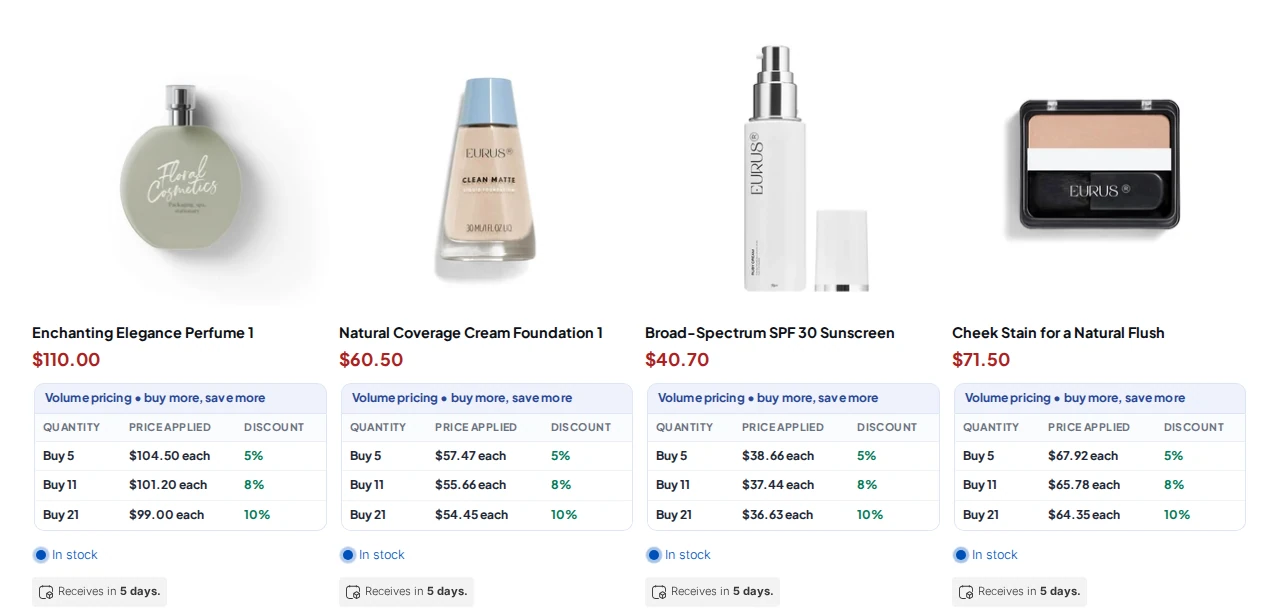
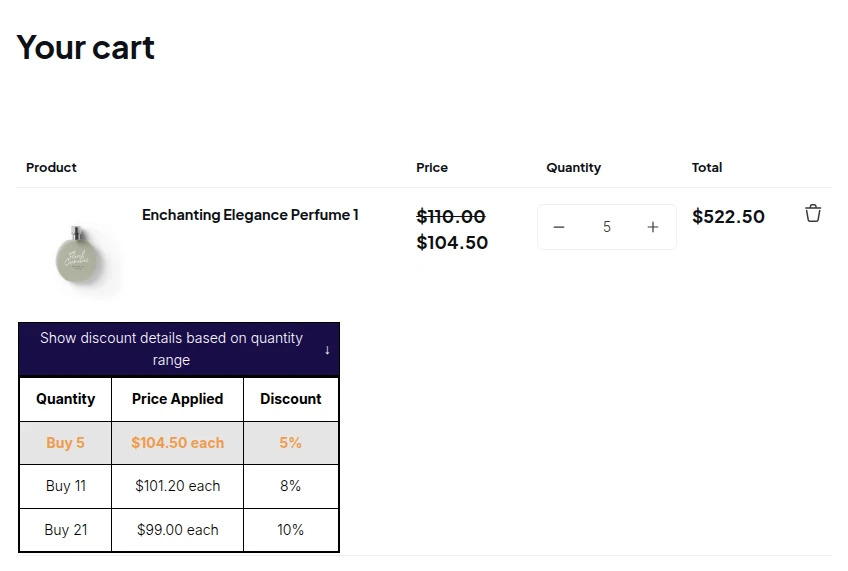
| Tier table on the page | Not described on Shopify’s quantity pricing page | Product, collection, quick view, cart and mini cart, with a row-click setting |
| Stacks with a customer price? | The price becomes fixed once volume pricing is applied | Tiers apply on top of the Custom Pricing or Price List price |
Standard Shopify discounts are the third option and the weakest for this job: Shopify lists amount off, buy X get Y and free shipping, and says stores needing tiered discounts should review other solutions (Discount types).
Method 1: Set up quantity price breaks with native Shopify B2B
Use this when every tiered buyer is a company with a catalog. Native B2B has been available on Basic, Grow and Advanced since April 2, 2026 (Shopify news), and quantity price breaks are a Yes on every plan (plan table).
- Open a catalog under Markets, then Catalogs, and add the products that need tiers. Shopify says you can add quantity rules and volume pricing to products in a catalog (Shopify catalogs).
- Set the price breaks. In a CSV import the columns are Quantity Break 1 to 10 and Price Break 1 to 10, so you can add up to 10 breaks, each with the reduced price per unit (Creating catalogs).
- Check the result as a buyer in that company. Buyers must meet the quantity on each variant, because Shopify does not let a customer combine 5 gray hats and 5 blue hats to reach a break (Quantity pricing).
Know the trade-offs before you commit. After volume pricing is applied, the price becomes fixed, and overall catalog discounts no longer apply to that product. Basic, Grow and Advanced allow up to 3 active catalogs across all B2B markets, so three buyer groups is the ceiling (Catalogs). If you need tiers for shoppers who are not companies, or a visible tier table, continue to method 2.
Method 2: Set up tiered pricing with BSS B2B Solution, step by step
BSS B2B Solution keeps tiers in its own Volume Pricing module, separate from Shopify catalogs. The steps below follow our Volume Pricing guide. Turn on the BSS B2B Solution app embed in your theme first, or the rule will save without showing.
Step 1: Add a Volume Pricing rule
In the app, open B2B Pricing, turn Volume Pricing on and click Add rule. Name the rule so the team recognises it, for example “Wholesale case breaks”. In the Customers card choose all customers, logged-in or not-logged-in customers, specific customers, customer tags or company locations. In the Products card choose all products, specific products or variants, collections or product tags, all published to the Online Store.
Step 2: Choose what the tiers count
Volume pricing type decides what is counted: quantity-based pricing counts items, value-based pricing counts the amount spent. Apply to decides which items are counted together. The choice changes who reaches which tier.
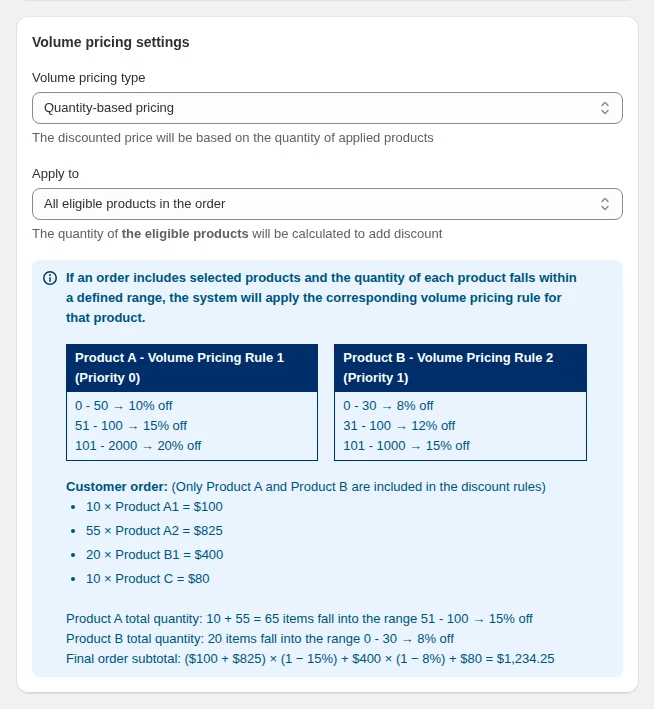
| Apply to option | What is counted together | Result for products A (35 units) and B (10 units) |
|---|---|---|
| Entire order | All eligible products added up | 45 units reach the 21 to 50 tier, so both products get 20% |
| All eligible products in the order | Each product on its own, variants added together | A has 35 units and gets 20%, B has 10 units and gets 10% |
| All eligible product’s variants in the order | Each variant on its own | A variant with 8 units gets 10%, a variant with 3 units gets no discount |
Step 3: Define the tiers
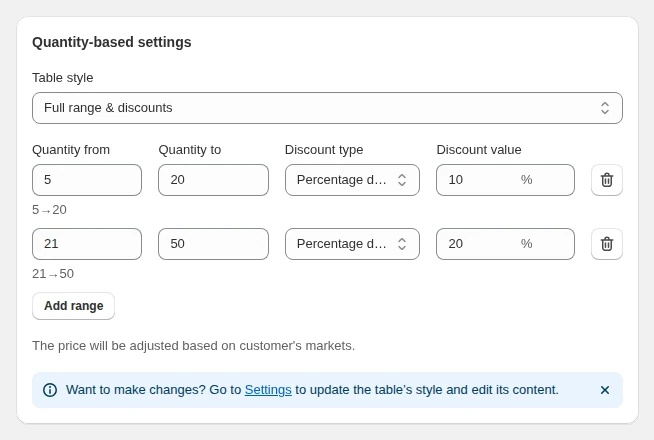
Each row is one range. Fill in Quantity from and Quantity to, or the amount range for value-based pricing, then pick the discount type and value. Leave the last To field blank to mean “and above” and click Add range for the next tier. The discount type can be a fixed price per item, a fixed amount off, or a percentage off: on a $20 product, a fixed price of 15 gives $15.00, a fixed amount of 3 gives $17.00 and 10% gives $18.00. Keep ranges from overlapping, because the lower row wins if a quantity fits two.
Step 4: Choose where the tier table shows
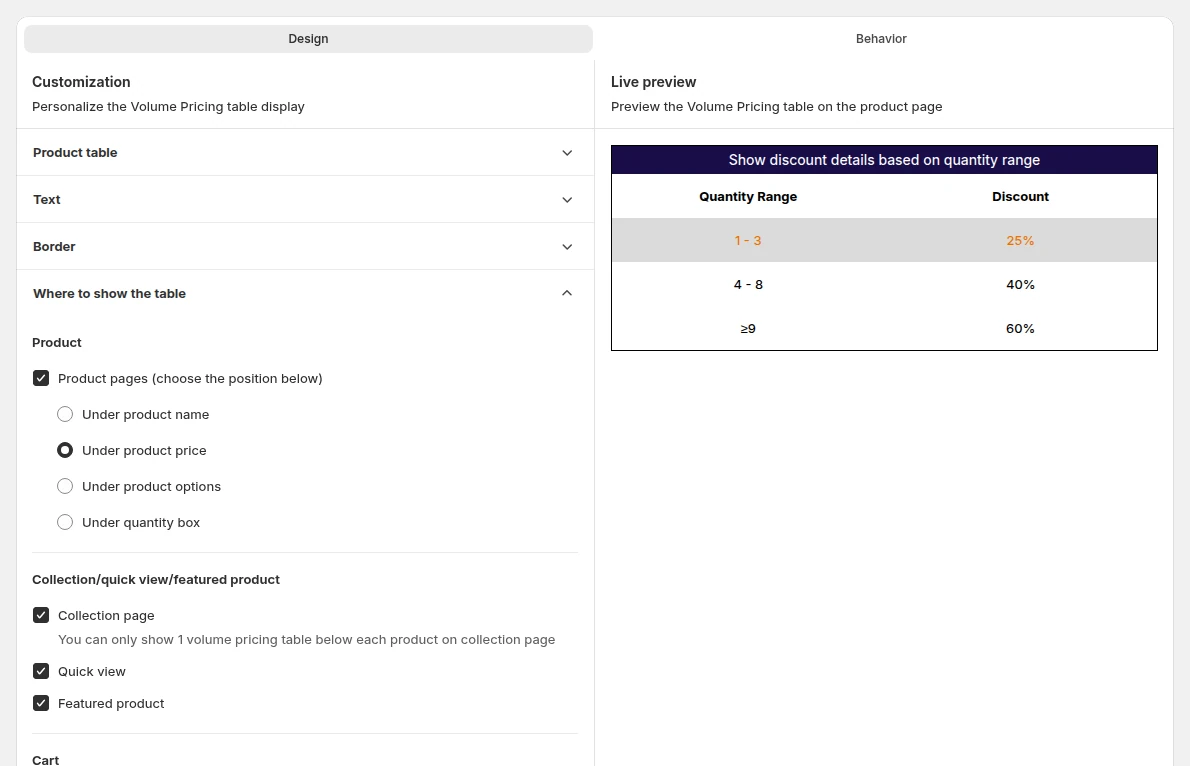
Open Volume Pricing, then Settings. Product pages, the cart page and the mini cart are on by default, and you can switch on the collection page, quick view and featured product. You can also decide what a click on a row does: jump to the minimum or the maximum of the range.
Step 5: Test as the buyer
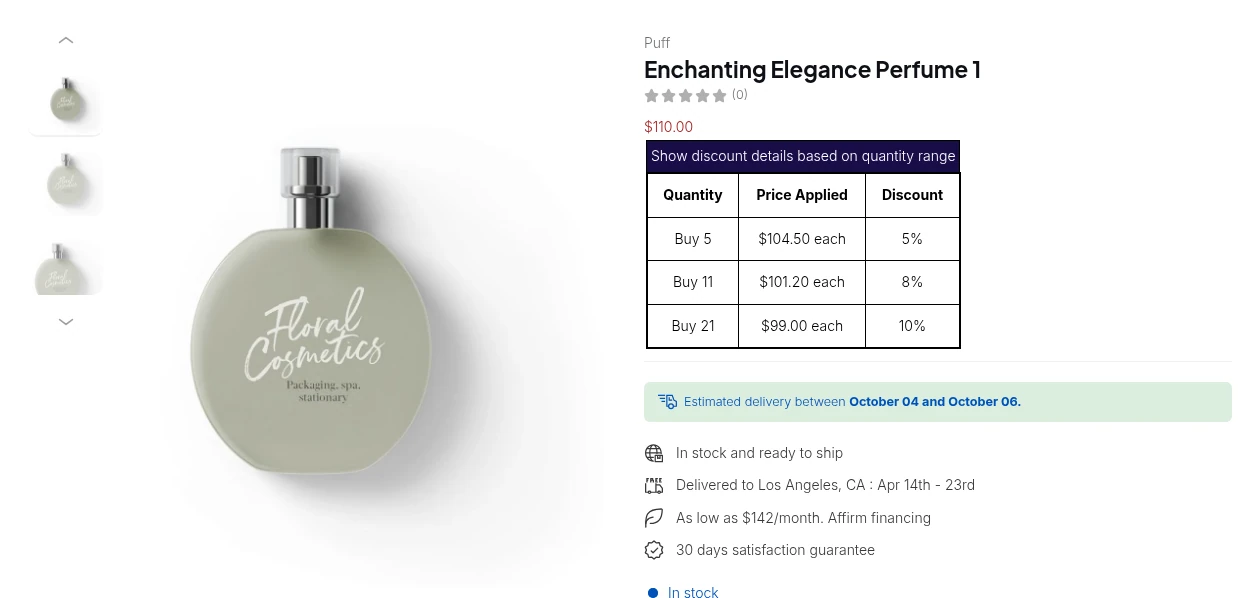
Save and enable the rule, then open a covered product in a session that matches the customer condition. A guest does not match a Logged-in customers rule, which is the most common reason a table seems missing. If it does not show, click Storefront setup on the Volume Pricing page: it checks the module and the app embed and links to your storefront.
How do tiers combine with wholesale prices and discount codes?
In BSS B2B Solution the order is fixed. A Price List or Custom Pricing rule sets the base price first, the Volume Pricing tier then applies to that price, and a discount code starts from the result. If a Price List applies to a variant, Custom Pricing is skipped for it. A Price List price of $80 with a 5% tier costs $76, and a $22.50 negotiated price with a 10% tier costs $20.25, not 10% off the retail price.
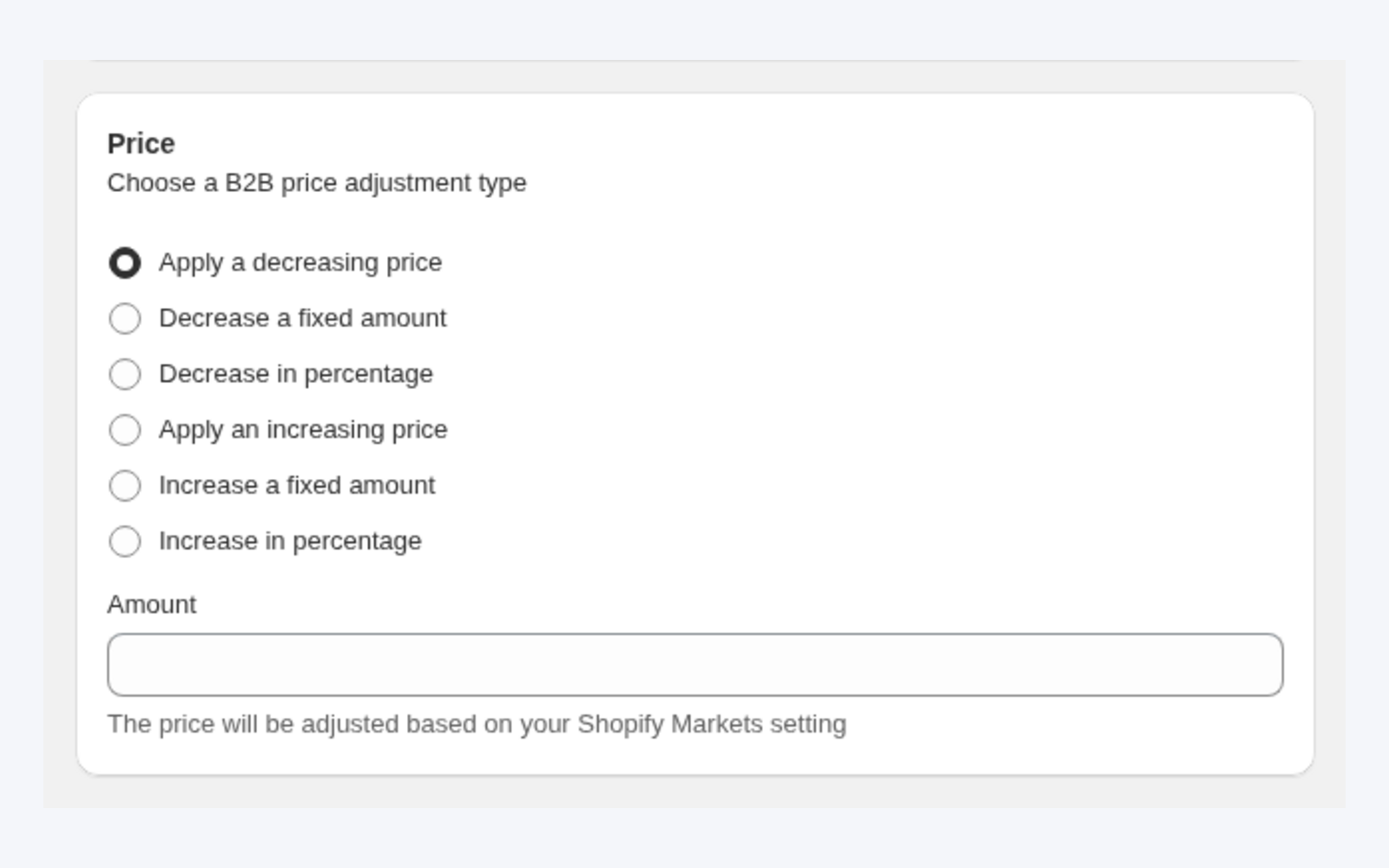
Priority (0 to 99, lower wins) only decides between rules of the same type. Read Which B2B pricing rule wins and Combine custom pricing and volume pricing before you build both. The BSS guide also says automatic Shopify discounts do not work alongside Custom Pricing or Volume Pricing, and manual codes work only if Shopify Discount is on under Advanced Settings, so test your promo codes.
Can you run tiered pricing for retail (B2C) shoppers?
Yes, with an app. Native price breaks belong to B2B catalogs, and Shopify’s standard discounts do not build tiers. In a Volume Pricing rule you can choose All customers or Not logged-in customers, so every shopper sees the table. A common hybrid is a small retail tier and a deeper rule for the tag wholesale, because the customer condition is set per rule. Our tiered pricing use case shows the setup, and Shopify quantity breaks covers the retail angle.
How do you choose break points that buyers actually reach?
- Start from order data. List the quantities trade buyers order today and put the first break just above the smallest typical order.
- Follow the case size. If a case holds 12, breaks at 12, 48 and 144 make sense, and a break at 17 is a number nobody reaches.
- Test the edges. Calculate the totals at the last unit of each range and the first unit of the next, as in the example above.
- Protect margin. Work out the lowest price a buyer can reach after the base price and the deepest tier, and check it against your cost. Keep each step big enough to matter.
Pair tiers with a minimum order. See how to set a minimum order quantity on Shopify and the order rules and terms hub.
How to prepare tiered pricing for BFCM 2026
Black Friday 2026 is Friday, November 27, and Cyber Monday is Monday, November 30. Volume Pricing rules accept a start date and an end date, so a holiday tier can switch on and off without you being online. This is a suggested plan, not a Shopify requirement.
| By | Task |
|---|---|
| Oct 30 | Decide the tiers and the margin floor. Choose whether holiday tiers replace or add to the everyday tiers |
| Nov 13 | Build the rules with a start date of Nov 27 and an end date of Nov 30. Keep everyday rules unchanged |
| Nov 20 | Test as each buyer type (guest, retail, wholesale tag). Test with your discount codes, because the guide limits how they combine |
| Nov 26 | Check the app embed is on in the live theme and the table shows on product, collection and cart pages |
| Nov 27 to 30 | Watch the first orders for the correct tier price |
Limits to know before you promise a price
- The app embed must be on. With the embed off, the rule is saved but buyers see no table, and each theme has its own switch.
- Free plan limits. The Free plan reads only your newest Volume Pricing rule, with up to 2 ranges, and it must be quantity-based with no collection, tag, variant, market or exclusion conditions. All features are free on development stores.
- Multi-currency is display only. Prices convert at Shopify’s rate, and checkout stays in your store or Markets currency.
- POS needs a tap. Quantity breaks work in Shopify POS on the Platinum plan, but staff tap the B2B Price tile to apply them. They are not applied automatically.
What do real stores do with quantity breaks?
Raven, a UK retailer of Japanese tiles, used quantity breaks to show discounts on product pages, including its sample products. Its case study says B2B clients now see their discount terms product by product (read the Raven case study). For more patterns, see Consumer electronics: trade accounts with tiered pricing and Show a volume pricing table on product pages.
Which option should you choose?
| Your situation | Use | Why |
|---|---|---|
| All tiered buyers are companies, three buyer groups or fewer, no table needed | Native catalog price breaks | Included on every plan, validated by Shopify |
| Buyers are identified by tag, or you sell retail and wholesale to the same logged-in audience | BSS B2B Solution Volume Pricing | Targets tags, customers, guests and company locations |
| You want buyers to see the next break before they add to cart, or tiers on a negotiated price | BSS B2B Solution Volume Pricing with Custom Pricing | Table on the page, tiers apply on the base price |
BSS B2B Solution is free on development stores, so you can build the rule, see the table on your theme and check the cart before you pay.
Install BSS B2B Solution Read the Volume Pricing guideFAQ: Shopify tiered pricing
What is tiered pricing on Shopify?
Tiered pricing gives a lower unit price as the quantity or spend rises, for example $20.00 for 1 to 9 units, $18.00 for 10 to 49 and $15.00 for 50 or more. On Shopify you set it with native B2B price breaks or with an app.
Does Shopify have tiered pricing built in?
Yes for B2B buyers. Native B2B includes quantity price breaks on Basic, Grow, Advanced and Plus, up to 10 per product in a catalog. Shopify’s standard discount types do not build tiers.
What is the difference between tiered pricing and volume pricing?
In practice the terms overlap: both lower the unit price as the order grows. Shopify and BSS use the name volume pricing for quantity breaks. Some people use tiered pricing for customer groups such as Silver and Gold, which you set with catalogs or customer tags.
Can tiered pricing apply only to certain customers?
Yes. A Volume Pricing rule in BSS B2B Solution can target all customers, logged-in or not-logged-in customers, specific customers, customer tags or company locations, with exclusions. Native price breaks reach buyers in companies.
Do tiers stack with wholesale prices?
In BSS B2B Solution the Price List or Custom Pricing price comes first and the tier applies to it. A $22.50 price with a 10% tier costs $20.25. In native B2B, a product with volume pricing gets a fixed price.
Can I show a tier table on the product page?
With BSS B2B Solution, yes. The table shows on product pages, the cart and the mini cart by default, and you can add the collection page, quick view and featured product. Turn on the app embed first.
Does tiered pricing work in Shopify POS?
Quantity breaks work in POS with BSS B2B Solution on the Platinum plan. Staff tap the B2B Price tile to apply them, and rules by market or company location do not work at POS.
Can I run a Black Friday discount code on top of tiers?
Test it first. The BSS guide says manual discount codes work only if Shopify Discount is on in Advanced Settings, and automatic Shopify discounts do not work alongside Volume Pricing. Black Friday 2026 is November 27.
Next steps
Write down your break points, check the edges with the math above, then build one rule and test it as a buyer. To compare apps first, read our quantity breaks apps comparison. If you are choosing a Shopify plan, read Shopify B2B without Plus, and for price strategy the Shopify B2B pricing guide.
Install BSS B2B Solution to set tiers by quantity or spend, choose who sees them and show the table on your theme. Free on development stores.
Install BSS B2B Solution See the appSources
Shopify pages read on October 4, 2026. BSS facts: BSS user guides at docs.bss-b2b.solutions and our checks of the app.
- Shopify Help Center: Quantity rules and volume pricing
- Shopify Help Center: Shopify B2B features by plan
- Shopify Help Center: Catalogs
- Shopify Help Center: Creating B2B catalogs
- Shopify Help Center: Discounts for B2B catalogs
- Shopify Help Center: Discount types
- Shopify news: native B2B for all plans (April 2, 2026)
You may also like

Is Shopify B2B or B2C? Run Both in One Store (2026)
Shopify supports both B2B and B2C. One store can sell to consumers and to businesses, which Shopify […]

11 Shopify B2B Examples: Real B2B Websites and Case Studies (2026)
The best Shopify B2B examples do one job clearly: a gated application, customer-specific prices, quick reordering or […]

8 Best B2B Ecommerce Platforms in 2026 (Features, Pros & Cons)
The best B2B ecommerce platforms in 2026 are Shopify (fastest launch, native B2B on every plan), BigCommerce […]