
Shopify B2B App Theme Compatibility Checklist: How to Test Before You Install

Test a Shopify B2B app on a duplicate of your theme before it touches the live one. Check that the theme uses JSON templates, turn on the app embed, add any app blocks, then walk a guest, a tagged buyer and an untagged customer through every page the app changes.
BSS B2B Solution, Lock and Quote can be tried on a development store at no cost, and paid plans have a trial. Use a duplicate theme for your first install.
Install BSS B2B Solution See pricingLast updated October 4, 2026. Shopify facts come from the pages linked in the text, read on that date. BSS facts come from the user guides at docs.bss-b2b.solutions and our October 2026 review of the apps. BSS B2B Solutions makes BSS B2B Solution, Lock and Quote. This checklist works for any B2B app. It is part of our complete guide to Shopify B2B; to pick a theme rather than test one, see the Shopify B2B theme guide.
Key takeaways
- Duplicate the theme, install and test there, then publish it or repeat the setup on the live theme. A duplicate is named “Copy of” plus the theme name, and Shopify allows no more than 20 themes (Shopify Help Center).
- App blocks need JSON templates, which means an Online Store 2.0 theme (shopify.dev). BSS Quick Order and the product variant table need one. Other features have manual install paths.
- Apps differ in how they touch your theme. BSS B2B Solution loads from an app embed. BSS B2B Lock writes Liquid into snippets and
theme.liquid. BSS B2B Quote writes Quick Order files per theme. - Every theme has its own app embed switch. A new or duplicate theme starts with the embed off.
- We list tested themes, and we do not claim compatibility with all themes.
What does theme compatibility mean for a B2B app?
A B2B app changes prices, buttons, forms and pages through three routes. An app embed loads a script for the whole theme. An app block is a block you add to a template in the theme editor. Some apps write code into theme files. Each fails differently: an embed that is off shows nothing, a block cannot be added to a legacy template, and written code can be overwritten by a theme update.
Shopify says app blocks require JSON templates (shopify.dev). To check yours, open Online Store, Themes, Edit code and look in the templates folder. Files ending in .json are JSON templates. A theme whose product and collection templates are .liquid files is a legacy theme, and app blocks will not work there.
How each BSS app touches your theme
| App | How it reaches the theme | Theme requirements and notes |
|---|---|---|
| BSS B2B Solution | One app embed named B2B Solution loads the storefront scripts. Some modules, such as Tax Display, also need price snippets added to product, collection and cart templates | Embed is per theme. Online Store 2.0 themes work with blocks and embeds. Legacy themes may need a manual snippet. The docs list 13 Online Store 2.0 themes and 28 premium themes as supported |
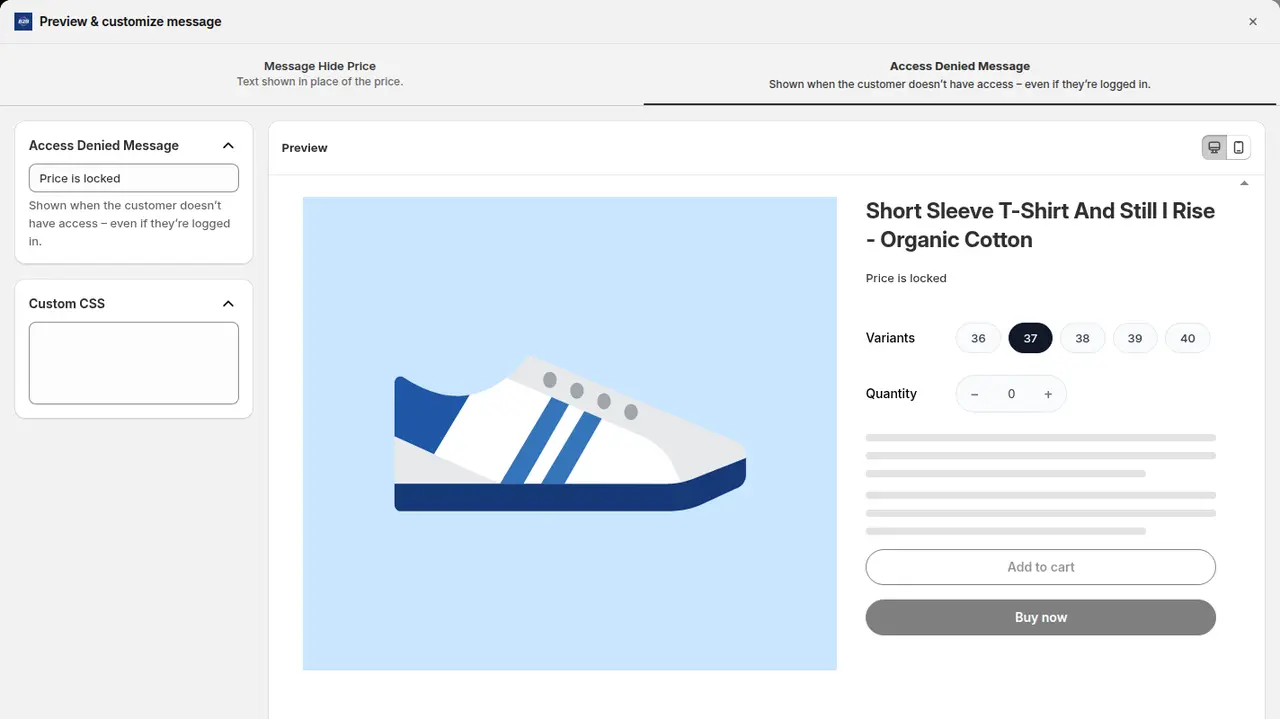
| BSS B2B Lock | Writes Liquid snippets into your theme and edits layout/theme.liquid and product, price and form files, so rules run when Shopify renders the page. A second app embed handles passcode pop-ups, request access and hiding accelerated checkout buttons | Auto installation works on free themes. Paid themes may need manual installation. Headless storefronts are not supported |
| BSS B2B Quote | Quick Order pages write a section and a page template into the live theme. The variant table is a product template app block. Quote buttons come from the app embed | Quick Order and the variant table need an Online Store 2.0 product or page template. Quote has 63 theme presets and falls back to the Dawn or Horizon preset for themes it does not know |
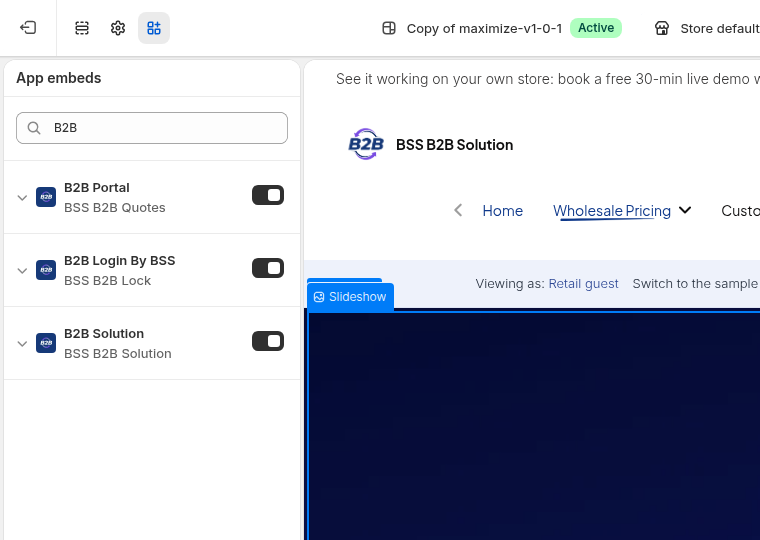
BSS B2B Solution
Everything loads from one head-target embed. If it is off, “none” of the prices, tables, forms or messages appear, even when rules are saved. Publishing a new theme or a duplicate does not carry the setting over (guide). The app also checks for Online Store 2.0 by looking for JSON templates for product, collection, cart and home. The list of supported themes names the themes where installation is automatic, and says its team can customize the integration for a theme that is not listed. Test these: the app hides Buy it now when rules are active, and cart drawers and quick views may need manual CSS selectors.
BSS B2B Lock
Lock does not work only through the app embed. To apply rules correctly it installs code into your theme, and the guide recommends installing to a test theme first. On the Installation tab you pick Install to TEST (Draft) or Install to LIVE. If locks already work, do not run auto installation again, because it can cause incompatibility. Lock is tested on free themes such as Dawn, Ride, Horizon and Spotlight, and may only partly work on paid themes (install guide).
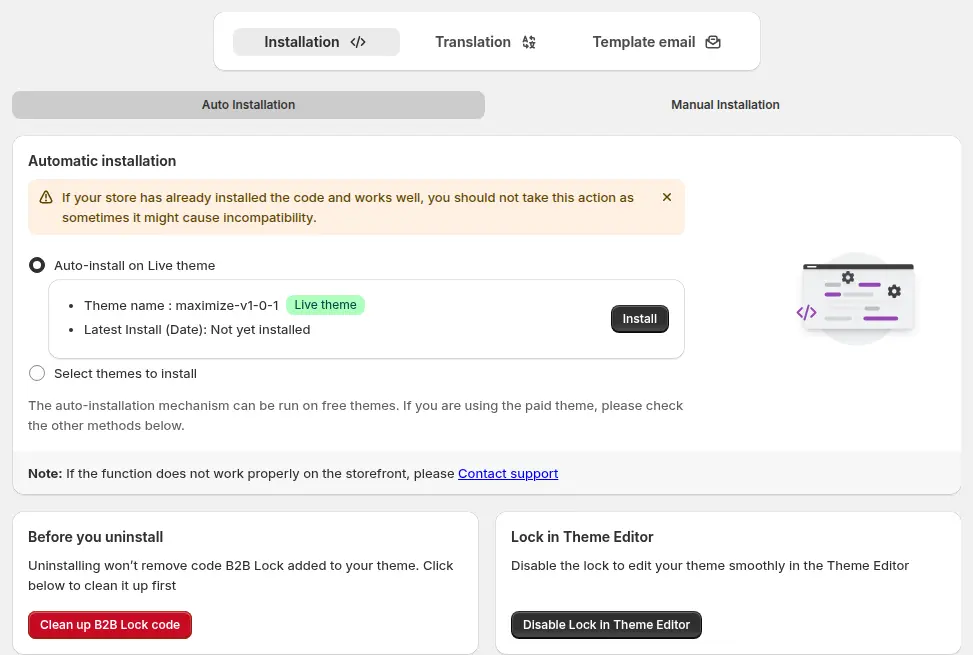
Because the code stays in the theme, plan the exit too. Before you uninstall or switch themes, open Theme Cleanup and click Disable all rules. A dormant snippet may remain, and support can remove every file on request (theme cleanup guide).
BSS B2B Quote
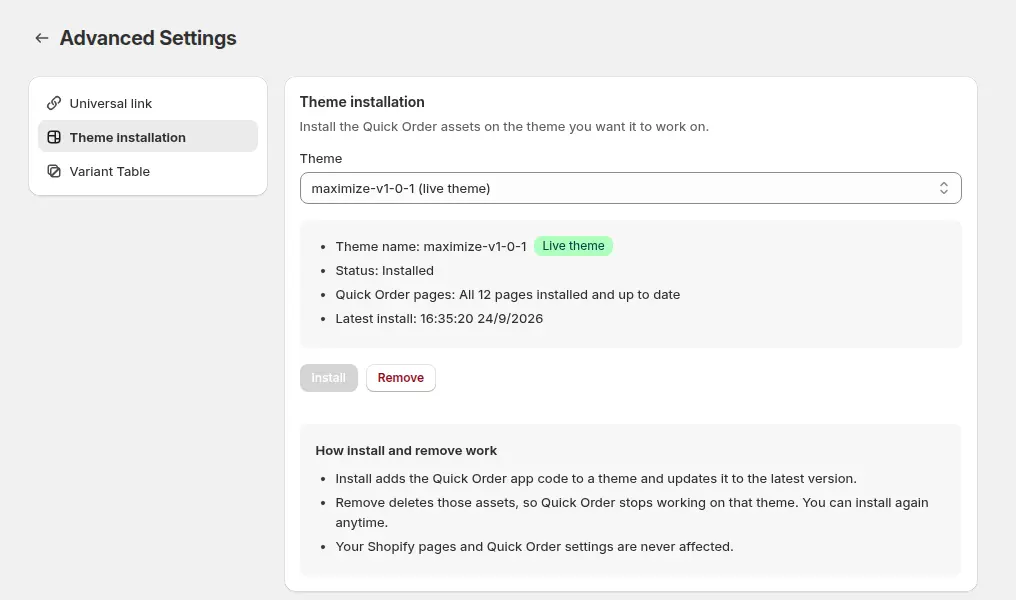
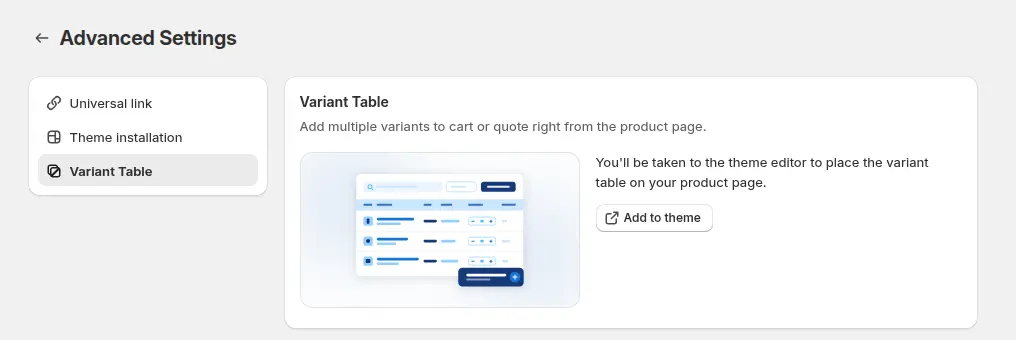
Publishing a Quick Order page adds its files to the theme that is live at that moment. A new theme does not get them automatically. In Advanced Settings, Theme installation you select any theme, see its status (Installed, Needs update or Not installed) and click Install, so you can prepare a duplicate before it goes live (guide). The page needs an Online Store 2.0 theme. The variant table is an app block, “BSS Product Page Variant Table”, that you add to the product template, and the live storefront shows it on the Business plan and up. For quote buttons on a heavily customized or paid theme, manual installation or support help may be needed (Quote FAQ).
The theme compatibility checklist
Before you install
- ☐ Write down your theme name and version, and whether it is free, paid or custom.
- ☐ Open Edit code and check that product, collection, cart and index templates are
.json. - ☐ Check whether the theme is on the app’s supported list, and note anything customized: cart drawer, quick view, custom price snippets.
- ☐ Duplicate the theme, name it clearly, and keep the original untouched.
- ☐ Create test customers: one with your wholesale tag and one without. Use a private window for a guest.
Install on the duplicate
- ☐ Install the app, then open the theme editor for the duplicate and turn the app embed on.
- ☐ Add app blocks where the app needs them: variant table on the product template, Tax Exempt block on the cart template.
- ☐ For Lock, choose Install to TEST (Draft) and pick the duplicate. For Quote, use Theme installation and install on the duplicate.
- ☐ Preview the duplicate and confirm the editor still loads with no errors.
Test every surface
| Surface | Check | Why it fails on some themes |
|---|---|---|
| Product page | Price, Add to cart, Buy it now, quantity box, volume table | Custom price markup or sections the app cannot find |
| Collection grid and search | Prices and badges on every card | Themes with their own card snippets |
| Quick view and cart drawer | Prices and rules inside the pop-up | These can need manual CSS selectors |
| Cart page | Order limit message, Net Terms button, tax ID box | App block missing from the cart template |
| Login and registration | Form displays, login prompt links to the right page | Account templates changed by the theme |
| Locked pages and prices | Guest sees the lock message, tagged buyer sees content | Theme files not patched by the install |
| Quick Order and quote button | Page loads, search, CSV upload, quote form opens | Legacy template or missing files on this theme |
| Mobile | All of the above on a phone width | Layout and sticky elements overlap |
| Theme editor | Editor loads and you can edit sections | Lock can be disabled in the editor from its settings |
Before you go live
- ☐ Compare the duplicate with the original on the same product, collection and cart.
- ☐ Check that checkout works from a test order. Shopify suggests testing as a test customer with its test payment gateway (Shopify Help Center).
- ☐ Publish the duplicate, then turn the app embed on in the live theme and rerun the install steps for Lock and Quote there.
- ☐ Keep the old theme for a rollback period. Know where Theme Cleanup is.
- ☐ After every theme update, repeat the test matrix.
When your theme is not on the list
A theme outside the tested list is a test case, not a refusal. Run the checklist, note which surfaces fail, and send support the theme name, a product URL and a screenshot. The BSS docs say the team can customize the integration for a theme that is not fully supported. If you are still choosing a theme, read the Shopify B2B theme guide, and for B2B-specific options see Shopify B2B themes.
What we do not claim
- We do not claim any BSS app works with every theme.
- We have not verified headless or Hydrogen storefronts. The apps depend on the theme, its embed and Liquid, so treat headless as unsupported unless support tells you otherwise.
- A pass today does not cover a future theme update.
Shopify B2B app theme compatibility: frequently asked questions
How do I test a Shopify app before installing it on my live theme?
Duplicate your theme from Online Store, Themes, install the app, turn its app embed on in the duplicate and run your test customers through the pages it changes. Publish the copy only when it passes.
How do I know if my theme is Online Store 2.0?
Open Edit code and check the templates folder. If the product and collection templates are .json files, the theme uses JSON templates, which app blocks require. Legacy themes use .liquid templates.
Does BSS B2B Lock change my theme files?
Yes. It installs Liquid snippets and edits layout/theme.liquid and product, price and form files so the rules run when Shopify renders the page. Use Theme Cleanup to disable all rules before you uninstall.
Do BSS B2B Quote Quick Order pages need Online Store 2.0?
Yes. Publishing a page writes a section and a page template into the theme, so the theme must support Online Store 2.0. The product variant table is an app block for the product template.
What happens to BSS apps when I switch themes?
Each theme has its own app embed switch, so turn the embed on in the new theme. Quick Order files are installed per theme, and Lock code is installed to the theme you target. Run the install steps on the new theme and retest.
Does BSS B2B Solution work with every Shopify theme?
We do not claim that. The user guide lists 13 Online Store 2.0 themes and 28 premium themes where installation is automatic. For other themes, test on a duplicate and contact support.
Do the BSS apps work on headless storefronts?
We have not verified headless support. The apps rely on the theme, its app embed and Liquid, so treat a headless build as unsupported unless support confirms otherwise.
Next steps
Pick the app you want to try, duplicate your theme and run the checklist above. The setup checklist puts this test inside the full ten-step setup. Related use cases: hide wholesale prices from guest visitors and product page variant table. The access control hub and the quick order and RFQ hub cover Lock and Quote.
Try BSS B2B Solution on a development store, check your theme on the supported list, and test every surface with a tagged test customer.
Install BSS B2B Solution See the appSources
Shopify pages read on October 4, 2026. BSS facts: BSS user guides at docs.bss-b2b.solutions and our October 2026 review of the apps’ behavior.
- Shopify Help Center: Duplicating themes
- shopify.dev: App blocks
- Shopify Help Center: Test the B2B customer experience
- BSS B2B Solution user guide: List of supported themes
- BSS B2B Solution user guide: Enable or disable the app in your theme
- BSS B2B Lock user guide: Install and open BSS B2B Lock
- BSS B2B Lock user guide: Theme Cleanup
- BSS B2B Quote user guide: Install Quick Order on a theme
You may also like

How to Uninstall a Shopify B2B or Lock App Safely: Remove Leftover Theme Code
Some Shopify apps leave code in your theme after you uninstall them. To remove a B2B or lock app safely, duplicate your […]

Shopify Markets and B2B Pricing: Wholesale Prices Per Country and Currency
Shopify Markets control currency, languages and taxes by audience, and B2B catalogs can be assigned per B2B market, with a cap on […]

How to Collect and Validate a Tax ID (EIN, ABN, GST, UK VAT) on Shopify
Shopify has a Tax ID field on company locations, but the pages we read describe no check against a tax register. BSS […]