
How to Import Wholesale Prices From CSV to Shopify (Template Included)

You can import wholesale prices to Shopify from a CSV in two ways. Shopify’s native B2B imports fixed prices and quantity rules into a catalog. BSS B2B Solution imports Custom Pricing, Price List and Volume Pricing rules by customer tag, on the Platinum plan. Download the templates below, fill them in, validate, then import. These templates follow the column layout in the BSS user guide as of October 2026; if the import window in the app offers a newer template, export a fresh one there and use its columns.
Export your rules, change the prices in a sheet, validate and import. Free on development stores, so you can test the file first.
Install BSS B2B Solution See pricingLast updated October 4, 2026. Shopify facts come from the Help Center pages linked in the text. BSS B2B Solutions makes BSS B2B Solution, the app in the screenshots. This guide belongs to the wholesale pricing hub of our complete guide to Shopify B2B. The import wholesale prices from CSV use case shows a worked spring price update.
Key takeaways
- Shopify imports catalog prices from CSV. Go to Markets, then Catalogs, then Import. The file carries fixed prices, quantity rules and up to 10 price breaks (Shopify Help Center).
- BSS B2B Solution imports rules, not just prices. A row holds the customer tag, the products, the discount type and the value, so one file can price several buyer groups.
- Import needs the Platinum plan for Custom Pricing, Price List and Volume Pricing, per the BSS user guides. File limits: 5 MB (Custom Pricing) and 10 MB (Price List, Volume Pricing).
- Export first. The export is your backup and your template. The mode Replace all existing rules deletes what is there.
- Spelling is exact. Discount types are case-sensitive and numbers carry no currency symbol or percent sign.
Download the CSV templates
Three files, one per BSS B2B Solution module. Each has a header row and sample rows you replace with your own products and tags: Custom Pricing template (CSV), Price List template (CSV) and Volume Pricing template (CSV). The sample names are made up.
The columns follow the BSS user guides as of October 4, 2026. Headers can change between app versions, so compare the header row with the file from Download sample CSV in the app’s import window before you upload. If they differ, move your data into the app’s file.
Can you import wholesale prices to Shopify from a CSV?
Yes. Which route fits depends on how you price. If your buyers are Shopify B2B companies with a few catalogs, the native importer is enough. If you price by customer tag, by percentage, or by quantity tier across many groups, an app that stores rules gives you more.
| Shopify native catalog CSV | BSS B2B Solution CSV | |
|---|---|---|
| What the file holds | Fixed prices, compare-at, published flag, quantity rules, up to 10 quantity and price breaks per row | Rules: who, which products, discount type and value, schedule. Tiers for Volume Pricing |
| Who it targets | A catalog, assigned to B2B markets (up to 3 active on Basic, Grow, Advanced) | Customers, tags, company locations, markets, collections |
| Where | Markets, Catalogs, Import | Module, More actions, Import and export |
| Backup | Export a catalog by CSV, sent by email | Export CSV or Excel, download link works 24 hours |
| Plan | Basic, Grow, Advanced and Plus (plan table) | Platinum for import, per the BSS user guides |
| Percentage prices | Only fixed prices export. Percentage adjustments are not in the file | Percentage and fixed-amount rules import |
How to import wholesale prices into a Shopify catalog
Shopify describes the steps in its help center. From the Shopify admin go to Markets, then Catalogs, click Import, click Adjust prices and choose Import CSV. Add the file or drop it, click Preview your CSV to review the changes, then import (Shopify Help Center: Catalogs).
- Start from an export. Select the catalog, click Export and Shopify emails you the CSV. Only products with fixed prices are in it. Products with a percentage adjustment are not.
- Keep required columns. The Catalog Title column is required. Other columns include SKU, Handle, Fixed Price, Compare At and Published (TRUE or FALSE). Don’t include currency symbols in prices.
- Quantity rules ride along. The file can carry Quantity Increment, Minimum Order Quantity and Maximum Order Quantity, plus Quantity Break 1 to 10 and Price Break 1 to 10 (Creating catalogs).
- A blank removes a price. A blank field in both Fixed Price and Compare At removes the fixed price for that product or variant.
We do not ship a native template because Shopify offers its own sample catalog CSV, and an export of your catalog gives you the exact headers. Native limits to remember: fixed prices override a catalog adjustment, volume pricing makes a price fixed, and the file size limit is not stated on those pages. See which price wins for how native and app rules interact.
How to import wholesale prices with BSS B2B Solution
Step 1: Export your current rules
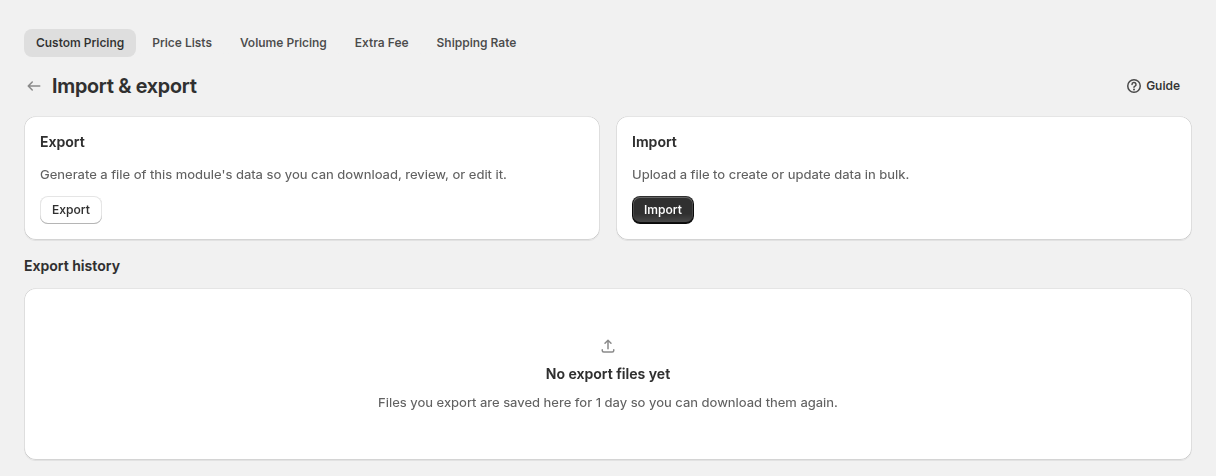
Open the module (Custom Pricing, Price Lists or Volume Pricing), click Export above the rule list, or open More actions, then Import & export. Pick a scope: the current page, selected rules, the current filter or all rules. Choose CSV or Excel. The export runs as a background job and the download link works for 24 hours. This file is your backup and your template.
Step 2: Edit the prices in your spreadsheet
Keep the header row exactly as exported. Leave ID blank to create a rule and keep the exported ID to update one. Enter plain numbers in Discount value. Customer emails, product titles, SKUs and tags must match what is in your store.
Step 3: Choose how the file is applied
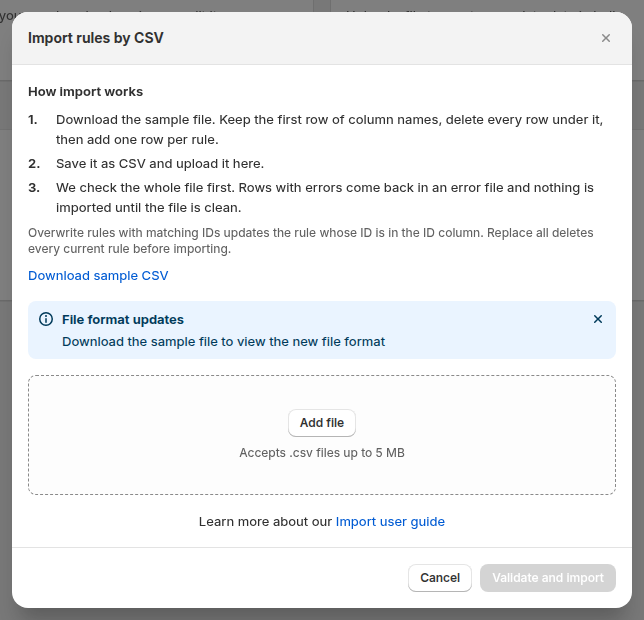
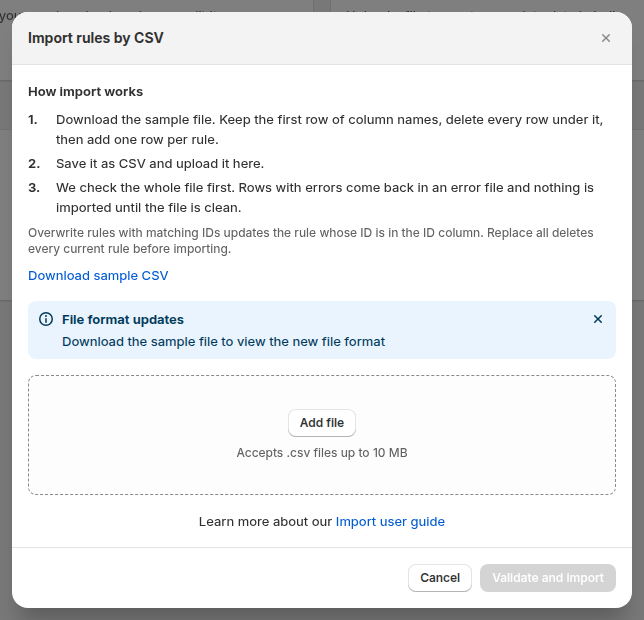
Click Import and add the file. Overwrite rules with matching IDs updates the rules whose IDs are in the file and creates rules for rows with no ID, leaving other rules alone. Replace all existing rules deletes the current rules and replaces them with the file. Click Validate and import.
Step 4: Read the result and fix errors
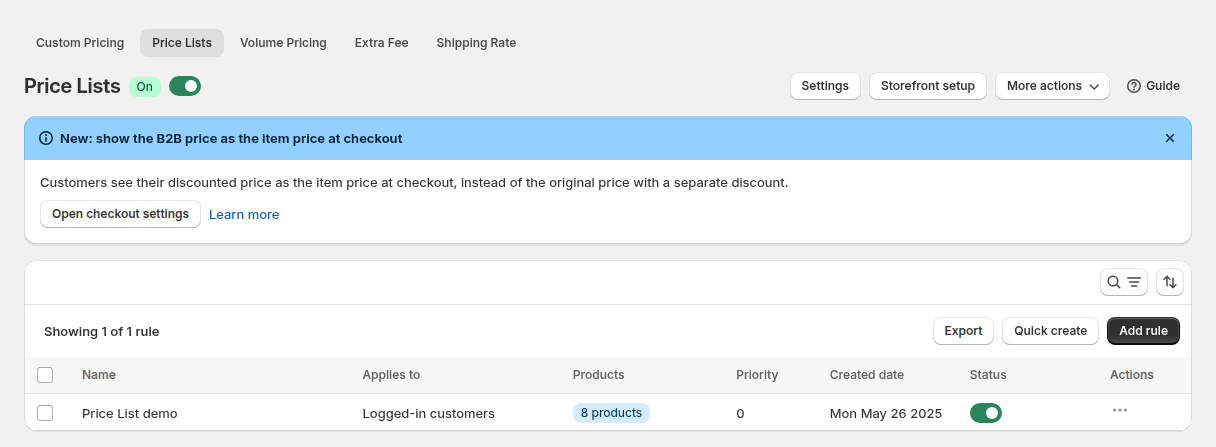
The app validates headers and values, then imports in the background with a progress banner. If rows fail, it shows how many and gives an error file with the reason for each row. Fix those rows and import again. Price List updates are written to store metafields and typically reach the live storefront in one to three minutes.
Step 5: Test as a buyer
Open a few rules in the app, then view a product page as a matching buyer. Check one fixed price, one percentage and one tier table. Compare with a guest in a private window.
What goes in each CSV: Custom Pricing, Price List and Volume Pricing
Custom Pricing CSV
One row per rule. Allowed values: Customer condition is All, Logged-in, Not logged-in, Specific customers, Customer tags or Company locations. Product condition is All, Specific products, Specific variants, Specific collections or Specific tags. Discount type is Fixed price, Decrease fixed amount, Decrease fixed percentage, Increasing price, Increase fixed amount or Increase fixed percentage. Required fields are ID, Name, Priority and Status (Custom Pricing import guide). A column left out of an imported row is reset to empty for that rule.
ID,Name,Priority,Status,Market,Customer condition,Customers,Exclude customer condition,Exclude customers,Product condition,Products,Exclude product condition,Exclude products,Discount type,Discount value,Start date,Start time,End date,End time
,Wholesale 20 percent off,10,Enable,All,Customer tags,wholesale,None,,All,,Specific tags,clearance,Decrease fixed percentage,20,2026-11-01,00:00,2026-12-31,23:59
,Gold 5 off hoodies,5,Enable,All,Customer tags,gold,None,,Specific collections,Hoodies,None,,Decrease fixed amount,5,,,,
,Distributor T-shirt price,3,Enable,All,Customer tags,distributor,None,,Specific products,Classic T-Shirt,None,,Fixed price,18,,,,
Price List CSV
In a price list file, a rule with several products puts the rule settings on the first row. The next rows fill only Product, Discount type and Discount value. Apply level is Product or Variant, and Product is a title, SKU, barcode or variant ID. Rows must have one product each (Price List import guide). Status in the sample is lowercase.
ID,Name,Priority,Status,Market,Customer condition,Customers,Exclude customer condition,Exclude customers,Exclude product condition,Exclude products,Apply level,Product,Discount type,Discount value,Start date,Start time,End date,End time
,VIP Wholesalers,0,enable,All,Customer tags,vip-wholesale,None,,Specific tags,clearance,Product,Classic T-Shirt,Decrease fixed percentage,25,2026-09-01,00:00,2026-12-31,23:59
,,,,,,,,,,,,Leather Jacket,Fixed price,120,,,,
,,,,,,,,,,,,Denim Jeans,Decrease fixed amount,15,,,,
Volume Pricing CSV
In a volume pricing file each row is one tier. A rule with three tiers takes three rows that share the same Name, and a tier needs From and To. Leave To blank for “and above”. Volume pricing type is Quantity or Value, and Apply level is Product, Order or Variant (Volume Pricing import guide). The Table style value must be one of the style names in the app’s sample file.
ID,Name,Priority,Status,Market,Customer condition,Customers,Exclude customer condition,Exclude customers,Product condition,Products,Exclude product condition,Exclude products,Volume pricing type,Apply level,Table style,From,To,Discount type,Discount value
,Case breaks,10,Enable,All,Customer tags,wholesale,None,,Specific collections,Hoodies,None,,Quantity,Product,From & Discounts,5,10,Decrease fixed percentage,5
,Case breaks,10,Enable,All,Customer tags,wholesale,None,,Specific collections,Hoodies,None,,Quantity,Product,From & Discounts,11,20,Decrease fixed percentage,8
,Case breaks,10,Enable,All,Customer tags,wholesale,None,,Specific collections,Hoodies,None,,Quantity,Product,From & Discounts,21,,Decrease fixed percentage,10
Why does a CSV import fail? Common errors and fixes
| Symptom | Likely cause | Fix |
|---|---|---|
| Whole row rejected | A discount type with different spelling, such as Percentage decrease | Copy the exact values from the sample. They are case-sensitive |
| Row rejected on value | A $ or % sign in Discount value | Enter the plain number |
| Customer or product not found | The email, title, SKU or tag does not exist in the store | Match the store exactly, then re-import the failed rows from the error file |
| Header error | A renamed, removed or reordered column, or an old Price List file with Exclude variants | Export a fresh template and move the data across |
| File refused | More than 5 MB (Custom Pricing) or 10 MB (Price List, Volume Pricing) | Split the file by group or collection |
| Price list change not visible | Metafields still syncing | Wait one to three minutes, then reload |
| Rule imported but not live | The option is not in your plan, such as specific variants below Platinum | Importing does not bypass plan limits |
| Custom price not shown | The custom price is not lower than the original price | Check the discount type and value |
Limits to know before you import
- Plan. Per the BSS user guides, import and export of Custom Pricing, Price Lists and Volume Pricing are on the Platinum plan, $99 per month on the App Store listing as of October 4, 2026. BSS B2B Solution is free on development stores, so you can test the file there.
- File size. The app window states 5 MB for Custom Pricing and 10 MB for Price List and Volume Pricing. Use the lower figure for Custom Pricing even if a server limit is higher.
- Not a catalog import. BSS Price List rules live in the app, not in Shopify’s Catalogs page. A native catalog CSV and a BSS CSV are separate files.
- API alternative. The Public API is a Platinum feature for syncing from an ERP. See sync B2B data with ERP via public API.
CSV import checklist
- You exported the current rules and saved the file with a date in the name.
- The header row matches the file from Download sample CSV.
- Every tag, email, SKU and collection exists in the store.
- Discount types are spelled exactly, and numbers have no symbols.
- Priority numbers follow your order. See which rule wins.
- You imported a small group first and checked the product page and cart as a tagged buyer.
- The file is under the size limit of the module.
Import wholesale prices from CSV: frequently asked questions
Can I import wholesale prices to Shopify from a CSV?
Yes. Shopify’s native B2B imports fixed prices and quantity rules into a catalog from Markets, Catalogs, Import. BSS B2B Solution imports Custom Pricing, Price List and Volume Pricing rules from CSV on the Platinum plan.
Where do I find the CSV template?
Download the templates on this page, or use Download sample CSV in the app’s import window. For a native catalog, Shopify offers a sample catalog CSV, and exporting a catalog gives you the exact headers.
What is the file size limit?
The BSS import window states 5 MB for Custom Pricing and 10 MB for Price List and Volume Pricing. Shopify’s catalog import pages do not state a limit.
Does the import overwrite my existing prices?
In BSS B2B Solution you choose. Overwrite rules with matching IDs updates only the rules in the file. Replace all existing rules deletes the current rules first, so export a backup.
Can I import prices by customer tag?
Yes, in BSS B2B Solution. The Customer condition column takes Customer tags and the Customers column holds the tags. A native Shopify catalog is assigned to B2B markets, not to tags.
Can I import quantity breaks from a CSV?
Yes in both. A Shopify catalog file carries Quantity Break and Price Break columns, up to 10 per product. A BSS Volume Pricing file holds one tier per row.
Why did some rows fail?
Usually a spelling mismatch in a discount type, a currency symbol in a value, or a customer, SKU or tag that does not exist in the store. The app returns an error file with a reason for each row.
How long until imported prices show in my store?
For Price Lists, rule updates typically reach the live storefront within one to three minutes. Test as a matching buyer after that.
Next steps
Export one module, change one column, and import the file on a development store first. Then repeat on the live store for one customer tag. The wholesale pricing hub links the matching setup guides, and price list per buyer group shows a list built by hand.
Install BSS B2B Solution to import and export Custom Pricing, Price List and Volume Pricing rules.
Install BSS B2B Solution See the appSources
Shopify pages read on October 4, 2026. BSS facts: the BSS B2B Solution user guides at docs.bss-b2b.solutions, our October 2026 review of the app’s behavior, and the Shopify App Store listing (as of October 4, 2026).
- Shopify Help Center: Catalogs (CSV import and export)
- Shopify Help Center: Creating catalogs
- Shopify Help Center: Quantity rules and volume pricing
- BSS user guide: Import & Export Custom Pricing Rules
- BSS user guide: Import & Export Price List Rules
- BSS user guide: Import & Export Volume Pricing Rules
You may also like

How to Uninstall a Shopify B2B or Lock App Safely: Remove Leftover Theme Code
Some Shopify apps leave code in your theme after you uninstall them. To remove a B2B or lock app safely, duplicate your […]

Shopify Markets and B2B Pricing: Wholesale Prices Per Country and Currency
Shopify Markets control currency, languages and taxes by audience, and B2B catalogs can be assigned per B2B market, with a cap on […]

How to Collect and Validate a Tax ID (EIN, ABN, GST, UK VAT) on Shopify
Shopify has a Tax ID field on company locations, but the pages we read describe no check against a tax register. BSS […]