


Sinful Glow Body Collective is a small US body-care brand that sells to shoppers on Shopify and takes wholesale applications through a form in its main menu. The public store shows retail prices and a short application with an EU VAT field. BSS B2B Solution runs the form and a set of tag-based pricing rules for approved accounts.
Key facts from the public storefront
- Model: hybrid. A retail store with a Wholesale menu item that opens an application form.
- Form: company, address, phone and an optional EU VAT validation field, with a password for the new account.
- Public terms: the wholesale page shows only the form, with no minimums or approval time written down.
- Configuration: the app’s pricing rules are keyed to customer tags, most with fixed prices on chosen products.
- Review: the merchant found the support team helpful and patient, especially for someone new to the process.
About Sinful Glow Body Collective
Sinful Glow Body Collective is a United States brand of body lotion, body wash, body oil and mini kits, sold online in several scents. According to its About page the company was started by a licensed esthetician and is run as a family business. The store also has a blog, a free-shipping offer on orders over $150, a buy-one-get-one promotion on the homepage and a page that lists the ingredients of its aftercare products.
The storefront is a standard Shopify theme: announcement bar, a main menu with Home, Search, Collections, Blog, About Us, Wholesale and Aftercare Product Ingredients, then a product grid, a cart and Shop Pay installments at checkout. Everything a consumer needs is on the surface. That makes it a typical small direct-to-consumer brand, and a useful example of how little is needed to start selling wholesale from the same store.

Wholesale buyers often come from a handful of places: a trade show, a referral, an Instagram message or a search for a supplier. Each of them ends up on the website to check the products, the brand and the way to apply. A store that makes that last step obvious loses fewer of them, which is why the placement of the menu item matters more than the design of the form.
This story does not repeat the brand’s product claims. It looks only at the wholesale side of the store: the application, the pricing configuration and what a similar brand can learn from it.
The B2B model: wholesale as a second door
There is no separate wholesale site, no dedicated landing page and no price list on the public store. Wholesale sits behind one menu item, “Wholesale”, which opens the “Wholesale Application”. Retail customers keep shopping as before, and a boutique or salon owner who wants to resell the products fills in the form.
Who can apply
The application page does not say. There is no text about who qualifies, minimum order values, approval times or how wholesale prices are shown. We mention this because it is the most important gap in an otherwise tidy setup. A brand that wants to scale wholesale can add three sentences above the form and answer most applicant questions before they are asked.
What the form asks
The form has two blocks. Primary details asks for first name, last name, email and password. Business details asks for company, phone with a country prefix, address, city, country and zip code. The last field is “EU VAT Validation”, and it is not marked required. The VAT field is there for buyers in the European Union, where a valid business VAT number matters for tax. The brand sells from the United States, so it is an extra step that few small stores take.
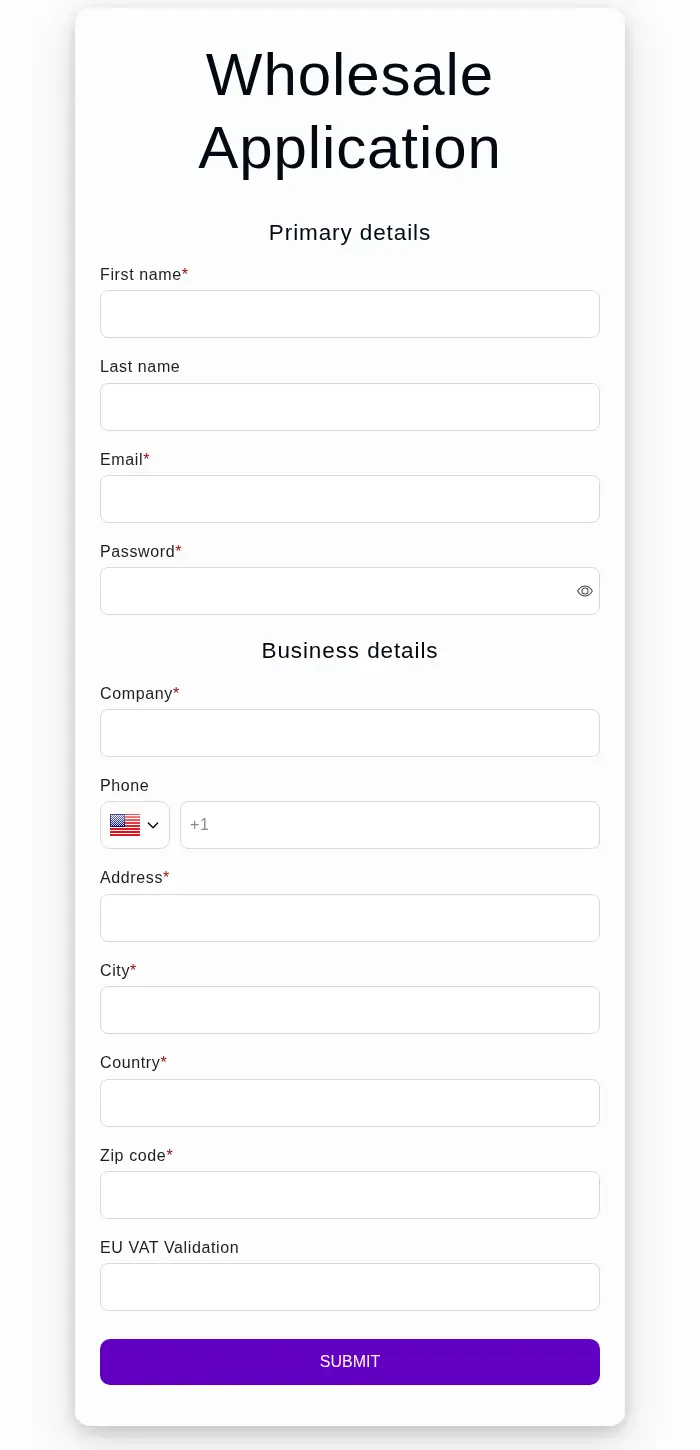
How the storefront handles wholesale
1. Wholesale in the main menu
The menu item is visible on every page, and it is underlined on the application page so that visitors know where they are. A shopper who is not looking for wholesale ignores it. A retailer looking for a supplier finds it in a second. For small brands that cannot afford a banner or a landing page, a menu item is a good first step.
2. A password in the application
Because the form includes a password, the applicant creates the account while applying, so the store does not need a second step later to invite the buyer. That is how the BSS registration form works: it creates the customer, the app can tag the customer and the pricing rules read the tag. We cannot see from outside whether Sinful Glow approves each applicant by hand or automatically.
3. The same form on a phone
On a phone the form is a single column. The fields are large enough to tap, the required fields carry an asterisk, and the submit button stays at the bottom of the form.
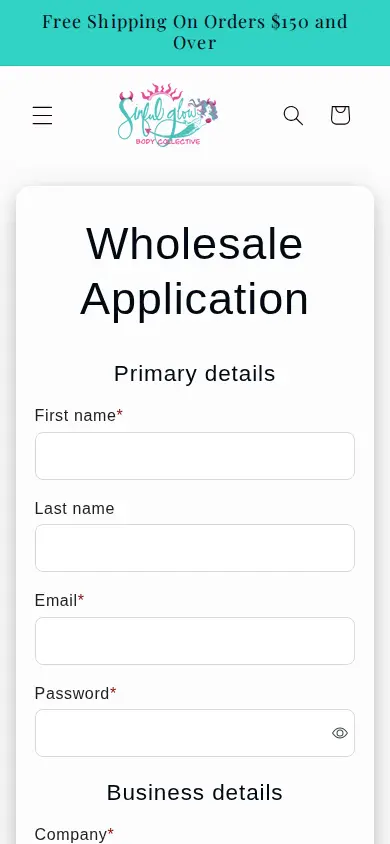
Which BSS features power it
Sinful Glow installed BSS B2B Solution in February 2025 on the Advanced plan. Its review is for that app. The review does not mention the other BSS apps, and we saw no lock or quote behavior on the public pages, so we make no claim about them. The configuration we could verify, in categories only, is:
- A registration form with tagging. One active form with the fields above, tagging of new customers and email notifications switched on. The EU VAT validation field comes from the form builder. See the registration form guide and verify a business tax ID before approving.
- Tag-based pricing. Twenty custom pricing rules are active, all keyed to customer tags. Seventeen set a fixed price on chosen products, two give a percentage off chosen products and one covers the whole catalog. See set unique prices for wholesale customers and give tagged wholesale customers special prices.
Fixed prices per product work like a price sheet, and the percentage rule is a simple fallback. The order in which rules apply is explained in which B2B pricing rule wins. We cannot see the logged-in storefront, so we make no claim about the amounts.
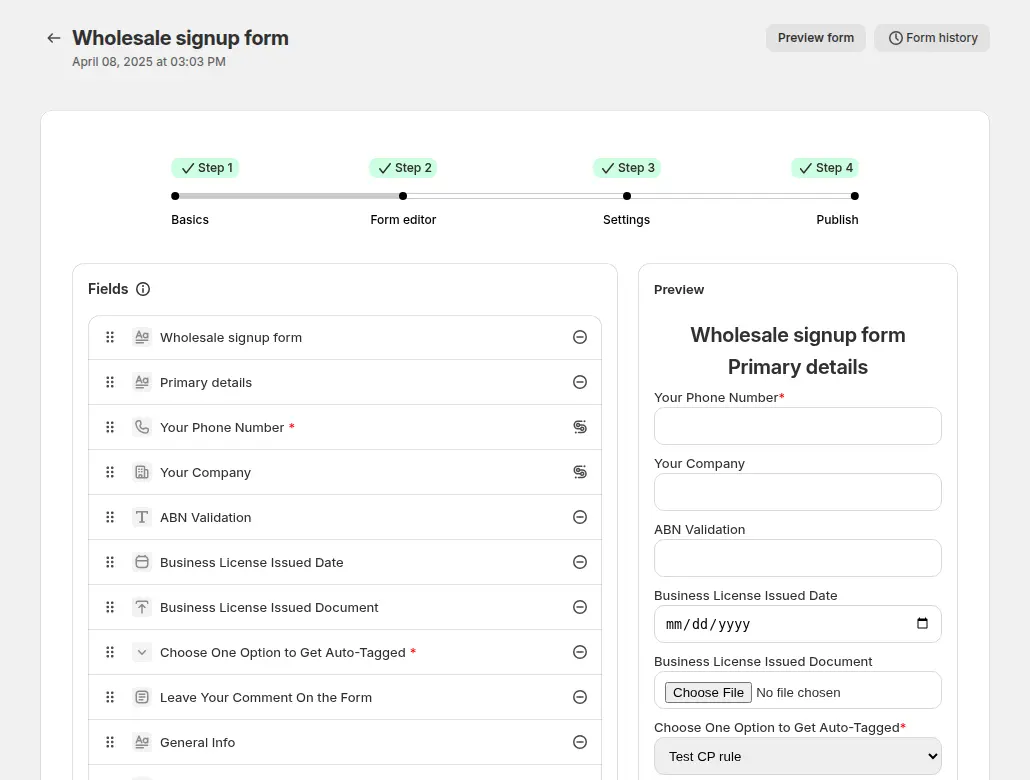
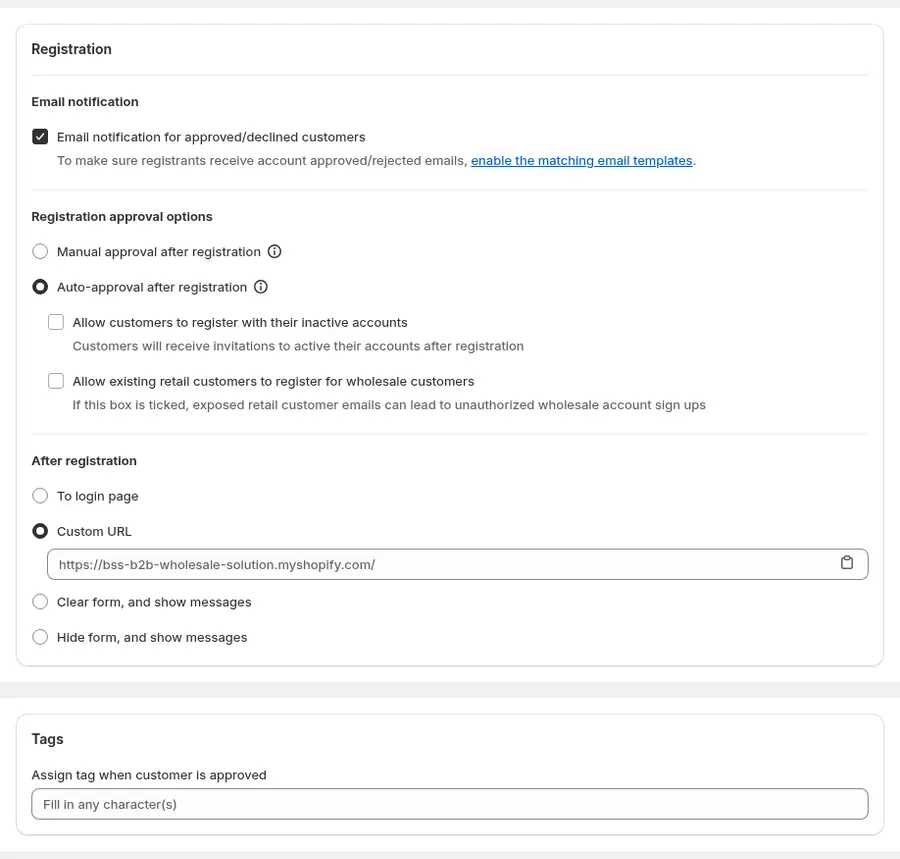
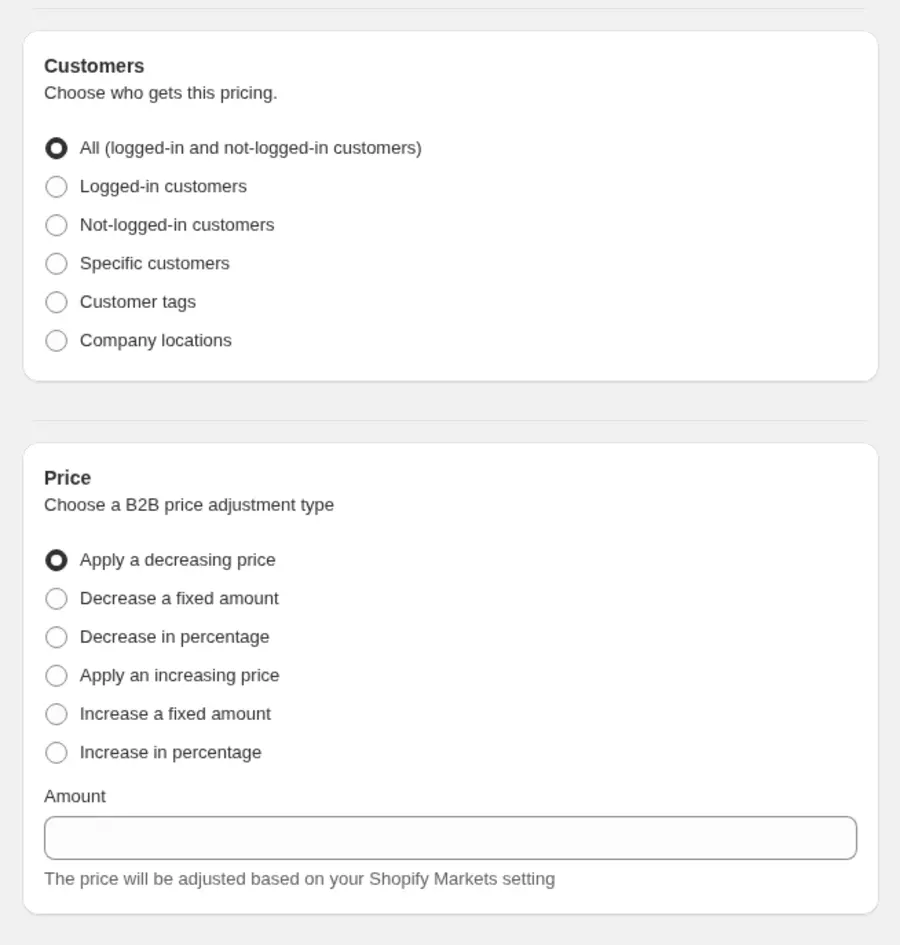
These images show how the options look in the BSS admin. They come from the user guide and are examples, not Sinful Glow’s own settings.
How to add wholesale to a small brand’s store
Sinful Glow’s setup is a good template for a brand with a short catalog and no wholesale team. These are the steps in the order we would take them.
- Write down your wholesale terms. Decide who qualifies, the minimum first order, the approval time and whether prices are fixed or a percentage off retail. A paragraph on a page is enough.
- Build the application. Start from the standard fields, then add the tax ID field if you sell to Europe. Use build a powerful wholesale registration form as a checklist.
- Pick the tag. One tag for approved wholesale buyers is enough to start. The form can assign it when you approve the customer.
- Create the price rules. A fixed price per product suits a short catalog. A single percentage rule for the rest keeps new products covered.
- Add the menu item and the page. Link the application from the main menu, and put your terms above the form.
- Publish and test. Apply with a test email, approve it, and check the price as the new wholesale buyer. Then check as a guest.
A sample paragraph for the application page
To show what “terms above the form” can mean, here is a generic example in the style a small brand might use. It is not Sinful Glow’s text: “We sell to boutiques, salons and studios. Your first order has a minimum value, and we review applications within two business days. Approved accounts see wholesale prices when they log in. If you sell in the EU, add your VAT number so we can check it.” Four sentences answer who, how much, how long and what next.
Mistakes to avoid
- Letting the form carry the whole message. A bare form leaves applicants guessing about terms.
- Creating one pricing rule per customer. Tags keep the rule list short as the number of buyers grows.
- Forgetting to test the approval email. Send one to yourself before you publish.
What other merchants can copy
- Start with one menu item. “Wholesale” in the main menu costs nothing and finds retailers who are already looking.
- Create the account in the application. A password field means one step instead of two.
- Tag every approved buyer. A tag is how pricing rules, net terms and locks know who gets what.
- Set fixed prices for a small catalog. A short list of products with a fixed price per item is easy to maintain and easy to explain.
- Collect a tax ID if you sell across borders. A VAT field is optional on this form, which lets you keep it for buyers who need it.
- Write the terms above the form. Say who qualifies, the minimum order, how long approval takes and what a buyer sees after approval.
- Ask support to review your setup. The merchant’s review says a BSS specialist offered to check the settings and share tips for a better customer experience.
If you are starting from scratch, read set up a wholesale store from scratch and wholesale registration form with approval.
The merchant’s review
This is a great Wholesale app. The support team is extremely helpful and has solved any issue and answered every question in a timely manner. They are very nice and patient, especially if you are new to the process.
Sinful Glow Body Collective, United States, review on the Shopify App Store, 5 of 5 stars, February 19, 2025, after 7 days of use. The rest of the review is not quoted because it names a staff member
FAQ
How can a small brand start selling wholesale on Shopify?
Add a Wholesale page with an application form, tag approved buyers and give the tag its own prices. Sinful Glow does this from its main menu. See set up a wholesale store from scratch.
Do I need a separate store for wholesale?
Not for a small catalog. A hybrid store keeps one theme, one product list and one checkout, and uses customer tags to switch prices. See sell B2B and B2C from one Shopify store.
What does an EU VAT field do on a US store?
It lets a European business give its VAT number so you can check it and, if your tax setup allows, treat the order accordingly. The form builder can validate the number as the buyer types. See sell VAT-exempt to EU businesses with a valid VAT ID.
Should wholesale terms be public?
Usually yes. Minimum order, approval time and who may apply cut the number of unsuitable applications and the number of questions. Sinful Glow’s page does not publish them yet.
Does this story show business results?
No. It reports no sales, order or customer numbers, because we have none from the merchant. It describes public storefront behavior, configuration facts and the merchant’s public review.
This store spotlight is based on Sinful Glow Body Collective’s public website and its public review on the Shopify App Store, as of 2026-10-05. Screenshots show the public storefront. Admin images are labelled examples from the BSS user guide.