


Traffic Distribution is a UK distributor of BMX, MTB and gravel parts for bike shops, and its Shopify store is closed to the public. Every visitor sees a “Trade account required” page until a dealer applies and is approved. This spotlight shows that lock page, the trade application and the BSS B2B Lock and BSS B2B Solution rules configured behind it.
About Traffic Distribution
Traffic Distribution Ltd. is based in London and describes itself, in the store’s own page description, as a “UK distributor for BMX, MTB, Gravel and Bikepacking products”, with “premium brands, strong B2B service and fast nationwide delivery”. The footer lists seventeen brands it distributes, including Bombtrack, Seido, Acepac, Swift Industries, Zink Bikes, Radio Bikes, Total BMX, Eclat, Salt BMX, SaltPlus BMX, WeThePeople, Fuse Protection, Higher and 6Mil.
The public product feed lists 1,342 products and about 4,000 variants, from complete BMX bikes and wheels to hub spare parts, bearings, cables and bags. That is a catalog where a dealer needs exact part-level ordering. BSS B2B Solution has been installed on the shop since August 2023, according to BSS production data.
How Traffic Distribution structures its B2B program
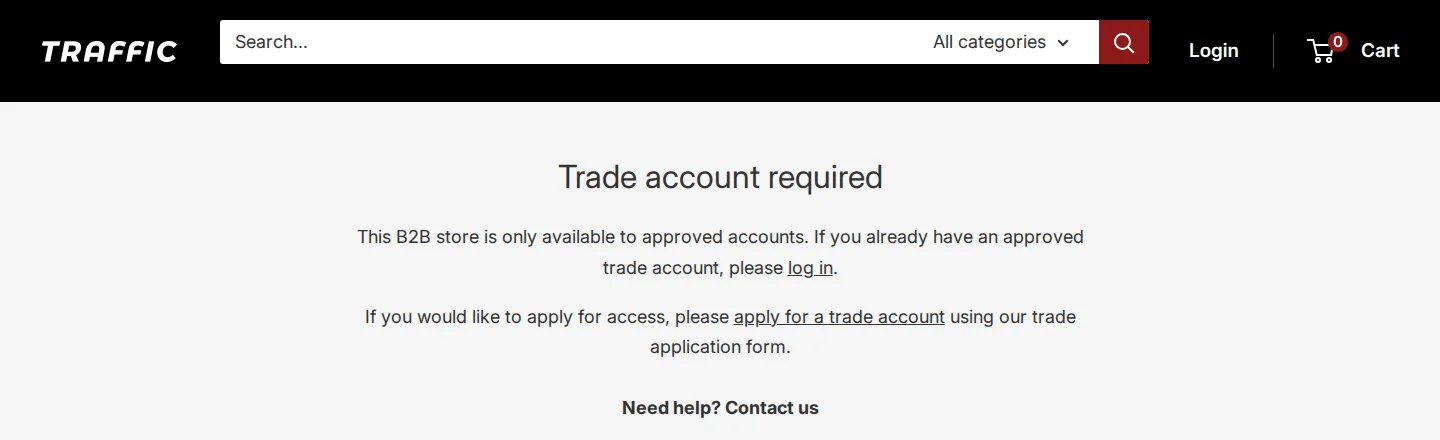
This is a pure B2B store. There is no consumer checkout to protect and no retail price to show, so the store lock is the front door. The wording on the lock page is clear about the model: “This B2B store is only available to approved accounts. If you already have an approved trade account, please log in. If you would like to apply for access, please apply for a trade account using our trade application form.”
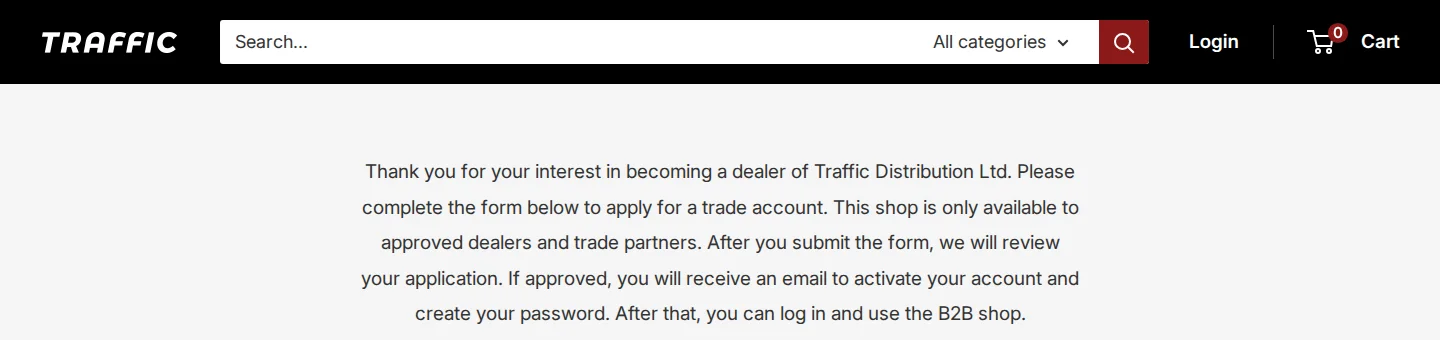
The path for a new dealer is spelled out on the application page: “Thank you for your interest in becoming a dealer of Traffic Distribution Ltd. Please complete the form below to apply for a trade account. This shop is only available to approved dealers and trade partners. After you submit the form, we will review your application. If approved, you will receive an email to activate your account and create your password. After that, you can log in and use the B2B shop.”
In short: apply, wait for review, receive an activation email, set a password, log in. Approval is manual, and it is the store’s team that decides who gets in. The footer then offers the dealer a “Trade Support” menu with Apply for a Trade Account, Dealer Login, Shipping Policy, Refund Policy, a Stock Feed page and Contact Us, and a “Trade Updates” email sign-up.
How the storefront handles wholesale
A lock on the entire store
Whatever URL a guest opens, the main content is replaced by the same message. The header stays visible with a search bar, a Login link and the cart, and the footer stays visible with the brand list and support links. The page is built by BSS B2B Lock: the content sits in a Lock page container, and the page loads the Lock app’s scripts.
This is the lock you use when the whole store is for trade. In BSS B2B Lock the target is “Entire store” and the merchant picks which pages stay open, such as the home page, customer areas (login, register and account), policy pages or chosen pages. Traffic Distribution keeps its login page and its application page open (both load normally for a guest), so a dealer can always find the way in.
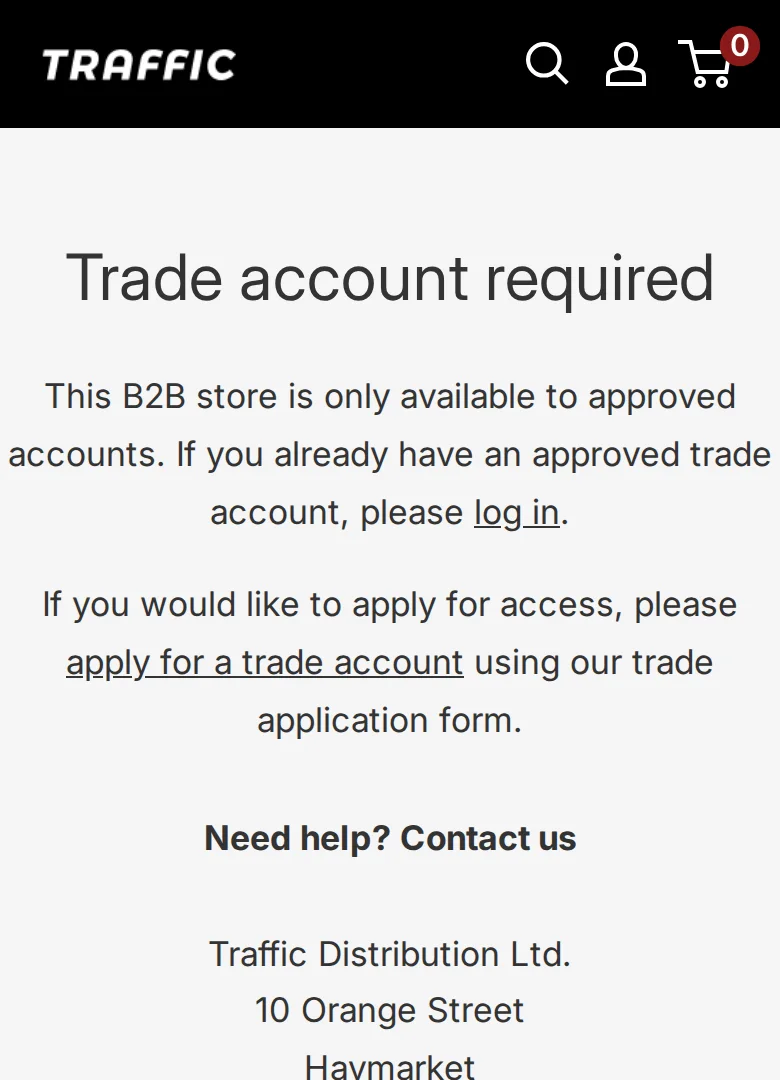
On a phone, the same message and the same two links appear in a single column below a compact header with search, account and cart.
The trade application form
The application page is titled “Trade Account Application” and is also reached from the account registration link. The form is a BSS B2B Solution registration form. In our headless browser check the form did not render, so we do not show a screenshot of it. The form definition that the page carries in its source lists these fields: company, address, address details, postcode, city, a required “UK VAT ID”, an optional upload for a copy of the business registration, and a newsletter checkbox.
The VAT field is the interesting one for a UK trade business. It is a BSS UK VAT field, so a number can be checked as the dealer types it, and because it is marked as required, an invalid number stops the submit. Production data shows one live form, created in March 2026 and edited since, with manual approval, a privacy policy confirmation, a CAPTCHA and a customer tag added on approval. An earlier form from 2023 is switched off.
Which BSS features power it
We read, with read-only queries, which BSS B2B Solution features are switched on for the shop. We looked at settings, not at orders, revenue or customers. Lock and Quote keep their data in separate databases that we did not access, so for those apps we rely on what the storefront shows. As of October 5, 2026:
- BSS B2B Lock: store lock. The Trade account required page. See Lock the entire store for approved wholesale customers.
- Registration form: 1 live form with manual approval, UK VAT ID, a file upload and a customer tag on approval (verify a business tax ID).
- Custom pricing: 10 enabled rules, all percentage-based. Eight target customers by tag and two target specific customers. Seven work by product tag, two by collection and one by product. Together they cover 1,304 of the 1,342 public products, about 97%. See special prices for tagged wholesale customers.
- Price list: 1 enabled rule for specific customers (B2B price list per buyer group).
- Net Terms: 1 enabled rule with payment due within 30 days and an order-amount limit set (Net 30 for wholesale buyers).
- Shipping rates: 7 enabled rules, six by product tag and one across the catalog (custom shipping for wholesale).
The 97% figure is the share of the public catalog targeted by enabled custom pricing rules, taken from configuration. It is not a sales figure, and it ignores exclusions. We also see BSS B2B Quote’s script on the storefront and the Lock review mentions quotes, but we cannot see any quote interface behind the lock, so we do not describe it.
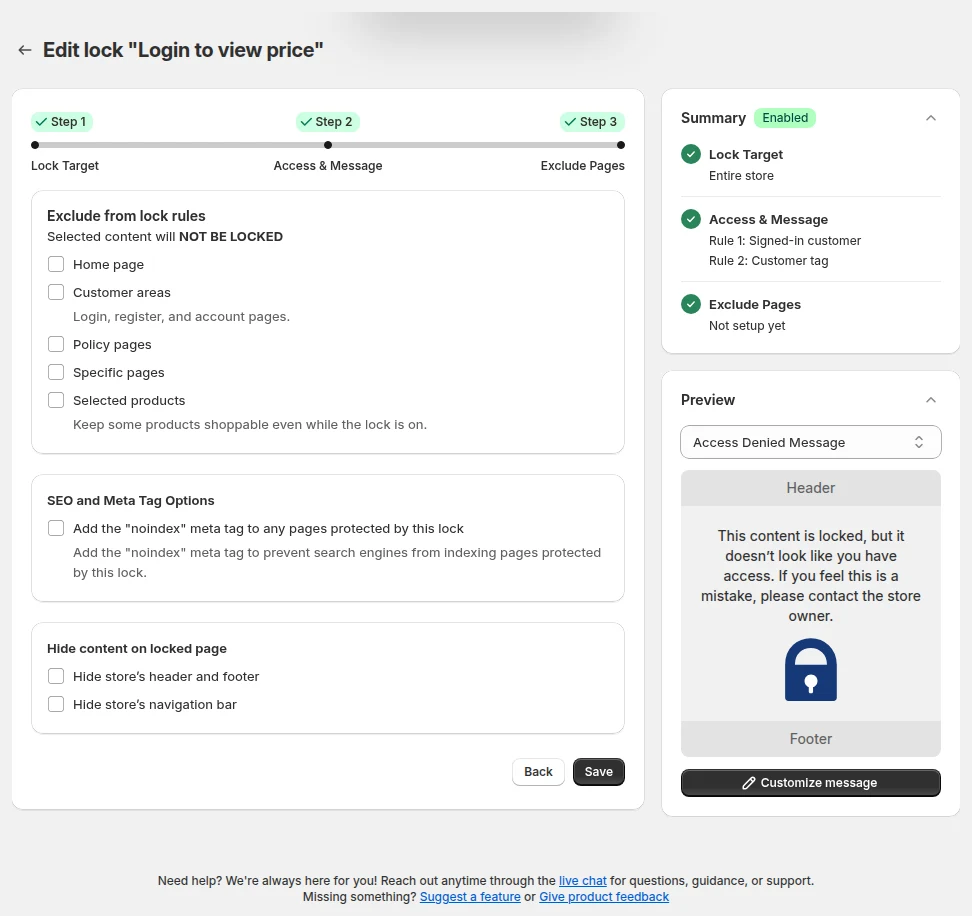
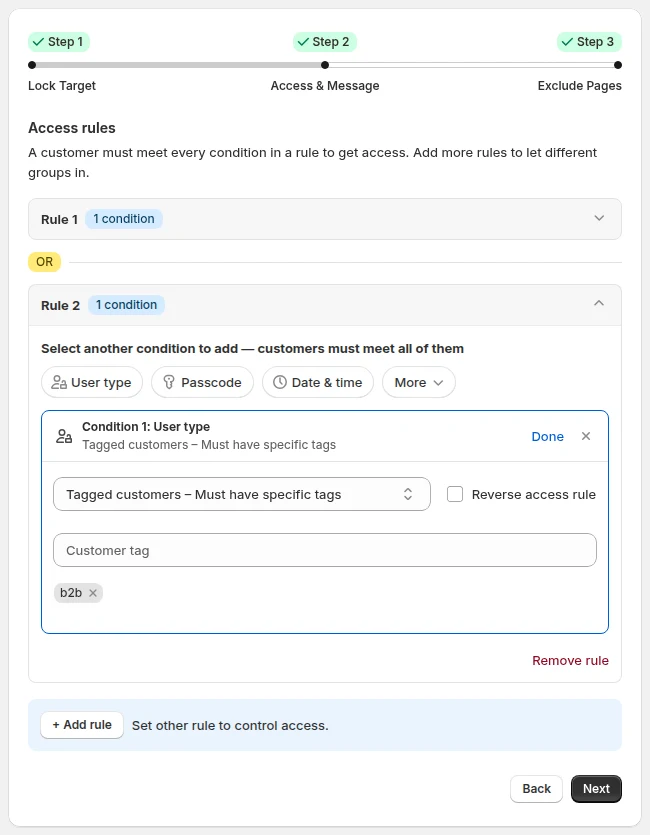
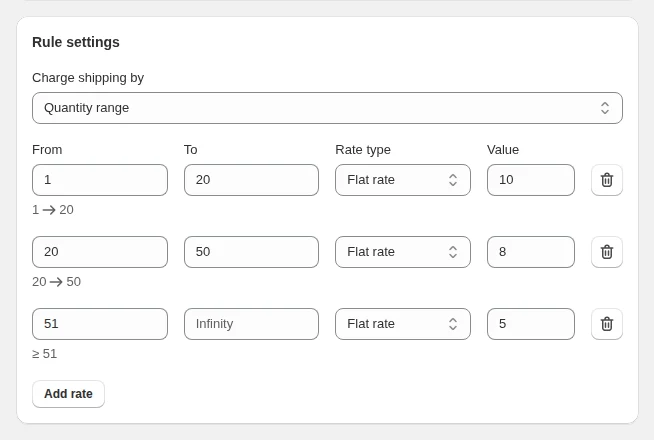
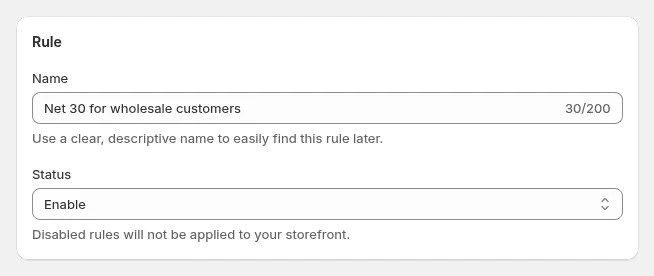
The four images above are examples from BSS demo configurations, not Traffic Distribution’s admin.
What the storefront does not show
A locked store reveals little by design. We cannot see the dealer prices, the Stock Feed page (it sits behind the lock like the rest), the Net Terms or shipping options at checkout, or how orders are handled. No sales, order or customer figures are part of this story. We also do not know how many dealers are approved.
Hide prices, pages, products or the whole storefront from guests, and let approved or tagged customers in. Request-access and login options included.
Install BSS B2B Lock See pricingWhat other merchants can copy
- If everything is for trade, lock everything. One lock on the entire store is simpler than locking each collection.
- Write the lock message as the first step of onboarding. Say who the store is for, and link to both login and application.
- Keep the application and login pages open and keep the header, so a dealer is never stranded.
- Explain what happens after submit. “Review, email, password, log in” cuts the number of “where is my account” emails.
- Ask for a tax ID your country can validate, such as a UK VAT number, and make it required.
- Price by tag. A handful of tag-based rules covered nearly the whole catalog here.
- Put payment terms and shipping in rules, so every approved dealer gets the same treatment.
What Traffic Distribution says about the apps
Traffic Distribution left a public review on the BSS B2B Lock listing on March 24, 2026, five of five stars, after four months of use. It describes its setup across several BSS apps:
“We are using multiple apps from BSS Commerce for our B2B / wholesale setup, and they have been absolutely excellent.”
“Everything works reliably and integrates well with our store.”
The review also praises the support team’s responsiveness. Read it on the BSS B2B Lock reviews page.
Frequently asked questions
Can I lock my whole Shopify store for approved B2B buyers only?
Yes. BSS B2B Lock can lock the entire store and let in only the customers who meet a condition, such as being signed in or carrying a tag. Locked pages show a message you write, with links to log in or apply. See Lock the entire store for approved wholesale customers and the BSS guide.
Will a locked store still be indexed by Google?
A lock changes what the page returns to guests, which affects what search engines see. BSS B2B Lock also has an optional noindex setting for locked pages. If you want a store to stay findable, keep some pages open, such as a landing page, and exclude them from the lock. See the guide to lock targets.
How do I check a UK VAT number on the application form?
Add a UK VAT field to the BSS B2B Solution registration form. It checks the number as the buyer types, against HMRC or a VAT lookup service, and when the field is required an invalid number blocks the submit. Traffic Distribution’s form asks for a UK VAT ID. See Verify a business tax ID before approving.
Can I set different prices for dealers by brand or product tag?
Yes. A custom pricing rule can target a customer group and then products by tag, collection or product. Traffic Distribution has ten enabled rules, mostly by product tag. See Give tagged wholesale customers special prices.
Can trade accounts have their own shipping charges and payment terms?
Yes. Shipping rate rules in BSS B2B Solution set shipping by quantity range, amount or weight, and Net Terms rules set when payment is due. See Charge handling fees and custom shipping rates and Offer Net 30 and other payment terms.
This store spotlight is based on Traffic Distribution’s public website and its public review on the Shopify App Store, as of October 5, 2026. Screenshots show the public storefront, with business contact details masked. Feature details come from BSS B2B Solution’s own configuration data, read without customer, order or revenue information. Traffic Distribution has not reviewed this page.