


Metro Wholesale SD is a San Diego distributor of drinks, groceries and household goods for neighborhood markets and gas stations. Retailers register on a Register for Wholesale form, see case-pack prices in the catalog, and get account-specific prices, order minimums and shipping rates from BSS B2B Solution.
About Metro Wholesale SD
Metro Wholesale SD describes itself as San Diego’s dedicated wholesale partner for neighborhood markets, gas stations and local retailers. The about section on the home page says it specializes in high-turnover beverages, authentic Mexican snacks and household essentials, with a mission to “streamline your supply chain and keep your shelves stocked.” The promise is local and logistical: a banner reads Local Delivery – Next Day Shipping, the home page says goods are delivered on the company’s own trucks free of charge, and a free pickup option is offered at its San Diego location.
The catalog reads like a corner-store shopping list. Top-level categories are Bath, Beauty, Beverages, Candles, Candy, Cleaning, Grocery, Health, Kitchen, Laundry, Miscellaneous and Papers, and the store has well over a hundred brand and product collections: soda, canned goods, laundry, personal care, snacks, baking, pet supplies and more. Promotional sections push Monthly Closeouts, Bulk Beverages and Water with pallet-ready pricing, Household and Cleaning, Weekly Specials with multi-case discounts, and a Mexican Classics shelf.
That is a store built for repeat, case-sized purchases by businesses that already know what they need. Its Shopify setup has to do three things well: confirm that a buyer is a legitimate reseller, show the right case price, and keep orders at a size that makes a delivery run worthwhile.
The B2B model: an open catalog and gated accounts
Metro Wholesale SD is wholesale-only in purpose but not hidden in practice. A guest can browse the catalog and see prices: a 24-bottle case of spring water showed a single price on the product page, and a 12-count liquid laundry soap showed its case price. The header has a Login / Signup link, and the footer lists a Wholesale Account page. What changes after registration is the commercial layer: custom prices for specific accounts, order minimums and shipping rates.
The product titles do part of the wholesale work before any app is involved. Pack sizes are written in the name: “Zote Liquid Azul 12/1L” is twelve one-liter bottles, “Crystal Geyser Water 24/16.9oz +1.20CRV” is a case of twenty-four bottles with the California redemption value shown as part of the title. A featured water product offers variants labelled 1PK and 84PK, which look like a single case and a pallet. A buyer sees the unit of sale and the price together, which cuts down on the phone calls a distributor usually handles.
To open an account a retailer fills in the Register for Wholesale page. The owner’s public review credits the app with solving “custom discounted pricing”, which in this model means different retailers can pay different prices for the same case, set per account.
How the storefront handles wholesale
Register for Wholesale
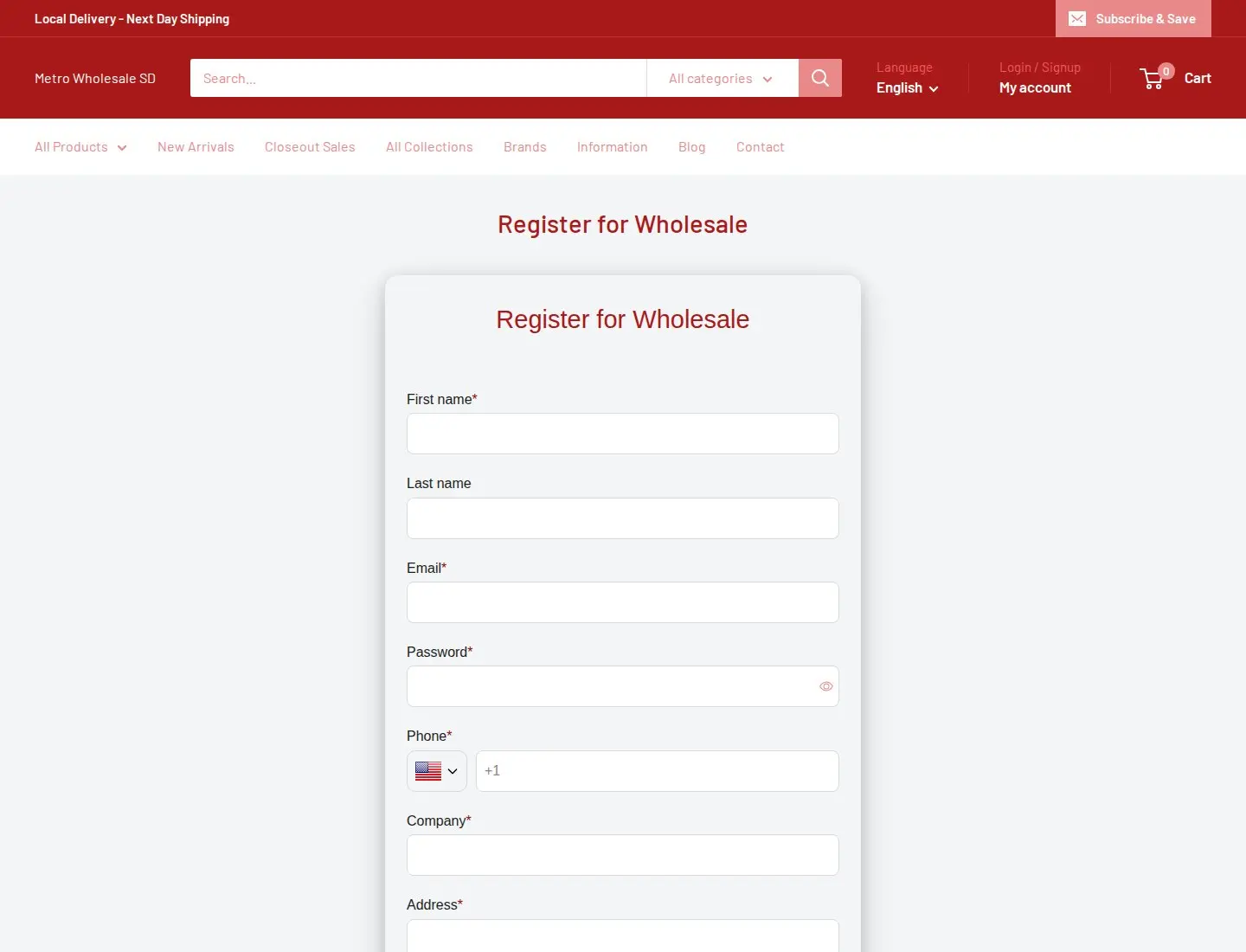
The page title and the form title both read Register for Wholesale, so there is no doubt what the page is for. The form asks for first name, last name, email, password, phone, company, address, apartment or suite, city, zip, country and a reseller’s permit, twelve fields in all. Most are required, with last name and apartment optional. The reseller’s permit is the interesting one. A distributor selling to stores needs proof that the buyer resells goods, and asking for the permit on the registration form moves that check to the front of the process instead of leaving it to email afterward. We cannot tell from outside whether the field takes a number or an uploaded document; the BSS form supports both.
Below the form the page repeats four selling points: next-day San Diego delivery for orders by 4 PM, wholesale margins with case and pallet pricing, free pickup, and reliable inventory of high-demand brands. A registration page that sells as well as collects is a good habit; the retailer is deciding whether to commit, and the page answers the first questions.
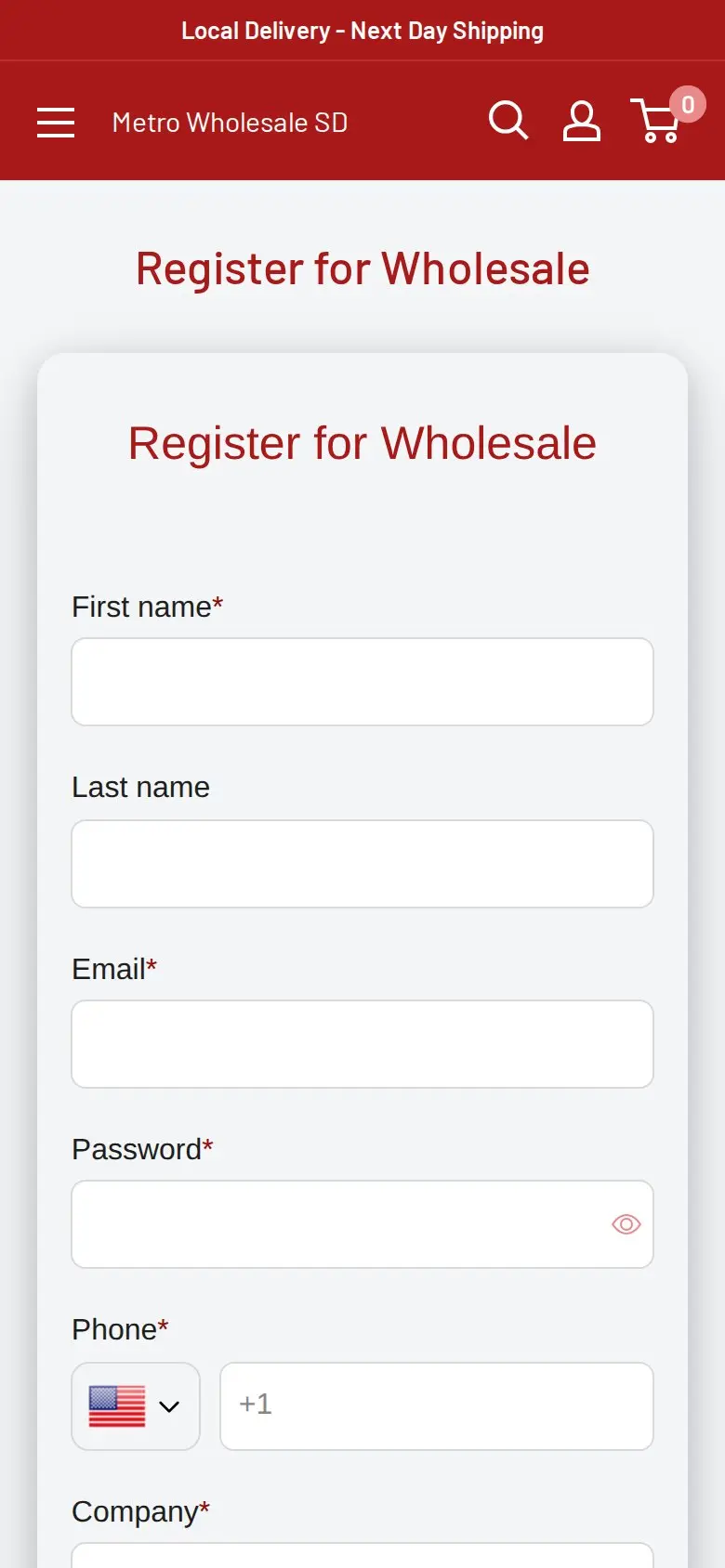
On a phone the form collapses into one column, with the phone field showing a +1 country code for US numbers. Corner-store owners often place orders from their phones between customers, so the mobile layout is not an afterthought here.
A catalog designed for cases
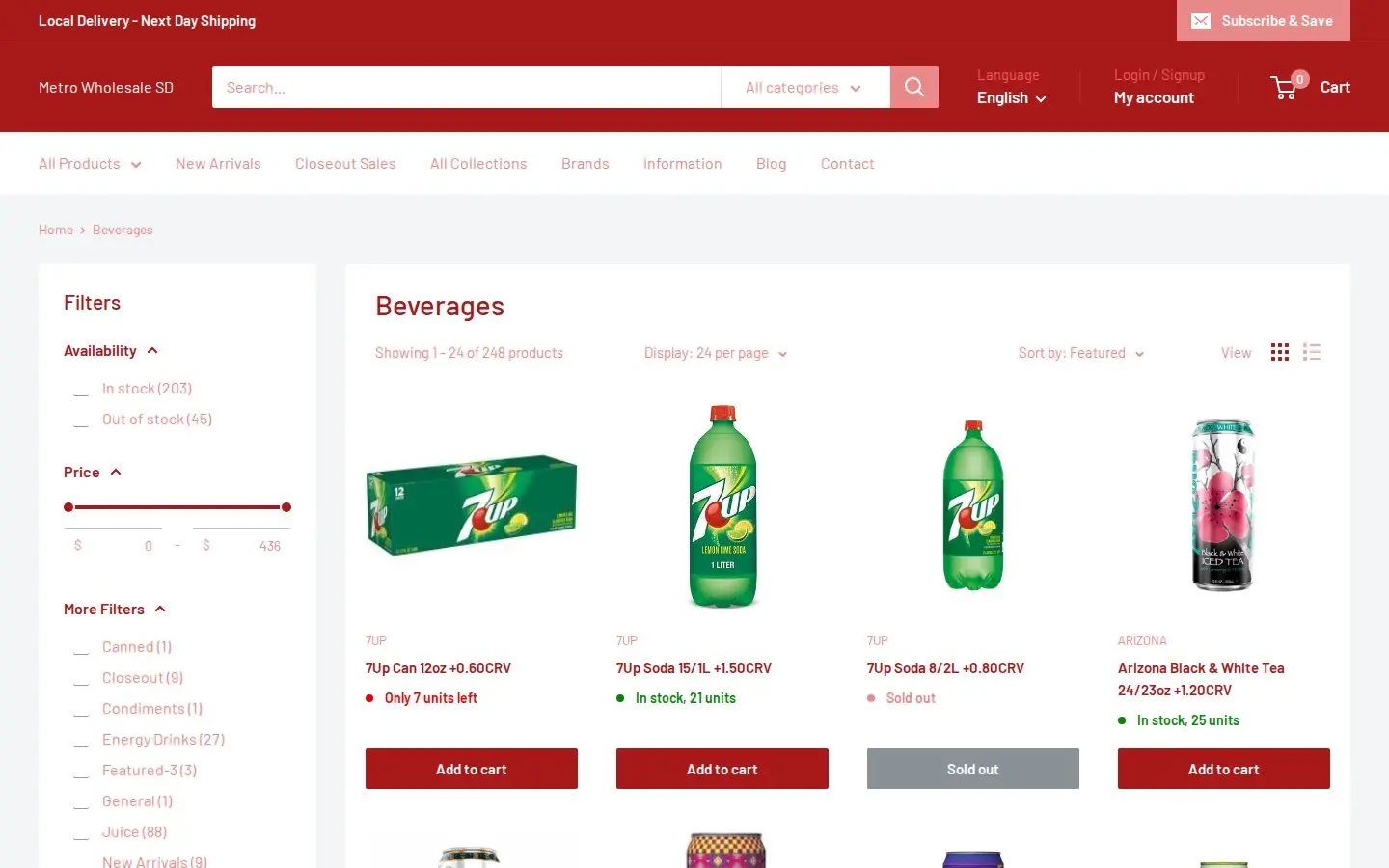
The beverages collection shows filters for availability and price, a sort control, grid and list views, and pack-size titles on every product. Each card has an Add to cart button and a stock line. Brand collections such as Zote, Fabuloso and Crystal Geyser let a buyer who thinks in brands jump straight to them. Because prices are public, the catalog doubles as a price book that a store owner can check before calling.
Which BSS B2B Solution features power it
We compared the storefront with the app’s production configuration. That check was read-only and covered only which modules have active rules, with no customer or order data, and rule contents such as prices are not published here.
| Feature | What we found | Learn more |
|---|---|---|
| Registration form | A live Register for Wholesale page with twelve fields, built with the BSS form | Build a registration form |
| Custom pricing | An active rule for specific customers, applied to specific variants | Personalized wholesale pricing |
| Price list | An active price list for all customers, set at product level | Price list per buyer group |
| Order limits | A minimum order amount rule for all customers | Minimum order quantity and value |
| Shipping rate | Active rules based on quantity, on order amount and on weight | Custom shipping for wholesale |
| Auto-tag | An active rule that runs when a customer registers | Automatic tags |
From permit to price
The sequence is simple. A retailer registers, the auto-tag rule marks the new customer when the registration event fires, and the rules read the tag or the account. A rule aimed at specific customers is the app’s way of saying this account pays this price: it is the right tool for a distributor who negotiates with some buyers and publishes list prices for the rest. The price list covers the shared layer for everyone, and the customer-specific rule overrides it where a deal exists. Rule priority decides which one wins when two apply, and the use case on rule priority explains the order.
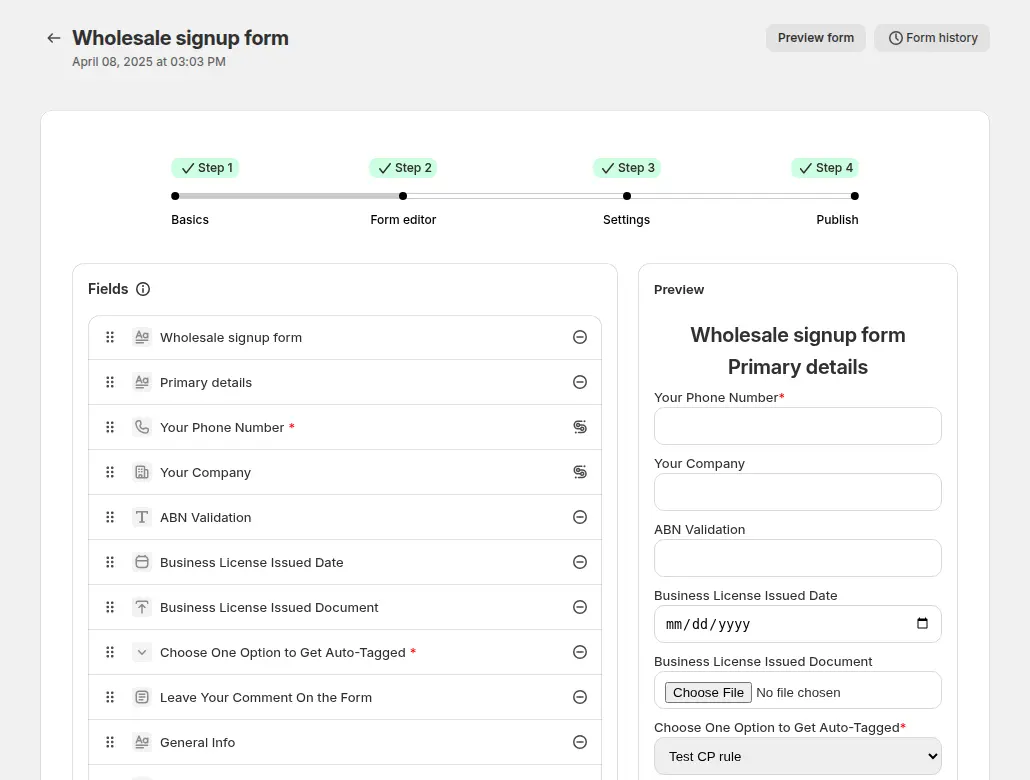
The registration form is built in the app’s editor. The guide’s example includes date and document fields, similar to what a permit check needs, and a dropdown that adds a customer tag based on the answer. See the registration form with approval use case for the full flow.
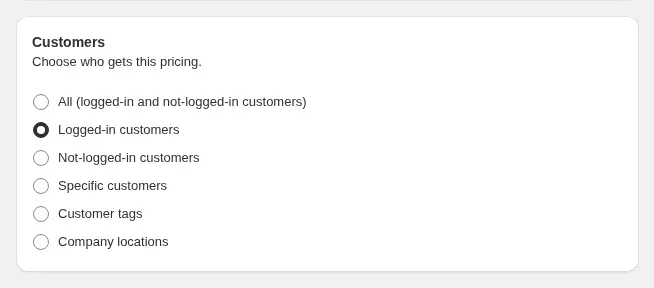
A price list chooses its audience the same way custom pricing does: all customers, logged-in customers, specific customers or tags. Metro Wholesale SD’s active list is set for all customers at product level, which fits a distributor whose published case prices are the baseline for everyone.
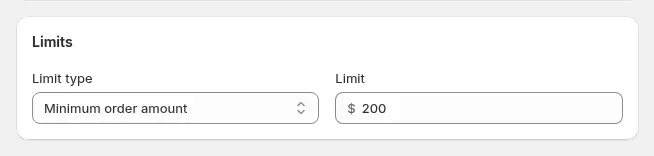
The minimum order amount is the control that protects delivery economics. A limit of this type can show the buyer a warning and hold back the checkout button until the cart reaches the set order value. For a distributor delivering on its own trucks, it keeps a one-case order from costing more to deliver than it earns. The order limits guide covers quantity and amount limits, minimum and maximum.
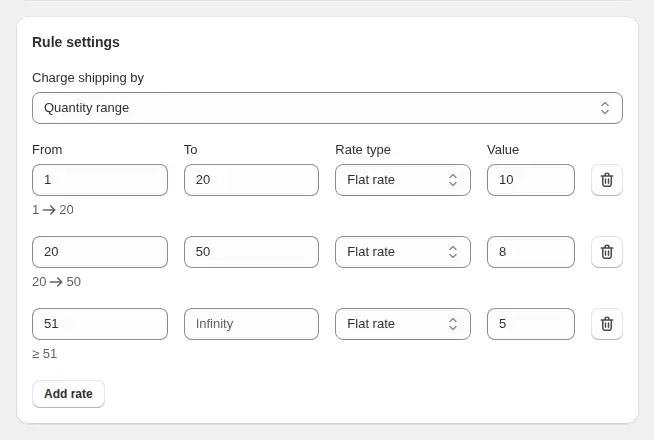
Shipping rules can charge by quantity range, order amount or weight, with flat or percentage rates. Metro Wholesale SD has all three types active. That fits a store that sells both light bags of candy and heavy cases of water and detergent: weight and quantity rules can price the heavy orders realistically while an amount rule rewards bigger baskets.
What other merchants can copy
- Write the pack size into the product title. A name like 12/1L tells a retailer the unit of sale at a glance, and it keeps case and unit prices from being confused.
- Ask for the proof you need at registration. If you sell to resellers, collect the permit or license on the form instead of by email later.
- Layer public and private prices. A shared price list gives every buyer a baseline, and customer-specific rules handle negotiated deals on top.
- Set an order minimum that matches your delivery cost. Pick a number from your own logistics, then test the warning message a buyer sees.
- Use shipping rules for weight and quantity separately. Heavy and light goods rarely share one fair rate.
- Repeat the benefits on the registration page. Delivery cut-off, pickup and stock reliability are what a retailer weighs before signing up.
- Check the form on a phone. Many small retailers order from mobile devices; a long form has to work in one column.
Metro Wholesale SD’s review
Metro Wholesale SD left a public review of BSS B2B Solution on the Shopify App Store: 5 out of 5 stars, last edited March 9, 2026, after about eleven months of use. The part about the product, quoted verbatim:
"[…] Highly recommend using this for your B2B wholesale solution! This completely solved our custom discounted pricing with ease, after trying 10+ other pricing/b2b apps I can see with confidence this is by far the best one!"
Metro Wholesale SD, public review on the BSS B2B Solution listing, 5 stars, edited March 9, 2026
The review also praises support for solving the store’s issues. The practical point for other distributors is the one in the middle: the hard part of wholesale on Shopify is rarely the form, it is giving different accounts different prices without a spreadsheet. The store’s setup reflects that, with customer-specific pricing at its center.
FAQ
How do I ask for a reseller permit or business license on a Shopify wholesale form?
Add a field for it to the registration form. BSS B2B Solution forms support text, dropdown, date and file upload fields, with a limit of 10 MB per uploaded file. Metro Wholesale SD’s form includes a reseller’s permit field. See the document upload use case.
Can I set a minimum order for wholesale buyers only?
Yes. An order limit rule can target all customers, logged-in customers, specific customers or tags, and the limit can be a minimum or maximum quantity or amount. Metro Wholesale SD uses a minimum order amount.
Can shipping fees change with the size of a wholesale order?
Yes. A shipping rate rule can charge by quantity range, order amount or weight. Metro Wholesale SD has all three types active.
Should wholesale prices be visible to guests?
It depends on your market. Metro Wholesale SD lists case prices publicly and uses customer-specific rules for negotiated prices. If you need prices hidden until login, a lock app such as BSS B2B Lock is built for that.
Where should a distributor start?
The pieces are separate rules, so you can start with the registration form and one price list and add order limits and shipping rules later. Plan a test pass as a guest and as a registered buyer before you announce the program.
This store spotlight is based on Metro Wholesale SD’s public website and its public review on the Shopify App Store, as of October 5, 2026. Screenshots show the public storefront. Admin screenshots are labelled examples from the BSS user guide, and the descriptions of active features come from a read-only check of feature configuration.