


Energy Connections, a Victoria-based distributor of off-grid power equipment, runs its Shopify store as a trade-only shop. Installers request access with a business form that asks for ABN and trade type, see Login For Pricing until approved, and then get tag-based prices from BSS B2B Solution.
About Energy Connections
Energy Connections is an off-grid equipment supplier in Pakenham, Victoria. The home page calls it an authorised Victron Energy distributor with more than ten years of experience, and its slogan is design, supply, support. The meta description names the brands it carries: Victron Energy, Powerplus Energy and Zenaji batteries, with inverter chargers and solar charge controllers available online.
The catalog is deep and technical. Collections cover batteries, battery chargers, battery monitors and management systems, inverters and inverter chargers, MPPT solar charge controllers, DC to DC chargers and converters, circuit protection, cables, connectors and lugs, DC distribution, isolation transformers and pre-wired boards. There is an inverter cable and fuse calculator in the footer, and a series of how-to pages on choosing batteries, solar charge controllers and chargers. The audience is people who specify and install systems: electricians, auto electricians, security and CCTV installers, and retailers.
The store serves four markets that the home page lists: tiny homes, battery storage, pre-wired boards and off-grid systems. A showroom in Pakenham is open on weekdays and by appointment on Saturdays. This story is about the online store.
The B2B model: trade only, with proof of trade
Energy Connections does not sell to the public through this store. The home page slide reads TRADE B2B STORE, followed by the words Trade professionals only and an invitation to register for trade access to unlock the full product range, trade pricing and expert support. The button says Log In or Request Access. The main menu repeats it with a Request Trade Access item, and the footer has a Trade and Wholesale link.
A trade-only store answers a familiar distributor problem. Trade prices are meant for installers, but search sends homeowners and price shoppers to the same pages. The store keeps those visitors out of the price list and gives installers a clear way in.
The owner’s public review is short: very happy with the follow-up support from the app, with excellent support so far. It was written eight days after installation, so the store was in its first week of use. What we can examine is the design the team chose, which is a form built for qualification and prices that come after approval.
How the storefront handles wholesale
Login For Pricing instead of a price
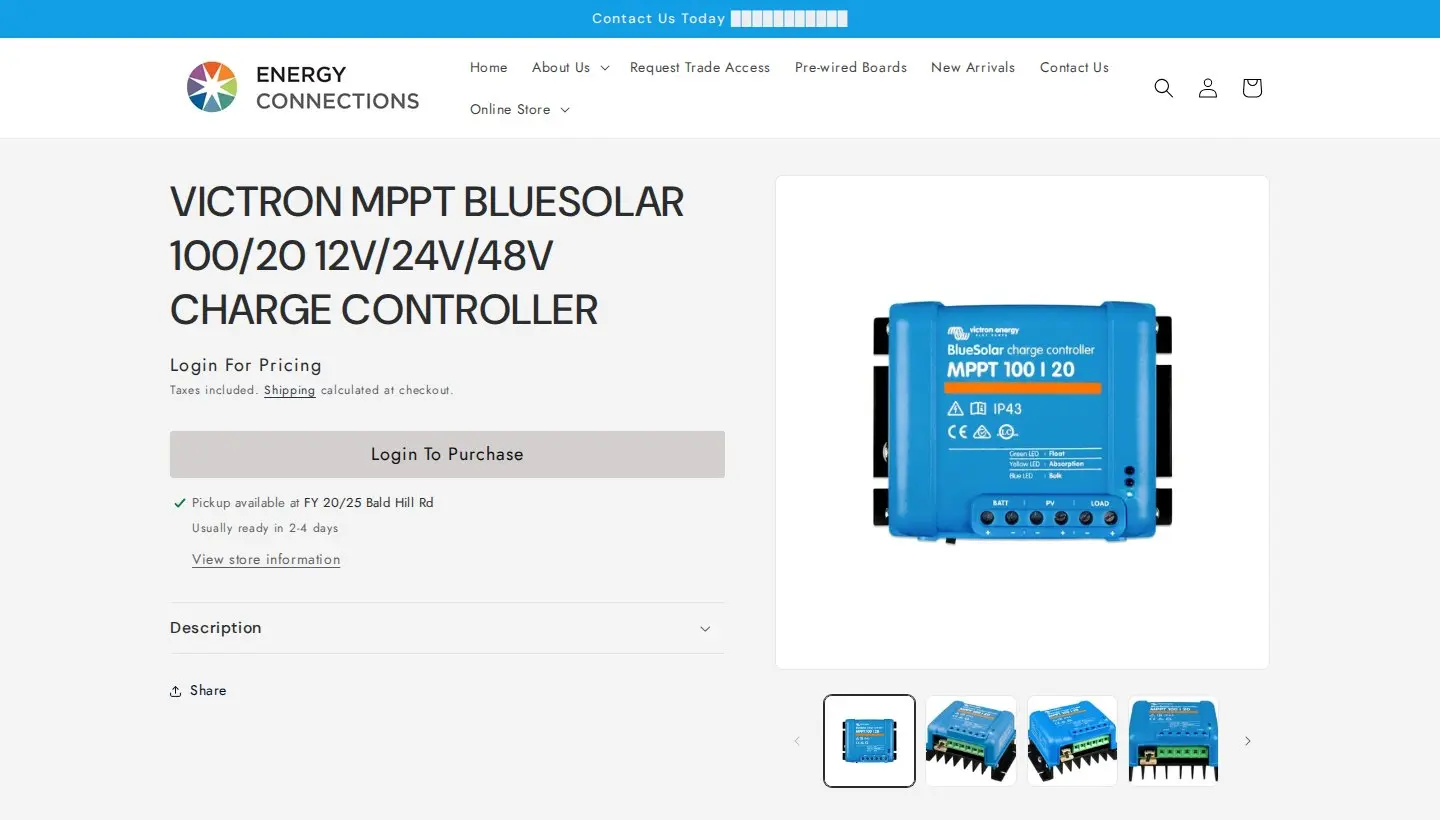
A guest who opens a product page sees the product name, the words Login For Pricing where the price would be, a note that taxes are included and shipping is calculated at checkout, and a grey Login To Purchase button. Pickup information for the Pakenham showroom is still shown. The page tells the visitor three things at once: this is a trade store, the price is on the other side of the login, and the product is real and in the range.
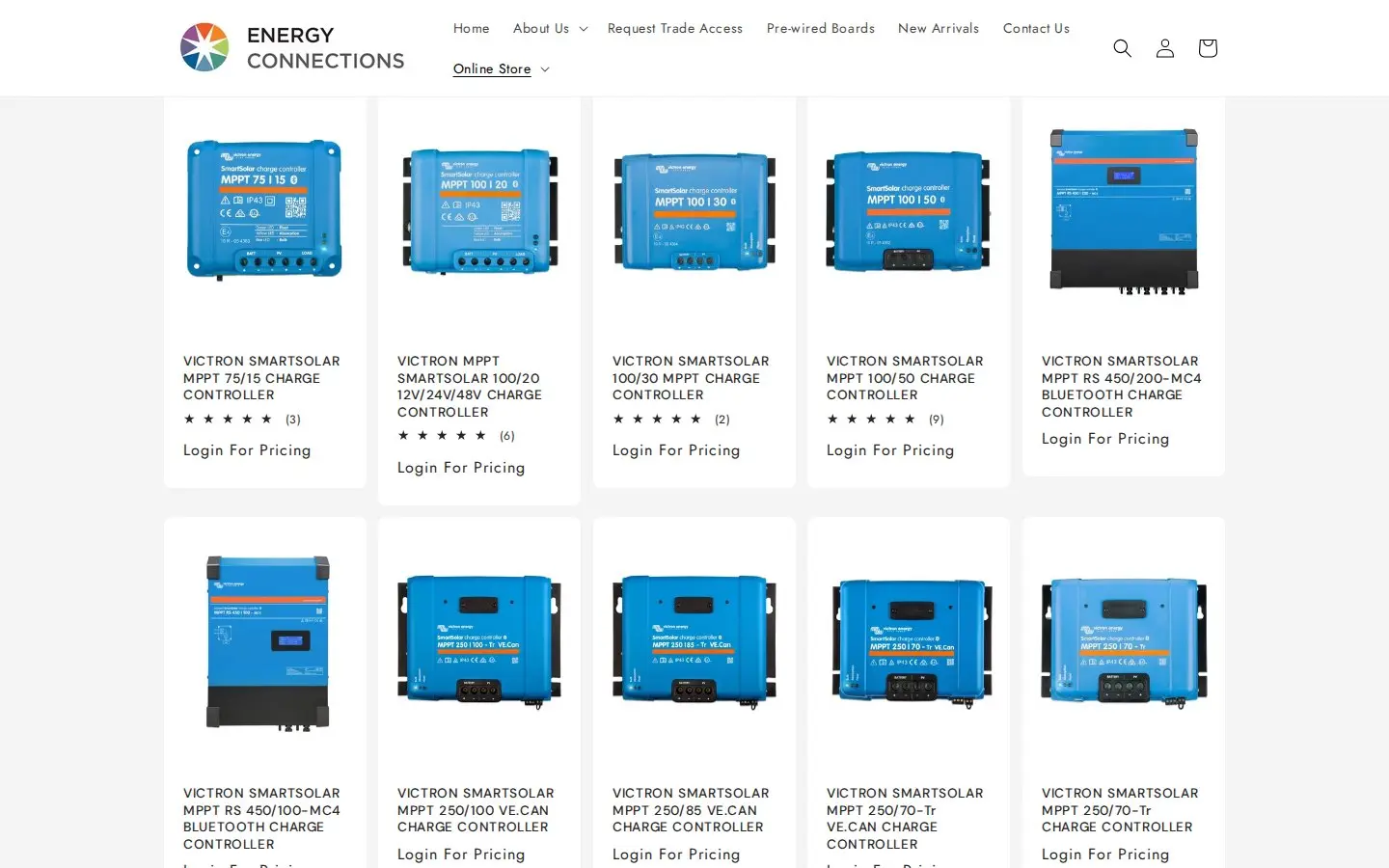
On collection pages every card shows the same phrase. A visitor can browse the range, see ratings and read specifications, but cannot see a price or add anything to the cart. That is a clear, consistent message. Hiding prices on the page controls what the storefront shows. It is not a security boundary, since Shopify serves product data through other routes, so a store that needs real confidentiality should not rely on it alone. The use case on hiding wholesale prices from guests covers the settings and limits. We have not verified which component renders the Login For Pricing label on this store. BSS B2B Lock is the BSS app built for hiding prices and the add to cart button, and the hide prices guide explains how.
Notice what stays public. The inverter cable and fuse calculator, the guides on choosing batteries and charge controllers, product photos and specifications are all open to guests. Only the price and the purchase sit behind the login. For a technical distributor that split makes sense: the content that helps an installer specify a system also brings installers to the site, and the commercial terms are reserved for people who have proved they are trade. The guides do the selling, the form does the vetting.
A form that qualifies installers
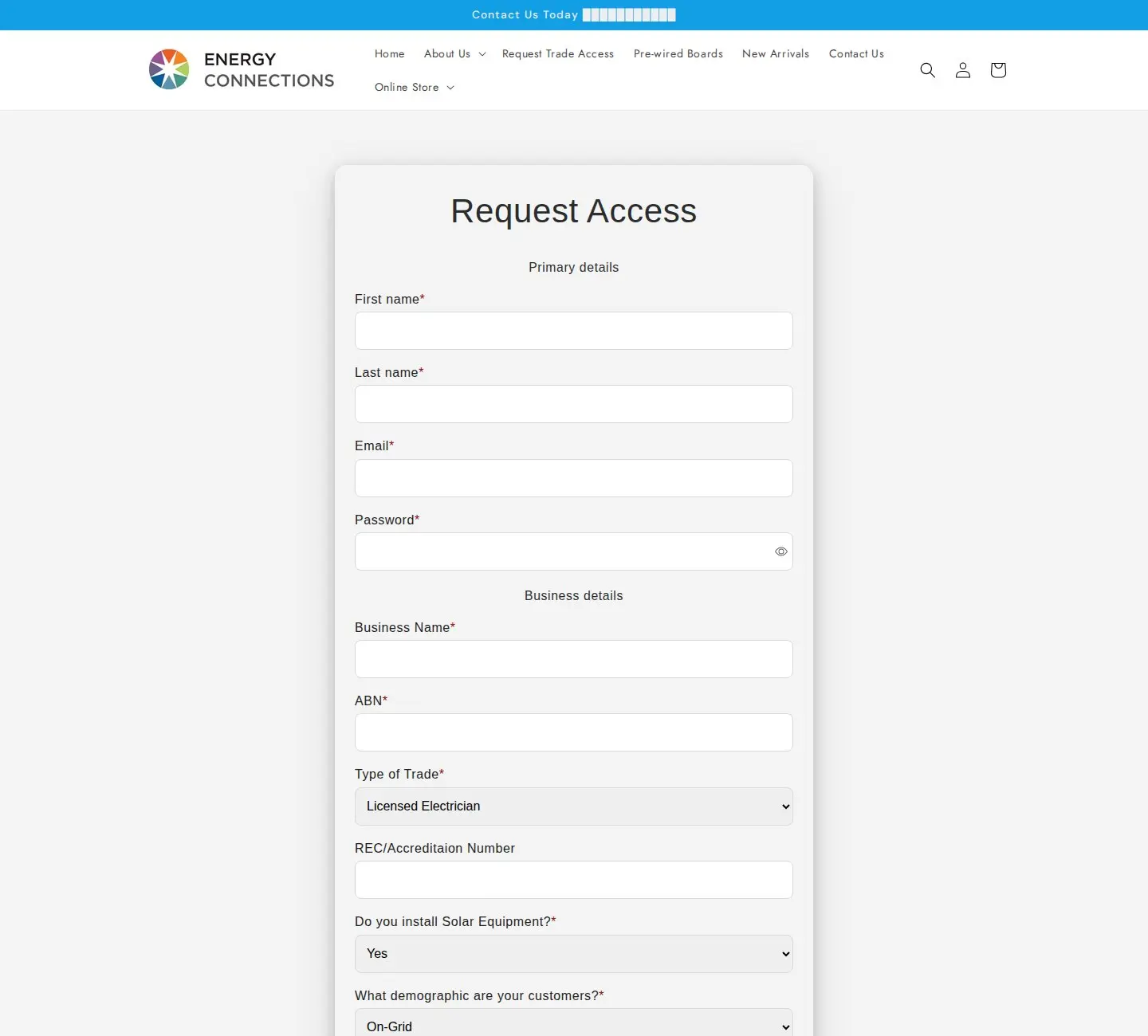
The Request Access form has two sections. Primary details ask for first name, last name, email and password. Business details ask for business name and ABN, then the type of trade (licensed electrician, auto electrician, security or CCTV, retailer or other), an optional REC or accreditation number, whether the business installs solar equipment, and what demographic its customers are: on-grid, off-grid or both. Phone, address, postcode and a free-text box titled Tell us about your business complete it. Fourteen fields in all.
Each question can do a job. ABN identifies the business. Type of trade and accreditation number let a staff member check whether the applicant is licensed for the work. The solar and customer questions help the sales team understand what to recommend. The result is an application a person can approve in a minute, without a phone call to find out what the buyer does.
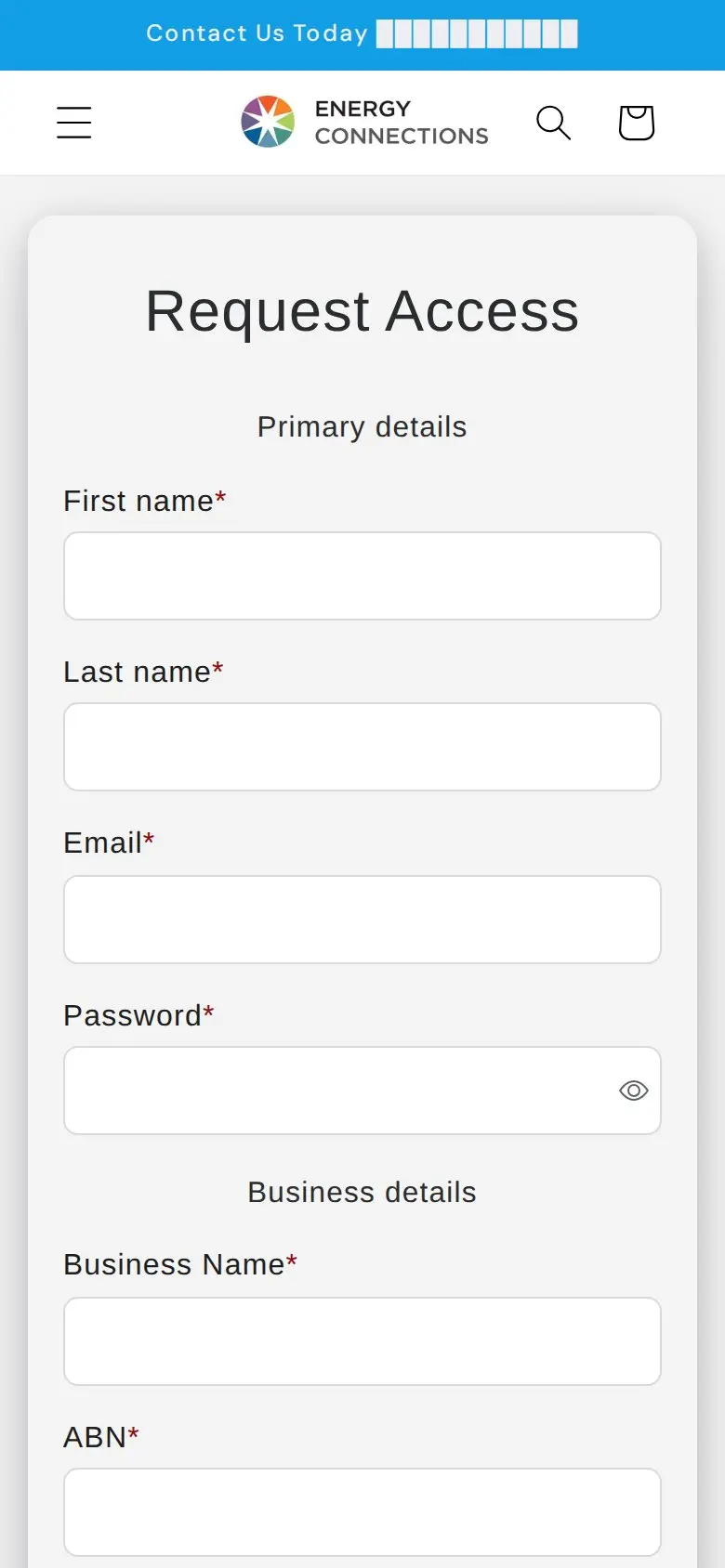
On a phone the form stays a single column and the phone field keeps its country selector, which suits installers who apply from the van.
Which BSS B2B Solution features power it
We compared the storefront with the app’s production configuration: a read-only check of which modules have active rules, with no customer or order data. Prices and discount values are not published here.
| Feature | What we found | Learn more |
|---|---|---|
| Registration form | A live Request Access form with ABN, trade type and accreditation questions, built with the BSS form | Registration form with approval |
| Custom pricing | Active rules for specific customers and for customer tags, some of them limited to collections | Discounts by collection or tag |
| Tax display | An active rule aimed at customer tags | Prices excluding VAT for business buyers |
From approval to price
The flow is straightforward. The form creates a customer record and can add a tag when the account is approved. Custom pricing rules aimed at that tag then change what the customer pays. Because two of the tag rules are limited to collections, the store can give different treatment to different product families, for example a different margin on batteries than on cables. The rule for specific customers handles an account with its own deal. When several rules could apply, a priority number decides, with the lowest number winning.
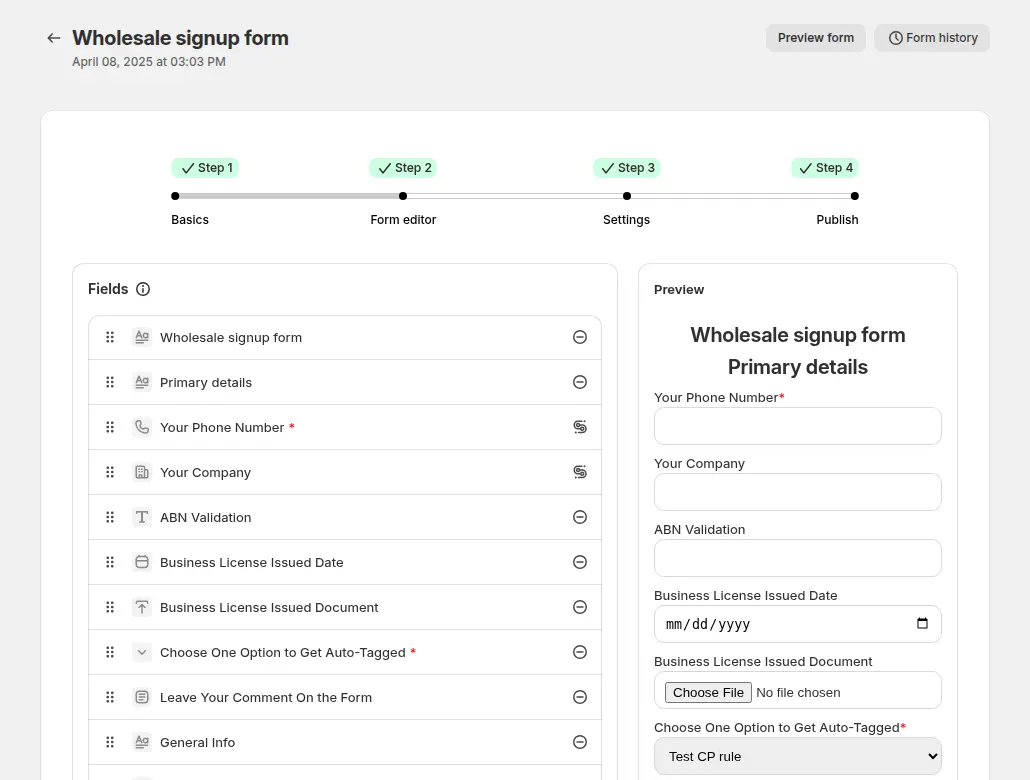
The guide’s example form includes an ABN field and a dropdown that adds a tag depending on the answer. For Energy Connections’ form, the type-of-trade dropdown is the natural place to sort buyers: a licensed electrician and a retailer may deserve different prices, and the tag can follow the choice. See running a B2B-only store for the full flow from application to order, and verifying a business tax ID for the ABN field.

The approval tag is a single text setting. A manual review lets the team check the licence number before the tag is applied, and the approve and notify use case shows the emails that go to the applicant.
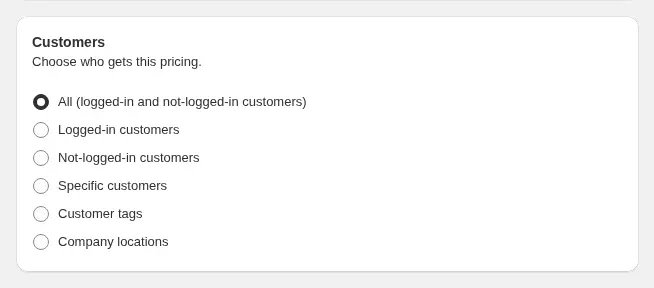
Custom pricing rules choose who gets a price: all customers, logged-in customers, not-logged-in customers, specific customers or customer tags. Energy Connections’ rules use the last two options. The custom pricing guide describes the rule cards.
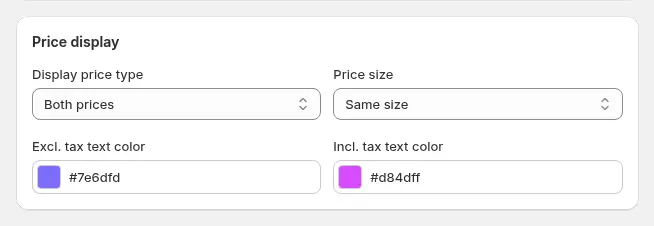
A tax display rule is useful in Australia, where the store shows prices with GST included to the public. A trade buyer who claims GST credits thinks in prices without it. A rule for tagged customers can show both prices, as in the example above, or only the one the buyer uses. We cannot see the logged-in view, but the configured rule is aimed at tagged customers. Tax display is available on the Advanced and Platinum plans. The tax display guide covers the options.
What other merchants can copy
- Say it on the home page. A slide that states Trade professionals only filters the audience before they hit a login wall.
- Qualify in the form. Ask for a business number, trade type and accreditation number so approval takes a minute.
- Use the answers. A type-of-trade dropdown can drive the customer tag, which drives the price.
- Keep the product visible. Showing product names, photos and specs to everyone helps search and helps buyers confirm the range before they apply.
- Give each customer segment its own rule. Collection-limited tag rules let you price batteries and cables differently.
- Show the tax view the buyer uses. A tax display rule for trade accounts avoids ex-GST calculations on the buyer’s side.
- Do not treat hiding prices as security. It controls the page, not the data, so keep truly confidential terms out of the store.
Energy Connections’ review
Energy Connections left a public review of BSS B2B Solution on the Shopify App Store: 5 out of 5 stars, on June 30, 2026, after eight days of use. Quoted in full:
"Very happy with the follow up support from the app. Seems like a great app with excellent support so far."
Energy Connections, public review on the BSS B2B Solution listing, 5 stars, June 30, 2026
The review is a first impression, and it emphasizes support. That fits the situation: the store is new to the app, and its setup, a custom form and several rules, involves enough moving parts that a responsive team matters in the first week.
FAQ
Can a Shopify store be trade-only?
Yes. A store can state that it serves trade professionals only, show Login For Pricing to guests, and give approved accounts prices after login. See running a B2B-only store with all three BSS apps.
How do I check that an applicant is a licensed tradesperson?
Ask for the licence or accreditation number on the registration form and review applications before approving. A tax ID field such as ABN can be validated live.
Can I show different prices to different kinds of trade?
Yes. Add a dropdown for type of trade, tag each account from the answer, and aim a custom pricing rule at each tag. Rules can be limited to collections.
Is hiding prices from guests secure?
No. It controls what the storefront shows, and product data can still be reachable through other routes. Use it to shape what visitors see, not to protect confidential information.
Will search engines still see my products?
Product names, images and descriptions stay on the page, so the products remain visible to search. The price is the part that changes for guests. Some apps list a setting for hiding prices from Google; the BSS B2B Lock guide explains its limits.
This store spotlight is based on Energy Connections’ public website and its public review on the Shopify App Store, as of October 5, 2026. Screenshots show the public storefront with the phone number masked. Admin screenshots are labelled examples from the BSS user guide, and the descriptions of active features come from a read-only check of feature configuration.