
Shopify B2B VAT Exemption in the EU: VAT ID Validation and Net Prices

To sell VAT-exempt to EU businesses on Shopify, collect the buyer’s VAT ID, check it, and remove tax from that order. BSS B2B Solution does this in the cart: the buyer types a VAT ID, the app checks it as they type, and a valid ID creates the order without tax. Shopify’s own exemptions are set by hand.
Add a Tax Exempt box to the cart page, check EU VAT, UK VAT, ABN, GST and EIN numbers, and create tax-free orders for valid IDs. Free on development stores, 14-day trial on paid plans.
Install BSS B2B Solution See pricingLast updated October 4, 2026. Shopify and EU facts come from the pages linked in the text, read on that date. BSS B2B Solutions makes BSS B2B Solution, the app in the screenshots. This is general information, not tax advice: confirm the rules for your goods and countries with your accountant. It belongs to our complete guide to Shopify B2B and the tax and compliance hub.
Key takeaways
- The EU rule in short: goods sent to a business in another EU country with a valid EU VAT number are generally sold without VAT. Without a valid number you should usually charge VAT at your own country’s rate (Your Europe).
- Shopify sets exemptions by hand on a customer or a company location. If your prices include tax, an exempt customer still pays the full listed price (Shopify Help Center).
- BSS Tax Exempt works per order, in the cart, not in Shopify checkout. A buyer who opens the checkout URL directly skips it and is taxed. It needs the Advanced or Platinum plan.
- A valid VAT ID shows the number exists, not that the sale qualifies. Keep your own records and let your accountant decide.
- BSS has no reverse-charge feature. It removes tax from the order and does not write reverse-charge text on invoices. Showing net prices is a separate module, Tax Display, which changes only what is shown.
What does VAT exemption mean for EU B2B sales?
When you sell goods to a business in another EU country, the sale is usually not charged VAT by you. Your Europe, the EU’s official guide for businesses, says: “If you sell goods to a business and these goods are sent to another EU country, you do not charge VAT” when the customer has a valid EU VAT number, and “if your customer doesn’t have a valid EU VAT number, you should usually charge VAT on the sale at the rate applicable in your country” (Your Europe: cross-border VAT). That is why shops that sell to EU businesses collect a VAT number and treat orders with a valid one as a tax exemption.
| Situation | What the EU guide says | What your Shopify store needs to do |
|---|---|---|
| Buyer has a valid EU VAT number | You do not charge VAT | Collect the number, check it, and make sure tax is removed from that order. Keep a record of the number |
| Buyer has no valid EU VAT number | You should usually charge VAT at your country’s rate | Leave tax on the order. Do not exempt on trust |
What about reverse charge?
In a reverse charge, the customer rather than the supplier accounts for the VAT, and the invoice usually carries the buyer’s VAT number and a note. Whether it applies, and what the invoice must say, depends on the country and the type of supply, so read the VAT reverse charge entry and ask your adviser. BSS B2B Solution has no reverse-charge feature. Its Tax Exempt module removes tax from the order and does not write reverse-charge wording on your invoices, so decide separately how your invoices will carry that text.
What Shopify does on its own
Shopify gives you three tax settings for a customer: “Collect tax,” “Don’t collect tax,” and “Collect tax unless exemptions apply” (Shopify tax overrides and exemptions). You set them on the customer record, one customer at a time. Two details matter for EU stores.
- Tax-included prices. Shopify says: “If you set a customer to be tax exempt but you use tax-included pricing, then the customer will still be charged the full listed product price.” Many EU stores show prices with VAT, so a manual exemption alone does not lower the price. See how to remove tax included on Shopify.
- Company locations. On plans that include Shopify B2B, you can enter a tax ID on a company location. For UK and EU locations with Shopify Tax the field is labeled VAT number, and exemptions are location-specific (Shopify companies). Shopify also says exemptions apply only when the checkout email matches the account on file.
- Markets. A Shopify market can control settings such as currency, languages and taxes (Shopify Markets), which is how a store shows tax-inclusive or tax-exclusive prices by region.
The Shopify pages we read describe entering a tax ID and choosing a tax setting. They do not describe checking the number against a VAT register. BSS Tax Exempt adds that check, plus an exemption that applies without you editing a record.
How VAT ID validation and tax removal work in BSS B2B Solution
The Tax Exempt module adds a box to the cart page. This is the full path of one exempt order, taken from our October 2026 review of the app’s code and the Tax Exempt user guide.
| Step | What happens | Where |
|---|---|---|
| 1 | The buyer picks a tax ID type and types the number in the Tax Exempt box | Cart page (or a product page, for Buy It Now) |
| 2 | The browser asks the app’s check service while the buyer types. EU numbers go to the European VIES service first. A UK number typed in the EU field is rejected | Storefront, then BSS service |
| 3 | If the number is valid, the app creates the purchase as a Shopify draft order with tax exempt turned on, and the buyer continues from there | Draft order |
| 4 | The order carries a note and an attribute with the number the buyer entered, and an order tag if you set one | Order details in Shopify admin |
| 5 | If your prices include tax and you turned on the matching option, the app subtracts the tax as a discount titled Excluded Tax. It skips this when the buyer’s market already shows prices without tax | Draft order |
| 6 | If the app’s step fails, the buyer is sent to the normal Shopify checkout and is taxed | Checkout |
Two points follow. The exemption belongs to the order, not the customer, so a returning buyer enters the number again. And the app does not claim to mark the customer as exempt for later orders, so do not promise that to buyers. (The registration form has a separate action that can mark an approved applicant as tax exempt in Shopify. That is your decision at approval, not a result of the VAT check.)
How to set up EU VAT exemption at the cart
You need the Advanced or Platinum plan of BSS B2B Solution (see pricing; US EIN numbers need Platinum). Tax Exempt is not available when your store runs the app’s v4 storefront: in our review the Tax Exempt and Net Terms modules are hidden there. If you cannot find Tax Exempt in the app, ask BSS support which storefront version your store uses. The steps below follow the user guide.
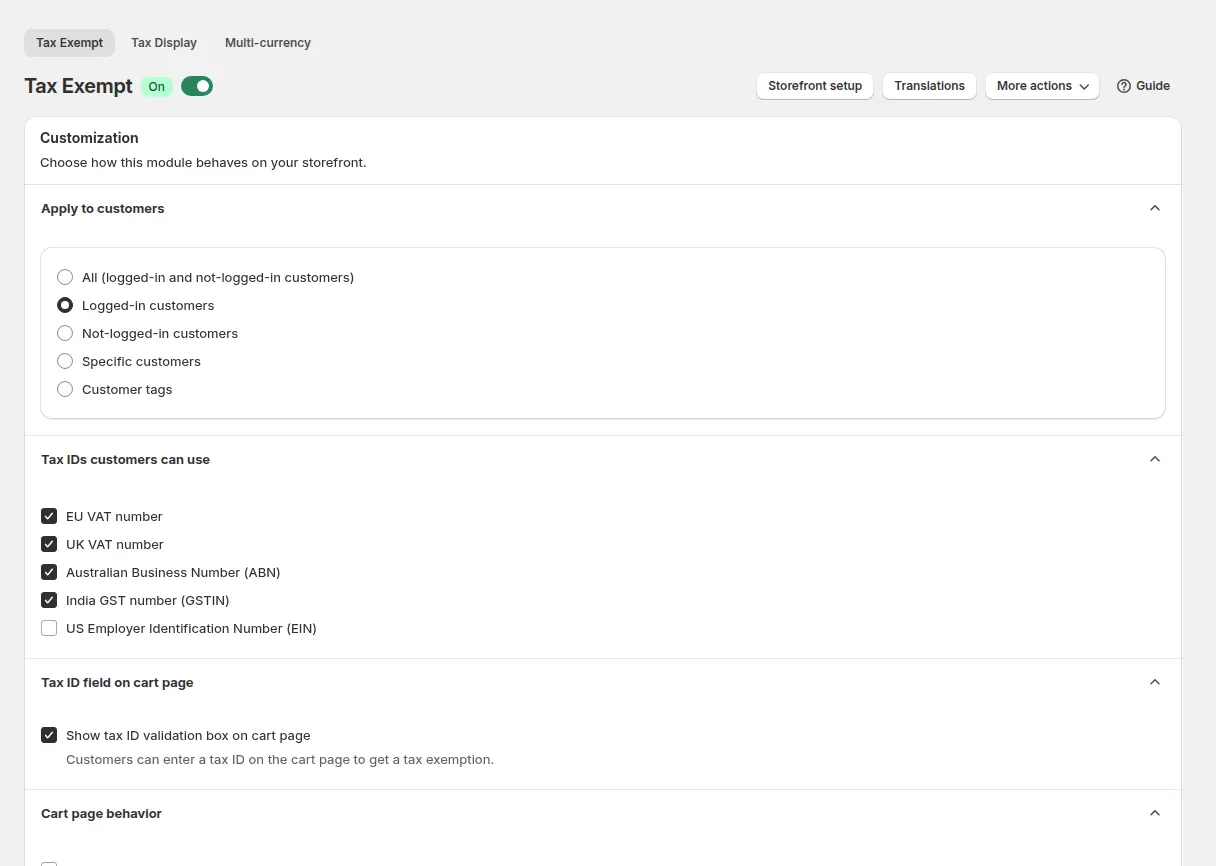
Step 1: Add the Tax Exempt block to the cart and switch the module on
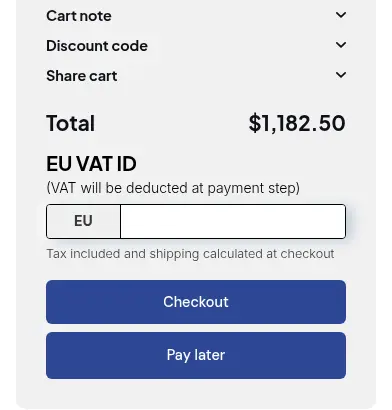
The form is a theme app block. In the Shopify admin open Online Store > Themes > Customize, go to the Cart template, add the Tax Exempt block from BSS B2B Solution and save. Without the block, buyers never see the form. Then open Tax Exempt in the app and turn the module on. The page also decides who sees the box, for example customers with a certain tag. Test on your live theme again after any theme change.
Step 2: Choose the tax ID types
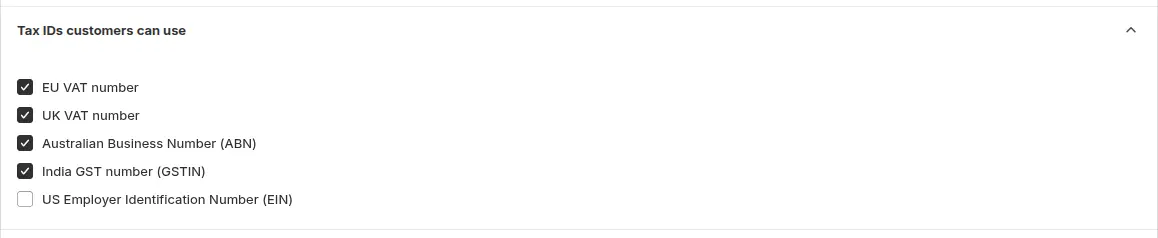
Tick the types you accept: EU VAT, UK VAT, Australian ABN, India GST and US EIN. With more than one type on, the buyer picks from a dropdown. Offer UK VAT as its own type if you sell to the UK, because a UK number typed in the EU field is rejected. Each type is checked by a different service; the tax ID validation guide explains how.
Step 3: Decide what happens at the cart
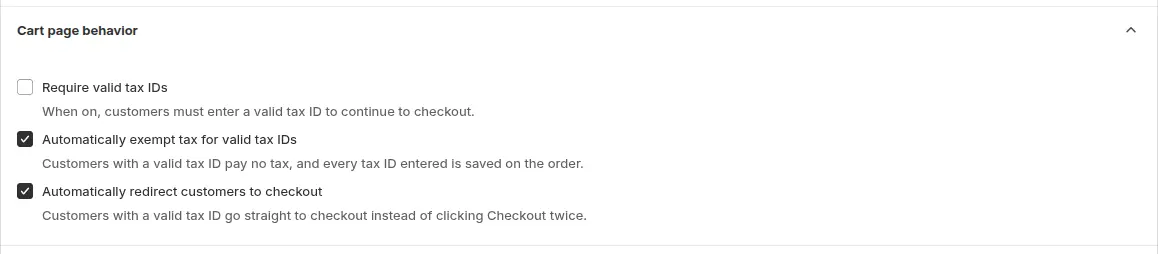
Require valid tax IDs stops a buyer from continuing without a valid number. If you leave it off, a buyer who skips the box or enters an invalid number can still check out, with tax. The page also has options to exempt tax automatically for valid IDs and to send the buyer on to checkout right after validation. For a store that sells to businesses only, require the ID.
Step 4: Limit the countries and tag the orders
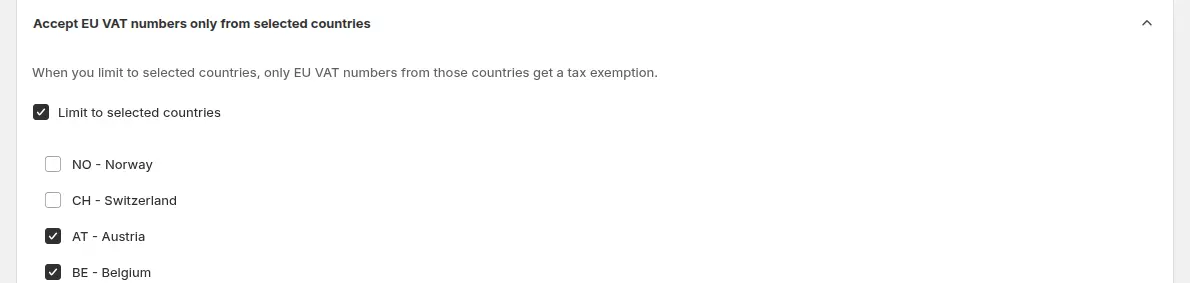
If you only exempt buyers from the countries you serve, turn on the option to accept EU VAT numbers only from selected countries. An ID from another country is not accepted and tax stays on the order. Add an order tag such as tax-exempt to filter these orders. It is added only when the order is exempt.
Step 5: Handle prices that include tax
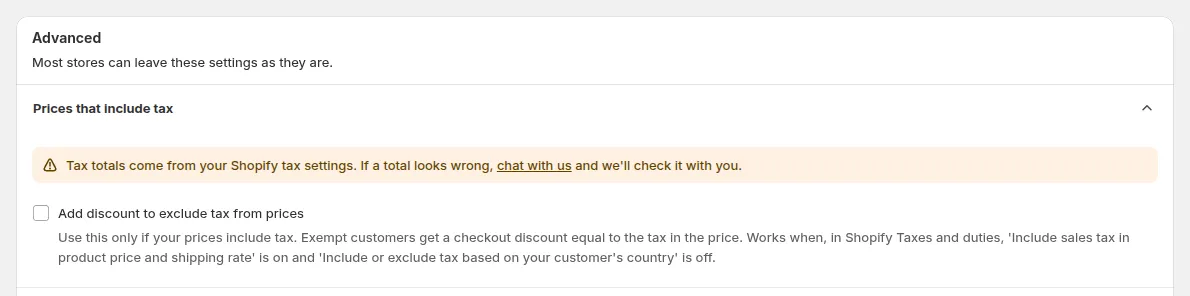
If your product prices include VAT, tick the option that deducts the tax as a discount, so an exempt buyer pays the net price instead of the full listed price that Shopify would charge. The discount line is titled Excluded Tax. Test it with a buyer whose market already shows prices without tax, where the app does not deduct. Check Markets and your tax settings for each market before you rely on it.
Step 6: Test as a buyer, then check the order
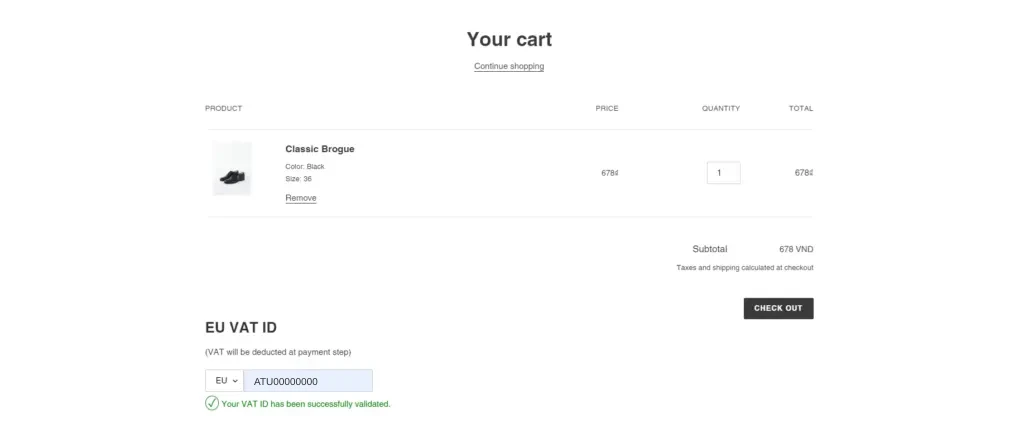
Add a product to the cart as a buyer who should see the box and enter a valid number: a confirmation shows and tax is removed. Then try an invalid number and a number from a country you do not allow, and confirm tax stays. Finally open the order in Shopify admin and check the tax line, the tag and the note.
If the box does not appear, follow the form not showing guide. For the full setup in one page, see the use case sell VAT-exempt to EU businesses with a valid VAT ID. To check the number once when the buyer applies, use verify a business tax ID at registration. For buyers who cannot enter a number, see exempt tax for customers without a VAT number.
What a valid VAT ID does and does not prove
For EU numbers the standard check is VIES. The European Commission describes it as “a search engine (not a database)” that retrieves data from national VAT databases, and says it “cannot accept responsibility for the accuracy of the information in VIES” (Your Europe: check a VAT number). The page also says the system is sometimes unavailable while national databases are backed up, and that changes are not always reflected immediately.
So treat a valid result as one piece of evidence. It does not show that the goods leave your country, that the buyer is the company named, or that the exemption applies to that sale. In the BSS cart a failed lookup counts as invalid, so a buyer can be refused during an outage; tell them to retry later or handle the order by hand. Keep the number the buyer entered (the order note has it).
How do you show net prices (without VAT) to EU businesses?
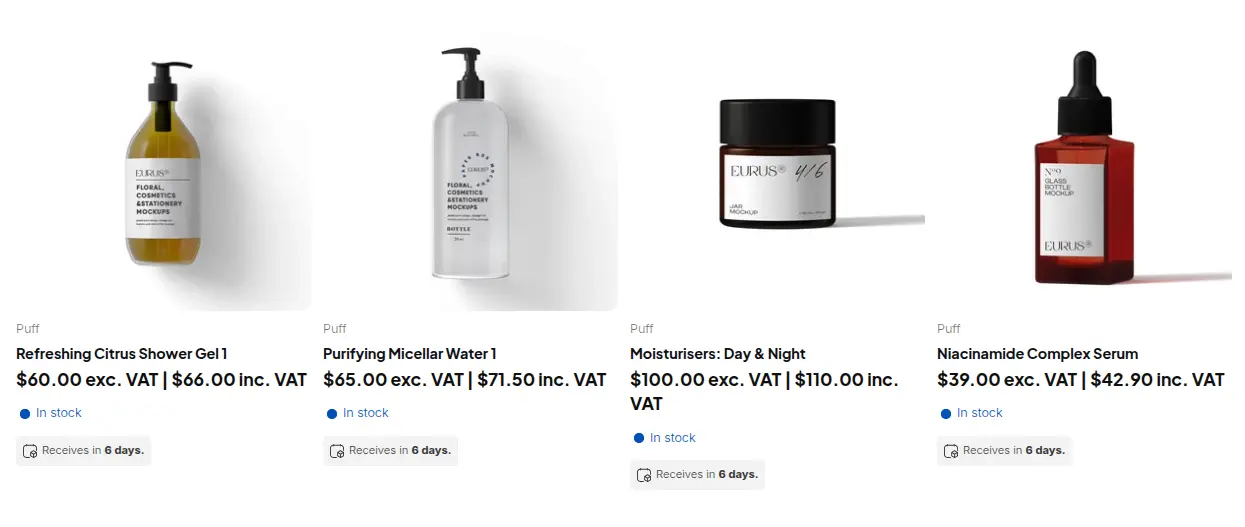
Tax Exempt changes what the buyer pays. Showing prices without VAT changes what the buyer sees. They are separate modules in BSS B2B Solution, and you often want both: the page shows the net price, and the exempt order is charged the net price.
| Tax Exempt | Tax Display | |
|---|---|---|
| What it does | Creates the order without tax when the buyer’s tax ID is valid | Shows prices with tax, without tax, both, or a toggle, per customer group |
| Changes the amount charged | Yes, for that order | No. Shopify still calculates tax at checkout |
| Where it works | Cart page (and Buy It Now on the product page) | Product page, cart, collections, or all pages |
| Plan | Advanced or Platinum | Advanced or Platinum |
| Limits | Per order, not in Shopify checkout, not on the v4 storefront | Display only. Variant-level rate overrides do not exist and Shopify’s own tax overrides are not read |
Tax Display takes the country’s tax rate from Shopify and computes both prices in the browser. The toggle between the two prices is offered only for all pages and all products. Read the Tax Display guide and the use case show prices excluding VAT to business buyers.
Limits to know before you rely on it
| Limit | What it means | What to do |
|---|---|---|
| Per order | The exemption is not stored on the customer | Tell buyers to enter the number on each order. Use the registration or Shopify customer settings for permanent exemptions |
| Cart, not checkout | The box is on the cart page. A buyer who opens /checkout directly skips it and is taxed | Do not describe it as enforced at checkout. Test your cart and Buy It Now paths |
| Browser-side check | The number is validated as it is typed and the order is built from that entry. The server does not validate it again | Review exempt orders yourself, for example by the tag |
| Fail-open | If the app’s step fails, the buyer goes to the normal checkout and is taxed | Safe for tax, but the buyer may be confused. Add a note on the cart page |
| No reverse-charge text | The app does not write reverse-charge wording on invoices | Handle invoice wording in your invoicing process |
EU VAT exemption checklist for a Shopify B2B store
- The Tax Exempt block is on the Cart template of your live theme.
- The tax ID types match your buyers: EU VAT, UK VAT, and others as needed.
- Require valid tax IDs is on if you only sell to businesses.
- An order tag is set, and you know how to filter tagged orders.
- If prices include VAT, the Excluded Tax option is on and tested for each market.
- You tested a valid number, an invalid number, a number from a blocked country, and a direct /checkout visit.
Shopify EU VAT exemption: frequently asked questions
How do I make a customer VAT exempt on Shopify?
In Shopify you set the customer’s tax setting, or a company location’s, by hand. If your prices include tax, the customer still pays the full listed price. BSS B2B Solution Tax Exempt lets the buyer enter a VAT ID in the cart and creates the order without tax when the ID is valid.
Does Shopify validate EU VAT numbers?
The Shopify Help Center pages we read describe entering a tax ID on a company location, but not checking it against a VAT register. BSS B2B Solution checks EU numbers against the VIES service as the buyer types.
Where does the buyer enter the VAT ID?
On the cart page, in the Tax Exempt box. It is not in Shopify checkout. A buyer who opens the checkout URL directly skips the box and is taxed.
Does BSS B2B Solution support reverse charge?
No. It has no reverse-charge feature and does not write reverse-charge text on invoices. It removes tax from the order when the tax ID is valid. Ask your accountant what your invoices must say.
Which plan do I need for Tax Exempt?
The Advanced or Platinum plan of BSS B2B Solution, and Platinum for US EIN numbers. Check the pricing page for the current plans. Tax Exempt is not available on the v4 storefront.
How do I show prices without VAT to business buyers?
Use the Tax Display module with a rule for your wholesale customer tag and the Excluding tax only display type. It changes what is shown, not what is charged.
Can a valid VAT number alone justify a VAT-free sale?
No. A valid number shows the registration exists. Whether the sale qualifies depends on the goods, the countries and your records, so confirm it with your accountant.
Next steps
Start with the tax ID types and the cart box, then add net-price display for your wholesale tag. Related reading: the tax and compliance hub, onboarding tax-exempt buyers with Net Terms, and the tax ID and VIES glossary entries.
Install BSS B2B Solution to add the Tax Exempt box, tax ID validation and Tax Display. Try it free on a development store.
Install BSS B2B Solution See the appSources
Pages read on October 4, 2026. BSS facts come from the BSS B2B Solution user guide at docs.bss-b2b.solutions and our October 2026 review of the app’s behavior.
- Your Europe: cross-border VAT, selling goods to businesses
- Your Europe: check a VAT number (VIES)
- Shopify Help Center: Tax overrides and exemptions
- Shopify Help Center: B2B companies and locations
- Shopify Help Center: Shopify Markets
- BSS B2B Solution user guide: Tax Exempt
- BSS B2B Solution user guide: Tax Display
You may also like

How to Sell Wholesale to Retailers: A Playbook for Shopify Brands
To sell wholesale to retailers, set a wholesale price that leaves room for both of you (usually […]

Shopify Tax Exempt Customers With a Resale Certificate: A US Guide for Wholesale Sellers
A resale certificate is a state-issued US document that lets a business buy goods it will resell […]

Faire Alternatives for Brands: Sell Wholesale on Your Own Shopify Store
The best Faire alternative for most Shopify brands is not another marketplace. It is your own Shopify […]