
Shopify B2B Registration Form: Step-by-Step Guide (2026)

A Shopify B2B registration form collects a business’s details, lets you approve or reject the application, and tags approved buyers so wholesale prices unlock. Use Shopify’s free Forms app, which creates a company for each request, or a form app such as BSS B2B Solution, which adds tax ID checks, file upload, approval options and tags.
Build a registration form with tax ID fields and file upload, approve or reject each application, and tag buyers so wholesale prices unlock. Free on development stores, 14-day trial on paid plans.
Install BSS B2B Solution See pricingLast updated October 4, 2026. BSS B2B Solutions makes BSS B2B Solution, the app used in the steps below, so we show Shopify’s own option first and say where each approach stops. This guide is part of our complete guide to Shopify B2B and the customer onboarding hub.
Key takeaways
- Shopify’s default sign-up form asks for little and approves nobody. A B2B registration form adds business fields, a review step and a way to tell approved buyers apart.
- Shopify’s free Forms app can take access requests and creates a company, a location and a customer for each one (Allowing new B2B customers to request access).
- An app form adds what that page does not describe: tax ID checks, automatic tags, spam protection and approval rules.
- In BSS B2B Solution, approval creates the Shopify customer and adds your tag. Pricing and lock rules then read the tag.
- With new customer accounts, put the form on its own page, or use the multi-step form inside the account.
What a Shopify B2B registration form does
A B2B registration form is the front door of a wholesale store. It collects the facts you need before you sell at trade prices, such as the legal company name, a tax number and a business document. It puts each application in a queue, so you decide who gets wholesale access. And it marks the approved buyer, usually with a customer tag, so price rules, locks and payment terms apply to them and to nobody else. A trade account is the result.
Default sign-up form, native access request or app form
| Default customer sign-up | Shopify Forms access request | App registration form (BSS B2B Solution) | |
|---|---|---|---|
| Fields | Name, email and the basics your theme and accounts provide | Company name and email, plus custom fields including file upload up to 20 MB | Business, address and custom fields, file upload up to 10 MB, tax ID fields |
| Approval | None: the account is created | Approve in Customers, Companies, Ordering not approved | Manual, auto, or auto when the email contains your text; bulk approve and reject |
| What it creates | A customer | A company, a location and a customer | A Shopify customer with your tags and custom fields as metafields |
| Tax ID checks | No | Not described on Shopify’s page | EU VAT, UK VAT, US EIN, ABN and India GST fields, checked live |
| Tags on approval | No | Not described on Shopify’s page | Yes, plus Auto Tags rules |
| Spam protection | Shopify’s own | Not described on Shopify’s page | Google reCAPTCHA v2 option |
Sources: Shopify Help Center: company account requests (read October 4, 2026) and BSS user guides. Native B2B itself is included on Basic, Grow, Advanced and Plus (plan features). See also Shopify B2B without Plus and setting up a wholesale store on Shopify.
What to put on a wholesale registration form
Ask for what you will check, and nothing you will not use. Each extra field lowers the number of buyers who finish. This is a sensible starting set:
| Field | Why you ask | Field type |
|---|---|---|
| Company legal name | Matches the invoice and the company record | Company (system field) |
| Contact name, email, phone | Who you approve and call | First name, last name, email, phone |
| Billing and shipping address | Tax and freight | Address, city, zip, country |
| Tax ID: VAT, EIN, ABN or GST | Proof of a registered business; basis for tax exemption | Tax ID validation field |
| Business document (resale certificate, licence) | Evidence for tax-exempt or trade pricing | File upload, 10 MB per file |
| Business type and website | Fit check for your trade terms | Dropdown, text |
| Expected order volume | Decides which price tier or tag to give | Dropdown |
| Privacy consent | Records agreement to your policy | Privacy policy checkbox |
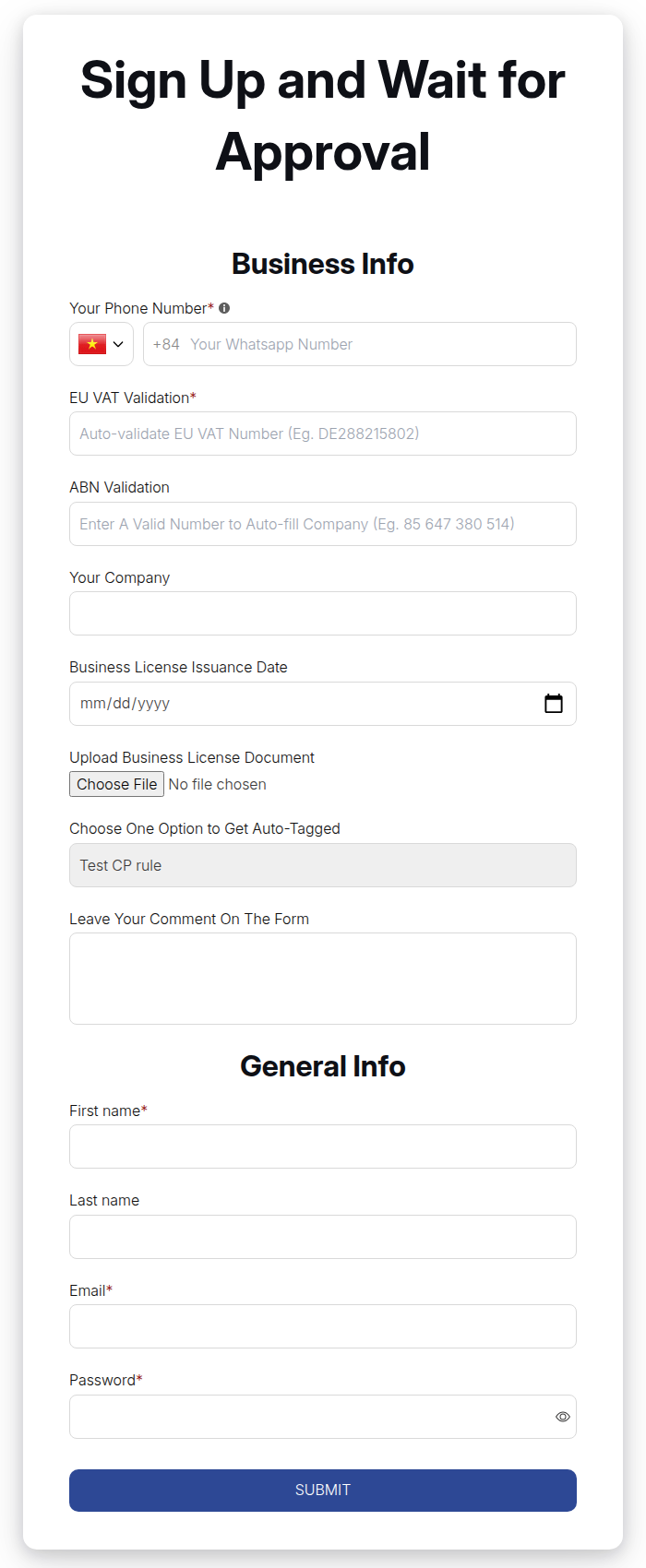
BSS B2B Solution supports text, text area, number, date, file upload, dropdown, checkbox, radio and heading fields, plus the system fields above. Each field has a label, a required switch, help text and a width of 30%, 50% or 100%. Custom answers are saved as customer metafields, so you can read them in the Shopify admin.
How to create a B2B registration form in 7 steps
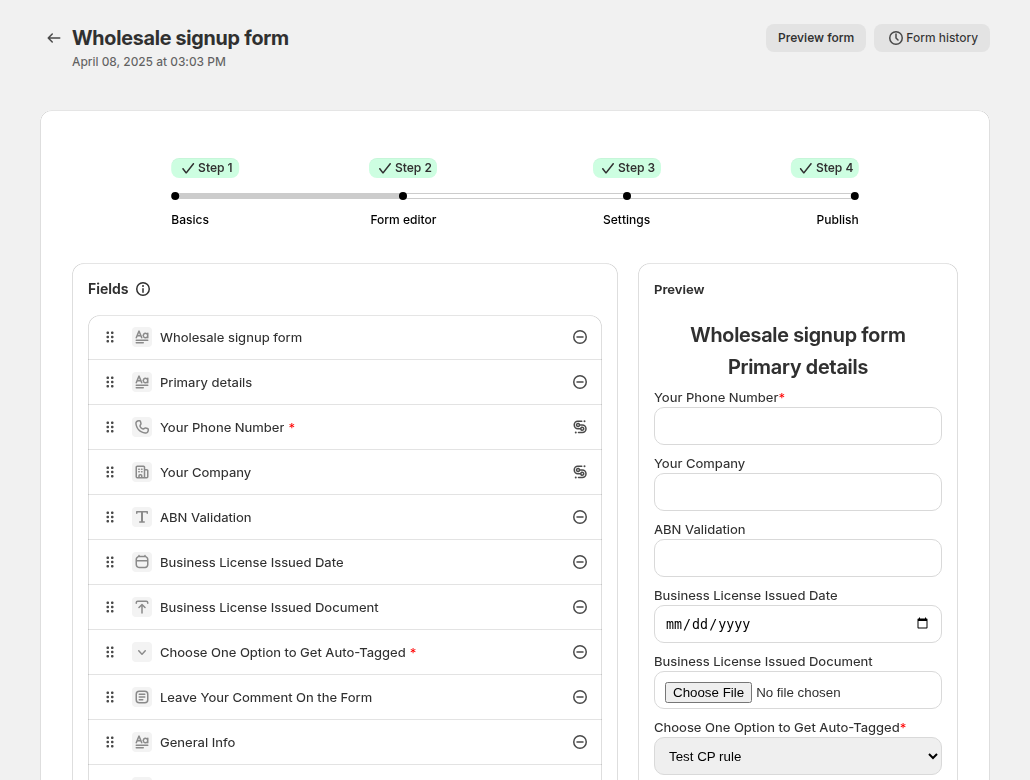
These steps use BSS B2B Solution. The editor is a four-step wizard: Basics, Form editor, Settings and Publish.
Step 1: Turn on Registration Forms and the app embed
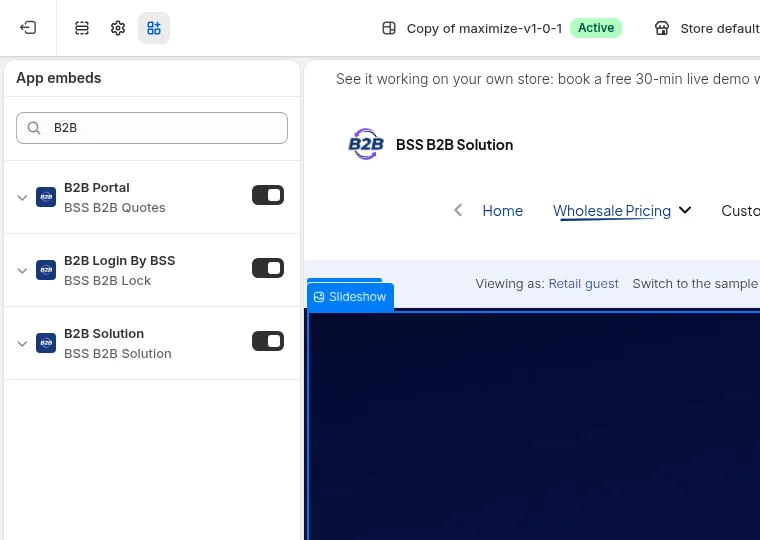
In the app, go to B2B customers, Registration Forms and switch the module on. Then, in Online Store, Themes, Customize, open App embeds and turn on B2B Solution. With the embed off, the form page shows only a loading placeholder. On the Free plan you can create one form, and some options are locked: auto-approval, reCAPTCHA, tax exempt on approval and multi-step forms.
Step 2: Create the form and add fields
Click Create form and choose Wholesale registration form. Name it, set the form URL (for example wholesale-apply, so the page is /pages/wholesale-apply) and add your fields from the table above. Tax ID fields (EU VAT, UK VAT, ABN, GST) check the number as the buyer types and show a message when it is valid. The US EIN field needs the Platinum plan.
Step 3: Set approval, emails and what happens next
Choose how applications are handled:
- Manual approval. The application waits as Pending until you approve or reject it in Registration management. You can also approve automatically when the email contains text you set, for example a partner’s domain.
- Auto-approval. The Shopify customer account is created as soon as the form is submitted.
- After registration. Send the buyer to the login page (auto-approval only), to a custom URL, or show a message and clear or hide the form.
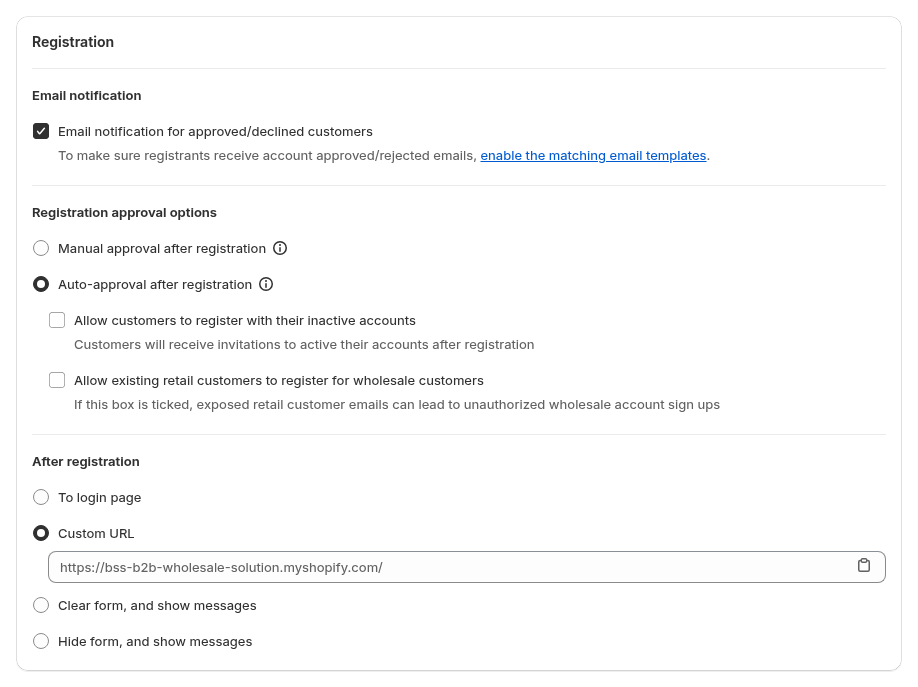
Turn on email notification for approved and declined applicants, and review the templates. Five emails exist: new registration (to you), account pending, account approved, account activation and account rejected. Only turn on “Allow existing retail customers to register for wholesale” if you review applications another way: anyone who knows a retail customer’s email could otherwise sign that account up as wholesale.
Step 4: Tag buyers on approval and add spam protection
In the Tags card enter the tag, for example wholesale. Pricing, lock and terms rules that target this tag start working for the buyer when you approve them. You can also enable Google reCAPTCHA. Do not turn on the app’s reCAPTCHA and Shopify’s own at the same time, or the form stops working.

Step 5: Publish the form
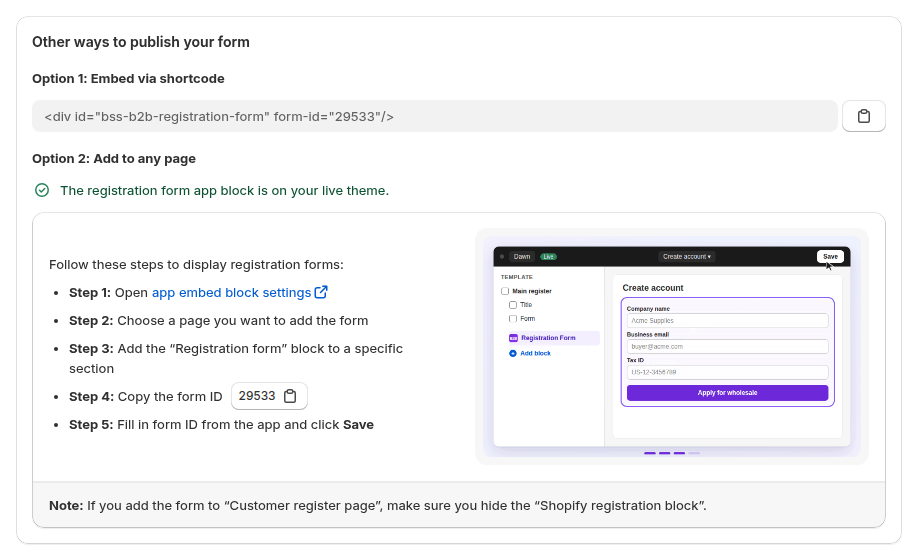
Saving creates the page at your form URL. You can link to it from your menu or add the Registration form app block to any page: copy the form ID from the Publish step and paste it into the block settings. If you add it to a customer register page, hide Shopify’s own registration block so the form does not appear twice.
Step 6: Test the whole path
Submit the form with a test email, check the new-registration email, approve the application, and confirm the tag landed on the customer record. Then sign in as that customer and check the price. If the price does not show, use our guide to wholesale prices not showing.
Step 7: Review applications
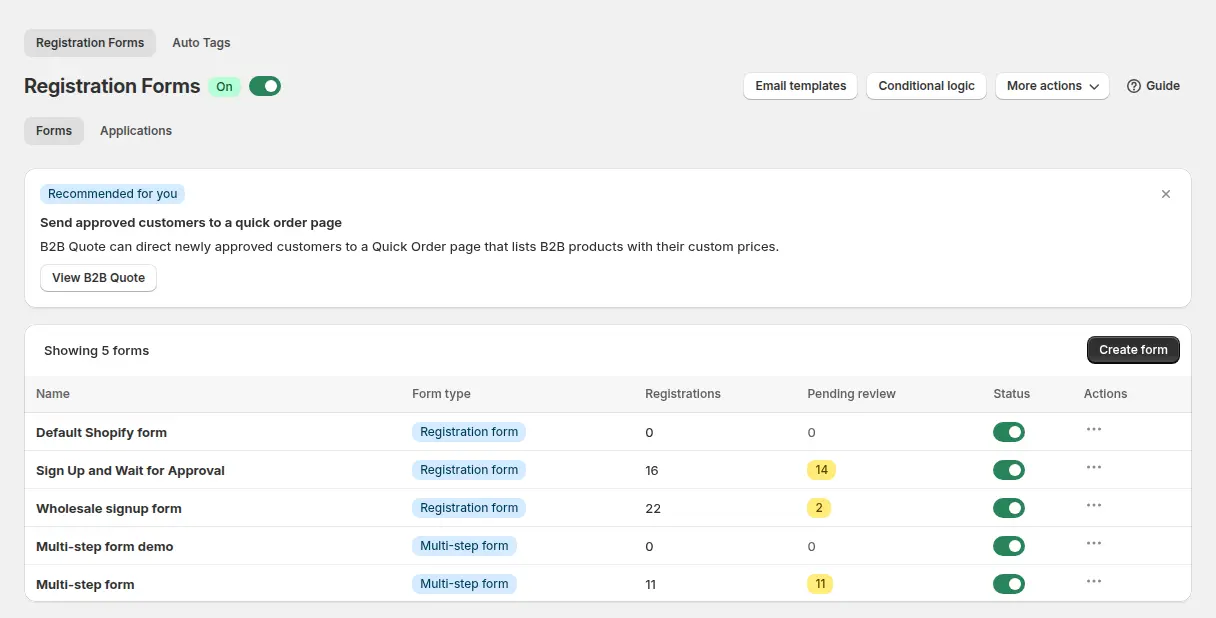
Applications appear under Registration management, where you can filter by status or date, preview uploaded files, edit a field before approving, and bulk approve or reject. Statuses are Pending, Approved, Rejected, Restricted and Deleted. Restricted suspends an approved buyer without deleting the account.
Read the full registration form guide and the use cases Wholesale registration form with approval, Verify a business tax ID before approving and Approve, reject and notify applicants.
BSS B2B Solution is free on development stores. Build the form, approve a test application and see the tag unlock a price before you pay.
Get BSS B2B Solution How BSS B2B Solution worksUse Shopify’s own access request form
If you want companies created straight in the admin, Shopify’s route is the free Shopify Forms app. Install it, create a popup or inline form, and add company and customer fields. Company name and email are required, and custom fields can be single-line or multi-line text, dropdown, radio, multiple choice, date, number or file upload (up to 20 MB). When someone submits it, a company, a company location and a customer are created automatically. By default a company cannot order until you approve it under Customers, Companies, on the Ordering not approved tab. To reject, you delete the company. The form cannot add a customer to an existing company (Shopify Help Center). Shopify’s setup checklist also points to this app for access requests (Setup checklist).
Pick it when one company per application is what you want and you do not need tax ID checks or tags. Pick an app form when you need those, or when buyers should be priced by tag rather than by catalog. BSS B2B Solution does not create a Shopify B2B company on approval, so if you want a company record for native catalogs or payment terms, add it in the Shopify admin after you approve the application.
New customer accounts and the multi-step form
Shopify says B2B requires customer accounts and cannot use legacy customer accounts (Requirements and considerations). Buyers then sign in with their email and a one-time PIN (Sign-in and accounts in B2B). Legacy customer accounts are deprecated, and after an upgrade Shopify redirects legacy account URLs such as /account/login to the new accounts. Shopify warns that a custom sign-in or registration experience may need removing from your theme first (Legacy customer accounts). So avoid editing the theme’s sign-up template to build a custom registration form for B2B. It is the older approach, and the next theme or account change can break it.
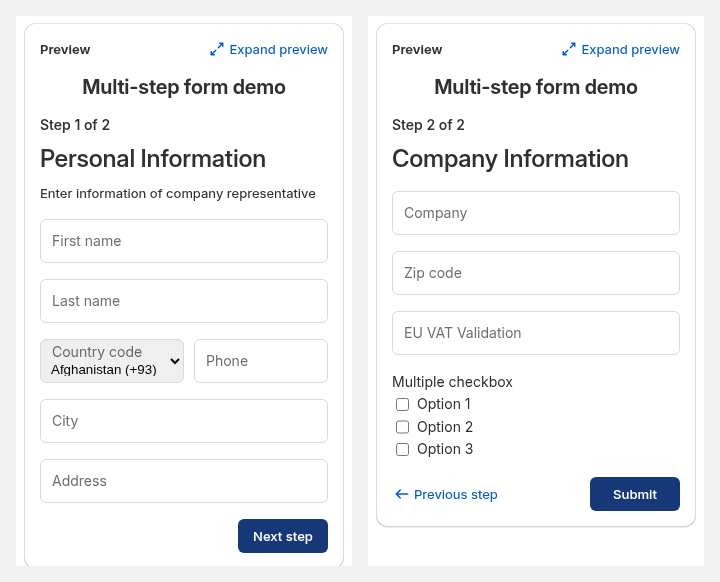
With new customer accounts, BSS guides advise putting the standard form on its own page, for example /pages/wholesale-apply, rather than at /account/register, and not relying on the sign-in state alone for wholesale prices. Tags are safer. A multi-step form is the alternative that runs inside the customer account page: the buyer signs in with Shopify’s code, then fills the steps. Multi-step forms need a paid plan.
What happens after approval
- Prices. A rule set to Customer tags gives the tagged buyer wholesale prices. See Give tagged wholesale customers special prices and the wholesale pricing hub.
- Visibility. To keep prices from visitors until they are approved, add BSS B2B Lock. See how to hide prices on Shopify and the access control hub.
- Terms and tax. Tags can also drive net terms and tax exemption. See the order rules and terms hub and the customer tag definition.
- Ordering. BSS B2B Quote can send newly approved buyers to a quick order page.
Limits to know before you launch
- Tax ID checks run in the browser. They block a submission only when the field is required, and the server does not check the number again. Treat them as a screening step and review the application before you approve.
- One application per email. A second submission with the same email is blocked whatever the first status, with the message “Customer email already exists”. Delete the old record in the app to let the buyer apply again.
- No email verification step. The form does not verify that the applicant owns the address.
- Conditional logic is built for Platinum. You can create rules on other plans, but they run only on Platinum. Multi-step forms, tax ID fields, reCAPTCHA and auto-approval are not on the Free plan.
- Uploads. One file per field, 10 MB each.
FAQ: Shopify B2B registration form
What should a wholesale registration form include?
Company legal name, contact name, business email and phone, billing and shipping address, a tax ID such as VAT, EIN, ABN or GST, a business document such as a resale certificate, business type, expected order volume and a privacy consent checkbox. Keep it to what you will check.
How do I create a B2B customer on Shopify?
In the Shopify admin, create a company with a location and assign a customer to it. This is available on Basic, Grow, Advanced and Plus. To let buyers apply themselves, add a registration form: Shopify’s free Forms app creates a company per request, and BSS B2B Solution adds approval rules, tax ID checks and tags.
Does Shopify have a built-in B2B registration form?
Shopify’s Help Center describes an access request form built with the free Shopify Forms app. It creates a company, a location and a customer, and the company cannot order until you approve it. The page does not describe tax ID checks, automatic tags or spam protection.
Can I approve wholesale applications automatically?
Yes, in BSS B2B Solution. Auto-approval creates the customer when the form is submitted, and with manual approval you can auto-approve applicants whose email contains text you set, such as a partner’s domain. Auto-approval is a paid-plan option. Review risk first, especially with the option for existing retail customers.
Can I check VAT or EIN numbers on the form?
BSS B2B Solution has fields for EU VAT, UK VAT, US EIN, Australian ABN and India GST numbers, checked live as the buyer types. The check runs in the browser and the server does not repeat it, so review applications before approval. The EIN field needs the Platinum plan.
Can a buyer apply twice with the same email?
No. If an application already exists for that email, a new one is blocked whether the first is pending, approved or rejected. Delete the old record in Registration management if you want the buyer to apply again.
Does the form work with Shopify’s new customer accounts?
Yes, with the right placement. Put the standard form on its own page rather than at /account/register, or use the multi-step form, which runs inside the customer account page and needs a paid plan. Shopify B2B itself requires customer accounts, not legacy accounts.
Which plan do I need?
The Free plan of BSS B2B Solution gives one form, and auto-approval, reCAPTCHA, tax ID fields and multi-step are paid options. Check the plan table on the BSS B2B Solution page. Shopify’s own Forms app is free, and native B2B is on Basic, Grow, Advanced and Plus.
How do I make a Shopify store wholesale-only with an application form?
Choose a dedicated B2B-only store, or keep a public catalog with a locked trade area, then connect three steps with one customer tag. Buyers apply through the registration form in BSS B2B Solution. You approve each application and the form adds a tag such as wholesale. A BSS B2B Lock entire-store rule then allows customers with that tag and keeps the registration and login pages open, so applicants can still reach the form. If you also use Shopify native B2B, a customer cannot place B2B orders until they are assigned to a company location, so add that step to your approval routine. Test the whole path as a new applicant. The store lock is a storefront rule, and a checkout lock is Plus only. See our use case for running a B2B-only Shopify store.
Next steps
Decide whether one company per application (Shopify Forms) or a tagged customer with checks (an app form) fits your trade process, build the form, and test it from sign-up to price. For the wider flow, read the customer onboarding hub and the use case Multi-step wholesale application form.
Install BSS B2B Solution for registration forms with tax ID fields, file upload, approval and tags. Add BSS B2B Lock to hide prices until approval, and BSS B2B Quote for quick ordering.
Install BSS B2B Solution See all three appsSources
Shopify pages read on October 4, 2026. BSS facts: BSS user guides at docs.bss-b2b.solutions and our checks of the app.
- Shopify Help Center: Allowing new B2B customers to request access to your store
- Shopify Help Center: Setup checklist for blended B2B stores
- Shopify Help Center: Sign-in and customer accounts in B2B
- Shopify Help Center: Requirements and considerations for using B2B
- Shopify Help Center: Legacy customer accounts
- BSS guide: Build a powerful wholesale registration form
- BSS guide: Set up a multi-step registration form
You may also like

How to Sell Wholesale to Retailers: A Playbook for Shopify Brands
To sell wholesale to retailers, set a wholesale price that leaves room for both of you (usually […]

Shopify Tax Exempt Customers With a Resale Certificate: A US Guide for Wholesale Sellers
A resale certificate is a state-issued US document that lets a business buy goods it will resell […]

Faire Alternatives for Brands: Sell Wholesale on Your Own Shopify Store
The best Faire alternative for most Shopify brands is not another marketplace. It is your own Shopify […]