
Prepare Your Shopify Wholesale Business for Holiday Sales: BFCM 2026 Checklist

To prepare your Shopify wholesale business for holiday sales, fix four things before Black Friday on November 27, 2026: the price each buyer sees, the order rules, the payment terms and a fast way to reorder. Then test the whole path as a wholesale customer. Start in October, because wholesale buyers plan their restock earlier than retail shoppers.
Custom pricing, volume tiers, order limits, quantity increments and Net Terms in one app. Free on development stores, 14-day trial on paid plans.
Install BSS B2B Solution See pricingLast updated October 4, 2026. This checklist replaces a 2021 article and uses Shopify’s own 2025 figures and help pages. BSS B2B Solutions makes BSS B2B Solution, Lock and Quote, so we say where Shopify’s built-in B2B is enough and where an app adds something. For the full picture of wholesale on Shopify, read the complete Shopify B2B guide.
Key takeaways
- Black Friday is Friday, November 27, 2026 and Cyber Monday is Monday, November 30, 2026. Plan the freeze date for November 20 and finish testing by then.
- Shopify’s own BFCM numbers are for all merchants and include no B2B split (Shopify, 2025 BFCM data). Treat them as a traffic warning, not a wholesale forecast.
- A store code meant for retail can reach wholesale buyers too. By default, Shopify discounts apply to both B2B and D2C buyers unless you assign a B2B market to the discount (Shopify B2B discounts).
- Native B2B covers quantity rules, price breaks and net terms on Basic, Grow, Advanced and Plus (plan table). Apps cover quotes, CSV ordering and locked private offers.
- Test every rule logged in as a buyer, on mobile, before the freeze. A rule you never tested is a rule that fails on the busiest day.
When is BFCM 2026, and when should wholesale start preparing?
Black Friday 2026 falls on November 27 and Cyber Monday on November 30. Small Business Saturday is November 28. Work backward from those dates. The schedule below is our suggestion, not a Shopify requirement, and it assumes a small team.
| Window | Goal | Output |
|---|---|---|
| Oct 5 to Oct 16 | Decide the holiday offer and audit prices, tags and companies | One page: who gets what price, minimums, terms and dates |
| Oct 19 to Oct 30 | Build price rules, order limits, payment terms and quick order | Rules live but limited to a test customer |
| Nov 2 to Nov 13 | Test as a buyer on desktop and mobile; fix gaps | Test orders placed, draft orders and emails checked |
| Nov 16 to Nov 20 | Announce to buyers; freeze rules and theme changes | Email sent; change freeze from Nov 20 |
| Nov 23 to Dec 1 | Run the offer, answer quotes, watch orders daily | Daily check of orders, limits and inventory |
What do Shopify’s BFCM numbers mean for wholesale sellers?
Shopify reported that its merchants sold a record $14.6 billion over the 2025 Black Friday Cyber Monday weekend, up 27% from the year before (24% in constant currency). 81+ million customers bought from Shopify-powered businesses, sales peaked at $5.1 million per minute at 12:01 p.m. EST on Black Friday, and the average cart was $114.70 (Shopify, 2025 BFCM data). In 2025 the weekend ran from Black Friday, November 28, to Cyber Monday, December 1.
Read these numbers with care. They describe all Shopify merchants, mostly consumer sales, and the page does not mention B2B or wholesale. What they do show is load: traffic and orders arrive in bursts, so the pages your buyers use must work under pressure. Our own judgment, not a Shopify statistic: many wholesale buyers place their holiday stock orders earlier, so the wholesale peak around BFCM is often restocks, early orders for the next season and repeat orders, not first-time gift shopping.
Should a wholesale store run Black Friday offers?
Yes, if the offer fits how businesses buy. Retail buyers respond to a percentage off. Business buyers respond to a lower cost per case, free freight over a threshold, longer payment terms or early access to a limited run. Pick one lever, so your margin stays predictable and the rules stay simple to test.
| Offer | Why buyers care | How to run it on Shopify |
|---|---|---|
| Extra volume tier for the weekend | Lower cost per unit on a restock | Native quantity price breaks (up to 10 per product) or a BSS Volume Pricing rule with dates |
| Lower minimum order | Smaller shops can join the sale | Native quantity rules, or BSS Order Limits |
| Longer payment terms | Cash flow after the holidays | Native net terms, or BSS Net Terms with a Pay later button |
| Early access or private offer | First pick of limited stock | A locked collection with a secret link or passcode in BSS B2B Lock |
| Quote for a big seasonal order | Negotiated price and freight | Request a quote with BSS B2B Quote, then a draft order |
Mind the overlap with your retail promotion. Shopify says automatic discounts and discount codes apply on top of the price adjustments made with catalogs. It also says discounts for all customers, specific customers or segments reach both B2B and D2C buyers in a blended store, and that you need a B2B market in the discount’s eligibility to limit it to B2B buyers (Shopify B2B discounts). If you do not want your 20% retail code on top of a wholesale price, set the eligibility before the sale, then place a test order as a wholesale customer.
Holiday checklist for a Shopify wholesale store
| Area | Check | Done by |
|---|---|---|
| Prices | Wholesale price shows for each buyer group; retail visitors see retail only | Oct 30 |
| Offer | Holiday tier or code has a start time, an end time and the right eligibility | Oct 30 |
| Order rules | Minimums, maximums and case-pack increments match what you can ship | Oct 30 |
| Payment | Net terms or Pay later works for approved accounts, and ineligible buyers cannot use it | Nov 6 |
| Access | Private collections and hidden prices open only for the right buyers | Nov 6 |
| Reordering | Quick order and CSV upload work with your top 50 SKUs | Nov 13 |
| Mobile | Product, cart and login pages work on a phone | Nov 13 |
| Inventory | Stock counts are right for the top sellers; backorder rule is written down | Nov 13 |
| Communication | Buyers know the dates, the minimum and how to order | Nov 20 |
| Freeze | No theme, app or pricing changes from Nov 20 | Nov 20 |
How to set up your wholesale store for holiday sales, step by step
Step 1: Set the price each buyer group sees
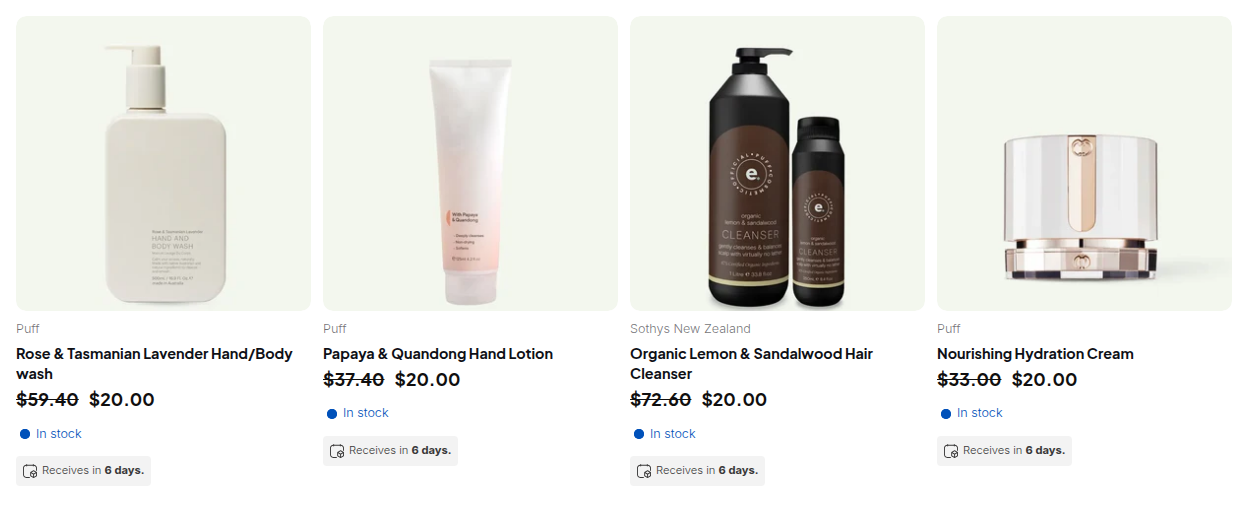
Decide the audience first: all logged-in buyers, a customer tag, or a company. Then decide the price: a percentage off retail or a fixed price. Native B2B does this with catalogs, up to 3 active B2B market catalogs on Basic, Grow and Advanced (Shopify plan table). If you need more groups or tag-based prices, BSS B2B Solution Custom Pricing targets logged-in customers, customer tags or specific customers. Our tag-based pricing use case shows the setup.
Step 2: Add a holiday volume tier
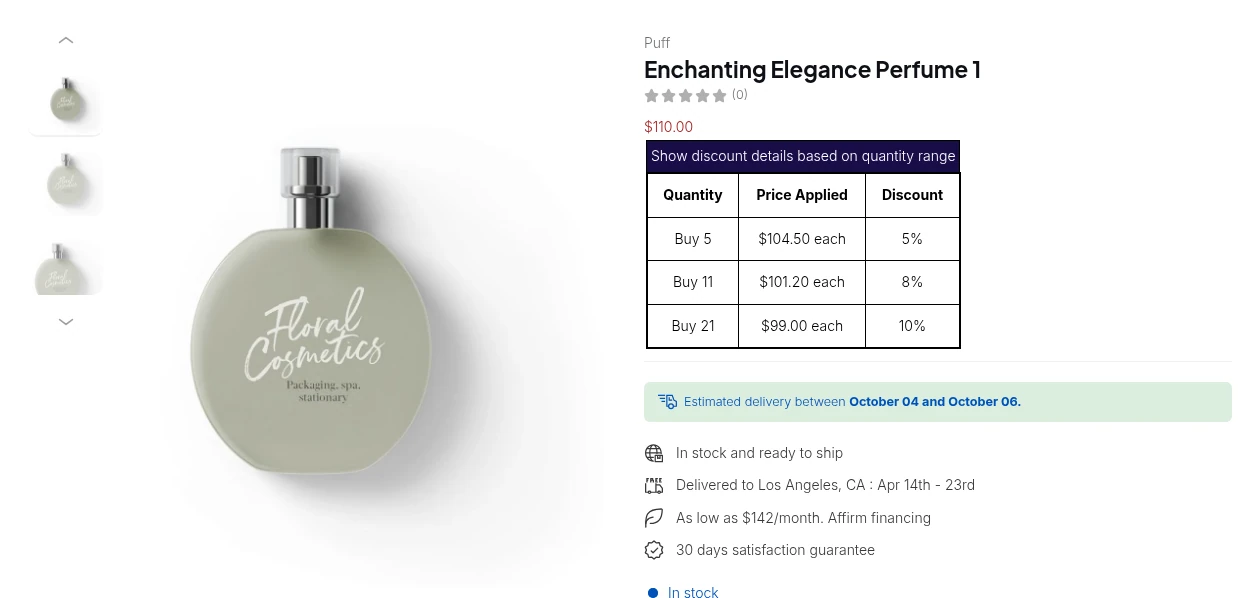
A volume tier (a quantity break) rewards the bigger restock order. In native B2B you add up to 10 price breaks per product, and the price becomes fixed after you apply volume pricing, so a catalog-wide adjustment no longer applies to that product (Shopify quantity pricing). Variants do not combine toward a break. In BSS Volume Pricing you pick quantity or spend, set the ranges and show a tier table on the product page. See tiered pricing and quantity breaks and our Shopify tiered pricing guide.
Step 3: Set order minimums and case packs
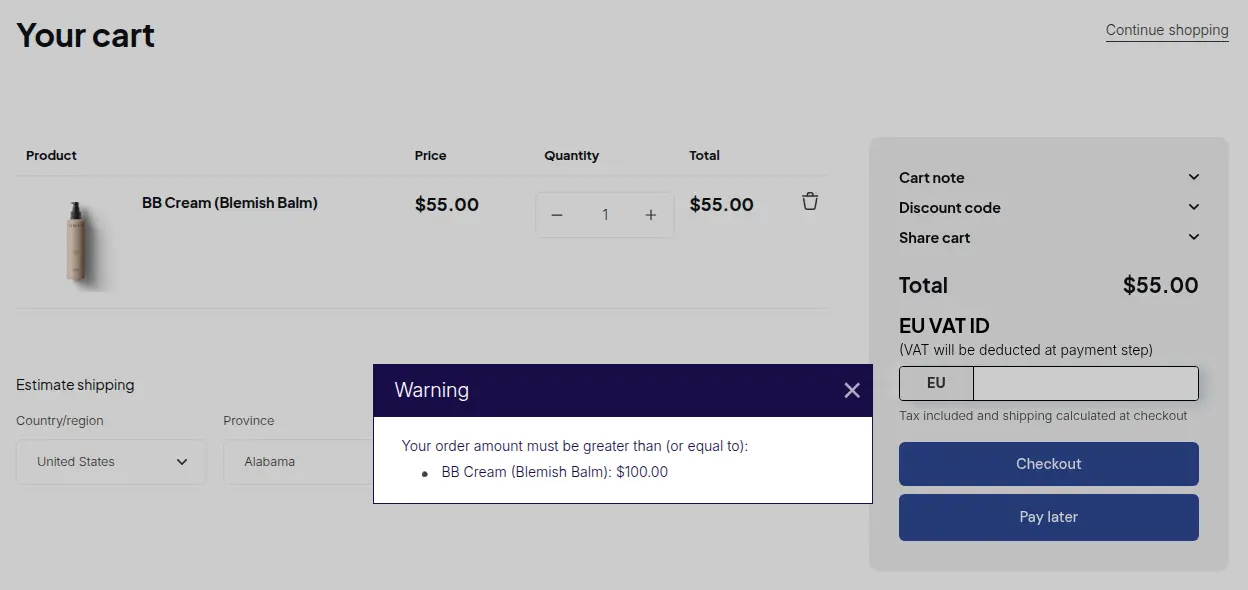
A holiday rush brings small, awkward orders. Set a minimum order quantity or value, and sell in case packs. Native B2B has minimum, maximum and increment rules per variant (quantity rules). BSS Order Limits adds a minimum order amount or quantity with a warning pop-up, and Quantity Increments enforces multiples. Both are on Advanced ($49) and above. They run at the storefront, so a buyer who opens a direct checkout URL can go around them, and Manual Orders are not limited. If a rule must never be bypassed, use Shopify’s native rules too. Details are in our MOQ guide and the minimum order use case.
Step 4: Offer payment terms for approved buyers
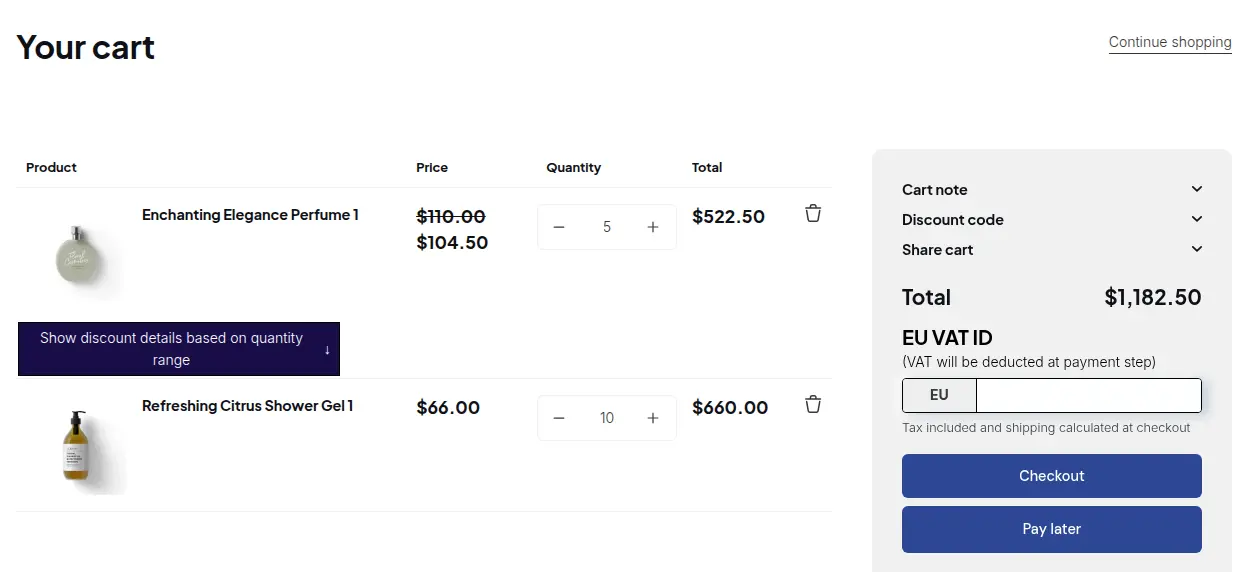
Terms win holiday orders because buyers pay after they sell. Shopify’s net terms offer net 7, 15, 30, 45, 60 and 90 days, due on fulfillment, or a fixed date on draft orders. Payment is not captured automatically when terms expire, so you collect it from the admin, and deposits are Plus only (Shopify payment terms). BSS Net Terms (Advanced and above) puts a Pay later button on the cart for buyers who match a rule, and creates a draft order for you to review. It has no Net 45 and no credit limit, and guests cannot use it. Setup is in the BSS Net Terms guide and our Net 30 guide.
Step 5: Make reordering fast
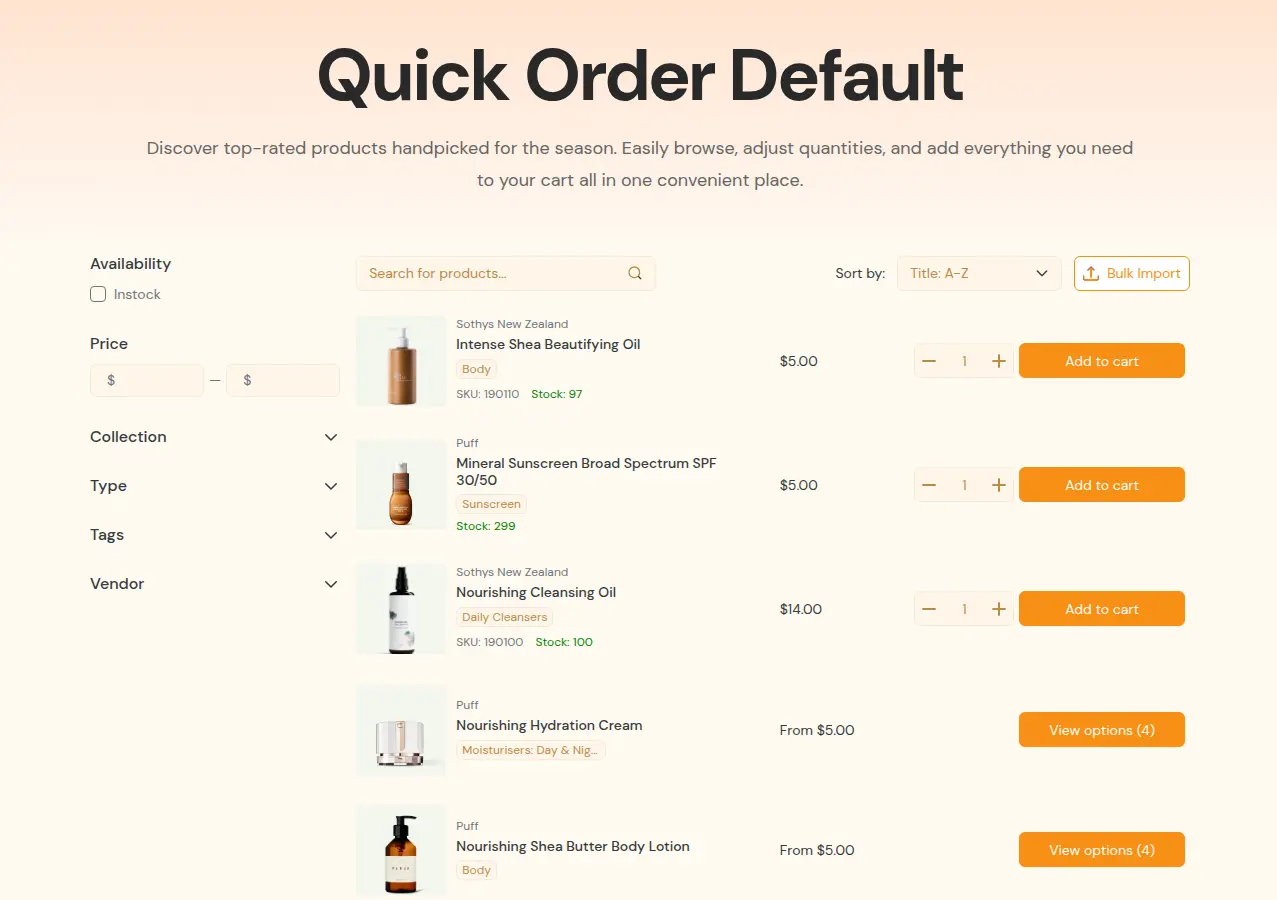
Repeat buyers do not want to browse. Shopify’s native quick order list is included on every plan (plan table). Shopify’s setup checklist points to third-party apps for quoting workflows and CSV order upload (setup checklist). BSS B2B Quote adds a Quick Order page with search, filters and a CSV or XLSX Bulk Import. The upload adds items to the cart, not to checkout, and the Quick Order page needs an Online Store 2.0 theme. More in our quick order form guide.
Register and approve buyers, price them, unlock private offers and take quotes, all keyed to one customer tag.
See the BSS appsStep 6: Control who sees early offers and prices
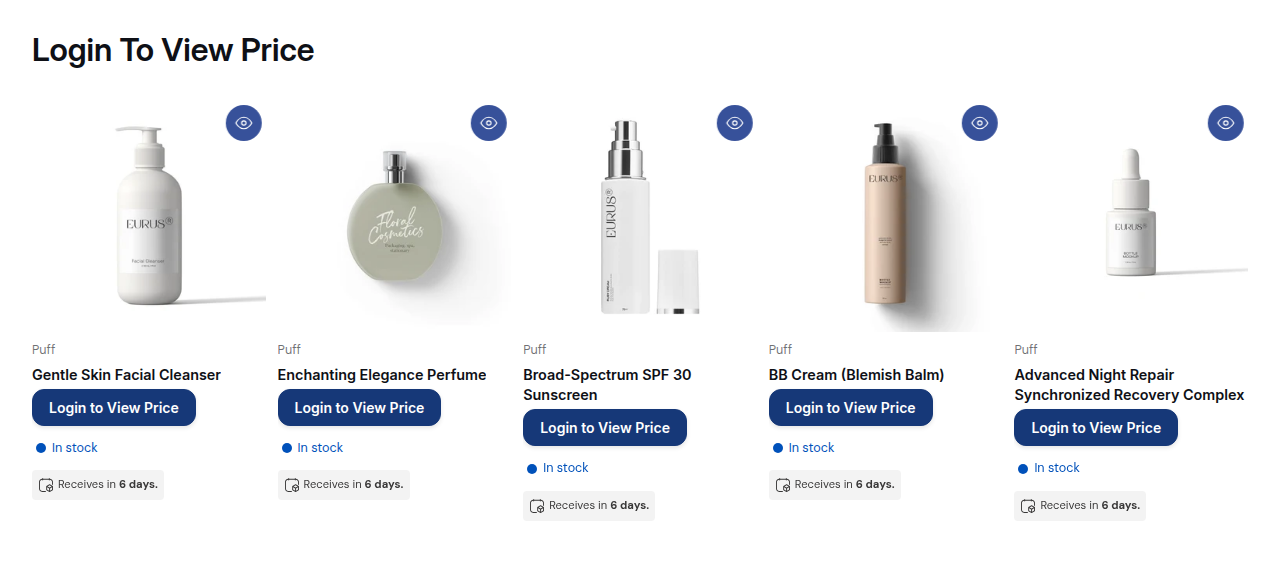
Limited stock and holiday prices should reach your own buyers first. With BSS B2B Lock you can hide prices and Add to cart from guests, lock a collection behind a login, passcode or secret link, and restrict by customer tag. A secret link gives access to anyone who holds the link, so send it only to the buyers you mean. For hidden prices, read our hide price guide.
Step 7: Offer quotes for large seasonal orders
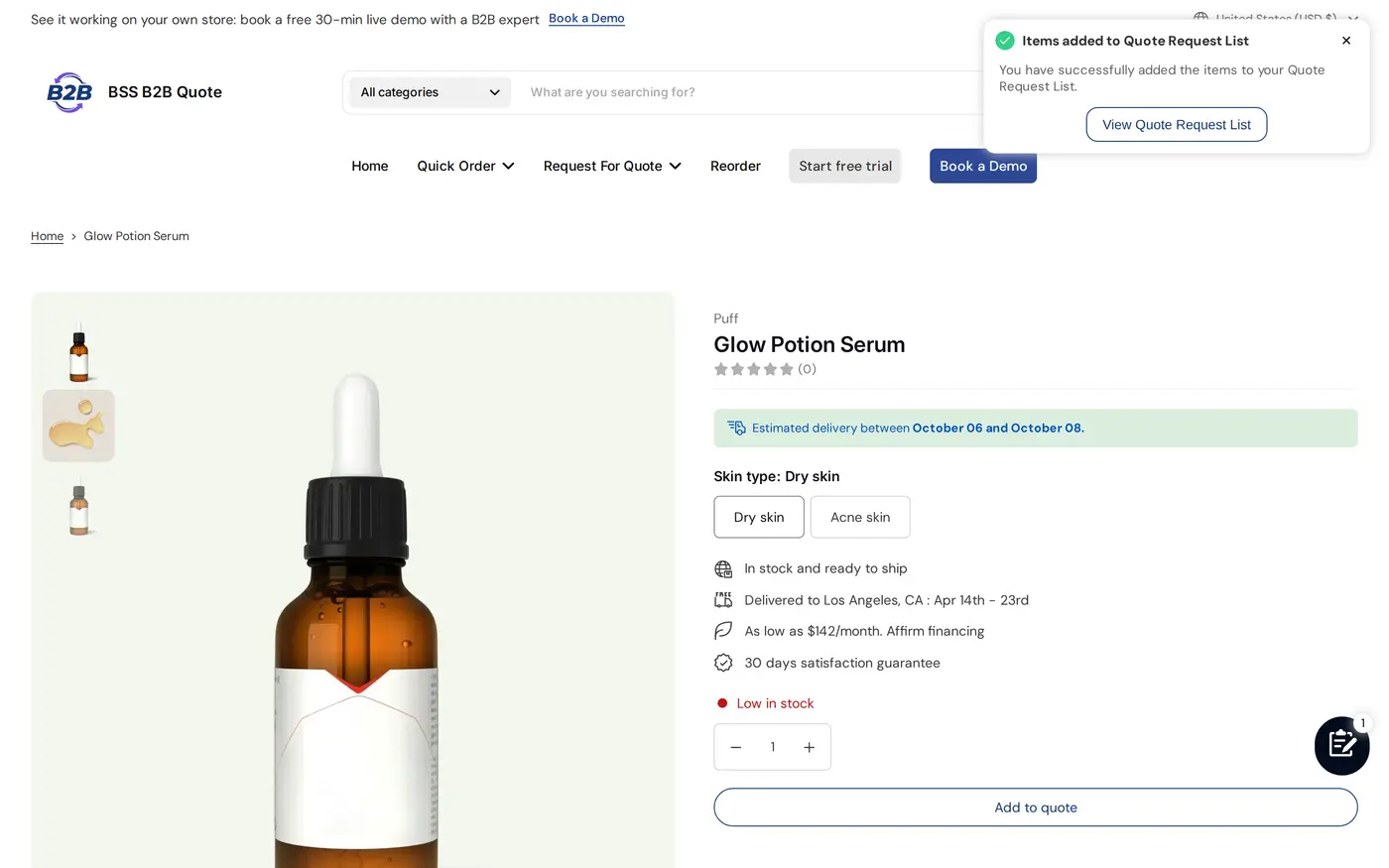
Some orders are too big for a fixed price. A Request a Quote button lets the buyer ask, and you send a proposal. In BSS B2B Quote, guests can submit a quote, but the Approve link in the email needs a signed-in customer, and approval creates a draft order. Starter allows 5 quotes in total, Growth ($19) 100, and Business ($39) is unlimited. See the request for quote guide.
Step 8: Test as a wholesale buyer
Shopify’s setup checklist says to log in as a customer and place test orders before launch. You can create a test customer, or use the view icon next to a company location to see the store as that buyer (setup checklist). Run this script on desktop and on a phone: log in, check the price, add a case, hit the minimum, use a quick order, choose terms, place the order and read the confirmation email.
What should you check on the site itself?
- Checkout compatibility. Shopify lists accelerated checkouts (Shop Pay, Apple Pay, Google Pay, Amazon Pay), local delivery, pickup points, tipping, subscriptions, legacy customer accounts and checkout.liquid customizations as not working with B2B. Orders and draft orders are limited to 500 line items (Shopify considerations). Tell buyers which payment methods they will see.
- Customer accounts. Buyers must be able to log in. Test the login and password reset on a phone, because a locked-out buyer cannot see wholesale prices.
- Speed and apps. Remove apps and theme code you no longer use, then test product, cart and login pages on a phone. Do not install new apps after the freeze.
- Inventory. Use last year’s wholesale orders to find the top sellers, then compare stock with your lead times. Decide in advance whether you backorder, and write the rule on the product page.
- Support. Name who answers quote requests and registration approvals during the weekend, and how fast.
For the wider setup, see the order rules and terms hub, the wholesale pricing hub and the quick order and RFQ hub.
Limits to know before the sale
- Native B2B on Basic, Grow and Advanced allows 3 active catalogs across all B2B markets. Direct company catalogs, deposits and partial payments are Plus only (plan table).
- BSS Order Limits and Quantity Increments are storefront rules, not checkout rules. Manual Orders ignore them.
- BSS Net Terms has no Net 45 and no credit limit. Net 45 exists only in Manual Orders.
- A BSS Volume Pricing rule on the Free plan allows 2 ranges. Ask for the paid plan you need on the pricing page.
- Our guide says automatic Shopify discounts do not run together with BSS Custom or Volume Pricing, and that codes work only if the Shopify Discount option is on. That statement comes from the guide only and we have not confirmed it in the app code, so place a test order with your exact stack.
- A secret link is a bearer link. Anyone with the link gets in, so it is not a security control.
What should you do after the weekend?
Export the orders and check which rule each one used: tier, terms, quote or quick order. Keep the tiers that moved volume and remove the rest. Send a thank-you with a reorder link, then plan the January restock offer while the buyers still remember the process. Add the winning rules to your regular catalog so next year’s preparation starts from a tested base.
Frequently asked questions
When is Black Friday 2026?
Black Friday 2026 is Friday, November 27. Cyber Monday is Monday, November 30, and Small Business Saturday is November 28.
When should a wholesale store start preparing for holiday sales?
Start in early October. The plan above uses October 5 to 16 for the offer and audit, October 19 to 30 for the build, and a rule freeze on November 20. This timeline is our suggestion, not a Shopify rule.
Do wholesale customers shop on Black Friday?
Shopify’s 2025 BFCM figures cover all merchants and do not break out B2B. Many business buyers order their holiday stock earlier, so a wholesale offer is often about restocks, early orders for the next season and better terms. Check your own order history for last year’s pattern.
Will my retail Black Friday discount apply to wholesale buyers?
It can. Shopify says discounts for all customers, specific customers or segments apply to both B2B and D2C buyers in a blended store, and you must assign a B2B market in the discount’s eligibility to limit it to B2B buyers. Test with a wholesale login before the sale.
Can I offer net terms during the sale?
Yes. Shopify’s native net terms cover net 7, 15, 30, 45, 60 and 90 days, due on fulfillment, or a fixed date on draft orders. Payment is not captured automatically when terms expire. BSS Net Terms adds a Pay later button on the cart for buyers who match a rule, on Advanced and above.
How do I give wholesale buyers early access to a sale?
Put the offer on a collection that only approved buyers can open. With BSS B2B Lock you can require a login, a customer tag, a passcode or a secret link. Remember that anyone holding a secret link can enter.
Do I need Shopify Plus for wholesale holiday sales?
No. Since April 2, 2026 native B2B features are available on Basic, Grow, Advanced and Plus. Plus adds unlimited catalogs, direct company catalogs, deposits and partial payments. Check the current plan table before you decide.
What should I test before Black Friday?
Log in as a wholesale buyer on desktop and mobile, then check the price, the minimum, the case pack, the payment terms, the quick order and the confirmation email. Place at least one test order for each buyer group and freeze rule changes a week before the sale.
Sources
- Shopify: merchants generate record-breaking $14.6 billion in BFCM sales (2025), read October 4, 2026.
- Shopify Help Center: B2B features by plan, read October 4, 2026.
- Shopify Help Center: Requirements and considerations for B2B, read October 4, 2026.
- Shopify Help Center: Quantity rules and volume pricing, read October 4, 2026.
- Shopify Help Center: B2B discounts and catalogs, read October 4, 2026.
- Shopify Help Center: B2B payment terms, read October 4, 2026.
- Shopify Help Center: Setup checklist for blended B2B stores, read October 4, 2026.
- Shopify: native B2B for more merchants (April 2, 2026), read October 4, 2026.
- BSS plan prices and ratings: BSS B2B Solution listing (4.9, 1,187 reviews) and BSS B2B Lock listing (4.9, 651 reviews), as of October 4, 2026.
Start with BSS B2B Solution for prices, order limits and Net Terms. Add BSS B2B Lock for private offers and BSS B2B Quote for quotes and quick order.
Install BSS B2B Solution Talk to usYou may also like

How to Remove Tax Included on Shopify (2026 Guide)
Shopify shows “tax included” when your store is set to include tax in prices. To remove it, […]

Shopify Quantity Breaks: How to Implement & Boost Sales
These quantity breaks are the most vibrant strategies that custom store owners around Shopify are using. It […]

How To Sell B2B Services: A Complete Guide to Closing Deals
B2B sales, especially B2B sales service have dramatically increased in recent years, and salespersons, therefore, have to […]