
How to Collect and Validate a Tax ID (EIN, ABN, GST, UK VAT) on Shopify

Shopify has a Tax ID field on company locations, but the pages we read describe no check against a tax register. BSS B2B Solution adds a tax ID field to the registration form, or a Tax Exempt box to the cart, and checks EU VAT, UK VAT, US EIN, ABN and GST numbers live as the buyer types.
Add EU VAT, UK VAT, US EIN, ABN and GST fields to a wholesale registration form, with approval and customer tags. Free on development stores, 14-day trial on paid plans.
Install BSS B2B Solution See pricingLast updated October 4, 2026. Shopify, UK, EU and US facts come from the pages linked in the text, read on that date. BSS B2B Solutions makes BSS B2B Solution, the app in the screenshots. A valid tax ID is a starting point for approval, not tax advice or proof of entitlement. This guide is part of our complete guide to Shopify B2B and the tax and compliance hub.
Key takeaways
- You can collect a tax ID in two places in BSS B2B Solution: a field on the registration form and the Tax Exempt box in the cart. Both check the number as the buyer types.
- Five types are supported: EU VAT, UK VAT, US EIN, Australian ABN and India GST. Each is checked by a different service, so results and speed differ.
- On the form, an invalid number blocks Submit only when the field is marked required. An optional field lets the application through.
- Limitation: the check runs in the browser, and the app does not validate the number again on the server when the form is submitted. Review each application before you approve it.
- A bulk import runs no live tax ID check. Do not assume imported numbers were validated.
What does Shopify give you to collect a tax ID?
Shopify B2B has a Tax ID field on each company location, and for UK and EU locations using Shopify Tax the field is labeled VAT number. Tax IDs and exemptions are location-specific (Shopify companies). Shopify’s company account request form collects a company name, an email address and custom fields such as text, dropdowns, file uploads and numbers, and creates a company record. The page we read does not mention tax ID collection or any validation for those requests, and by default a new company cannot order or see B2B pricing until you approve it (Shopify company account requests).
So with native tools alone you can ask for a number in a custom field and type it into the location yourself, but nothing tells you whether the number exists. If you need that check before approval, or at the cart, you need an app. Our guide to the Shopify B2B registration form compares the options.
Where can you collect and validate a tax ID in BSS B2B Solution?
| Registration form field | Cart Tax Exempt box | Bulk import of customers | |
|---|---|---|---|
| Purpose | Check the number once, when the buyer applies | Remove tax from one order when the number is valid | Load existing customers |
| Live check as the buyer types | Yes | Yes | No |
| What blocks the buyer | Submit is blocked only if the field is required and the number is invalid | Checkout is blocked only if Require valid tax IDs is on | Nothing |
| Server-side recheck | None found | None found | None |
| Plan | A paid plan. The EIN field needs Platinum | Advanced or Platinum. EIN on Platinum | See the import guide |
| Next step | You approve or reject; a tag can start pricing rules | Draft order without tax | Check numbers by hand |
In our review the tax ID fields are hidden on the Free plan, and conditional logic that shows a field by country runs on the Platinum plan. See pricing for current plans.
Which tax IDs can it check, and against what?
Each type goes to a different source. Results depend on those services, which can be slow or briefly unavailable, so treat an answer as an early signal.
| Type | Checked against | Notes |
|---|---|---|
| EU VAT | The EU’s VIES service first, then a fallback lookup. Norway and Switzerland use a separate lookup | A UK, GB or XI number is rejected in the EU field. Use the UK VAT field instead |
| UK VAT | HMRC, then a fallback lookup | The number must be 9 or 12 digits. HMRC’s own service checks that a number is valid and shows the registered name and address |
| US EIN | An EIN lookup service | Nine digits. The storefront first checks the XX-XXXXXXX pattern. Platinum plan |
| Australian ABN | The Australian business register lookup | The status must be Active |
| India GST | A GST lookup service | The status must be Active |
Two sources set expectations. The European Commission describes VIES as “a search engine (not a database)” that reads national VAT databases, and says it “cannot accept responsibility for the accuracy of the information” (Your Europe: check a VAT number). HMRC’s service checks “if a UK VAT registration number is valid” and shows the name and address it is registered to (GOV.UK: check a UK VAT number). For EINs, the IRS page we read explains how to confirm your own EIN and does not describe a way to verify another business’s number (IRS: employer ID numbers), so an EIN check is only as good as the lookup service behind it. Glossary entries: tax ID, EIN and ABN.
Some lookups are cached by the app for a period: in our code review, valid results for some types are kept up to 30 days and invalid results 7 days. A number that changed status recently can therefore show an old answer. If a buyer insists a number is valid, ask for a document and decide by hand.
How to collect and validate a tax ID on a registration form
These steps follow the registration form user guide.
Step 1: Open the form editor and add the field
In BSS B2B Solution go to B2B customers > Registration Forms, open your form or create a wholesale registration form, and open the Form Editor. In the field list add the type your buyers need: EU VAT, UK VAT, US EIN, Australian ABN or India GST. Add only the types you really sell to, because every extra field is a reason to abandon the form.
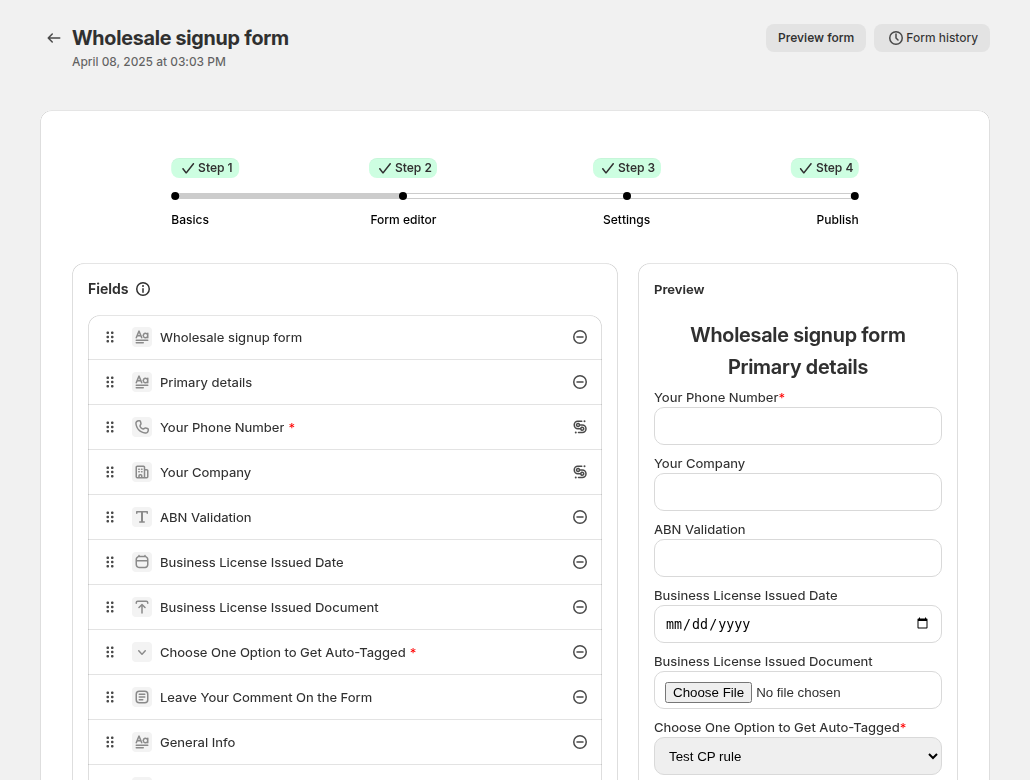
Step 2: Decide whether the field is required
Required means an invalid number blocks the Submit button, so the mistake never reaches your queue. Optional means the applicant can submit even if the check fails, and the reviewer decides. If you sell across borders, use one field per region and a country field with conditional logic (Platinum), or on lower plans label the fields clearly, for example “EU VAT number (if you are in the EU)”.
Step 3: Add approval and a tag
In Settings choose manual approval and assign a tag on approval, such as wholesale. The tag starts your pricing and access rules. Check each application against the documents you collect, such as a licence or certificate. The verify a business tax ID at registration use case shows the full flow, and wholesale registration form with approval covers approval emails and tags.
Step 4: Publish and test with three numbers
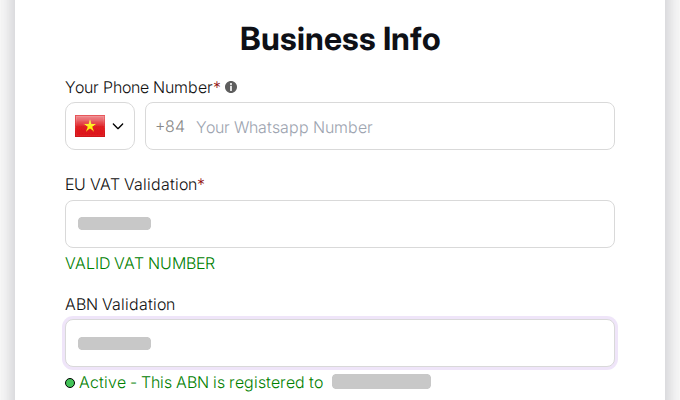
Publish the form and turn on the app embed. Test a valid number, an invalid number and a number from another country. While typing, the applicant sees a message such as a valid number or an active ABN, and an invalid number shows an error.
How to validate a tax ID at the cart
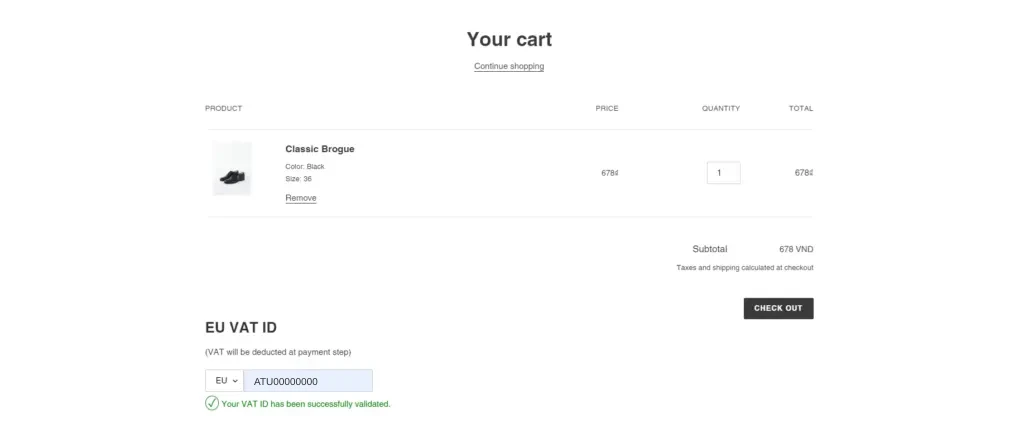
The Tax Exempt box in the cart uses the same checks and then creates an order without tax when the number is valid. You choose the types the buyer can enter, and whether a valid ID is required before the buyer can continue. The full setup, including the EU country limit and the order tag, is in our guide to Shopify EU VAT exemption and the Tax Exempt user guide.
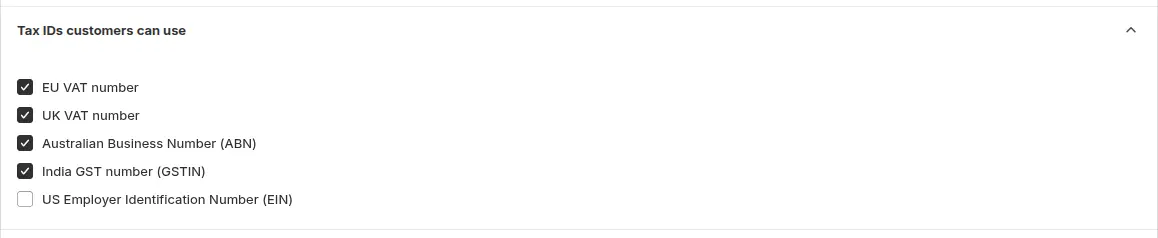
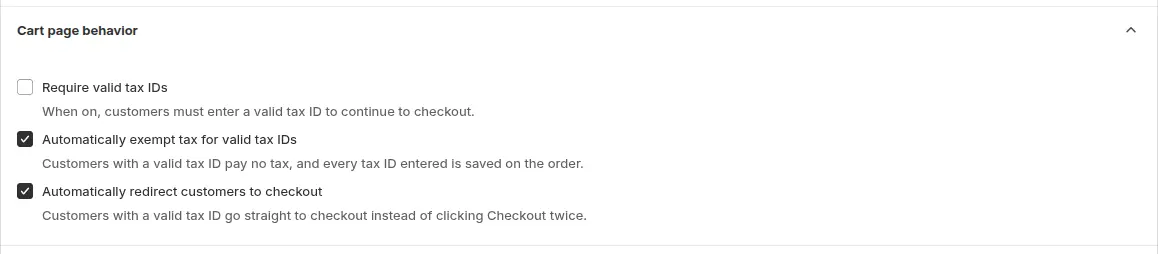
In the cart, the box sits above the checkout buttons, not in Shopify checkout, and a buyer who opens the checkout URL directly skips it. Any failed lookup counts as invalid. The guide above lists these limits in full.
Limits of tax ID validation in BSS B2B Solution
| Limit | What it means | What to do |
|---|---|---|
| No server-side recheck | The number is validated in the buyer’s browser. The app does not validate it again when the form is submitted | Treat the form result as a first check. Review each application and compare the number with the documents |
| Block only when required | On an optional field an invalid number can still be submitted | Mark the field required if you must stop invalid numbers |
| Imports are not checked | Bulk import runs no live tax ID check | Validate imported numbers another way before you trust them |
| Outside services | Lookups depend on VIES, HMRC and other services that can be slow or down. Some answers are cached | Decide a rule for outages, such as asking the applicant to resubmit later |
| Valid is not entitled | A valid number does not show the person applying can act for that company or that an exemption applies | Keep approval as your decision and confirm tax rules with your accountant |
| Plans | Tax ID fields need a paid plan, the EIN field needs Platinum, and Tax Exempt needs Advanced or Platinum | Check the pricing page |
For buyers who cannot enter a number, see exempt tax for customers without a VAT number. To show tax-free prices after approval, see show prices excluding VAT to business buyers.
Tax ID collection checklist
- You listed the countries you sell to and chose one field per tax ID type.
- Fields that must be valid are marked required.
- You test a valid, an invalid and a foreign number on the live form.
- UK buyers use the UK VAT field, not the EU field.
- You compare each number with the documents before you approve.
- Approved buyers get a tag that starts pricing rules.
- You have a rule for what to do when a lookup service is down.
- Imported customers are checked another way.
Shopify tax ID validation: frequently asked questions
Does Shopify validate tax IDs?
The Shopify pages we read describe a Tax ID field on company locations and a company account request form, and mention no check against a tax register. BSS B2B Solution adds live validation for EU VAT, UK VAT, US EIN, Australian ABN and India GST.
How does BSS B2B Solution validate an EU VAT number?
It checks the number against the EU’s VIES service as the buyer types, with a fallback lookup. Norway and Switzerland use a separate lookup. A UK number entered in the EU field is rejected.
Does the form block an invalid tax ID?
Only when the field is marked required. Then Submit is blocked until the number is valid. On an optional field the applicant can submit anyway and you decide during review.
Does the app validate the tax ID again on the server?
No. In our code review we found no server-side recheck on form submission. The check runs in the browser, so review each application before you approve.
Can I validate a US EIN?
Yes, on the Platinum plan. The number must have nine digits, and the storefront checks the XX-XXXXXXX pattern before it calls an EIN lookup service. The IRS page we read does not describe verifying another business’s EIN, so treat the result as an early signal.
How is an Australian ABN checked?
The number is looked up in the Australian business register and must have the status Active. The applicant sees an active message on the form.
Are imported customers validated?
No. Bulk import runs no live tax ID check, so verify imported numbers another way.
What should I do when the check service is down?
Decide a rule in advance, for example asking the applicant to resubmit later, so approvers treat the case the same way. In the cart a failed lookup counts as invalid.
Next steps
Pick the tax ID types you really need, mark them required where an invalid number must stop the form, and test with three numbers. Then read the customer onboarding hub for approval and tagging, and the tax and compliance hub for exemption and tax display.
Install BSS B2B Solution to add tax ID fields, approval, tags and the Tax Exempt cart box. Try it free on a development store.
Install BSS B2B Solution See the appSources
Pages read on October 4, 2026. BSS facts come from the BSS B2B Solution user guide at docs.bss-b2b.solutions and our October 2026 review of the app’s behavior.
- Shopify Help Center: B2B companies and locations
- Shopify Help Center: Company account requests
- Your Europe: check a VAT number (VIES)
- GOV.UK: check a UK VAT number
- IRS: employer ID numbers
- BSS B2B Solution user guide: wholesale registration form
- BSS B2B Solution user guide: Tax Exempt
You may also like

How to Uninstall a Shopify B2B or Lock App Safely: Remove Leftover Theme Code
Some Shopify apps leave code in your theme after you uninstall them. To remove a B2B or lock app safely, duplicate your […]

Shopify Markets and B2B Pricing: Wholesale Prices Per Country and Currency
Shopify Markets control currency, languages and taxes by audience, and B2B catalogs can be assigned per B2B market, with a cap on […]

How to Show Retail Price but Hide Wholesale Price From Guests on Shopify
To show retail prices but hide wholesale prices from guests, keep the retail price as the store price and attach wholesale prices […]