
Shopify Markets and B2B Pricing: Wholesale Prices Per Country and Currency

Shopify Markets control currency, languages and taxes by audience, and B2B catalogs can be assigned per B2B market, with a cap on catalogs. For wholesale prices that differ by country, BSS B2B Solution adds a market condition to its pricing rules. Rule prices are stored in your shop currency and converted at Shopify’s market rate.
Target Custom Pricing, Price List and Volume Pricing rules by Shopify market and customer tag. Free on development stores, 14-day trial on paid plans.
Install BSS B2B Solution See pricingLast updated October 4, 2026. Shopify facts come from the Help Center pages linked in the text, read on that date. BSS B2B Solutions makes BSS B2B Solution, the app in the screenshots. This guide belongs to our complete guide to Shopify B2B and the wholesale pricing hub. The step-by-step setup is in the use case wholesale prices per country with Shopify Markets.
Key takeaways
- A Shopify market can control currency, product availability, theme content, languages, domains and taxes. By default prices convert at the market exchange rate, and you can adjust or fix them per market (Shopify Help Center).
- Native B2B assigns catalogs to B2B markets. Basic, Grow and Advanced allow up to 3 active catalogs across all your B2B markets; Plus is unlimited (Shopify catalogs).
- BSS B2B Solution rules can target one or more markets and combine that with customer tags. Rule prices are in your shop currency and are multiplied by Shopify’s market rate. There are no fixed prices per currency.
- The Multi-Currency module is display only, on the Advanced plan and up. Checkout stays in your store currency or the currency Shopify sets for the buyer’s market.
- Do not promise that buyers pay in the currency they see. Test one order in each market before you launch.
What do Shopify Markets do for wholesale pricing?
Shopify describes markets as a way to customize the store by customer location, customer group, retail location or sales channel. The customizations “control settings, such as currency, product availability, theme content, domains, languages, and taxes” (Shopify Markets). On pricing, Shopify says that “prices are converted automatically using the current market exchange rate,” that you can set exchange rates manually, and that you can “control the prices in different markets using price percentage adjustments, and by setting the product prices by country or region.” Rounding is also available (Pricing in local currencies).
That covers retail well: one catalog, a price for each region. Wholesale adds a second question, which is who gets which price. A distributor in Germany and a retail shopper in Germany share a market, yet should see different prices.
How do Markets and B2B catalogs work together?
Native Shopify B2B sets prices and product availability by assigning catalogs to companies and company locations. When several catalogs apply to the same product, “the lowest price displays to the customer” (Shopify catalogs). Three limits shape a multi-country plan:
- Catalog cap. On Basic, Grow and Advanced you can assign up to 3 active catalogs across all your B2B markets. Plus has no limit and allows catalogs to be assigned directly to companies and locations (Shopify catalogs).
- Markets setup. Shopify’s plan table says that to use B2B catalog features on Basic, Grow or Advanced, “your store must be using new Shopify Markets” (plan features), while the considerations page says “to use B2B with Markets, you must activate it in feature test drive” (considerations). The two pages word it differently, so check your own admin.
- Contextual features. Contextual checkout and contextual storefront customization require Shopify Markets and are limited to Advanced and Plus (plan features).
Three catalogs can run out quickly if you want one wholesale price per country and per buyer group. That is the case where a rule-based app helps. Our guide to Shopify B2B without Plus has the full plan table.
| Need | Native Shopify B2B and Markets | BSS B2B Solution |
|---|---|---|
| Different currency per country | Markets convert prices at the market rate or at a rate you set | Shows converted prices through Multi-Currency (display only); checkout currency stays the store’s or the market’s |
| Wholesale price per country | Assign catalogs to B2B markets, up to 3 active on Basic, Grow and Advanced | A market condition on Custom Pricing, Price List and Volume Pricing rules |
| Different prices for different buyer groups in one market | Catalogs per company or location (direct assignment on Plus) | Customer tag, specific customers, or company location (Advanced and up) combined with the market |
| Fixed price in each currency | Fixed prices by country or region in Shopify’s pricing settings | Not available: rule prices are in shop currency and converted |
| Tax shown per region | A market setting for taxes | Tax Display for display by customer group (separate module) |
How to set wholesale prices per market with BSS B2B Solution
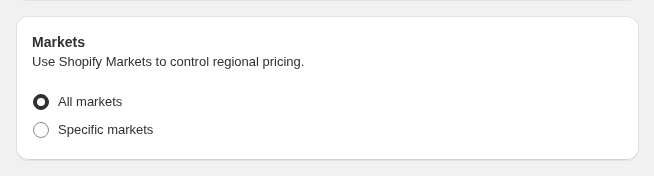
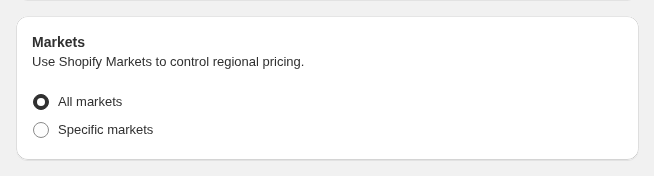
Custom Pricing, Price List and Volume Pricing rules each have a Markets card. With Specific markets, a rule applies only while the shopper is browsing one of the Shopify markets you picked. With All markets, the market is ignored (customer targeting guide). Price List is the app’s own rule type; in our review we found no code that reads Shopify catalogs or price lists, so the two systems do not share data.
Step 1: List the buyer groups and the markets
Write a small grid: each buyer group, each market, and the price or discount for that pair. Keep it short. Every extra combination is a rule you must test.
Step 2: Create the rule and pick the markets
Create a Custom Pricing rule (or a Price List on the Platinum plan for exact prices per product), open the Markets card and choose Specific markets. Select the Shopify markets where the rule should run.
Step 3: Combine it with a customer tag
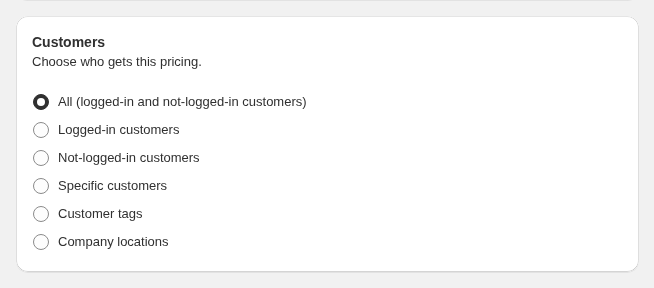
In the Customers card choose customer tags. A buyer with the tag in the selected market gets the rule. The same tag in another market is covered by that market’s rule. Customer tags come from your registration form with approval, so approval starts the pricing; see also customer tag.
Step 4: Repeat for Price Lists and volume tiers
Price List and Volume Pricing rules have the same card, so you can give a market its own exact prices or its own quantity tiers. Rules can overlap, so set the priority (0 to 99, a smaller number wins, compared only within the same module). The use case which B2B rule wins explains the order.
Step 5: Test in each market
Sign in with a test customer that has the tag, switch the storefront to each market (country selector or a market URL), and check the product page, the cart and one test order. Check also a guest and a customer without the tag, who should see retail prices.
How are wholesale prices converted into other currencies?
Rule values are entered in your shop currency. The app multiplies them by the market rate Shopify provides: the storefront script uses Shopify’s currency rate, the draft-order path uses the market’s rate, and the discount function uses the presentment rate. There are no separate fixed prices per currency. If you need an exact price in each currency, the Shopify catalog and market price settings are the place to set it.
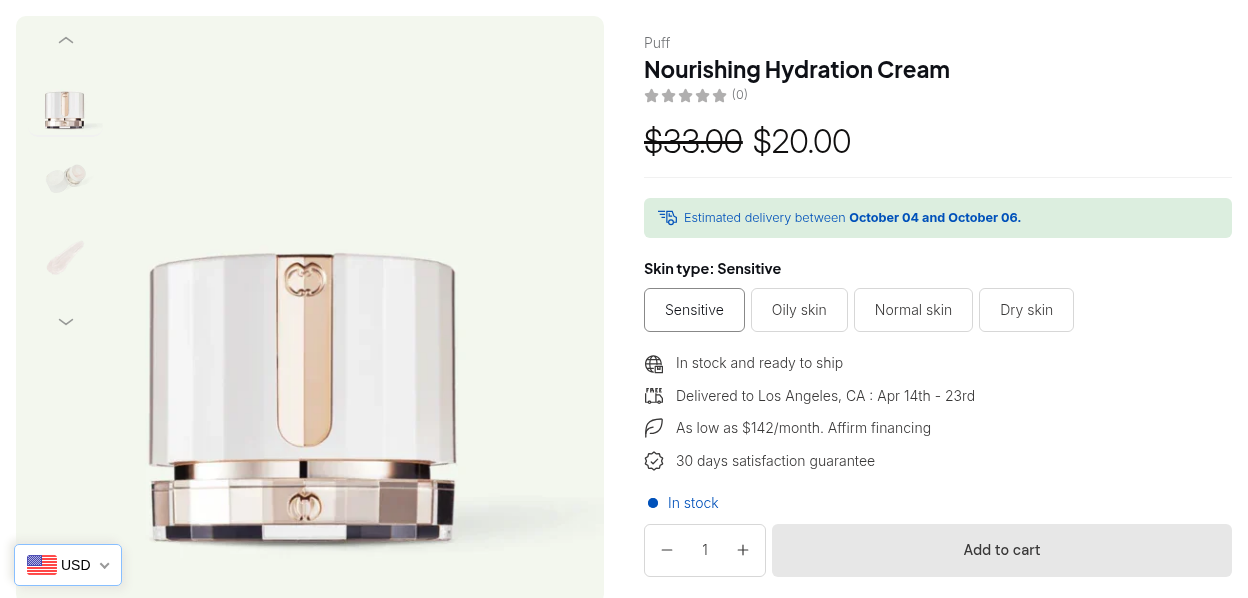
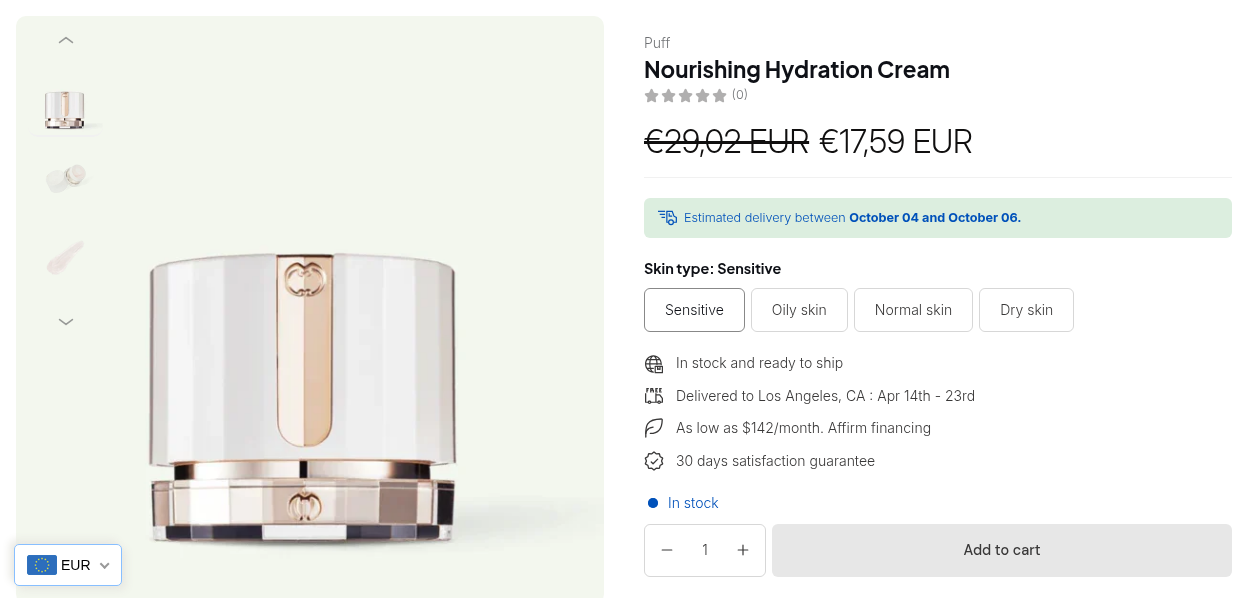
Illustration, not a customer result. A rule sets a case at 20.00 in the shop currency (USD). If Shopify’s market rate for a euro market is 0.90, the buyer sees about 18.00 EUR. If you change the rate, the euro price follows without editing the rule.
What we have not verified. Whether the rate the app reads includes Shopify’s market rounding or price adjustments, and whether the app reads Shopify’s fixed per-market prices, are not confirmed in our review. Test a product with market rounding on, and compare the cart with the product page, before you rely on exact amounts.
The Multi-Currency module is a display tool
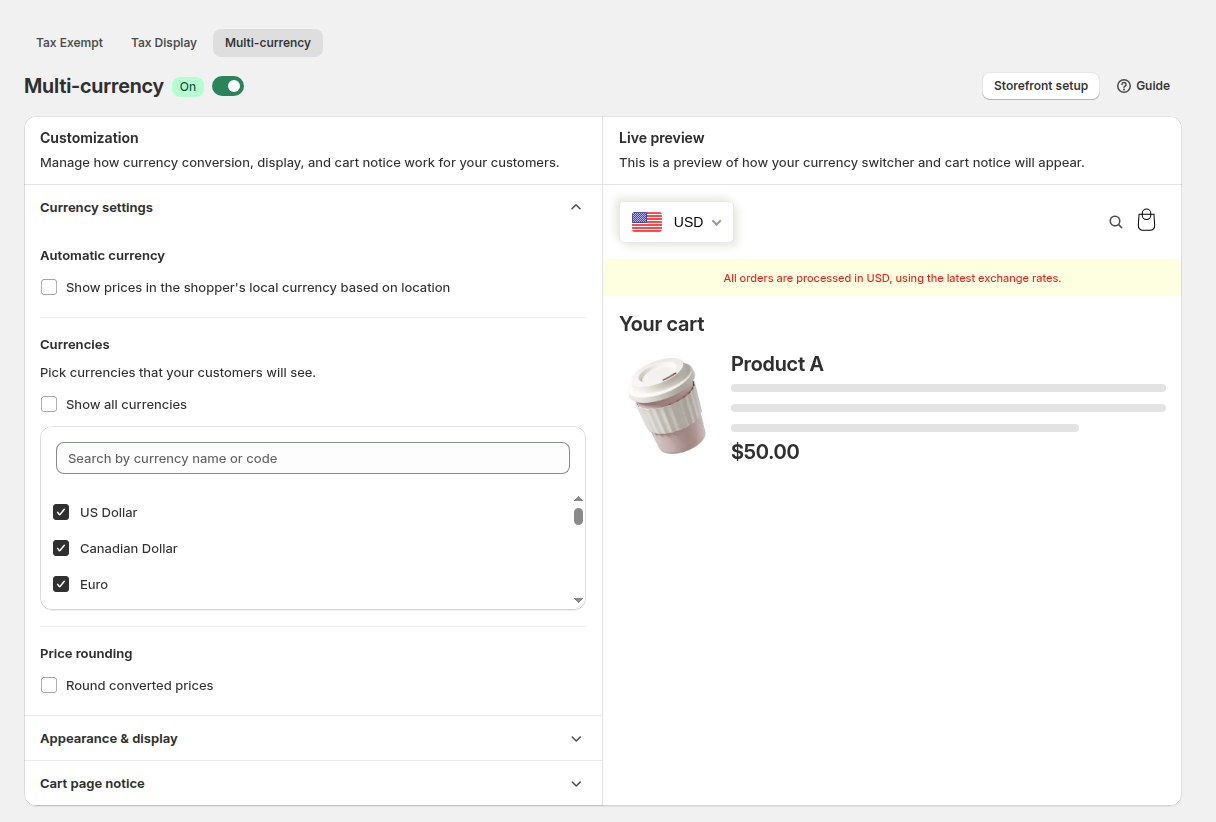
The Multi-Currency module adds a currency switcher that converts prices on your pages, including B2B prices, with optional rounding. It is display only: checkout stays in the store currency or the currency Shopify sets for the market, and the module needs the Advanced plan or higher. Do not tell buyers that they pay in the displayed currency. The multi-currency user guide and the use case show wholesale prices in the buyer currency cover the setup.
Limits of market-based wholesale pricing
| Limit | What it means | What to do |
|---|---|---|
| No fixed price per currency | Rule prices are in shop currency and converted | Use Shopify’s market pricing where an exact local price matters |
| Display-only Multi-Currency | Checkout is in the store or market currency | Add a cart notice, and test an order in each market |
| Rounding unverified | We have not confirmed that Shopify’s market rounding or adjustments feed the app’s rate | Compare product page, cart and order for a few products |
| Point of sale | Rules with a Specific markets condition do not work at POS, and company-location rules do not apply there | Use POS only for rules without these conditions |
| Catalog cap | Native B2B allows 3 active catalogs across B2B markets on Basic, Grow and Advanced | Use app rules for the extra combinations |
| Plans | Price List needs Platinum; company-location targeting and Multi-Currency need Advanced or higher | Check the pricing page |
Order limits can also target a market. Their amounts use the B2B price multiplied by the currency rate. See enforce minimum order quantity and value and remember that those limits run in the storefront.
Multi-market wholesale pricing checklist
- Markets are set up in Shopify and each country maps to the right market.
- You listed buyer groups and markets, and kept the grid small.
- Each rule has a Markets card choice and a customer tag.
- Priorities are set where rules overlap.
- You tested a tagged buyer, a guest and an untagged customer in every market.
- The cart and one order match the product page in each market.
- Multi-Currency, if used, shows a checkout-currency notice.
- Your team knows that there are no fixed prices per currency in the app.
Shopify Markets and B2B pricing: frequently asked questions
How do I set different wholesale prices per country on Shopify?
Natively, assign catalogs to B2B markets: up to 3 active catalogs on Basic, Grow and Advanced, unlimited on Plus. With BSS B2B Solution, create a Custom Pricing or Price List rule, choose Specific markets in the Markets card and add a customer tag.
Does Shopify convert B2B prices into other currencies?
Shopify converts prices automatically using the market exchange rate by default, and lets you set rates manually, adjust prices by percentage or set prices by country or region. See the Shopify page on pricing in local currencies.
Can I set a fixed wholesale price in each currency with BSS B2B Solution?
No. Rule prices are stored in your shop currency and multiplied by Shopify’s market rate. Use Shopify’s market pricing when you need an exact price in a currency.
Do buyers pay in the currency they see?
Not necessarily. The Multi-Currency module is display only. Checkout stays in the store currency or the currency Shopify sets for the buyer’s market.
Which plan do I need for Multi-Currency?
The Advanced plan of BSS B2B Solution or higher. Price List needs Platinum, and company-location targeting needs Advanced or higher. Check the pricing page for the current plans.
Do market rules work at the point of sale?
No. Rules with a Specific markets condition do not work in Shopify POS, and company-location rules do not apply there.
Does Shopify Plus matter for market-based B2B pricing?
On Shopify’s side, Plus lifts the catalog cap and allows direct catalog assignment. BSS B2B Solution rules do not depend on the catalog cap, and we do not state a Shopify plan requirement for the app.
Is Shopify’s market rounding applied to BSS prices?
We have not confirmed it. Compare the product page, cart and a test order for a few products in each market before you rely on exact amounts.
Next steps
Start with two markets and one buyer tag, test the full path, then add more. Related reading: the wholesale pricing hub, personalized B2B wholesale pricing, the Shopify B2B pricing guide, and the catalog glossary entry.
Install BSS B2B Solution to add market and customer-tag conditions to your wholesale pricing rules. Try it free on a development store.
Install BSS B2B Solution See the appSources
Shopify pages read on October 4, 2026. BSS facts come from the BSS B2B Solution user guide at docs.bss-b2b.solutions and our October 2026 review of the app’s behavior.
- Shopify Help Center: Markets
- Shopify Help Center: Pricing in local currencies
- Shopify Help Center: B2B catalogs
- Shopify Help Center: Shopify B2B features by plan
- Shopify Help Center: Requirements and considerations for using B2B
- BSS B2B Solution user guide: How customer targeting works
- BSS B2B Solution user guide: Show prices in different currencies
You may also like

How to Uninstall a Shopify B2B or Lock App Safely: Remove Leftover Theme Code
Some Shopify apps leave code in your theme after you uninstall them. To remove a B2B or lock app safely, duplicate your […]

How to Collect and Validate a Tax ID (EIN, ABN, GST, UK VAT) on Shopify
Shopify has a Tax ID field on company locations, but the pages we read describe no check against a tax register. BSS […]

How to Show Retail Price but Hide Wholesale Price From Guests on Shopify
To show retail prices but hide wholesale prices from guests, keep the retail price as the store price and attach wholesale prices […]