
How to Hide Collections and Products by Customer Tag, Country or IP on Shopify

To hide a Shopify collection from certain customers, you need something that checks who is browsing. With BSS B2B Lock you pick the collection or products, then allow only customers with a tag, a login, a country or an IP address. Everyone else sees a message or no product at all.
Lock collections, products, prices or the whole store by customer tag, login, country or IP. 7-day free trial on paid plans, and a free plan that locks the entire website.
Install BSS B2B Lock See the appLast updated October 4, 2026. Shopify facts come from the Help Center pages linked in the text. BSS B2B Solutions makes BSS B2B Lock, the app in the screenshots. This guide sits in the access control hub of our complete guide to Shopify B2B.
Key takeaways
- Shopify decides product availability by sales channel, market and B2B catalog (Shopify Help Center). Hiding a collection by customer tag, country or IP needs theme code or an app.
- BSS B2B Lock has a Collections target and a Products target. You choose who gets in with rules: tagged customers, signed-in customers, Shopify Market, country, region or IP.
- Country, region and IP rules run in the visitor’s browser. They are a convenience, not a security control, so do not use them for anything you must keep private.
- A free plan locks the entire website only. Collection and product locks need a paid plan or the 7-day trial.
- Always test as a guest, an untagged customer, a tagged customer and a visitor from another country.
Can you hide a collection from certain customers in Shopify?
Not with a single built-in switch, as far as the Shopify pages we read describe. Shopify lets you change sales channel visibility with the bulk editor (product availability), and catalogs “control which products are available in each market, and at what price” (managing markets). For B2B, catalogs are assigned to companies and company locations (B2B catalogs). Those controls work per market or per company location. They do not describe a rule such as “show this collection to customers tagged gold“.
Tags exist and are useful: Shopify says you can use them to sort customers into categories and to build customer segments (customer tags). In theme code, customer.tags returns the tags, but the customer object is nil when nobody is logged in (Liquid customer object). A theme edit that checks a tag has to cover collection cards, product cards, product pages, search and menus. That is the job an access app takes over.
| Approach | Decides by | Where you set it | Watch out for |
|---|---|---|---|
| Sales channel visibility | Channel | Bulk editor in the Shopify admin | Same for every visitor of that channel |
| Markets and catalogs | Market | Shopify Markets and catalogs | Not by customer tag. Basic, Grow and Advanced get up to 3 active catalogs across B2B markets (plan features) |
| B2B company catalogs | Company location | Companies in the Shopify admin | Direct company catalogs are Plus only (plan features) |
| Liquid in your theme | Anything you code, such as a tag | Theme files | You maintain every spot that lists the item |
| BSS B2B Lock | Tag, login, passcode, country, region, IP, Market and more | Lock rules in the app | Storefront rules, with the limits listed below |
What you can hide with BSS B2B Lock
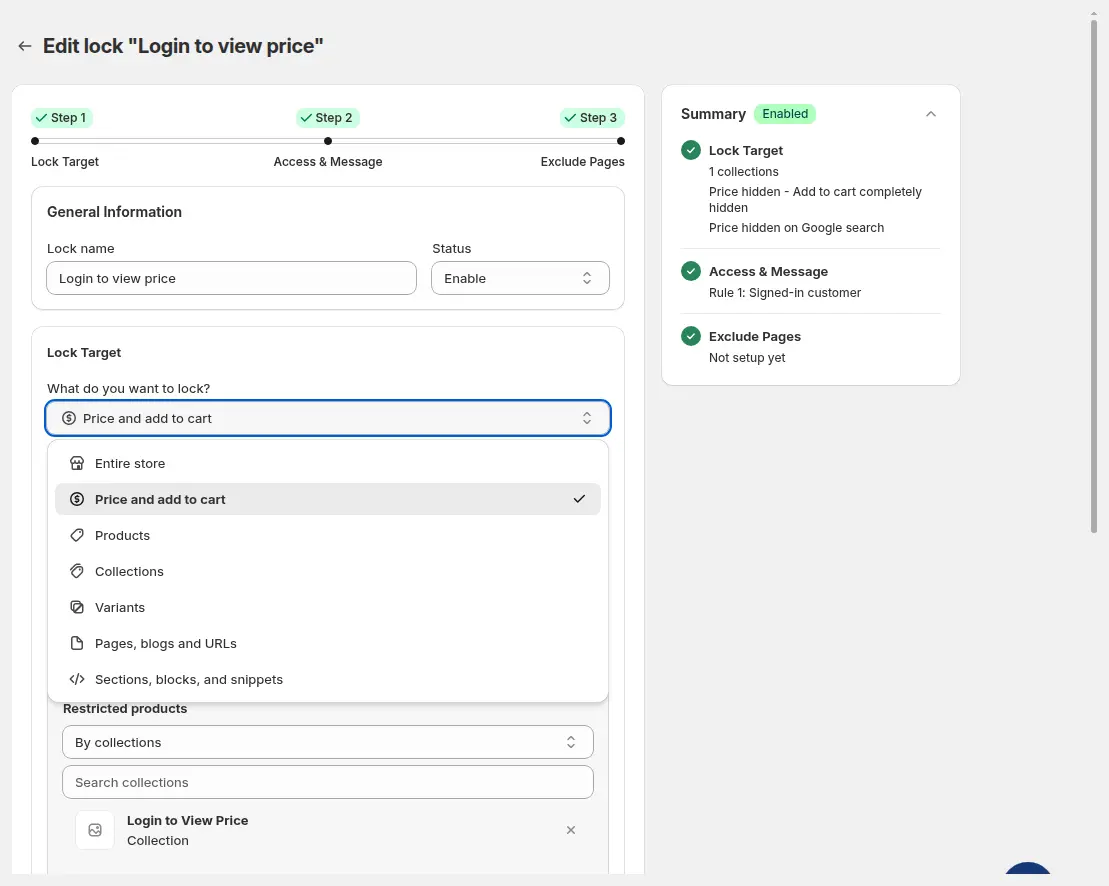
A lock has three steps: Lock Target, Access and Message, then Exclude Pages. Step 1 offers seven targets (user guide: lock targets). Two of them answer this question.
| Target | What you choose | What a blocked visitor sees |
|---|---|---|
| Collections | All or specific collections, then four visibility settings: collection cards, product cards, product pages, navigation menu (all ticked by default) | Hidden cards and pages, plus the lock message where a page is opened |
| Products | All, by tags, by collections or specific products | Fully Hide Product removes the item from listings and its page; Only lock product page keeps it listed but shows Access Denied |
| Variants | Variant options to match, such as a pack size | The product, minus the hidden variants |
| Price and add to cart | Hide price, Add to cart, or both | The product with a lock message in place of the price. See how to hide prices on Shopify |
How to hide a collection from customers without a tag
These steps follow the BSS user guide: Hide wholesale collections from guest users. Try them on a development store first.
Step 1: Tag the customers who should see the collection
Add a tag such as wholesale to each approved customer in Shopify. Shopify says tags are not case sensitive (customer tags). You can tag by hand, tag on approval from a registration form, or let BSS B2B Solution do it with Auto Tag rules and form tags. Auto Tag runs on registration and order events and does not remove a tag when a customer stops matching, so plan removals yourself or with its bulk job. The customer tag glossary entry has the basics.
Step 2: Create a lock on the Collections target
- In Shopify admin open Apps, BSS B2B Lock, Locks and click Add lock rule.
- Pick Create my own lock and name the rule, for example “Hide wholesale collections”.
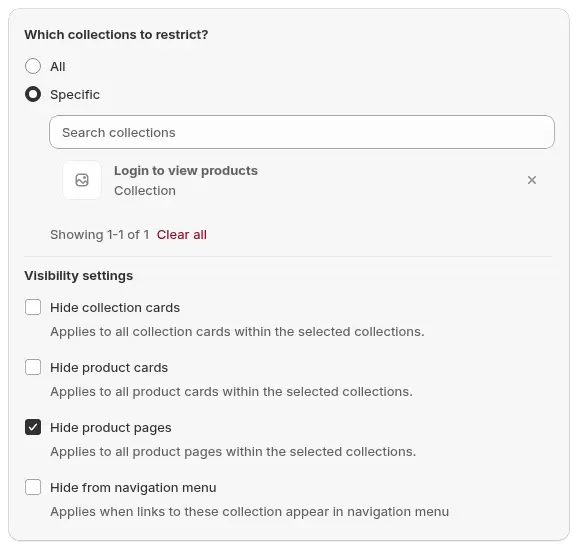
- Under What do you want to lock? choose Collections, then Specific.
- Open Search collections, tick your wholesale collections and click Select.
- In Visibility settings, keep what you need: collection cards, product cards, product pages and the navigation menu. The guide lists all four as ticked by default.
- Click Next.
Step 3: Allow customers with the tag
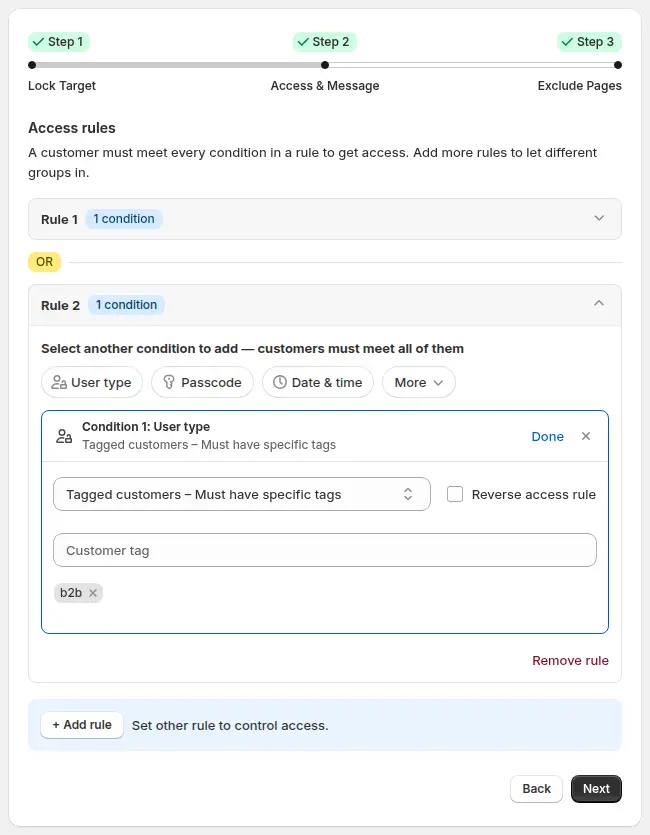
- In Access and Message click the User type chip in Rule 1.
- Choose Tagged customers, Must have specific tags and type the tag.
- To let a second group in, click Add rule. Separate rules are joined by OR, conditions inside one rule must all match (how access rules combine).
- Edit the text blocked visitors see from Customize message in the Preview.
- Click Next, exclude any page that must stay public, then Save.
Use the Collections target with a Tagged customers rule. Add BSS B2B Solution to tag customers when you approve their application.
Install BSS B2B Lock BSS B2B SolutionHow to hide specific products by customer tag
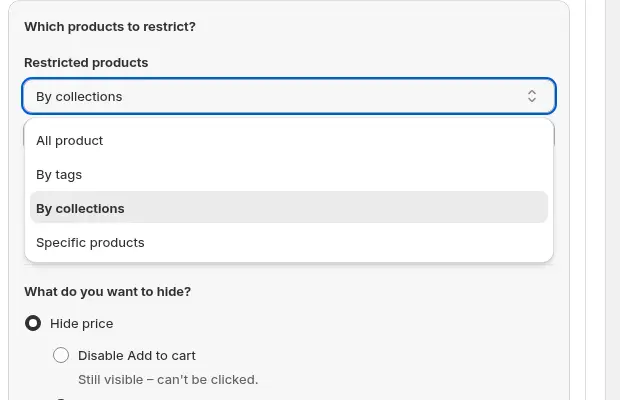
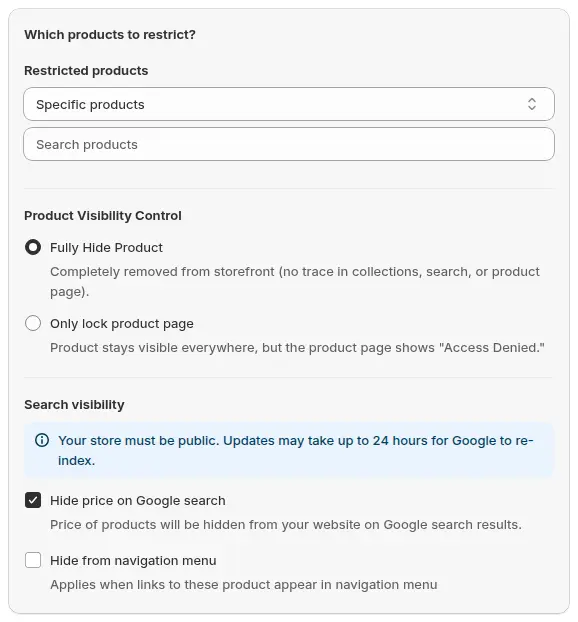
Use the Products target when only some items in a mixed collection are restricted. Under Restricted products you can pick all products, products with certain tags, products in certain collections, or specific products.
Then choose Product Visibility Control. Fully Hide Product removes the item from the storefront for visitors who do not match. Only lock product page keeps it in listings and shows an Access Denied message on its page. Hide from navigation menu is ticked by default and applies to both. Step 2 is the same Tagged customers rule as above (user guide: show products only to tagged customers).
For tiers, make one lock per tier and add the higher tier as a second rule on the lower lock, so gold sees silver products as well. The use case Silver, Gold and Platinum wholesale tiers with tags shows the pattern, and Show specific products only to tagged customers walks through one tier.
How to hide a collection by country or IP
Step 2 of the lock editor has a Location group. Its conditions are live for collection and product locks: Shopify Market, IP, Region and Country (we checked the app’s condition list and its storefront code). In the country picker you tick the allowed countries. Tick Reverse access rule on a condition to block those countries instead (user guide: Location condition).
Know how the check works before you rely on it. For IP, region and country rules, the locked page loads first with a spinner. The visitor’s browser then asks a third-party service for its location, the app checks the result, the browser records a cart attribute and the page reloads. If the lookup fails, the visitor stays locked. Because the browser supplies the location, a visitor can change it, for example with a VPN or by editing cart attributes. Treat these rules as a way to tailor a catalog, not as secure geo-blocking.
If you sell different catalogs per market, the Market condition ties the rule to the market a visitor sees. Our use case wholesale prices per country with Shopify Markets covers the pricing side.
Checklist: test before you go live
- Visit the collection URL, a product URL and the search page as a logged-out guest.
- Log in as a customer without the tag and as one with the tag.
- Check the navigation menu, homepage sliders and featured collections for gaps or leftover links.
- For country or IP rules, test from an allowed and a blocked location and watch for the reload.
- Open the Lock list and confirm the rule is on and the target is right.
- Write a lock message that tells buyers how to get access, with a link to your application form.
Limits to know before you launch
| Limit | What it means | What to do |
|---|---|---|
| Plan | The free plan locks the entire website only. Collection and product targets need a paid plan or the 7-day trial | Check pricing on the App Store listing first |
| Where it runs | Rules are written into your theme code. Headless storefronts are not supported | Test on your live theme after any theme change |
| Page HTML | For page, product and collection locks the app replaces the main content with the lock message, so it is not in the HTML. Age verification is the exception | Do not use age gates to hide products |
| Other endpoints | We have not verified whether product JSON or the Storefront API still return hidden items | Do not store secrets in product data |
| Location rules | Browser-side and spoofable | Do not call them secure geo-blocking |
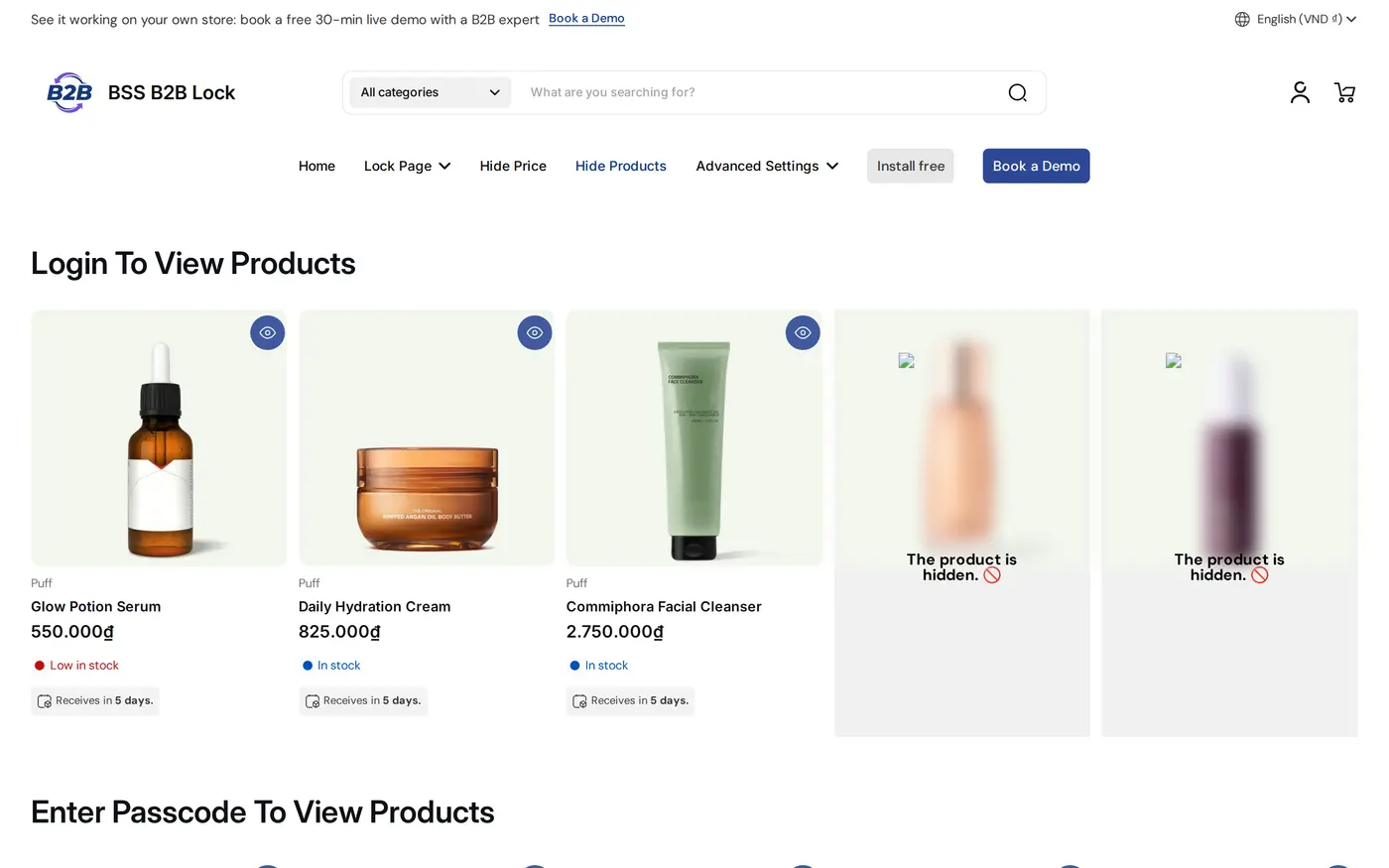
| Empty tiles | Hidden cards can leave gaps or placeholder tiles, depending on the theme (user guide) | Keep B2B items in their own collection and lock the collection |
| Rule limits | 10 rules per lock and 10 conditions per rule | Use tags instead of long lists |
In short, the app restricts storefront access through theme code. That is enough to keep wholesale items away from casual visitors. It is not a guarantee against someone who knows how to query your store directly. For prices on a public catalog see Shopify hide price, for login-based access see Shopify B2B login, and for hiding a product for everyone with Shopify’s own settings see how to hide a product on Shopify. A gated catalog is the general term, and a secret link is another way to share a collection (use case).
Hide collections on Shopify: frequently asked questions
How do I hide a collection from certain customers on Shopify?
Install an access app such as BSS B2B Lock, create a lock on the Collections target, pick the collection and add a rule that allows customers with a tag. Visitors who do not match see a message or no product cards.
Can I hide products from customers who do not have a tag?
Yes. Use the Products target in BSS B2B Lock, restrict products by tag, collection or one by one, and add a Tagged customers rule. Choose Fully Hide Product to remove them from the storefront for everyone else.
Can I hide a collection by country or IP address?
BSS B2B Lock has Country, Region, IP and Market conditions. The IP, region and country checks run in the browser through a third-party lookup, so they can be bypassed. Use them to tailor a catalog, not to enforce a legal restriction.
Does the lock work for guests who are not logged in?
Yes. A guest has no tag, so a Tagged customers rule keeps them out. Add the Signed-in customers condition if any logged-in customer should get in. The customer object in Liquid is nil when nobody is logged in.
What does a blocked visitor see?
Either a lock message that you write, or hidden product cards, depending on the visibility settings you chose. Some themes show a placeholder tile where a card was hidden, so test your grid.
Is a hidden collection really hidden from Google?
We have not verified search engine behavior for hidden collections, so check your own store in Search Console. Hide price on Google search is a separate option for prices only. Updates can take up to 24 hours.
Which plan do I need for collection and product locks?
A paid BSS B2B Lock plan or the 7-day trial. The free plan locks the entire website only. Plans are priced by your Shopify plan, from $9.99 per month on Basic, as of October 4, 2026.
Is this the same as Shopify catalogs?
No. Shopify catalogs control products and prices by market or company location. BSS B2B Lock rules go by who is browsing, such as a tag, login, country or IP. You can use both together.
Next steps
Start with one wholesale collection, one tag and a clear lock message, then widen the rules. Read the access control hub for password, request access and checkout options, and see hide wholesale collections from guests for a worked example.
BSS B2B Lock rates 4.9 from 651 reviews on the Shopify App Store (as of October 4, 2026). Pair it with BSS B2B Solution to tag approved wholesale customers.
Install BSS B2B Lock See the appSources
Shopify pages read on October 4, 2026. BSS facts: BSS B2B Lock user guide at docs.bss-b2b.solutions, our October 2026 review of the app’s behavior, and the Shopify App Store listing (as of October 4, 2026).
- Shopify Help Center: Product availability
- Shopify Help Center: B2B catalogs
- Shopify Help Center: Shopify B2B features by plan
- Shopify Help Center: Managing markets
- Shopify Help Center: Customer tags
- shopify.dev: Liquid customer object
- BSS B2B Lock user guide: Lock content targets
You may also like

How to Uninstall a Shopify B2B or Lock App Safely: Remove Leftover Theme Code
Some Shopify apps leave code in your theme after you uninstall them. To remove a B2B or lock app safely, duplicate your […]

Shopify Markets and B2B Pricing: Wholesale Prices Per Country and Currency
Shopify Markets control currency, languages and taxes by audience, and B2B catalogs can be assigned per B2B market, with a cap on […]

How to Collect and Validate a Tax ID (EIN, ABN, GST, UK VAT) on Shopify
Shopify has a Tax ID field on company locations, but the pages we read describe no check against a tax register. BSS […]