
Shopify Companies and Catalogs vs Customer Tags: Which B2B Model Should You Use?

Use Shopify companies and catalogs when each buyer is a business with its own locations, tax settings and payment terms, and you need three catalogs or fewer. Use customer tags when many buyers share a price tier or you sell B2B and B2C from one store. Most wholesale stores end up using both.
BSS B2B Solution rules can target a customer tag, a specific customer or a company location, so you pick the model per feature. Free on development stores, 14-day trial on paid plans.
Install BSS B2B Solution See pricingLast updated October 4, 2026. Shopify facts come from the Help Center pages linked in the text, read on that date. BSS B2B Solutions makes BSS B2B Solution, the app in the screenshots. This guide is part of our complete guide to Shopify B2B and of the wholesale pricing hub. For what each Shopify plan includes, see Shopify native B2B vs Plus.
Key takeaways
- A company is the business, a location is the place you sell to, and a catalog sets products and prices. Tax IDs, payment terms and permissions sit on the location (Shopify Help Center).
- On Basic, Grow and Advanced you can have 3 active catalogs across all B2B markets. Catalogs assigned directly to a company location are Plus only (plan table).
- A customer tag is just a label on a customer profile. It becomes a pricing or access rule only when an app, a segment or a Flow reads it.
- BSS B2B Solution price rules can use tags, specific customers or company locations. Company-location targeting needs the Advanced plan or higher. Net Terms and order limits do not target company locations.
- Do not mix two price sources for the same buyer group without a test. Pick one owner of price per group, then use the other model for terms, tax or access.
What is the difference between Shopify companies and customer tags?
Shopify defines a company as “the parent organization for one or more company locations” and a company location as “the business that you’re selling to in a B2B transaction” (Shopify Help Center). Each location can carry its own tax ID and tax exemptions, addresses, catalogs, payment terms, customer permissions and checkout settings. A buyer who can order for more than one location is asked to choose which one when they sign in.
A customer tag is a lighter idea. Shopify describes tags as labels that “organize your customer profile list” and that can also build customer segments (Shopify Help Center). A tag has no price, terms or tax setting of its own. It only means something because another feature reads it: a segment, an automation, or an app rule such as “give customers tagged wholesale this price”. In glossary terms, see company location, catalog and customer tag.
Companies and catalogs versus customer tags at a glance
| Companies, locations and catalogs (native) | Customer tags (with BSS B2B Solution rules) | |
|---|---|---|
| What a buyer is | A company with one or more locations, plus customer contacts | A normal Shopify customer carrying a tag such as wholesale |
| Where prices come from | A catalog, assigned to a B2B market (all plans) or to a company location (Plus only) | A BSS price rule: Custom Pricing, Price List or Volume Pricing. These are app-owned rules, not Shopify catalogs |
| How many groups | 3 active catalogs across B2B markets on Basic, Grow and Advanced. Unlimited on Plus | Not limited by Shopify’s catalog cap. The Free plan allows 1 Custom Pricing rule |
| Payment terms | Set per company location, Net 7 to Net 90 and more | BSS Net Terms for logged-in customers, specific customers or tags. Not for company locations |
| Tax ID and exemptions | Set per location (collect, don’t collect, collect unless exemptions apply) | BSS Tax Display and Tax Exempt have an Apply to customers setting. Tax Exempt works per order, from the cart page |
| Sign-in | New customer accounts required. Legacy accounts cannot be used for B2B orders | Any logged-in customer account. Rules read the tag when the page loads |
| B2B and B2C in one store | Possible in a blended store. A blended store cannot be gated to B2B only | Natural fit: untagged shoppers see retail, tagged shoppers see their rule |
| Setup effort | Create each company and location, then assign a catalog | Tag a customer once. A registration form or Auto Tags rule can add the tag |
What do Shopify companies and catalogs give you?
Companies and locations are available on Basic, Grow, Advanced and Plus. So are quantity rules, quantity price breaks, net terms and the quick order list (Shopify plan table). Shopify says the foundation of B2B is included at no extra cost, which changed in April 2026 (what changed, in the pillar guide).
How catalogs set prices
A catalog decides which products a buyer can order and at what price. To create one you open Markets, then Catalogs, click Create catalog, pick all or specific products, set an overall percentage adjustment or fixed prices, and change the status to Active (Shopify Help Center). Fixed prices override the overall adjustment. If several catalogs give a buyer different prices for one product, Shopify shows the lowest price (Shopify Help Center).
The two limits that decide the model
- Three active catalogs on Basic, Grow and Advanced. They are counted across all your B2B markets. Four price levels for four buyer groups already pass the cap.
- No direct company catalogs below Plus. On Basic, Grow and Advanced you assign catalogs to B2B markets. On Plus you can assign catalogs directly to a company or location, up to 25 per location (Shopify Help Center).
Also check the requirements. “You must activate customer accounts. You can’t use legacy customer accounts for B2B orders and customers.” and “To use B2B with Markets, you must activate it in feature test drive.” (Shopify Help Center). Shopify also lists accelerated checkouts, local delivery, pickup points, tipping and subscriptions as incompatible with B2B orders.
What companies are good at
Companies shine when buyers are real organizations: several branches, different billing and shipping addresses, a tax ID per location, payment terms per account, and staff with different permissions. Shopify allows up to 10,000 locations and 10,000 customers per company, and up to 50 customers per location (Shopify Help Center). Net terms are the clearest example: you set Net 30 on the location and every order from it carries the term. Our Net 30 guide walks through it.
What do customer tags give you?
Tags make a group out of customers who have nothing else in common than how you treat them: approved wholesalers, a Silver or Gold tier, buyers from one sales rep, or tax-exempt accounts. They need no company, no location and no catalog slot.
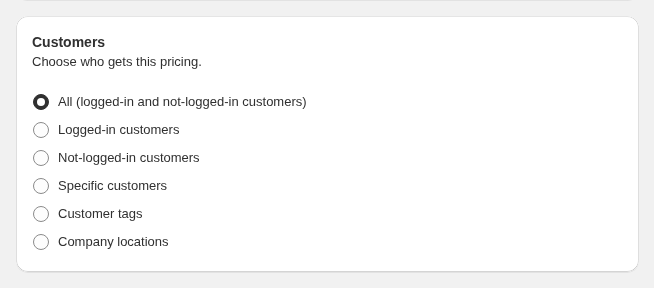
Here is how BSS B2B Solution reads them. A rule set to Customer tags matches logged-in customers who have at least one of the tags you enter. Capitalization does not matter, spaces around a tag are ignored, and one matching tag is enough. You cannot require two tags at once, but you can exclude a tag, for example give a price to every logged-in buyer except accounts tagged retail (how customer targeting works).
How tags get onto customers
- Registration approval. The form can add a tag when you approve an application. The tag is added to the Shopify customer the moment you approve (registration form guide).
- Auto Tags. Rules add or remove tags on events such as customer created or order created. Existing customers are not tagged retroactively, and a customer is not untagged automatically when they stop matching a rule.
- By hand or in bulk. Shopify lets you tag from the customer profile or in bulk (Shopify Help Center).

Two behaviors to plan for. A new tag shows up after the buyer’s next page load, and tags from Auto Tags are added in the background, so check the Auto Tags history before you assume a rule failed. Shopify also notes that a merged customer profile cannot carry more than 250 tags (Shopify Help Center).
Which BSS features can target tags, customers and company locations?
The answer is not the same for every module, so choose the model feature by feature. This table follows the BSS user guide and our October 2026 review of the app.
| Feature | Tags and specific customers | Company locations | Plan notes |
|---|---|---|---|
| Custom Pricing, Volume Pricing | Yes | Yes, and you can exclude locations | Company-location targeting: Advanced and up |
| Price List | Yes | Yes | Platinum |
| Order limits, shipping rate | Yes | No | Order limits: Advanced and up |
| Quantity increments, extra fee, discount codes, BOGO | Yes | No | Quantity increments: Advanced and up |
| Net Terms | Logged-in customers, specific customers or tags only | No | Advanced and up |
| BSS B2B Lock | Signed-in, tagged, specific customers, request access | Yes: company name, company location, Shopify B2B customer | Paid plan for most targets |
| BSS B2B Quote | Tags and specific customers | Company customer types need the Enterprise plan; company-location catalogs need Shopify Plus | See the Quote and Shopify Plus B2B guide |
Two details matter. Selecting a whole company in a rule covers its current locations only, so edit the rule after you add a location. And if your store still uses legacy customer accounts, the app recognizes a company contact only after you send them B2B access from their customer profile. At Shopify POS, company-location rules never match.
Which model should you use? A decision guide
| Your situation | Use | Why |
|---|---|---|
| Each buyer is an organization with several locations, tax IDs or Net terms of its own | Companies and locations | Terms, tax and permissions live on the location |
| Up to 3 price levels and buyers already set up as companies | Native catalogs | No extra app needed for price |
| More than 3 price groups on Basic, Grow or Advanced | Tags with BSS price rules, or Shopify Plus | The native catalog cap is reached. Plus lifts it |
| You sell B2B and B2C from one store | Tags, plus companies where terms matter | Untagged shoppers keep retail prices without a second store |
| Buyers apply through a form and you approve them | Tags for pricing; companies if you need terms or catalogs | BSS approval tags a customer. It does not create a Shopify company |
| You want to hide prices or products from guests | Tags or company conditions in BSS B2B Lock | Lock reads tags, customers and company conditions |
Can you use both?
Yes, and many stores should. A common split is companies for the accounts that need terms or their own tax settings, and tags for price tiers and access. Keep one rule: one owner of price per buyer group. We have not documented how a BSS price rule and a native catalog price combine for the same buyer, so test with a test customer before you rely on both. Our Silver, Gold and Platinum tiers use case shows tags carrying price tiers, and B2B and B2C on one store covers the blended setup.
What about applications and approval?
Shopify’s own route is the Shopify Forms app: a submitted form creates a company, a company location and a customer for review, and new companies cannot order until you approve them in Customers, Companies, Ordering not approved. It cannot add a customer to an existing company, and the form is not available to logged-out visitors in a gated store (Shopify Help Center). BSS registration forms approve a customer and can add a tag, with tax ID fields and file upload, but they do not create a Shopify company. If you need native catalogs for an approved buyer, create the company yourself after approval.
How to set up the tag model with BSS B2B Solution
- Turn on the B2B Solution app embed in your live theme and save.
- Create a registration form, or an Auto Tags rule, that adds one tag such as
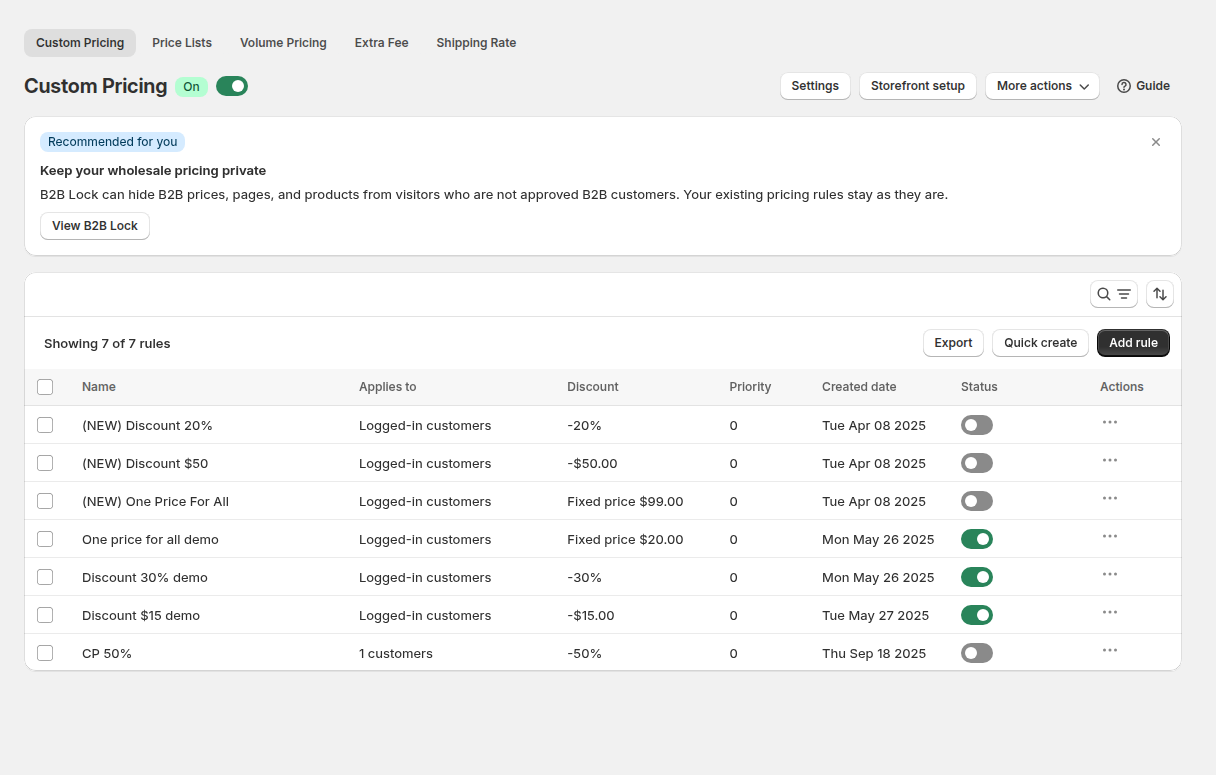
wholesale. Keep tag spelling consistent. - In Custom Pricing, add a rule, set Apply to customers to Customer tags, enter the tag, choose products and a price adjustment type, and save.
- Check the rule list: audience, priority and status. Priority runs from 0 to 99 and the lowest number wins when rules of the same type overlap.
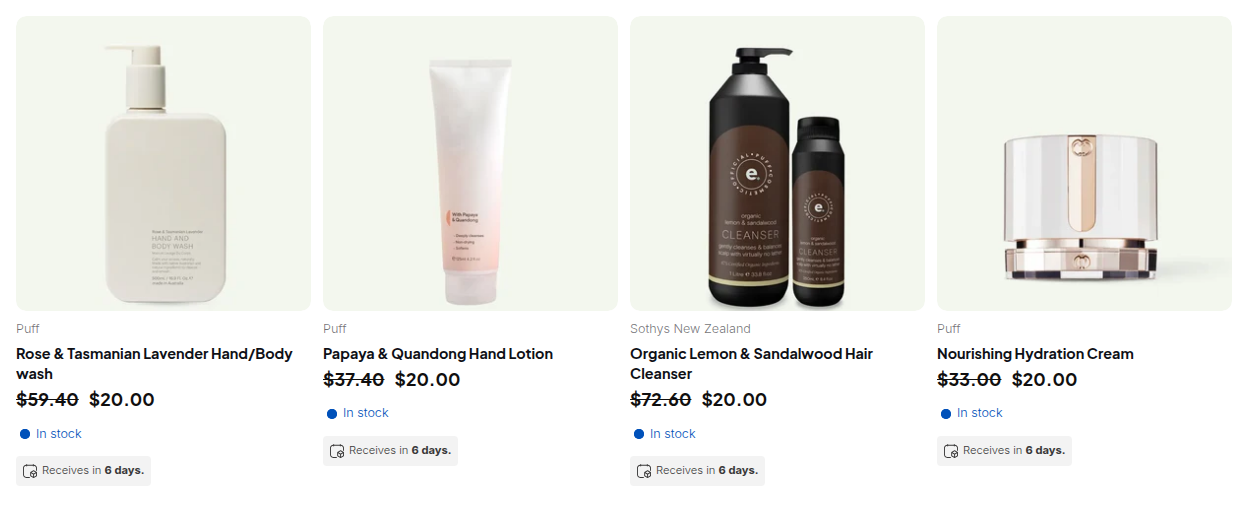
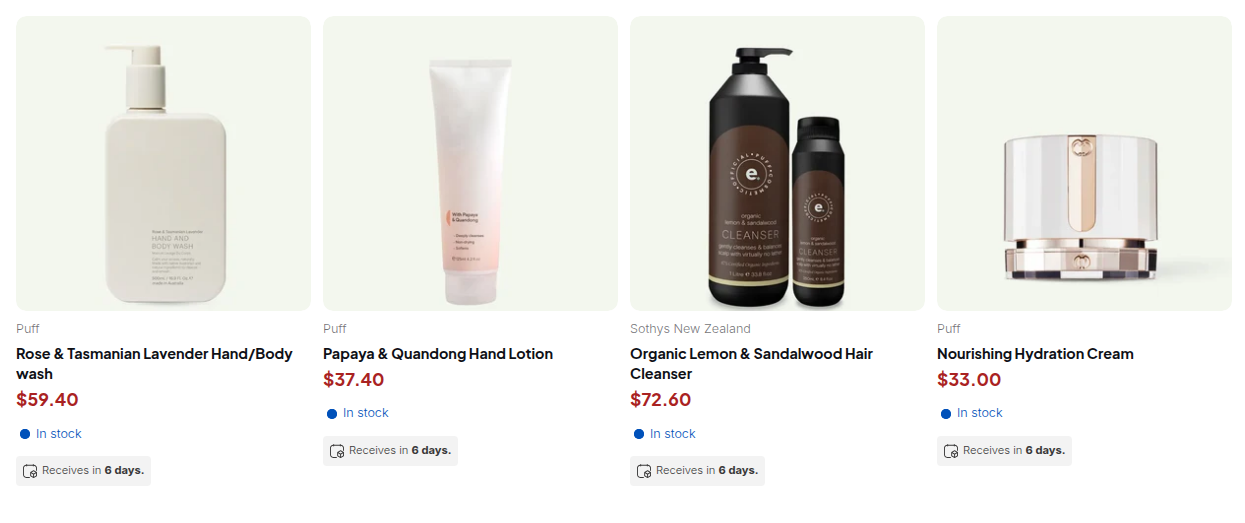
- Create a test customer with the exact tag, sign in in a private window and open a covered product. Sign out and confirm the price returns to retail.
How to set up the company model in Shopify
- Activate new customer accounts and check the requirements.
- In Customers, Companies, create the company and a location with billing and shipping details, then assign a customer contact.
- Set the location’s tax ID, tax settings and payment terms.
- In Markets, Catalogs, create the catalog, set prices and mark it Active. Assign it to a B2B market, or to the location on Plus.
- Follow Shopify’s own advice and test: create a test customer and log in before you invite buyers.
Limits to know before you choose
- A tag is not security. BSS rules run in the storefront, so treat them as visibility controls. Anyone with admin access can edit tags.
- Cart rules are not checkout rules. BSS Net Terms, order limits and Tax Exempt work from the cart page, and a direct checkout URL skips them.
- BSS Price Lists are not Shopify catalogs. They live in the app, so they do not appear under Markets, Catalogs.
- No automatic untag. A customer keeps a tag until you or a rule removes it. Review tags when a buyer stops qualifying.
- Shopify can change plan limits. Confirm the catalog cap and Plus features in the Help Center before you decide.
Companies, catalogs and customer tags: frequently asked questions
Do I need Shopify companies to offer wholesale prices?
No. Native catalogs need buyers set up as companies, but BSS B2B Solution rules can price by customer tag or specific customer without any company. Companies add value when you need per-location terms, tax settings or permissions.
Can I use Shopify catalogs without Shopify Plus?
Yes, with limits. Basic, Grow and Advanced allow up to 3 active catalogs across all B2B markets, assigned to markets. Assigning a catalog directly to a company or location is a Plus feature.
Are BSS Price Lists the same as Shopify catalogs?
No. Price Lists, Custom Pricing and Volume Pricing are rules stored and managed by the app. They do not create or change Shopify catalogs.
Can I use customer tags and companies together?
Yes. A customer can belong to a company and carry a tag. Test the combination first, because we have not documented how a BSS price rule and a native catalog price combine for the same buyer.
Does approving a wholesale registration create a Shopify company?
Not with BSS registration forms. Approval creates or updates the customer and can add a tag. Shopify Forms, by contrast, creates a company, a location and a customer for review.
How many tags can a Shopify customer have?
Shopify says the combined tags on a merged customer profile cannot exceed 250. Tags are case-insensitive. Keep a short, consistent naming scheme such as wholesale, silver and gold.
Does BSS Net Terms work for company locations?
BSS Net Terms targets logged-in customers, specific customers or customer tags, not company locations. For terms set per location, use Shopify’s native payment terms.
Which model is better for a store that sells to both consumers and businesses?
Tags are the simpler fit, because untagged shoppers keep seeing retail prices. Shopify notes that a blended store cannot be gated to B2B customers only, so use a lock or a dedicated store if you need to hide the catalog.
Next steps
List your buyer groups and mark which need their own terms or tax settings. Those are your companies. Everything else can ride on a tag. Then read the wholesale pricing hub, the customer onboarding hub and the use case give tagged customers special prices. The buyer group glossary entry explains the term.
Install BSS B2B Solution to build price rules by tag, customer or company location and test them with a test customer before you pay.
Install BSS B2B Solution See the appSources
Shopify pages read on October 4, 2026. BSS facts: BSS B2B Solution user guide at docs.bss-b2b.solutions and our October 2026 review of the app’s behavior.
- Shopify Help Center: Companies, locations and contacts
- Shopify Help Center: B2B catalogs and pricing
- Shopify Help Center: Creating and managing B2B catalogs
- Shopify Help Center: Shopify B2B features by plan
- Shopify Help Center: Requirements and considerations for using B2B
- Shopify Help Center: Customer tags
- Shopify Help Center: Company account requests
- Shopify Help Center: Blended and dedicated B2B stores
- BSS B2B Solution user guide: How customer targeting works
- BSS B2B Solution user guide: Give tagged customers special prices
You may also like

How to Uninstall a Shopify B2B or Lock App Safely: Remove Leftover Theme Code
Some Shopify apps leave code in your theme after you uninstall them. To remove a B2B or lock app safely, duplicate your […]

Shopify Markets and B2B Pricing: Wholesale Prices Per Country and Currency
Shopify Markets control currency, languages and taxes by audience, and B2B catalogs can be assigned per B2B market, with a cap on […]

How to Collect and Validate a Tax ID (EIN, ABN, GST, UK VAT) on Shopify
Shopify has a Tax ID field on company locations, but the pages we read describe no check against a tax register. BSS […]