
Why Shopify B2B Prices Are Not Showing for Some Customers: 8 Causes and Fixes

Shopify wholesale prices usually do not show because the visitor does not match the condition that unlocks them: the buyer is not signed in, is not linked to a company location or tagged, or the catalog or rule is inactive. Work through the eight checks below in order, starting with a private-window test as that buyer.
Set who gets a price by customer tag, specific customer or company location, then check the result as that buyer. Free on development stores, 14-day trial on paid plans.
Install BSS B2B Solution See pricingLast updated October 4, 2026. This guide covers both ways a store shows wholesale prices: Shopify’s native B2B (companies, locations and catalogs) and price rules from BSS B2B Solution, which BSS B2B Solutions makes. Each cause says which one it applies to. It is part of our complete guide to Shopify B2B.
Key takeaways
- A wholesale price is a conditional price. A buyer sees it only when every condition matches: signed in, linked to a company location or carrying the right tag, and covered by an active catalog or rule.
- Shopify says only logged-in B2B customers can see B2B-specific pricing, and B2B does not work with legacy customer accounts (Sign-in and accounts in B2B).
- Native catalogs are capped at 3 active on Basic, Grow and Advanced (B2B features by plan), and BSS rules can be switched off by a missing app embed or a plan limit.
- Test as the buyer, in a private window, with a real customer account. Your admin login is not a buyer.
- Most cases end at one of the first four checks: sign-in, link or tag, catalog or rule, app embed.
Why wholesale prices show for some customers and not others
A buyer gets a wholesale price only when the store can tell who they are and finds a price source that applies to them. With native B2B that source is a catalog assigned to a market or, on Plus, to a company location. With BSS B2B Solution it is a rule whose “Apply to customers” condition the buyer matches. A buyer who is one condition short simply sees the retail price, with no error message.
Quick diagnosis
| What you see | Likely cause | Where to check |
|---|---|---|
| Retail price for everyone, including a test buyer | App embed off, module off or rule inactive (BSS); no active catalog (native) | Theme editor App embeds; module switch; catalog status |
| Wholesale price in your test but not for a real buyer | The buyer’s account is not linked to a location, lacks the tag, or is not signed in | The customer record in Shopify admin |
| Price shows on the product page but not in the cart drawer | Theme layout the app does not detect | Installation tab and theme selectors in the app |
| A different price from the one you expected | Another rule or a Price List wins, or several catalogs apply | Rule priority; catalog assignments |
| Price disappeared after a plan change | A rule option is not in the new plan | Banner on the rule; plan comparison |
Check what the buyer sees first
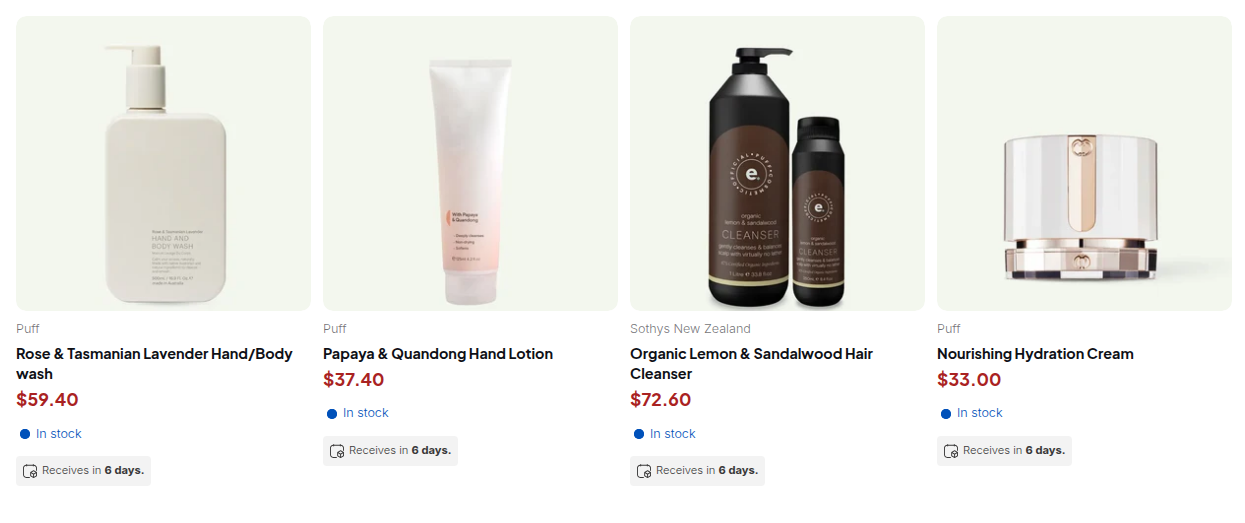
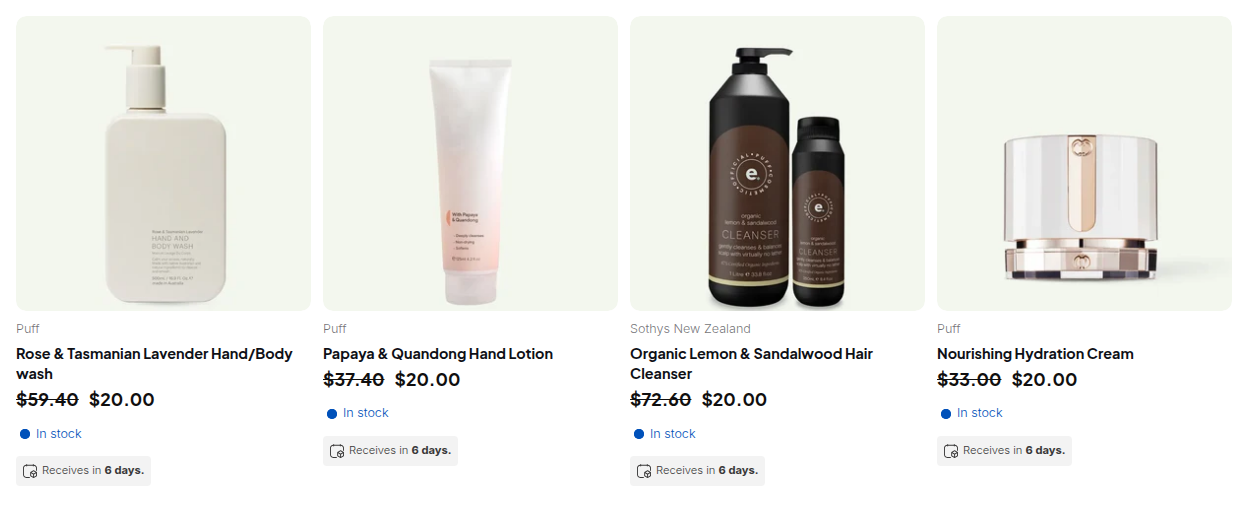
Before you change anything, reproduce the problem. Shopify recommends testing with a test customer and checking that the prices displayed are the ones you expect (Testing your B2B setup). The steps below take about five minutes.
- Pick one buyer who cannot see the price and one product they should see it on. Open the customer in the Shopify admin and note their tags, company and location.
- Open a private browser window, sign in as that customer and reload the product page. Do not use your own admin session.
- Sign out and reload. You should see the retail price. If you see it signed in too, the buyer matches no condition yet.
8 causes and fixes
1. The buyer is not signed in (native and BSS)
Shopify is explicit: anyone can browse your products and content, but only logged-in B2B customers can access B2B-specific pricing, B2B-only products and B2B-exclusive content (Sign-in and accounts in B2B). BSS rules set to Logged-in customers, Specific customers, Customer tags or Company locations do not apply to a visitor who is not signed in either.
Fix: ask the buyer to sign in before judging the price. Shopify’s new customer accounts sign buyers in with an email and a one-time PIN, so BSS recommends tag or specific-customer rules for wholesale prices instead of “any logged-in customer” (BSS guide on new customer accounts). If a visitor should see a prompt instead of a plain retail price, see how to hide prices until login.
2. The account is not linked to a company location, or lacks the tag
Native: a customer gets the B2B experience when their email address is associated with a company location. A buyer assigned to more than one location must select which one to order for before adding items to the cart (Sign-in and accounts in B2B).
BSS: a Customer tags rule needs the buyer to have at least one of its tags, compared without case, so Wholesale matches wholesale. You cannot require two tags at once.
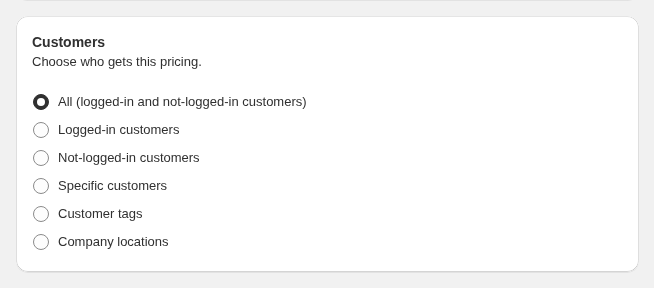
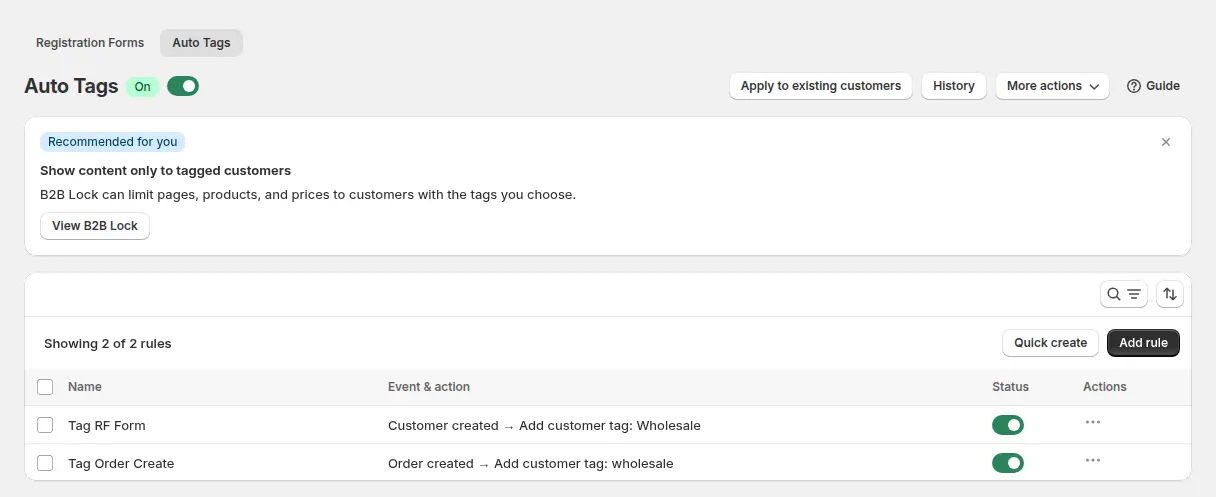
Fix: open the customer record and add the missing company link or tag. If a registration approval or an Auto Tags rule should add it, check the form’s tag setting and the Auto tags history. A tag added while the buyer is browsing takes effect on the next page load. Term: customer tag and see the use case give tagged wholesale customers special prices.
3. The store still uses legacy customer accounts (native)
Shopify’s requirements page says it plainly: you must activate customer accounts, and you cannot use legacy customer accounts for B2B orders and customers (Requirements and considerations for B2B). Buyers on the old account pages can be signed in and still not be treated as B2B buyers.
Fix: switch the store to customer accounts in the Shopify admin, then repeat the private-window test. BSS rules read the customer’s tag, so they do not depend on the account type.
4. The catalog is not active, not assigned or over the limit (native)
Catalogs control which products and prices a buyer sees. A buyer without access to a catalog does not see its pricing (Create a catalog). Check four things:
- Status. The catalog must be set to Active.
- Assignment. Below Plus a catalog reaches buyers through a B2B market. Direct company or location assignment is a Plus feature.
- The 3-catalog limit. Basic, Grow and Advanced allow up to 3 active catalogs across all B2B markets (B2B features by plan).
- Products. A catalog includes all products or only those you pick. When several catalogs price a product, Shopify shows the lowest (Catalogs and pricing in B2B).
Below Plus your store must also use new Shopify Markets for catalog features (B2B features by plan). Fix: activate the catalog, assign it to the buyer’s market and add the product. For more buyer groups than three catalogs allow, see Shopify B2B without Plus. Terms: catalog and company location.
5. The app embed or the module is off (BSS)
BSS B2B Solution loads prices, quantity tables, order-limit messages and the registration form through one app embed. When it is off in your live theme, none of them appears, even if every rule is enabled. Each theme has its own switch, and a new or duplicated theme does not inherit it. Each module also has a switch that applies only after you click Save.
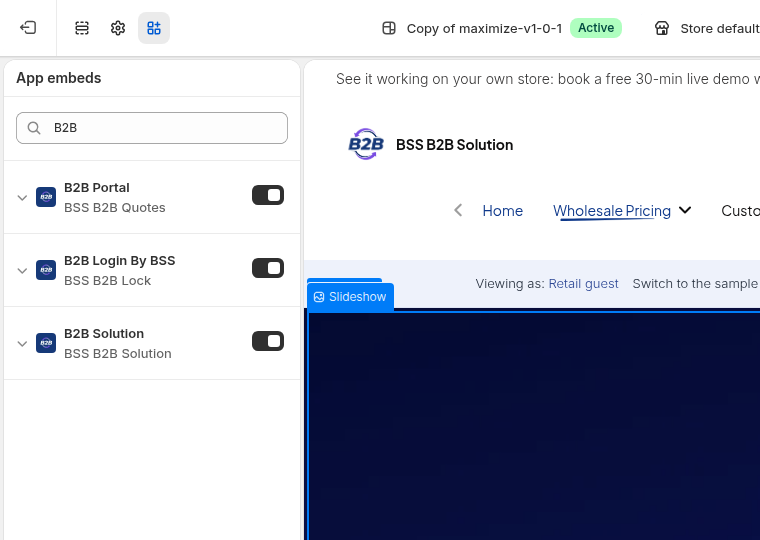
Fix: in Online Store, Themes, Customize, open App embeds, turn on B2B Solution and save, then check the module switch in the app. See the BSS guide I don’t see the app on my storefront.
6. The rule is disabled, outside its dates or uses an option your plan lacks (BSS)
Check the rule’s status, its start and end dates (times follow the time zone of the browser you set them in) and its markets. Then check the plan: company-location targeting needs Advanced or higher and Price Lists need Platinum. A rule that uses an option above your plan is kept but not published to the storefront, and shows the banner “This rule is automatically INACTIVE on the storefront because some configurations are available on a higher plan.” The Free plan allows one Custom Pricing rule.
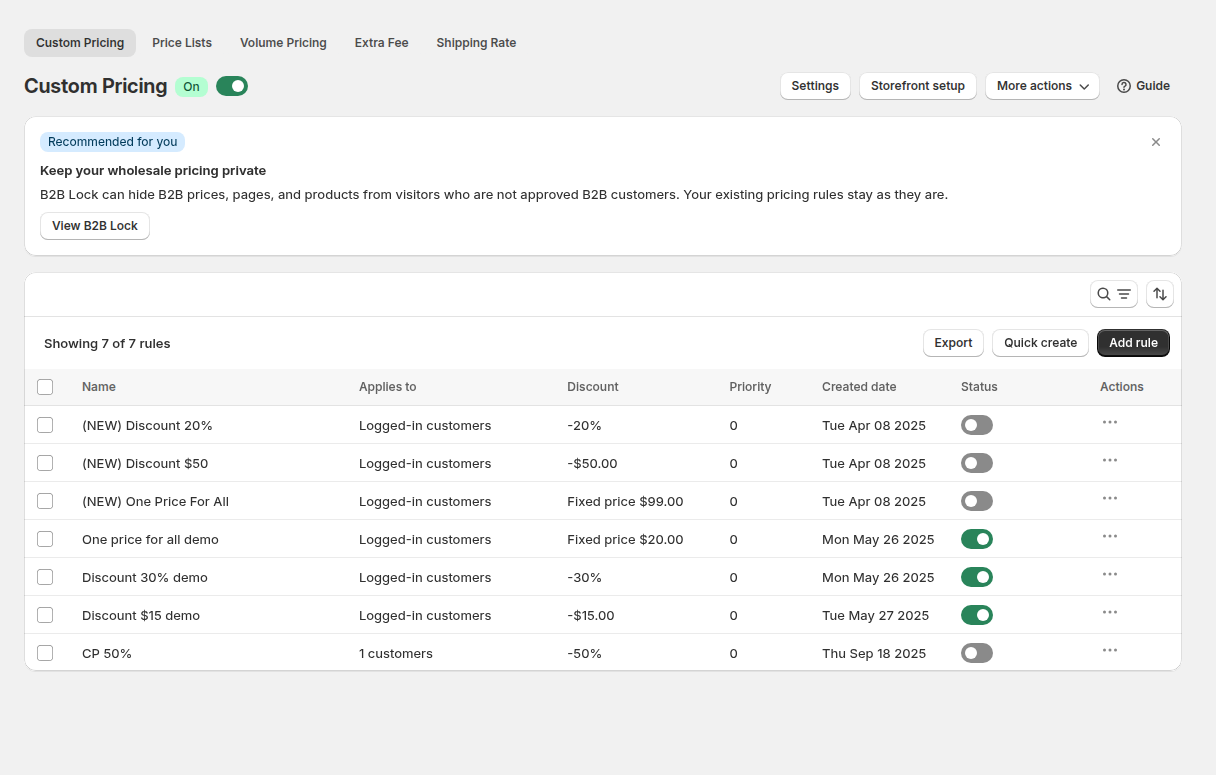
Fix: open the rule, switch the locked option to one your plan includes or upgrade, then save. Compare plans on the BSS B2B Solution page and read A feature stopped working after I changed my plan.
7. Another rule wins, or the B2B price is higher than the original (BSS)
When several BSS rules match one buyer, the app does not merge them. Inside a module the lowest priority number (0 to 99) wins, and a tie goes to the older rule. A Price List rule replaces Custom Pricing for the same product, so an old Price List rule can hide a better Custom Pricing rule. Custom Pricing also does not show a price that is higher than the original or compare-at price.
Fix: list the rules that match the buyer and product, compare priorities, and keep one module responsible for each buyer group. Read Which B2B pricing rule wins and build a B2B price list per buyer group.
8. A cached page, a script-loading setting or your theme hides the change (BSS)
Three smaller causes belong together. Changes reach the storefront within seconds of saving, so an old price is usually a cached page. If Advanced settings, General, Optimize B2B script loading is on, B2B scripts load only for logged-in customers, so rules for everyone do not run for guests. And if prices update on the product page but not in a cart drawer or quick view, your theme may use a layout the app does not detect. Fix: hard refresh or use a new private window, review the script-loading setting, and ask support to adjust the price selectors under Feature customization in theme (installation help is free).
Rules in BSS B2B Solution show who gets each price, their priority and their status in one list. Try it free on a development store.
Get BSS B2B Solution How BSS B2B Solution worksChecklist: the 10-minute fix order
- Reproduce in a private window with a real customer account, not your admin login.
- Confirm the buyer is signed in, and that the store uses customer accounts, not legacy accounts.
- Native: confirm the buyer’s email is linked to a company location and the catalog is Active, assigned and within the 3-catalog limit.
- BSS: confirm the buyer has the tag or is in the specific-customer list the rule uses.
- BSS: confirm the app embed is on in the live theme and the module switch is saved.
- BSS: confirm the rule is enabled, inside its dates and free of options above your plan.
- If the price is different rather than missing, compare priorities, then reload without cache and check the cart and checkout.
If you still cannot find the cause, contact BSS support through Live Chat and include the rule name and module, a customer email or tag you tested with, and the product URL where the price should change (BSS troubleshooting guide).
Limits and what to expect
- Cart and checkout can differ from the product page. Custom Pricing, Price List and Volume Pricing are designed to carry to checkout, but Buy it now, express checkout buttons and direct checkout links skip the cart page, and Buy One Get One, Discount Code and Extra Fee can be missing on those paths. Test your theme.
- Hiding is not the same as missing. If guests should not see prices at all, that is a visibility control, with its own limits: see how to hide prices on Shopify.
- Shopify changes plans. B2B was extended to Basic, Grow and Advanced in April 2026 and Shopify says the rollout continues. Re-read the Help Center before you rely on a limit.
FAQ: Shopify wholesale prices not showing
Why can’t my wholesale customer see wholesale prices on Shopify?
The buyer is usually missing one condition: they are not signed in, their email is not linked to a company location (native B2B) or they lack the tag a rule targets (BSS B2B Solution), or the catalog or rule is inactive. Test in a private window as that customer and work through the eight checks in this guide.
Do Shopify B2B prices show to guests?
No. Shopify says only logged-in B2B customers can access B2B-specific pricing. A guest sees the normal storefront price. BSS rules set to Logged-in customers, tags, specific customers or company locations also skip guests.
Why did a customer’s wholesale price disappear after I changed my BSS plan?
A rule that uses an option outside your new plan stays in the app but is not published to the storefront. Open the rule, replace the locked option or upgrade, and save it again. The Free plan allows one Custom Pricing rule.
Why does the price show on the product page but change in the cart or at checkout?
Another rule may win, or the buyer reached checkout without the cart page. Custom Pricing, Price List and Volume Pricing are designed to hold at checkout, but Buy it now, express checkouts and direct checkout links can skip Buy One Get One, Discount Code and Extra Fee. Test the full path as a buyer.
Why is my custom price not showing even though the rule is on?
Check whether the custom price is higher than the original or compare-at price, because Custom Pricing does not show a price above it. Also check for a higher-priority rule or a Price List covering the same product, and whether the module and app embed are on.
How many B2B catalogs can I use on Shopify?
Up to 3 active catalogs across all B2B markets on Basic, Grow and Advanced, and unlimited on Plus (Shopify Help Center, read October 4, 2026). If more buyer groups need their own prices, tag-based rules from an app can cover the rest.
Next steps
Run the private-window test for one buyer and fix the first condition they miss. For the bigger picture, read the wholesale pricing hub and our Shopify native B2B overview, and see how buyers get tagged through registration with approval or auto-tagging by spend or order count.
Install BSS B2B Solution to set prices by customer tag, specific customer or company location, approve applicants with tags, and see every rule’s status in one place. Add BSS B2B Lock to hide prices from visitors who are not approved.
Install BSS B2B Solution See all three appsSources
Shopify pages read on October 4, 2026. BSS facts: BSS user guides at docs.bss-b2b.solutions and our checks of the app.
- Shopify Help Center: Sign-in and customer accounts in B2B
- Shopify Help Center: Requirements and considerations for using B2B
- Shopify Help Center: Shopify B2B features by plan
- Shopify Help Center: Catalogs and pricing in B2B
- BSS guide: Troubleshooting B2B prices or rules not showing
- BSS guide: How customer targeting works
- BSS guide: How rule priority works
You may also like

How to Uninstall a Shopify B2B or Lock App Safely: Remove Leftover Theme Code
Some Shopify apps leave code in your theme after you uninstall them. To remove a B2B or lock app safely, duplicate your […]

Shopify Markets and B2B Pricing: Wholesale Prices Per Country and Currency
Shopify Markets control currency, languages and taxes by audience, and B2B catalogs can be assigned per B2B market, with a cap on […]

How to Collect and Validate a Tax ID (EIN, ABN, GST, UK VAT) on Shopify
Shopify has a Tax ID field on company locations, but the pages we read describe no check against a tax register. BSS […]