


SL Lighting is a UK supplier of LED lighting that sells to trade buyers through Shopify. Anyone can browse the range, read the technical guides and download the catalogue. Prices are hidden behind a login, and buyers apply with a wholesaler signup form. BSS B2B Solution handles trade pricing, quantity breaks and payment terms.
Key facts from the public storefront
- Audience: trade buyers. The header offers Sign in and Register on every page.
- Prices: each product and collection card says “Login view prices”, and the buy buttons are disabled for guests.
- Application: a wholesaler signup form that asks for company registration and VAT numbers.
- Public content: catalogue, CRI guide, dimmer compatibility list, symbol guide and installation guides.
- Review: the merchant praises the support it received during setup.
About SL Lighting
SL Lighting trades as the brand of Save Light Ltd, a company with its address in Egham, Surrey. The Shopify store sells LED lighting for residential and commercial projects. The collections include fire-rated and low-glare downlights, mini downlights, marker and low-level lights, outdoor fittings, LED strip with controllers and drivers, aluminium profile, bulkheads and emergency lighting. The blog also covers switches and sockets, so the range goes beyond lamps.
A lighting catalogue is full of technical choices, and the site is built to answer them. The site links to a catalogue page with an e-catalogue (Edition 7), a compare page, a Colour Rendering Index explainer, a dimmer compatibility list, a guide to the product symbols, installation guides, product specifications and a bespoke strip cutting service. Project posts in the blog show finished installations such as staircase lighting. All of this is public, so an installer can research a product before applying for an account.
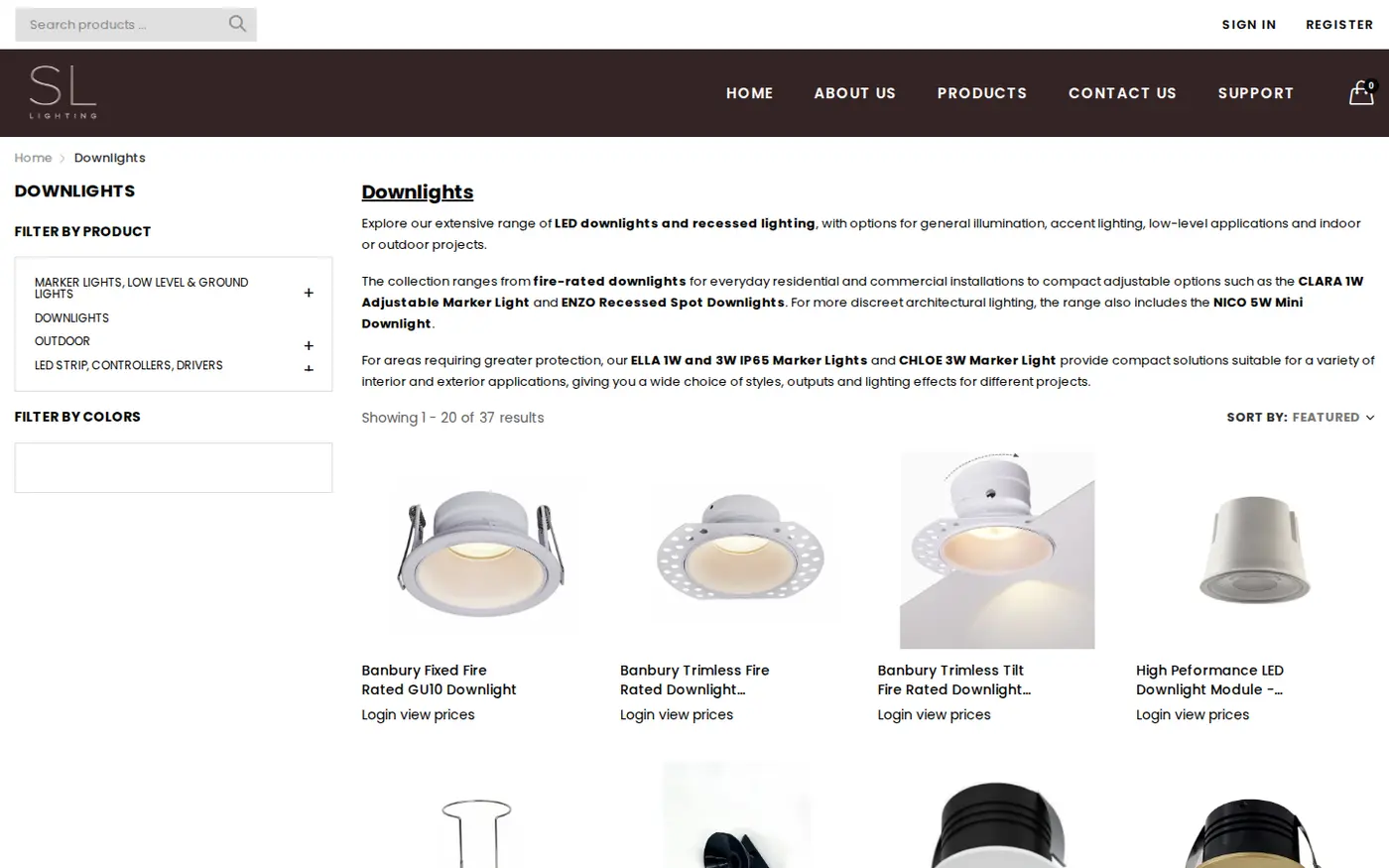
That mix of technical depth and private pricing suits lighting. A specifier or installer compares beam angles, IP ratings and driver compatibility before anything else, and prices only matter once the product fits the job. By keeping the specification public and the price private, SL Lighting lets buyers qualify the product first and the supplier qualify the buyer second.
SL Lighting’s B2B model: a public catalogue and private prices
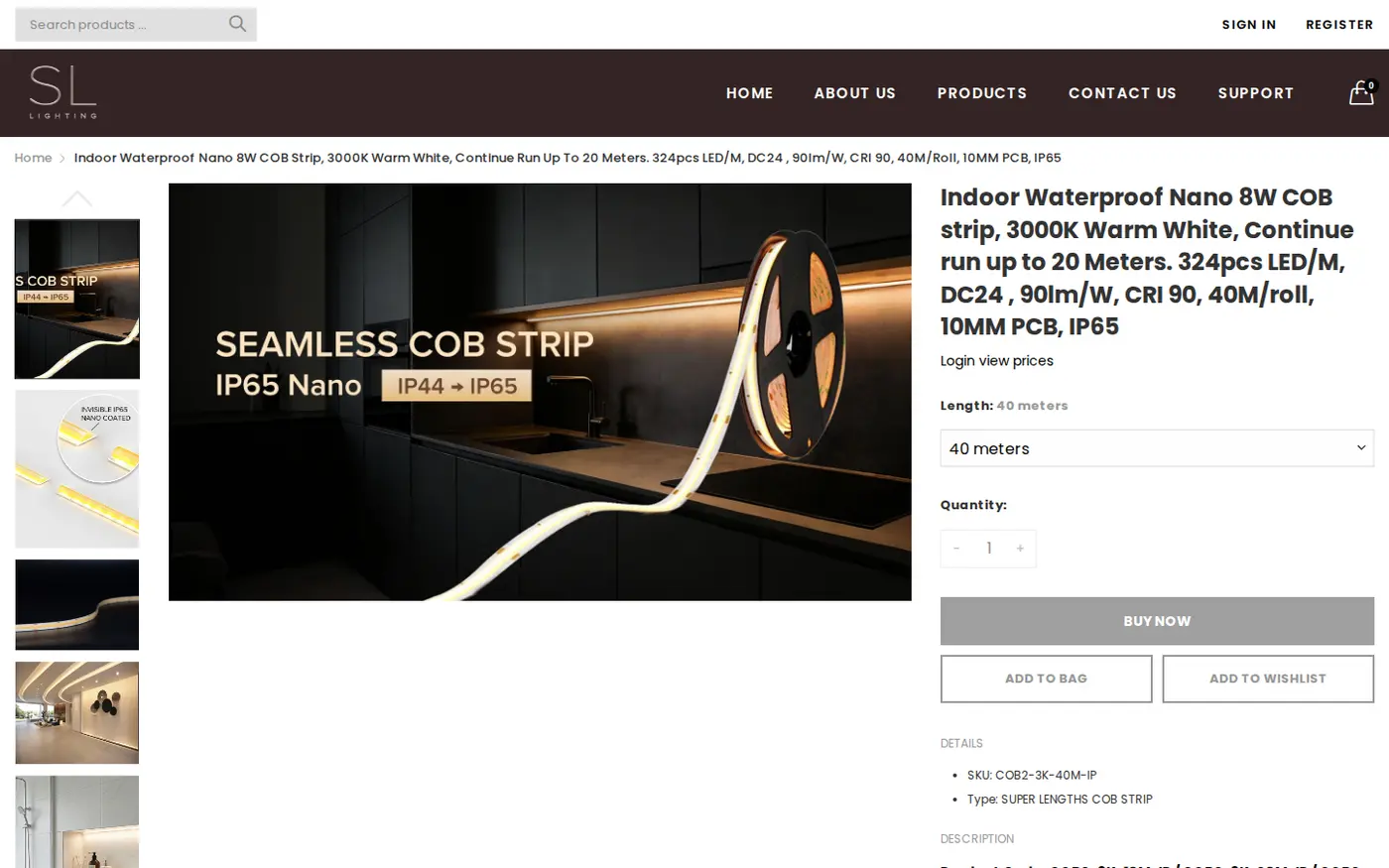
SL Lighting does not describe itself as B2B-only, but the storefront behaves like a trade counter. There is no way to buy as a guest: the Buy now, Add to bag and Add to wishlist buttons are greyed out, and the price line on every product says “Login view prices”. The visitor still sees everything needed to specify a product: title, photos, SKU, type, technical bullet points, datasheets and related items.
Who can buy and how they apply
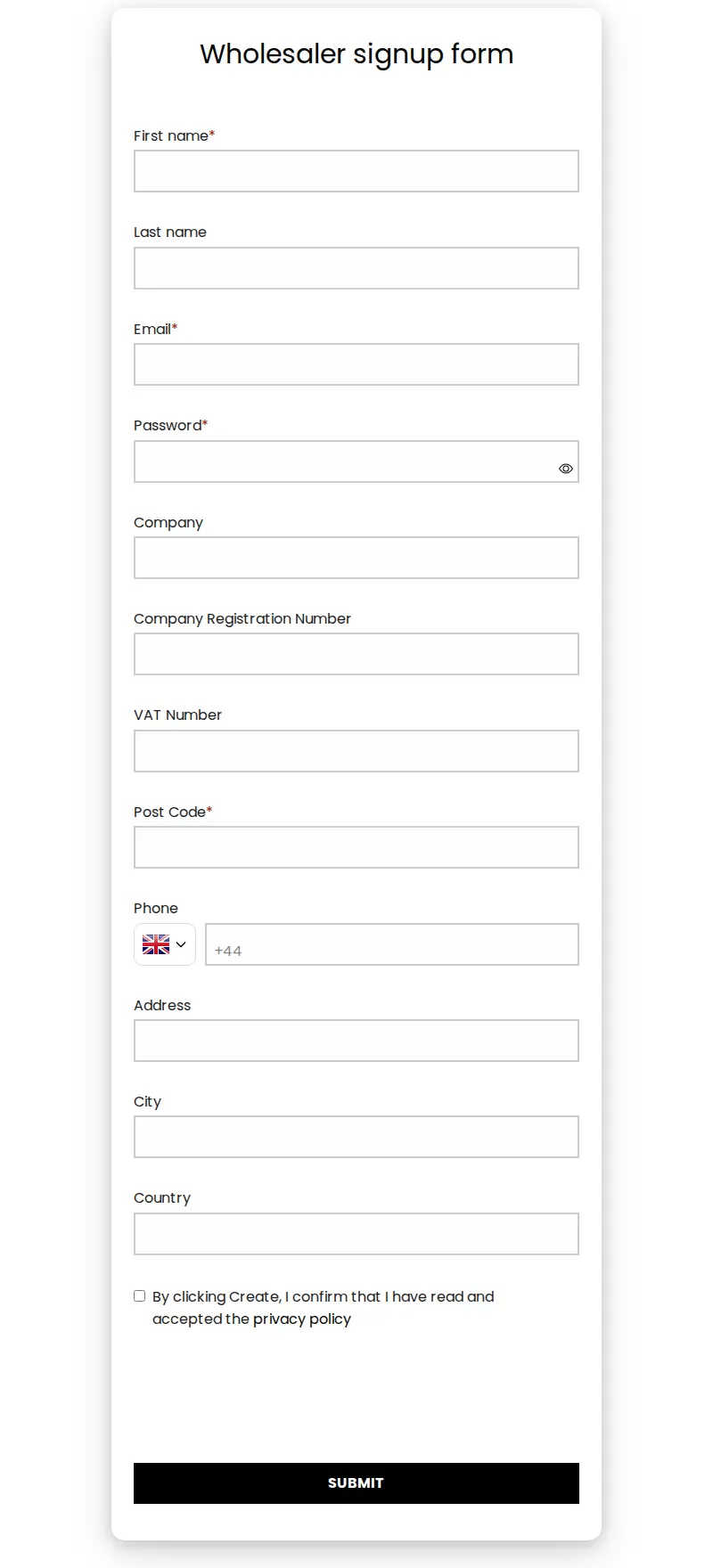
The store does not publish a customer policy, so we cannot say which kinds of trade buyers it accepts. What the storefront shows is the process. A visitor chooses Register, which opens a “Wholesaler signup form”. The form collects name, email and password, then business details: company, company registration number, VAT number, post code, phone, address, city and country. Post code is required, while company and registration numbers are not marked as required.
This is a good fit for a UK supplier. Company registration and VAT numbers let the team check a buyer before approving the account, and the form can sit in front of a price list without adding a separate wholesale website.
How the storefront handles wholesale
1. Sign in and Register are always visible
The top-right corner of every page reads Sign in and Register in the same type size as the main menu. A returning buyer logs in, and a new buyer applies. The store needs no banner to explain it.
2. Prices replaced by one short sentence
On collection pages each product card shows its photo and name, followed by “Login view prices”. The product page uses the same sentence. The text works as an instruction rather than an error, and it is the same on every product we opened, from a downlight bezel to a 40 metre LED strip reel.
3. Buttons that cannot be clicked
Buy now, Add to bag and Add to wishlist are visible but greyed out for guests. The page keeps its normal layout, so guests see the whole product page except the price and the purchase. The BSS B2B Lock theme extension is loaded on these pages, and the sentence matches the hide-price behaviour of that app. The merchant’s review is for BSS B2B Solution, so we do not claim more than that.
4. The same experience on a phone
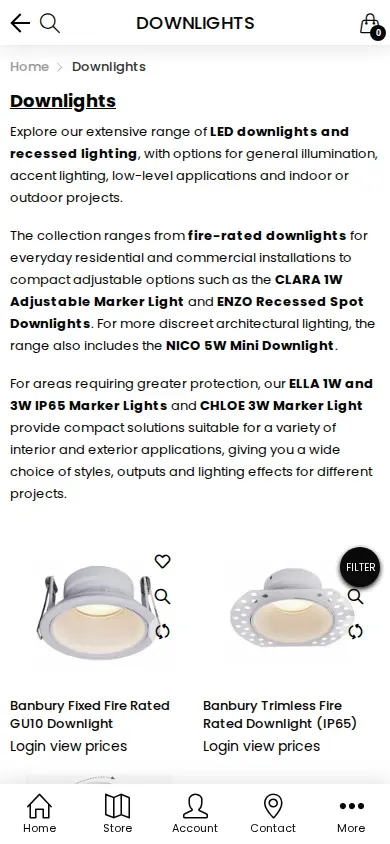
On a phone the collection keeps the same sentence under each product. The Sign in and Register links stay in the header.
Which BSS features power it
SL Lighting installed BSS B2B Solution in July 2025 on the Advanced plan. The review was written after about a month of use. From the app configuration we could verify the following, all of it described in categories rather than business numbers:
- Customer-targeted pricing. Six active custom pricing rules give percentage discounts: four target customers by tag and two target chosen customers. That is the usual way to build trade price levels. See set unique prices for wholesale customers and silver, gold and platinum wholesale tiers with tags.
- Quantity breaks. Eighteen volume pricing rules are active, almost all aimed at chosen products for tagged customers. Lighting is bought by the dozen, the reel or the project, so tiered prices fit. See set tiered pricing by purchase volume and tiered pricing and quantity breaks.
- Net terms. Four net terms rules are active: three keyed to customer tags and one to chosen customers. See Net 30 and other payment terms.
- Wholesale shipping and limits. Two shipping rate rules, two order limit rules and a discount code rule are active. See handling fees and custom shipping for wholesale and enforce minimum order quantity and value.
- Registration form. One active form with spam protection, tagging, email notifications and a privacy consent. See the registration form guide.
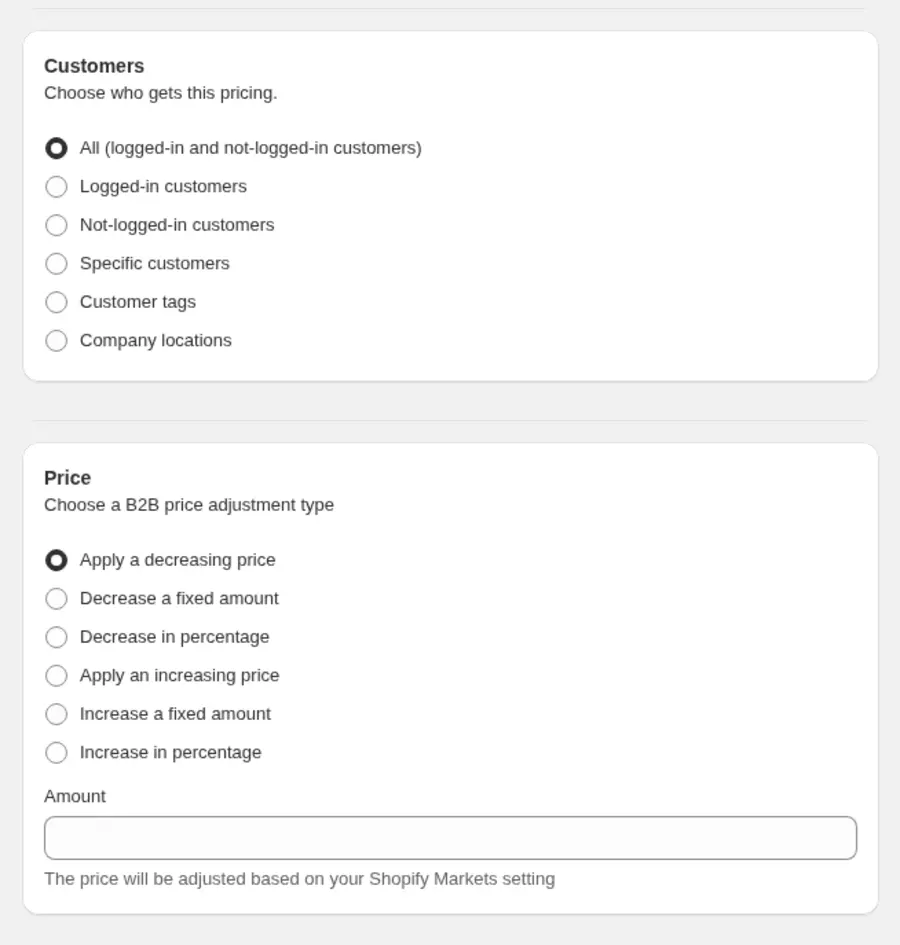
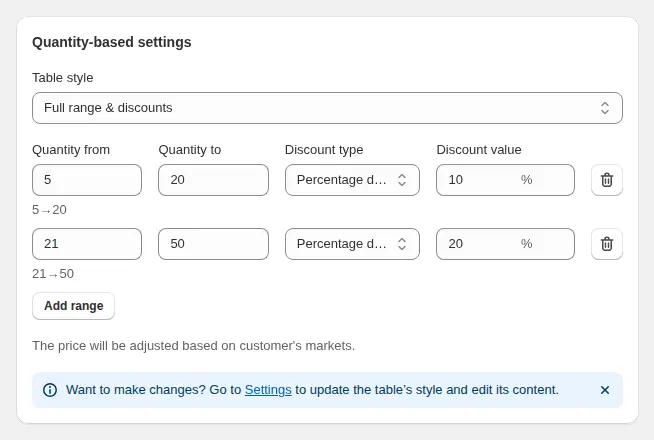
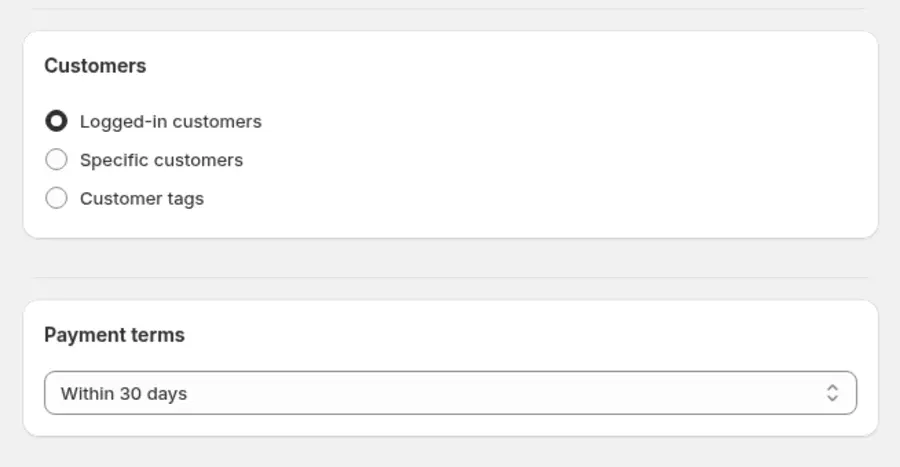
These three images show how the options look in the BSS admin. They come from the user guide and are examples, not SL Lighting’s own settings.
We cannot see how these rules display to a logged-in buyer, so we make no claim about the discounts or the order sizes. What the public storefront shows is that the gate is in place and the supporting rules exist.
How to build a similar trade gate
SL Lighting’s storefront is simple to describe, and the steps behind it are the same on any Shopify store. This is the order we would follow, with a guide for each step.
- Decide what stays public. List the content you want search engines and buyers to see: product names, photos, datasheets, guides and the catalogue. Everything else, mainly the price and the purchase, goes behind the login. The hide prices from guest users guide shows the options.
- Create the tags that name your trade levels. A tag such as trade or installer is how every later rule knows who the buyer is. See auto-tag customers by spend or order count if you want tags to change as buyers grow.
- Publish a signup form. Ask for company, registration number, VAT number and post code, and add the privacy consent. Follow publish your registration form to your storefront.
- Write one pricing rule per tag. A percentage off the retail price is the quickest way to launch. Add fixed prices later for products that need them.
- Add quantity breaks where buyers order in bulk. Reels, boxes and project quantities are the natural candidates.
- Attach payment terms to approved tags. Net terms belong to accounts you trust, so key them to the tag, not to the product.
- Test three views. Open the store as a guest, as a logged-in retail customer and as a tagged trade buyer, on a phone and on a desktop.
Mistakes to avoid
- Hiding the prices but leaving them in the page source, search results or a product feed. Check the page as a crawler would see it, and read the note on Google search in the Lock guide.
- Writing different messages on the collection page and the product page. Buyers should see one sentence everywhere.
- Forgetting the phone. A grey button that looks broken on mobile makes the store feel unfinished.
What other merchants can copy
- Publish the technical content. Catalogues, guides and compatibility lists bring installers to the site even when prices are private.
- Use one sentence for locked prices. “Login view prices” is short, clear and the same everywhere.
- Disable, do not remove, the buy buttons. Greyed-out buttons keep the page layout the same before and after login.
- Ask for company and VAT numbers. Two optional fields give you something to check before you approve a trade account.
- Build price levels with tags. Four tag rules are easier to manage than hundreds of customer-specific prices.
- Add quantity breaks for bulk items. Reels, boxes and project quantities are natural places for tiers.
- Keep a support path. The merchant’s review is mostly about the speed of help during setup, which is when a store most needs it.
The use case consumer electronics: trade accounts with tiered pricing is a close match for a technical product catalog.
The merchant’s review
From the start, his support has been consistent, proactive, and incredibly efficient. The instant responses we’ve received have made a huge difference, especially when dealing with the demands of running a business around the clock.
SL LIGHTING, United Kingdom, review on the Shopify App Store, 5 of 5 stars, August 4, 2025, after about one month of use
FAQ
How do I hide prices on Shopify until a customer logs in?
Use a price lock that checks whether the customer is logged in and replaces the price with a message. SL Lighting’s pages show “Login view prices”. The approach is described in hide wholesale prices from guest visitors and in the BSS B2B Lock guide.
Can a catalogue stay public while prices are private?
Yes. Product titles, photos, datasheets and guides can all stay visible. Only the price and the buy buttons need to change. Public content also helps search engines and buyers who research before applying.
What should a UK trade signup form ask for?
At minimum name, email and a password, plus company, company registration number and VAT number so you can check the business. SL Lighting’s form follows that pattern. See verify a business tax ID before approving.
How do quantity breaks help a lighting supplier?
They give a lower unit price when a buyer orders more, such as a full reel of LED strip instead of a short length. Rules can be limited to chosen products and customer tags. See tiered pricing and quantity breaks.
Does this story show business results?
No. It reports no sales, order or customer numbers, because we have none from the merchant. It describes public storefront behavior, configuration facts and the merchant’s public review.
This store spotlight is based on SL Lighting’s public website and its public review on the Shopify App Store, as of 2026-10-05. Screenshots show the public storefront. Admin images are labelled examples from the BSS user guide.