Numbers come from quotes in the app
Insights counts quotes created in BSS B2B Quote. Orders placed another way are not part of the funnel.
BSS B2B Quote: Quote Insights
Quote Insights is a page in the BSS B2B Quote admin that shows how quotes move from request to order. It covers the quote funnel and conversion, win rate and pipeline value by currency, standard lost reasons with the value lost, top requested products and the share of quotes answered within 24 hours.
A quote app that only lists requests tells you what is waiting. It does not tell you how many quotes you win, how much is still open, or why you lose the rest. Insights answers those questions inside the Quote admin.
It shows how quotes move from request to order, with date presets to compare periods. You can see where quotes drop out and which reasons come up most.
Quote conversion rate on Shopify B2B is easy to guess and hard to measure. Insights counts it from the quotes your buyers actually sent.
What each part shows, and since which release.
| Metric | What it tells you |
|---|---|
| Quote funnel and conversion | How many quotes reach each stage, with date presets to compare periods (4.14) |
| Win rate | How many of your quotes you win, shown by currency (4.16) |
| Pipeline value | Value of open quotes, shown by currency (4.16) |
| Lost reasons | Standard reasons you pick when you reject a quote or a buyer picks when they decline (both optional), counted in Insights; quotes without one show as Not specified (4.14) |
| Value lost | A column in the lost quotes table (4.17) |
| Top requested products | Each product with its name and a link to the product in Shopify admin (4.17) |
| Answered within 24h | The share of quotes answered within a day. Same rate as on Home (4.17) |
| First response time | Time to first response for each quote in the quote inbox, with a flag for quotes waiting more than 24 hours (4.12) |
A simple weekly routine with the numbers on the page.
Pick a date preset and compare it with the one before. Look at the funnel first: where do quotes stop?
Read win rate and pipeline value for each currency. A big pipeline with a low win rate usually means slow or uncompetitive proposals.
Open the lost reasons and the Value lost column. A price reason points at your quoted prices. A timing reason points at your response time.
Compare the Answered within 24h rate with your goal. In the quote inbox, filter for quotes waiting more than 24 hours and answer those first.
Products buyers ask about most often are good candidates for a standing price or a Quick Order page.
See your own quote funnel on a development store, then watch real numbers on a paid plan.
You pick a standard reason when you reject a quote. A buyer can pick one when they decline. Both are optional, and quotes without a reason are counted as Not specified. The reason is saved on the quote and counted in Insights, so you see a pattern instead of a pile of free-text notes.
The lost quotes table shows the value of each lost quote in a Value lost column, so a few large losses stand out from many small ones.
Insights counts quotes created in BSS B2B Quote. Orders placed another way are not part of the funnel.
Win rate and pipeline value are shown by currency, so you read each currency on its own.
Test quotes made with the preview on your store are marked Test and not counted.
The user guide says charts, top lists and CSV export are on paid plans.
BSS B2B Quote runs on a paid plan on a live store. On the Shopify App Store listing, as of November 5, 2026, paid plans start at $19 per month and the listing shows a 14-day free trial on paid plans. Every app feature is free on development stores, so you can build and test first. A live store below Growth can view the app but not change it.
Some charts, top lists and the CSV export depend on your plan, and the plan table in the user guide does not list Insights separately, so check it before you rely on a specific list for your plan.
The main use case shows the quote flow that Insights measures. Browse all use cases.
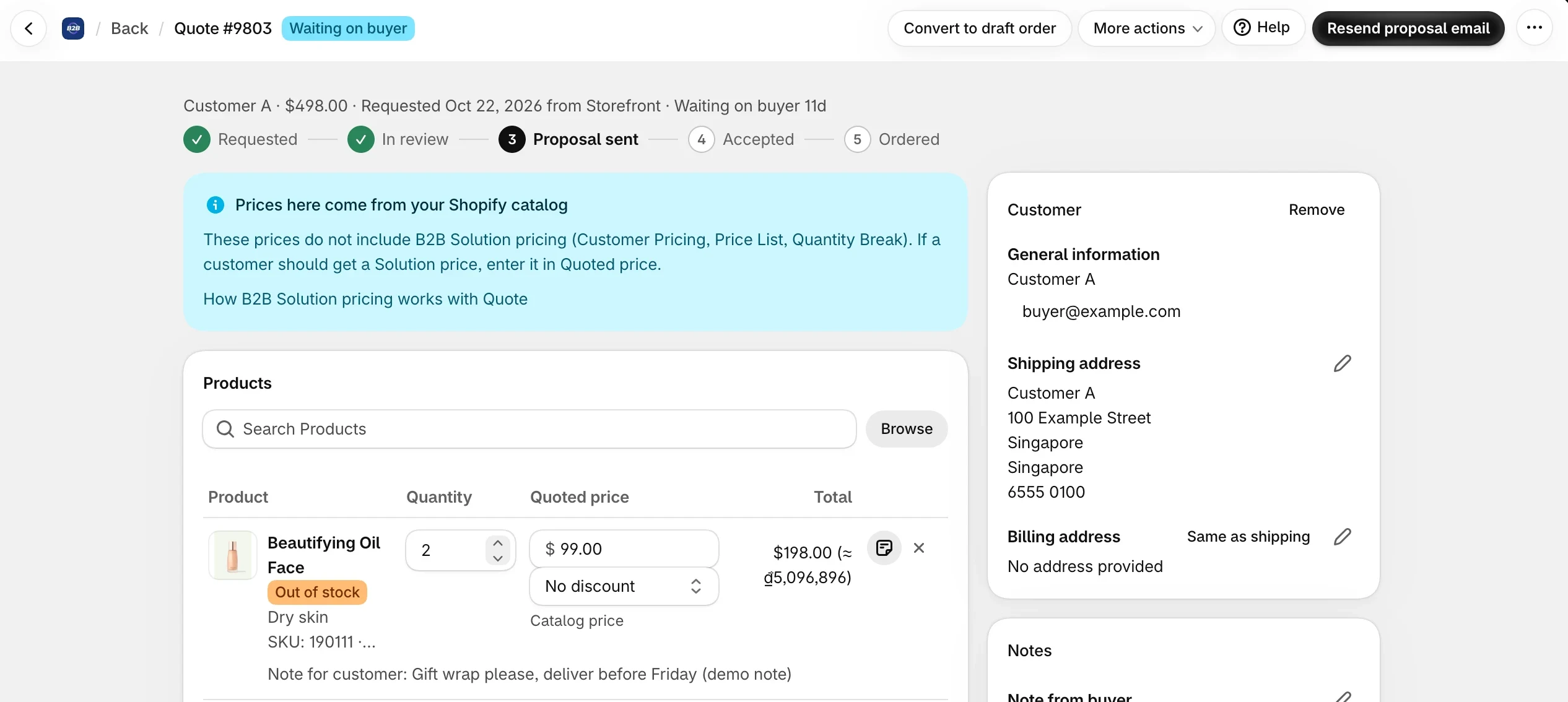
Send a proposal email with Approve and Reject buttons, and when the buyer approves, BSS B2B Quote converts the quote into a Shopify draft order and emails the invoice, with no manual order entry.
Explore use case: Approve a Quote and Turn It Into a Draft OrderRead these next for the full detail.
Messages, counter-offers and proposal versions.
How to choose a quote app.
Give buyers quick order pages, CSV upload, reorder and request for quote.
Request for quote (RFQ)Approval workflow
Each feature has its own page. See also all BSS B2B Quote features.
Talk to the buyer on the quote, handle price and quantity counter-offers and keep every proposal version.
Choose what buyers fill in on a quote, who gets which email and when your team is reminded of quotes that wait.
A page where logged-in buyers repeat a past order from their history, edit it and get a checkout link.
A table on the product page where buyers enter a quantity for each variant and add all of them in one click.
Quote Insights in BSS B2B Quote turns your quote history into win rate, pipeline and lost reasons.
Also: BSS B2B Lock for hidden prices until a quote and BSS B2B Quote for quotes and negotiation.
The quote funnel and conversion, win rate and pipeline value by currency, standard lost reasons with a Value lost column, top requested products and the Answered within 24h rate, with date presets to compare periods.
No. Win rate and pipeline value are shown by currency, so a store that quotes in several currencies reads each one separately.
No. Test quotes made with the preview on your store are marked Test and are left out of your stats.
You pick a standard reason when you reject a quote, and a buyer can pick one when they decline. Both are optional; quotes without a reason are counted as Not specified. The reasons are counted in Insights, and the lost quotes table has a Value lost column.
The quote inbox shows the first response time of each quote and flags quotes waiting more than 24 hours. Insights and Home show the same Answered within 24h rate.
Feature behavior follows the BSS B2B Quote release notes (versions 4.12 to 4.25, October 20 to November 1, 2026) and the BSS user guides. Prices come from the App Store listing on the date shown. We make BSS B2B Solution, BSS B2B Lock and BSS B2B Quote.