
Shopify Request for Quote: Complete Guide to Quotes, Approvals and Draft Orders

Shopify’s B2B plan table has no request-for-quote feature, so quoting runs on an app or on manual draft orders. With BSS B2B Quote, a buyer requests a quote, you send a proposal with your prices, and a logged-in buyer approves it. The app then creates a draft order and emails the invoice.
Add an Add to quote button, review requests in the admin, send proposals and turn approved quotes into draft orders. Free on development stores, 14-day trial on paid plans.
Install BSS B2B Quote See pricingLast updated October 4, 2026. Shopify facts come from the Help Center pages linked in the text. BSS B2B Solutions makes BSS B2B Quote, the app in the screenshots. For quote prices that follow your wholesale rules, pair it with BSS B2B Solution. This guide belongs to the quick order and RFQ hub of our complete guide to Shopify B2B.
Key takeaways
- A request for quote (RFQ) lets a buyer ask for a price before buying. Shopify’s Help Center lists quoting workflows as a use case for third-party apps (blended store checklist).
- In BSS B2B Quote a quote has four statuses: Unread, Under review, Converted and Rejected. Proposal sent and Expired are badges.
- Guests can submit a quote and receive a proposal. Approving by the email link needs a logged-in buyer.
- Approving creates a Shopify draft order and emails the invoice. The buyer pays through Shopify’s invoice link.
- A quote changes quoted unit prices, shipping and expiry. It has no separate discount field and no merchant tags.
What is a request for quote on Shopify?
A request for quote is a buyer’s way of saying: here is what I want, what will you charge? It suits custom, large or variable orders where a public price would be wrong or does not exist. The seller replies with a proposal. If the buyer agrees, the proposal becomes an order.
Shopify gives you the last half of that flow. Draft orders let you “sell products at custom prices, including discounts, surcharges, or negotiated wholesale rates” and send an invoice with a secure checkout link. When a draft order is paid, it becomes a regular order (Shopify draft orders). Shopify says draft orders created on or after April 1, 2025 are deleted after one year of inactivity, so do not park old quotes there. What Shopify does not give you is the first half: a form on the product page, a list of requests, a proposal email and an approval step. Its B2B checklist points to third-party apps for “quoting workflows” (Shopify Help Center).
Email and draft orders or a quote app: which fits?
| Email, then a draft order | BSS B2B Quote | |
|---|---|---|
| Where the request starts | Contact form or email inbox | Add to quote button, quote form or cart |
| Guests | Anyone can email you | Guests can submit a quote and get a proposal |
| Tracking | Your inbox and a spreadsheet | Quote list with four statuses, filters and an Expired badge |
| Price edits | Custom line prices on the draft order | Quoted unit price per line, shipping and expiry on the quote |
| Approval | Buyer replies by email or pays the invoice | Approve and Reject buttons in the proposal email |
| Result | Draft order, invoice | Draft order, invoice, status Converted |
| Best for | A handful of quotes a month | Recurring requests that need a record and a repeatable flow |
If you only quote a few times a month, draft orders and email are enough. Once requests arrive daily, or buyers need to see their quote history, a form and a status list save time. If you want a button-only store, see add a Request a Quote button and hide the price.
How does the quote flow work, from request to draft order?
- Request. The buyer clicks Add to quote on a product, collection card or cart, and submits the quote form. The quote lands in your admin as Unread.
- Review. You open it. It moves to Under review. You edit quantities, quoted prices, shipping and the expiry date.
- Proposal. You send the proposal email, or an Auto Send Proposal rule sends it. The quote gets the Proposal sent badge.
- Decision. The buyer clicks Approve or Reject in the email. Approve creates a draft order. Reject can include a reason.
- Invoice. The app emails the Shopify invoice. The quote becomes Converted.
| Status or badge | Meaning | Final? |
|---|---|---|
| Unread | Submitted or created in the admin. Nobody has opened it | No |
| Under review | You opened it, or a proposal was sent while it was Unread | No |
| Converted | A Shopify draft order was created from the quote | Yes |
| Rejected | Closed without an order | Yes |
| Proposal sent (badge) | A proposal email reached the customer | Not a status |
| Expired (badge) | The expiry date passed and the quote is not Converted or Rejected | Not a status |
Picking Converted in Change status only changes the label. To create the draft order, use Convert to draft order. More detail is in the quote statuses and lifecycle guide.
How to set up request for quote on Shopify, step by step
These steps follow the BSS B2B Quote setup guide. Install the app, turn on its app embed in your theme, and use a development store first; BSS B2B Quote is free there.
Step 1: Choose which products can be quoted
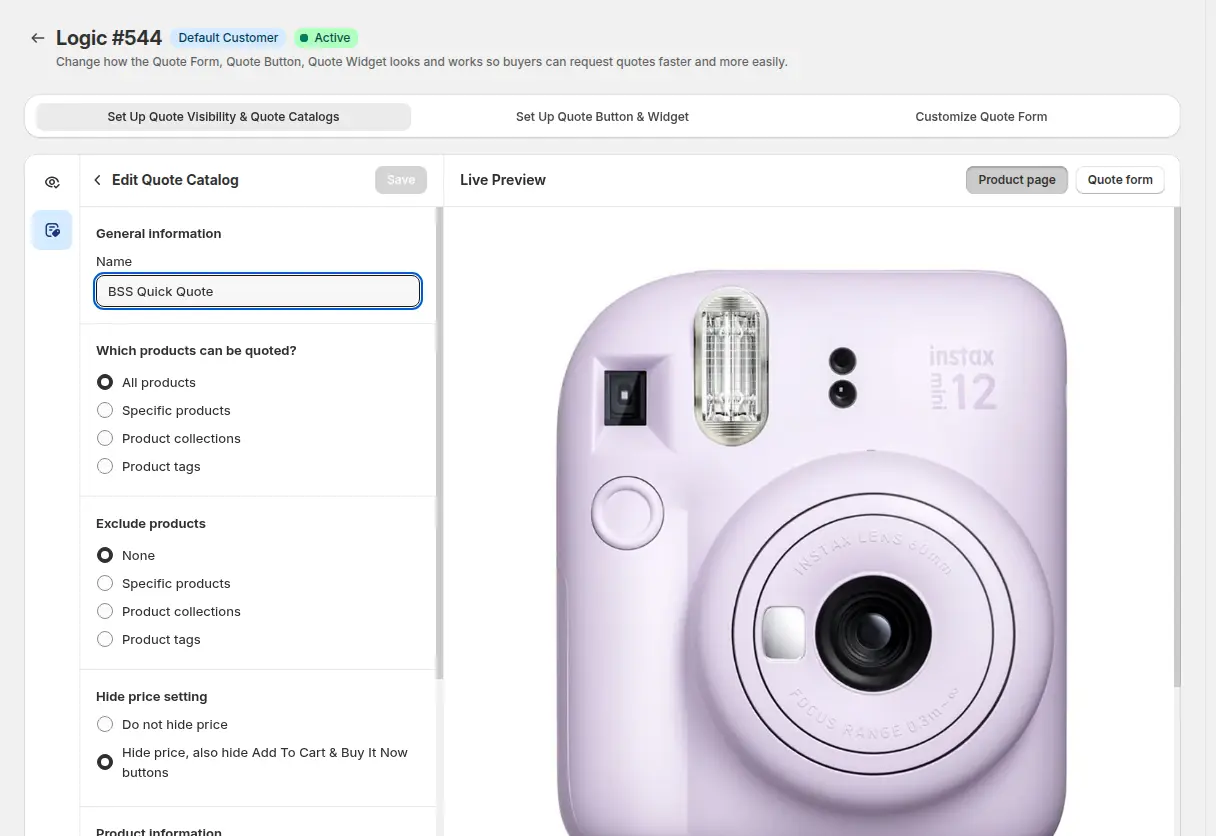
Create a quote logic. In the catalog, pick all products, specific products, collections or product tags, and exclude what you do not want to quote. The Hide price setting can also hide the Add to Cart and Buy It Now buttons, which turns the product into a quote-only item. You choose who sees the logic: all visitors including guests, or narrower groups. Company customer types need the Enterprise plan.
Step 2: Add the quote button
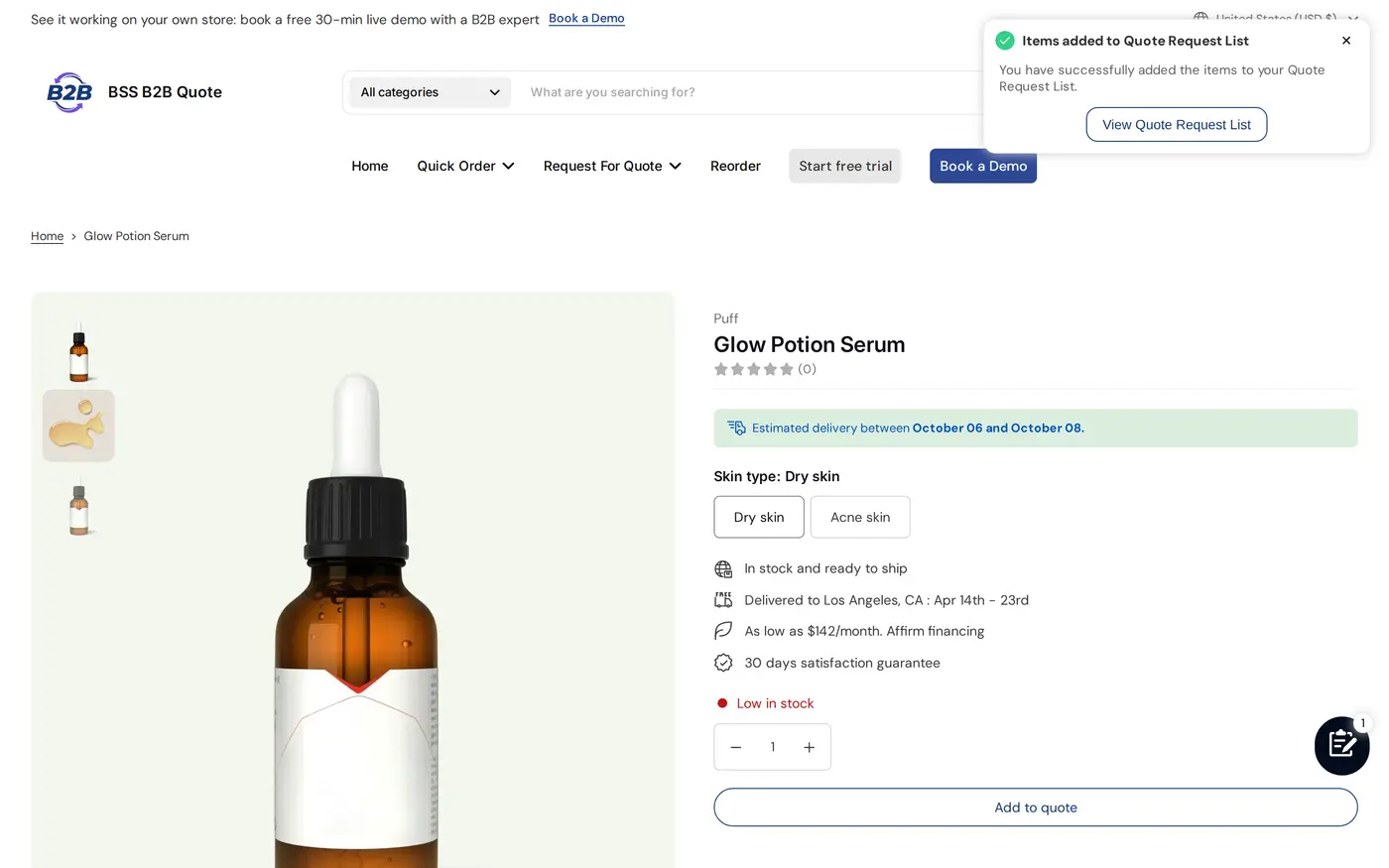
In Set Up Quote Button and Widget choose where the button shows: product, collection and cart pages, and how it looks. A buyer who clicks Add to quote sees a confirmation and a link to the quote request list.
Step 3: Shape the quote form
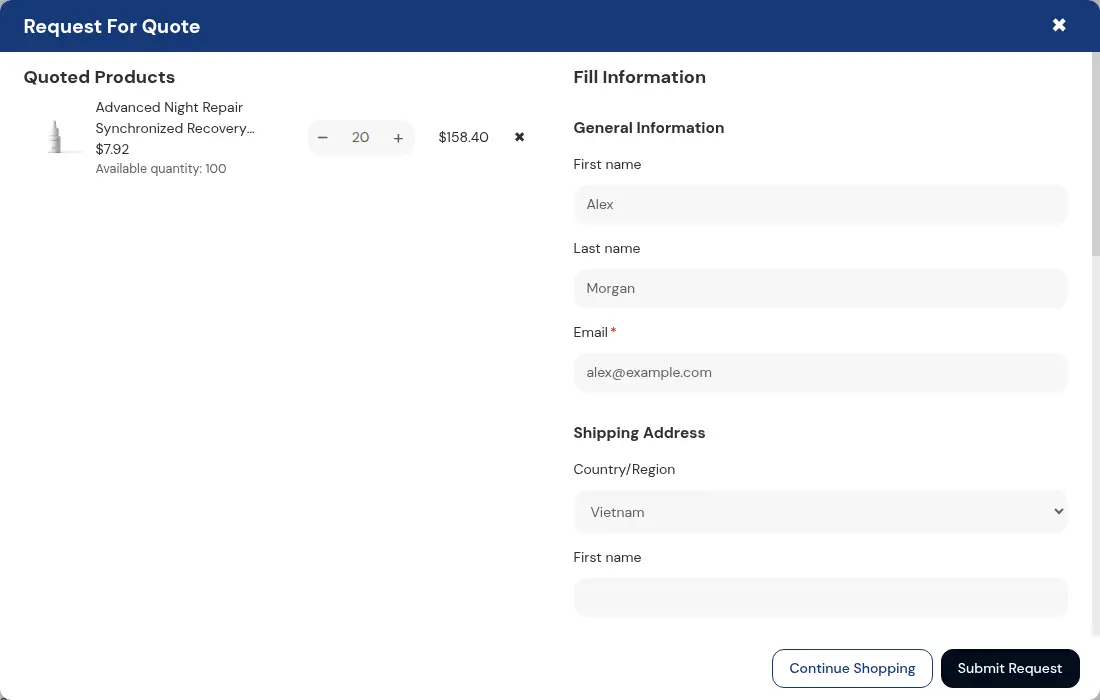
The default form for regular customers asks for first name, last name, email (required) and a shipping address. Customers who belong to a Shopify company see read-only company information instead. You can add text, number, phone, dropdown, checkbox, radio and file fields. If you add a PO number field, it is forwarded to the draft order. Keep the form short: every extra field costs requests.
Step 4: Review the request and send a proposal
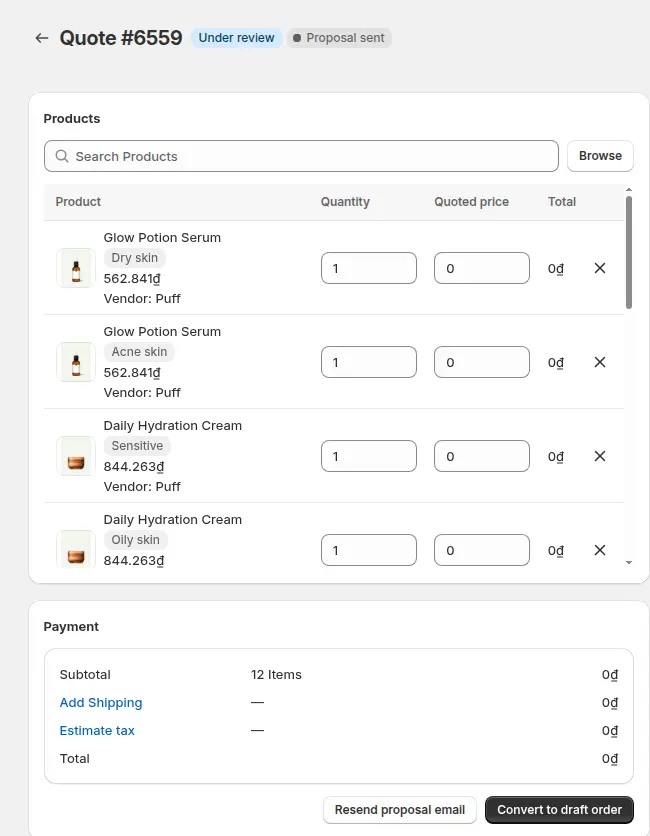
Open the quote from the list. Change quantities and the quoted price per line, add shipping, and set an expiry date. Then send the proposal email. A quote without a quoted price keeps the product’s normal price on the draft order. Convert to draft order creates the draft yourself without waiting for the buyer, and a separate action sends the invoice.
Step 5: Turn on Approve and Reject buttons
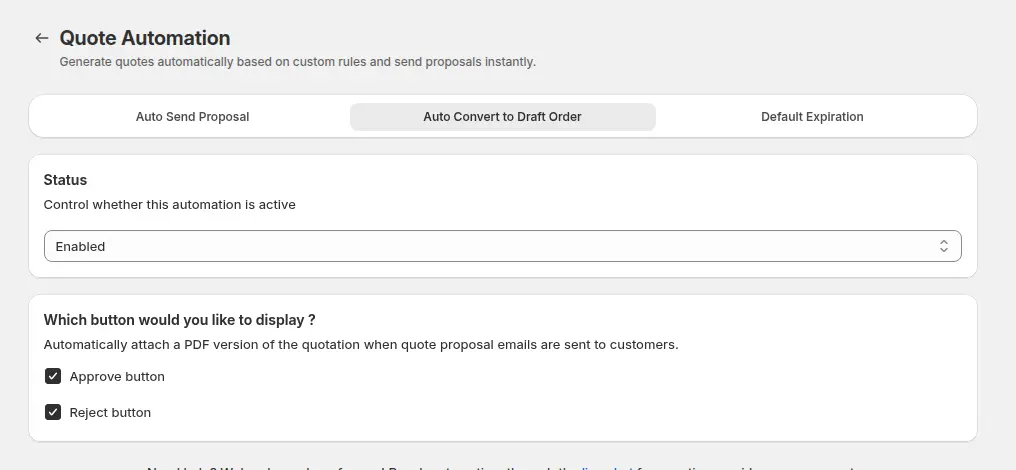
In Quote Automation open the Auto Convert to Draft Order tab, set the status to Enabled and tick Approve and Reject. Those buttons then appear in the proposal email. You can also set Auto Send Proposal rules so that quotes from matching forms get a proposal without a manual step. The approve or reject guide has the details.
Step 6: Publish the Quote History page
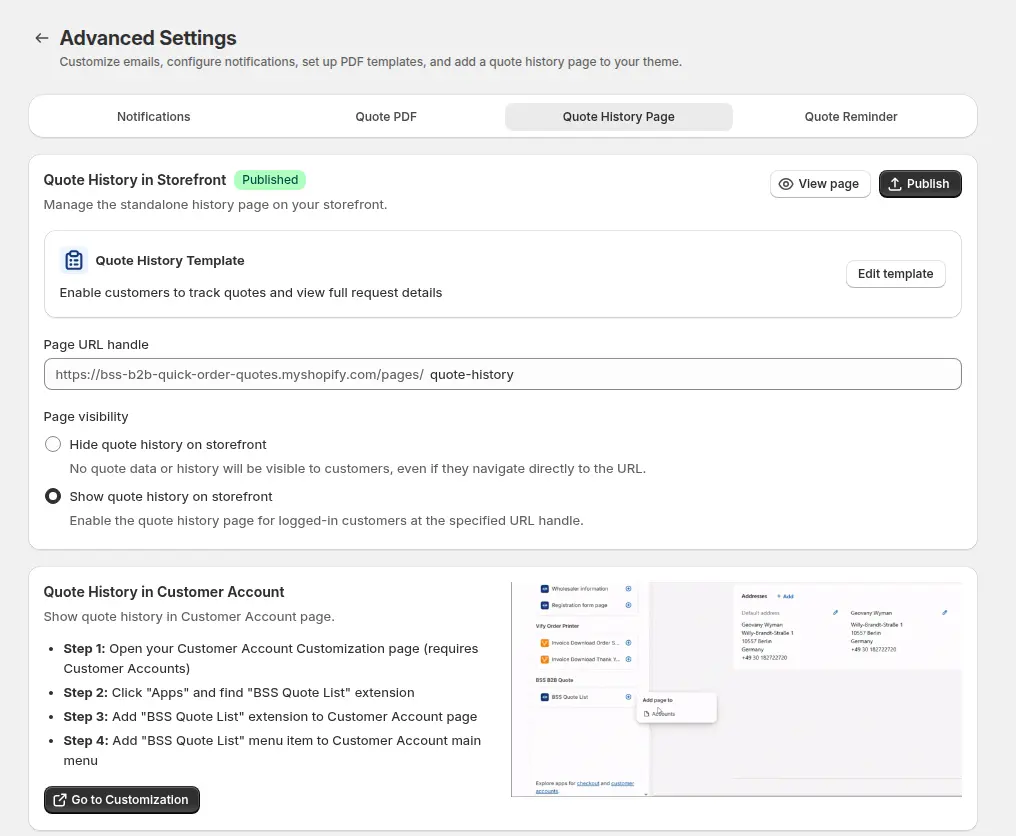
The button links to a Quote History page in your theme, so this page has to be published. In Advanced Settings open the Quote History Page tab, publish it and note the URL handle. Without it the Approve and Reject buttons do not work.
Step 7: Test as a buyer, signed in and signed out
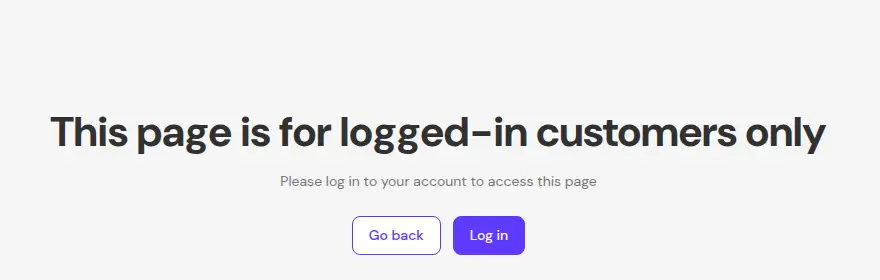
Submit a quote as a guest, then send the proposal and click Approve. A visitor who is not signed in lands on a page that is for logged-in customers only. In our code review of the app, the sign-in redirect did not carry the approval details, so tell buyers to click the button in the email again after they sign in.
How to make quotes faster to answer
Ask only what you need to price the order
A quote you can answer in one reply beats a form that triggers three follow-up emails. Useful fields are quantity per product, requested delivery date, a PO number, a shipping method and a file upload for a specification or a drawing. The form builder supports text, text area, number, phone, dropdown, checkbox, radio, file and shipping method fields. Mark only the fields you truly need as required.
Let buyers add items from a quick order page
When a buyer already knows the SKUs, a list is quicker than product pages. On a BSS Quick Order page each row has Add to cart and, when the quote integration is on (the default), Add to quotes. Buyers can build a long request in one sitting. See Shopify quick order forms and bulk order by CSV upload.
Keep prices consistent with your wholesale rules
A quote often starts from a list price. With BSS B2B Solution installed, buyers who do not use Shopify’s native B2B see Solution prices in the quote cart: quantity breaks, custom prices and quantity increments. You then edit only the lines that need a custom price. Read how to price B2B on Shopify for the rule order.
Can guests request and approve quotes?
| Action | Guest | Logged-in buyer |
|---|---|---|
| Submit a quote request | Yes | Yes |
| Receive a proposal email | Yes | Yes |
| Receive an invoice you send from the admin | Yes | Yes |
| Approve or Reject from the email link | No, sign-in required | Yes |
| See the quote history page | No | Yes |
| Company details on the form | Not applicable | Read-only, for company customers |
A guest quote is stored without a customer, so the approve link cannot match it. You can still convert a guest quote to a draft order yourself and send the invoice. For repeat accounts, register and approve wholesale buyers first so that their quotes carry an account.
What happens when the buyer approves a quote?
On Approve the app creates a Shopify draft order, sets the quote to Converted and sends the invoice. In our code review the draft carries a price override only for lines that have a quoted price, a custom shipping line or the rate the buyer picked, the company and location when the buyer belongs to one, and the PO number. Shopify calculates the tax. An expiry line is added to the order note.
- Payment. The buyer pays through Shopify’s invoice link. If you want net terms, set them on the draft order yourself, because the app does not pass payment terms when it creates the draft. See how to offer Net 30 on Shopify.
- Link life. In our code review the Approve link in the email stays valid for 72 hours. After that, resend the proposal.
- After the click. A Converted quote is locked. Edit the draft order in Shopify instead. A Rejected quote is locked unless it already has a draft order.
- Prices. For customers who do not use Shopify’s native B2B, the quote cart uses BSS B2B Solution prices: quantity breaks, custom prices and quantity increments.
See approve a quote and turn it into a draft order for a worked example, and automated B2B quote pricing for rule-based prices.
Do quotes expire, and do you get reminders?
Each quote can have an expiry date on every plan. The Expired badge is a reminder only: it does not change the status, and in our code review nothing blocks approving or converting an expired quote. If an expired quote should not be honored, say so in the proposal email and check the date before you convert. Default Expiration, which sets an expiry a number of days after each new quote, and reminders to your team need the Business plan or higher. Reminders go to your team, not to the buyer.
Plans and limits
| Plan | Price per month | Quotes | Notable features |
|---|---|---|---|
| Starter | Free | 5 in total | Stores below Growth are read-only since June 14, 2026, per the in-app notice |
| Growth | $19 | 100 | Admin email notification, Convert to draft order, Reorder |
| Business | $39 | Unlimited | Thank-you email, Default Expiration, reminders, variant table, Create similar quote |
| Enterprise | $79 | Unlimited | Company customer types. Not limited to Shopify Plus |
All paid plans have a 14-day trial, yearly billing saves 15%, and all features are free on development stores. In our code review the quote count is a running total of quotes, not reset each month. Check the plan guide before you buy.
What a quote cannot do
- It has no separate discount field. Change the quoted unit price instead.
- It has no merchant tags. Orders created from quotes carry the app’s own tag.
- A guest cannot approve from the email link.
- The buyer’s quote list in customer accounts is read-only. Approval happens from the email button.
Request for quote checklist
- The app embed is on and the Add to quote button shows on a product page.
- Hide price is set only where you really want quote-only products.
- The quote form is short and asks for what you need to price the order.
- A proposal email goes out and shows Approve and Reject.
- The Quote History page is published.
- You tested approval as a signed-in buyer, and as a guest.
- Your team knows that expiry is a reminder and who checks it.
- Payment terms are added to the draft order when you need them.
Shopify request for quote: frequently asked questions
Does Shopify have a request for quote feature?
Not in its B2B plan table. Shopify’s Help Center lists quoting workflows as a use case for third-party apps, and draft orders let you set custom prices and send invoices. BSS B2B Quote adds the form, the proposal and the approval.
Can guests request a quote on Shopify?
Yes, with BSS B2B Quote. A guest can submit a quote and receive a proposal. Approving by the email link needs a logged-in buyer, so a guest quote is usually converted by you.
What happens when a buyer approves a quote?
The app creates a Shopify draft order, sets the quote to Converted and emails the invoice. The buyer pays through Shopify’s invoice link, and the draft becomes a regular order when paid.
What are the quote statuses?
Four: Unread, Under review, Converted and Rejected. Proposal sent and Expired are badges next to the status. Converted and Rejected are final.
Can I add a discount to a quote?
There is no separate discount field. You change the quoted unit price per line, and you can edit shipping and expiry.
Does an expired quote block approval?
No. Expiry is a reminder badge. It does not change the status, and nothing in the app blocks approving or converting an expired quote, so check the date yourself.
Which BSS B2B Quote plan do I need?
Starter is free with 5 quotes in total and is read-only for stores below Growth since June 14, 2026. Growth is $19 for 100 quotes, Business is $39 and Enterprise is $79, both unlimited. Prices are from the App Store listing as of October 4, 2026.
Can I hide the price and show only Request a Quote?
Yes. In the quote catalog, the Hide price setting hides the price and the Add to Cart and Buy It Now buttons for the products you choose, leaving the Add to quote button.
Does request for quote work with Shopify B2B companies?
Yes. Customers who belong to a company see read-only company information on the form, and the draft order is attached to the company and location. Company customer types in the app need the Enterprise plan.
Next steps
Start on a development store: add the button, submit a quote as a guest, send the proposal and test approval as a signed-in buyer. Then read the quick order and RFQ hub, compare options in the guide to Shopify quote apps, or read what a draft order is. Buyers who order known SKUs may prefer a quick order form over a quote.
Install BSS B2B Quote for quote forms, proposals, approvals and Quick Order pages. Pair it with BSS B2B Solution so quotes follow your wholesale prices.
Install BSS B2B Quote See the appSources
Shopify pages read on October 4, 2026. BSS facts: BSS B2B Quote user guide at docs.bss-b2b.solutions, our October 2026 review of the app’s behavior, and the Shopify App Store listing (as of October 4, 2026).
- Shopify Help Center: Create draft orders
- Shopify Help Center: B2B draft orders
- Shopify Help Center: Setup checklist for blended B2B stores
- Shopify Help Center: Shopify B2B features by plan
- BSS B2B Quote user guide: Quote setup
- BSS B2B Quote user guide: Quote statuses and lifecycle
- BSS B2B Quote user guide: Approve or reject quotes
- BSS B2B Quote user guide: Pricing and plans
You may also like

How to Uninstall a Shopify B2B or Lock App Safely: Remove Leftover Theme Code
Some Shopify apps leave code in your theme after you uninstall them. To remove a B2B or lock app safely, duplicate your […]

Shopify Markets and B2B Pricing: Wholesale Prices Per Country and Currency
Shopify Markets control currency, languages and taxes by audience, and B2B catalogs can be assigned per B2B market, with a cap on […]

How to Collect and Validate a Tax ID (EIN, ABN, GST, UK VAT) on Shopify
Shopify has a Tax ID field on company locations, but the pages we read describe no check against a tax register. BSS […]