
499 line items
The builder blocks an order with more than 499 line items. Split a larger order in two.
BSS B2B Solution: Manual Orders
Manual Orders is an admin order builder in BSS B2B Solution. You pick a customer and products, and the app applies Price List, Custom Pricing, Volume Pricing, shipping rates, discount codes, tax exemption and payment terms into a Shopify draft order. It needs Advanced or Platinum. Extra Fee, Order Limit and Quantity Increment are not applied.
Open the app and go to B2B orders & discounts > Manual Orders. Turn on Enable Manual Order the first time. Your Shopify staff role must be allowed to create and edit draft orders.
Click Create order, then choose an existing customer or create a new one. The app reads the customer's tags and tax-exempt status and loads the rules that match.
Search by title and tick the variants. Each line shows the original price and the B2B price. When a quantity reaches a Volume Pricing tier, the line recalculates. If a price does not update after you change the customer or quantity, click Reload above the product list.
Choose a B2B discount code rule, checked against the products in the order, or a custom discount as a percentage or amount with a reason.
Click Add shipping and pick Free shipping, Custom (your own name and rate), B2B shipping rates (calculated from your Shipping Rate rules) or Shopify shipping rates (needs a customer with a full address).
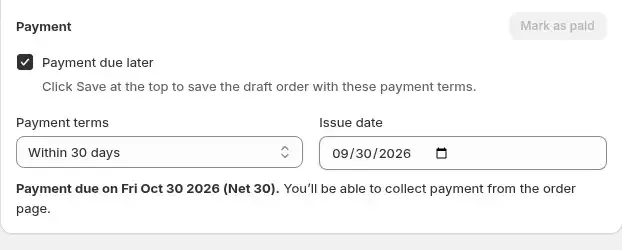
Taxes are calculated for you. For a customer who is not tax exempt, click Tax and clear Charge Taxes to remove tax from this order only. Tick Payment due later to choose due on receipt, within 7, 15, 30, 45, 60 or 90 days, custom days (1 to 366) or a fixed date, and set the issue date. The due date is calculated for you. With payment due later ticked, Send invoice and Mark as paid are turned off.
Use Preview invoice to check totals. Click Create order to save the draft in Shopify, then send the invoice so the customer pays online, or mark it as paid.
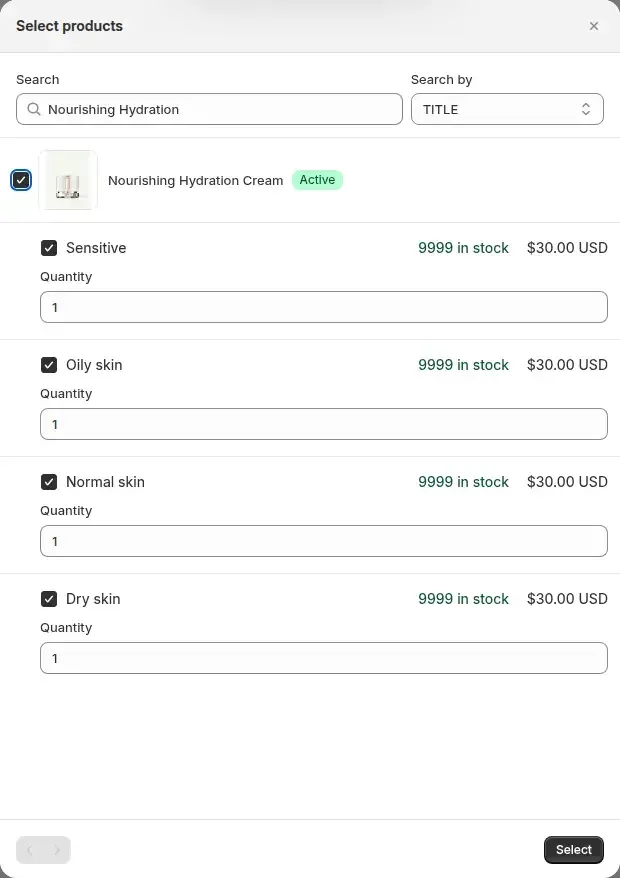
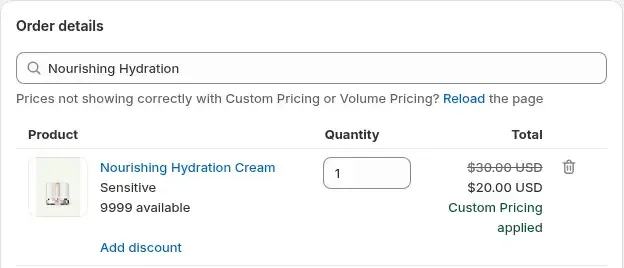
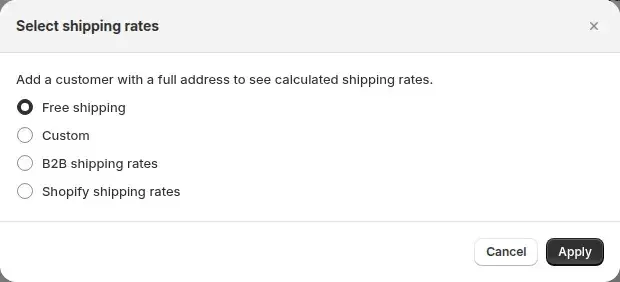
Build your first manual order on an Advanced or Platinum plan. The listing shows a 14-day free trial on paid plans.
The builder runs pricing rules for the chosen customer. It does not run rules that depend on a storefront cart.
| Module | On a manual order | How it behaves |
|---|---|---|
| Price List | Applied | Checked first. If it matches the customer and variant, Custom Pricing is skipped for that line. |
| Custom Pricing | Applied | Sets the line price when no Price List matches. |
| Volume Pricing | Applied | Tier discounts by quantity or value are applied on top of the price above. |
| Discount codes | Applied | B2B discount code rules are checked against the products in the order. |
| Shipping Rate | Applied | Available as the B2B shipping rates option. |
| Net terms (payment terms) | Applied | Due on receipt, 7, 15, 30, 45, 60 and 90 days, custom days or a fixed date. |
| Tax exempt | Applied | Follows the customer's tax-exempt flag in Shopify, or you set it by hand on the order. |
| Extra Fee | Not applied | These work on the storefront cart. Add the lines yourself if the order needs them. |
| Order Limit, Quantity Increment | Not applied | Check minimums and multiples yourself before you send the invoice. |
Source: BSS user guide for Manual Orders and the app code, checked October 9, 2026.
You do not have to start from scratch. On the Create order page, Import draft order offers two modes. Import to create copies the customer, addresses and lines of an existing Shopify draft order into a new order and applies your current B2B rules. Import to edit opens a draft order for changes, and saving recalculates every line from your current rules.
The Manual Orders list shows each draft order as Open, Invoice sent or Completed. Sync Order Data refreshes totals and statuses from Shopify, and the pen icon beside an order opens it for editing. For completed orders, the Sufio integration can download an invoice.
The builder blocks an order with more than 499 line items. Split a larger order in two.
Extra Fee, Order Limit and Quantity Increment are not applied. Order Limit and Quantity Increment will not stop a bad quantity on a manual order.
If you change a line price in Shopify's draft order editor, do not reopen and re-save the order from Manual Orders. The app recalculates every line from your rules and replaces your edit.
Tax exemption follows the customer's flag in Shopify or a manual switch. A manual order does not validate a tax ID.
The Shopify shipping rates option needs a customer with a full address.
Advanced or Platinum. Essential does not get the module. Free gets it on development stores only.
Manual Orders reads the same rules as the storefront, so a customer who sees $20 online is priced at $20 on the draft order. The rule order is the same too: Price List first, then Custom Pricing, then Volume Pricing on top. A Price List price of $7 with a 10% Volume Pricing tier at 20 units gives $6.30 per unit for 25 units.
Net terms set when the order is created appear as Shopify payment terms on the draft order.
Sales reps, account managers and support staff who take orders by phone or email. If the buyer orders on the storefront, nothing here is needed, since the same rules apply in the cart.
Manual Orders is on the Advanced and Platinum plans. On the Shopify App Store listing, as of October 9, 2026, Advanced is $49 per month and Platinum is $99 per month, with 10% off on yearly billing. The listing shows a 14-day free trial on paid plans.
Each use case shows one setup with screenshots. Browse all use cases.
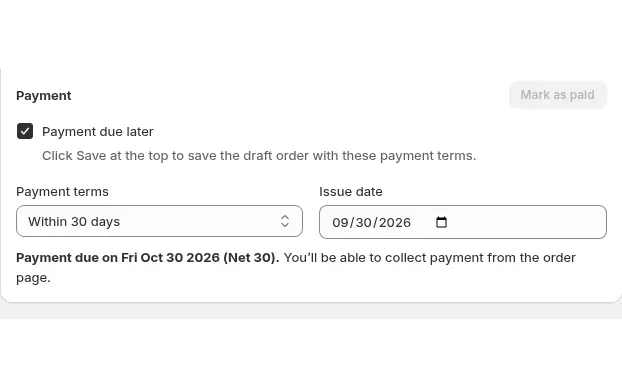
Build draft orders in the Shopify admin with each buyer's custom prices, volume tiers, net terms and tax status applied using Manual Orders in BSS B2B Solution.
Explore use case: Place Orders on Behalf of Customers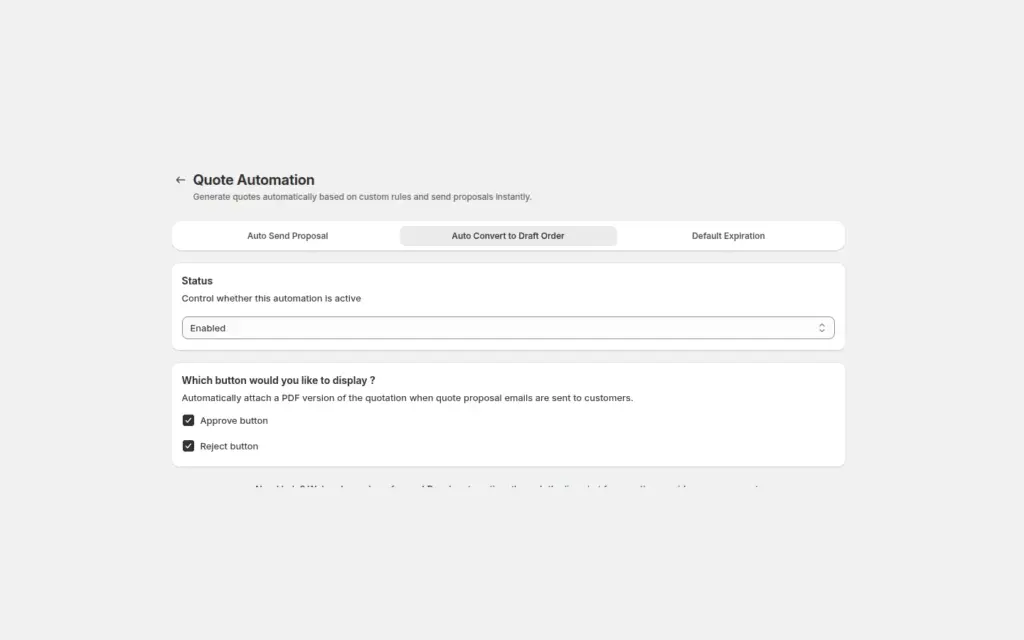
Send a proposal email with Approve and Reject buttons, and when a logged-in buyer approves, BSS B2B Quote converts the quote into a Shopify draft order and emails the invoice, with no manual order entry.
Explore use case: Approve a Quote and Turn It Into a Draft Order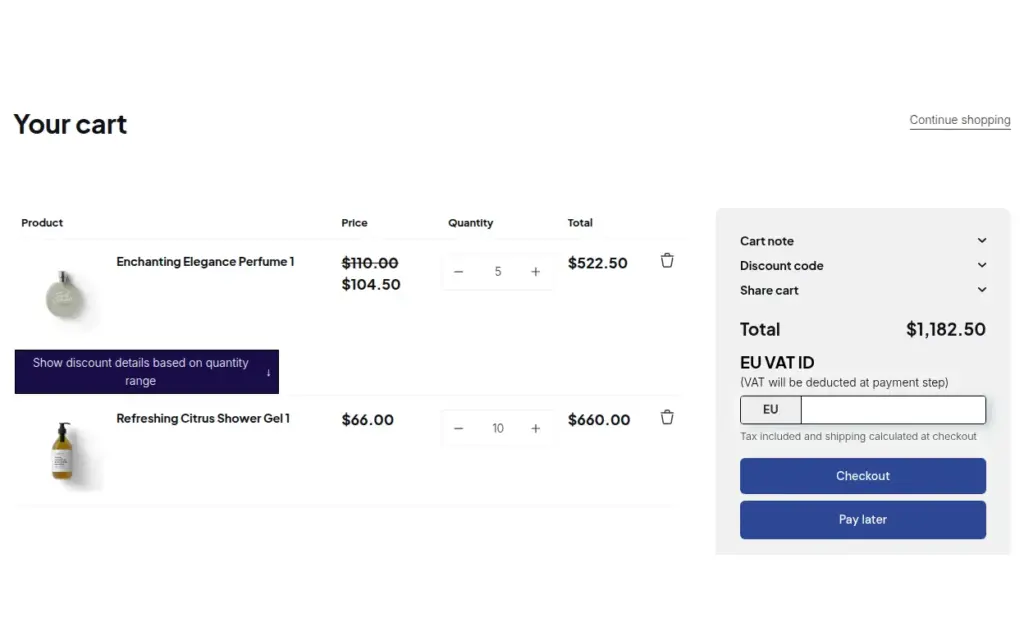
Verify a tax ID once at registration, then give approved buyers tax exemption and Net Terms with a Pay later button using BSS B2B Solution for Shopify.
Explore use case: Onboard Tax-Exempt Buyers With Net TermsEach topic has one page that owns it. Start from these.
Wholesale prices at the counter.
Quotes, orders and customer prices.
Set minimum orders, case packs and net payment terms for wholesale buyers.
Show business buyers their own prices with price lists, custom pricing and quantity breaks.
Draft orderSales repNet termsTax exemption
Each feature has its own page. See also all BSS B2B Solution features.
Add or remove customer and order tags when a Shopify event matches your rules, so tag-based prices and access follow the buyer.
Give wholesale buyers a private code they enter in the cart, with rules for who can use it, what it covers and how often.
Read and write B2B pricing rules, registrations and customer lookups from your ERP or PIM with one API key.
Add a handling fee by quantity or amount, and set wholesale shipping rates by customer, product, market and weight.
Show wholesale prices in the buyer's currency with a switcher. Checkout stays in your store or Markets currency.
The B2B Price tile in Shopify POS shows the wholesale discount for the cart. Staff apply or remove it from the tile.
Install BSS B2B Solution from the Shopify App Store, with a 14-day free trial on paid plans.
Also: BSS B2B Lock for hidden prices for guests and BSS B2B Quote for quotes and quick order.
It builds a Shopify draft order for a customer from the app admin. The app applies the customer's Price List, Custom Pricing and Volume Pricing, plus discount codes, shipping rates, tax exemption and payment terms. You then send the invoice or mark the order paid.
Advanced or Platinum. As of October 9, 2026 the App Store listing shows Advanced at $49 per month and Platinum at $99 per month. It works in the admin, so no theme change is needed.
No. Extra Fee, Order Limit and Quantity Increment work on the storefront cart, and a manual order has none. Add fees yourself and check minimums before you send the invoice.
Up to 499. The builder blocks an order with more lines than that.
Yes, in Shopify's draft order editor. Do not reopen and re-save the order from Manual Orders afterwards, because it recalculates every line from your rules and overwrites the edit.
Feature behavior follows our review of the BSS B2B Solution app code on October 3, 2026 and the BSS user guides, and where the guides and the code differ we follow the code. Prices and ratings come from the App Store listing on the date shown. We make BSS B2B Solution, BSS B2B Lock and BSS B2B Quote.