
Shopify Quick Order Form: Let Wholesale Buyers Order by SKU

A quick order form lets a wholesale buyer add many products and quantities to the cart from one page. Shopify’s native quick order list is a variant table on the product page, included on every plan. For a dedicated page with filters and CSV upload by SKU, BSS B2B Quote adds a Quick Order page for Online Store 2.0 themes.
Give buyers one page to search, set quantities and add to cart, or upload a SKU and quantity file. Free on development stores, 14-day trial on paid plans.
Install BSS B2B Quote See pricingLast updated October 4, 2026. Shopify facts come from the Help Center pages linked in the text. BSS B2B Solutions makes BSS B2B Quote, the app in the screenshots. This guide belongs to the quick order and RFQ hub of our complete guide to Shopify B2B.
Key takeaways
- Shopify’s quick order list is on Basic, Grow, Advanced and Plus (plan table). It is a product page section for free themes version 11.0.0 or later (Shopify Help Center).
- Shopify does not describe SKU search or file upload for it. Its checklist lists order upload via CSV as a use case for third-party apps (checklist).
- BSS B2B Quote adds a Quick Order page with filters, per-row quantity and Add to cart, and a CSV or XLSX upload that matches SKUs.
- Uploaded rows go to the cart, not straight to checkout. Valid SKUs are added even when some rows fail.
- Search is not the same on every form. Use CSV upload when SKU is the main way buyers order.
What is a Shopify quick order form?
A quick order form is an order page for buyers who already know what they want. Instead of opening product pages one by one, they search or paste a list, set a quantity next to each item and add everything to the cart together. Retail shoppers browse. Wholesale buyers restock: 30 lines, the same items as last month, from a spreadsheet. A quick order form is built for that second case.
Does Shopify have a quick order form?
Yes, in a limited form. The quick order list is a section that shows the variants of a product in a table, where the buyer changes the quantity of several variants at once. Shopify says it is supported on free Shopify themes, version 11.0.0 or later, and it is on the product template (Shopify Help Center). The table shows images, titles, SKU when available, prices, quantity fields and subtotals. Shopify’s page does not mention SKU or product-name search, or CSV upload (Shopify quick order list).
- Open Online Store and click Edit theme.
- Use the Market dropdown to pick your target market.
- Open the Template dropdown and choose Products.
- Click Add section, choose Quick order list and save.
- Consider hiding the Buy buttons, Quantity selector and Variant picker blocks, since the purchase now runs through the list.
That fits a store whose buyers order many variants of one product, such as sizes and colors. It does not give buyers a single page across the whole catalog. Custom themes need code, which Shopify calls an advanced tutorial.
Native quick order list or a quick order app?
| Shopify quick order list | BSS Quick Order page | BSS CSV bulk import | BSS variant table | |
|---|---|---|---|---|
| Where it lives | Section on the product page | A page in your store, any URL handle | A button on the Quick Order page | App block on the product page |
| Buyer action | Set quantity per variant | Search, filter, set quantity, add to cart | Upload a SKU and quantity file | Set quantity per variant, add all |
| SKU ordering | Not described by Shopify | Search varies by form (see below) | Yes, matches SKUs | Not the focus |
| Theme | Free themes 11.0.0+ | Online Store 2.0 | Online Store 2.0 | Online Store 2.0 product template |
| Wholesale prices | Shopify catalog prices | Shopify B2B prices, or BSS B2B Solution prices for other buyers | Same as the page | Shopify prices only |
| Plan | Basic, Grow, Advanced, Plus | BSS Growth and up | BSS Growth and up | BSS Business and up |
Use the native list for variant-heavy products. Add the BSS Quick Order page when buyers order across the catalog, need filters, or send spreadsheets. For ready-made examples see standard quick order pages, personalized quick order pages and variant matrix order form on the product page.
How to build a quick order page for wholesale buyers
These steps follow the BSS user guide: Create Quick Order Page. Try them on a development store first; BSS B2B Quote is free there.
Step 1: Use an Online Store 2.0 theme and turn on the app embed
When you publish a page, the app writes a section and a page template into the live theme, so the theme must support Online Store 2.0. Other themes do not get these files automatically. If you switch themes, open Advanced Settings, then Theme installation, select the new theme and click Install. Also turn on the B2B Portal app embed in the theme editor.
Step 2: Create the page and choose the customer type
In the app open Quick Order, click Set up pages and then Create new page, or start from a template. Choose Default Customers for ordinary customer accounts, or Company Customers for Shopify B2B companies, which needs the Enterprise plan.
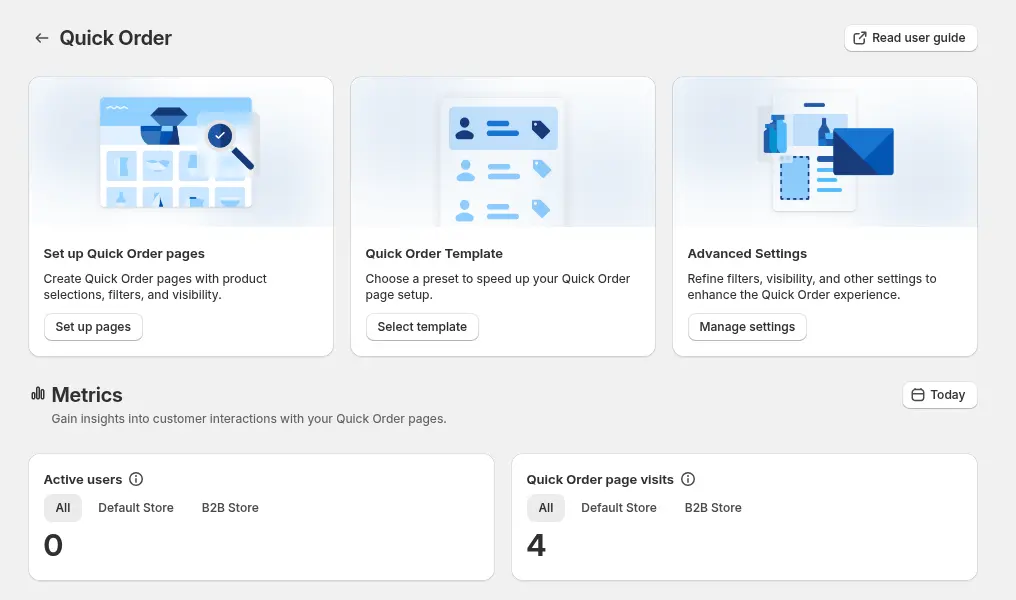
Step 3: Choose the products and who sees the page
Pick all products, selected collections, product tags or specific products, and exclude customers or products you do not want on the page. Exclusions are checked before inclusions. For Default Customers you can show the page to everyone, logged-in customers, specific customers or customer tags. Company forms use everyone, specific customers, companies or tags. For a wholesale-only page, use a customer tag.
Step 4: Set the layout
Show All Variants lists every variant on its own row with a quantity box, which is the fastest for bulk orders. Modal Variant shows one row per product and opens a window to pick variants, which suits large option sets. Choose a sort order, add filters for collection, type, vendor, tags and in-stock, and pick metafields as table columns. The page shows 40 products at a time by default, and buyers can choose 10, 20, 40, 60, 80 or 100.
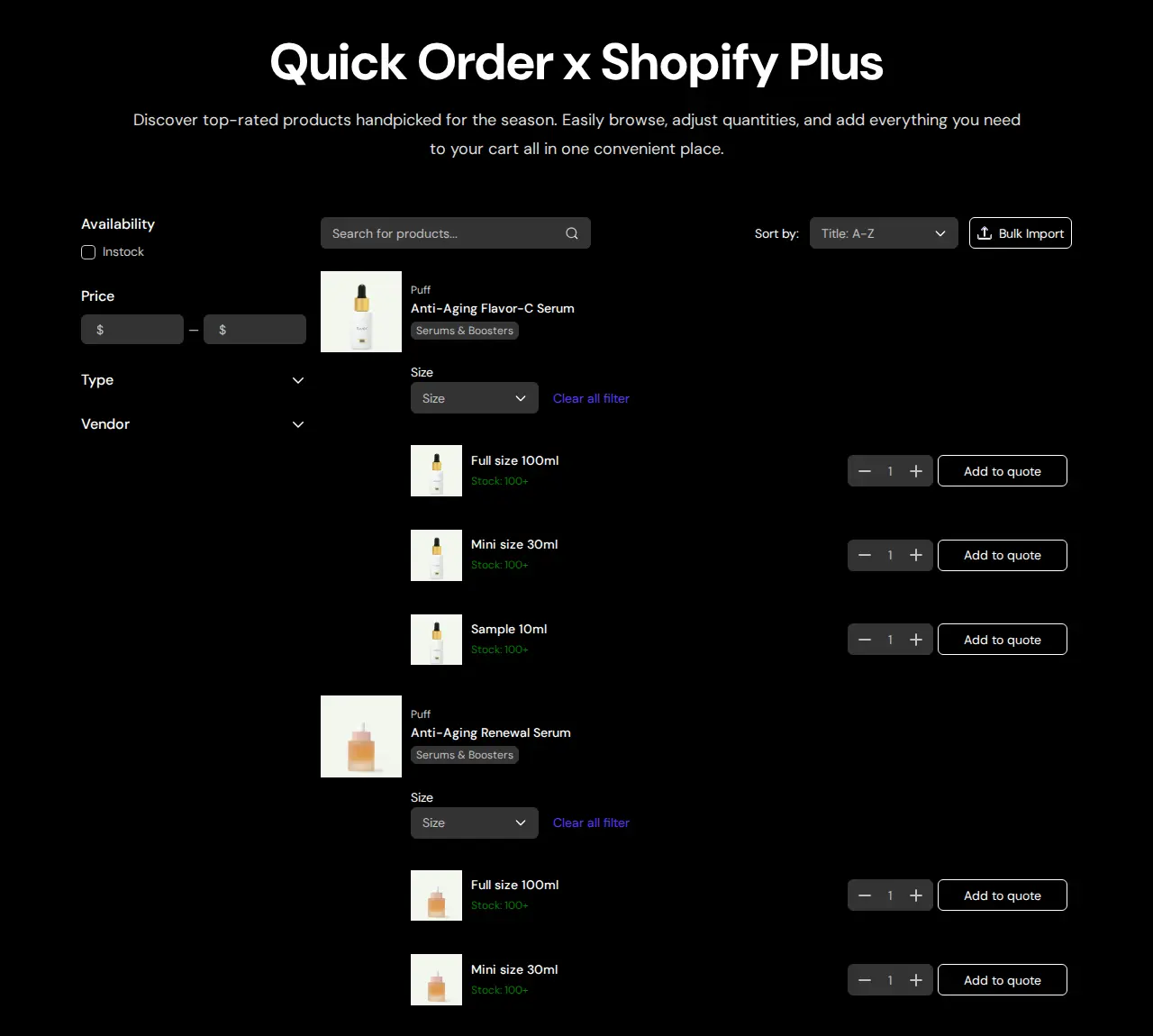
Step 5: Publish and link the page
Click Publish, enter the page title and the URL handle, for example /pages/wholesale-order, then publish in the window. Add the page to your menu or to a wholesale landing page. Test with a logged-out visit and with a matching account to confirm who can see it.
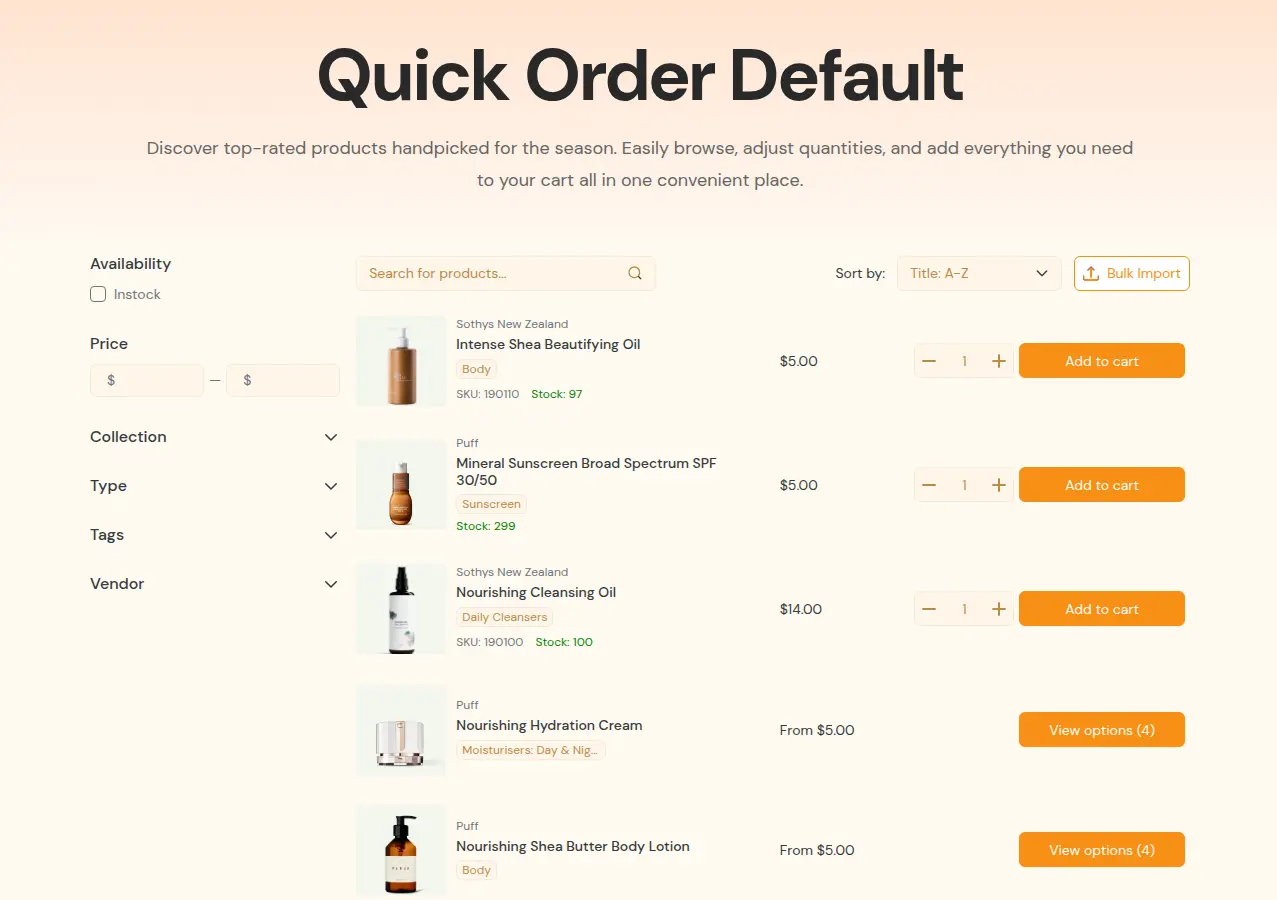
Can buyers search by SKU on the quick order page?
Do not promise more than the search does. In our October 2026 review of the app’s code, the search bar on forms for Default Customers matches the start of the product title. Matching on title or variant SKU applies in product-batch mode. We found no barcode or vendor search, so do not tell buyers the box finds those. If SKU is how your buyers order, send them to the CSV upload, which matches on SKU, or to a Show All Variants page where the SKU appears on each row.
How does CSV order upload work?
On a Quick Order page the Bulk Import button opens a window where the buyer drops a file. The app reads the first sheet of an .xlsx, .xls or .csv file, finds the SKU and quantity columns, and shows a result table before anything touches the cart. The CSV upload guide lists the details.
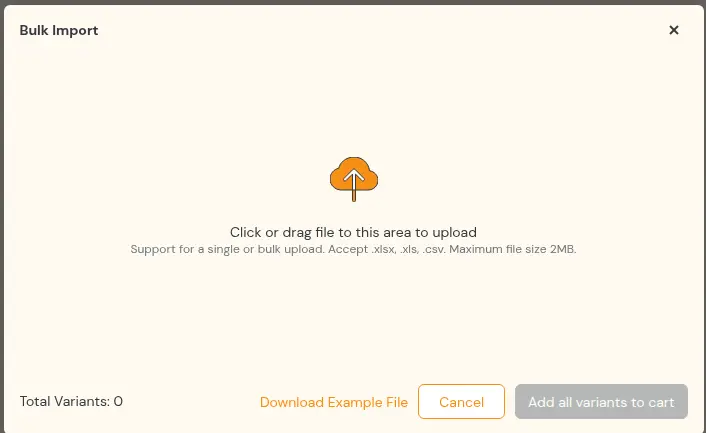
sku,quantity
TSHIRT-BLK-S,50
TSHIRT-BLK-M,100
TSHIRT-BLK-L,75
HOODIE-GRY-XL,20- Headers are not case sensitive. Recognized SKU names include sku, variant sku, sku code, product sku, variant code, item sku and item code. Quantity names include quantity, qty, amount, order qty, order quantity, qty ordered and quantity ordered.
- Duplicate SKUs are added together, across rows and across files.
- Invalid SKUs are listed in a banner, and the valid SKUs still go through. Rows with a quantity of 0 or less are skipped.
- Out-of-stock variants are removed and the buyer is told in a window.
- Add all variants to cart sends the matched rows to the cart. The buyer then checks out as usual.
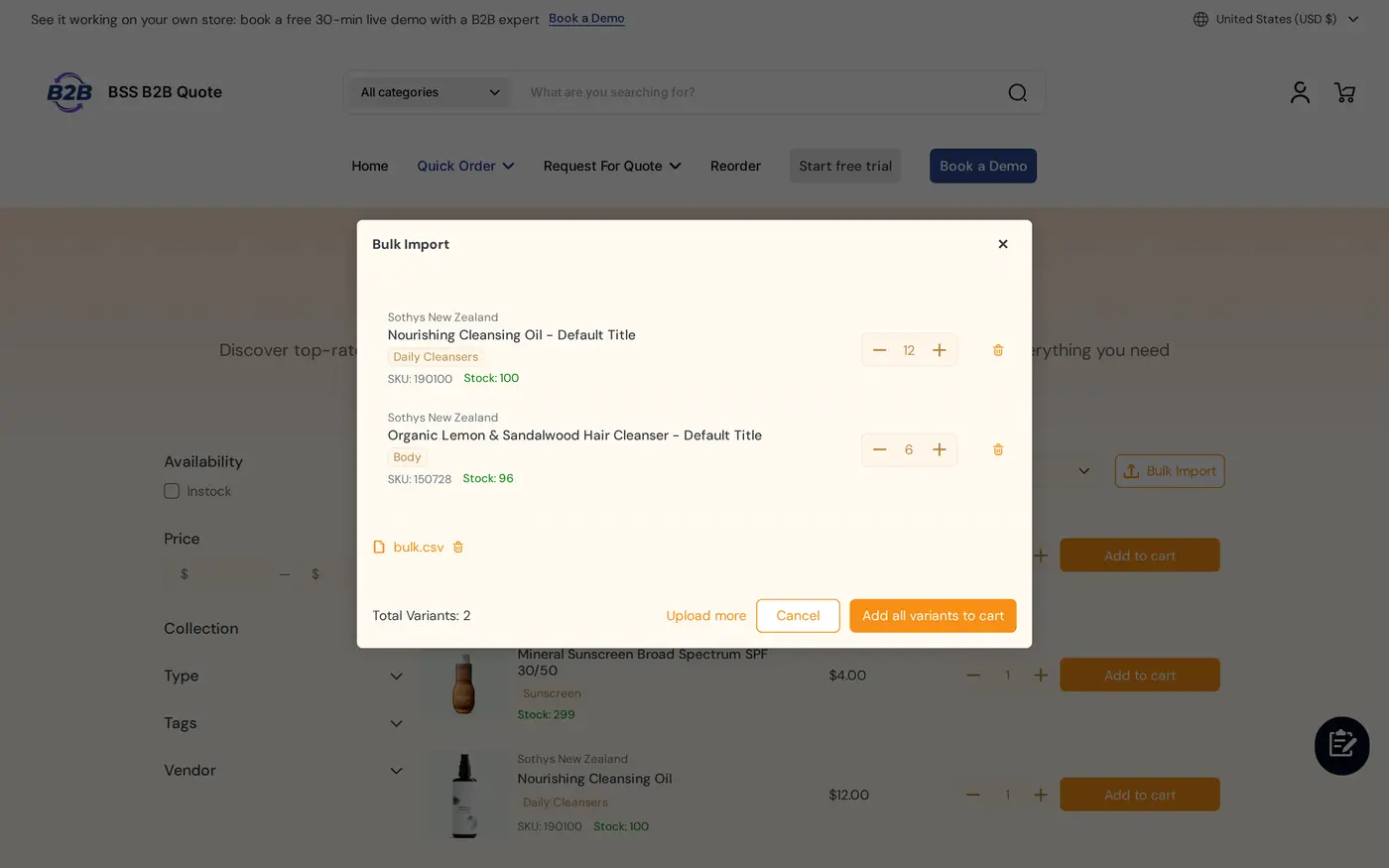
Two cautions. The upload window states a 2 MB limit per file, and in our code review we found no row limit in the storefront code, so test your largest file. SKU lookup reads variants in pages, and in our review it covered up to 2,500 variants, so test an upload against a very large catalog before you promise it. See bulk order by CSV upload for a worked example.
Will the quick order page show wholesale prices?
For customers who do not use Shopify’s native B2B, the Quick Order page uses BSS B2B Solution prices when both apps are installed: custom prices, quantity breaks and quantity increments, with discount badges on each row. Customers who belong to Shopify B2B companies see their Shopify catalog prices. Set the prices once in BSS B2B Solution and they carry into quick order. The plan guide lists this price integration from the Growth plan.
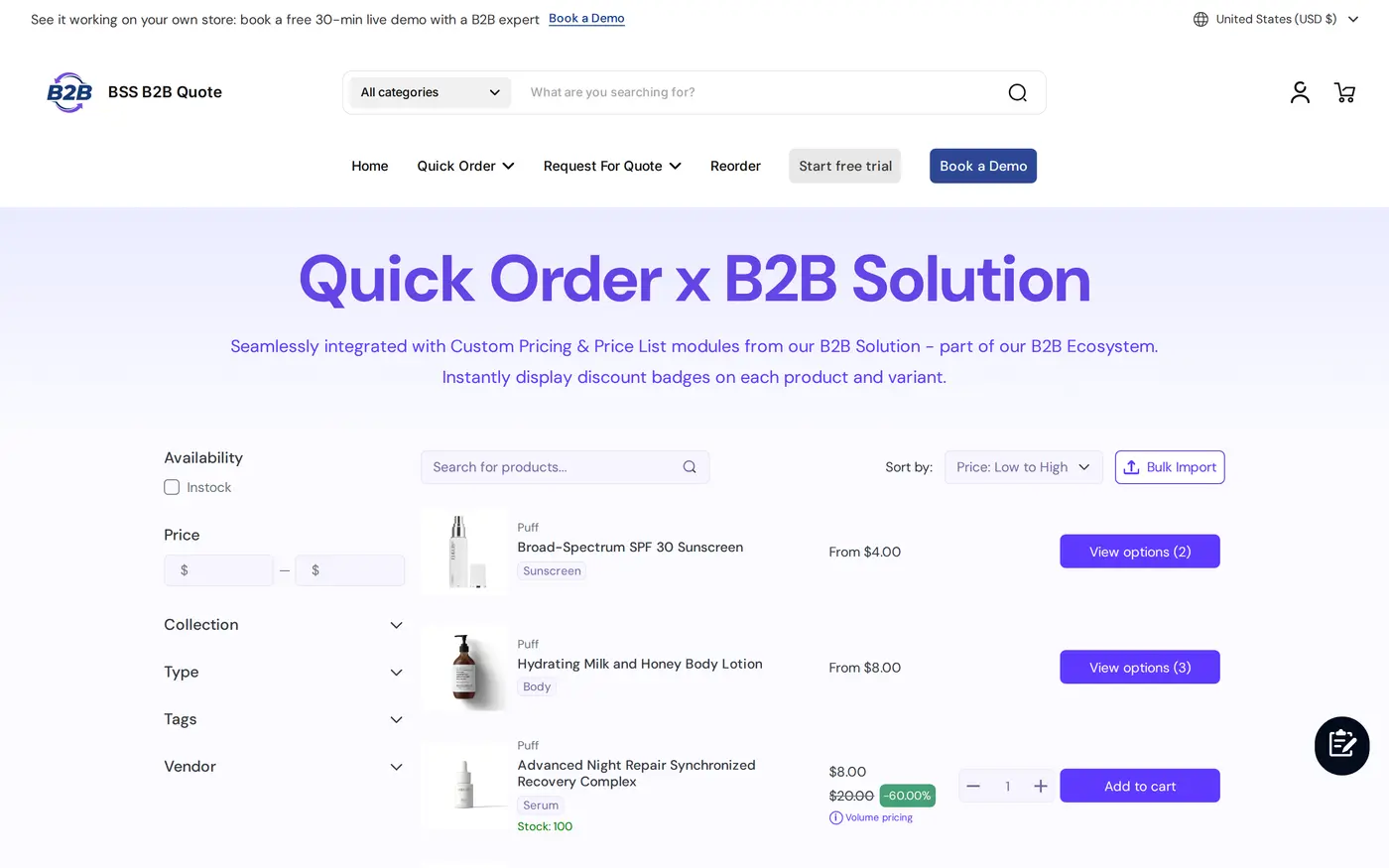
Each row can also offer Add to quotes, so a buyer who needs a better price can turn the list into a request. See our Shopify request for quote guide.
Limits to know before you launch
| Limit | What it means | What to do |
|---|---|---|
| Theme | The Quick Order page and variant table are theme sections. A legacy theme needs an upgrade | Use an Online Store 2.0 theme and run Theme installation after a switch |
| Cart, not checkout | Uploads and rows add to the cart | Tell buyers to review the cart and check out as usual |
| Search coverage | Title prefix on default forms. No barcode or vendor search | Send SKU-first buyers to CSV upload |
| Plan | Stores below the Growth plan are read-only in the app since June 14, 2026 | Plan on Growth ($19 per month) or higher. Free on development stores |
| Company forms | Company Customers pages need the Enterprise plan | Use customer tags for most stores |
| Login | Reorder needs a signed-in buyer | Offer both a quick order page and a reorder page |
| Headless | Storefront features rely on the theme app embed | Test before you plan a headless storefront |
Repeat buyers often want a second tool: a page of past orders. The reorder page creates a draft order from a previous one at current prices, from the Growth plan.
Quick order launch checklist
- Your theme is Online Store 2.0 and the app embed is on.
- The page lists the right products and only the right buyers can see it.
- A logged-out visit and a matching account both behave as you expect.
- A sample CSV is available for download, filled with real SKUs.
- You uploaded a test file with a duplicate SKU, an invalid SKU and an out-of-stock item.
- The prices on the page match what the cart shows.
- The page link is in your wholesale menu and in your welcome email for new accounts.
Shopify quick order form: frequently asked questions
What is a quick order form?
A quick order form is an order page where buyers search products, set quantities for many items and add them to the cart at once. In BSS B2B Quote this is the Quick Order module, with filters and a CSV upload.
Does Shopify have a quick order form?
Yes. A quick order list is included on Basic, Grow, Advanced and Plus. It is a product page section for free themes version 11.0.0 or later. Shopify lists order upload via CSV as a use case for third-party apps.
Can wholesale buyers order by SKU on Shopify?
Yes, with CSV or XLSX upload in BSS B2B Quote, which matches SKUs and quantities. The search box on default forms matches the start of the product title, so use the upload when SKU is the main way buyers order.
Does a CSV upload go straight to checkout?
No. The matched rows are added to the cart. The buyer reviews the cart and checks out as usual.
What file formats and headers are accepted?
Files of type xlsx, xls and csv. The app reads the first sheet. Headers are not case sensitive, and names such as sku, variant sku, quantity and qty are recognized. Duplicate SKUs are added together.
What happens to an invalid SKU in the file?
It is listed in a banner and skipped. The valid SKUs still go to the cart. Out-of-stock variants are removed and the buyer sees a message.
Does the quick order page need a special theme?
It needs an Online Store 2.0 theme, because the app adds a section and a page template to the theme. After switching themes, run Theme installation in the app.
Will quick order show my wholesale prices?
For customers who do not use Shopify’s native B2B, yes, when BSS B2B Solution is installed: custom prices, quantity breaks and quantity increments. Company customers see their Shopify catalog prices.
How much does BSS B2B Quote cost?
It is free on development stores. Paid plans are Growth at $19, Business at $39 and Enterprise at $79 per month, with a 14-day trial. Prices are from the App Store listing as of October 4, 2026. Stores below Growth are read-only since June 14, 2026.
Next steps
Start with one page for your tagged wholesale buyers and a sample CSV with real SKUs. Then read the quick order and RFQ hub for reorder and quote options, and compare tools in the guide to Shopify wholesale order forms. The purchase order entry explains what many buyers upload.
Install BSS B2B Quote for a Quick Order page, CSV upload, quotes and reorder. Pair it with BSS B2B Solution to show wholesale prices.
Install BSS B2B Quote See the appSources
Shopify pages read on October 4, 2026. BSS facts: BSS B2B Quote user guide at docs.bss-b2b.solutions, our October 2026 review of the app’s behavior, and the Shopify App Store listing (as of October 4, 2026).
- Shopify Help Center: Adding the quick order list to your theme
- Shopify Help Center: Create and manage overrides (quick order list)
- Shopify Help Center: Shopify B2B features by plan
- Shopify Help Center: Setup checklist for blended B2B stores
- BSS B2B Quote user guide: Create Quick Order Page
- BSS B2B Quote user guide: CSV upload (bulk import)
- BSS B2B Quote user guide: Pricing and plans
You may also like

How to Uninstall a Shopify B2B or Lock App Safely: Remove Leftover Theme Code
Some Shopify apps leave code in your theme after you uninstall them. To remove a B2B or lock app safely, duplicate your […]

Shopify Markets and B2B Pricing: Wholesale Prices Per Country and Currency
Shopify Markets control currency, languages and taxes by audience, and B2B catalogs can be assigned per B2B market, with a cap on […]

How to Collect and Validate a Tax ID (EIN, ABN, GST, UK VAT) on Shopify
Shopify has a Tax ID field on company locations, but the pages we read describe no check against a tax register. BSS […]