
Wholesale Application Form Fields: What to Ask Before Approving a Reseller (Free Template)

A good wholesale application form asks for four things: who the business is, how to reach it, proof that it is real, and what it will buy. Keep it to about ten fields, mark only what you will check as required, and copy the free field template below.
Add business fields, tax ID checks and file upload, approve or reject each application, and tag approved buyers so wholesale prices unlock. Free on development stores, 14-day trial on paid plans.
Install BSS B2B Solution See pricingLast updated October 4, 2026. BSS B2B Solutions makes BSS B2B Solution, the app in the screenshots. This post covers which fields to ask; for building and publishing the form, follow our Shopify B2B registration form guide. It belongs to the customer onboarding hub of our complete guide to Shopify B2B.
Key takeaways
- Ask for what you will check or use. Every extra field loses applicants, and data you never use is still data you must protect.
- Group fields in four tiers: must ask, should ask, ask only in specific cases, and do not ask.
- In BSS B2B Solution, fields are 30%, 50% or 100% wide, file uploads are 10 MB per file, and tax ID checks run in the browser only.
- A form screens applicants; it does not replace your review. Check the tax ID, the website and any document before you approve.
- Copy the plain-text template in this post into your own form editor and trim it to your trade terms.
What is a wholesale application form?
A wholesale application form is the page where a business asks to buy at trade terms. You read the answers, decide whether the applicant is a genuine reseller or retailer, and then approve or reject. The form is not the same as a sign-up form: a sign-up creates an account, an application creates a decision. That is why the fields matter. They are the evidence you decide on.
Shopify can collect applications with its free Forms app. Submissions create a company in Customers, Companies, where they wait under “Ordering not approved” until you approve them, and the form supports custom fields such as dropdowns, dates and a single file of up to 20 MB (Shopify Help Center, read October 4, 2026). Shopify’s page does not describe tax ID checks, tags or spam protection. An app form such as BSS B2B Solution adds those. Setup differs; the questions you ask do not.
What should you ask on a wholesale application form?
Start from the decision, not the form. Before approving, you want to know four things. Is this a real business? Can I reach the person? Do they sell what I sell, in a way I accept? Will they order enough to be worth the trade price? Each field below answers one of those questions. Here are the fields in four tiers.
Tier 1: must ask (every store)
| Field | Type | Width | Required | Why you ask | How to check before approving |
|---|---|---|---|---|---|
| Company legal name | Company (system field) | 100% | Yes | Matches invoices and the company record | Search the name with the website and tax ID |
| Contact first and last name | System fields | 50% each | Yes | Who you approve and email | Check the email domain matches the company |
| Business email | Email (system field) | 50% | Yes | Notifications and login | Prefer a company domain; free-mail addresses need a second check |
| Phone | Phone (system field) | 50% | Yes | Call back for large or unusual orders | Call once if anything looks off |
| Billing and shipping address | Address fields | 100% | Yes | Tax, freight and fraud screening | Compare with the company’s public address |
| Business type | Dropdown | 50% | Yes | Retailer, online seller, distributor, other | Filters out consumers and fits your terms |
Tier 2: should ask (most wholesale stores)
| Field | Type | Width | Required | Why you ask | How to check before approving |
|---|---|---|---|---|---|
| Website or store URL | Text | 50% | Yes for resellers | Fastest proof of a real business | Open it: real products, working contact page, no resale of your own listings |
| Tax ID (VAT, EIN, ABN or GST) | Tax ID field | 50% | If you sell tax-exempt | Registered business identity | Run it through the official registry yourself; the form check is a screen |
| Years in business | Dropdown | 30% | No | Rough maturity signal | Cross-check with the website and registry |
| Expected order volume | Dropdown | 50% | No | Decides the price tier or tag | Compare with your minimums |
| How did you hear about us? | Dropdown | 50% | No | Shows which channel brings real buyers | None needed |
| Accepts marketing | Accepts-marketing checkbox | 100% | No | Records opt-in to emails | Leave unticked by default |
For tax IDs, VAT numbers can be looked up in the EU’s VIES service, and BSS B2B Solution has fields for EU VAT, UK VAT, US EIN, Australian ABN and India GST numbers that check the number as the buyer types. Read the limit: the check runs in the browser, blocks the submission only when the field is marked required, and the server does not check the number again. Treat it as a screen, then verify before you approve. The US EIN field needs the Platinum plan.
Tier 3: ask only in specific cases
| Field | Type | Width | Ask when | Note |
|---|---|---|---|---|
| Resale or business document | File upload | 100% | You grant tax-exempt or trade pricing | 10 MB per file, one file per field. Allowed: csv, txt, pdf, zip, doc, docx, xls, xlsx, gif, jpeg, png, wav, mp4 |
| Reference or trade account | Text area | 100% | You extend payment terms | A reference is a prompt for you to call, not a credit check |
| Store type: physical, online, both | Radio group | 50% | Your brand rules differ by channel | Use conditional logic to show a store-address field only for physical shops |
| Product categories of interest | Checkbox group | 100% | You have separate catalogs | Maps to the tag you assign |
| Marketplace seller ID | Text | 50% | You restrict Amazon or marketplace resale | Ask only if you enforce it |
Conditional logic (show or hide a field depending on an answer) runs on the Platinum plan, or on plans that include the registration module. You can build rules on other plans, but they will not run, so test the live form. For the term, see resale certificate in the glossary, and ask your accountant what you need to collect in your state or country, because the rules vary.
Tier 4: do not ask
- Bank or card details. A wholesale application is not a payment form. Terms and payment come later (see net terms).
- Government ID numbers or birth dates of individuals, unless your accountant tells you a specific reason.
- Anything you will not look at. If nobody reads the answer, delete the field.
- Passwords in a free-text field. Use the account sign-up step, not a custom field.
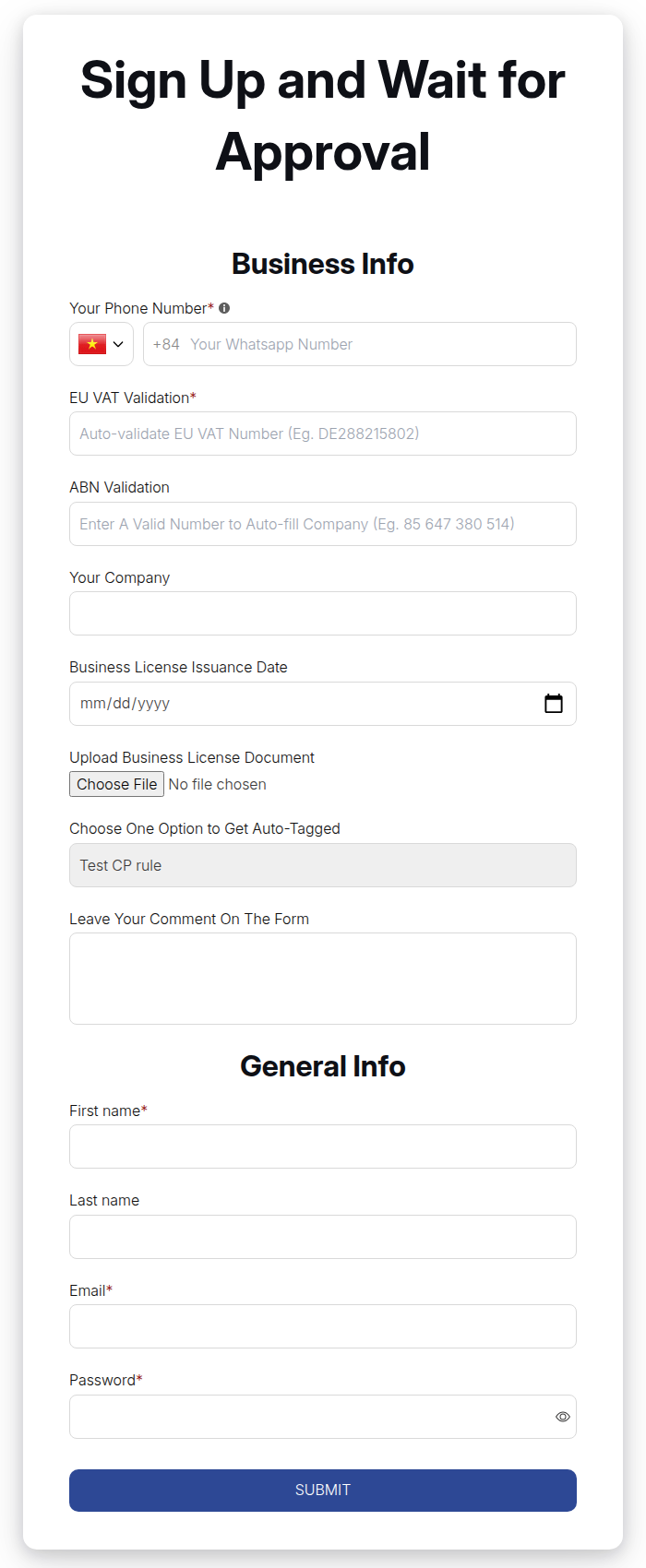
Free wholesale application form template (copy and paste)
Copy this list into a document, delete the lines you do not need and build the rest in your form editor. Required fields are marked (R), widths are suggestions.
WHOLESALE APPLICATION FORM TEMPLATE

Section 1: Your business
[ ] Company legal name (R)            text, 100%
[ ] Trading name, if different        text, 50%
[ ] Business type (R)                 dropdown, 50%: Retailer / Online seller / Distributor / Other
[ ] Website or store URL (R)          text, 50%
[ ] Years in business                 dropdown, 30%: Under 1 / 1 to 3 / 3 to 10 / Over 10

Section 2: Contact
[ ] First name (R)                    50%
[ ] Last name (R)                     50%
[ ] Business email (R)                50%
[ ] Phone (R)                         50%

Section 3: Address
[ ] Billing address (R)               100%
[ ] Shipping address, if different    100%

Section 4: Proof
[ ] Tax ID (VAT / EIN / ABN / GST)    tax ID field, 50%, required only if you sell tax-exempt
[ ] Business document (PDF, up to 10 MB)  file, 100%

Section 5: How you would buy
[ ] Expected order volume             dropdown, 50%
[ ] Product categories of interest    checkbox group, 100%
[ ] How did you hear about us?        dropdown, 50%

Section 6: Consent
[ ] I agree to the privacy policy (R) checkbox, 100%
[ ] Send me wholesale news            accepts-marketing, 100%, unticked by default
Add each field, set its width and required switch, and preview the form before you publish it. Applications land in a queue you can approve or reject.
Install BSS B2B Solution Read the setup guideWhat the form builder can and cannot do
| Item | What to expect |
|---|---|
| Field types | Text, text area, number, date, file, dropdown, checkbox group, radio group, heading and accepts-marketing, plus system fields (names, email, password, address, company, phone, country) |
| Field width | 30%, 50% or 100% only |
| File upload | 10 MB per file, one file per field; a failed upload blocks the submission |
| Tax ID fields | EU VAT, UK VAT, US EIN (Platinum), ABN, India GST; checked in the browser, not re-checked on the server |
| Conditional logic | Show or hide, any or all conditions; runs on Platinum or plans that include the registration module |
| Spam protection | Google reCAPTCHA v2 on paid plans, not on the Free plan |
| Forms on Free | One form; multi-step form needs a paid plan |
| Same email twice | Blocked, whatever the status of the first application |
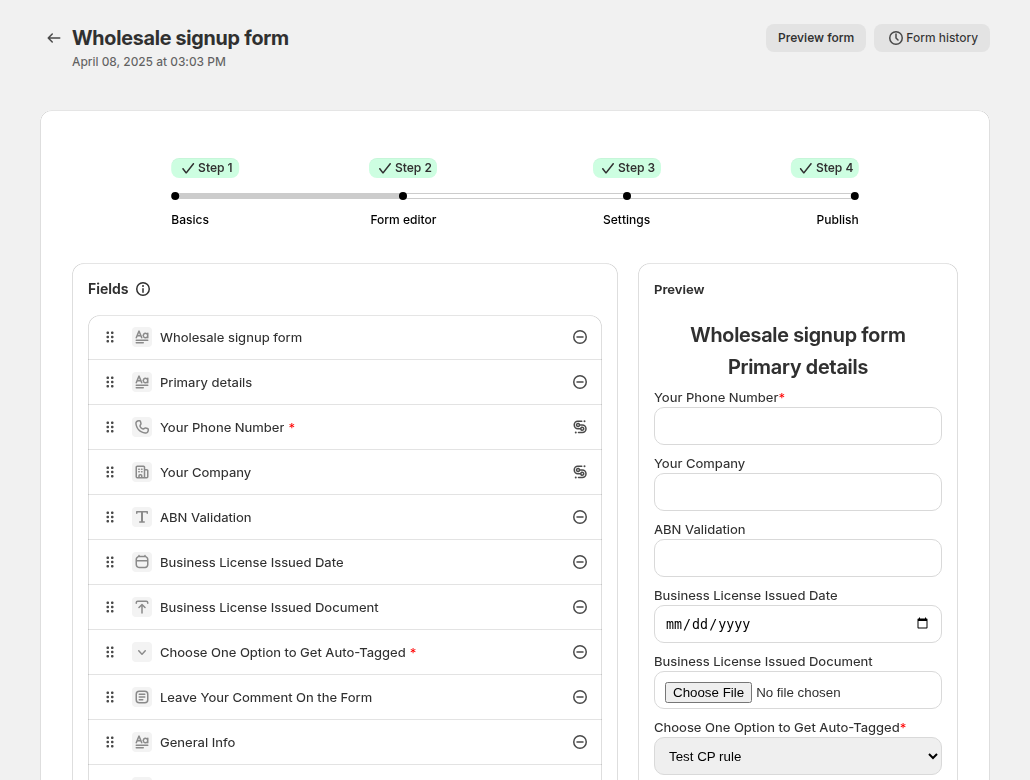
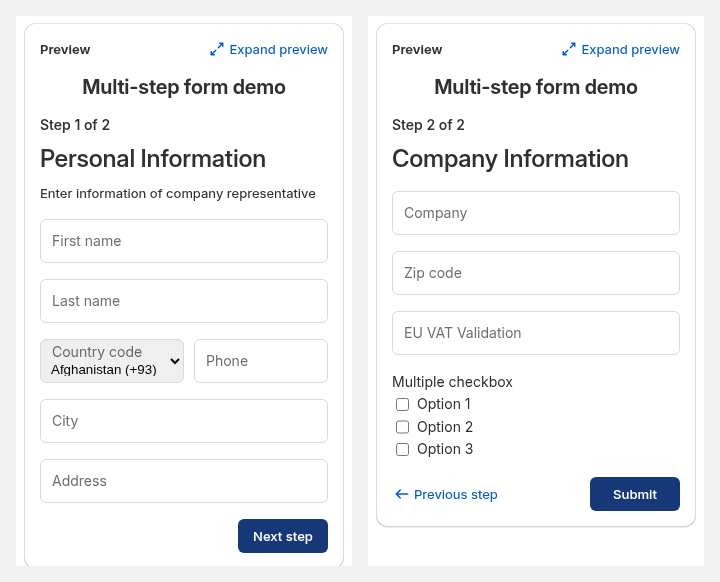
A long form is where applicants quit. If your list runs past ten fields, split it with the multi-step form, which runs inside Shopify’s new customer accounts. Read the multi-step wholesale registration form use case for a worked example.
What to check before approving a reseller
Run this list on each application. It takes a few minutes and avoids most bad approvals.
- Website: real products, a contact page and a working checkout or storefront. A parked page is a no.
- Email domain: matches the company. A free-mail address is not a rejection, but ask for a second proof.
- Tax ID: look it up in the official registry for its country. The form’s live check is a screen, not a record.
- Document: open the upload and check the name and dates match the company. Ask your accountant which documents you must keep.
- Fit: does the business sell in a way your brand allows? Check the business type and the website against your channel rules.
- Volume: does the expected order size clear your minimums?
We cannot tell you which documents the law requires you to collect. That depends on your product, country and state, so confirm it with your accountant. See tax exemption and the use case verify business tax ID at registration for how the app side works.
How approval works after the form
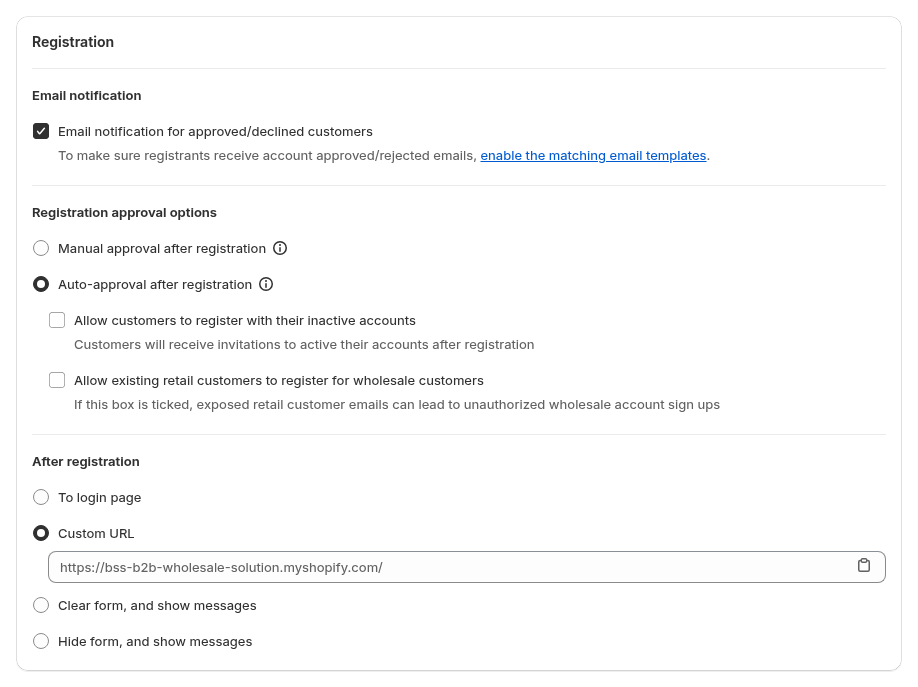
With BSS B2B Solution you choose manual approval, auto-approval, or a Shopify Flow route. With manual approval you can also auto-approve applicants whose email contains text you set, such as a partner’s domain; the match is case-sensitive, so test it. Approval emails and rejection emails are sent only if the form’s email option is switched on. When you approve, the app creates or updates the Shopify customer and adds the tag you set. It does not create a Shopify Company, so if you want native catalogs, create the company in Shopify yourself.
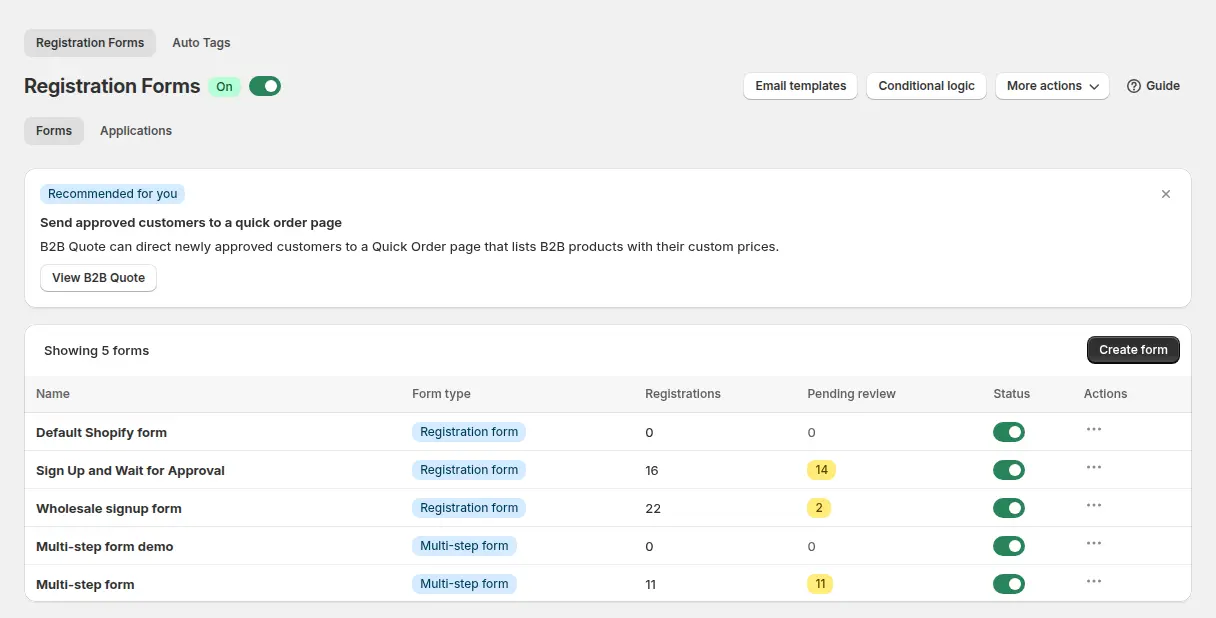
Add the tag at approval so your price and access rules can read it: wholesale price by customer tag and wholesale registration form with approval show the flow. The form has no email verification step, so a first-time applicant is not proven to own the address.

Data minimisation: ask only what you use
Short forms convert better and hold less personal data. For each field, write one line: what decision does this answer feed? If you cannot, drop it. Tell applicants why you collect the data and link your privacy policy next to the consent checkbox. This is a general practice, not legal advice; ask your accountant or lawyer what applies in the places you sell.
FAQ: wholesale application form
What should be on a wholesale application form?
Company legal name, contact name, business email and phone, billing and shipping address, business type, website, and a tax ID or business document if you sell tax-exempt. Add expected order volume and a privacy consent checkbox. Skip anything you will not check.
How many fields should a wholesale application have?
About ten for most stores. More than that, split the form into steps. BSS B2B Solution offers a multi-step form on paid plans that runs inside Shopify’s new customer accounts.
Do I need a resale certificate on the application?
Only if you grant tax-exempt or trade pricing based on one. Rules for resale certificates vary by state and country, so check with your accountant what you must collect and keep. The form can take a file of up to 10 MB.
Can the form verify a VAT or EIN number?
BSS B2B Solution checks EU VAT, UK VAT, US EIN, ABN and India GST numbers as the applicant types. The check runs in the browser and blocks submission only when the field is required, so verify the number in the official registry before you approve. EIN needs the Platinum plan.
Can I use Shopify’s own form instead?
Yes. Shopify Forms takes access requests with custom fields and a file of up to 20 MB, and creates a company that cannot order until you approve it. Shopify’s page does not describe tax ID checks, tags or spam protection.
Can the same business apply twice?
Not with the same email. A new application with an email that already has one is blocked, whatever the first status. Delete the old record in the app if you want them to apply again.
Can I approve applicants automatically?
Yes, with auto-approval, or by auto-approving emails that contain text you set. Auto-approval trusts the answers, so use it only with fields you do not need to verify, such as a partner’s domain.
Does approval create a Shopify company?
No. BSS B2B Solution creates or updates a Shopify customer and adds your tag. To use native company catalogs, create the company and location in Shopify.
Next steps
Copy the template, cut it to your trade terms, then build and test the form with the registration form guide. The BSS user guide covers each field type in the editor.
Install BSS B2B Solution for registration forms with tax ID fields, file upload, approval and tags. Add BSS B2B Lock to hide prices until approval, and BSS B2B Quote for quick ordering.
Install BSS B2B Solution See all three appsSources
Shopify page read on October 4, 2026. BSS facts: BSS user guides at docs.bss-b2b.solutions and our checks of the app.
- Shopify Help Center: Allowing new B2B customers to request access to your store
- Shopify Help Center: B2B features by plan
- BSS guide: Build a powerful wholesale registration form
You may also like

How to Uninstall a Shopify B2B or Lock App Safely: Remove Leftover Theme Code
Some Shopify apps leave code in your theme after you uninstall them. To remove a B2B or lock app safely, duplicate your […]

Shopify Markets and B2B Pricing: Wholesale Prices Per Country and Currency
Shopify Markets control currency, languages and taxes by audience, and B2B catalogs can be assigned per B2B market, with a cap on […]

How to Collect and Validate a Tax ID (EIN, ABN, GST, UK VAT) on Shopify
Shopify has a Tax ID field on company locations, but the pages we read describe no check against a tax register. BSS […]