


Folkington’s is a UK family-owned brand of premium juices, tonic waters and mixers. Most businesses buy through wholesalers, so its Shopify store adds a direct route: a trade registration form by business type, plus case-pack and pricing rules for approved accounts, built with BSS B2B Solution.
About Folkington’s
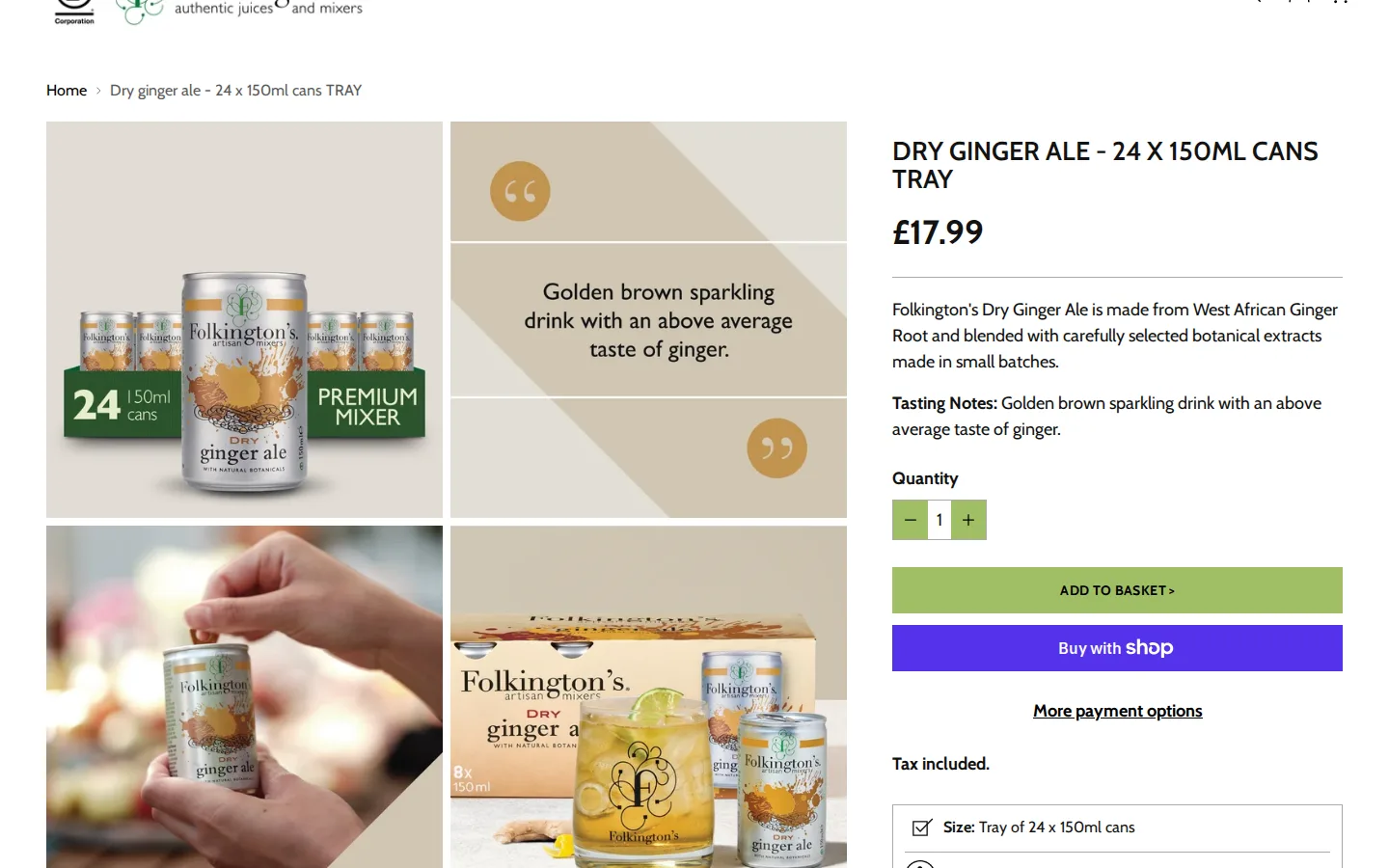
Folkington’s (folkingtons.com) describes itself as a family-owned brand of authentic juices and mixers. The header shows a Certified B Corporation mark next to the logo, and the shop sells 250ml and one litre juices, sparkling drinks in cans and glass bottles, tonic waters and other mixers in 150ml cans, soda water, mocktail bundles, glassware and merchandise. A banner offers free UK mainland delivery above a set order value.
The brand’s pages are written for people who care how the drinks are made. A section called six principles describes using a handful of good ingredients, selecting fruit varieties for consistency, sourcing from the same habitats and returning to the same farming communities each year. The same principles appear on the trade guides, so a buyer reads the brand story and the product range in one place.
Consumers can buy directly from the Shopify store. But a drinks brand also sells to cafes, farm shops, delis, pubs, bars and hotels, and most of those businesses already have a wholesaler. That shapes the trade program.

The B2B model: wholesaler first, direct if you prefer
The Buying from Folkington’s page states the model plainly. Most businesses buy from their local wholesaler, so a business that wants to serve Folkington’s is invited to get in touch and the team will say which wholesalers stock what the business wants. A business can also buy direct, by contacting the team to find out how. That is an honest description of how the drinks trade works. The store does not set out to replace wholesalers. It gives direct buyers an organised way to apply and order.
The trade section is built as a set of guides. There is one for retail, one for cafes, one for bars and hotels and one for international buyers, with links to the juice, sparkling and mixer ranges, a brochure, an environmental and social report and the trade shows the brand attends. The retail and cafe guides end with the same next step: ask for samples. That keeps the first contact human and low commitment.
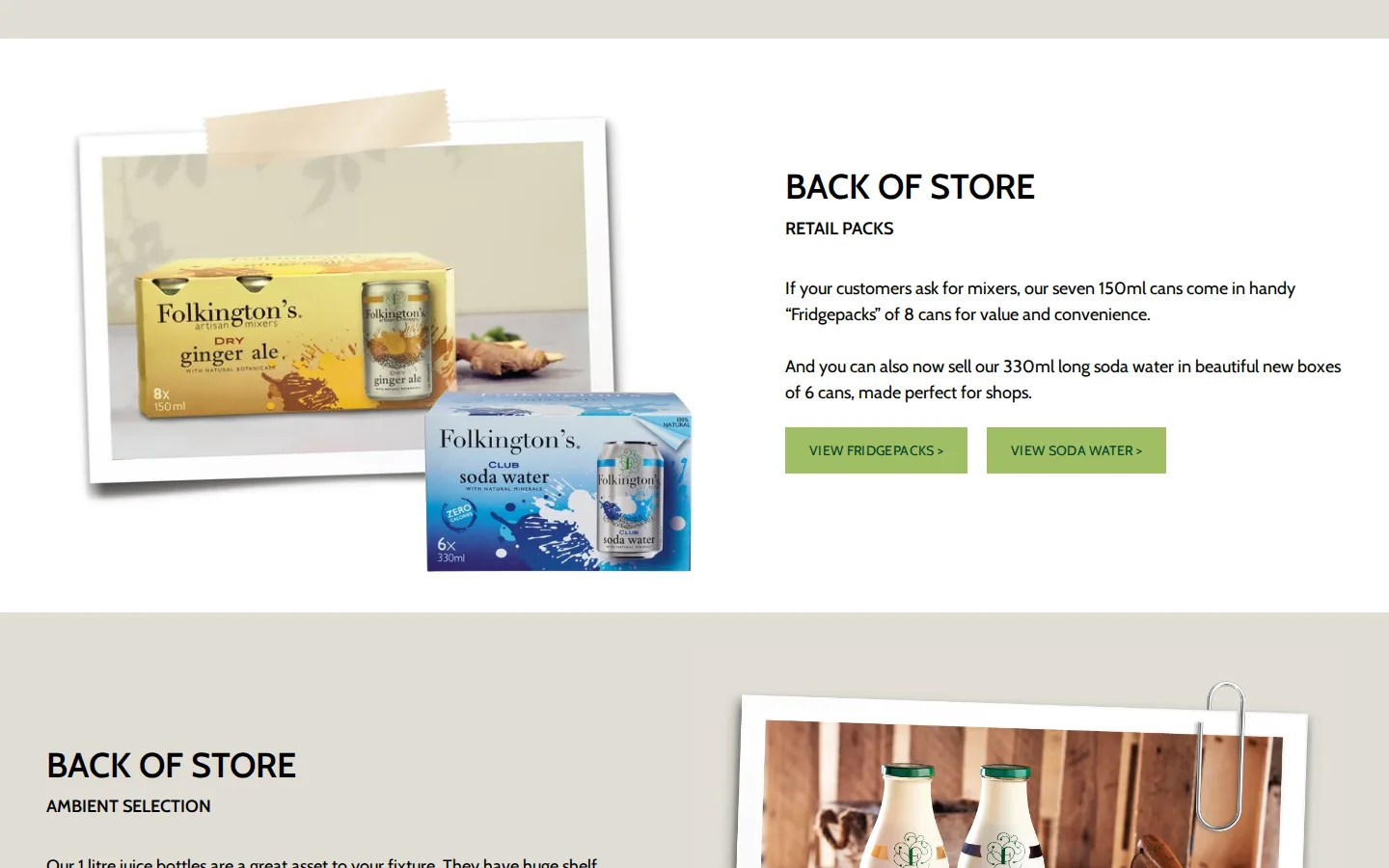
The retailer guide shows how much thought goes into the buyer’s side of the conversation. It splits a shop into two zones, the front of store grab-and-go chillers where the 250ml juices and 250ml sparkling cans belong, and the ambient back of store where retail packs of mixers, one litre juice bottles and 330ml sparkling bottles sit. A shop owner can plan a first order from that guide before filling in a form.
How the storefront handles wholesale
A registration form built around the drinks trade
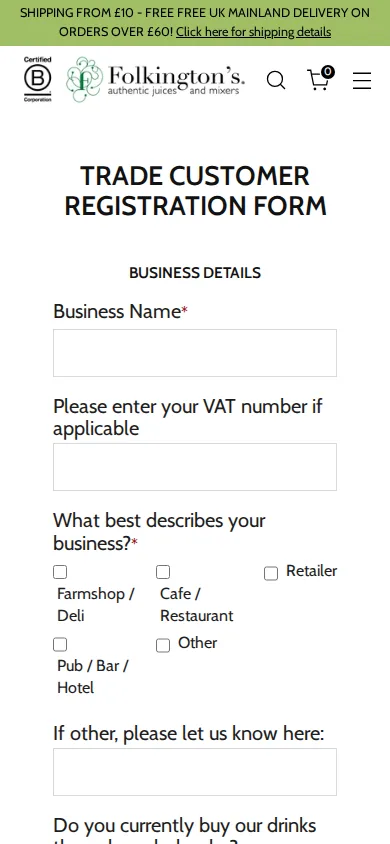
The Trade Customer Registration Form is a BSS B2B Solution form, and it is shaped by the way the brand sells. It starts with business details: business name, VAT number if applicable and a choice of five business types, namely farm shop or deli, cafe or restaurant, retailer, pub, bar or hotel, and other. It then asks whether the business currently buys through a wholesaler and, if so, which one, and which of six drink ranges it is interested in: 250ml juices, 1000ml juices, 250ml sparkling cans, 330ml sparkling bottles, 150ml mixers and 330ml soda water.
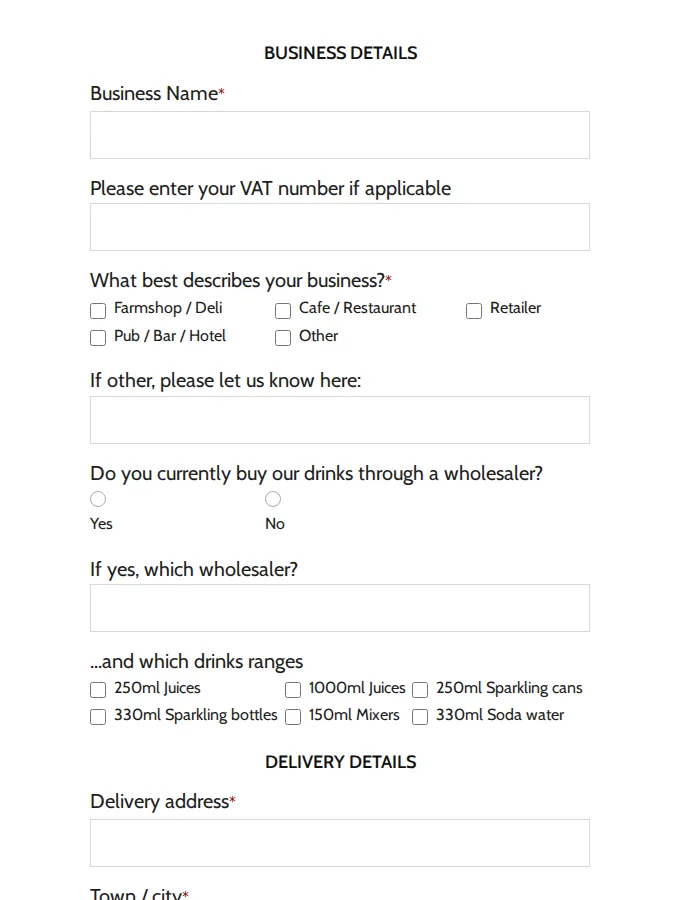
Those questions are worth a closer look. The wholesaler question lets the brand route a request to the right place, and the range checklist tells the team what to quote. Because the form supports checkboxes, radio buttons and dropdowns, the merchant did not need a custom page for any of this.
The second half of the form collects delivery details and contact details: delivery address, town, county, post code, any special delivery instructions, whether there is a safe place for deliveries if nobody is in, and open times for deliveries, followed by first name, last name, email and phone. Drinks deliveries are heavy, so asking for open times and a safe place at registration helps avoid failed drops later.
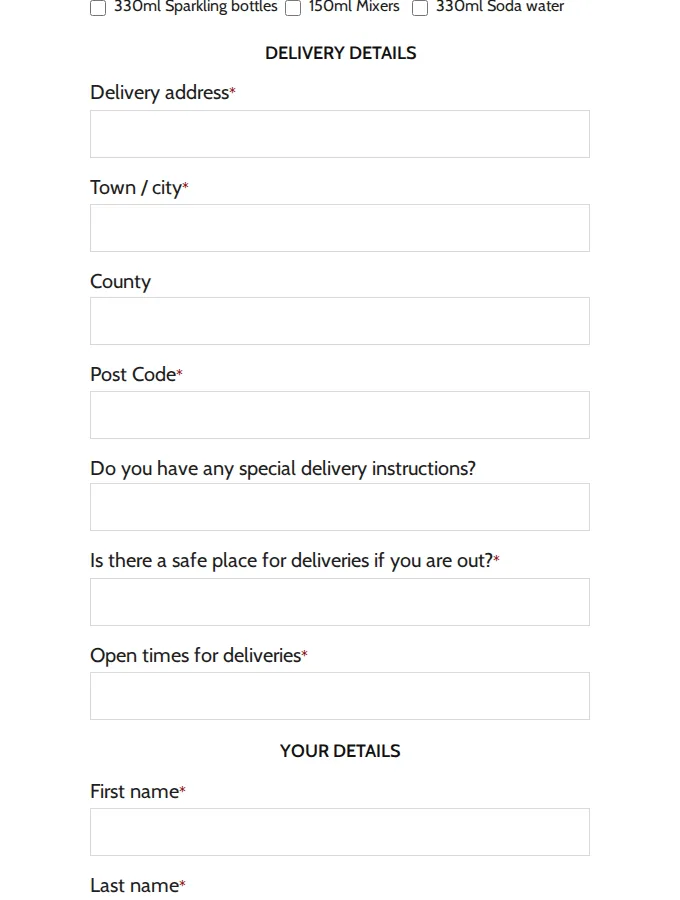
The same form on a phone.
A trade buyer’s journey
Reading the public pages in order gives a clear picture of the journey for a new venue:
- The venue reads the guide for its type of business, such as retail or cafes, and asks for samples.
- If it prefers to buy direct, it opens the Trade Customer Registration Form and says which wholesaler it uses today and which ranges interest it.
- The team reviews the application and approves it in the app, which adds the customer tag.
- The approved buyer logs in and orders under the rules that apply to the tag: trade prices, case multiples, shipping and any quantity limits.
Each step answers a question before the buyer has to ask it, which is the point of a self-service trade section.
Rules for approved trade accounts
Production data for this shop shows that the registration form assigns a customer tag on approval. The tag then drives the rules. Folkington’s drinks come in cases, trays and fridge packs, and the shop has quantity increment rules that apply to tagged customers on collections and on selected products, some with minimums, which keeps a trade order in the size the warehouse packs. Custom pricing rules apply to customer tags on collections and on selected products, with an exclusion by customer tag on the same rules.
There is also a shipping rate rule for tagged customers, a rule that limits the maximum quantity of an item, a discount code rule and a tax display rule, all switched on. The brand also has an auto tag rule that adds tags to customers automatically.
Which BSS features power it
The public pages show the form and the guides. Production data for the shop shows the rules behind them. The table lists feature categories only, with no counts of orders, customers or revenue.
| Experience | BSS B2B Solution feature | Evidence |
|---|---|---|
| Trade form by business type with delivery details | Registration form with approval and an automatic tag | Public page /pages/trade-signup-form; an active form with a tag on approval in production data |
| Trade prices for approved accounts | Custom pricing for customer tags on collections and products | Active custom pricing rules with tag targeting and a tag exclusion in production data |
| Ordering in cases and trays | Quantity increments | Active quantity increment rules for tagged customers, some with minimums |
| A cap on quantity per order | Order limits (maximum quantity) | A maximum quantity rule is switched on |
| Delivery charges for trade orders | Shipping rate rule for tagged customers | A shipping rate rule for customer tags is switched on |
| Codes for approved accounts | Discount code rule | A discount code rule is switched on |
| Customers tagged automatically | Auto tags | An auto tag rule is switched on |
| Clear price display | Tax display rule | A tax display rule is switched on |
To build a similar program, read Sell in case packs and multiples for the pack rules, Wholesale registration form with approval for the form and Auto-tag customers by spend or order count for tagging. Wholesale discounts by collection or product tag shows pricing by collection. The user guide has pages on quantity increments and auto tags.
Three settings a drinks brand uses
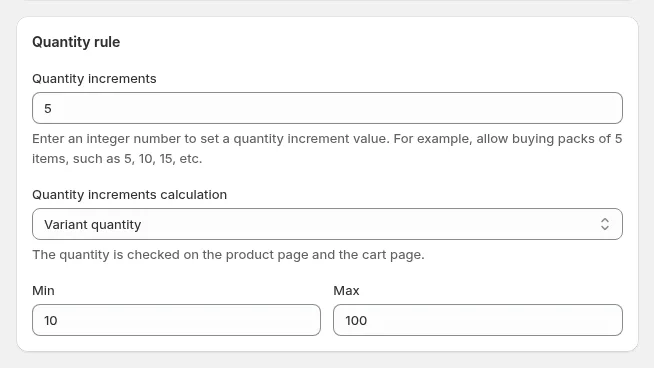
These screens are documentation examples, not Folkington’s admin. A quantity increment rule sets the multiple, and a minimum and maximum, which is how a case size such as 8 or 24 is enforced.
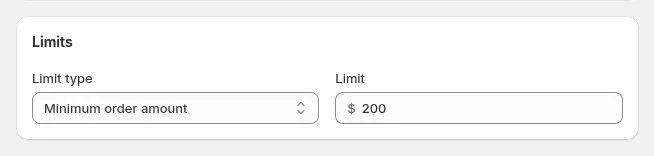
An order limit rule caps a quantity or sets a minimum. The value shown is an example.
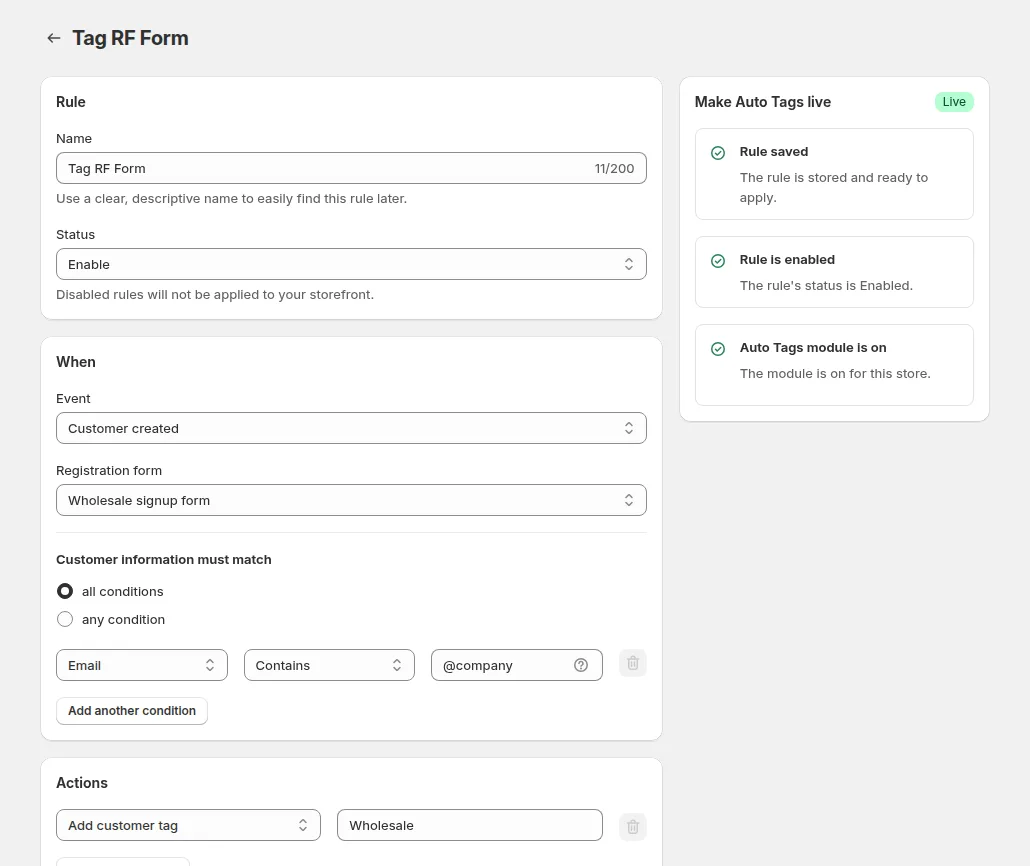
An auto tag rule adds a customer tag when an event happens, for example when a customer is created from a registration form, so the approved buyer lands in the right group without manual work.
What other merchants can copy
- Respect your existing channels. If most buyers use wholesalers, say so and offer direct accounts as an option.
- Write trade guides by business type. Retail, cafe, bar and international buyers want different products and pack sizes.
- Use the form to qualify. Ask for business type, current wholesaler and range interest so the first reply is specific.
- Collect delivery practicalities up front. Safe place and open times at registration save failed deliveries.
- Sell in the pack you ship. Quantity increments keep trade orders in whole trays and cases.
- Offer samples as the next step. A free sample is a low-risk first purchase for a new venue.
- Keep price groups in tags. One tag per trade group lets pricing, shipping and codes follow the account.
Folkington’s review on the Shopify App Store
Folkington’s left a 5-star review of BSS B2B Solution on March 4, 2025, after about four months of use. It is public on the app listing’s review page. The full text:
The BSS Commerce team have gone above and beyond in helping us to add a B2B section to our Shopify store.
Jonah's patient and professional approach, excellent communication and detailed support to help integrate our rather exact requirements, was hugely appreciated.
No hesitation in giving them a 5 star review!
Folkington’s, United Kingdom, review of BSS B2B Wholesale Pricing (BSS B2B Solution) on the Shopify App Store, March 4, 2025, 5 stars
The review talks about adding a B2B section to an existing store and about integrating rather exact requirements. That fits the setup above: a form shaped to the drinks trade, case rules and tag based pricing on top of a consumer shop that already existed.
FAQ: adding a trade section to an existing consumer store
Can I add B2B to a store that already sells to consumers?
Yes. Folkington’s added a B2B section to an existing consumer store. Customer tags separate trade accounts from retail shoppers, and rules apply only to tagged customers.
How do I sell in cases or trays?
Use quantity increments. A rule requires multiples of a number, such as 8 cans or 24 cans, with an optional minimum and maximum, checked on the product page and in the cart. Quantity increments are available on the Advanced plan and above.
Can I ask different questions of cafes and shops on the same form?
Yes. A registration form can include dropdowns, checkboxes and radio buttons, and conditional logic can show a field only for a certain answer.
What if my trade customers mostly use wholesalers?
Keep the wholesaler route and add a direct route for those who want it. Folkington’s trade form even asks which wholesaler a business uses today, so the team can point a new venue to the right supplier.
Can trade buyers have different shipping charges?
Yes. A shipping rate rule can target customer tags and charge by quantity range, so trade deliveries can be priced separately from consumer orders.
This store spotlight is based on Folkington’s public website and its public review on the Shopify App Store, as of October 5, 2026. Screenshots show the public storefront. Admin screenshots are examples of BSS B2B Solution settings from the product documentation. Folkington’s has not reviewed this page.
Install BSS B2B Solution to add a trade form, case rules and tag based prices. It is free on development stores, and paid plans have a 14-day trial.
Install BSS B2B Solution See the app