
Shopify Price List vs Custom Pricing vs Volume Pricing: Which Rule Wins

In BSS B2B Solution a Price List always beats Custom Pricing on the same variant, whatever the Priority numbers say. Volume Pricing then takes its tier off that price. Inside one module, the lowest Priority number (0 to 99) wins. Shopify’s native catalogs work differently: when several catalogs price one product, the lowest price displays.
Set the rules once, number them, and test the winner as a buyer. Free on development stores, 14-day trial on paid plans.
Install BSS B2B Solution See pricingLast updated October 4, 2026. Shopify facts come from the Help Center pages linked in the text. BSS B2B Solutions makes BSS B2B Solution, the app in the screenshots. This guide belongs to the wholesale pricing hub of our complete guide to Shopify B2B. If you already have a wrong price on screen, the rule priority use case is the faster debugging path.
Key takeaways
- Price List and Custom Pricing never stack. If a Price List rule covers the variant for that buyer, Custom Pricing is skipped for it.
- Volume Pricing stacks on top. Its tier applies to the Price List or Custom Pricing price, not to the retail price.
- Priority is a tie-breaker inside one module. The field takes 0 to 99, the lowest number wins, and equal numbers go to the older rule.
- Native Shopify catalogs follow another logic: the lowest price displays, fixed prices override a catalog adjustment, and volume pricing makes a price fixed (Shopify Help Center).
- Test every group with a real tagged account. The storefront is the only place the final price is certain.
What do a price list, custom pricing and volume pricing each do?
The three names sound alike but they answer different questions. A price list sets a fixed price per product or variant for a buyer group. Custom Pricing applies a rule such as 20% off, a fixed amount off or one price, to the products and customers you pick. Volume pricing lowers the price as the quantity in the order goes up.
| Module | What it sets | Example | Plan notes |
|---|---|---|---|
| Price List | A price per product or variant for one buyer group | Product A is $38 for the gold list | Platinum |
| Custom Pricing | A rule: percentage off, amount off or a fixed price | 20% off everything for tag wholesale | Free plan: 1 rule. More rules on paid plans. Variant-level conditions: Platinum |
| Volume Pricing | Tiers by quantity (or order value) on top of the base price | 5% off from 12 units | Free plan: newest rule only, basic options. More options on paid plans |
All three target logged-in customers, specific customers, customer tags or company locations (company-location targeting needs Advanced or higher). The tag match is forgiving: tags are trimmed and lowercased, and one matching tag is enough. Product tags used in exclusions are the exception, because they are case-sensitive.
Does Shopify have its own rule order for B2B prices?
Yes, and it is simpler. Native B2B prices through catalogs. Shopify states that if there are several catalogs and prices for a specific product, the lowest price displays to the customer (Catalogs and pricing). A catalog can hold an overall adjustment and fixed prices for chosen products, and fixed prices override the adjustment (Creating catalogs). Basic, Grow and Advanced allow up to 3 active catalogs across all B2B markets, and Plus is unlimited (plan table).
Native volume pricing has a twist. You can add up to 10 price breaks per product, and after you apply volume pricing the price becomes fixed: an overall adjustment set on the catalog no longer applies (Quantity rules and volume pricing). Automatic discounts and discount codes apply on top of catalog price adjustments (Catalog discounts).
| Question | Shopify native catalogs | BSS B2B Solution |
|---|---|---|
| Two prices for one product | The lowest price displays | Price List beats Custom Pricing. Inside a module the lowest Priority number wins |
| Fixed price and a percentage | The fixed price overrides the catalog adjustment | A Price List price replaces the Custom Pricing rule for that variant |
| Quantity breaks | Up to 10 per product. The price becomes fixed and the catalog adjustment stops applying | Volume Pricing takes its tier off the Price List or Custom Pricing price |
| Discount codes | Apply on top of catalog prices | Run after Volume Pricing and BOGO. Shopify automatic discounts do not work alongside Custom Pricing or Volume Pricing |
| Who can have it | Catalogs on all four plans, up to 3 active below Plus | Rules by tag, customer or company location |
If your buyers fit into companies and three catalogs, native pricing is enough and there is nothing to rank. The rest of this guide is for the moment you add rules by tag and need to know who wins. For the native-versus-app decision, see Shopify native B2B.
Which pricing rule wins in BSS B2B Solution?
The app does not merge rules. It runs the modules in a fixed order, and each step starts from the price the step before produced (How Rule Priority Works).
- Price List or Custom Pricing sets the base price. If a Price List rule applies to the product or variant, Custom Pricing is skipped for it.
- Volume Pricing (quantity breaks) applies its tier to that base price.
- BOGO starts from the Volume Pricing, Price List or Custom Pricing price.
- Discount Code starts from the result of the steps above.
- Extra Fee is a separate fee line. It does not change the product price.
Price list vs custom pricing: why the list wins
This is the point that surprises people. Priority does not decide between a Price List and Custom Pricing, because they are different modules. The list wins on every variant it covers, even if the Custom Pricing rule has priority 0 and the list has priority 50. The app checks the Price List first for each variant and only falls back to Custom Pricing when no list entry applies.
The practical risk runs the other way, and the user guide warns about it: a Price List rule with a higher price can stop a better Custom Pricing discount from applying. Give each customer group and product range to one of the two modules. Use lists for negotiated per-variant prices and Custom Pricing for broad percentage rules.
Volume pricing: tiers on the base price
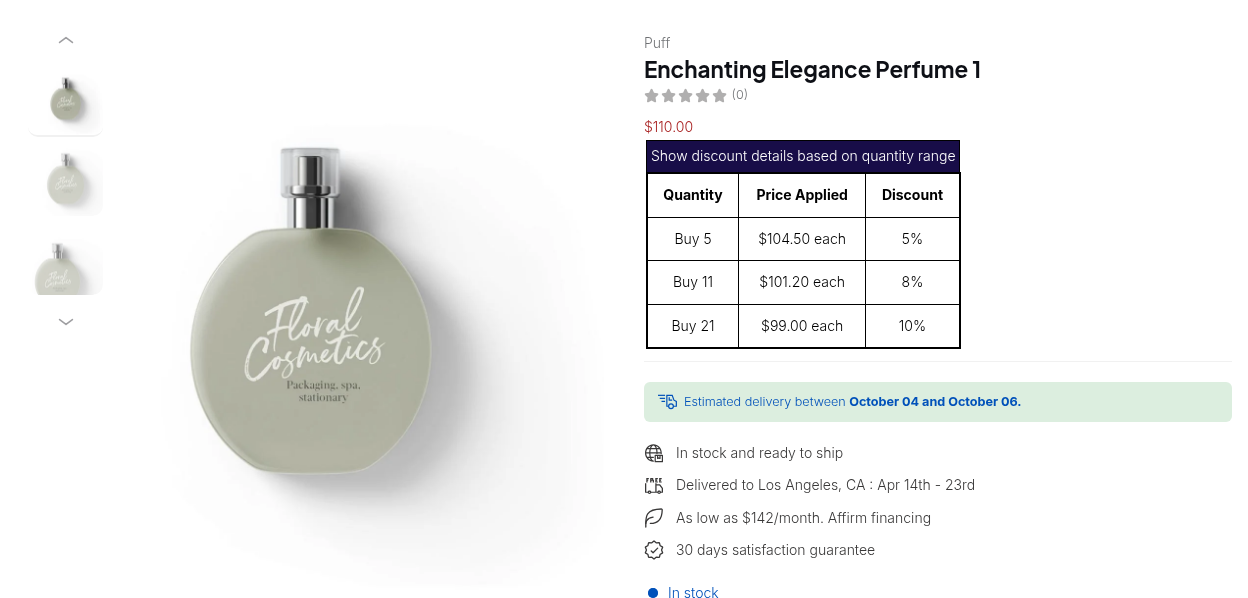
Volume Pricing never starts from retail for a matched buyer. A $100 product with a Price List price of $80 and a 5% tier at 10 units costs $76 per unit. If the same buyer orders a product with no list entry, a 10% Custom Pricing rule makes it $90 and the tier takes it to $85.50 (Custom and Volume Pricing together). For a longer treatment see combine custom and volume pricing.
How does the Priority field work?
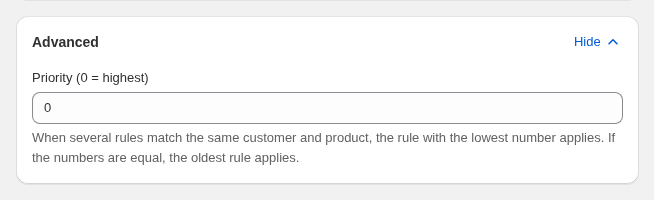
Rule editors have a Priority field in the Advanced card. The rules are simple, and each one removes a common mistake.
- Lower wins. Priority 0 beats priority 5. The field takes whole numbers from 0 to 99, and new rules start at 0. We checked that range in the code for Custom Pricing and Price List.
- Ties go to the older rule. If two rules share a number, the one created first applies.
- Only enabled rules compete. A disabled rule is ignored even at priority 0. A rule outside its schedule is ignored too.
- Only the same module competes. A Custom Pricing rule at 0 does not beat a Volume Pricing rule at 5. They combine.
- Leave gaps. Use 10, 20, 30 so you can slot a rule between without renumbering.
| Module | Result |
|---|---|
| Custom Pricing | The lowest Priority number sets the price. The others are ignored |
| Price List | Same: one rule per product or variant |
| Volume Pricing | The lowest Priority number applies. A setting can show every matching table on the product page |
| Shipping Rate | No priority field. Settings decide between the lowest and the highest matching rate |
We verified the 0 to 99 limit in code for Custom Pricing and Price List only. The guide describes the same field elsewhere, so check the field in the editor you use.
Worked example: three rules, two products
This is an illustration with made-up numbers, not a customer result. A buyer is tagged gold and wholesale, and orders 12 units of two products.
| Rule | Module | Effect | Priority |
|---|---|---|---|
| Gold list | Price List | Product A fixed at $38 (retail $50) | 3 |
| Wholesale | Custom Pricing | 15% off all products | 10 |
| Clearance | Custom Pricing | 30% off all products | 20 |
| Case breaks | Volume Pricing | 5% off from 12 units | 5 |
- Product A (retail $50). The Gold list covers it, so the base price is $38 and both Custom Pricing rules are skipped. The tier takes 5% off $38: $36.10 per unit.
- Product B (retail $40). No list covers it, so the two Custom Pricing rules compete. Wholesale (10) beats Clearance (20), so the base price is $34.00. The deeper Clearance price of $28.00 never applies, because priority decides, not the size of the discount. The tier takes 5% off $34.00: $32.30 per unit.
If you wanted Clearance to win on Product B, give it a lower number than Wholesale, for example 5. Do not delete Wholesale: the next buyer who needs it would lose it.
How to set the order up step by step
Step 1: Decide which module owns which group
Write one line per buyer group: the module that sets its base price, and whether tiers apply. Gold distributors with negotiated prices go on a price list. A broad wholesale tag with a percentage goes on Custom Pricing (price by customer tag).
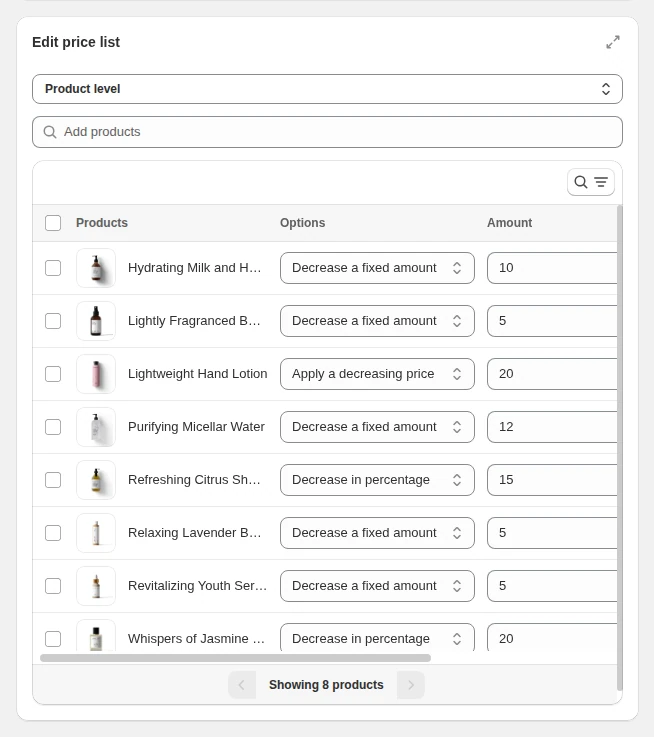
Step 2: Build rules and number them in the Advanced card
Open B2B pricing, pick the module and create the rule. In the Advanced card set Priority.
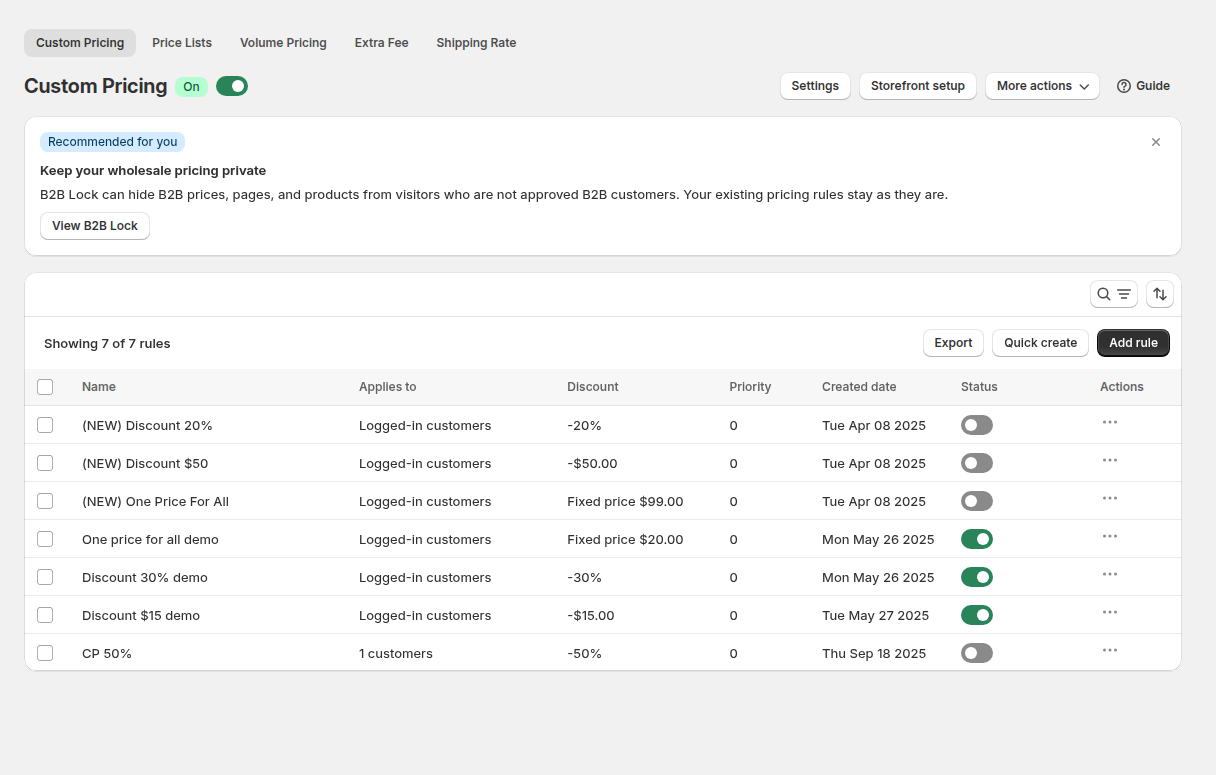
Step 3: Review the rule list
The Custom Pricing list shows the Priority column next to the target and the discount. Sort or scan it before you publish. Two rules at the same number that match the same buyer are the first thing to fix.
Step 4: Test as each buyer group
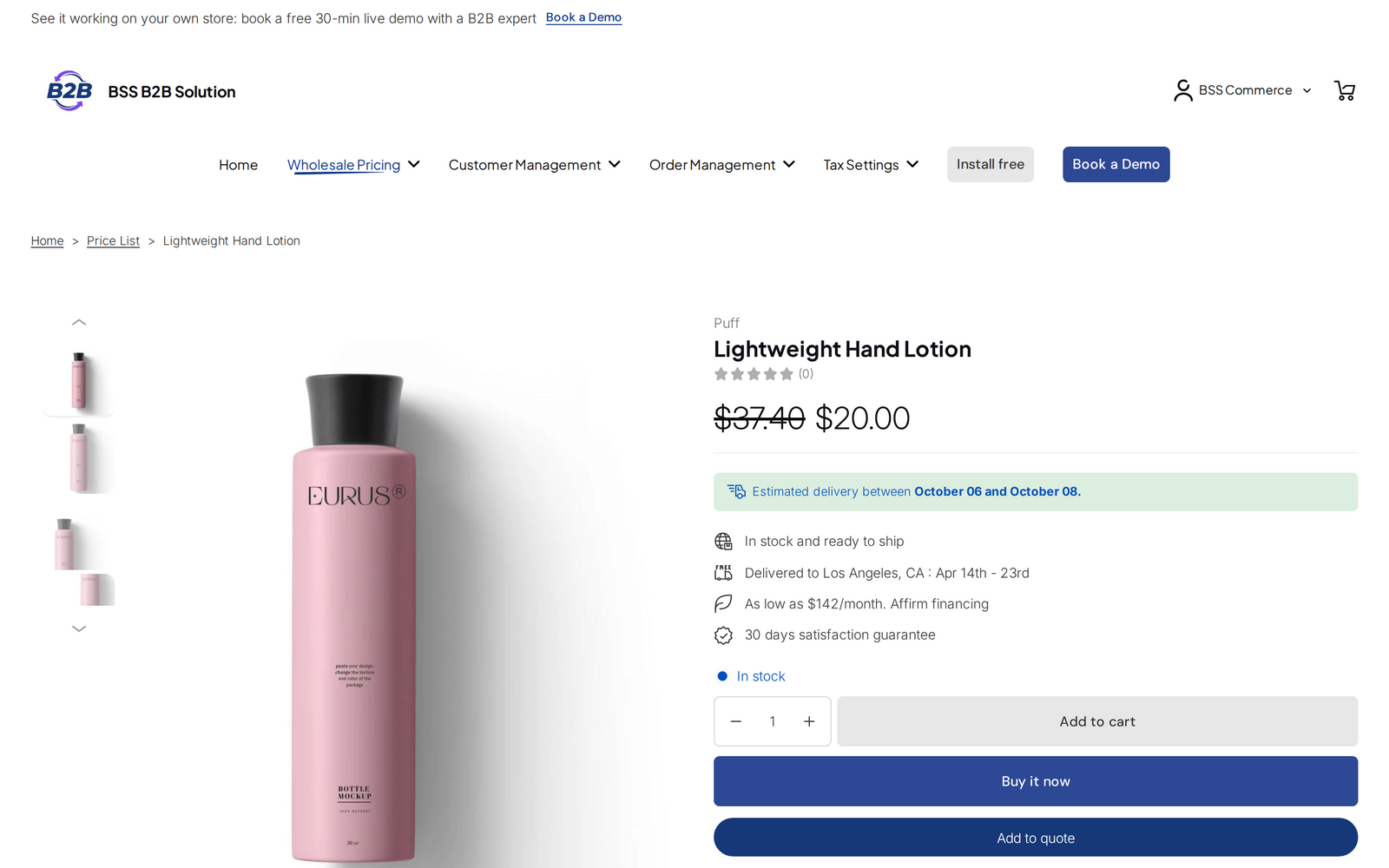
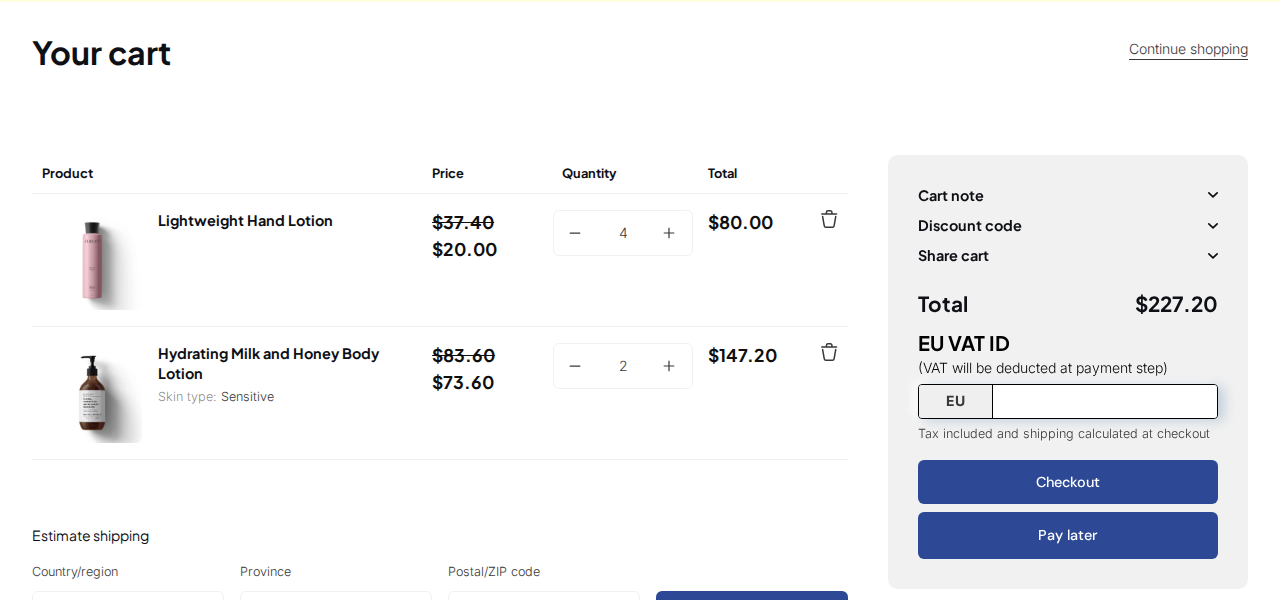
Log in as a test account with exactly the tags of one group. Open a product, a collection and the cart. Repeat for each group. Compare with a guest in a private window.
What to check when the wrong price shows
- The BSS B2B Solution app embed is on in the live theme, and the module is on.
- The rule is enabled and inside its schedule.
- The buyer matches the customer condition (logged in, tag or company location) and the product is not excluded.
- A Price List does not cover the same variant. If you expected Custom Pricing, this is the most common cause.
- Two rules of the module share a number. The older rule wins. Make the order explicit.
- The rule uses an option your plan does not include. It stays in the app but is not published.
A custom price also shows only when it is lower than the original price. For the wider list of causes read why Shopify B2B prices are not showing.
Limits to know before you rely on the order
| Limit | What it means | What to do |
|---|---|---|
| Shopify automatic discounts | Do not work alongside Custom Pricing or Volume Pricing | Use Discount Code rules or manual codes. Manual codes need the Shopify Discount setting in Advanced Settings |
| Price List plan | Price List is a Platinum feature | Use Custom Pricing on lower plans |
| Price List is not a Shopify catalog | The app manages its own rules. It does not create Shopify catalogs | Do not expect a list to appear in Shopify’s Catalogs page |
| Express checkout | Express checkout and direct links can skip BOGO, Discount Code and Extra Fee | Test the checkout path buyers use |
| Headless | The app depends on the theme app embed | Treat headless storefronts as unsupported until you test them |
Which module should you use?
| Your situation | Use | Why |
|---|---|---|
| Negotiated price per variant for key accounts | Price List | Exact prices, and it overrules a general rule |
| One percentage for a whole buyer tag | Custom Pricing | One rule covers the catalog |
| Reward bigger orders | Volume Pricing | Tiers stack on the buyer’s own price |
| Up to 3 groups and companies only | Native catalogs | Nothing to rank, and no app fee |
| Many groups, retail and wholesale on one store | Rules by tag in BSS B2B Solution | Not capped at 3 catalogs |
More on quantity tiers in tiered quantity break pricing and in our Shopify tiered pricing guide. Prices are only half of the setup: net terms and order limits sit in the order rules hub.
Price list vs custom pricing vs volume pricing: frequently asked questions
Which wins, a price list or custom pricing?
In BSS B2B Solution the Price List wins on every variant it covers, and Custom Pricing is skipped for that variant. The Priority number does not change this, because priority is compared only between rules of the same module.
Does a lower Priority number mean higher priority?
Yes. A rule with priority 0 beats a rule with priority 5. The field takes whole numbers from 0 to 99, and rules with the same number go to the older rule.
Does volume pricing apply to the price list price?
Yes. Volume Pricing takes its tier off the Price List or Custom Pricing price, not off the retail price. For example, $80 from a list and a 5% tier gives $76.
What happens if two custom pricing rules match?
The matching rule with the lowest Priority number sets the price and the other is ignored. If both have the same number, the rule created first wins. A deeper discount does not win on size alone.
How does Shopify decide between catalogs?
When several catalogs price one product, the lowest price displays to the customer. Fixed prices override a catalog adjustment, and volume pricing makes a price fixed. Basic, Grow and Advanced allow up to 3 active catalogs across all B2B markets.
Can discount codes stack with these rules?
A Discount Code runs after Volume Pricing and BOGO, starting from the price they produced. Shopify’s automatic discounts do not work alongside Custom Pricing or Volume Pricing. Manual codes need the Shopify Discount setting turned on in Advanced Settings.
Why is my custom price not showing?
Common causes are an app embed that is off, a buyer who does not match the rule, a Price List that wins on the same variant, a schedule that has ended, or an option your plan does not include. A custom price also shows only when it is lower than the original price.
Which plan do I need for a price list?
Price List needs the Platinum plan, at $99 per month on the App Store listing as of October 4, 2026. The Free plan allows 1 Custom Pricing rule, and the pricing page lists what each plan includes. BSS B2B Solution is free on development stores.
Next steps
Pick one buyer group, write down the three modules that touch it, and test the result with a tagged account today. Then keep a short sheet of active rules and their numbers. The wholesale pricing hub links the setup guides, and the rule priority use case walks through debugging.
Install BSS B2B Solution to run price lists, custom pricing and quantity breaks by tag, customer or company location.
Install BSS B2B Solution See the appSources
Shopify pages read on October 4, 2026. BSS facts: the BSS B2B Solution user guide at docs.bss-b2b.solutions, our October 2026 review of the app’s code and behavior, and the Shopify App Store listing (as of October 4, 2026).
- Shopify Help Center: B2B catalogs and pricing
- Shopify Help Center: Creating catalogs
- Shopify Help Center: Quantity rules and volume pricing
- Shopify Help Center: Catalog discounts
- Shopify Help Center: Shopify B2B features by plan
- BSS user guide: How Rule Priority Works
- BSS user guide: How Custom Pricing and Volume Pricing Work Together
You may also like

How to Uninstall a Shopify B2B or Lock App Safely: Remove Leftover Theme Code
Some Shopify apps leave code in your theme after you uninstall them. To remove a B2B or lock app safely, duplicate your […]

Shopify Markets and B2B Pricing: Wholesale Prices Per Country and Currency
Shopify Markets control currency, languages and taxes by audience, and B2B catalogs can be assigned per B2B market, with a cap on […]

How to Collect and Validate a Tax ID (EIN, ABN, GST, UK VAT) on Shopify
Shopify has a Tax ID field on company locations, but the pages we read describe no check against a tax register. BSS […]